This article explains how to implement a Flutter integration testing framework on OpenHarmony. It covers scenario orchestration, automated execution, test reporting, and directory organization to solve common challenges in end-to-end validation for cross-platform apps, high regression costs, and poor result visibility. Keywords: Flutter, OpenHarmony, integration testing.
This solution builds a complete Flutter integration testing capability for OpenHarmony
| Parameter | Description |
|---|---|
| Language | Dart, YAML |
| Testing Protocol/Mode | E2E, widget-driven, asynchronous scheduling |
| GitHub Stars | Not provided in the source |
| Core Dependencies | integration_test, flutter_test, flutter_driver |
| Target Platform | OpenHarmony / HarmonyOS devices |
| Key Capabilities | Scenario management, automated execution, report export |
Flutter’s integration_test package works well for validating real business workflows. In OpenHarmony environments, it becomes especially valuable for covering multi-page and multi-state flows such as login, search, payment, and order lookup.
Unlike unit tests, which verify function behavior, or widget tests, which focus on isolated UI components, integration tests answer a more critical question directly: can the app complete a full user journey on a real device?
The goal of an integration testing framework is not just to run, but to remain maintainable, observable, and extensible
A production-ready testing framework should include at least four layers: a management layer for entry points and state aggregation, an execution layer for task scheduling, a scenario layer for business steps, and a reporting layer for statistical output.
┌──────────────────────────────┐
│ Test Management Layer        │
│ Handles page entry and state overview │
├──────────────────────────────┤
│ Test Execution Layer         │
│ Handles runner, scheduling, and progress control │
├──────────────────────────────┤
│ Test Scenario Layer          │
│ Handles scenario definitions and step breakdown │
├──────────────────────────────┤
│ Test Reporting Layer         │
│ Handles statistics, display, and export │
└──────────────────────────────┘
This structure defines clear responsibility boundaries for the test system: business test cases do not couple directly to UI control logic, and execution logic does not mix with reporting code.
Scenario data modeling determines the scalability ceiling of the testing system
The original implementation uses List<Map<String, dynamic>> to manage test scenarios. This approach is lightweight and direct, making it suitable for quickly validating test orchestration on OpenHarmony.
Each scenario includes, at minimum, a name, status, duration, icon, and a list of steps. Each step is then broken down into action, status, and duration, which makes failure diagnosis and visual tracing easier later.
final List<Map<String, dynamic>> testScenarios = [
  {
    'name': 'User login flow test',
    'status': 'passed',
    'duration': '3.2s',
    'steps': [
      {'action': 'Open login page', 'status': 'passed'}, // Navigate to the initial page
      {'action': 'Enter username', 'status': 'passed'},   // Fill in the account name
      {'action': 'Enter password', 'status': 'passed'},     // Fill in the password
      {'action': 'Tap the login button', 'status': 'passed'}, // Submit the login request
      {'action': 'Verify successful login', 'status': 'passed'}, // Validate the result
    ],
  },
];
This code shows how to use a unified data structure to represent both test scenarios and test steps.
An expandable scenario view makes the test process easier to debug
At the presentation layer, you can render test scenarios with a Card + ExpansionTile combination. This allows developers to see all workflows on an overview page and expand down to failed steps level by level.
This design works especially well for OpenHarmony device debugging, because failures usually do not mean the entire test case crashed. More often, a specific page state, interaction feedback, or asynchronous callback did not occur as expected.
Widget buildScenario(Map<String, dynamic> scenario) {
  return ExpansionTile(
    title: Text(scenario['name']), // Display the scenario name
    subtitle: Text(scenario['duration']), // Display the execution duration
    children: scenario['steps'].map
<Widget>((step) {
      return ListTile(
        title: Text(step['action']), // Display the current step
        trailing: Icon(Icons.check_circle), // Display the step status
      );
    }).toList(),
  );
}
This code renders test data into an expandable scenario tree for easier manual review.
Automated execution is the key to making integration testing truly valuable
If tests can only be clicked through manually one by one, their value declines quickly. The original solution uses _runAllTests() to chain multiple scenarios together and simulates batch execution with asynchronous delays.
The core idea is not the delay itself. The real value lies in abstracting the current scenario, current step index, and running state into a unified state machine, then using that state to drive progress bars and result panels in the UI.
void runAllTests() {
  setState(() {
    isRunning = true; // Mark the start of test execution
    currentStep = 0;  // Reset the step cursor
  });

  for (int i = 0; i < testScenarios.length; i++) {
    Future.delayed(Duration(seconds: i + 1), () {
      setState(() {
        currentTest = testScenarios[i]['name']; // Update the current scenario
        currentStep = i; // Advance execution progress
      });
    });
  }

  Future.delayed(const Duration(seconds: 6), () {
    setState(() {
      isRunning = false; // Mark the end of test execution
      currentTest = '';
      currentStep = 0;
    });
  });
}
This code enables one-click execution of all tests with real-time progress updates.
The reporting layer must produce data that the team can actually consume
Testing is not about watching animations. It is about generating shareable evidence. At a minimum, the reporting layer should include total execution time, average response time, pass rate, and an export entry point.
Once these metrics are output consistently, the team can integrate results into CI pipelines, daily reports, or defect tracking systems, giving OpenHarmony-side regression quality a measurable foundation.
dev_dependencies:
  integration_test:
    sdk: flutter
  flutter_test:
    sdk: flutter
  flutter_driver:
    sdk: flutter
This configuration declares the core dependencies required for Flutter integration testing in the project.
OpenHarmony platform adaptation depends on clear boundaries for directories, dependencies, and execution
It is recommended to split test files by scenario under integration_test/scenarios/ and place shared methods under utils/. Compared with placing all logic in a single file, this structure is far more suitable for long-term maintenance.
integration_test/
├── app_test.dart
├── scenarios/
│   ├── login_test.dart
│   ├── search_test.dart
│   ├── cart_test.dart
│   ├── payment_test.dart
│   └── order_test.dart
└── utils/
    ├── test_utils.dart
    └── constants.dart
This directory example defines a recommended way to organize test files for team collaboration and scenario expansion.
The runtime UI demonstrates strong value for visual debugging
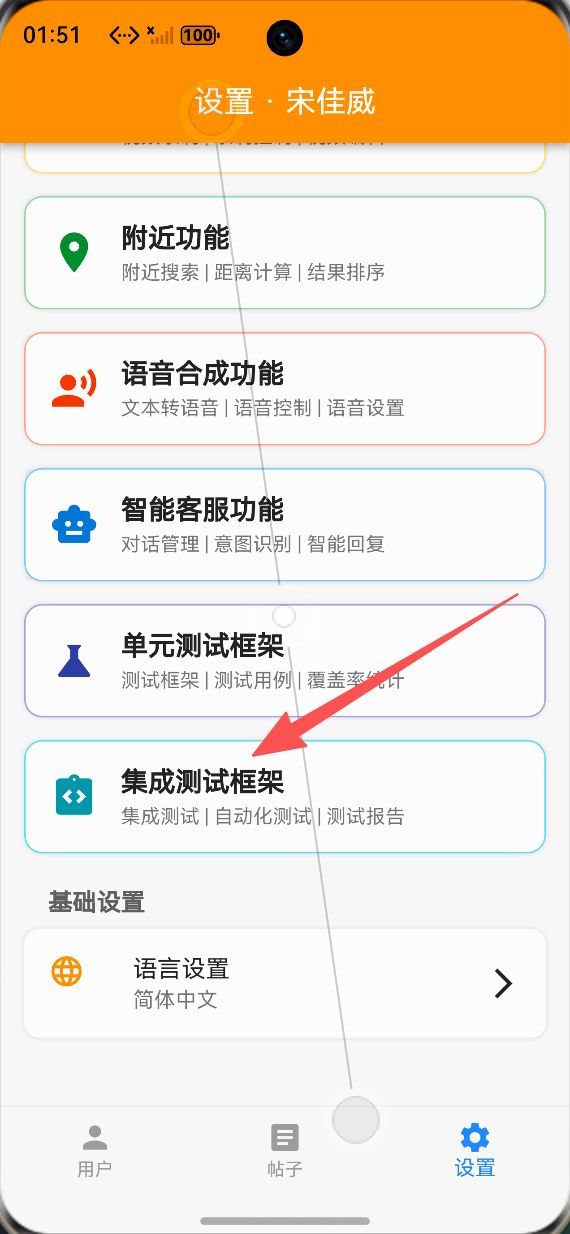 AI Visual Insight: This image shows the overview page of the testing framework. It typically includes a scenario list, status indicators, execution duration, and control entry points. This indicates that the system has already bound test data to a UI panel and can be used directly for manual regression and real-device debugging.
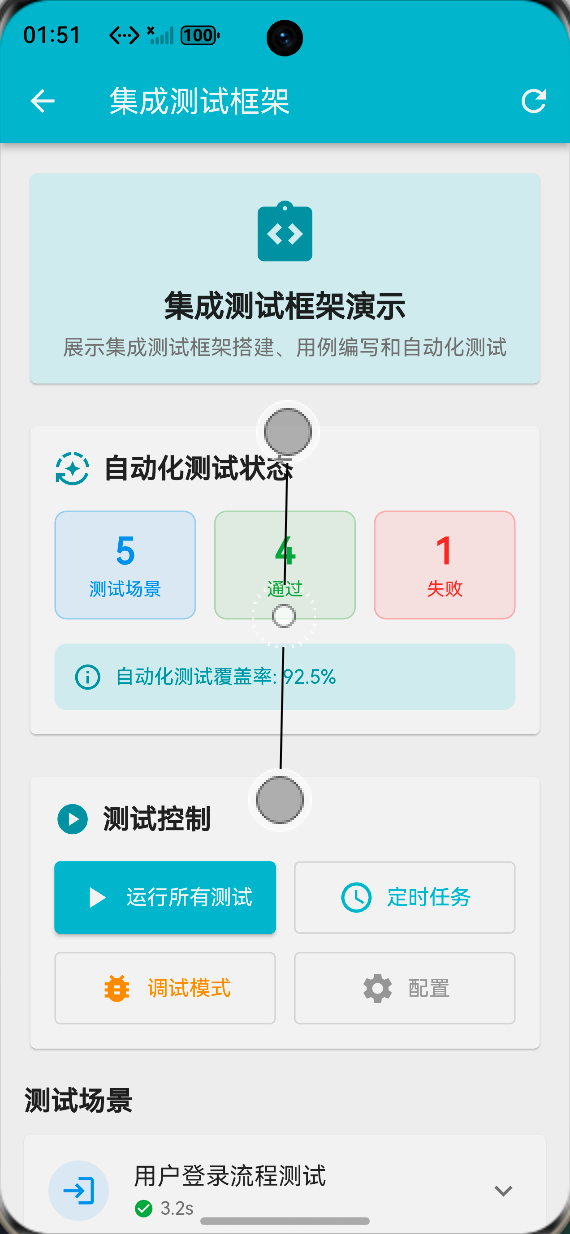 AI Visual Insight: This image highlights the step-level expandable view. Developers can inspect the execution state and hierarchy of each business action, which is critical for locating failure points in long workflows such as login, search, and payment.
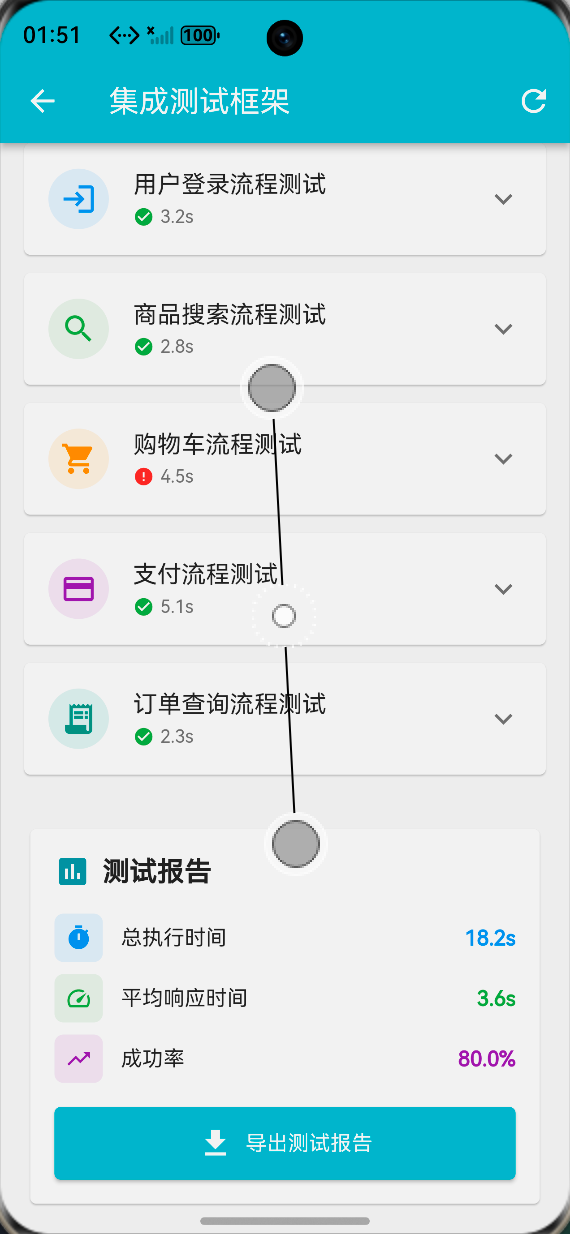 AI Visual Insight: This image reflects the visual output of a test report or metrics dashboard. It usually includes pass rate, total duration, and export buttons, showing that the implementation already has baseline test operations capability rather than being limited to local execution.
Performance optimization should focus first on execution speed and reporting overhead
First, mark slow test cases independently so they do not drag down full regression runs. Second, run scenarios in parallel whenever possible, while still ensuring device resource limits and test isolation. Third, support caching or incremental computation for report statistics.
The goal of these strategies is not technical showmanship. It is to ensure that the testing system remains stable as OpenHarmony projects evolve, rather than losing control as the number of scenarios grows.
This implementation works well as a baseline for Flutter for OpenHarmony integration testing
From an engineering perspective, this solution already covers five critical areas: framework setup, scenario definition, automated execution, report generation, and platform-oriented project organization. It is not the final form, but it is strong enough to serve as a team baseline.
Next steps can include CI pipeline integration, failure screenshots, screen recording for evidence retention, cloud report synchronization, and test recording tools, turning the current visual demo into a real quality platform.
FAQ
Why prioritize integration testing on OpenHarmony instead of relying only on unit tests?
Because the highest-risk issues in cross-platform apps usually appear in page navigation, asynchronous callbacks, state synchronization, and end-to-end interaction flows. Unit tests rarely cover these issues completely, while integration tests stay much closer to real user behavior.
Is List<Map<String, dynamic>> suitable for long-term maintenance?
It works well for early-stage setup and validation. As the project grows, it is better to upgrade to strongly typed models such as TestScenario and TestStep to improve readability, constraints, and IDE support.
How can this solution be integrated further into an automated pipeline?
You can connect integration_test execution commands to CI, generate standardized logs, screenshots, and HTML/PDF reports, and combine them with device farms or scheduled jobs to enable daily regression and release acceptance testing.
Core Summary: This article reconstructs a complete solution for implementing a Flutter integration testing framework on OpenHarmony. It covers architecture design, scenario modeling, automated execution, report generation, and platform adaptation, helping developers build an extensible, visual, and CI-friendly end-to-end testing system.