This article focuses on the core low-level mechanisms behind high-performance I/O: the traditional file transfer path, Linux zero-copy, the real lifecycle of a single read I/O operation, and the performance impact of CPU caches and false sharing. It addresses a common pain point: why programs often slow down because of data movement rather than business logic. Keywords: zero-copy, Page Cache, false sharing.
Technical Snapshot
| Parameter | Description |
|---|---|
| Domain | Operating Systems, Network Transfer, Concurrent Performance Optimization |
| Key Languages | C, Java, Linux system call semantics |
| Core Protocols / Mechanisms | DMA, Page Cache, sendfile, cache coherence |
| Use Cases | File transfer, high-concurrency services, message middleware, network frameworks |
| Star Count | Not provided in the original article |
| Core Dependencies | Linux kernel, block device layer, NIC, CPU cache |
The Traditional File Transfer Path Defines the Baseline Cost of I/O
To send a file from disk to a remote server, the most intuitive approach is read + write/send. This path looks simple, but it actually spans the disk, the kernel buffer, the user buffer, the socket send buffer, and the NIC.
The typical flow has four steps: the disk first uses DMA to move data into the kernel Page Cache; the application calls read to copy the data into user space; it then calls write or send to copy the data back into the kernel socket buffer; finally, the NIC sends it out through DMA.
int fd = open("data.bin", O_RDONLY);
char buf[4096];
ssize_t n = read(fd, buf, sizeof(buf));   // Copy from the kernel Page Cache to the user buffer
send(sock, buf, n, 0);                    // Copy again from the user buffer to the kernel socket buffer
This code demonstrates the two CPU-involved copy operations in the traditional file transfer model.
The Bottleneck in Traditional I/O Is Not the Disk Alone
Performance loss usually comes from two additional costs: multiple data copies and frequent context switches between user space and kernel space. The larger the file and the higher the concurrency, the more visible these hidden costs become.
Zero-Copy Improves Throughput by Reducing Unnecessary Data Movement
Zero-copy does not mean “no copying at all.” Instead, it minimizes unnecessary CPU involvement in data transfer. In Linux, the most typical implementation is sendfile(), which lets the application bypass the user buffer and allows the kernel to orchestrate file-to-network transfer directly.
Its core value is threefold: it removes one kernel-to-user copy, removes one user-to-kernel copy, and significantly reduces the time the CPU spends acting as a data mover.
int fd = open("data.bin", O_RDONLY);
off_t offset = 0;
sendfile(sock, fd, &offset, 1 << 20); // The kernel directly orchestrates file-to-socket transfer
This code shows the shorter data path in a zero-copy scenario.
The Real Path of a Read I/O Operation Includes Cache Hit Checks
When an application issues a read, the kernel does not access the disk immediately. It first checks the Page Cache. If the target data is already in the page cache, the system can return the result directly. This is one of the main reasons disk-backed programs can sometimes behave like memory-backed programs.
If the cache lookup misses, the request goes down to the block device layer, and the disk controller performs the actual read. Modern systems typically use DMA to move the data directly into the kernel Page Cache, reducing CPU involvement in byte-by-byte transfer.
Page Cache Is the First Optimization Layer for Read Performance
Many high-performance components depend on sequential reads, read-ahead, and page cache hits rather than relying only on “fast disks.” Kafka, Redis persistence-related tools, and log systems all benefit heavily from this mechanism.
Application read()
  -> Check the Page Cache
  -> If missed, trigger block device I/O
  -> DMA moves data into the kernel Page Cache
  -> Copy to the user buffer
  -> Return to the application
This flow summarizes the core path of a normal read I/O operation.
Multi-Level CPU Caches Narrow the Speed Gap Between the Processor and Memory
CPUs execute much faster than main memory can respond, so modern processors use multi-level caches such as L1, L2, and L3. The closer a cache is to a core, the smaller and faster it is; the farther away it is, the larger it is but with higher latency.
In general, L1 and L2 are more private to a core, while L3 is often shared across multiple cores. The access path is usually CPU -> L1 -> L2 -> L3 -> Memory. The better a program’s locality, the more likely it is to hit higher-level caches.
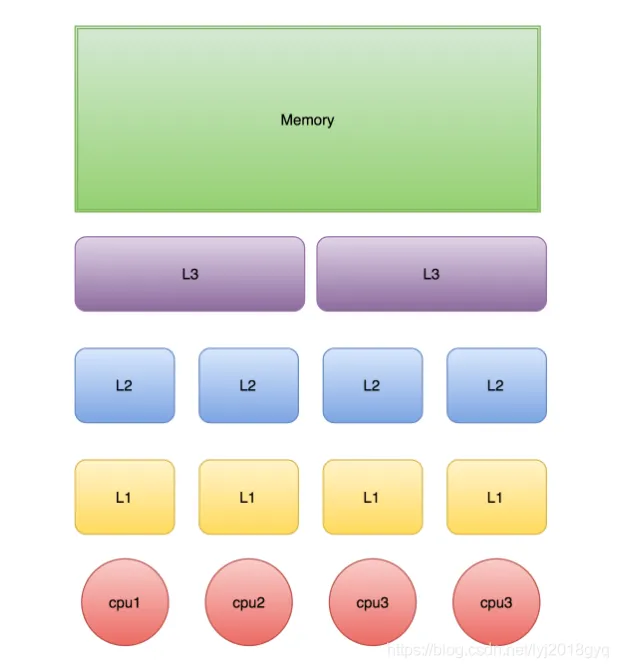 AI Visual Insight: This diagram shows the hierarchical relationship between CPU cores, private L1/L2 caches, the shared L3 cache, and main memory. It highlights the hardware layout of “lower latency and smaller capacity near the core” versus “higher capacity and greater sharing farther from the core,” which helps explain why cache hit rate directly influences the latency ceiling of concurrent programs.
Cache Lines, Not Variables, Define the Unit of Hardware Cache Management
CPUs do not manage caches one variable at a time. They manage them in cache lines. A common cache line size is 64 bytes, which means reading one variable may also load nearby adjacent data.
As a result, contiguous memory access is usually more efficient. In contrast, scattered access patterns and competing hot writes can degrade both cache hit rate and cache coherence traffic.
class CacheLineDemo {
    long a; // Variable a may reside in the same cache line as b
    long b; // Adjacent fields can easily share the same 64-byte cache line
}
This code shows that “adjacent variables” does not mean “thread isolation.”
False Sharing Causes Unrelated Threads to Slow Each Other Down
False sharing happens when two threads modify different variables, but those variables happen to sit in the same cache line. Logically, the threads are not sharing the same field, but the hardware treats them as the same invalidation unit.
As a result, after one core writes to the cache line, the copy of that same cache line in another core becomes invalid. When the other core accesses it again, it must reload it, causing cache coherence traffic to spike and throughput to drop significantly.
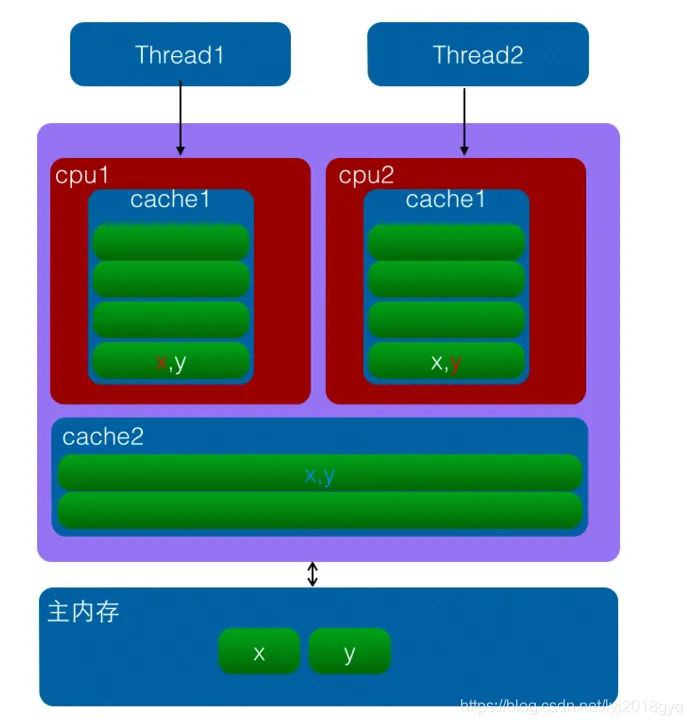 AI Visual Insight: This diagram illustrates the cache line invalidation process that occurs when two CPU cores update different variables stored in the same cache line. The key issue is not that the variables are shared, but that they share the same invalidation granularity. That is a common root cause of performance jitter and unusually high CPU utilization in multithreaded programs.
The Core Strategy for Reducing False Sharing Is to Isolate Hot Writes
Practical approaches include placing frequently written variables on different cache lines, using padding to prevent hot fields from being adjacent, and reducing simultaneous writes from multiple threads to shared regions.
class PaddedCounter {
    volatile long value; // Frequently updated field
    long p1, p2, p3, p4, p5, p6, p7; // Padding fields to better isolate cache lines
}
This code reduces the probability of false sharing by adding padding fields.
Time Synchronization Issues Show Why Distributed Systems Cannot Trust Only Local Clocks
Linux servers usually synchronize time through NTP. Inside a local area network, clock differences can often be controlled within milliseconds. Across wide area networks, however, latency and jitter amplify timing error.
For that reason, many distributed systems do not rely solely on physical time to determine absolute ordering. They combine logical clocks, version numbers, or Snowflake-style ID generation to avoid incorrect ordering decisions.
The Shared Principles of High-Performance Systems Can Be Reduced to Three Rules
First, copy data less. Second, switch contexts less. Third, invalidate CPU caches less. Zero-copy optimizes the transfer path, Page Cache optimizes the read path, CPU cache optimizes the access path, and false sharing optimization improves the concurrency path.
Once you understand these four layers of mechanisms, it becomes much easier to see where systems such as Netty, Kafka, and Redis really get their performance from, instead of stopping at the API surface.
FAQ
Why does zero-copy improve performance if it is not truly “zero” copying?
Because data may still move from disk to memory and from memory to the NIC through DMA. Zero-copy reduces CPU-side copying and context switching in user space, rather than eliminating all physical transfer.
Why does a Page Cache hit matter so much for system performance?
A page cache hit avoids real disk access. That changes the read path from microsecond-to-millisecond-scale I/O waiting into something much closer to memory access cost, improving both throughput and latency.
What is the difference between false sharing and lock contention?
Lock contention occurs when multiple threads compete for the same synchronization resource, which is explicit mutual exclusion. False sharing happens when threads modify different variables that happen to occupy the same cache line, which creates an implicit hardware-level performance conflict.
Core Summary: This article systematically explains four foundational pillars of high-performance I/O: how zero-copy reduces CPU-side data movement and context switching, the real path of a single read, how multi-level CPU caches and cache lines work, and why false sharing slows down concurrent programs. It provides a solid foundation for understanding the real performance characteristics of systems such as Netty, Kafka, and Redis.