PhoneCoder delivers a three-layer architecture—backend agent, mobile client, and web IDE—to solve the limits of desktop-only development, fragmented deployment workflows, and hard-to-reuse streaming collaboration. With dockerBot at the core, it uses SSE, Docker, Traefik, and shared TypeScript modules to make development and deployment available anywhere. Keywords: AI coding, mobile development, automated deployment.
The technical specification snapshot captures the stack clearly
| Parameter | Details |
|---|---|
| Core Languages | TypeScript, JavaScript |
| Backend Framework | NestJS |
| Client Frameworks | Expo / React Native, Vite / React 18 |
| Communication Protocols | REST, SSE, HTTPS/LAN |
| Container Orchestration | Docker Compose, docker.sock |
| Preview Routing | Traefik |
| Data Storage | SQLite |
| Encryption Scheme | AES-256-GCM |
| Core Dependencies | Monaco, AsyncStorage, localStorage shim |
| Upstream Repositories | jsCanvas/dockerBot, jsCanvas/phoneCoder, jsCanvas/clientCoder |
| Star Count | Not provided in the source material |
This system closes the AI development loop through a three-layer architecture
PhoneCoder is not a single application. It is a coordinated system made up of three repositories. dockerBot handles the backend control plane and agent execution, phoneCoder powers the mobile experience, and clientCoder provides an IDE-like experience in the browser.
Its core value lies in unifying code authoring, code execution, project preview, Git commits, and container management inside one AI workflow. Developers only need to provide a Git repository and an access token to trigger a full-stack development and deployment flow.
The upstream repository mapping is straightforward
jsCanvas/dockerBot    # NestJS backend responsible for API, SSE, agents, and container orchestration
jsCanvas/phoneCoder   # Expo multi-platform client for iOS, Android, and Web
jsCanvas/clientCoder  # Vite web IDE that reuses shared modules from phoneCoder
Together, these three repositories form a complete product surface from agent execution to multi-platform interaction.
dockerBot acts as the authoritative backend for the entire system
dockerBot is a NestJS-based backend service responsible for file management, Git operations, model configuration, multi-turn conversations, SSE streaming messages, and sandbox container scheduling. It orchestrates runtime environments through the host machine’s docker.sock, then exposes preview URLs through Traefik.
Data persists to ./data by default, and sensitive configuration is stored in encrypted form through phoneCoder_ENCRYPTION_KEY. The article explicitly states that the system uses AES-256-GCM, which means model credentials are not written to disk in plaintext and are suitable for real development environments.
The dockerBot initialization flow is very direct
cp .env.example .env
# If you do not fill in the key manually, start.sh can generate a placeholder replacement automatically
./scripts/start.sh
# Start in the background
./scripts/start.sh -d
# Stop and remove the current Compose stack
./scripts/start.sh down
These commands initialize the environment, build images, and start the API, sandbox, and preview pipeline.
After startup, the REST base URL is typically http://localhost:8080/api. If you want to connect from a phone, switch to your computer’s LAN IP and make sure the service listens on an address reachable from the local network.
phoneCoder extends the development entry point from desktop to mobile
phoneCoder is an Expo application that targets iOS, Android, and Web. It is not only a client, but also the source of shared modules across the system, including the API client, SSE hooks, chat payloads, mention logic, and DTO types.
That means the mobile app is not a thin shell. It is a first-class part of the system. clientCoder can spin up a browser IDE quickly largely because it reuses the TypeScript capabilities already established inside phoneCoder.
The local phoneCoder workflow is optimized for fast validation
cd phoneCoder
npm install
npm run web   # Fastest way to validate in the browser
npm start     # Open the Expo CLI and connect a real device or emulator
npm run typecheck
npm test
These commands install dependencies, start the web preview, and run type checks and tests.
On the settings page, developers only need to enter an API Base URL ending with /api, such as http://192.168.1.10:8080/api. The configuration is written to AsyncStorage under the key phoneCoder.client.settings.
The phoneCoder interface layering is very clear
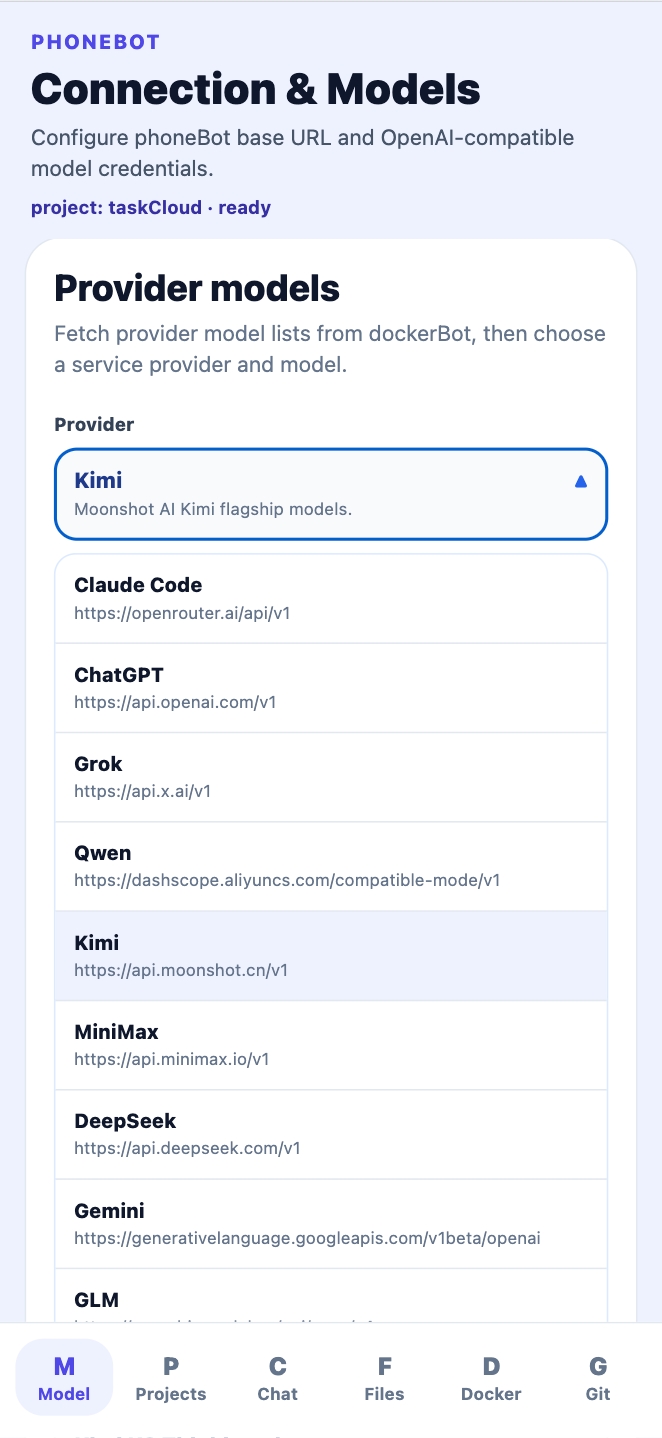 AI Visual Insight: This image shows that the mobile client splits settings, projects, chat, files, preview, Docker runtime, and Git operations into separate views. That design indicates the product is built around completing the entire development lifecycle on mobile, not just sending and receiving messages. It especially highlights file-tree navigation, runtime visibility, and deployment visualization.
clientCoder delivers an IDE-like development experience in the browser
clientCoder is a single-page application built with Vite and React 18, and its layout mirrors a desktop IDE. It provides an activity bar, file tree, Monaco editor, bottom output panel, and right-side chat panel, while establishing streaming sessions with dockerBot over SSE.
More importantly, it does not rebuild the SDK from scratch. Through the path alias @phoneCoder/*, the project directly reuses logic from phoneCoder/src/*, which enables shared networking, types, and session handling.
Vite proxying is the recommended local development setup
export default {
  server: {
    proxy: {
      "/api": {
        target: "http://127.0.0.1:8080", // Forward frontend requests to dockerBot
        changeOrigin: true, // Allow the proxy to rewrite the request origin
      },
    },
  },
};
This configuration allows the browser to access 5173/api uniformly, and then lets Vite forward those requests to the backend on port 8080.
During development, prefer 127.0.0.1 over localhost to avoid hostname resolution differences in some sandboxed environments.
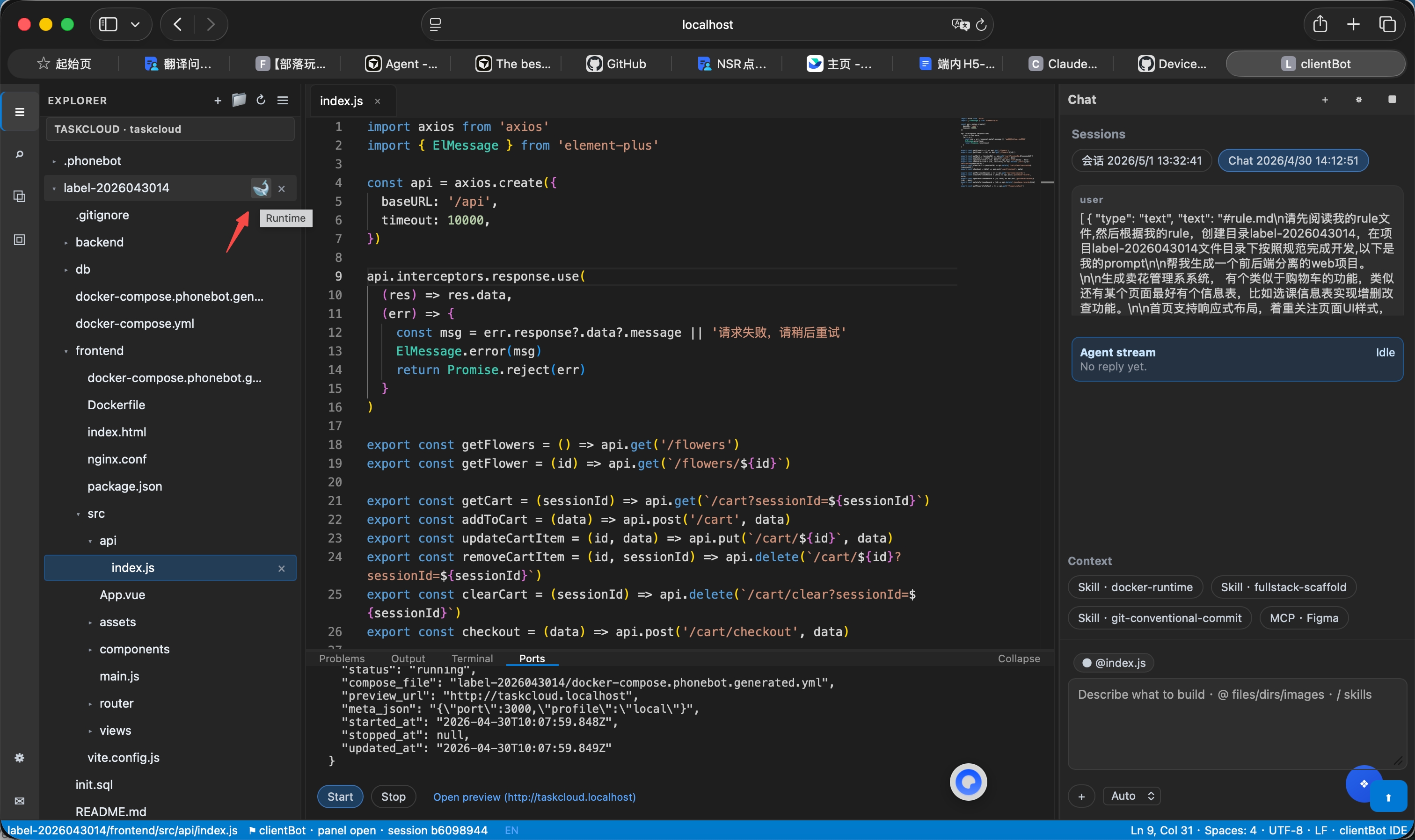 AI Visual Insight: The screenshot shows a classic three-column IDE layout: project and runtime entry points on the left, the code editor in the center, a ports and output panel at the bottom, and an SSE-powered assistant on the right. This demonstrates that clientCoder is not just a chat panel, but a browser workstation for real project operations.
The typical end-to-end flow already covers development, preview, and testing
The shortest path is to start dockerBot first, then connect through clientCoder or phoneCoder. The web client works well for local debugging, while the mobile client is better for remote operation and on-the-go inspection.
For complete project generation, the source article provides a high-value pattern: first create a Git access token, then launch multi-turn tasks from the project page, explicitly defining the frontend, backend, database ports, and technology stack, and finally run the automated testing skill.
An effective prompt template should include explicit constraints
/skill prompt2repo-engineering-rules
# Specify the project directory
# Describe the business requirements
# Specify UI guidelines or a Figma link
# Specify the frontend stack and port
# Specify the backend stack and port
# Specify the database type and port
The purpose of this kind of prompt is not to let the AI improvise freely. It is to define engineering boundaries, deployment constraints, and acceptance criteria up front.
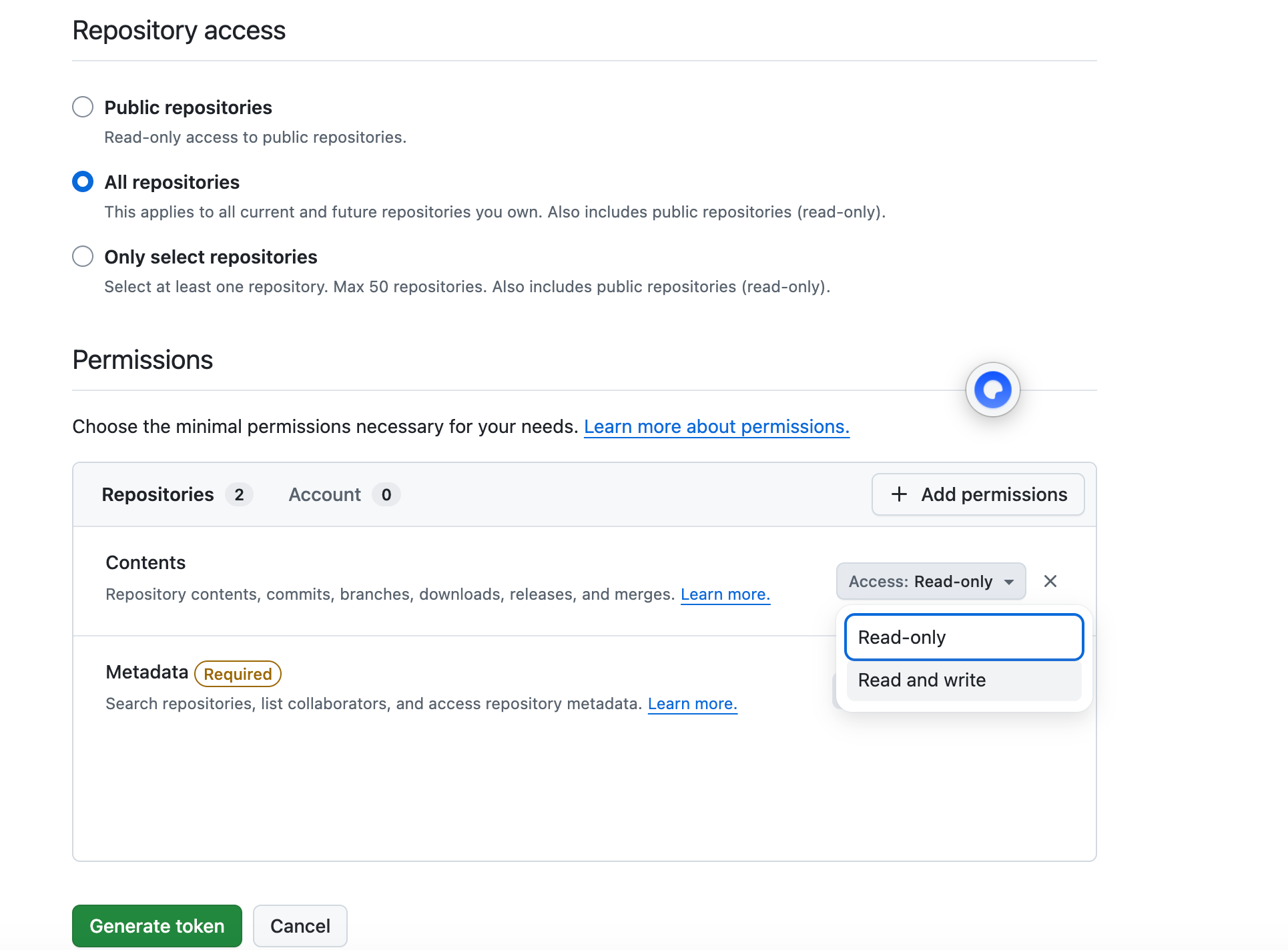 AI Visual Insight: This image emphasizes the permission setup for a GitHub fine-grained personal access token. The key takeaway is enabling read and write access for repository Contents, which directly determines whether the AI agent can create, modify, and commit project files.
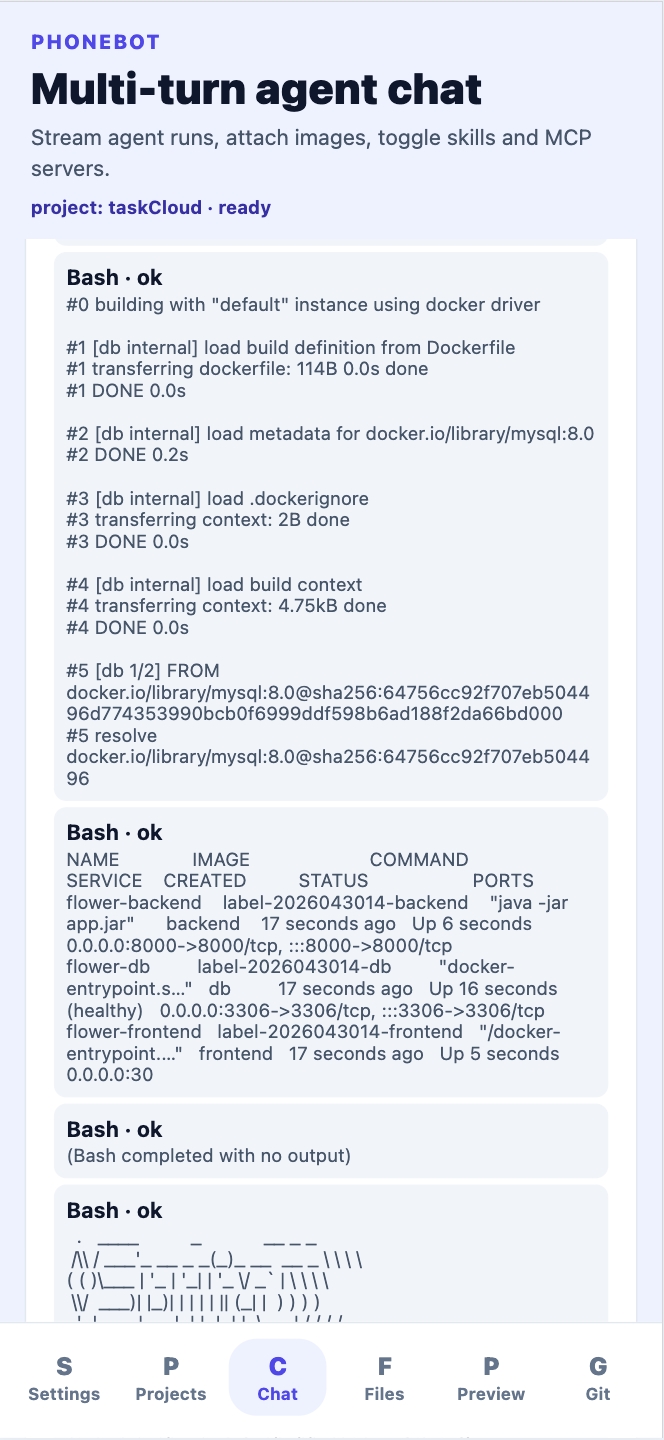 AI Visual Insight: This image highlights the output panels of the AI engineering pipeline, including coding results, documentation, the file tree, and preview entry points. It shows that the system does more than generate code—it also provides a browsable, runnable, and verifiable delivery interface.
The real strength of this architecture lies in reuse and executability
Many AI coding products only offer conversation capabilities, but PhoneCoder stands out through shared modules, container execution, and multi-platform entry points. Shared modules reduce duplicated client-side work, Docker sandboxes provide execution isolation, and Traefik standardizes preview publishing.
From a software architecture perspective, this structure is especially well suited for solo developers, small-team prototyping, and AI agent scenarios that require project management from mobile devices.
FAQ provides structured answers to common implementation questions
Q: Why is the system split into dockerBot, phoneCoder, and clientCoder?
A: Because each component has a completely different responsibility. dockerBot provides the authoritative API, agent execution, and container orchestration; phoneCoder handles mobile interaction; clientCoder delivers the browser IDE. This split allows each project to evolve independently while still reusing core logic through shared modules.
Q: Why can the phone participate in real development instead of only viewing chat history?
A: Because phoneCoder is not just a messaging endpoint. It is a full client that connects directly to project, file, Git, runtime, and preview interfaces, while reusing the TypeScript API layer. That gives it real operational capability.
Q: Why is 127.0.0.1:5173/api recommended for local debugging?
A: Because it uses the Vite proxy to provide a unified frontend request entry point, which reduces cross-origin issues and environment-specific differences. In some sandboxed or browser environments, 127.0.0.1 is also more stable than localhost.
Core Summary: PhoneCoder is an AI development system composed of dockerBot, phoneCoder, and clientCoder. It supports automated development, container execution, streaming conversations, and preview deployment based on Git repositories and access tokens, while covering both mobile and browser IDE workflows. Keywords: AI coding, mobile development, automated deployment.