Spring AI Alibaba gives Java developers a unified abstraction for integrating large language models, reducing the cost of calling model APIs directly, lowering model-switching friction, and improving engineering readiness. This article focuses on quick setup, ChatClient, streaming responses, and multimodal implementation. Keywords: Spring AI, DashScope, ChatClient.
Technical specifications are easy to review at a glance
| Parameter |
Description |
| Language |
Java 17+ |
| Framework |
Spring Boot 3.x |
| AI Integration Layer |
Spring AI Alibaba |
| Model Service |
Alibaba Cloud Bailian / DashScope / Qwen family |
| Interaction Protocol |
HTTP, Streaming Response (Flux) |
| Typical Capabilities |
Chat, Structured Output, System Prompt, Multimodal |
| Core Dependencies |
spring-ai-alibaba-starter, spring-ai-alibaba-starter-dashscope |
| Source Article Popularity |
Original article displayed 421 views |
Spring AI Alibaba is a practical LLM integration solution for Java engineering
Spring AI Alibaba is built on top of Spring AI. Its core value is not simply “wrapping another SDK,” but bringing model invocation into Spring’s unified programming model. For Java teams, this means they can continue to reuse dependency injection, configuration management, auto-configuration, and cloud-native integration.
The real pain points it addresses are clear: mainstream AI frameworks such as LangChain and LlamaIndex are centered around the Python ecosystem, while Java developers integrating LLMs into enterprise systems often face fragmented APIs, high model-switching costs, and scattered prompt management.
The framework has clearly defined capability boundaries
It supports chat, text-to-image, audio transcription, and text-to-speech model capabilities, while also supporting synchronous calls, streaming output, structured results, function calling, conversational memory, and RAG extensions. That makes it better suited to enterprise backends rather than simple demo assembly.
<dependency>

<groupId>com.alibaba.cloud.ai</groupId>

<artifactId>spring-ai-alibaba-starter</artifactId>

<version>1.0.0-M5.1</version>
</dependency>
This dependency integrates Spring AI Alibaba into a standard Maven project.
The quick-start process can be reduced to three steps
The first step is to apply for an API key on the Alibaba Cloud Bailian platform. The second step is to create a Spring Boot 3.x project. The third step is to add the AI Starter and complete the configuration, after which you can inject ChatModel or ChatClient directly to make requests.
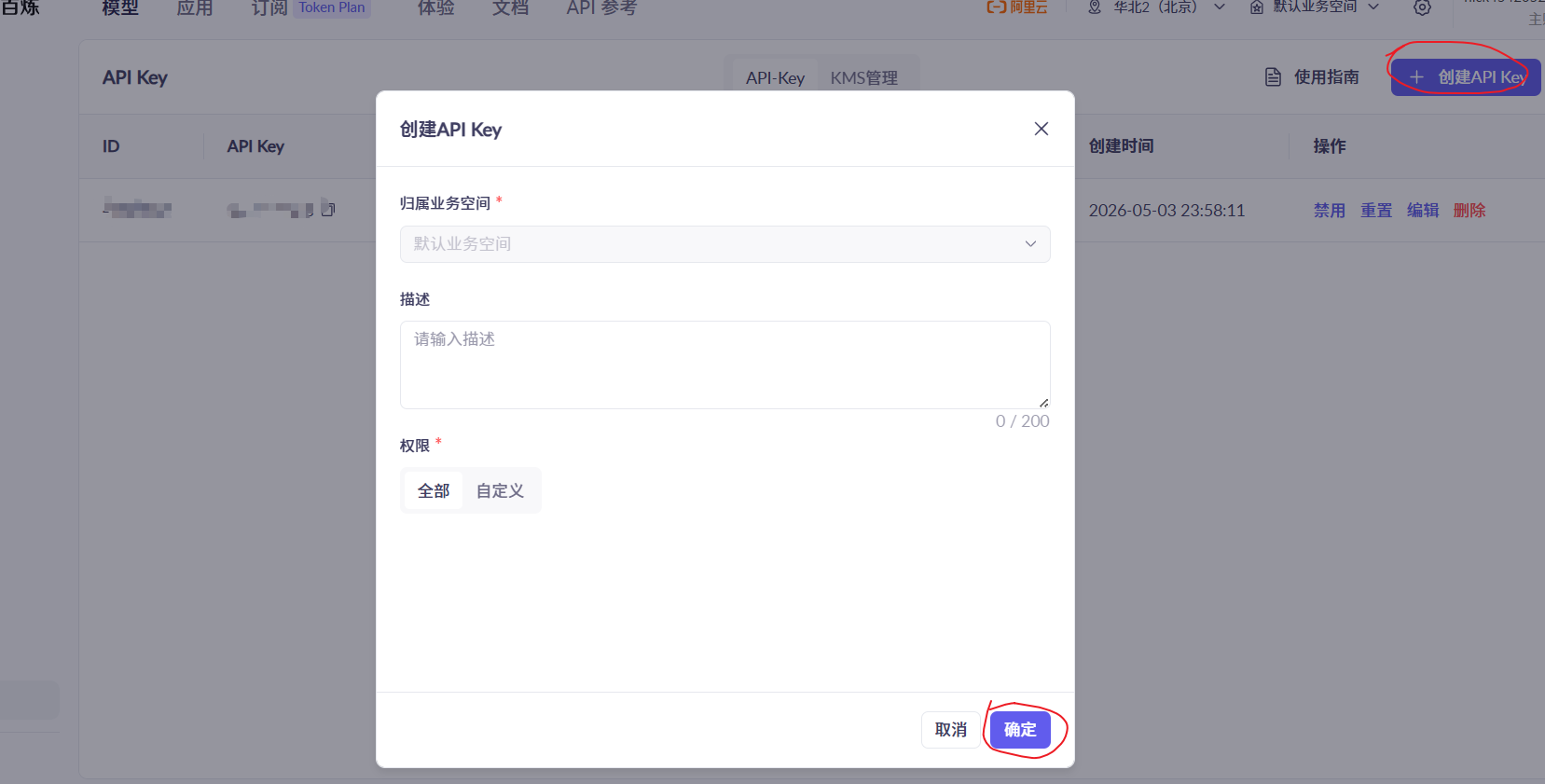 AI Visual Insight: This screenshot shows the API key application entry on the Alibaba Cloud Bailian platform. It highlights that account verification and callable credentials are prerequisites for model access, forming the identity authentication starting point of the entire invocation chain.
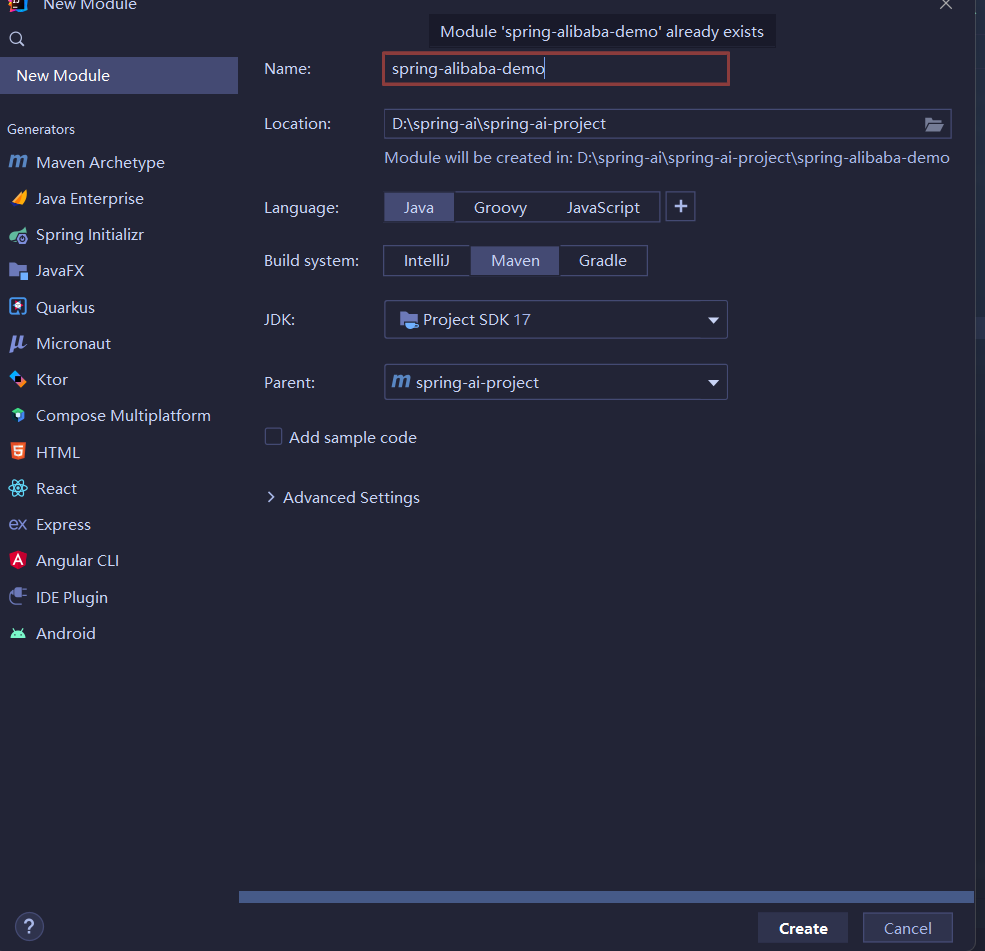 AI Visual Insight: This image shows the initialization screen for creating a new module with Spring Boot. It reflects a standard scaffold-based project setup, which simplifies later integration with auto-configuration, configuration files, and web controllers.
server:
  port: 8082
spring:
  application:
    name: spring-alibaba-demo
  ai:
    dashscope:
      api-key: your-api-key  # Configure the Bailian platform key
This configuration defines the service port, application name, and DashScope authentication parameters.
Using ChatModel is the fastest way to build your first chat endpoint
ChatModel is closer to the underlying capability and is ideal for validating the request pipeline first. By creating a simple controller, you can send an HTTP request parameter directly to the model for processing.
@RestController
@RequestMapping("/ali")
public class AliController {

    private final ChatModel chatModel;

    public AliController(ChatModel chatModel) {
        this.chatModel = chatModel; // Inject the model client
    }

    @RequestMapping("/chat")
    public String chat(String message) {
        return chatModel.call(message); // Call the model directly for a single-turn conversation
    }
}
This code demonstrates the smallest runnable text chat endpoint.
ChatClient provides a higher-level way to orchestrate prompts and results
Compared with ChatModel, ChatClient is better suited to business development. It wraps prompt construction, role messages, and response extraction into a fluent API, which significantly reduces boilerplate code in the controller layer.
@RestController
@RequestMapping("/chat")
public class ChatController {

    private final ChatClient chatClient;

    public ChatController(ChatClient.Builder builder) {
        this.chatClient = builder.build(); // Build the default client from the Builder
    }

    @GetMapping("/call")
    public String call(String input) {
        return this.chatClient.prompt()
                .user(input) // Add the user message
                .call()
                .content(); // Extract the model text output
    }
}
This code shows the higher-level conversational invocation style recommended by Spring AI.
Streaming responses fit chat windows and long-form generation scenarios
When a response is long, waiting for the full result increases time to first token. Using stream() with `Flux
` lets the application return content as it is generated, which is ideal for token-by-token rendering in the frontend.
“`java
@GetMapping(value = “/stream”, produces = “text/html;charset=utf-8”)
public Flux
stream(String input) {
return this.chatClient.prompt()
.user(input) // Inject the current user input
.stream()
.content(); // Return chunked text as a stream
}
“`
This code implements a server-side streaming output endpoint.
### Structured output makes model results easier to route into business workflows
Enterprise systems often do not need “free-form text”. They need structured objects that applications can consume directly. Spring AI supports mapping model output directly to a Java Record or POJO.
“`java
record ActorFilms(String actor, List
movies) {
}
@GetMapping(“/entity”)
public String entity(String actor) {
ActorFilms actorFilms = chatClient.prompt()
.user(String.format(“Generate the filmography of actor %s”, actor)) // Constrain the output topic
.call()
.entity(ActorFilms.class); // Deserialize into a structured object
return actorFilms.toString();
}
“`
This code converts the model response directly into a strongly typed object, making it easier to persist or orchestrate downstream.
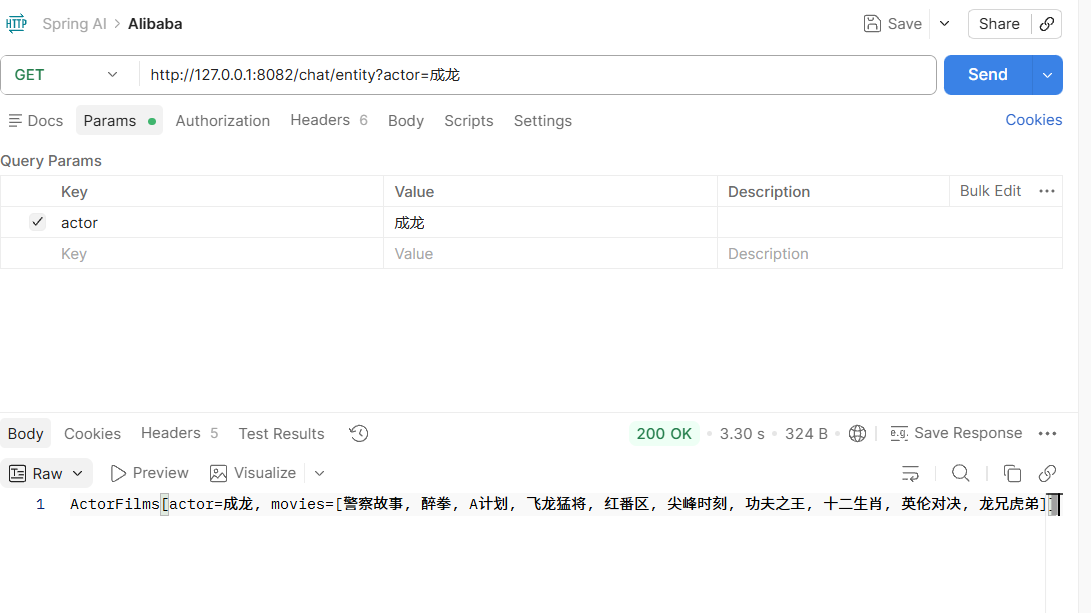
**AI Visual Insight:** This screenshot shows the execution result of the structured output endpoint. It demonstrates that the model response has been mapped into an object containing an actor name and a movie list, rather than loose natural language text.
## A default System Message moves role definition into the infrastructure layer
In most business scenarios, the system role should not be duplicated across every endpoint. A better approach is to configure the default System Prompt during bean initialization so that all requests share a consistent persona and tone.
“`java
@Configuration
public class ChatClientConfig {
@Bean
ChatClient chatClient(ChatClient.Builder builder) {
return builder
.defaultSystem(“Assume you are David Ogilvy, capable of writing advertisements for many brands”) // Preset the system role
.build();
}
}
“`
This configuration hardcodes the default system prompt as a global client behavior.
If you need dynamic variables, you can also reserve parameters in the system template and inject them at call time. This preserves a unified setup while still allowing request-level customization.
“`java
@GetMapping(“/word”)
public String word(String input, String word) {
return chatClient.prompt()
.system(sp -> sp.param(“word”, word)) // Fill template parameters dynamically
.user(input)
.call()
.content();
}
“`
This code injects request-specific variables into the default system prompt.
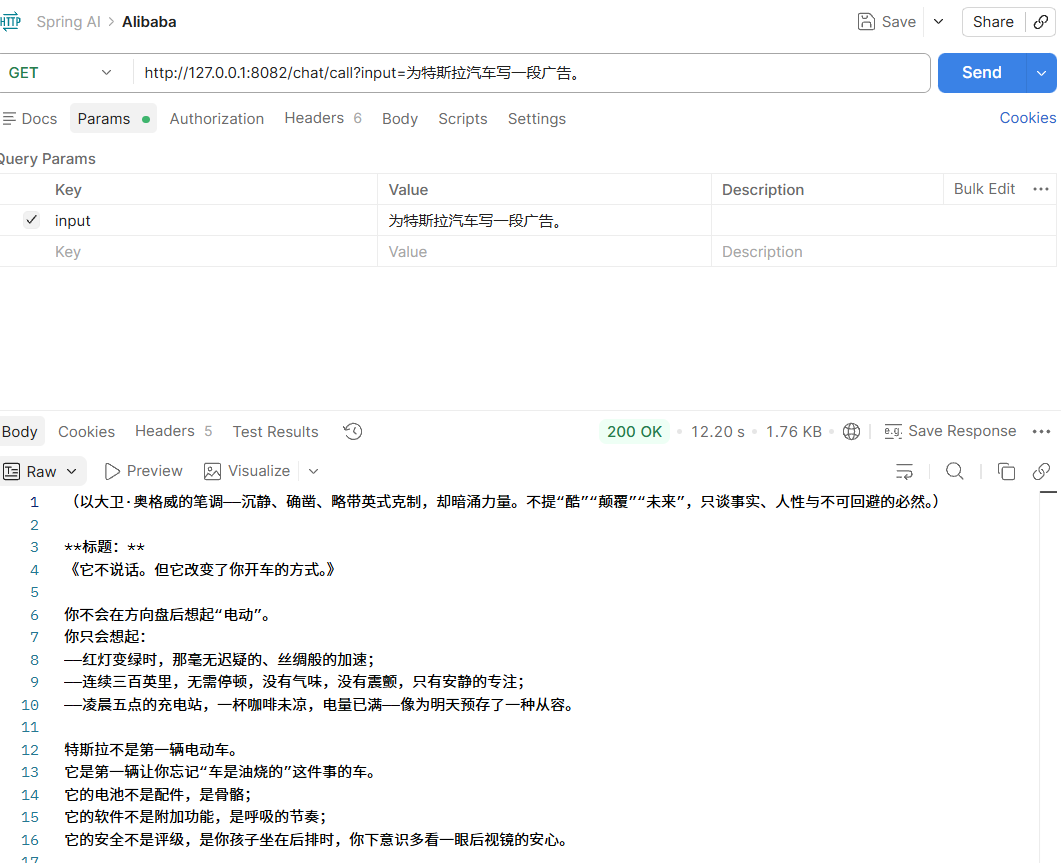
**AI Visual Insight:** This screenshot reflects the generated result after the default System Message takes effect. It shows that the model output is now constrained by the predefined advertising copywriter persona, demonstrating how prompt engineering can stabilize output style.
## Multimodal support extends Spring AI from text Q&A to image-text understanding
The key to multimodal support is not just “uploading an image.” It is packaging text and media together into a unified message model. Spring AI uses the `UserMessage + Media` abstraction to send an image URL, MIME type, and text instruction together to the underlying vision model.
When enabling multimodal support, the original article recommends using the dedicated DashScope Starter and configuring a vision model together with `multi-model: true`.
“`xml
com.alibaba.cloud.ai
spring-ai-alibaba-starter-dashscope
1.1.2.0
“`
This dependency adds the DashScope starter that supports multimodal capabilities.
“`yaml
spring:
ai:
dashscope:
api-key: your-api-key
chat:
options:
model: qwen-vl-max-latest # Specify the vision understanding model
multi-model: true # Enable multimodal support
“`
This configuration declares the selected vision model and the multimodal switch.
“`java
@GetMapping(“/image”)
public String image(String input) throws Exception {
String url = “https://lcshelter.org/wp-content/uploads/2024/11/lewis-clark-animal-shelter-lewiston-idaho-cat.png”;
List
mediaList = List.of(
new Media(MimeTypeUtils.IMAGE_PNG, new URI(url).toURL().toURI())
);
UserMessage prompt = UserMessage.builder()
.text(input) // Text question
.media(mediaList) // Image input
.build();
return this.chatClient.prompt(new Prompt(prompt))
.call() // Call the vision model
.content(); // Return the image understanding result
}
“`
This code implements a multimodal endpoint that lets you ask questions about an image.
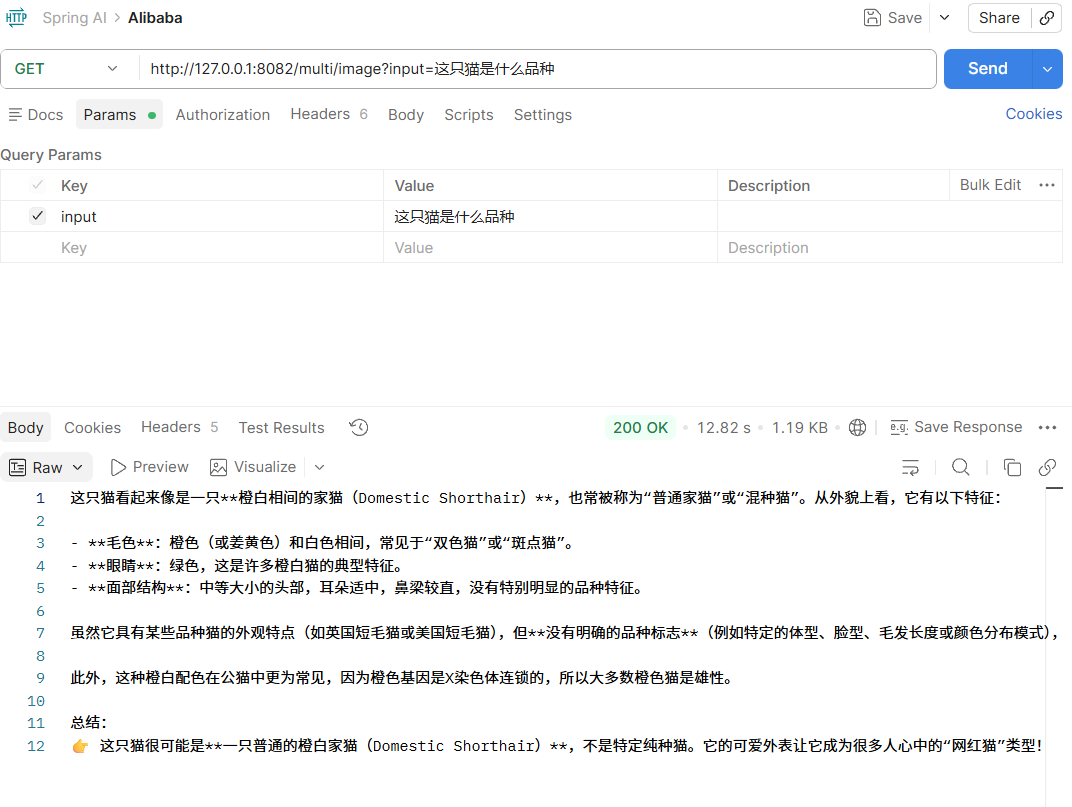
**AI Visual Insight:** This screenshot shows the return value of the image recognition endpoint. It demonstrates that the model has completed visual understanding based on the input cat image and produced a natural-language judgment about its breed or appearance.
## The practical value of Spring AI Alibaba lies in replaceability and governability
From an engineering perspective, the most important outcome is not that a call succeeds once, but that invocation logic becomes standardized. Controllers no longer need to be aware of a specific vendor SDK, and prompts, model selection, and default roles can all be managed through configuration. That greatly reduces application-layer changes when switching the underlying model later.
For teams already using Spring Boot 3.x and JDK 17+, this is a low-friction path for building Java-native AI applications. A safer evolution path is to validate the pipeline with `ChatModel`, consolidate capabilities with `ChatClient`, and then extend into structured output and multimodal support.
## FAQ with structured answers
### What is the difference between Spring AI Alibaba and calling Alibaba Cloud model APIs directly?
Direct API calls offer more flexibility, but they also create more repetitive engineering work. Spring AI Alibaba provides a unified abstraction, auto-configuration, and prompt orchestration, making it a better fit for projects that require long-term maintenance, model switching, and deep integration with the Spring ecosystem.
### How should you choose between ChatModel and ChatClient?
`ChatModel` is lower level and works well for quickly validating the request pipeline or building deep customizations. `ChatClient` is higher level and better suited to business development, especially for prompt composition, streaming output, and structured result extraction.
### What are the most common pitfalls in multimodal integration?
The most common issues fall into three categories: selecting the wrong dependency, using a model name that does not support vision, and failing to enable `multi-model: true`. In addition, the image URI must be reachable and the MIME type must be correct, or the model will not be able to read the media content.
**AI Readability Summary:** This article reconstructs both beginner and advanced Spring AI Alibaba practices, covering dependency setup, ChatModel and ChatClient usage, streaming responses, structured output, default System Message configuration, and image-based multimodal integration. It helps Java developers quickly build enterprise-grade LLM applications with Spring Boot.