This hands-on introduction to SQL Server Graph focuses on RAG and knowledge graph use cases. It shows how to use native NODE, EDGE, and MATCH capabilities for graph modeling, relationship inserts, and multi-hop queries. It addresses a common deployment challenge: if your data stack already runs on SQL Server, you can implement graph-based workflows without introducing Neo4j. Keywords: SQL Server, Graph Database, RAG.
| Technical Specification | Details |
|---|---|
| Database Engine | SQL Server 2017+ |
| Graph Model Protocol | Native Graph tables: AS NODE / AS EDGE |
| Query Syntax | T-SQL + MATCH |
| GitHub Stars | Not provided in the original content |
| Core Dependencies | SQL Server, SSMS |
SQL Server already provides native capabilities for building lightweight knowledge graphs
Many teams think of Neo4j first when building Graph RAG systems. But if your existing data infrastructure already centers on SQL Server, using its native graph features is often more practical. It does not aim to replace specialized graph databases. Instead, it lowers the barrier to implementing graph data in an existing relational environment.
In RAG systems, graph databases work well for storing entities, relationships, and paths. Typical objects include people, companies, and products, along with directed relationships such as employment, creation, and production. The value is that you can transform text-based knowledge into a traversable structured network.
The runtime prerequisite is SQL Server 2017 or later
-- Create a graph database with Chinese collation support
CREATE DATABASE GraphDB COLLATE Chinese_PRC_CI_AS;
GO

-- Switch to the target database
USE GraphDB;
GO
This script initializes the graph database environment and ensures stable comparison behavior for Chinese text fields.
The core graph design consists of node tables and edge tables
The core objects in SQL Server Graph are conceptually similar to those in Neo4j, but they are implemented as T-SQL tables. Node tables store entities, and edge tables store relationships. SQL Server automatically maintains the internal identifier columns required by the graph engine.
A node table is essentially an entity container. In addition to business columns, SQL Server generates a $node_id for each node. That means you do not need to design a graph primary key manually, although you should still create indexes on frequently filtered columns.
Node tables define entity types and property payloads
-- Create a node table: people, companies, and products can all live in the same table
CREATE TABLE Nodes (
    NodeType NVARCHAR(100) NOT NULL,      -- Node type, such as Person or Company
    Name NVARCHAR(255) NOT NULL,          -- Entity name
    Properties NVARCHAR(MAX) DEFAULT '{}',-- JSON extension properties
    CreatedAt DATETIME2 DEFAULT GETDATE(),
    UpdatedAt DATETIME2 DEFAULT GETDATE(),
    IsDeleted BIT DEFAULT 0
) AS NODE;

-- Create indexes on commonly filtered fields
CREATE INDEX IX_Nodes_NodeType ON Nodes(NodeType);
CREATE INDEX IX_Nodes_Name ON Nodes(Name);
This code defines a unified node model that works well for quickly building small to medium-sized knowledge graphs.
An edge table stores directed relationships. Once you create it with AS EDGE, SQL Server automatically adds $edge_id, $from_id, and $to_id. Direction matters because every path query depends on the source and destination of each edge.
-- Create an edge table: store relationship types, weights, and extension properties
CREATE TABLE Edges (
    EdgeType NVARCHAR(100) NOT NULL,      -- Edge type, such as WORKS_AT
    Properties NVARCHAR(MAX) DEFAULT '{}',-- JSON extension properties
    Weight FLOAT DEFAULT 1.0,             -- Can be used for scoring or confidence
    CreatedAt DATETIME2 DEFAULT GETDATE(),
    UpdatedAt DATETIME2 DEFAULT GETDATE(),
    IsDeleted BIT DEFAULT 0
) AS EDGE;

-- Create an index on relationship type
CREATE INDEX IX_Edges_EdgeType ON Edges(EdgeType);
This code defines the relationship layer that supports path traversal, weighted analysis, and graph retrieval.
Data insertion should create nodes first and then connect relationships through $from_id and $to_id
After you complete the schema design, insert entities first and relationships second. This ensures that both ends of every edge resolve to real objects in the node table. The property field uses JSON strings, which work well for flexible metadata.
-- Insert person and company nodes
INSERT INTO Nodes (NodeType, Name, Properties)
VALUES
('Person', '张三', '{"age": 35, "occupation": "工程师", "city": "北京"}'),
('Person', '李四', '{"age": 42, "occupation": "CEO", "city": "深圳"}'),
('Company', '腾讯科技', '{"founded_year": 1998, "industry": "互联网"}'),
('Company', '阿里巴巴', '{"founded_year": 1999, "industry": "电子商务"}');

-- Insert a directed relationship based on node IDs
INSERT INTO Edges ($from_id, $to_id, EdgeType, Properties)
SELECT p.$node_id, c.$node_id, 'WORKS_AT', '{"department": "技术部", "start_year": 2020}'
FROM Nodes p, Nodes c
WHERE p.Name = '张三' AND c.Name = '腾讯科技';
This code demonstrates the most important graph write pattern: resolve the nodes first, then create the relationship.
Adding product nodes makes it possible to build a two-hop knowledge path
-- Insert a product node
INSERT INTO Nodes (NodeType, Name, Properties)
VALUES
('Product', '微信', '{"launch_year": 2011, "category": "社交"}');

-- Create a production relationship from company to product
INSERT INTO Edges ($from_id, $to_id, EdgeType, Properties)
SELECT c.$node_id, p.$node_id, 'PRODUCES', '{}'
FROM Nodes c, Nodes p
WHERE c.Name = '腾讯科技' AND p.Name = '微信';
This code expands the entity network from a person-company model to a person-company-product path.
MATCH queries are the core entry point for graph retrieval in SQL Server
The value of a graph database is not just storage, but traversal and retrieval. SQL Server uses MATCH to describe path patterns and avoids the need to write complex JOIN logic explicitly. For developers already familiar with T-SQL, the learning curve is much lower than introducing an entirely new graph query language.
-- Query the direct neighbors of Zhang San
SELECT n1.Name AS source_name, e.EdgeType, n2.Name AS target_name
FROM Nodes n1, Edges e, Nodes n2
WHERE MATCH(n1-(e)->n2)
  AND n1.Name = '张三';
This query retrieves the one-hop adjacent relationships of an entity, which is the smallest useful graph retrieval pattern.
Multi-hop queries can directly express inference paths from entities to target knowledge
-- Query the products of the company where Zhang San works, using a two-hop path
SELECT n1.Name AS person_name, n2.Name AS company_name, n3.Name AS product_name
FROM Nodes n1, Edges e1, Nodes n2, Edges e2, Nodes n3
WHERE MATCH(n1-(e1)->n2-(e2)->n3)
  AND n1.Name = '张三'
  AND e1.EdgeType = 'WORKS_AT'
  AND e2.EdgeType = 'PRODUCES';
This query shows a common Graph RAG path reasoning pattern: start from a user-related entity and traverse toward a business object.
If you also need to determine edge direction, you can compare system columns directly against the current node and $from_id. This is useful for adjacency panels, frontend arrow rendering, or in-degree and out-degree analysis.
-- Determine the direction of relationships for a given node
SELECT n.Name AS node_name,
       e.EdgeType,
       CASE
           WHEN e.$from_id = n.$node_id THEN 'outgoing'  -- The current node is the source
           ELSE 'incoming'                               -- The current node is the target
       END AS direction
FROM Nodes n, Edges e, Nodes n2
WHERE MATCH(n-(e)->n2)
  AND (n.Name = '张三' OR n2.Name = '张三');
This query identifies relationship flow direction, which is useful for frontend visualization and graph analysis.
SQL Server Graph is a good fit as the knowledge graph foundation inside an existing database stack
Its advantages are straightforward: it reuses your existing SQL Server environment, operations model, and team skill set, without requiring a separate graph database deployment. For small to medium Graph RAG workloads, business relationship analysis, and entity association queries, it already delivers practical value.
Its limitations are equally clear. SQL Server does not provide a native visual graph experience in SSMS comparable to Neo4j Browser. In practice, you will usually need to build your own service layer and frontend visualization stack, such as FastAPI, Vue, or D3.js.
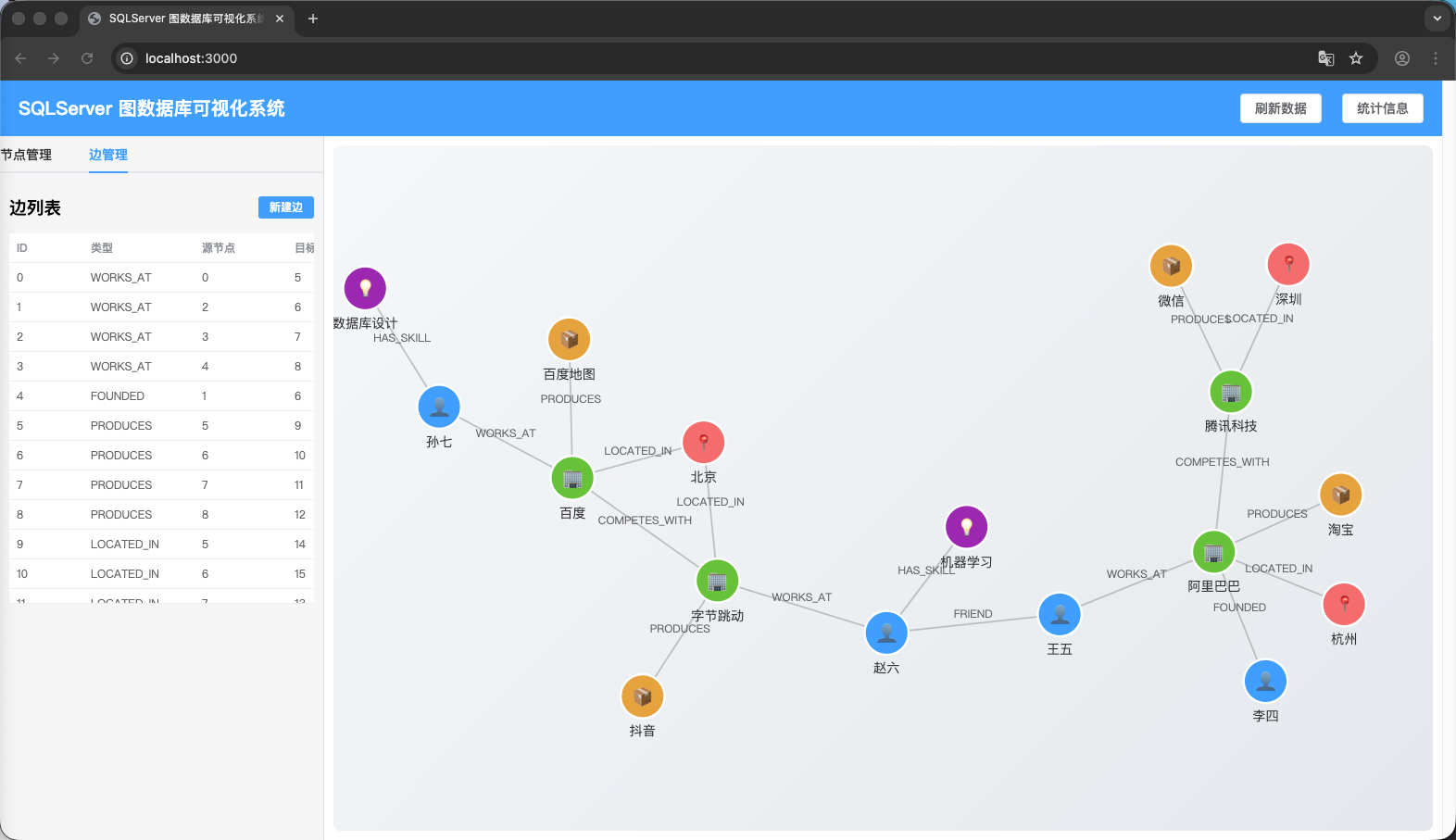 AI Visual Insight: This image shows a typical frontend view of a knowledge graph: multiple entity nodes connected by relationship edges to form a network. Nodes should be grouped into categories such as people, companies, and products, and the semantic structure should be conveyed through color, position, or edge direction. Visualizations like this usually rely on force-directed layouts, converting database
 Nodes and Edges into graph JSON that the frontend can render.
FAQ: The 3 questions developers care about most
Q1: Can SQL Server Graph replace Neo4j?
Not completely. It is better suited for quickly enabling graph relationships inside an existing SQL Server ecosystem, but it is still weaker than Neo4j in graph algorithm support, visualization experience, and specialized graph features.
Q2: Why design properties as JSON fields?
Because entities and relationships in a knowledge graph are naturally heterogeneous. JSON reduces the cost of frequent schema changes while preserving flexibility, which makes it a good fit for RAG prototypes and iterative projects.
Q3: What scenarios is it best suited for?
It is a strong fit for teams that already use SQL Server and need a lightweight knowledge graph, relationship queries, a Graph RAG foundation, or business entity association analysis. If you need advanced graph algorithms and a native graph browsing experience, consider a specialized graph database instead.
Core summary: This article reconstructs the core practices of SQL Server native graph databases, covering database setup, node and edge table design, test data insertion, MATCH-based multi-hop queries, and direction analysis. It also explains the practical boundaries and engineering value of SQL Server Graph in RAG and knowledge graph scenarios.