[AI Readability Summary] Ansible Playbooks turn scattered operations commands into repeatable automation workflows for deployment, configuration, and inspection. They solve the reuse, maintenance, and collaboration limits of ad-hoc commands. Keywords: Ansible Playbook, YAML, Infrastructure Automation.
Technical Specifications Snapshot
| Parameter | Description |
|---|---|
| Language | YAML |
| Execution Tool | ansible-playbook |
| Communication Protocol | SSH |
| Applicable Targets | Linux hosts, application services, database services |
| Core Dependencies | Ansible, Python, Jinja2 |
| GitHub Stars | Not provided in the source content |
Playbooks are the standard approach for orchestrating complex tasks
When a task includes multi-step installation, configuration, conditional logic, and cross-host coordination, continuing to use ad-hoc commands quickly becomes unmanageable. The value of a Playbook lies in expressing these steps as declarative YAML files and executing them from top to bottom.
Unlike one-off commands, Playbooks can preserve execution state, register variables, route tasks based on conditions, and organize templates, static files, and roles into a project structure that remains maintainable over time.
YAML is the foundational language for describing Playbooks
YAML syntax is simple, but its formatting rules are strict: it is case-sensitive, indentation must use spaces only, items at the same level must align to the left, lists use -, and key-value pairs use :. In Playbooks, indentation errors are often more common than business logic errors.
---
- name: Minimal runnable Playbook demo
  hosts: webservers
  become: yes  # Run tasks with privilege escalation
  tasks:
    - name: Install nginx
      apt:
        name: nginx
        state: present  # Ensure the package is installed
This example shows a minimal Playbook: after specifying the target hosts, it installs the software in task order.
Playbooks enable controlled execution through task state
A Playbook is not just a batch script. It can also pass the result of an earlier command to later tasks. For example, you can first check a service state and then decide whether to reload or start it. That is the core of automation flow control.
- name: Perform actions based on service state
  hosts: web_servers
  tasks:
    - name: Get nginx status
      command: systemctl is-active nginx
      register: nginx_status  # Save command output to a variable
      ignore_errors: yes  # Continue even if the command fails

    - name: Reload config when nginx is running
      command: systemctl reload nginx
      when: nginx_status.stdout == "active"  # Run only when the condition is true

    - name: Start service when nginx is not running
      command: systemctl start nginx
      when: nginx_status.stdout != "active"  # Conditional branch control
This example performs conditional execution based on command results and avoids unnecessary repeated operations.
Cross-host variable passing makes deployment pipelines more complete
The source content also presents a key capability: read a file on host A, then use that value on host B. Typical scenarios include sharing a version number, image tag, or configuration identifier.
- name: Extract the version from the primary node
  hosts: master_server
  tasks:
    - name: Read the version file
      slurp:
        src: /app/version.txt
      register: version_file  # Read the file content and save it

    - name: Decode and set the version variable
      set_fact:
        current_version: "{{ version_file.content | b64decode | trim }}"  # Decode from base64

- name: Use the version on application nodes
  hosts: app_servers
  tasks:
    - name: Pull the target image version
      command: "docker pull myapp:{{ hostvars['master_server']['current_version'] }}"  # Access variables from another host
This example demonstrates Playbook-based variable bridging in a multi-node deployment.
A Playbook is fundamentally a collection of Plays
A Playbook can contain multiple Plays, and each Play can target a different host group. This makes it possible to split load balancing, application services, and database configuration into independent stages that form a complete delivery pipeline.
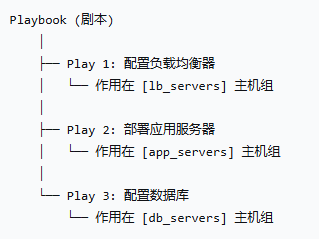 AI Visual Insight: This diagram shows a typical three-tier deployment topology: the entry layer is a load balancer, the middle layer is an application server cluster, and the bottom layer contains database nodes. It highlights how a Playbook can orchestrate automation by role and layer, connecting traffic ingress to data storage in a single deployment workflow.
The core components of a standard Play are highly consistent
The source content summarizes four high-frequency components: hosts defines the target hosts, vars defines variables, tasks defines execution steps, and handlers defines post-actions that run only after notification. This model covers most day-to-day automation tasks.
- name: Deploy the web service
  hosts: web_servers
  become: yes
  vars:
    app_name: mywebapp  # Define the application name variable
    app_port: 8080  # Define the port variable
  tasks:
    - name: Distribute the configuration file
      template:
        src: nginx.conf.j2
        dest: /etc/nginx/nginx.conf
      notify: restart nginx  # Notify the handler after a configuration change
  handlers:
    - name: restart nginx
      systemd:
        name: nginx
        state: restarted  # Run only when notified
This example shows the coordination between tasks and handlers: the service restarts only when the configuration changes.
Roles evolve Playbooks from scripts into engineering projects
As tasks grow, a single YAML file quickly becomes bloated. The value of Roles lies in splitting variables, tasks, handlers, static files, and templates into a standard directory structure that forms reusable modules.
roles/
├── common/
│   ├── defaults/
│   ├── vars/
│   ├── tasks/
│   ├── handlers/
│   ├── files/
│   └── templates/
├── nginx/
└── mysql/
This directory structure reflects the engineering mindset behind Roles and is well suited for team collaboration and multi-environment reuse.
Inventory determines which hosts a Playbook targets
hosts is not arbitrary. It must match the inventory. The inventory file can define individual hosts, groups, group variables, and even nested group relationships.
[all]
192.168.79.139
192.168.79.140

[all:vars]
ansible_user=root
ansible_ssh_pass=root
ansible_ssh_common_args='-o StrictHostKeyChecking=no'

[webservers]
192.168.79.139
192.168.79.140
This inventory defines the host scope, connection account, and host groups, which together serve as the entry condition for Playbook execution.
Execution commands shape the debugging and rollout experience
Before running a Playbook in production, it is best to list hosts, list tasks, perform a syntax or dry-run check, and then move into verbose execution mode. This significantly reduces the risk of large-scale operational mistakes.
ansible-playbook -i hosts first.yml --list-hosts   # View the target hosts to be executed
ansible-playbook -i hosts first.yml --list-tasks   # View the task list
ansible-playbook -i hosts first.yml --check        # Perform a dry run
ansible-playbook -i hosts first.yml -v             # Execute with verbose output
ansible-playbook -i hosts first.yml --limit webservers  # Limit execution to a specific host group
These commands cover three critical stages: preflight validation, debugging, and precise targeting.
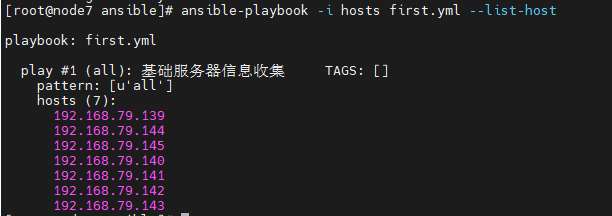 AI Visual Insight: This diagram corresponds to the
 --list-hosts output. It shows how a Playbook can enumerate the target host set before actual execution, which is useful for verifying inventory groups and preventing accidental changes to production nodes.
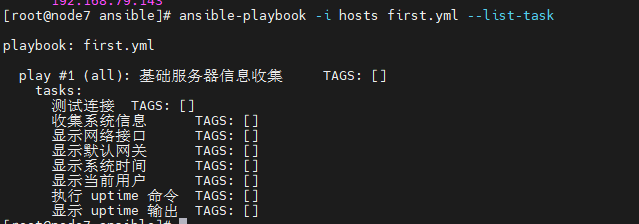 AI Visual Insight: This diagram corresponds to the
 --list-tasks output and reflects execution order and task naming readability. Good task names improve auditability and make it easier to locate stage-specific failures.
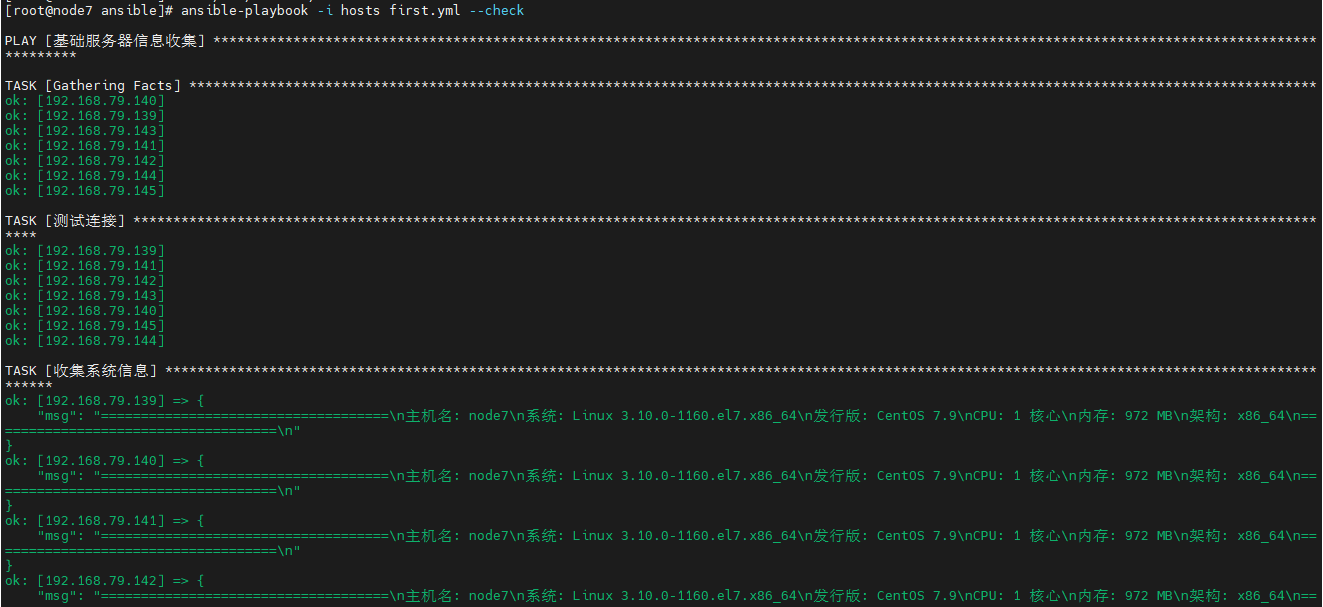 AI Visual Insight: This diagram shows the
 --check dry-run result and demonstrates that Ansible can validate task logic without modifying the target system. This is an important mechanism for controlling change risk before rollout.
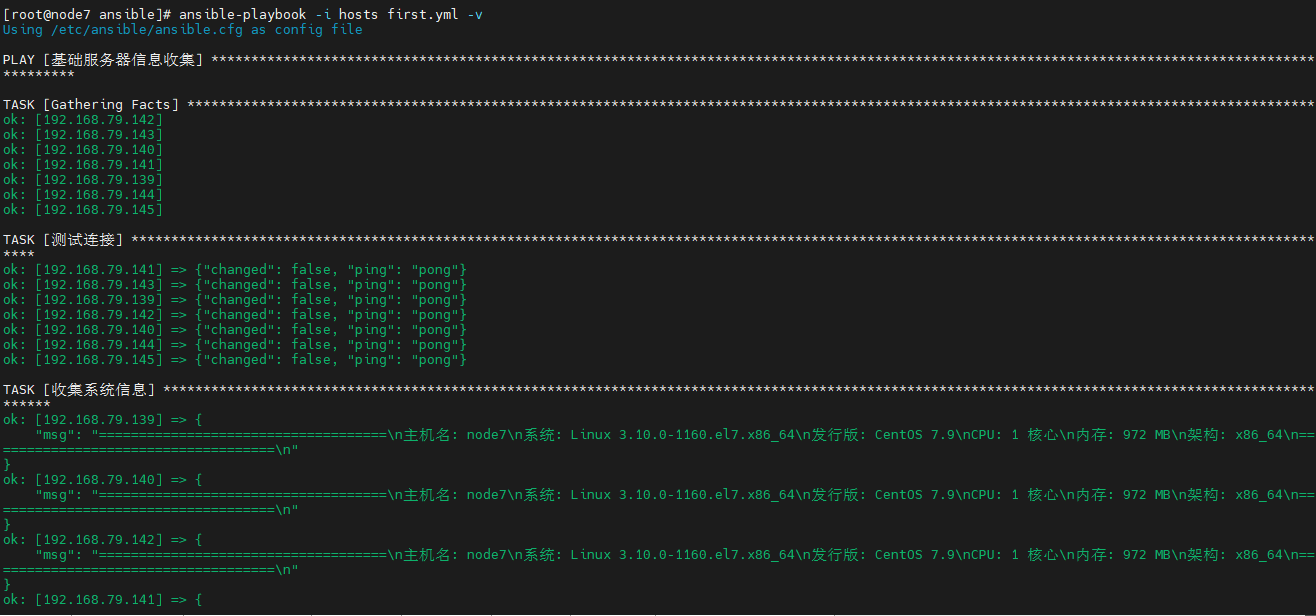 AI Visual Insight: This diagram shows verbose execution output, which typically includes task states, change counts, failed nodes, and command output. It is a key reference for troubleshooting module behavior, privilege issues, and idempotency.
Understanding Playbooks means understanding idempotency and reuse
A good Playbook does more than run once successfully. It must be repeatable, predictable, and composed of clearly bounded tasks. Only when modularization, variables, conditional logic, and handlers work together can a Playbook truly replace manual operations.
For beginners, the recommended learning path is to first master YAML, inventory, tasks, and handlers, then move on to roles and cross-host variable orchestration. This path is the shortest and offers the highest return.
FAQ
What is the core difference between a Playbook and an ad-hoc command?
Ad-hoc commands are suitable for one-time, single-step operations. Playbooks are better for multi-step, reusable, and auditable automation tasks, especially for deployment and continuous configuration.
Why do Playbooks frequently fail because of formatting issues?
Because Playbooks are based on YAML, indentation must be consistent and spaces are the only valid indentation character. Most errors are not caused by modules, but by alignment problems, missing spaces after colons, or invalid list formatting.
When should you split a Playbook into Roles?
When a project needs multi-environment reuse, team collaboration, or includes templates, static files, handlers, and default variables, you should convert it into a Role-based structure as early as possible to avoid losing control of a single large file.
Core summary: This article systematically reconstructs the core knowledge of Ansible Playbooks, including YAML syntax rules, Play and Task organization, variables and Handler mechanisms, Roles directory design, and common execution commands. It helps developers move from ad-hoc commands to reusable automated deployment workflows.