This is a practical AI agent deployment pattern for individual developers: deploy OpenClaw on Tencent Cloud Lighthouse with one click, connect it to the high-throughput model capacity of Lanyun MaaS, and use WeChat plus Notion to build a closed-loop knowledge archival workflow. It addresses three common pain points: complex deployment, high response latency, and poor knowledge retention. Keywords: OpenClaw, Lanyun MaaS, WeChat knowledge base.
The technical specification snapshot is straightforward
| Parameter | Details |
|---|---|
| Deployment platform | Tencent Cloud Lighthouse (Lightweight Application Server) |
| Agent framework | OpenClaw |
| Model API protocol | OpenAI-compatible API |
| Base URL | https://maas-api.lanyun.net/v1 |
| Typical model | deepseek-v3.2 |
| Channel | |
| Plugin capabilities | agent-browser, notion |
| Configuration style | Web console configuration + JSON configuration |
| Star count | Not provided in the source material, so this article does not speculate |
| Core dependencies | Lighthouse application template, Lanyun API key, Notion authorization |
This stack is well suited for building a low-barrier production AI assistant
The value of OpenClaw is not that it can chat. Its real value is that it natively supports channels, plugins, and workflow orchestration. For developers, that makes it much closer to an executable agent platform than a thin wrapper around an LLM.
Lanyun MaaS handles the compute and model access layer. The source material highlights three advantages: high throughput, low latency, and an OpenAI-compatible interface. That combination is a strong fit for instant messaging scenarios like WeChat, where fast time-to-first-token and frequent interactions matter.
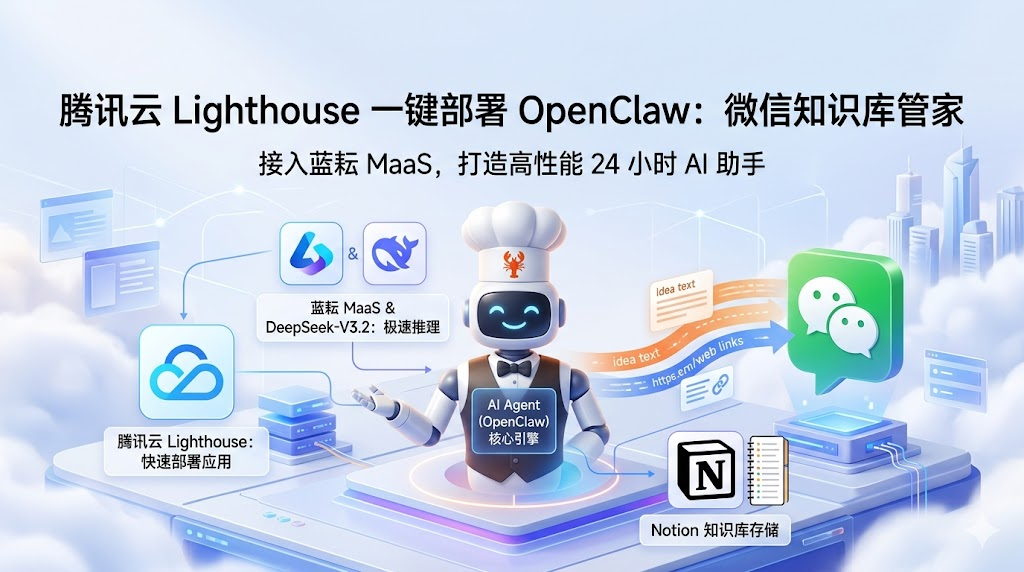 AI Visual Insight: This diagram shows the entry points and capability boundaries of the full solution. The key idea is that OpenClaw acts as the orchestration hub, connects to external model services, and then distributes outputs to WeChat or a knowledge base system, forming a three-layer architecture: model layer, agent layer, and channel layer.
The advantages of this architecture can be summarized in three points
First, deployment is fast. Lighthouse provides an application template, so you can skip the initial friction of setting up Docker, reverse proxies, and service orchestration.
Second, model switching is inexpensive. Lanyun exposes a standard OpenAI-style API, so OpenClaw can connect to it directly through a custom model configuration.
Third, the workflow closes the loop. WeChat handles input, Skills handle execution, and Notion handles persistence, ultimately producing a reusable personal knowledge base.
Preparing Lanyun MaaS credentials is a prerequisite for successful integration
Before deployment, you need three key parameters: the API key, the model invocation path, and the shared Base URL. If any one of them is missing, the downstream configuration will fail.
The source material gives a fixed endpoint: https://maas-api.lanyun.net/v1. The recommended model is deepseek-v3.2, but in OpenClaw the more important value is often the full model ID. You should copy the complete invocation path from the model marketplace.
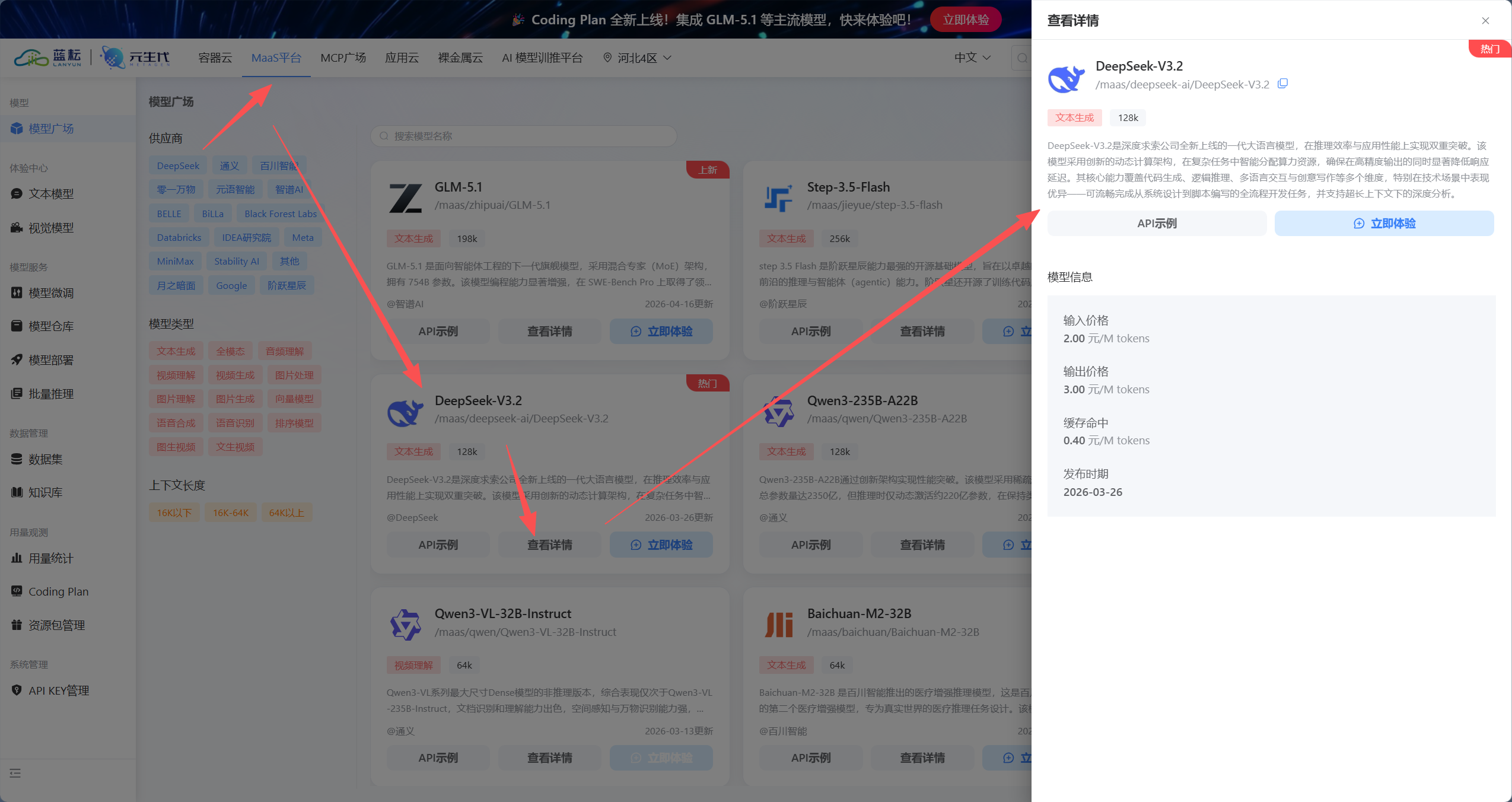 AI Visual Insight: This image reflects the model marketplace or model detail page in the MaaS console. The critical fields usually include the model name, invocation ID, vendor namespace, and API integration notes. These values directly determine whether OpenClaw can successfully route requests to the target model through a custom model definition.
{
  "provider": "lanyun",
  "base_url": "https://maas-api.lanyun.net/v1",
  "api": "chat/completions",
  "api_key": "sk-replace-with-your-key",
  "models": [
    {
      "id": "/maas/deepseek-ai/DeepSeek-V3.2",
      "name": "DeepSeek-V3.2"
    }
  ]
}
This configuration lets you quickly register a custom model in OpenClaw that is compatible with Lanyun MaaS.
Using the Lighthouse application template significantly reduces deployment complexity
The core recommendation from the source is clear: do not start with a manual command-line installation. Use the OpenClaw application template in Tencent Cloud Lighthouse instead. For first-time agent deployments, this avoids a large number of environment-related issues.
The workflow is also direct: open the Lighthouse console, choose to reinstall the system, select OpenClaw under “Use Application Template,” set a password, and wait one to three minutes for the installation to complete.
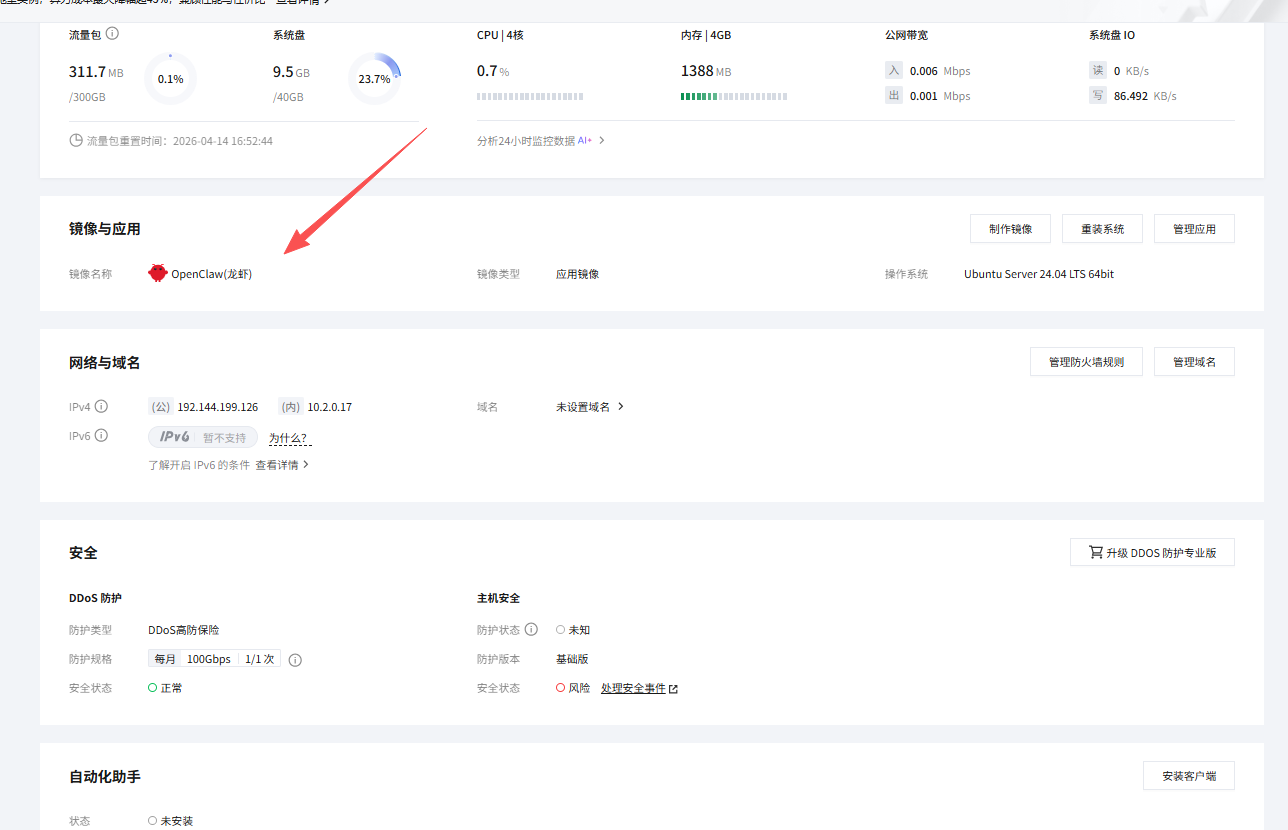 AI Visual Insight: This image shows the template-based deployment flow in Tencent Cloud Lighthouse. The technical point is that the prebuilt image already contains the OpenClaw runtime environment, so the user only needs to select the template and initialize credentials to rebuild the instance, without manually installing dependencies or orchestrating services.
The essence of this step is outsourcing infrastructure work to the platform
For developers, the value of Lighthouse is not just that it is a cloud server. Its value is that it standardizes system initialization, dependency installation, and service startup. That lets you spend your time on models, channels, and prompt design instead of base infrastructure.
When configuring the Lanyun model in OpenClaw, every field must match exactly
After entering the OpenClaw console, go to Models and choose “Custom Model.” A form-based setup is recommended because it is easier to validate field by field, especially when you are integrating a third-party MaaS provider for the first time.
You should verify five fields carefully: provider, base_url, api, api_key, and model.id. The most common source of failure is model.id. You should copy the full path from the model marketplace instead of entering only the display name.
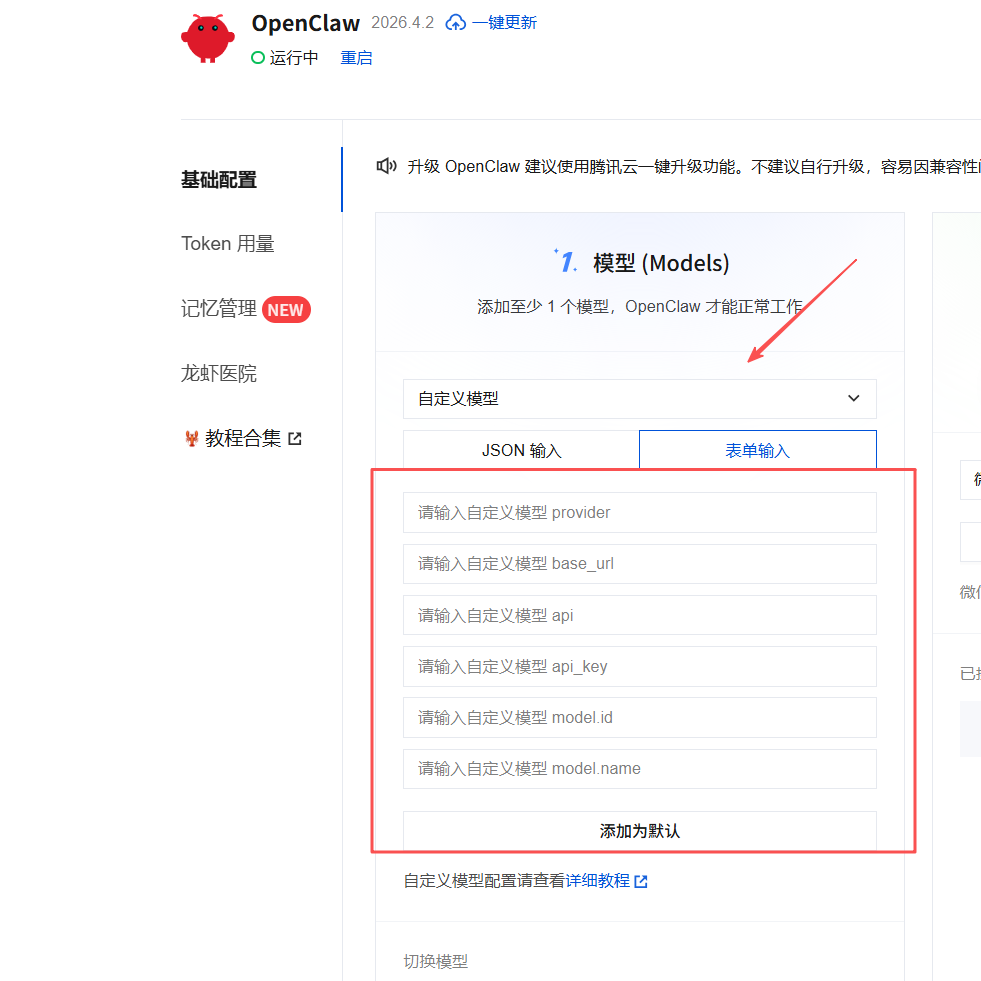 AI Visual Insight: This figure highlights the model abstraction layer inside OpenClaw. The form decouples provider identity, API root path, completion endpoint, API key, and model list configuration, showing that the platform uses a unified protocol to adapt to multiple OpenAI-compatible model services.
# Core checklist: make sure each field matches exactly
provider=lanyun
base_url=https://maas-api.lanyun.net/v1
api=chat/completions
model_id=/maas/deepseek-ai/DeepSeek-V3.2
# Enter the api_key securely in the console rather than storing it in a public script
This checklist helps you compare values against the console fields and quickly identify the cause of model integration failures.
The agent only enters a high-frequency workflow after you connect the WeChat channel
One of OpenClaw’s key advantages is native support for WeChat channels. The setup is also lightweight: add WeChat under Channels, let the system generate a login QR code, and scan it with a work account to complete the binding.
This step does more than place a bot inside a chat app. It places the agent on the shortest path of your daily workflow. Users do not need to open an extra system. They can send text, links, or commands directly in WeChat to trigger tasks.
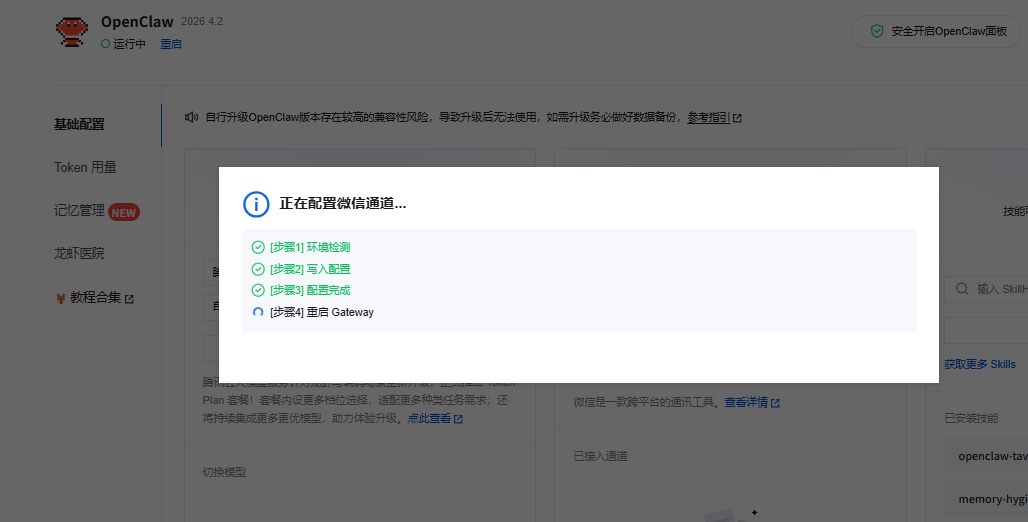 AI Visual Insight: This image shows the WeChat connection flow in OpenClaw. The system uses QR code scanning to bind the account, which implies that the channel layer already encapsulates message receipt, session synchronization, and reply forwarding, so developers do not need to implement message polling or protocol adaptation themselves.
Low latency directly determines the experience ceiling here
If the model is slow to produce its first token, the weakness will become obvious immediately in a WeChat workflow. The source emphasizes Lanyun’s performance under high concurrency and low latency precisely because fast message turnaround is essential after QR-based channel integration.
Skills turn a chatbot into an executable knowledge assistant
A bot that can only converse cannot retain knowledge effectively. To implement the workflow “read a web page, extract a summary, write to Notion,” you need two skills: agent-browser and notion.
The first opens links and extracts the main page content. The second writes the result into a Notion database. Together, they upgrade OpenClaw from something that can answer into something that can act.
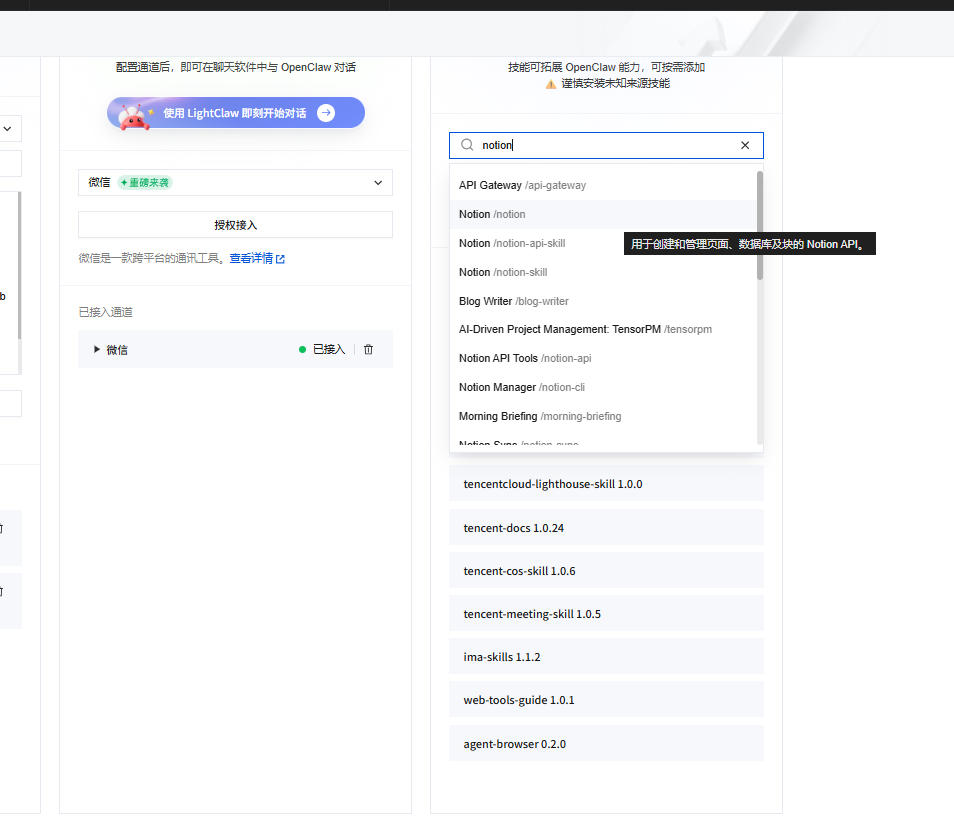 AI Visual Insight: This image shows the OpenClaw skills marketplace or skills management page. It demonstrates a plugin-based extension model that modularizes capabilities such as browser control and external SaaS integration, lowering the barrier to composable agent development.
You are now my personal knowledge base assistant.
Your task is to process every text idea or web link that I send you.
1. If I send a plain text idea, polish it and extract tags.
2. If I send a web link, use agent-browser to read the page content and extract the title, a 150-word summary, and 3 tags.
3. After processing, use the notion skill to write the result into my Notion database.
4. After the save succeeds, reply with: ✅ Archived for you: [Article Title]
This system prompt defines the input types, the tool invocation order, and the final response format. It is the minimum viable workflow for automated knowledge archiving.
The real impact appears in two high-frequency scenarios
The first is a “fleeting idea capsule.” The user sends a quick thought in WeChat, and the agent automatically polishes it, adds tags, and writes it into Notion, preventing fragmented ideas from getting lost in daily communication.
The second is “long-form article archiving.” The user forwards a link, and the agent automatically fetches the article body, extracts a summary and tags, and stores the result in the database. This workflow is highly efficient for technology selection, tutorial curation, and competitive tracking.
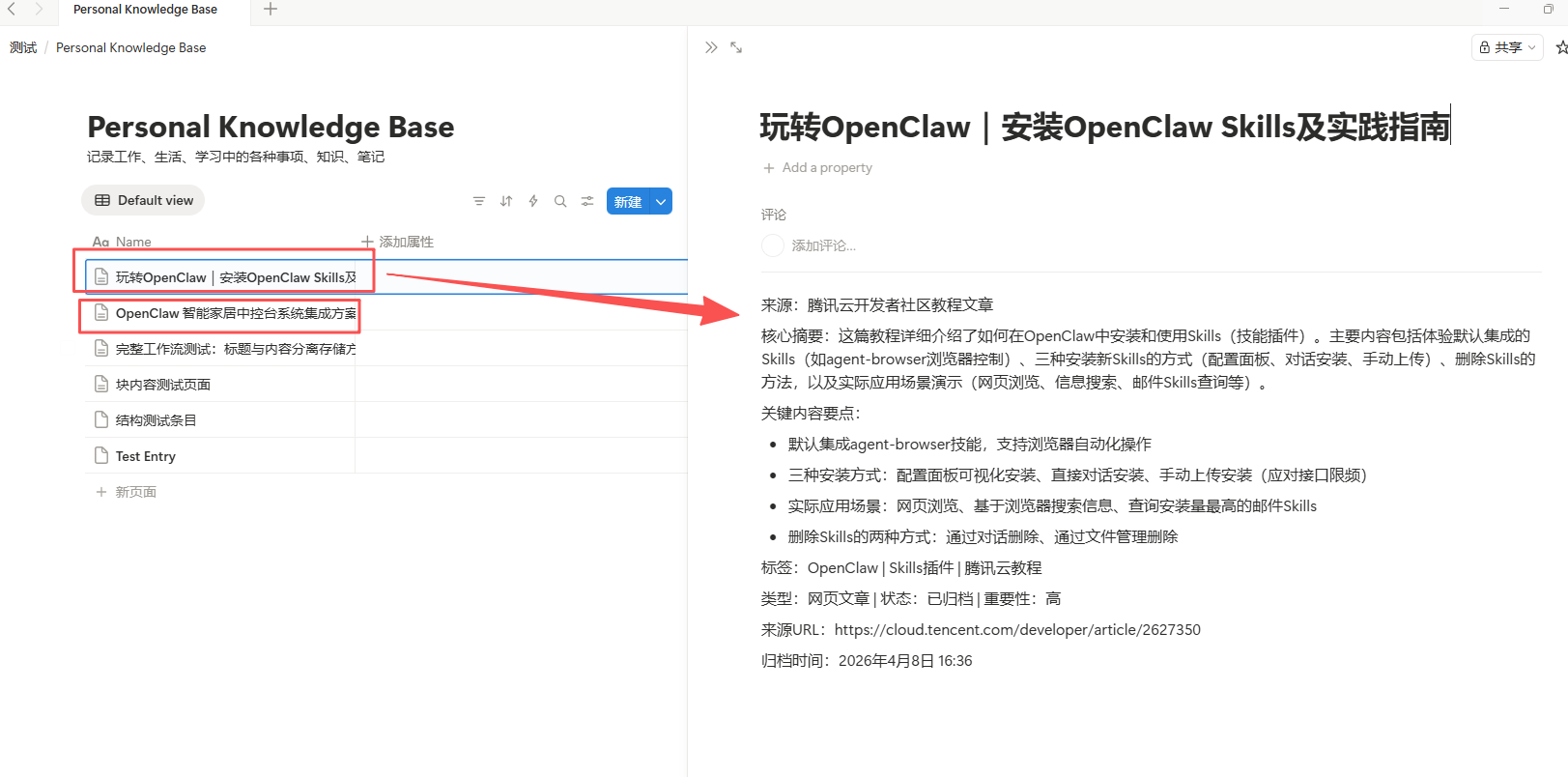 AI Visual Insight: This image shows the archival result feedback or the resulting knowledge base page. Technically, it indicates that the agent has completed a full closed loop from message input to web parsing, structured extraction, and database writeback, then returned a confirmation to WeChat to complete the verification path.
The value of this kind of agent is that it reliably replaces repetitive cognitive work
It is not built to look flashy. It is built to eliminate two repetitive tasks that developers perform every day: manual summarization and manual archiving. Once the pipeline is stable, AI output no longer stays trapped in a chat window. It accumulates into a durable personal knowledge asset.
FAQ structured Q&A
1. Why choose Lighthouse first when deploying OpenClaw?
Because the application template standardizes system installation, dependency preparation, and service initialization. Compared with a manual Docker-based deployment, it is faster and more stable, especially for developers building an agent service for the first time.
2. What is the most common mistake when integrating OpenClaw with Lanyun MaaS?
The most common issue is an incorrect model.id. Many users enter only the model name instead of copying the full invocation path. Another frequent problem is writing api as a path with a leading slash, which breaks request concatenation.
3. Can this stack extend beyond Notion?
Yes. OpenClaw’s core strength is its Skills extension mechanism. As long as a matching plugin exists, or the target system can be reached through HTTP or SaaS integration, you can continue writing outputs into document repositories, ticketing systems, knowledge platforms, or even internal enterprise services.
[AI Readability Summary]
This article reconstructs a practical private deployment pattern for OpenClaw: use the Tencent Cloud Lighthouse application template to launch OpenClaw quickly, connect it to the OpenAI-compatible API exposed by Lanyun MaaS, and combine the WeChat channel with
agent-browserand Notion Skills to build an AI assistant that can automatically summarize, archive, and write content into a knowledge base.