scheduleis a lightweight Python job scheduling library. Its core strength is a near-natural-language chained API that lets you configure recurring jobs quickly, reducing the cost of repeated script execution and simple automation orchestration. It is a strong fit for email reminders, database backups, and polling-based monitoring. Keywords: Python, schedule, scheduled tasks.
Technical specification snapshot
| Parameter | Description |
|---|---|
| Language | Python |
| License | The original source page labels it as CC 4.0 BY-SA |
| GitHub Stars | Not provided in the original content |
| Core dependencies | schedule, time, threading, smtplib, subprocess |
schedule is well suited for lightweight automation tasks.
The goal of schedule is not to replace enterprise-grade schedulers. Instead, it gives single-machine Python scripts recurring execution with minimal setup. Its advantages are concise syntax, a low learning curve, and fast integration, which makes it especially useful for test scripts, operations utilities, and personal automation.
Compared with crontab, schedule keeps scheduling logic directly inside Python code. Compared with APScheduler or Celery, it is much lighter, but it also lacks features such as persistence, distributed execution, and complex triggers. As a result, it fits best when your scheduling needs are simple, controllable, and single-process.
 AI Visual Insight: The image shows a high-level overview of how
 schedule is used in Python automation scenarios. It emphasizes that the library is designed to build recurring jobs through a compact API rather than through a complex visual scheduling system.
Installation and the minimal runnable unit
import schedule
import time

def task():
    print("Task is running")  # Core logic: define the scheduled function

schedule.every(10).seconds.do(task)  # Core logic: register a job every 10 seconds

while True:
    schedule.run_pending()  # Core logic: poll and run due jobs
    time.sleep(1)  # Reduce idle CPU usage
This code completes the most basic scheduling loop: register a job and continuously drive execution.
The core API expresses time rules through chained calls.
schedule.every() creates the job skeleton. You can then chain seconds, minutes, hours, days, weeks, or specific weekdays. Finally, use .do() to bind the function that should run.
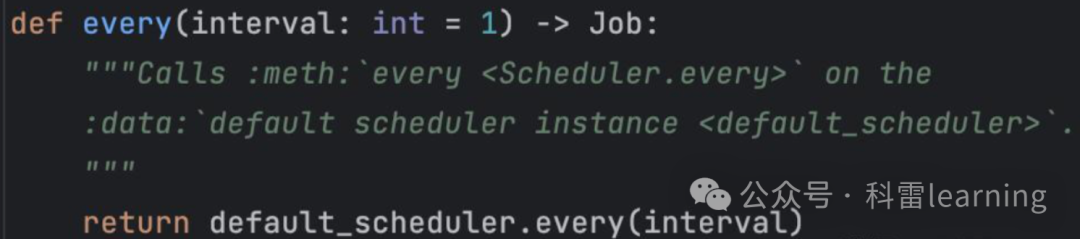 AI Visual Insight: The image highlights
 schedule‘s chained-call model: first define the execution frequency, then attach the time unit, and finally register the function to execute. This declarative style lowers the cost of understanding and maintaining scheduling rules.
Common time rule configurations
import schedule

schedule.every(5).minutes.do(task_function)      # Run every 5 minutes
schedule.every(2).hours.do(task_function)        # Run every 2 hours
schedule.every(3).days.do(task_function)         # Run every 3 days
schedule.every().monday.do(task_function)        # Run every Monday
schedule.every().friday.at("17:30").do(task_function)  # Run every Friday at 17:30
This snippet shows the most common recurring and fixed-time scheduling patterns in schedule.
at() and do() handle precise triggers and job binding.
at() is useful for exact execution times such as “every day at 09:00” or “every Monday at 18:00.” do() connects the schedule rule to your business function. If you need cross-time-zone execution, you can pass a time zone string to at(), although that usually requires additional time zone dependencies.
import schedule
import time

def print_current_time():
    print(time.strftime("%Y-%m-%d %H:%M:%S"))  # Core logic: print the current execution time

schedule.every().day.at("09:00").do(print_current_time)  # Run at a fixed time every day
schedule.every().monday.at("09:00", "Asia/Tokyo").do(print_current_time)  # Specify a time zone
This example shows how schedule defines fixed-time jobs and cross-time-zone jobs.
You can manage the job lifecycle through clear and cancel APIs.
In dynamic scheduling scenarios, developers often need to stop a specific job or clear all jobs. schedule.clear() removes all registered jobs globally, while schedule.cancel_job(job) removes a single registered job.
import schedule

def task():
    print("Task executed")

job = schedule.every(3).seconds.do(task)  # Core logic: keep a handle to the job
schedule.cancel_job(job)                  # Core logic: cancel the specified job
schedule.clear()                          # Core logic: clear all jobs
This code demonstrates fine-grained job removal after registration.
Typical business scenarios map quickly to reminder and backup tasks.
The two most common directions for lightweight scheduling are notification tasks and maintenance tasks. The first emphasizes delivery at a fixed time, while the second focuses on periodically running external commands or scripts.
Send scheduled email reminders
import schedule
import time
import smtplib
from email.mime.text import MIMEText

def send_email():
    msg = MIMEText("This is a scheduled email reminder!", "plain", "utf-8")
    msg["Subject"] = "Scheduled Email"
    msg["From"] = "[email protected]"
    msg["To"] = "[email protected]"

    try:
        server = smtplib.SMTP("smtp.qq.com", 587)
        server.starttls()  # Core logic: enable a secure connection
        server.login(msg["From"], "password")  # Core logic: log in to the SMTP service
        server.sendmail(msg["From"], msg["To"], msg.as_string())  # Core logic: send the email
        server.quit()
        print("Email sent successfully")
    except Exception as e:
        print(f"Failed to send email: {e}")

schedule.every().day.at("08:00").do(send_email)  # Run every day at 08:00
This example implements a daily email reminder through SMTP.
Run scheduled database backups
import schedule
import subprocess

def backup_data():
    backup_command = "mysqldump -u username -ppassword database_name > backup.sql"
    try:
        subprocess.run(backup_command, shell=True, check=True)  # Core logic: run the backup command
        print("Database backup succeeded")
    except subprocess.CalledProcessError as e:
        print(f"Database backup failed: {e}")

schedule.every(2).days.do(backup_data)  # Run a backup every 2 days
This snippet shows how schedule can combine with system commands to automate backups.
You must handle blocking, exceptions, and time zone issues when using schedule.
schedule.run_pending() requires continuous polling, so by default it occupies the current thread. If your main program also runs a web service, GUI, or other logic, move the scheduling loop into a separate thread so the components do not block each other.
Use a thread to isolate the scheduling loop
import schedule
import time
import threading

def run_schedule():
    while True:
        schedule.run_pending()  # Core logic: continuously check for due jobs
        time.sleep(1)

schedule_thread = threading.Thread(target=run_schedule, daemon=True)  # Core logic: run the scheduler in a background thread
schedule_thread.start()
This code places the scheduler in a background thread to avoid blocking the main thread.
In addition, at() relies on the system time zone by default, which can lead to time drift in cross-region deployments. In production, you should standardize the server time zone, configure time zones explicitly, and add exception handling and logging to jobs. Otherwise, a job may fail silently.
Choosing schedule means accepting its boundaries.
If your requirements are single-machine, lightweight, and based on simple rules, schedule is efficient enough. If you need job persistence, retry handling, distributed execution, or complex cron expressions, you should move up to APScheduler, Celery Beat, or an external workflow platform.
For most developers, the lower-cost path is to validate the automation flow with schedule first and upgrade only when complexity increases.
FAQ
1. Is schedule suitable for production?
Yes, for lightweight production workloads such as small monitoring jobs, reminders, and script orchestration. No, for highly reliable distributed scheduling, because it lacks persistence, failover, and advanced orchestration features.
2. Why did my job never run even though I configured it?
The most common reason is that you are not calling schedule.run_pending() continuously, or the main thread has already exited. You should also check the system clock, time zone configuration, and whether the job function raised an exception.
3. What is the difference between schedule, crontab, and APScheduler?
schedule is better when you want to write scheduling logic directly in Python code. crontab is better for operating-system-level tasks. APScheduler is better for complex time rules, persistence, and more complete scheduling management.
Core summary: This article reconstructs the core API, typical use cases, and common pitfalls of the Python schedule library. It covers every, at, do, run_pending, job cancellation, and multithreaded scheduling, helping developers quickly automate lightweight scheduled tasks such as email reminders and database backups.