[AI Readability Summary] In this project, the application relies on
bootstrap.ymlduring the Spring Cloud startup phase to determine the active environment. When no command-line parameter is passed locally, the profile becomes ineffective, soapplication-dev.ymlis never loaded. The root cause is that Jasypt wrapsPropertySourceobjects in a way that breaks Spring Cloud’s ability to recognize bootstrap configuration sources. Keywords: Spring Cloud,bootstrap.yml, Jasypt.
Technical Specifications Snapshot
| Parameter | Value |
|---|---|
| Language | Java 8 |
| Framework | Spring Boot 2.7.16, Spring Cloud 2021.0.5 |
| Configuration Center | Nacos |
| Core Dependencies | spring-cloud-starter-bootstrap, jasypt-spring-boot-starter 3.0.4 |
| Trigger Condition | -Dspring.profiles.active is not passed on the command line |
| Symptom | spring.profiles.active defined in bootstrap.yml does not take effect |
The root issue is that profile resolution is interrupted during the bootstrap phase
In this project, the developers commonly place spring.profiles.active in bootstrap.yml, then switch Nacos namespaces or local configuration files based on different profiles.
As expected, when no command-line argument is provided, Spring should use dev from bootstrap.yml and continue loading application-dev.yml. But startup fails instead, which means the environment activation information never enters the downstream configuration resolution chain.
spring:
  application:
    name: demo-svc
  profiles:
    active: dev  # Expect `dev` to be active by default
---
spring:
  config:
    activate:
      on-profile: dev
  cloud:
    nacos:
      config:
        enabled: false  # Disable Nacos in the dev environment
The purpose of this configuration is to declare a default environment and load subsequent configuration sections conditionally by profile.
Command-line parameters work because they have higher precedence
When the application starts with the following command, everything works as expected:
java -Dspring.profiles.active=dev -jar demo.jarThe reason is simple: command-line parameters have higher precedence than configuration files. The Environment can obtain the active profile very early during initialization, so ConfigDataEnvironmentPostProcessor can continue resolving application-dev.yml.
The configuration lookup chain runs during the EnvironmentPostProcessor phase
After Spring Boot publishes ApplicationEnvironmentPreparedEvent, it triggers EnvironmentPostProcessorApplicationListener. At that point, multiple EnvironmentPostProcessor implementations participate in configuration loading.
The most critical one is ConfigDataEnvironmentPostProcessor, which scans the classpath, ./config/, external directories, and profile-specific configuration files, then produces OriginTrackedMapPropertySource instances.
<logger name="org.springframework.boot.context.config" level="TRACE"/>
<logger name="org.springframework.boot.logging" level="TRACE"/>
After enabling TRACE logging, you can directly observe the configuration file search paths, matched profiles, and import order.
In a normal scenario, application-dev.yml appears in the PropertySource list
Under normal conditions, the propertySources inside Environment include an entry for application-dev.yml. After introducing Jasypt, the visible type of that entry becomes a wrapper class, but internally it still holds the original configuration source.
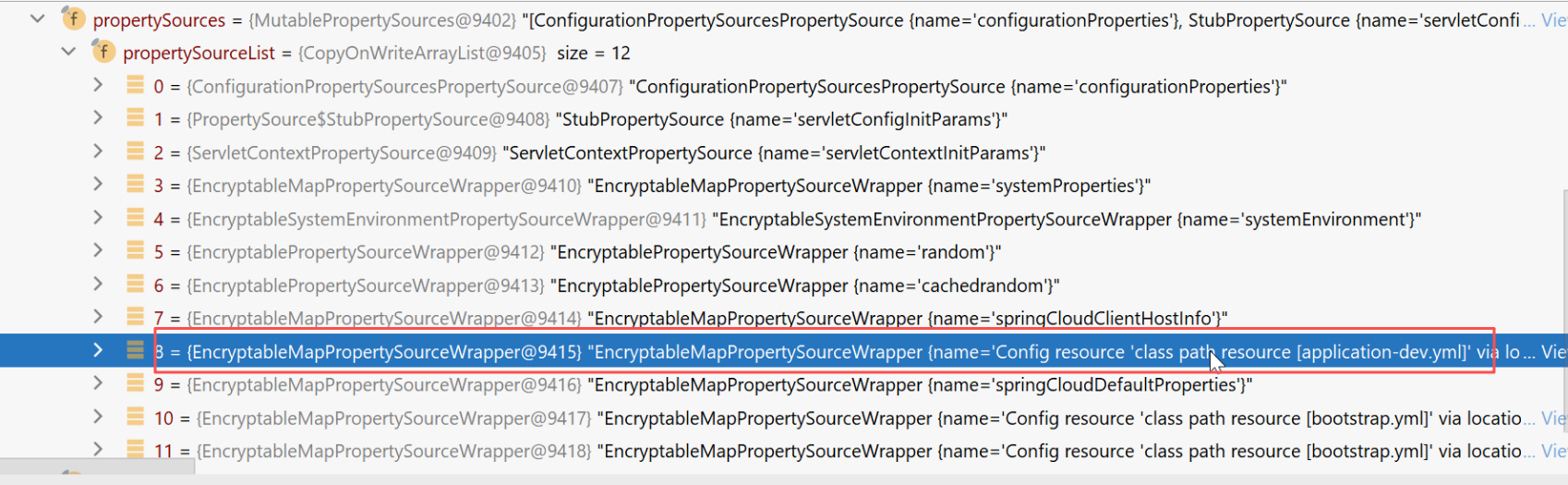 AI Visual Insight: This debug screenshot shows that the
 propertySources list in the Spring Environment already contains profile-related configuration sources. That means application-dev.yml was successfully resolved and injected into the environment, but the native implementation was replaced at the outer layer by Jasypt’s encryptable wrapper.
// Jasypt wraps the original configuration source at runtime to provide decryption support
EncryptableMapPropertySourceWrapper wrapper = ...;
PropertySource<?> delegate = wrapper.getDelegate(); // The original configuration source is still held internally
This means the issue is not that application-dev.yml is missing. Instead, the profile calculation flow has already deviated from expectations at an earlier stage.
The root cause is that Jasypt changes the PropertySource type check
Further debugging shows that in the failing scenario, the active profiles unexpectedly become an empty array. If you trace backward, you will find that Spring Cloud relies on a piece of logic that identifies configuration sources by type while merging bootstrap configuration.
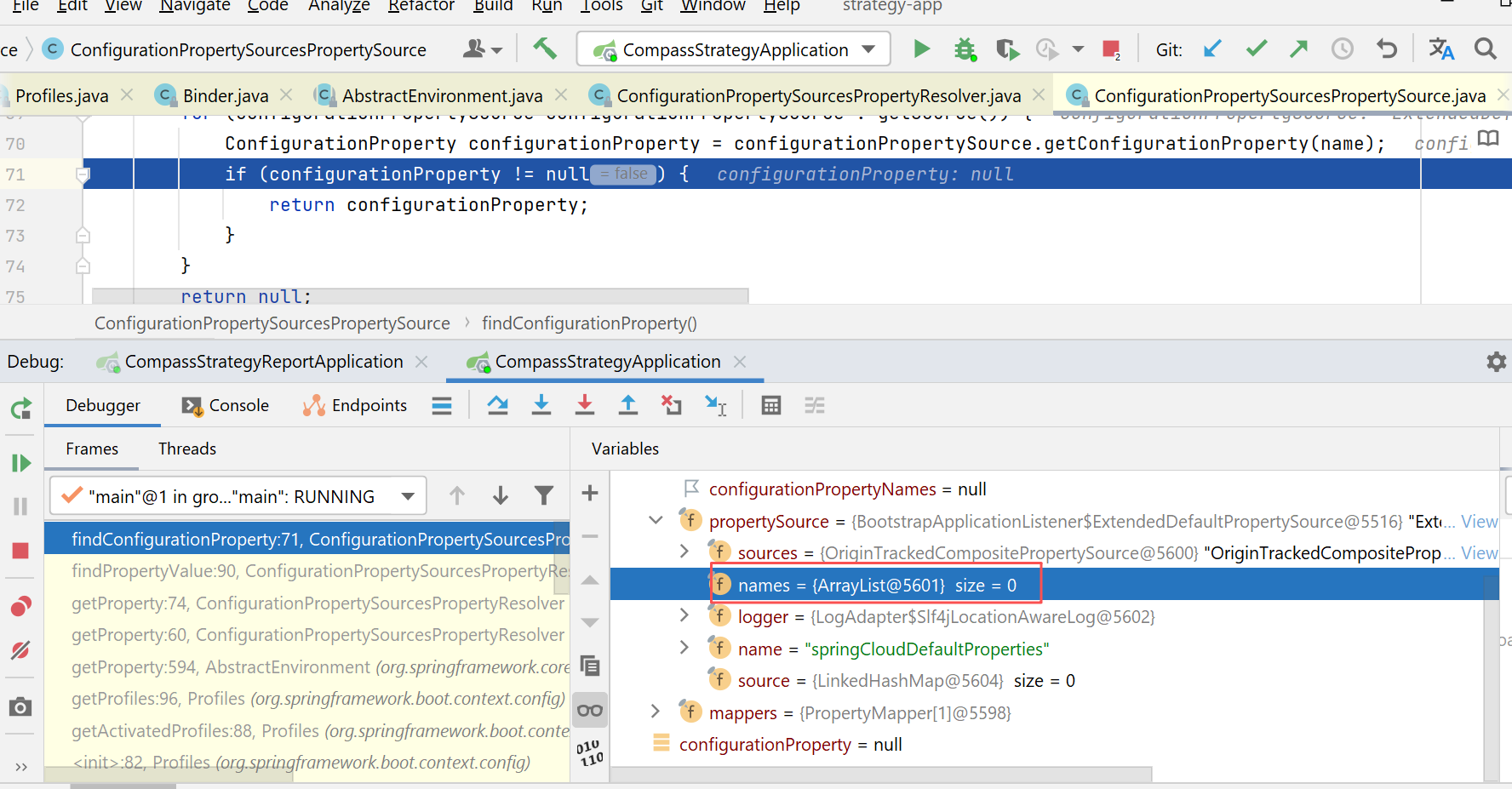 AI Visual Insight: This screenshot shows that the
 names array is empty in the failure case. That means the configuration source read during the bootstrap phase was not recognized as an eligible source for profile-origin tracking, so spring.profiles.active could not be propagated from bootstrap configuration back into the main environment.
Spring Cloud checks whether a PropertySource is an OriginTrackedMapPropertySource. But Jasypt wraps it as EncryptableMapPropertySourceWrapper. After wrapping, the data is still there, but the type no longer matches, so the bootstrap configuration segment is never added to the names array.
if (propertySource instanceof OriginTrackedMapPropertySource) {
    // Only the original type is recorded as a bootstrap configuration source
    names.add(propertySource.getName());
}
The flaw in this logic is that it only recognizes the outer type and does not inspect the wrapper’s internal delegate.
As a result, the Environment cannot obtain a valid profile from bootstrap.yml
Once the configuration source declared in bootstrap.yml is not properly registered, subsequent calls to resolve spring.profiles.active from the Environment return null or an empty value. Then ConfigDataEnvironmentPostProcessor cannot infer dev, so it never continues to load application-dev.yml.
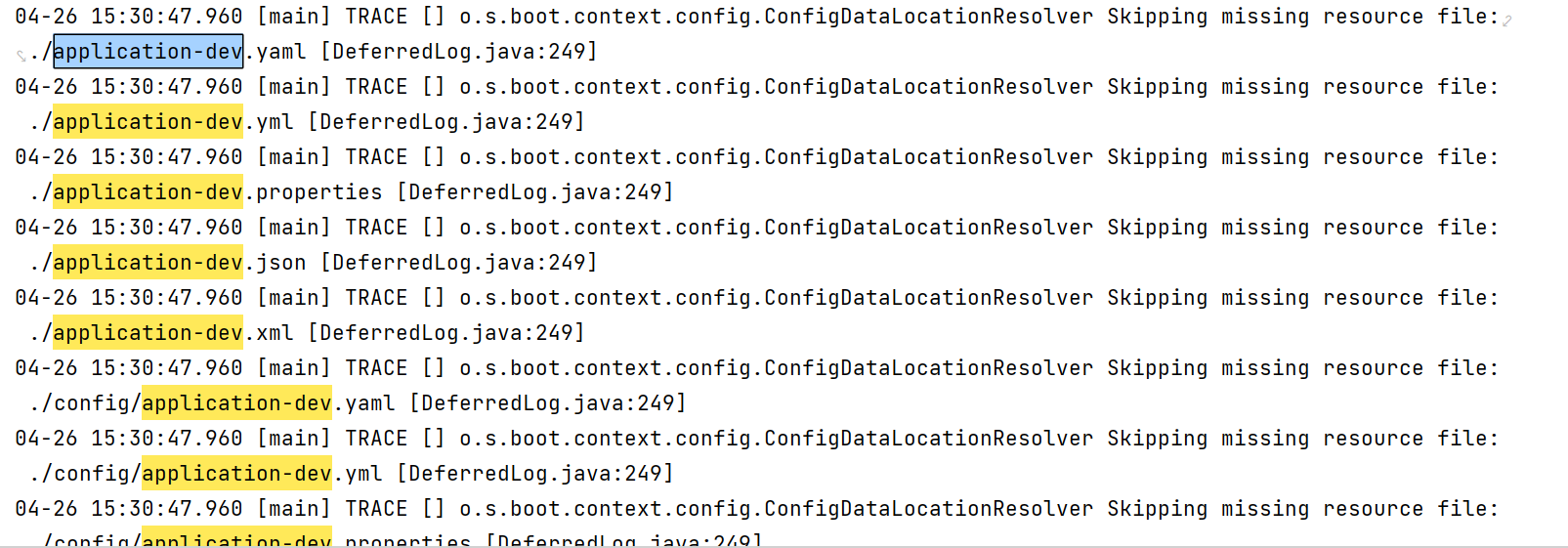 AI Visual Insight: This debug image shows Spring Boot’s computed active profiles during the config data processing flow. Under normal conditions, values such as
 dev should appear here. If this section is empty, the entire profile-specific configuration resolution chain will fail.
The fix is to make the logic compatible with wrapped PropertySource objects
The practical fix presented in the original analysis is straightforward: copy the relevant Spring Cloud class source into the project’s src directory, keep the same package name, override the original logic, and add support for EncryptableMapPropertySourceWrapper.
if (propertySource instanceof OriginTrackedMapPropertySource) {
    names.add(propertySource.getName());
} else if (propertySource instanceof EncryptableMapPropertySourceWrapper) {
    PropertySource<?> delegate = ((EncryptableMapPropertySourceWrapper) propertySource).getDelegate();
    if (delegate instanceof OriginTrackedMapPropertySource) {
        names.add(propertySource.getName()); // Support configuration sources wrapped by Jasypt
    }
}
This change restores Spring Cloud’s ability to recognize bootstrap configuration sources.
The add operation actually occurs while BootstrapApplicationListener merges environments
The problematic code does not run in the normal business initialization path. It is triggered when BootstrapApplicationListener processes ApplicationEnvironmentPreparedEvent. This listener creates a bootstrap-specific ApplicationContext, loads bootstrap.yml and configuration center content first, and then merges the result back into the main environment.
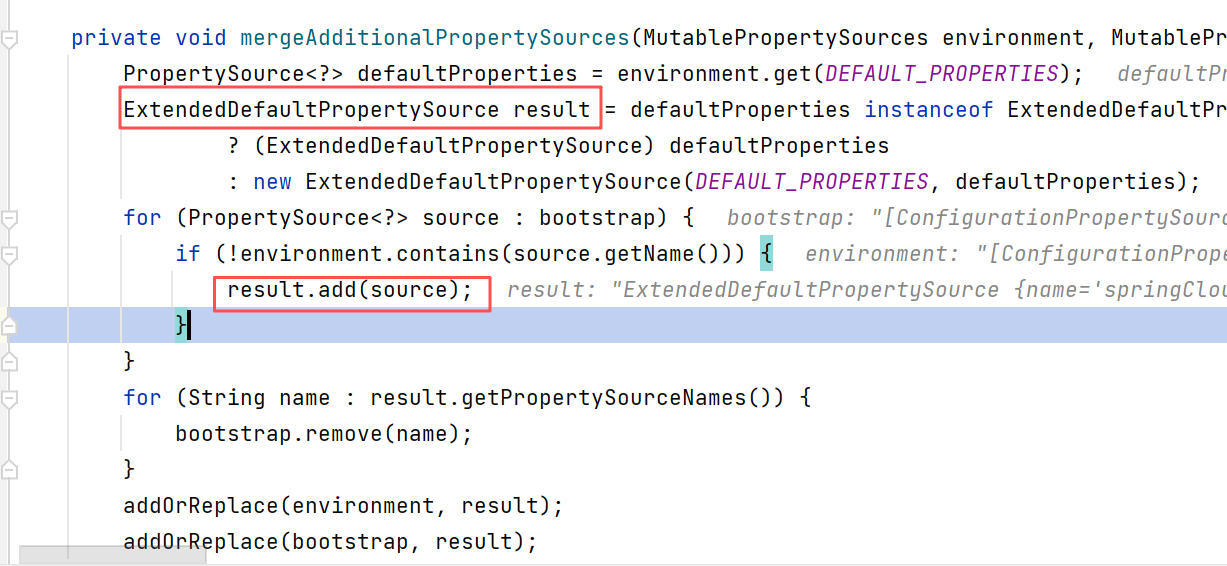 AI Visual Insight: This screenshot corresponds to the call site where the bootstrap environment is merged. It shows that the issue occurs during Spring Cloud’s early-stage process of feeding the bootstrap context back into the main
 Environment, not during bean creation or business configuration binding.
Therefore, the troubleshooting principle for this type of issue is clear: if command-line profiles work but bootstrap.yml profiles do not, first inspect the bootstrap listener chain, environment post-processors, and whether any third-party library has altered the structure or type of PropertySource.
Minimal troubleshooting checklist
1. Enable TRACE logging for org.springframework.boot.context.config
2. Compare activeProfiles between the working and failing scenarios
3. Inspect the actual types inside Environment.propertySources
4. Check carefully whether encryption libraries, Apollo, or Nacos extensions wrap configuration sources
This checklist applies well to any startup issue where a configuration file clearly exists but behaves as if it was never loaded.
FAQ
Q1: Why does specifying the profile on the command line work, while defining it in bootstrap.yml fails?
Command-line parameters have higher precedence, so Spring can obtain spring.profiles.active at a much earlier stage. By contrast, bootstrap.yml only takes effect after the bootstrap environment is merged successfully. If that merge logic fails because a wrapper type does not match the expected class, the profile appears to be lost.
Q2: Is this a defect in Spring Boot 2.7 or Spring Cloud 2021 itself?
More precisely, this is a compatibility conflict between Jasypt and Spring Cloud logic that depends on concrete PropertySource implementation types. Once Jasypt changes the outer type of the PropertySource, some Spring Cloud checks no longer match. Using Spring Boot or Spring Cloud alone may not trigger the problem.
Q3: Is there a safer alternative to copying the source code and overriding it?
You should first evaluate upgrading Jasypt or the related Spring Cloud version to see whether an official compatibility fix already exists. If an upgrade is not possible in the short term, then source override or custom compatibility logic is a practical fallback. At the same time, it is wise to reduce coupling between bootstrap.yml and type-sensitive extensions whenever possible.
Core summary: This article reviews an issue in a Spring Boot 2.7.16 + Spring Cloud 2021.0.5 project where spring.profiles.active defined in bootstrap.yml does not take effect. The root cause is not Nacos. Instead, jasypt-spring-boot-starter wraps OriginTrackedMapPropertySource, causing Spring Cloud to fail to recognize the profile source during bootstrap environment merging.