[AI Readability Summary] LogsDB is Elasticsearch’s storage-optimized mode for log workloads. By combining synthetic
_source, index sorting, columnar compression, and routing optimizations, it reduces log index size by 50%–75% with minimal throughput impact. It addresses redundant writes,_sourcebloat, and poor compression efficiency. Keywords: LogsDB, synthetic_source, index sorting.
The technical specification snapshot captures the essentials
| Parameter | Details |
|---|---|
| Core system | Elasticsearch / Lucene |
| Primary use cases | Log storage, observability, full-text search |
| Key mode | index.mode: logsdb |
| Core protocol | HTTP REST API |
| Key capabilities | synthetic _source, index sorting, ZSTD, doc values codec |
| Key versions | 8.15 TP, 8.17 GA, 9.0 default, 9.3 enhanced |
| Stars | Not provided in the source |
| Core dependencies | Lucene, JDK 21+, ZSTD native bindings |
LogsDB redefines Elasticsearch’s storage trade-offs for logs
Elasticsearch originally optimized for search first, not storage first. In log workloads, the same field often gets written into _source, the inverted index, doc values, and BKD trees at the same time. That means one write can generate multiple on-disk structures.
LogsDB does not weaken query capabilities by default. Instead, it recognizes a core truth of log workloads: not every search-engine feature deserves the same storage cost. In a representative result, LogsDB reduced the same dataset from 161.9 GB to 37.5 GB.
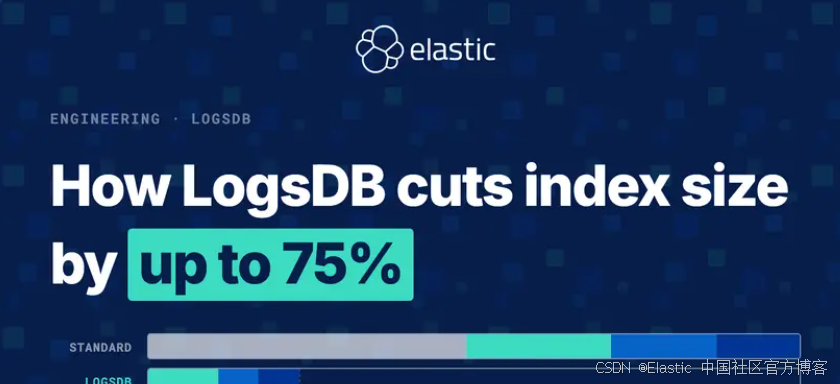 AI Visual Insight: This diagram shows LogsDB’s layered compression architecture. It highlights Elasticsearch’s shift from a search-first default to a log-storage-first design, where multi-layer encoding, sorting, and source reconstruction reduce redundant disk writes.
Write amplification comes from persisting the same data across multiple structures
The inverted index supports keyword search, doc values support sorting and aggregations, BKD trees support range queries, and _source preserves the original JSON. The issue is not any single structure. The issue is that the same field value gets materialized multiple times.
For log systems, the most expensive duplication is often _source. It stores the complete original document even when those values already exist in columnar structures. LogsDB starts from a simple principle: eliminate that redundant copy whenever possible.
{
  "host.name": "api-01",
  "@timestamp": "2026-04-26T16:00:00Z",
  "http.response.status_code": 200,
  "duration_ms": 18
}
This document expands into multiple on-disk representations. LogsDB aims to reduce exactly this kind of duplicated persistence.
Columnar storage is the real starting point for high compression ratios
doc values matter because they organize data by column. Instead of storing the entire JSON document as a single blob, a columnar layout places values from the same field together across many documents. That gives compression algorithms the patterns they need.
For example, in one million log records, @timestamp, host.name, and status_code each form an independent column. Lucene can then apply delta encoding, GCD encoding, run-length encoding, and bit-packing to each column separately.
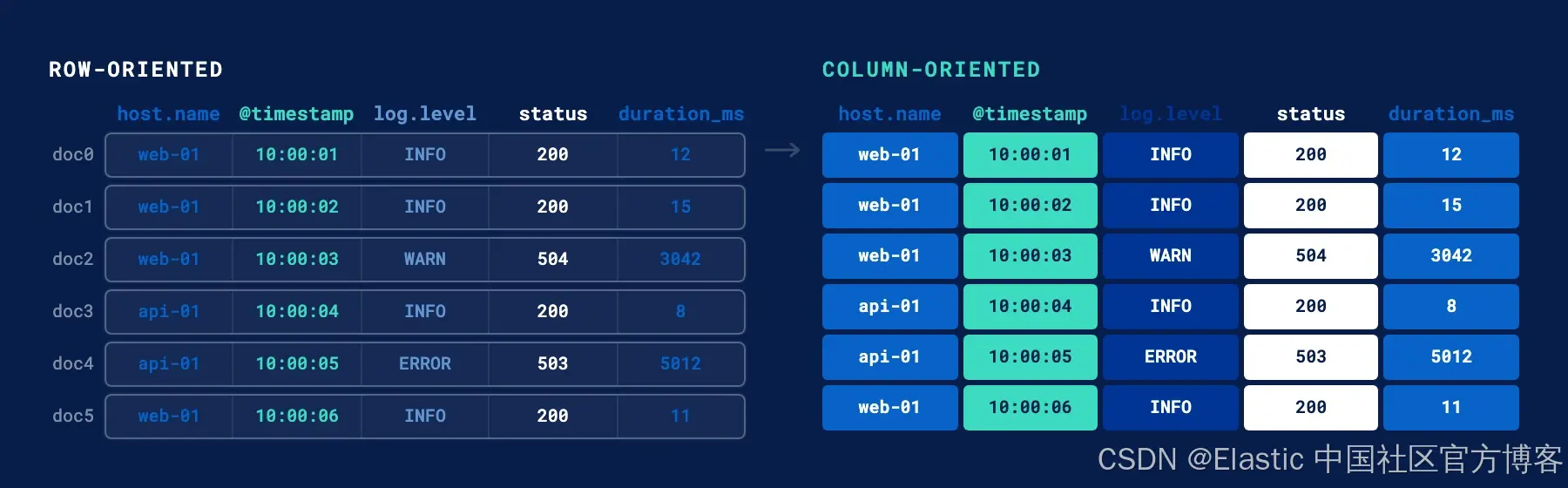 AI Visual Insight: The image contrasts row-oriented
 _source with columnar doc values. On the left, each document mixes multiple fields and breaks compression locality. On the right, like fields are placed contiguously, allowing timestamps, hostnames, and status codes to become independently encodable compressed columns.
Sorting determines whether columnar compression actually works
Compression algorithms are not magic. They depend on correlation between adjacent values. If logs are written in arrival order, timestamps from different hosts and services get interleaved randomly. Deltas become large and unstable, which limits compression gains.
If Elasticsearch sorts on host.name and @timestamp before flushing data to disk, logs from the same host appear together and timestamps increase more smoothly. At that point, RLE, delta encoding, and GCD encoding all become significantly more effective.
Unsorted: api-01, web-02, api-01, db-01, web-02
Sorted:   api-01, api-01, db-01, web-02, web-02
This is not cosmetic sorting. It creates a structural advantage for the compression layer.
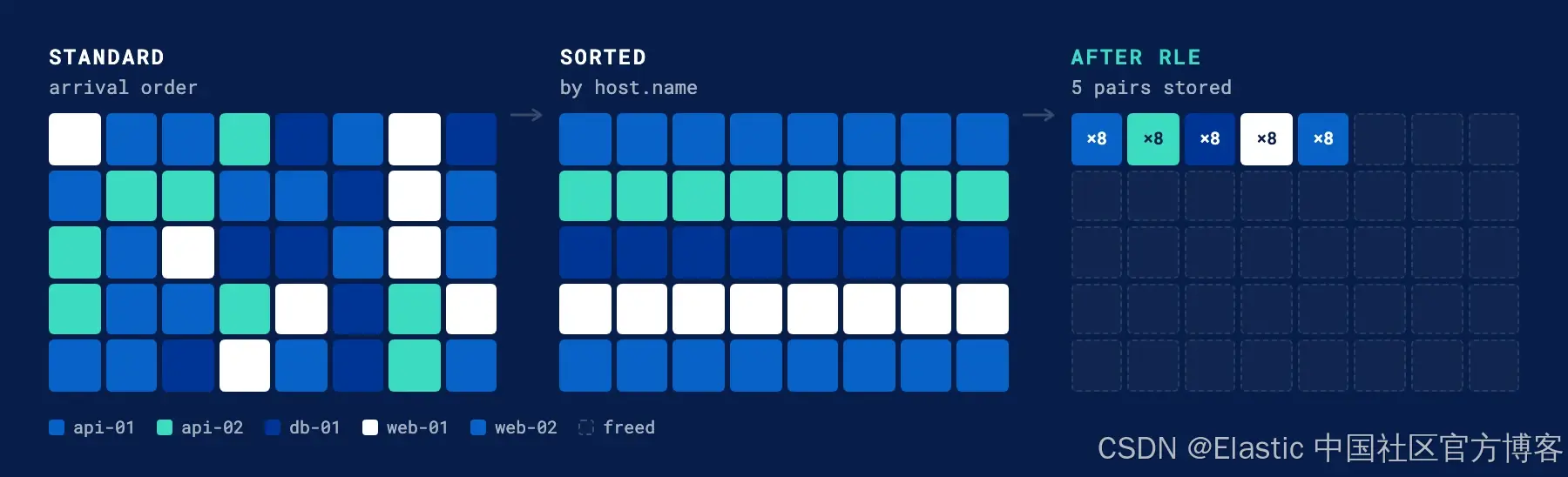 AI Visual Insight: This illustration shows how randomly arriving host identifiers become contiguous blocks after sorting, which can then be compressed into a small set of
 (value, count) pairs with RLE. That directly explains why host-first sorting outperforms time-only sorting.
LogsDB works because it layers more than a decade of capabilities
LogsDB is not a single feature. It is the combined result of years of Lucene and Elasticsearch evolution. Doc values arrived in 2012, became the default in 2016, and Lucene 7 added sparse doc values. Together, those changes laid the foundation for low-cost columnar storage.
In 2020 and 2021, stored field dictionary compression and match_only_text started removing unnecessary index overhead for logs. By dropping term frequencies and positions that add little value in many log-search scenarios, Elasticsearch kept documents searchable while reducing the storage footprint of text fields by roughly 40%.
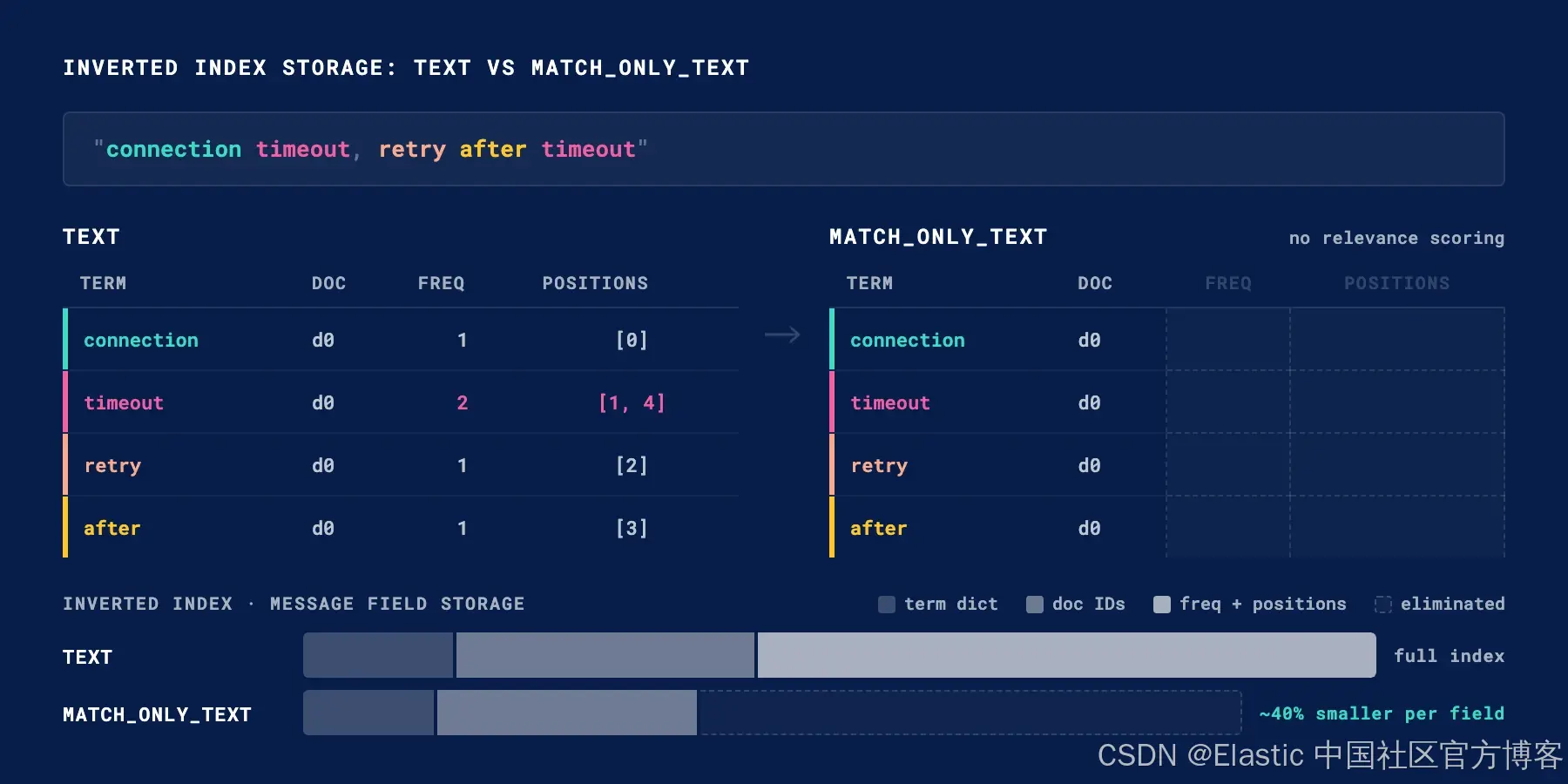 AI Visual Insight: This diagram compares the inverted structures of
 text and match_only_text. The former stores document IDs, term frequencies, and positions; the latter stores only document IDs. It shows how log search can trade ranking and phrase optimization for lower index cost.
LogsDB only became a complete system after 2023
The true inflection point arrived in 8.7. With synthetic _source and index sorting, Elasticsearch first proved in TSDB workloads that it could reconstruct documents at read time instead of storing the original JSON, while still delivering storage reductions of up to 70%.
In 2024, Elastic added a custom TSDB codec, the LogsDB mode, and ZSTD. By 8.17, LogsDB reached general availability. By 9.0, data streams matching logs-*-* enabled it by default. Later, route_on_sort_fields extended the “group similar documents together” idea from segments to shards.
{
  "index.mode": "logsdb",
  "index.logsdb.route_on_sort_fields": true
}
Together, these settings enable synthetic _source, host-first sorting, and routing locality based on sort fields.
Synthetic _source is the most decisive capability in LogsDB
In the traditional model, Elasticsearch writes the original document directly as a _source blob. LogsDB skips that step. When a query needs to return a document, Elasticsearch reconstructs the JSON field by field from doc values and stored fields.
This design changes the cost model from “pay once during every write” to “rebuild only when reads require it.” That trade-off fits log workloads well because writes greatly outnumber reads, and most queries do not need to replay the complete original JSON frequently.
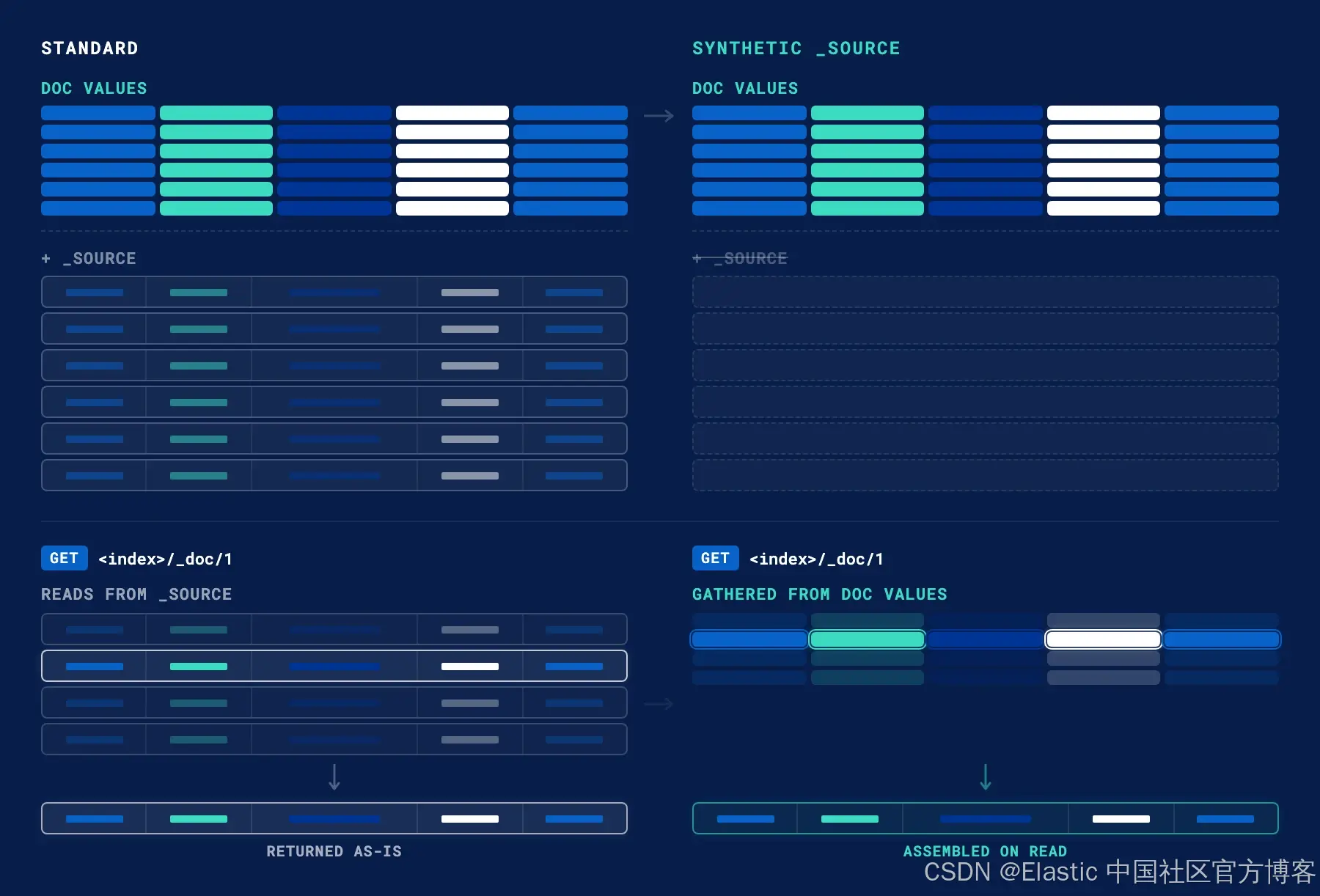 AI Visual Insight: The image compares the write and read paths in standard mode versus LogsDB. Standard mode writes both
 _source and doc values, while LogsDB writes only columnar data and assembles full documents dynamically for GET requests, removing one full raw-blob persistence path.
Throughput concerns have been reduced release by release
Early concerns focused on whether sorting, reconstruction, and ZSTD would slow ingest. But the ZSTD transition in 8.16, routing optimizations in 8.18, and merge and recovery redesigns in 9.1 have brought throughput back to near standard Elasticsearch levels.
Smaller indexes also reduce background merge I/O, which in turn frees CPU for ingest threads. As a result, LogsDB has evolved beyond “save disk space” into “save disk space without meaningfully slowing writes” in newer releases.
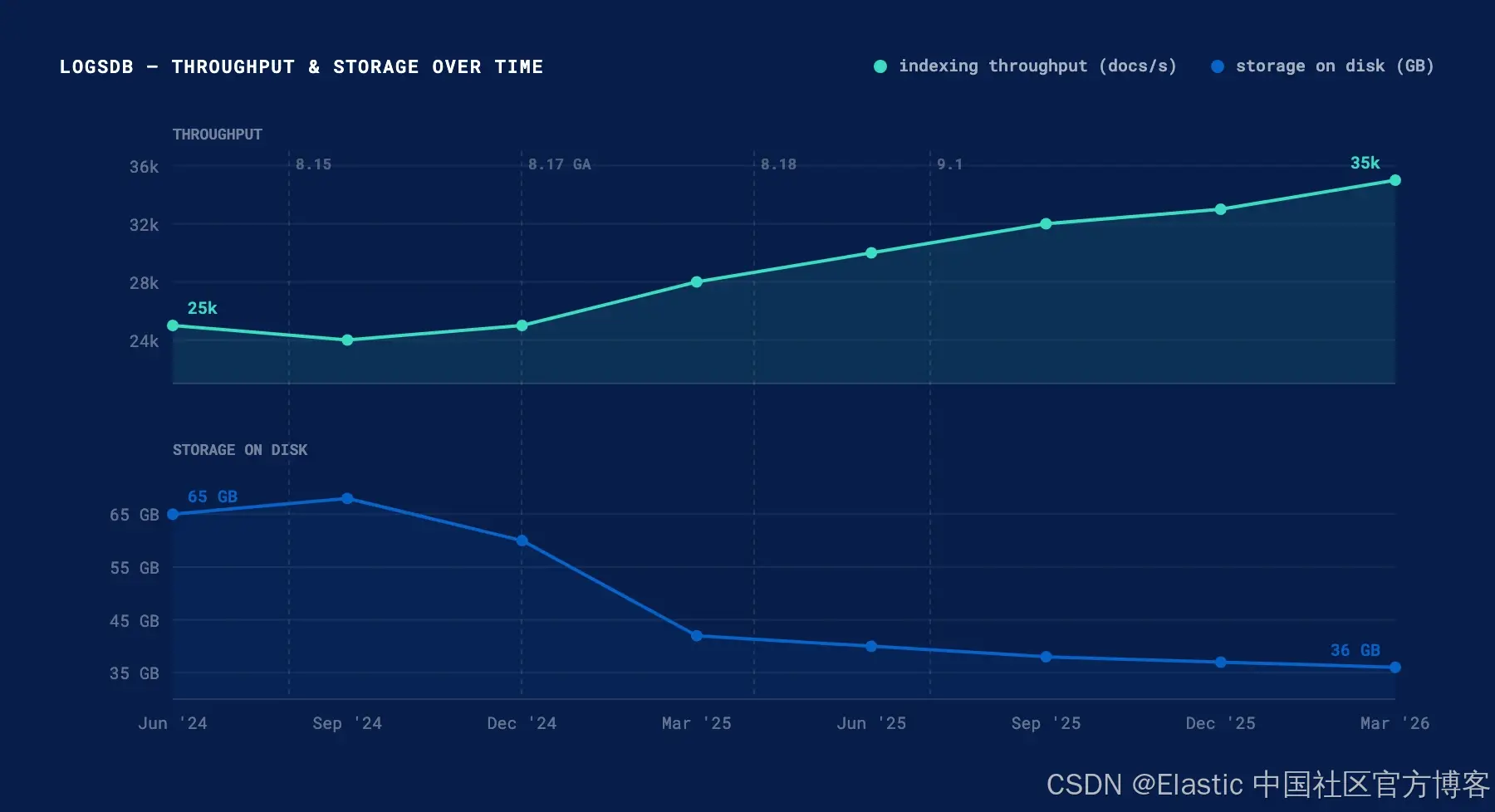 AI Visual Insight: The two trend lines show throughput rising while disk usage falls. This indicates that LogsDB optimization has expanded from pure compression into end-to-end ingest efficiency improvements, with key milestones including ZSTD, routing optimization, and merge redesign.
Enabling LogsDB is now straightforward
Starting in 9.0, data streams that match logs-*-* typically use LogsDB by default. If you need to enable it for custom log indexes, declare the mode explicitly in an index template.
PUT _index_template/logs-template
{
  "index_patterns": ["logs-*"] ,
  "template": {
    "settings": {
      "index.mode": "logsdb"
    }
  }
}
This configuration enables LogsDB mode for the logs-* index template.
If you also want to take advantage of sort-field-based routing, add one more setting. In exchange, expect roughly 1%–4% write overhead and use auto-generated _id values.
PUT _index_template/logs-template
{
  "index_patterns": ["logs-*"] ,
  "template": {
    "settings": {
      "index.mode": "logsdb",
      "index.logsdb.route_on_sort_fields": true
    }
  }
}
This configuration improves shard locality for similar documents and often delivers an additional storage reduction of about 20%.
The next phase of LogsDB still focuses on removing legacy structural overhead
Elastic has already started reducing the cost of structures such as _id and _seq_no, which originate from the search-engine era. For log analytics, this metadata does not always provide proportional value, yet it can consume a meaningful amount of disk space.
The direction of future releases is clear: continue moving reconstructable content out of the persistence layer and reserve disk budget for structures that provide real retrieval value. That means LogsDB is not the endpoint. It is the new baseline for Elasticsearch log storage architecture.
FAQ answers the most common implementation questions
1. Why can LogsDB shrink index size so dramatically?
Because it combines three optimizations at once: it removes the raw _source blob, clusters similar documents through sort fields, and lets doc values use more aggressive columnar compression. Together, these changes significantly reduce redundant storage.
2. Does enabling LogsDB affect queries or writes?
Yes, but the trade-offs are now much smaller. Returning original documents requires synthetic _source reconstruction, and enabling route_on_sort_fields introduces slight write overhead. Even so, overall throughput in recent versions is close to standard mode.
3. Can I switch an existing index to LogsDB in place?
No. In most cases, you need to migrate with reindex into a new index or data stream. A practical approach is to pilot LogsDB on a new log data stream first, then evaluate storage, throughput, and query behavior before wider adoption.
The core takeaway is that LogsDB turns storage efficiency into a first-class design goal
This article breaks down Elasticsearch LogsDB’s storage optimization path end to end. By combining synthetic _source, index sorting, ZSTD, a custom doc values codec, and route_on_sort_fields, LogsDB can reduce log index size by up to 75% while restoring write throughput to near standard mode.