OpenClaw is an open-source AI agent capable of executing tasks. This guide focuses on one-click deployment on Alibaba Cloud, enabling the Web UI, and integrating with Feishu and QQ to solve common issues such as unreliable local uptime, complex integrations, and high cross-platform adoption friction. Keywords: OpenClaw, Alibaba Cloud deployment, Feishu bot.
The technical specification snapshot outlines the deployment baseline
| Parameter | Details |
|---|---|
| Project | OpenClaw |
| Primary Language | Not explicitly stated in the source material; deployment is primarily centered on Linux and a web console |
| Deployment Method | One-click deployment on Alibaba Cloud Lightweight Application Server |
| Communication / Integration Protocols | HTTP Web UI, Feishu event subscription, QQ bot channel |
| Runtime Model | 24/7 persistent AI agent |
| Model Source | Alibaba Cloud Bailian platform, such as Qwen 3.5 |
| Core Dependencies | Cloud server, Bailian API Key, Feishu app, QQ bot |
| GitHub Stars | Not provided in the source material |
OpenClaw delivers value beyond chat interactions
The key difference with OpenClaw is that it is not just a chatbot that answers questions. It is an agent built around a full chain of receiving instructions, understanding tasks, invoking capabilities, and executing actions.
This type of system is well suited for ongoing, repetitive, and cross-tool workflows, such as scheduled summaries, file organization, message notifications, and knowledge retrieval. For individuals and small teams, it behaves more like a message-driven digital employee.
OpenClaw supports continuously extensible capability boundaries
The project emphasizes open-source extensibility and skill expansion. That means the value after deployment comes not only from basic conversation, but also from the skills, models, and business channels you connect later.
# Example: minimal post-deployment verification steps
# 1. Confirm the service has started
# 2. Confirm the port is open
# 3. Confirm the model and API key are configured
curl http://127.0.0.1:3000/health
This code block illustrates the basic connectivity checks to perform after deployment.
Cloud deployment significantly reduces OpenClaw adoption friction
The source material repeatedly emphasizes that cloud servers outperform local deployment for three core reasons: they stay online, they are publicly reachable, and they simplify environment initialization. For a message-driven agent, these are decisive requirements.
If your local computer shuts down, the bot goes offline. If you do not have a public endpoint, Feishu and QQ cannot reliably send callbacks. At its core, cloud deployment solves the problem of sustainable service availability, not merely whether the application can run at all.
You should evaluate at least three baseline constraints during selection
The first is memory, with 4 GB recommended as a starting point. The second is region selection. If you need to call international models, prioritize regions with more favorable network connectivity. The third is the image source. Prefer official or cloud-vendor prebuilt images to reduce environment configuration errors.
The Alibaba Cloud one-click deployment process can be summarized in four steps
First, prepare an account on the Alibaba Cloud Bailian platform and generate an API Key in advance. OpenClaw needs to call model services during inference, so all token consumption is ultimately tied to that account.
Second, purchase an Alibaba Cloud Lightweight Application Server and choose the corresponding one-click deployment entry. After the instance finishes initialization, the system provides remote access so you can directly use the command-line environment.
Enabling the Web UI determines downstream visualization and management efficiency
After entering the OpenClaw management page in the console, you need to complete port exposure, model selection, API Key binding, and access URL generation.
One important detail is that the port may be generated dynamically. Each time you recreate the access entry, recheck both the public access address and the security group status.
# Pseudocode example: record key configuration items to avoid repeated troubleshooting
export OPENCLAW_MODEL=qwen-3.5   # Specify the model
export BAILIAN_API_KEY=your_key  # Configure the Bailian API key
export OPENCLAW_PORT=3000        # Record the current service port
This code block highlights the three most critical deployment-time settings: model, key, and port.
The console screenshots show the standard visual configuration path
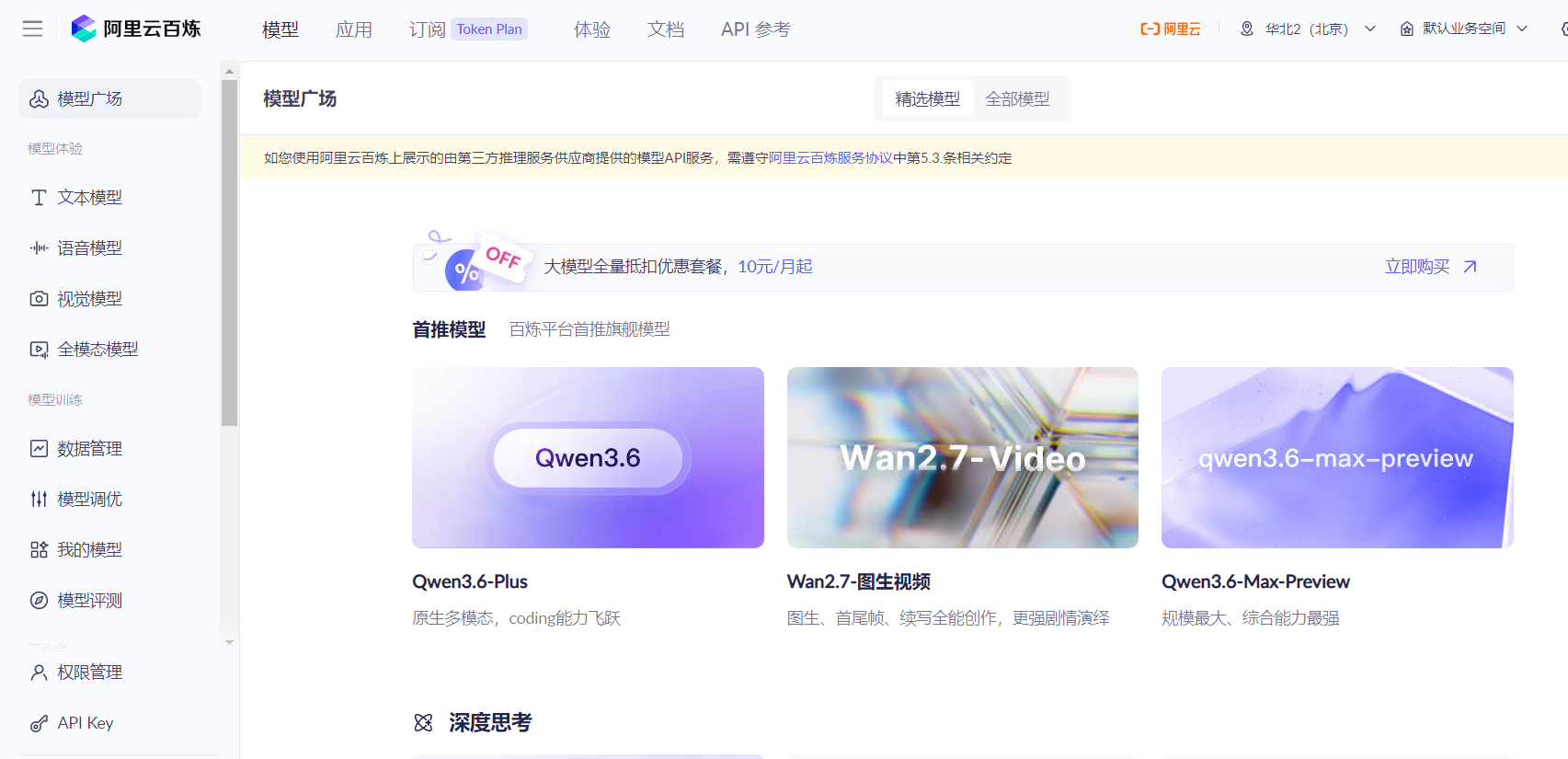 AI Visual Insight: This screenshot shows the entry point to the Alibaba Cloud Bailian platform, which is the prerequisite step for obtaining model access credentials. Technically, this is the starting point of the authentication chain. If the API Key is not generated or saved correctly, OpenClaw may still start, but it will not be able to perform real model inference.
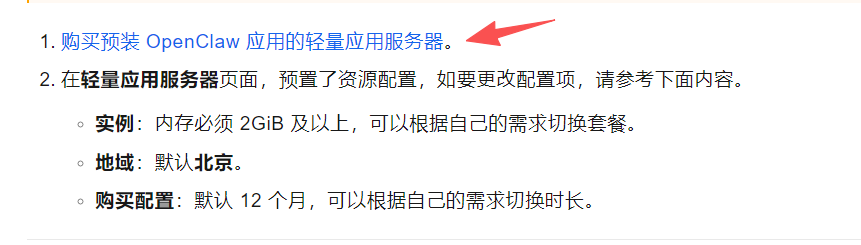 AI Visual Insight: This image shows the location of the one-click deployment entry. It demonstrates that the cloud vendor has packaged the image, dependencies, and initialization steps into a console-driven workflow, significantly reducing the manual effort required for Linux environment setup, dependency installation, and service orchestration.
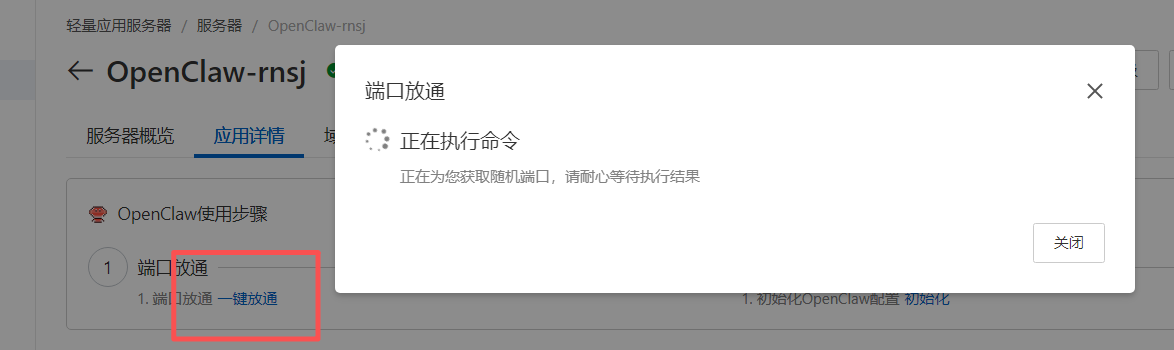 AI Visual Insight: This screenshot corresponds to the one-click port exposure page, reflecting that the OpenClaw Web UI depends on a publicly reachable entry point. In practice, this involves cloud firewall rules or security group policy distribution. If the rule is not applied successfully, the browser will typically show a timeout or connection refused error.
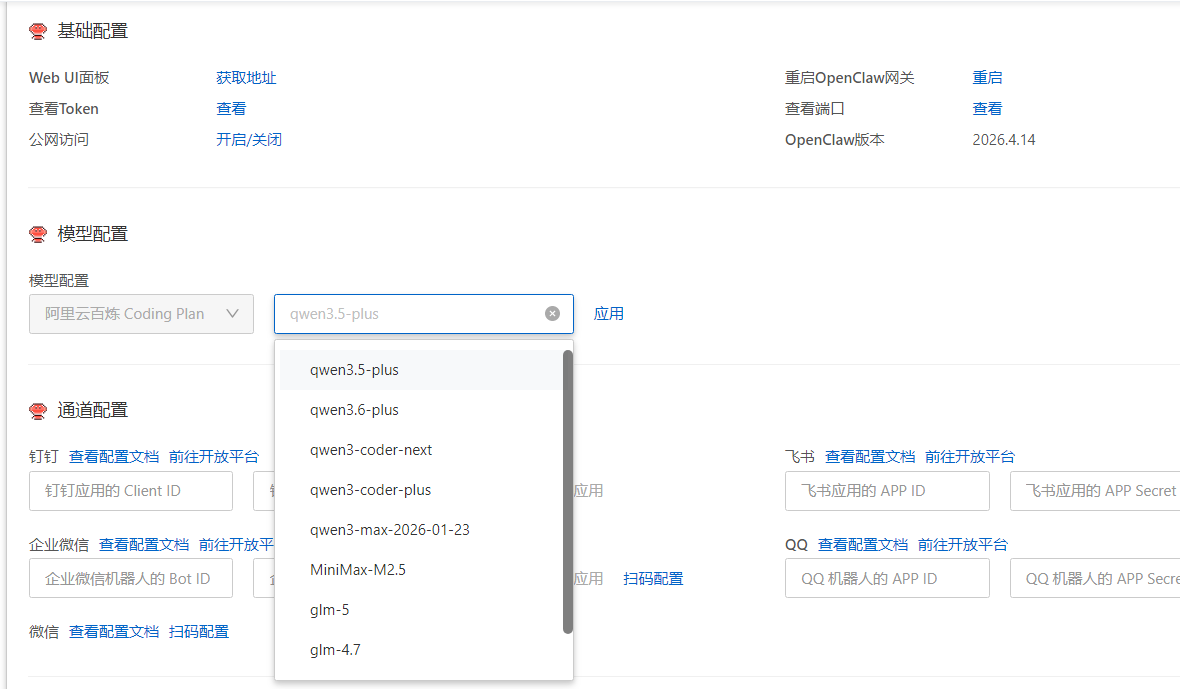 AI Visual Insight: This image shows the model selection interface, indicating that OpenClaw abstracts underlying model capabilities as replaceable configuration items. Technically, this means the system decouples the task orchestration layer from the model supply layer, making it easier to rebalance cost, speed, and output quality later.
Feishu integration depends on complete app permissions and event configuration
Feishu integration is not as simple as pasting an App ID and Secret. It is a full event-driven integration workflow. You need to create a custom app first, then enable bot capabilities, message permissions, and event subscription support for that app.
Pay special attention to message reception events such as im.message.receive_v1. Without them, the bot may exist in the group, but it will not actually receive instructions.
The server side is only responsible for credential intake and channel binding
Once the Feishu app is ready, write the App ID and App Secret into the OpenClaw channel configuration page. At that point, OpenClaw is responsible for mapping messaging platform events into agent inputs and mapping generated results back into bot replies.
{
  "channel": "feishu",
  "app_id": "your_app_id",
  "app_secret": "your_app_secret",
  "event": "im.message.receive_v1"
}
This code block summarizes the minimum authentication and event configuration required for Feishu channel integration.
The QQ integration flow is shorter, but it is still fundamentally a bot channel binding process
QQ integration is more focused: create a bot, obtain the application identifier, add it to the OpenClaw channel configuration, and then test messaging. Compared with Feishu, its permission system is often more straightforward, but it still depends on bot creation and authentication on the platform side.
This pattern of combining a messaging platform with an agent core is ideal for unifying access across multiple workplace and social channels. With one OpenClaw deployment, you can reuse the same capability foundation across multiple front-end entry points.
A practical integration order is to complete Feishu first, then QQ
The reason is simple: Feishu is more complex to configure. If you get it working first, you have effectively validated the model, the message callback path, and the bot capability stack. After that, integrating QQ becomes easier because the troubleshooting scope is much smaller.
This solution is best suited for three categories of use cases
Individual users can use it as an around-the-clock assistant for summaries, reminders, and file organization. Small teams can connect it to Feishu groups as a knowledge Q&A or workflow assistant. Enterprises can extend it further into internal systems, documentation, and approval flows to build an executable agent architecture.
If you only want a quick hands-on experience, prioritize the Web UI and Feishu integration first. If your goal is long-term operation, continue by adding logging and monitoring, access control, cost budgeting, and key rotation.
FAQ provides structured answers to common deployment and integration questions
1. Why is OpenClaw better suited for deployment on a cloud server?
Because an agent depends on 24/7 uptime, public access, and reliable callback handling. Local deployment is suitable for testing, but it is not ideal for long-term handling of Feishu or QQ messages.
2. If deployment succeeds but the Web UI is inaccessible, what should you check first?
First, verify that the port has been opened. Then confirm whether the generated access address has changed. Finally, make sure the model and API Key have been applied correctly.
3. Why does a Feishu bot remain silent after being added to a group?
Common causes include bot capability not being enabled for the app, missing event subscriptions, insufficient permissions, or incorrect binding of the App ID and App Secret on the server side.
The core takeaways summarize the full OpenClaw deployment workflow on Alibaba Cloud
This guide reconstructs the one-click deployment workflow for OpenClaw on Alibaba Cloud. It covers the value of cloud deployment, Web UI configuration, model and API Key setup, and the integration steps for Feishu and QQ bots. It is well suited for individuals and teams that want to operationalize an AI agent quickly.