The OMC MCP tool server exposes LSP, AST, Python REPL, memory, tracing, and team orchestration to Claude Code through a unified interface. It solves the core problems of fragmented tooling, unclear boundaries, and uncontrollable runtime behavior in multi-agent environments. Keywords: MCP, oh-my-claudecode, multi-agent.
Technical specifications show the system at a glance
| Parameter | Description |
|---|---|
| Project | oh-my-claudecode (OMC) MCP tool server |
| Core language | TypeScript / Node.js |
| Communication protocol | Model Context Protocol (MCP), stdio |
| Runtime form | In-process SDK server + standalone stdio server |
| Typical tools | LSP, AST, Python REPL, Memory, Trace, Wiki |
| Core dependencies | @anthropic-ai/claude-agent-sdk, MCP SDK, Zod, esbuild |
| Build artifacts | bridge/mcp-server.cjs, bridge/team-mcp.cjs |
| Ecosystem role | Capability aggregation layer and multi-agent tooling control plane for Claude Code |
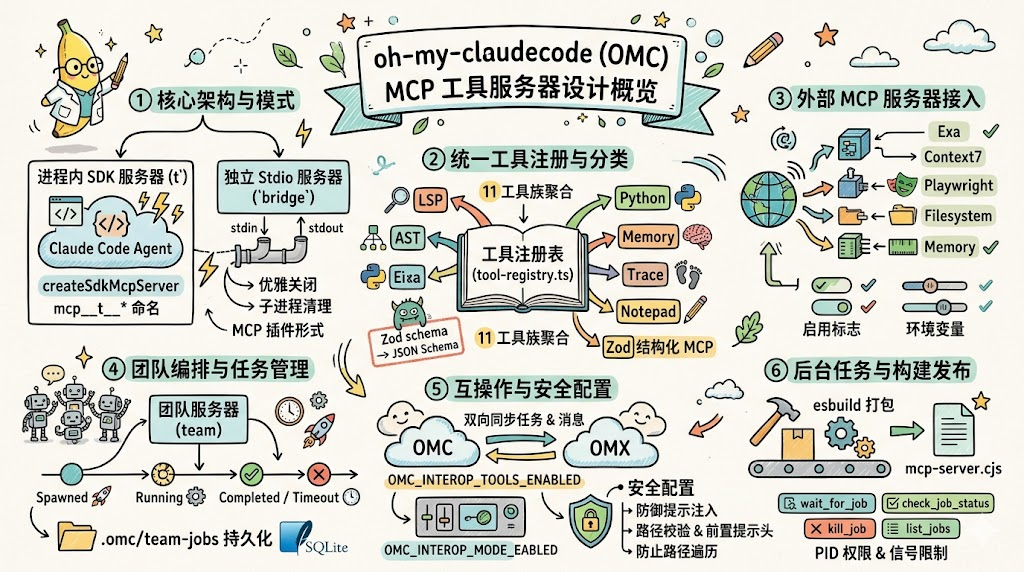
AI Visual Insight: This image serves as the article’s primary visual and emphasizes the MCP server’s central position between the model, tools, and runtime inside OMC. It usually illustrates the architectural theme of a single model invoking multiple engineering capabilities, rather than showing concrete interface details.
The OMC MCP tool server acts as the capability hub
In OMC, the Agent is responsible only for planning and decision-making. The tool layer performs the actual execution. The value of the MCP server is not simply that it provides several tools, but that it unifies heterogeneous capabilities behind one stable interface surface.
It addresses three core pain points: inconsistent tool integration methods, hard-to-unify runtime forms, and difficult-to-govern risk boundaries. For teams building their own Agent platforms, this is more instructive than any single isolated feature.
It first unifies the capability entry point visible to the model
The tool layer consolidates LSP, AST, Python REPL, state, memory, Wiki, and other capabilities, then exposes them through the MCP protocol. As a result, the model does not need to understand differences in the underlying implementations. It only needs to work with standardized tool calls.
// Unified tool abstraction: name, parameters, and handler
export interface ToolDef {
  name: string
  description: string
  inputSchema: z.ZodTypeAny // Use Zod to constrain the parameter structure
  handler: (input: unknown) => Promise
<unknown> // Return structured results asynchronously
}
This code shows that OMC first defines a unified tool model, then allows different capability modules to integrate through the same contract.
The dual deployment architecture preserves both embedded efficiency and external compatibility
OMC uses a dual-track design: an in-process SDK server plus a standalone stdio server, both sharing the same tool registry. This is the most important engineering trade-off in the entire architecture.
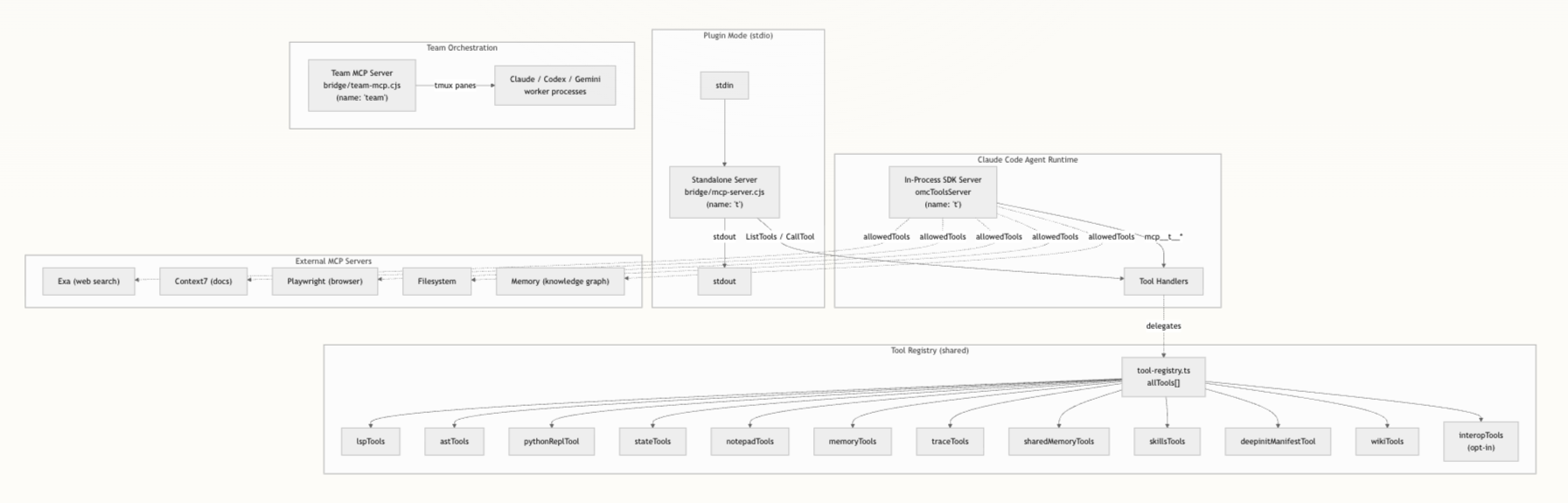
AI Visual Insight: The diagram typically shows two parallel paths: one is the in-process server embedded in the Claude Code runtime, and the other is the stdio server connected to an external host through stdin/stdout. Both share the same registry, enabling one source of truth for tools with two deployment modes.
The in-process server is the primary high-frequency path
In in-process mode, the runtime embeds the server directly through createSdkMcpServer, and tool names follow the mcp__t__* convention. This avoids IPC overhead and allows direct reuse of caches, context, and session state in the host process.
For IDE-based development workflows, this path offers lower latency and works more naturally with Claude Code’s native tool discovery mechanism.
The standalone stdio server handles pluggable distribution
The standalone server entry point is src/mcp/standalone-server.ts, and the build output is bridge/mcp-server.cjs. It communicates with external hosts through StdioServerTransport, so it can run independently without the full OMC environment.
# Build the standalone MCP server
node scripts/build-mcp-server.mjs

# The artifact is typically written to the bridge directory
ls bridge/mcp-server.cjs
These commands show how the standalone mode turns source code into a deployable plugin artifact.
The tool registry and classification system turn complex capabilities into governable assets
All tools eventually flow into tool-registry.ts. That means when you add a new capability, it does not get scattered across arbitrary parts of the system. Instead, it enters a unified registration and validation pipeline.
Tool definitions typically include descriptions, annotations, Zod parameter constraints, and asynchronous handlers. The standalone server also converts Zod schemas into JSON Schema and exposes them directly to MCP clients for parameter validation.
The classification system determines how capabilities are exposed
OMC maps tools into categories such as LSP, AST, Python, State, Memory, Trace, Skills, Wiki, and Interop. These are not just labels. They form the foundation for later permission control and Agent-specific tool visibility.
For example, a review Agent may need only read-only tools, while a remediation Agent may require Python or state management tools. After classification, allowedTools can be built by category, significantly reducing the model’s decision space.
const disabled = process.env.OMC_DISABLE_TOOLS?.split(",") ?? []
// Filter tools by category at startup to reduce the exposure surface
const enabledTools = allTools.filter(tool => !disabled.includes(tool.category))
This logic shows how OMC shifts tool governance forward from hard-coded conditionals into the configuration layer.
External MCP servers extend the capability boundary of OMC
In addition to its internal tool families, OMC also brings external MCP services such as Exa, Context7, Playwright, Filesystem, and Memory into a unified configuration model. The core idea is simple: external capabilities must also be standardized through the MCP layer.
This produces two benefits. First, the model sees a consistent invocation surface. Second, high-risk capabilities can be governed centrally through explicit switches, allowlisted paths, and similar controls, instead of being scattered across scripts.
External server configuration reflects a plugin-oriented design
For example, Exa depends on EXA_API_KEY, Filesystem must receive an allowlisted path array, and Playwright and Memory are enabled on demand by default. These constraints show that OMC does not confuse “integratable” with “open by default.”
Interop and Team Server elevate the tool layer into an orchestration layer
Once a system moves from a single Agent to multiple Agents, one-off tool invocation is no longer enough. OMC adds Interop and Team Server on top of MCP so that the tool layer can handle cross-system communication and team task management.
Interop handles tasks, messages, and team enumeration between OMC and OMX, with modes controlled by off, observe, and active. In essence, it uses a shared filesystem as a loosely coupled bridge.
The Team MCP server abstracts team collaboration into standard tools
The Team Server runs as the team server and exposes four key classes of tools: start, query, wait, and cleanup. It manages multi-Agent sessions through tmux panes and packages complex team pipelines into MCP calls.
// Simplified example of querying team task status
const status = await omc_run_team_status({
  jobId: "team-job-001" // Query status by job ID
})
console.log(status)
This example shows that multi-Agent team tasks have already been abstracted into standardized, queryable objects.
Security and task management determine whether the system can run reliably over time
The stronger the MCP layer becomes, the more important its security boundary is. OMC constrains high-risk operations into an auditable range through output path policies, external prompt controls, and path validation.
OMC_MCP_OUTPUT_PATH_POLICY supports strict and redirect_output. The former strictly limits output locations, while the latter redirects results into a safe directory. This prevents the model from writing artifacts to arbitrary paths.
Prompt injection protection reflects production-grade security awareness
The system rejects paths containing control characters, blocks directory traversal, restricts prompt files outside the workspace, and uses preset headers to prevent external CLI Agents from recursively spawning child Agents. Security is not an add-on feature here. It is part of the protocol boundary.
The task system gives tool invocation a lifecycle
OMC also promotes long-running operations into a task model, supporting wait_for_job, check_job_status, kill_job, and list_jobs. It tracks task state through dual writes to the filesystem and SQLite, ensuring recoverability even after a restart.
// Wait for a background job to finish
const result = await wait_for_job({
  jobId: "job-42", // Specify the job to wait for
  timeoutMs: 30000 // Set the timeout
})
This code shows that OMC no longer treats tools as one-shot requests, but as long-lived, observable execution units.
Build and export strategy turns the MCP layer into reusable infrastructure
At the distribution layer, OMC uses esbuild to bundle the standalone server and marks native modules as external. If the target environment lacks npm or native dependencies, the system still allows the server to start first and then fail gracefully only when a specific tool is invoked.
This strategy of graceful degradation instead of total failure is especially important for containers, minimal environments, and cross-machine deployments. It preserves baseline functionality while containing failures within local tools.
In the end, src/mcp/index.ts uses a barrel export to unify external server factories, the SDK server, prompt security, and task management interfaces, turning the MCP layer into a reusable infrastructure module inside OMC.
The OMC MCP design is fundamentally a capability operating system
If you view it only as a set of tool scripts, you will underestimate its value. What makes OMC worth studying is that it integrates tool abstraction, deployment form, extension governance, task lifecycle, and security boundaries into one complete engineering system.
For builders of Agent platforms, the three most important lessons are clear: unify the tool surface, govern by classification, and run through task models. Only then can model capability land reliably in complex engineering environments.
FAQ structured questions and answers
1. Why does OMC maintain both an in-process server and a stdio server?
Because they solve different problems. In-process mode prioritizes low latency and shared context, making it ideal for the primary IDE execution path. The stdio mode emphasizes independent deployment and pluggable integration, which makes it better suited to MCP ecosystem expansion.
2. What is the biggest value of the tool classification system for multi-Agent orchestration?
It allows the system to tailor visible tools by Agent role, reduce model selection noise, and batch-disable high-risk categories through environment variables. That creates a much more controllable permission boundary.
3. Why is OMC task management more important than ordinary tool invocation?
Because many real engineering operations are long-running tasks. Only by upgrading invocation into tasks that can be awaited, terminated, recovered, and audited can the system support collaboration across multiple models, phases, and processes.
Core Summary: This article reconstructs the architecture of the oh-my-claudecode MCP tool server, focusing on dual deployment, the tool registry, external MCP integration, task management, and security boundaries. It shows how OMC turns LSP, AST, Python REPL, and multi-Agent orchestration into a unified capability control plane.