This article focuses on integrating the Doubao large model into a WeChat Mini Program to build a free AI assistant, persist chat history, and create a typewriter-style reply effect. It also explains why, in Mini Programs, a “non-streaming API + frontend simulated streaming” approach is often more practical. Keywords: WeChat Mini Program, Doubao Model, SSE.
The technical specification snapshot provides the implementation baseline
| Parameter | Description |
|---|---|
| Runtime Environment | Native WeChat Mini Program development |
| Primary Languages | JavaScript, WXML, WXSS |
| Invocation Protocol | HTTPS / REST |
| Output Strategy | Non-streaming response + frontend typewriter simulation |
| Model Platform | Doubao / Volcano Ark compatible API |
| Base URL | https://ark.cn-beijing.volces.com/api/v3 |
| Core Dependencies | wx.request, wx.setStorageSync, setInterval |
| GitHub Stars | Not provided in the original article |
This solution delivers AI chat in a Mini Program with the fewest moving parts
The original implementation does not prioritize “true streaming.” Instead, it focuses on establishing a stable model connection first, then compensating for the user experience on the frontend. For WeChat Mini Programs, this is a more realistic engineering path.
To make the integration work, you must first obtain three critical parameters: the model name, the API base URL, and the API key. In addition, you must enable the inference switch in the Doubao console. Otherwise, the request will fail even if the other parameters are correct.
 AI Visual Insight: This image shows the Doubao platform console entry and the model-related configuration area. It highlights that developers must verify model availability, review the API examples, and understand that model parameters come from the console rather than frontend guesswork.
You should first clarify the real meaning of the three integration parameters
The model name is not the display name. It is the actual Model ID used in requests. The original example points out that the callable identifier is something like doubao-seedance-2-0-260128.
The API URL is also not the full chat endpoint. It is only the base URL. In code, you typically configure the Base URL, and the request logic appends paths such as /chat/completions. For Doubao, the unified base URL is https://ark.cn-beijing.volces.com/api/v3.
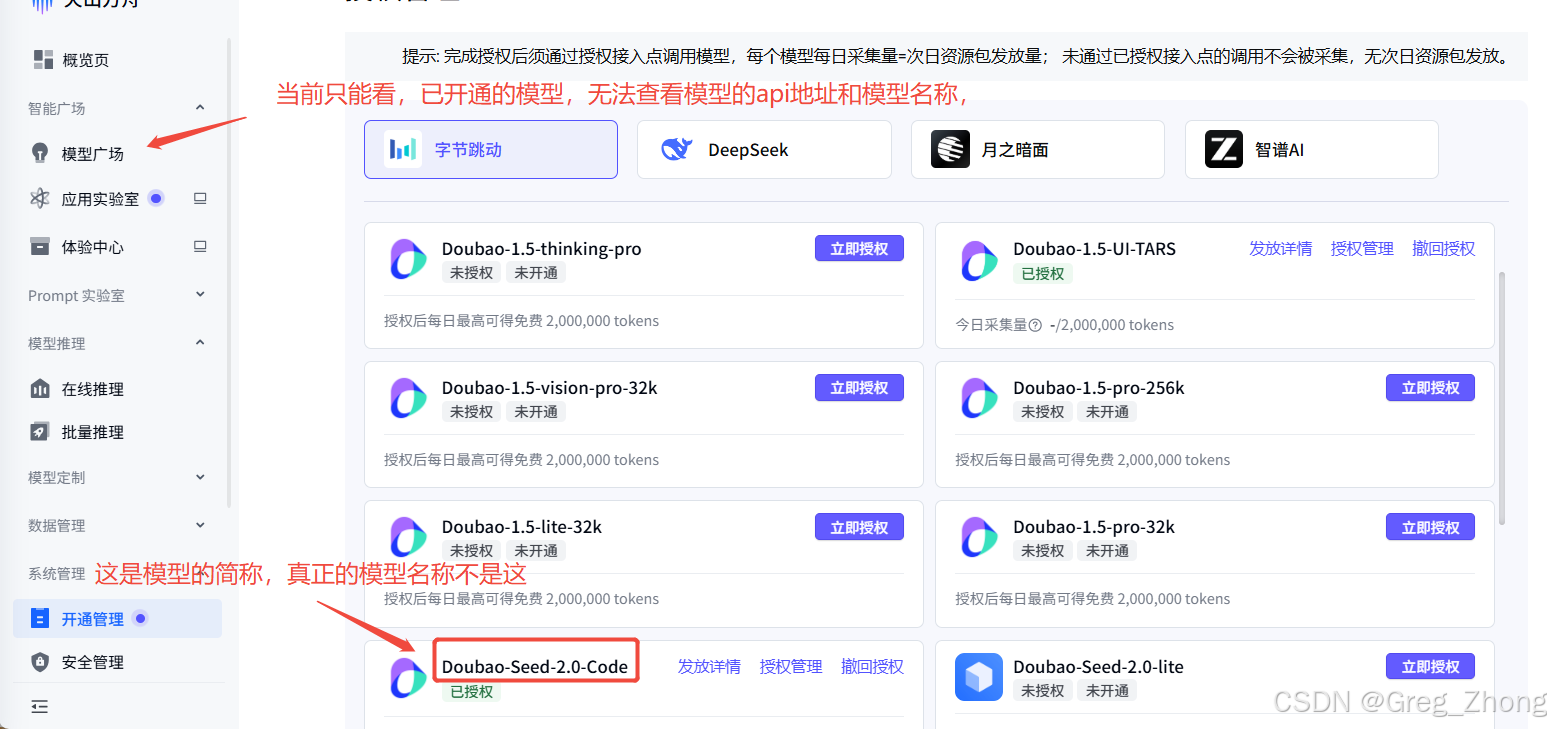 AI Visual Insight: This image shows the model marketplace or activation management page. The key technical takeaway is to distinguish between “model activation status” and the “model identifier that can be used directly in API requests,” so you do not confuse a marketing name with a request parameter.
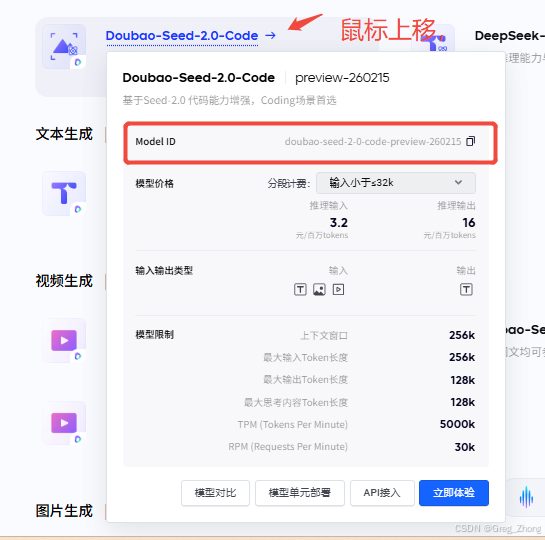 AI Visual Insight: This screenshot further pinpoints the exact ID field on the model details page. It shows that developers should record the programmable identifier rather than the UI display title, which is critical for request success.
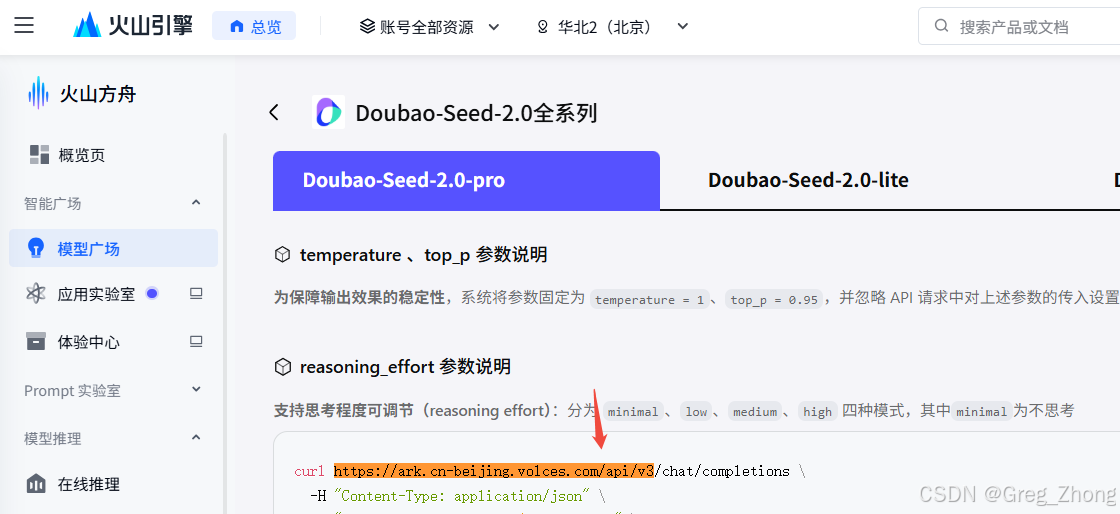 AI Visual Insight: This image displays the API example or cURL section. The core message is that the complete example URL consists of the “base URL + specific endpoint path,” so the frontend should extract and configure only the base URL instead of hardcoding the full example link.
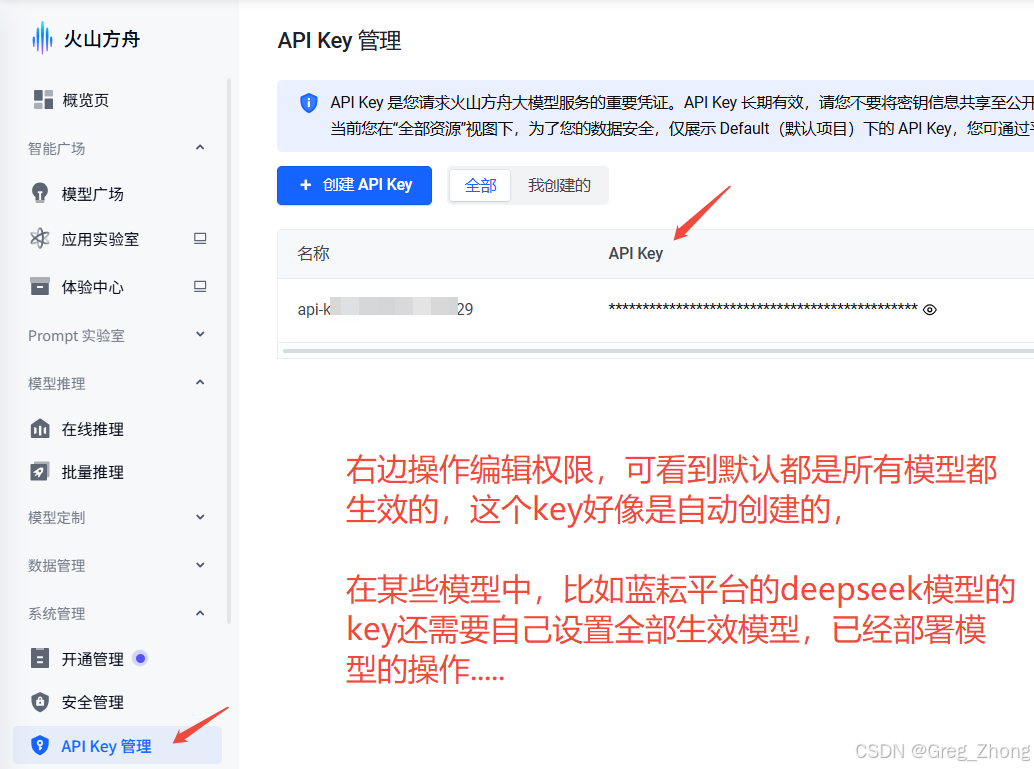 AI Visual Insight: This image shows the key management interface and the entry point for obtaining and controlling API key permissions. For Mini Program projects, it also implies a security risk: sensitive keys should not remain exposed in plaintext on the frontend.
In Mini Programs, the safer approach is to disable true streaming and simulate it instead
The key conclusion of the original article is this: WeChat Mini Programs do not handle SSE or streaming responses particularly well, so it is better to use stream: false to fetch the full answer in one response and then render it character by character with a timer.
The advantages of this approach are stability, easier debugging, and fewer issues caused by incomplete chunked JSON, broken streams, garbled text, or parsing failures. From the user’s perspective, the result still feels close to a typewriter-style streaming experience.
const AI_CONFIG = {
  baseUrl: 'https://ark.cn-beijing.volces.com/api/v3',
  apiKey: 'Replace this with your key',
  model: 'doubao-seed-2-0-code-preview-260215',
  systemPrompt: 'You are the Doubao AI assistant. Please answer the user in Chinese.'
};

async function callAI(request, history, userContent) {
  const res = await request({
    url: `${AI_CONFIG.baseUrl}/chat/completions`,
    method: 'POST',
    header: {
      'Content-Type': 'application/json; charset=utf-8', // Explicitly declare the encoding
      'Authorization': `Bearer ${AI_CONFIG.apiKey}`      // Pass the authorization credentials
    },
    data: {
      model: AI_CONFIG.model,
      messages: [
        { role: 'system', content: AI_CONFIG.systemPrompt },
        ...history,
        { role: 'user', content: userContent }
      ],
      stream: false // Use non-streaming mode in the Mini Program for better stability
    },
    timeout: 120000
  });

  return res.data.choices[0].message.content;
}
This code performs a standard conversational call to the Doubao model through the WeChat request API.
The chat page implementation depends on state management and partial updates
The frontend page structure is not complicated. The core task is to manage messages, the input box, the scroll anchor, and the loading state. Message rendering must distinguish between the user and assistant roles.
The original implementation also persists chat history locally. With wx.setStorageSync and wx.getStorageSync, you can restore the conversation context when the page is reopened.
startTypewriter(fullText, msgIndex) {
  return new Promise((resolve) => {
    let currentIndex = 0;
    const timer = setInterval(() => {
      if (currentIndex >= fullText.length) {
        clearInterval(timer);
        this.setData({
          [`messages[${msgIndex}].loading`]: false, // End the loading state
          isTyping: false,
          isStreaming: false
        });
        resolve();
        return;
      }

      currentIndex++;
      this.setData({
        [`messages[${msgIndex}].content`]: fullText.substring(0, currentIndex) // Append the text one character at a time
      });
    }, 30);
  });
}
This code turns a complete reply into a character-by-character rendering effect, simulating real-time AI output.
The UI layer should proactively handle line breaks and growing message length
The most valuable styling detail in the original article is white-space: pre-wrap. It ensures that line breaks, paragraphs, and formatting in the model output are preserved inside chat bubbles.
When you update a message, prefer indexed paths such as messages[3].content. This is more stable than replacing the entire array and also reduces rendering cost.
.message-text {
  font-size: 30rpx;
  line-height: 1.8;
  white-space: pre-wrap; /* Preserve line breaks in model output */
  word-break: break-all; /* Prevent long text from breaking the layout */
}
This style ensures that AI replies remain readable, wrap correctly, and do not overflow in the Mini Program chat UI.
The real challenges lie in streaming, encoding, and performance boundaries rather than the API call itself
The principle behind SSE is not complicated: the client initiates a request and keeps the connection open, the server continuously pushes chunks using text/event-stream, and the client consumes them piece by piece. However, the original article clearly states that this path is not smooth under native Mini Program capabilities.
Therefore, if your goal is teaching, validating model integration, or quickly shipping a prototype, the non-streaming approach provides better cost-effectiveness. If your goal is production-grade true streaming, you will usually need a backend proxy layer to handle chunking, buffering, authentication, and retries.
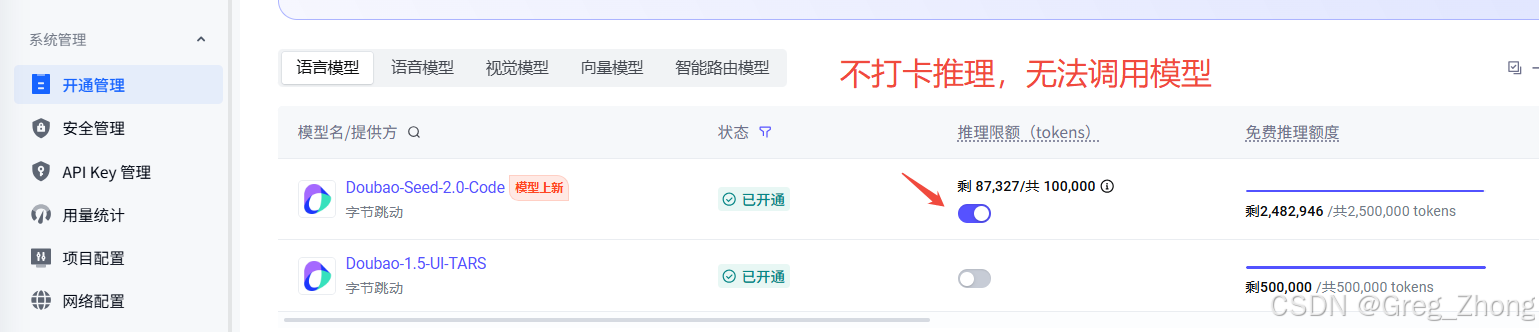 AI Visual Insight: This image shows the inference switch or model capability toggle interface. It demonstrates that the console includes explicit capability gating. Even if the API parameters are complete, the request may still fail or produce no output if inference is not enabled.
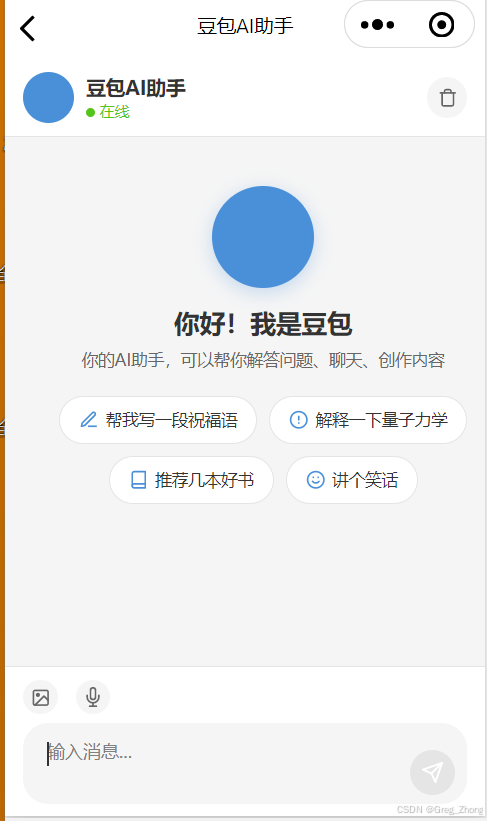
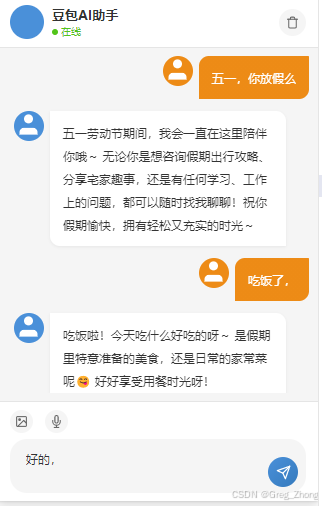 AI Visual Insight: This image looks like a runtime result or chat interface preview. It reflects the frontend typewriter output, chat bubble layout, and the final interaction pattern of the AI assistant page, showing that the solution prioritizes stable experience replication over protocol-level complexity.
This implementation comes with four engineering warnings
- Putting the API key on the frontend is acceptable only for learning, not for production release.
previewmodels are often slower, and their results may not outperform the web version.- The overhead of
wx.requestcan amplify response latency on the Mini Program side. - Responses longer than 20 seconds are not unusual on weak networks, so you need timeout handling and failure prompts.
The final conclusion is that this works best as an integration template, not a performance template
The most valuable part of this implementation is that it breaks “integrating the Doubao model into a WeChat Mini Program” into executable steps: obtain parameters, enable inference, send the request, render the reply, save the history, and handle exceptions.
However, if you want lower latency, true streaming, and stronger model performance, you should move the key and request logic to the backend. Let the server uniformly proxy the large model API, and keep the Mini Program frontend focused on lightweight interaction.
The FAQ section answers the most practical implementation questions
Q1: Can a WeChat Mini Program directly implement SSE streaming output?
You can explore it, but native support is not stable. In practice, a “non-streaming API + frontend typewriter simulation” approach is more reliable, cheaper to implement, and close enough in user experience.
Q2: Why does the request still fail even when all parameters look correct?
There are four common causes: the inference switch is not enabled, domain validation has not been allowlisted, the API key is invalid, or the Base URL was filled with the full endpoint URL instead of only the base address.
Q3: Why is the response so slow?
Latency usually comes from three places: the model’s own response time, weaker performance in preview versions, and the network plus TLS connection overhead in Mini Programs. For production projects, a backend proxy with connection reuse is strongly recommended.
Core summary: This article reconstructs the full practice of calling the Doubao model from a WeChat Mini Program, covering the three core integration parameters, the inference switch, chat page implementation, the non-streaming typewriter simulation approach, and the key conclusions around SSE, garbled text, broken line handling, and performance bottlenecks.