Linux processes are the basic unit of resource allocation and scheduling in the operating system. This article focuses on PCB,
fork, process state transitions, and zombie/orphan processes to answer questions such as how programs are managed, why they block, and why they can remain after exit. Keywords: Linux processes,task_struct,fork.
Technical Specifications at a Glance
| Parameter | Content |
|---|---|
| Domain | Linux / Operating Systems / Systems Programming |
| Core Languages | C, Shell |
| Key Interfaces | getpid, fork, kill, wait, chdir |
| Key Protocols/Standards | POSIX, Linux kernel process model |
| GitHub Stars | Not provided in the original article |
| Core Dependencies | glibc, procfs, GNU ps, Linux kernel |
The von Neumann Architecture Requires Programs to Run Above a Management Layer
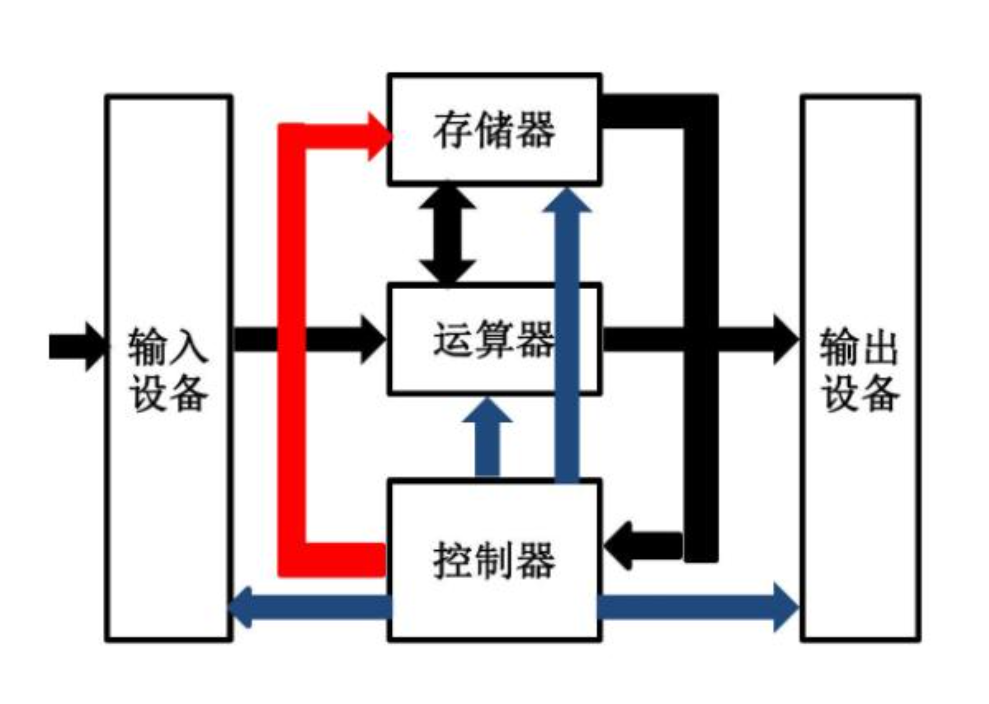 AI Visual Insight: The diagram shows the basic collaboration path between input devices, the CPU, and memory: data enters memory first, and then the CPU fetches and executes instructions. This reflects the sequential model of input, storage, and computation, and also shows why the operating system must coordinate efficient data movement across hardware components.
The von Neumann architecture emphasizes that input devices, memory, the CPU, and output devices form the minimum working loop of a computer. A program cannot run directly without memory, and the CPU must schedule work around the flow of data and instructions.
This directly explains the value of the operating system: hardware is diverse and behavior is complex, so applications cannot efficiently manage all resources on their own. A unified management layer is required.
Data flow is fundamentally information exchange across multiple systems
Whether the source is keyboard input, disk reads, or network I/O, the essence is the movement of data between different hardware and software entities. System performance is often constrained by the copy path and by when a process must wait.
The operating system is fundamentally a software system for resource management
An operating system consists of two parts: the kernel and supporting user-space programs. The kernel handles process management, memory management, and file management. Shells and library functions provide a more usable interface for users.
Upward, it provides an execution environment. Downward, it manages hardware resources. The key is not direct hardware control, but abstraction, isolation, and scheduling so that multiple programs can run concurrently and safely.
Describe first, then organize is the core idea behind Linux resource management
Processes, files, and devices are first described as structured data, and then organized using linked lists, queues, trees, and similar structures. For a process, that descriptive object is the PCB.
struct task_struct *task; // Process descriptor used by the kernel to describe a process
// The process state, priority, PID, memory mappings, and more can all be tracked here
This code illustrates the role of the PCB: a process is first and foremost a data object recorded and scheduled by the kernel.
System calls are the only legitimate entry point across the user-kernel boundary
Applications cannot manipulate hardware or kernel data arbitrarily. They must request services through system calls. Library functions usually wrap system calls to reduce complexity, but critical operations still require entering kernel mode.
Creating a process, retrieving a PID, changing directories, and terminating a task all fundamentally depend on interfaces exposed by the kernel.
#include <unistd.h>
#include <stdio.h>

int main() {
    pid_t pid = getpid(); // Get the PID of the current process
    printf("pid = %d\n", pid); // Print the process identifier
    return 0;
}
This code reads the current process identifier and serves as the smallest entry point for understanding how a running program instance becomes a process.
A process is not the program file itself, but the running entity of program plus context
A process can be defined as a PCB plus code, data, open files, address space, and execution context. In Linux, the typical PCB implementation is task_struct.
At a minimum, task_struct contains information such as the PID, state, priority, program counter, and memory-related pointers. The kernel schedules these described runtime entities, not executable files.
Common commands help you quickly observe process existence and attributes
ps -aux                 # View major process information in the system
ps -axj | grep myproc   # Filter the target process
ps -axj | head -1       # View the meaning of the header fields
ls /proc/1234           # View procfs information for the specified PID
These commands let you inspect the process table, understand field meanings, and view the kernel’s exposed perspective through /proc from user space.
`/proc/
` is the most direct window into process behavior. For example, `cwd` shows the current working directory, and `chdir()` changes that context attribute. ## Parent-child relationships show that processes can be copied and then evolve independently A child process is created by a parent process, most commonly through `fork()`. After creation, the child initially inherits most of the parent’s execution context, including the code segment and data view. 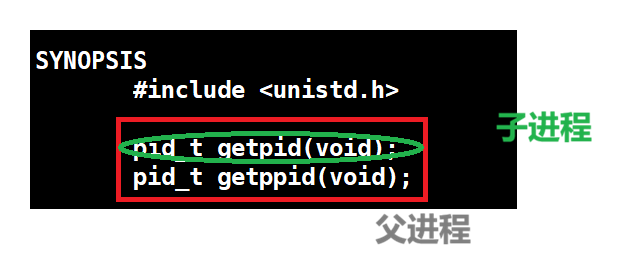 **AI Visual Insight:** The diagram clearly shows the branching relationship after a parent process creates a child process. It emphasizes that the PIDs differ even though the initial execution environment is inherited, which is essential for understanding process lineage and debugging tree-like relationships. 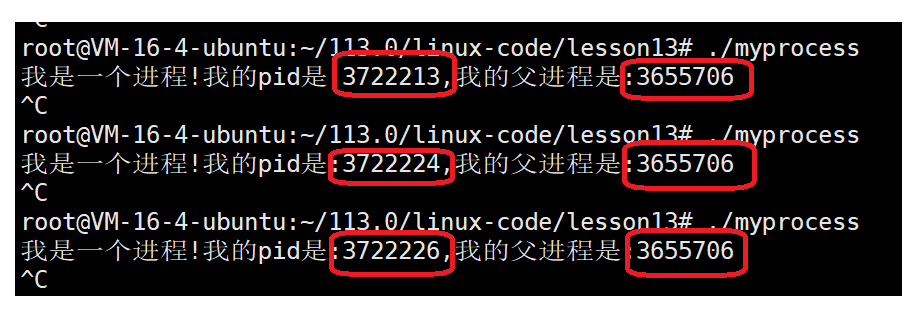 **AI Visual Insight:** This diagram further shows the parallel behavior of parent and child processes in scheduling or output, demonstrating that once created, both are scheduled independently by the kernel and their execution order is not fixed. “`c #include #include int main() { pid_t id = fork(); // Create a child process if (id == 0) { printf(“child pid=%d\n”, getpid()); // Child process branch } else if (id > 0) { printf(“parent pid=%d child=%d\n”, getpid(), id); // Parent process branch } return 0; } “` This code demonstrates the dual-return behavior of `fork()`: one call creates two execution flows. ### Copy-on-write ensures initial sharing but isolated modification between parent and child After `fork()`, the parent and child do not immediately duplicate all memory in full. The kernel copies a shared page only when either side attempts to write to it. This is copy-on-write (COW). ## Linux process states are a direct projection of kernel scheduling and waiting mechanisms The running state means the process is either executing or eligible to execute. The blocked state means the process is waiting for some kind of resource. The suspended state is typically related to memory pressure, swap activity, and scheduling policy. 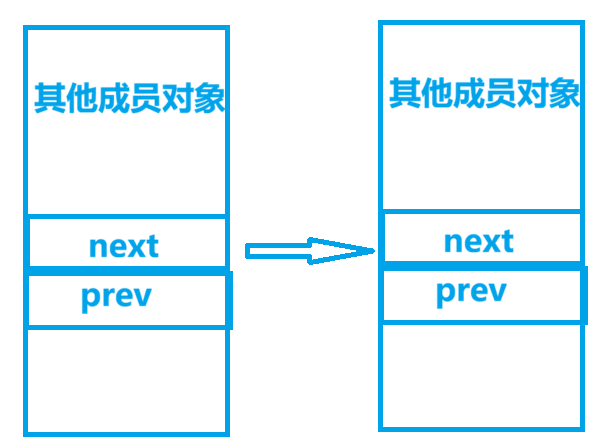 **AI Visual Insight:** The image shows how kernel linked lists are associated with external structures, focusing on member offsets and the logic used to recover the containing object. This is a key diagram for understanding `container_of`, task linkage organization, and kernel object management. “`c #include #define container_of(ptr, type, member) \ (type *)((char *)(ptr) – offsetof(type, member)) // Recover the containing struct from a member address “` This macro shows how the Linux kernel locates the full object by walking backward from a linked-list node. ### Common state values map directly to task flags inside the kernel “`c #define TASK_RUNNING 0 // Running or ready state #define TASK_INTERRUPTIBLE 1 // Interruptible sleep #define TASK_UNINTERRUPTIBLE 2 // Uninterruptible sleep #define __TASK_STOPPED 4 // Stopped #define __TASK_TRACED 8 // Being traced for debugging #define EXIT_ZOMBIE 16 // Zombie state #define EXIT_DEAD 32 // Fully exited “` These definitions help map the status characters shown by `ps` to their kernel-level semantics. 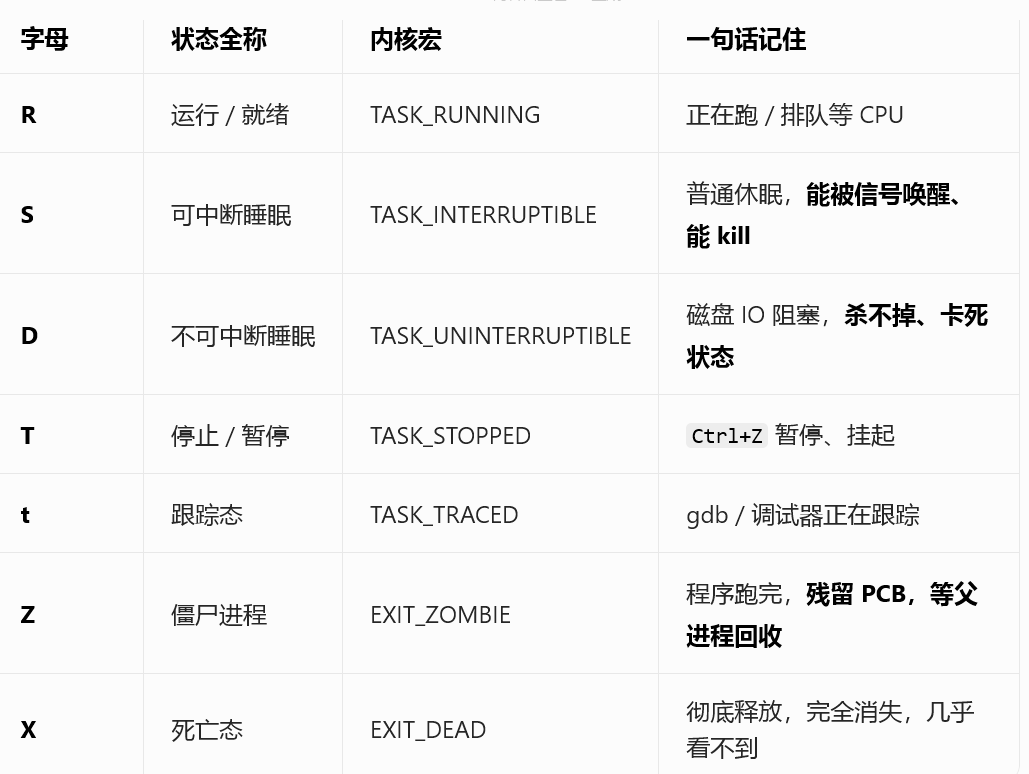 **AI Visual Insight:** The image should show the status field output from `ps` or a similar tool, where markers such as R, S, D, T, and Z indicate whether a process is running, in light sleep, deep sleep, stopped, or has become a zombie. S usually indicates interruptible sleep, while D indicates uninterruptible sleep. The former can be awakened by signals, while the latter is usually waiting on critical I/O and cannot be terminated immediately through ordinary means. ## Zombie and orphan processes reveal the responsibility handoff in the exit path A zombie process is not still running. It has already exited but has not yet been reaped. After a child process ends, its exit code and accounting information must remain available for the parent to read. If the parent does not call `wait()` or `waitpid()`, the PCB remains and the process enters state Z. An orphan process is the opposite: the parent exits first, and the child is adopted by process 1. This ensures that some process will eventually reap its exit information and prevents zombies from accumulating indefinitely. “`c #include #include int main() { pid_t id = fork(); // Create a child process if (id > 0) { wait(NULL); // Reap the child process to avoid a zombie } return 0; } “` This code shows the most direct way to handle zombie processes: the parent explicitly reclaims the child process resources. ## FAQ ### 1. Why can `kill -9` still fail to terminate some processes? Because a process in D state is usually waiting on uninterruptible kernel I/O. The signal is recorded, but it can only be handled after the kernel returns, so the process does not exit immediately. ### 2. Do zombie processes consume a lot of memory? Usually not. They do not retain the full user-space memory image, but they do consume a PID and a kernel process table entry. If many zombies accumulate, the system may fail to create new processes, which is a serious operational risk. ### 3. After `fork()`, are parent and child process data shared or independent? Logically, they are independent. At creation time, they share physical pages through copy-on-write. Once either side writes, the kernel copies the affected page so that their modifications remain isolated. Core Summary: This article systematically explains the core concepts of Linux processes, covering the von Neumann architecture, the operating system’s management responsibilities, system calls, PCB/`task_struct`, parent-child process relationships, `fork()` copy-on-write, and typical process states such as running, blocked, suspended, zombie, and orphan.