This article focuses on cross-compiling
vcpkg-toolfor HarmonyOS PC and making thevcpkgcommand runnable on a real device. It addresses three core pain points: integrating the SDK toolchain, resolvingcurl/fmtdependency conflicts, and handling runtimedlopenplus code-signing restrictions. Keywords: HarmonyOS PC, vcpkg-tool, cross-compilation.
Technical specifications are summarized below
| Parameter | Details |
|---|---|
| Target platform | HarmonyOS PC / aarch64 / OHOS |
| Host environment | Ubuntu 24.04 x86_64 |
| Build system | CMake + Ninja |
| Toolchain | OHOS SDK Clang Toolchain |
| Key dependencies | curl, fmt, nlohmann-json, OpenSSL, zlib |
| Runtime mechanism | vcpkg loads libcurl.so.4 at runtime via dlopen |
| Repository branch | ohos-pc |
| License | CC 4.0 BY-SA (as stated in the original article) |
This article enables native vcpkg command support on HarmonyOS PC
The value of vcpkg in the C/C++ ecosystem goes beyond installing third-party libraries. It also standardizes triplets, dependency trees, and build parameters. After porting vcpkg-tool to HarmonyOS PC, developers can run package management commands directly on the device, reducing the cost of manually copying .so files and header files.
The original implementation shows that the real challenge is not whether the project can compile, but whether the cross-compiled result can actually run on a HarmonyOS PC device. That requires handling build-time header compatibility, stable dependency downloads, and runtime system security policies at the same time.
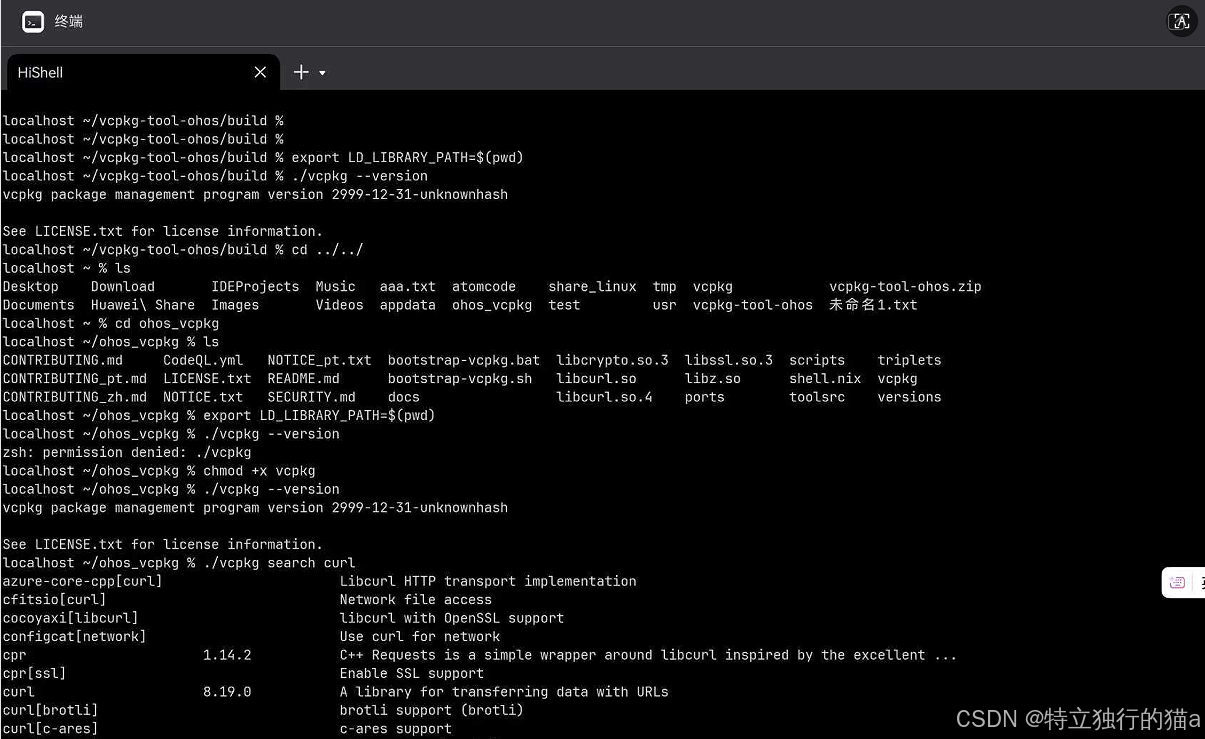 AI Visual Insight: The image shows
 vcpkg running successfully in a HarmonyOS PC terminal. The key takeaway is that the artifact is not merely buildable on the host machine; it has also passed a --version smoke test on the target device.
The minimum real-device validation workflow is straightforward
First, get the project directory used for deployment, then place the compiled vcpkg binary and its dependent libraries into it. At minimum, the required shared libraries usually include libcurl.so.4, libssl.so.3, libcrypto.so.3, and libz.so.
git clone https://gitcode.com/OpenHarmonyPCDeveloper/ohos_vcpkg.git
cd ohos_vcpkg
LD_LIBRARY_PATH="$(pwd)" ./vcpkg --version  # Set the current directory as the runtime library search path
This command verifies whether vcpkg is minimally runnable on a HarmonyOS PC device.
The cross-compilation environment must align exactly with the OHOS target triplet
The target is aarch64-linux-ohos, and Ubuntu 24.04 is the recommended host environment. The toolchain comes from the OHOS SDK, and the build tools should be the SDK-provided or compatible versions of CMake and Ninja.
sudo apt update
sudo apt install -y git curl cmake ninja-build gcc g++ make autoconf automake libtool yasm nasm gettext autopoint python3 python3-pip
export OHOS_SDK_ROOT=/root/ohos-sdk/linux  # Point to the OHOS SDK root
"$OHOS_SDK_ROOT/native/build-tools/cmake/bin/cmake" --version
"$OHOS_SDK_ROOT/native/build-tools/cmake/bin/ninja" --version
These commands prepare the host machine and confirm that the SDK build tools are available.
The OHOS SDK directory layout determines how the toolchain is integrated
The key directories are llvm/, sysroot/, and ohos.toolchain.cmake. The llvm/ directory provides clang/lld, sysroot/ provides target-platform headers and system libraries, and the toolchain file binds them into the CMake cross-compilation flow.
The external dependency strategy determines whether vcpkg-tool compiles smoothly
The stable strategy used in this article is: use external packages for curl and nlohmann-json, but do not use an external package for fmt. The reason is simple: the current vcpkg-tool source is clearly tied to fmt v11, while newer external versions often introduce template and namespace ambiguities.
./vcpkg install fmt:arm64-ohos
./vcpkg install libcurl:arm64-ohos
./vcpkg install nlohmann-json:arm64-ohos  # Pre-build target-platform dependency packages
These commands prebuild a HarmonyOS PC-compatible dependency tree for later CMake discovery.
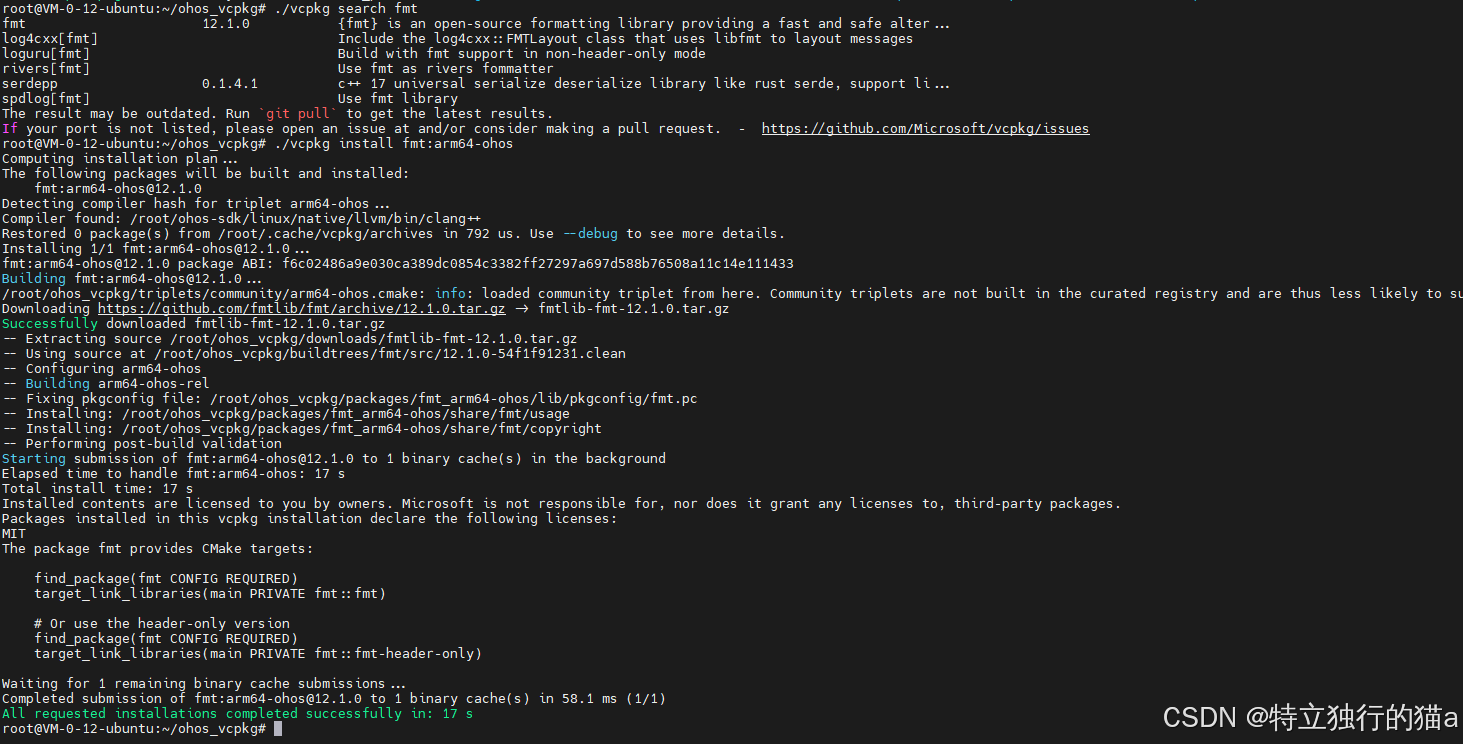 AI Visual Insight: The image shows the
 fmt installation result under the OHOS triplet, confirming that the dependency is a target artifact for arm64-ohos, not a host-machine version.
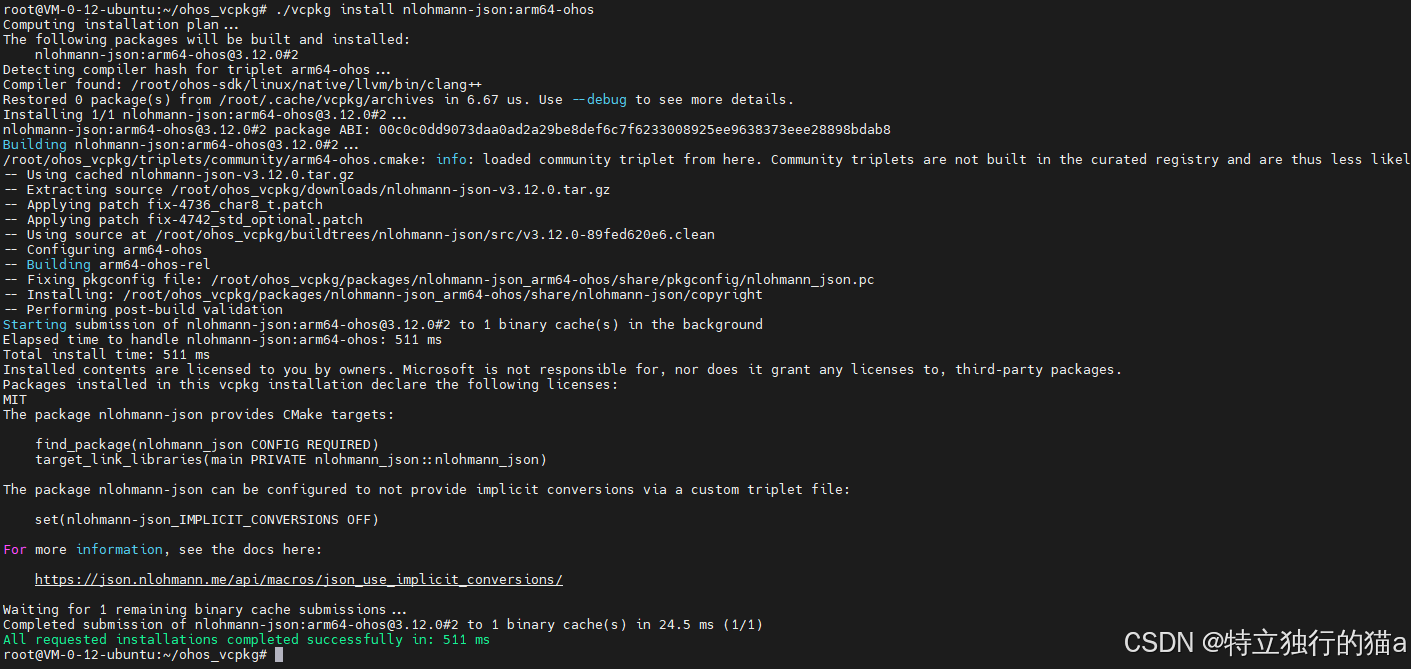 AI Visual Insight: The image shows
 libcurl and nlohmann-json successfully installed for the HarmonyOS target triplet, which means CMake can later integrate them explicitly through *_DIR package configuration paths.
curl header failures are fundamentally caused by cross-compilation macro mismatches
Typical errors are concentrated in curlbuild.h and curlrules.h, such as CURL_SIZEOF_LONG definition is missing. The root cause is that the curl header tree pulled internally by vcpkg-tool does not match the assumptions of the target architecture.
-DCMAKE_CXX_FLAGS="-I/root/ohos_vcpkg/packages/curl_arm64-ohos/include" # Prefer OHOS-built curl headersThis parameter overrides the internal headers through include precedence and avoids size macro conflicts in curlbuild.h.
Network download failures usually occur during the FetchContent stage
During configuration, tarballs for cmrc or libcurlheaders may fail because of network issues, TLS problems, or GitHub access restrictions. The best solution is to configure a proxy directly, followed by preloading source archives offline. Rewriting URLs to a mirror should be the last resort.
export http_proxy=http://<proxy-host>:<port>
export https_proxy=http://<proxy-host>:<port>  # Allow CMake/FetchContent to download through the proxy
These commands solve the problem of failing to fetch third-party source archives during configuration.
fmt version conflicts should be avoided by disabling the external dependency
If the build log contains both fmt::v11 and fmt::v12, along with errors such as formatter ambiguous, you can almost always conclude that the external fmt major version is too new. Do not patch the source by force in this case. The safest approach is to disable the external fmt dependency.
-DVCPKG_DEPENDENCY_EXTERNAL_FMT=OFF # Force the use of the source-compatible bundled fmtThis option makes vcpkg-tool download and statically link an internally compatible version of fmt.
Runtime libcurl issues matter more than link-time issues
Even if the build succeeds, vcpkg may still report that it cannot find libcurl.so.4 at startup. The reason is not simply that the file is missing. The program loads it dynamically at runtime with dlopen("libcurl.so.4"), and HarmonyOS may also enforce signature checks on loaded .so files.
readelf -d build/libcurl.so | grep -E "SONAME|NEEDED" # Inspect SONAME and the dependency chainThis command helps determine whether the library name matches what dlopen expects and whether it also depends on libssl, libcrypto, or libz.
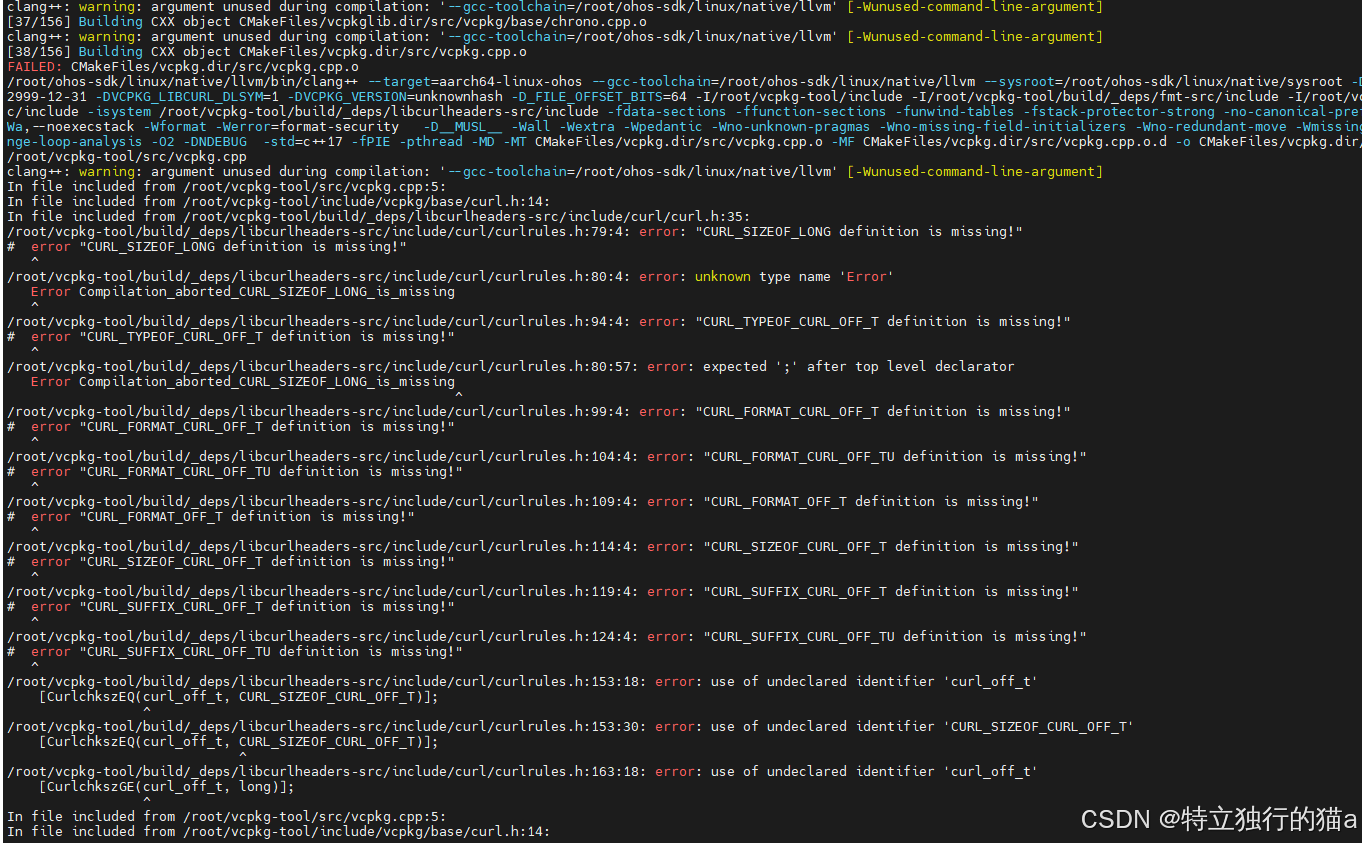 AI Visual Insight: The image shows a curl header-related compilation failure, highlighting a static assertion triggered by a mismatch between
 curlbuild.h and target-platform size macros.
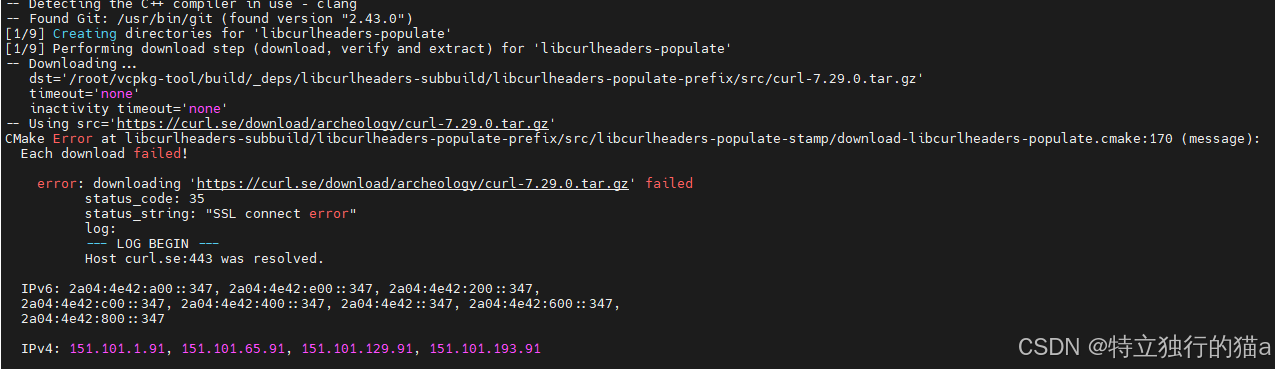 AI Visual Insight: The image shows CMake timing out or failing to fetch dependencies during the FetchContent stage, demonstrating that build stability depends not only on the source code itself but also heavily on external network access and caching strategy.
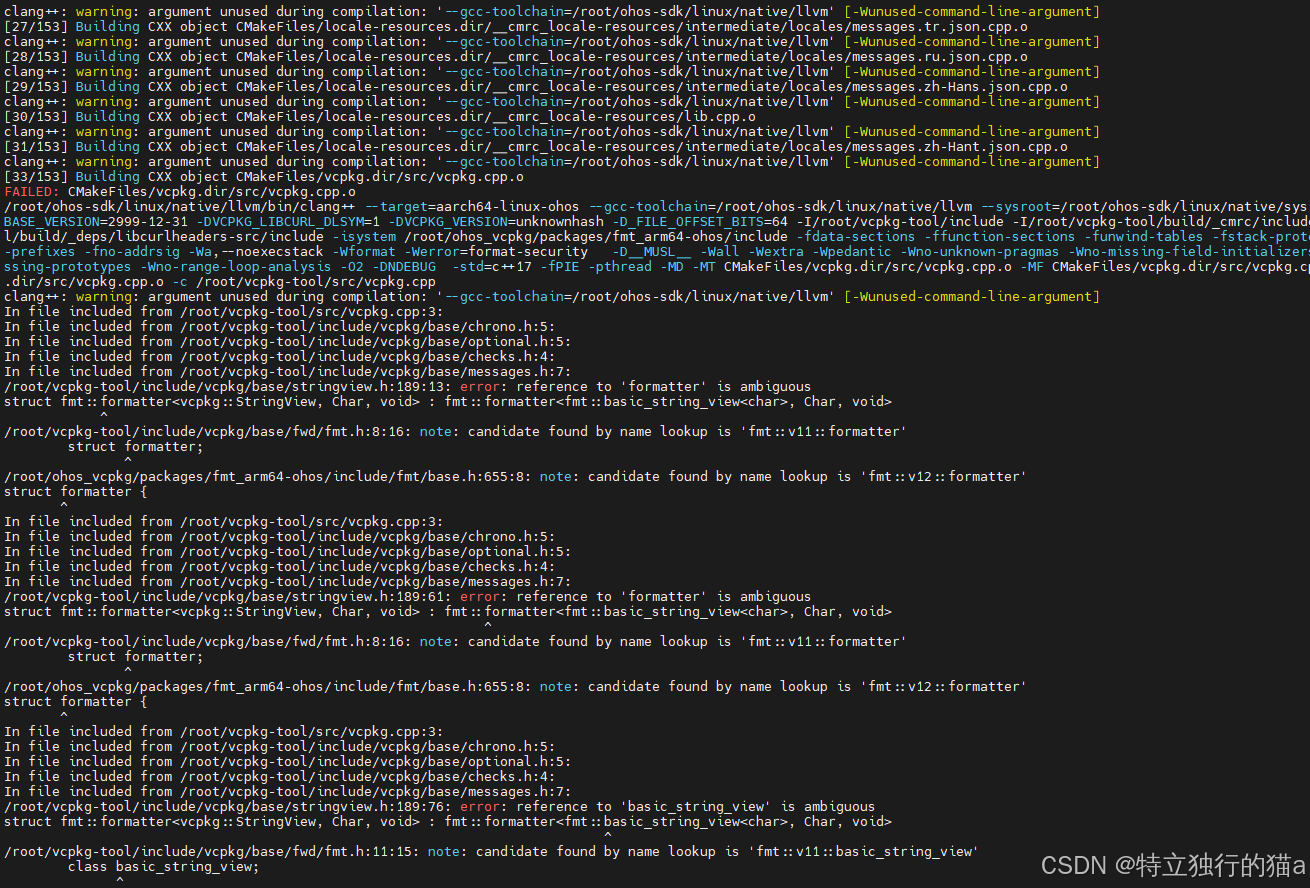 AI Visual Insight: The image shows a template ambiguity compilation error caused by multiple
 fmt symbol versions coexisting, which is a typical symptom of a mismatch between the external dependency major version and the version expected by the source code.
Shared library signing in HarmonyOS is a practical prerequisite for successful execution
Setting LD_LIBRARY_PATH alone may not be enough. You may also need to sign the core dependent libraries. Prioritize libcurl, libssl, and libcrypto. In some cases, issues with libz.so can be handled later.
cd build
for lib in libcurl.so libcurl.so.4 libssl.so.3 libcrypto.so.3; do
  binary-sign-tool sign -inFile "$lib" -outFile "$lib" -selfSign "1"  # Self-sign critical dependency libraries
 done
LD_LIBRARY_PATH="$(pwd)" ./vcpkg --version  # Run vcpkg with signed dependencies from the current directory
This script completes dependency signing and the final runtime verification, forming the key device-side closed loop.
A complete CMake configuration can serve as a stable starting point
The following parameters capture the core lessons from this article: integrate the OHOS toolchain correctly, enable external curl/json, disable external fmt, and prioritize the OHOS-specific curl headers.
cd ~/vcpkg-tool/
cmake -S . -B build -G Ninja \
  -DCMAKE_BUILD_TYPE=Release \
  -DBUILD_TESTING=OFF \
  -DCMAKE_TOOLCHAIN_FILE="$OHOS_SDK_ROOT/native/build/cmake/ohos.toolchain.cmake" \
  -DCMAKE_INSTALL_PREFIX=build/install \
  -DVCPKG_DEPENDENCY_EXTERNAL_FMT=OFF \
  -DVCPKG_DEPENDENCY_EXTERNAL_CURL=ON \
  -DVCPKG_DEPENDENCY_EXTERNAL_NLOHMANN_JSON=ON \
  -Dcurl_DIR="/root/ohos_vcpkg/packages/curl_arm64-ohos/share/curl" \
  -Dnlohmann_json_DIR="/root/ohos_vcpkg/packages/nlohmann-json_arm64-ohos/share/nlohmann_json" \
  -DCMAKE_CXX_FLAGS="-I/root/ohos_vcpkg/packages/curl_arm64-ohos/include"
cmake --build build  # Run the actual build
This command set provides a minimal stable template from a clean build to final artifact generation.
Artifact self-checking can quickly tell you whether device deployment is worthwhile
Before copying files to a HarmonyOS PC, check the ELF architecture, dynamic dependencies, and code-signing sections first. If these indicators are correct, the cost of real-device debugging drops significantly.
file ohos_vcpkg/vcpkg
readelf -d ohos_vcpkg/vcpkg | grep NEEDED
readelf -S ohos_vcpkg/libcurl.so.4 | grep -i codesign
LD_LIBRARY_PATH=ohos_vcpkg ohos_vcpkg/vcpkg --version  # Perform one final local smoke test
These commands confirm whether the artifact architecture, dependency chain, and runtime conditions are basically complete.
FAQ
Q1: Why does vcpkg still report that libcurl.so.4 is missing even though the file exists?
A: There are three common causes: the filename does not match what dlopen expects, transitive dependencies such as libssl.so.3 are missing, or the shared library does not satisfy HarmonyOS signing or security policies. Start by checking SONAME and NEEDED with readelf -d.
Q2: Why use an external package for curl but disable the external package for fmt?
A: The key issue for curl is consistency between target-platform macros and headers, so an external OHOS package is more reliable. The key issue for fmt is matching the source-level API version, so the bundled version is less likely to trigger conflicts between fmt::v11 and fmt::v12.
Q3: How can I reduce validation cost if I do not have a real HarmonyOS PC device?
A: You can first validate the ELF artifact, dependency layout, and basic runtime assumptions in a Linux container or simulated environment, then move to a real device for signing and a --version smoke test. This splits the problem into two layers: “the build is correct” and “the system policy is compatible.”
Core summary
This article systematically reconstructs the practical process of porting vcpkg-tool to HarmonyOS PC. It covers the OHOS SDK, CMake/Ninja cross-compilation, handling curl/fmt/json dependencies, FetchContent download failures, libcurl dynamic loading, and code-signing validation, and it provides reusable build and verification commands that you can apply directly.