OpenClaw Skills extend AI agents with standardized
SKILL.mdfiles, solving the maintenance challenges of complex prompts, unmanaged dependencies, and difficult skill distribution. This guide focuses on three core tracks: skill architecture, configuration injection, and debugging and testing. Keywords: OpenClaw, SKILL.md, Skills.
The technical specification snapshot provides a quick overview
| Parameter | Details |
|---|---|
| Primary Languages | Markdown, YAML, Python, JSON5 |
| Runtime Protocol / Interface | AgentSkills-compatible specification, CLI dispatch |
| Article Topic | Advanced OpenClaw Skills development |
| Typical Dependencies | python3, bandit, Jinja2, ffmpeg |
| Configuration File | ~/.openclaw/openclaw.json |
| Skill Entry Point | SKILL.md |
OpenClaw Skills deliver more than prompt reuse
The core of OpenClaw Skills is not about making prompts larger. It is about separating capability definition from capability implementation. Developers use SKILL.md to define trigger conditions, execution steps, dependencies, and configuration, while scripts, templates, and external tools handle the actual runtime logic.
This design solves three common pain points: complex tasks are hard to reuse, external dependencies are hard to declare, and collaborative maintenance is hard to scale. For long-chain tasks such as code review, browser automation, and report generation, Skills are more stable than a single prompt.
The core value of Skills lies in composability and governance
OpenClaw Skills are compatible with the AgentSkills specification, which makes them naturally portable across environments. A skill can be developed, tested, packaged, and distributed independently. It can also be filtered by gating rules and enabled only when system conditions are satisfied.
SKILL.md acts as the control plane for a skill
SKILL.md consists of YAML frontmatter and a Markdown body. The frontmatter handles declarative configuration, while the body serves as the operational manual for the agent. You need both: one tells the model when to invoke the skill, and the other tells it how to invoke the skill.
---
name: code-reviewer
description: Intelligent code review skill
user-invocable: true
command-dispatch: tool
command-tool: code-reviewer
metadata: { "openclaw": { "requires": { "bins": ["python3"], "env": ["OPENAI_API_KEY"] }, "primaryEnv": "OPENAI_API_KEY" } }
---

## Trigger Conditions
- Enable when the user asks for code review
- Enable when the user asks for a quality report
This configuration defines the skill identity, invocation entry point, and runtime dependencies. Together, they form the minimum viable loop that OpenClaw needs to recognize a skill.
Frontmatter fields determine skill discoverability
name and description determine how a skill is searched and matched. user-invocable determines whether the skill is exposed to user commands. command-dispatch and command-tool determine whether the command is dispatched directly to the tool layer.
metadata.openclaw is the entry point for advanced capabilities. It declares binary dependencies, environment variables, configuration items, platform constraints, and installers. This section marks the difference between a production-ready skill and a demo-only skill.
High-quality body instructions must be executable by the model consistently
The body is not product copy. It is an execution manual. A good structure is: trigger conditions, disable conditions, steps, exception handling, and resource references. Avoid ambiguous phrasing.
## Usage Steps
1. First determine whether the user input is a file, a directory, or a Git change
2. Then read the scripts and templates under `{baseDir}`
3. Invoke the local analyzer to generate intermediate results
4. Output a Markdown or HTML report
This kind of structured procedure significantly reduces incorrect invocations and missed steps.
A multi-file skill architecture fits real-world projects better
Once a skill depends on templates, scripts, rule files, and test code, a single-file layout becomes hard to control. A better approach is to split the skill into five layers: entry point, libraries, templates, configuration, and tests.
my-skill/
├── SKILL.md
├── lib/
├── templates/
├── config/
└── tests/
This directory structure decouples documentation, implementation, and validation, making collaboration and version control much easier.
Dependency gating determines whether a skill can be loaded
OpenClaw supports dependency gating through bins, env, config, anyBins, and similar fields. At runtime, if a required tool is missing from the system PATH, or if an environment variable is not configured, the skill can be filtered out immediately so the model never sees an invalid capability.
metadata: { "openclaw": { "requires": { "bins": ["ffmpeg"], "env": ["MY_API_KEY"], "config": ["browser.enabled"] } } }This configuration expresses three prerequisites: the tool exists, the key exists, and the feature flag is enabled.
The skills configuration file manages runtime injection and overrides
OpenClaw centralizes Skills-related settings in ~/.openclaw/openclaw.json. It controls load directories and installation preferences, and it can also inject env, config, and apiKey values for individual skills.
{
  skills: {
    load: { extraDirs: ["~/Projects/my-skills"], watch: true },
    entries: {
      "code-reviewer": {
        enabled: true,
        env: { OPENAI_API_KEY: "sk-xxx" },
        config: { severity: "medium", maxFileSize: 1048576 }
      }
    }
  }
}
This configuration implements skill-level feature toggles, environment variable injection, and custom rule overrides.
Environment variable injection follows a non-overwrite policy
If a variable with the same name already exists in the system, OpenClaw does not overwrite it by default. This behavior prevents local debugging values from being replaced unexpectedly and reduces the risk of leaking sensitive data. primaryEnv is commonly used to map apiKey to the target variable name.
Debugging, testing, and logging are prerequisites for production use
As soon as a skill integrates external commands or network requests, debugging must move upstream in the development process. Enable CLI debugging, hot reload, and structured logging together so you can quickly identify load failures, missing dependencies, and execution errors.
openclaw gateway start --verbose
openclaw skills list
openclaw agent --message "Review src/main.py" --skill code-reviewer
These commands are used to inspect verbose logs, list skill status, and test a single skill directly.
Test code should cover format, dependencies, and execution results
from pathlib import Path

skill_md = Path("SKILL.md")
assert skill_md.exists(), "Missing core definition file"  # Verify that the skill entry file exists
content = skill_md.read_text(encoding="utf-8")
assert content.startswith("---"), "Missing frontmatter"  # Verify that the metadata header exists
This test first ensures that the skill can be parsed, then continues to validate dependencies and execution results. It can significantly shorten the troubleshooting path.
The code review example demonstrates the full skill workflow
The code-reviewer skill in the practical example covers input validation, file collection, AST analysis, security scanning, and report generation. The key is not the amount of code. The key is placing static analysis and AI reasoning into a unified workflow.
def analyze_path(self, path: str):
    path = Path(path)
    if not path.exists():
        raise FileNotFoundError(f"Path does not exist: {path}")  # Fail early to avoid empty execution
    files = self._collect_files(path)  # Collect files to analyze
    return self._merge_results([self._analyze_file(f) for f in files])  # Merge analysis results
This core logic reflects three principles of production code: input validation, separation of responsibilities, and unified aggregation.
The report generator demonstrates template-driven output
The reporting module uses Jinja2 to support Markdown, HTML, and JSON at the same time. This shows that Skills should focus not only on execution, but also on downstream result consumption. Markdown and HTML serve human readers, while JSON supports system integration. That is a more sustainable design.
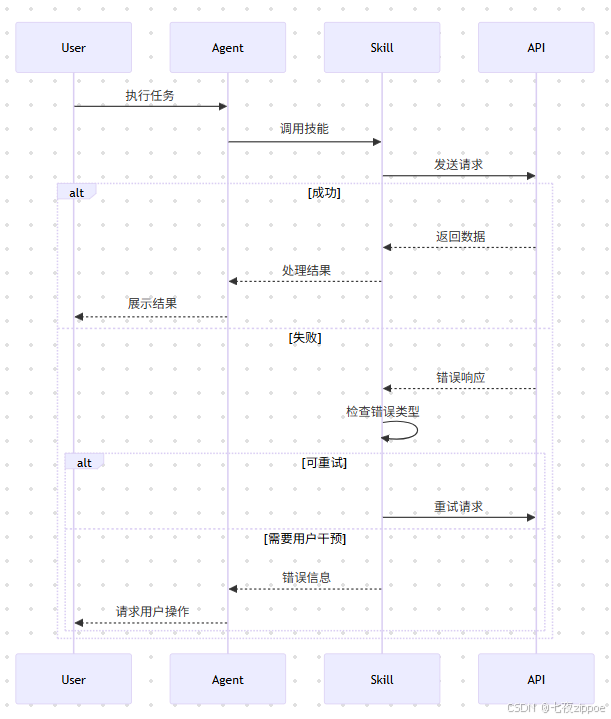 AI Visual Insight: This diagram illustrates a skill error handling and recovery workflow, emphasizing the full path from exception detection and error classification to retry strategy and fallback handling. For production skills, this means you should not simply return an error message. You should predefine timeout retries, alternative data sources, path validation, and resource fallback mechanisms so the agent can preserve a minimum viable capability even when dependencies fail.
The design principles for production-ready Skills are already clear
First, SKILL.md must be concise and precise, especially in its trigger conditions and boundary definitions. Second, declare dependencies explicitly; do not hide installation assumptions in the code. Third, externalize configuration to avoid hardcoding keys and thresholds. Fourth, put testing and logging first, or the skill will remain suitable only for demos rather than deployment.
Reference materials serve as direct paths for further reading
- OpenClaw Skills Official Documentation
- Creating Custom Skills
- Skills Configuration Reference
- AgentSkills Specification
The FAQ section answers common implementation questions
1. What is the fundamental difference between OpenClaw Skills and a standard prompt?
A standard prompt only describes intent. A Skill defines triggers, dependencies, configuration, and the execution path at the same time, which makes it suitable for complex tasks that require tool invocation and external resources.
2. Why is my skill not loading even though the definition looks correct?
Check whether the bins, env, and config declared in metadata.openclaw.requires are satisfied first. Then verify whether `entries.