UU Remote integrates TCP port mapping directly into its remote control channel, helping developers access internal databases, test environments, and NAS devices through a graphical interface. It solves the complexity of frp/ngrok setup and removes the need to provision a public server. Keywords: NAT traversal, port mapping, remote development.
Technical specifications at a glance
| Parameter | Details |
|---|---|
| Tool Name | NetEase UU Remote |
| Core Capability | Remote control + TCP port mapping |
| Controller Support | Windows |
| Protocol Support | TCP |
| Requires a Public Server | No |
| Cost | Free |
| Reference Popularity | 29 likes and 34 bookmarks in the original article |
| Key Dependencies | UU Remote client, an online relay device, network connectivity |
Developers really need low-friction internal network access
In remote development, the most common blocker is not the service itself, but the access path. Databases, test admin consoles, Nacos, Redis, and NAS services are often exposed only inside a private network. As a result, working from home, debugging while traveling, or giving cross-team demos can fail simply because the connection path is cut off.
Traditional solutions are not unusable, but their cost is distributed across every step. VPNs require approvals. frp requires a public server and configuration files. The free tier of ngrok is limited. SSH tunnels depend on the command line and session keep-alive. For most developers, the biggest pain point is not “I don’t know how,” but “It’s not worth building a full stack of infrastructure for a one-off debugging task.”
Typical use cases fall into four categories
- Remotely connect to MySQL, Redis, or PostgreSQL.
- Access a company test backend or Swagger page.
- Manage a home NAS and LAN services.
- Temporarily demo a local or internal service to a colleague or customer.
Local tool -> 127.0.0.1:local_port
           -> UU Remote tunnel
           -> target_address:target_port reachable by the relay device
The essence of this path is simple: remap a remotely reachable service into a service entry point on the local loopback address.
UU Remote port mapping is essentially a graphical TCP tunnel
Its core idea is not new: forward a remote service through a tunnel to a local port. What matters is that UU Remote turns this into a UI-driven workflow and directly reuses the existing remote control channel. That removes the need to deploy a server component, maintain a persistent process, or write configuration files.
The original article also makes the feature boundary clear: it currently targets Windows controllers and supports TCP only. That makes it a strong fit for development scenarios such as databases, admin pages, service registries, and cache services, but not for services that rely on UDP.
Its feature boundaries make it more of a developer connector
| Scenario | Mapping | Value |
|---|---|---|
| MySQL debugging | Remote 3306 -> Local 13306 | Connect directly with Navicat or DBeaver |
| Backend access | Remote 8080 -> Local 18080 | Open the test system in a local browser |
| Nacos management | Remote 8848 -> Local 18848 | View configuration and service registration remotely |
| Redis access | 192.168.1.100:6379 -> Local 16379 | Reach other hosts on the LAN through the relay device |
# Local connection example: the key is to access a local port
mysql -h 127.0.0.1 -P 13306 -u root -p
# 13306 is actually forwarded by the UU tunnel to remote port 3306
This means your business tools do not need to understand the remote network topology. They only need to behave as if they are connecting to a local service.
The operational workflow is compressed into four steps
First, prepare an online relay device. It can be an office computer or a home machine, but it must have the UU Remote client installed and must be able to access the target service address.
Second, sign in with the same account on the Windows controller, open the target device details, enter the Port Mapping panel, create a new rule, and fill in four fields: rule name, target service address, target service port, and local access port.
A minimal working example looks like this
rule_name: Company MySQL
target_host: 127.0.0.1      # Service hosted on the relay machine itself
target_port: 3306           # Remote MySQL port
local_port: 13306           # Locally exposed port
auto_enable: true           # Enable immediately after saving
This configuration means: map the MySQL service running on the relay machine itself to port 13306 on your local computer.
After the connection is established, the panel shows whether the mapping succeeded or failed. If a remote control video session already exists, port mapping reuses that existing channel. This is a critical design choice: it lowers connection setup cost and reduces instability caused by multiple concurrent channels.
The interface screenshots show a design centered on visualization and status feedback
 AI Visual Insight: This image shows the article hero section and tool introduction area. The key information centers on the “UU Remote” brand entry point and the official documentation link, emphasizing that the product offers a practical path to adoption rather than remaining a conceptual solution.
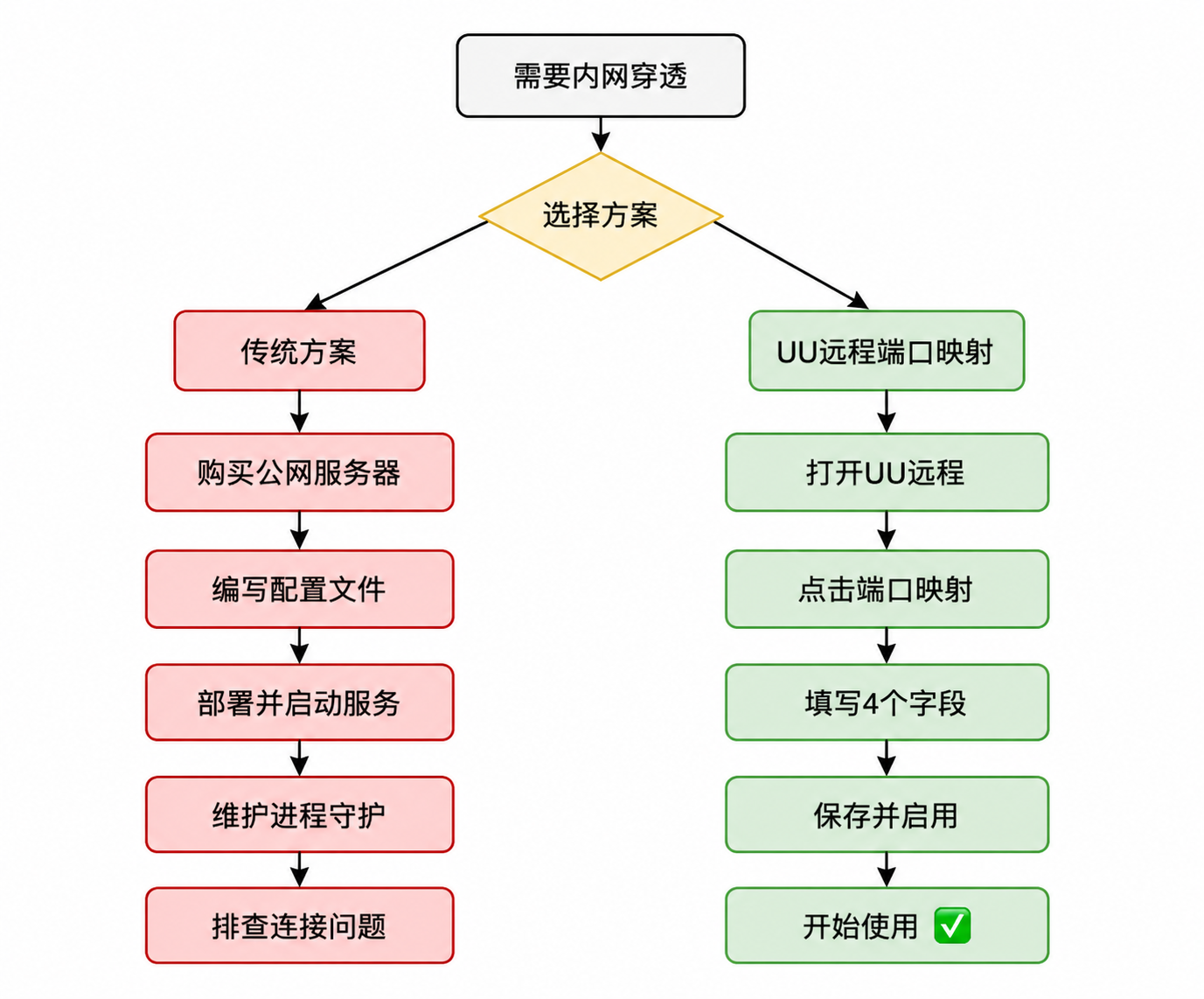
 AI Visual Insight: This image corresponds to the functional overview section after the summary. It highlights port mapping as a solution for accessing internal services and visually bridges the transition from pain-point analysis to solution introduction.
 AI Visual Insight: This image appears in the feature analysis section and is typically used to show the port mapping entry point or an explanatory page inside UU Remote, reinforcing that the capability is built in natively rather than added through an external plugin.
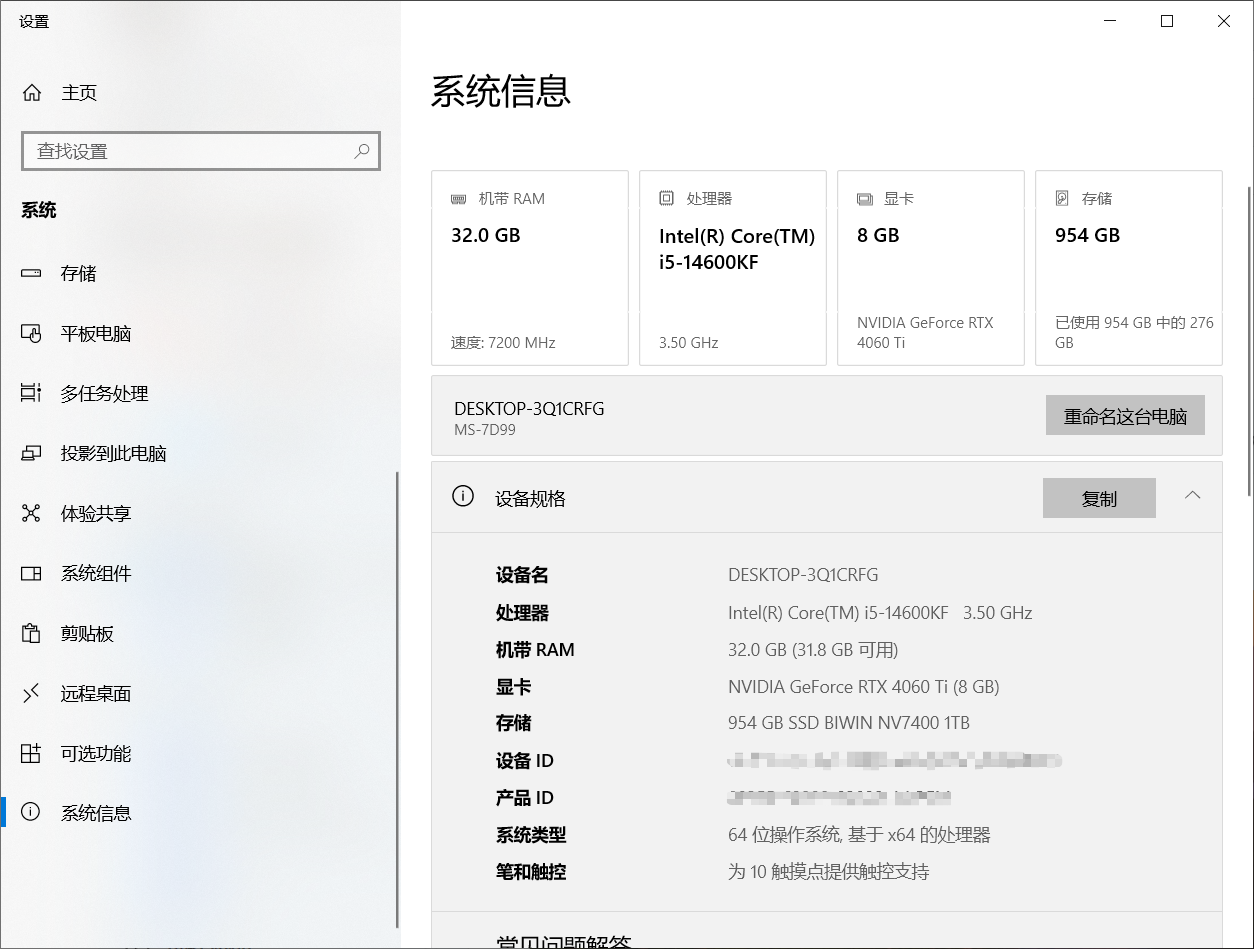 AI Visual Insight: This image shows the controller-side or device-list interface in a test environment. It helps readers understand the dual-end model of controller and relay device, as well as why device online status is a prerequisite for successful mapping.
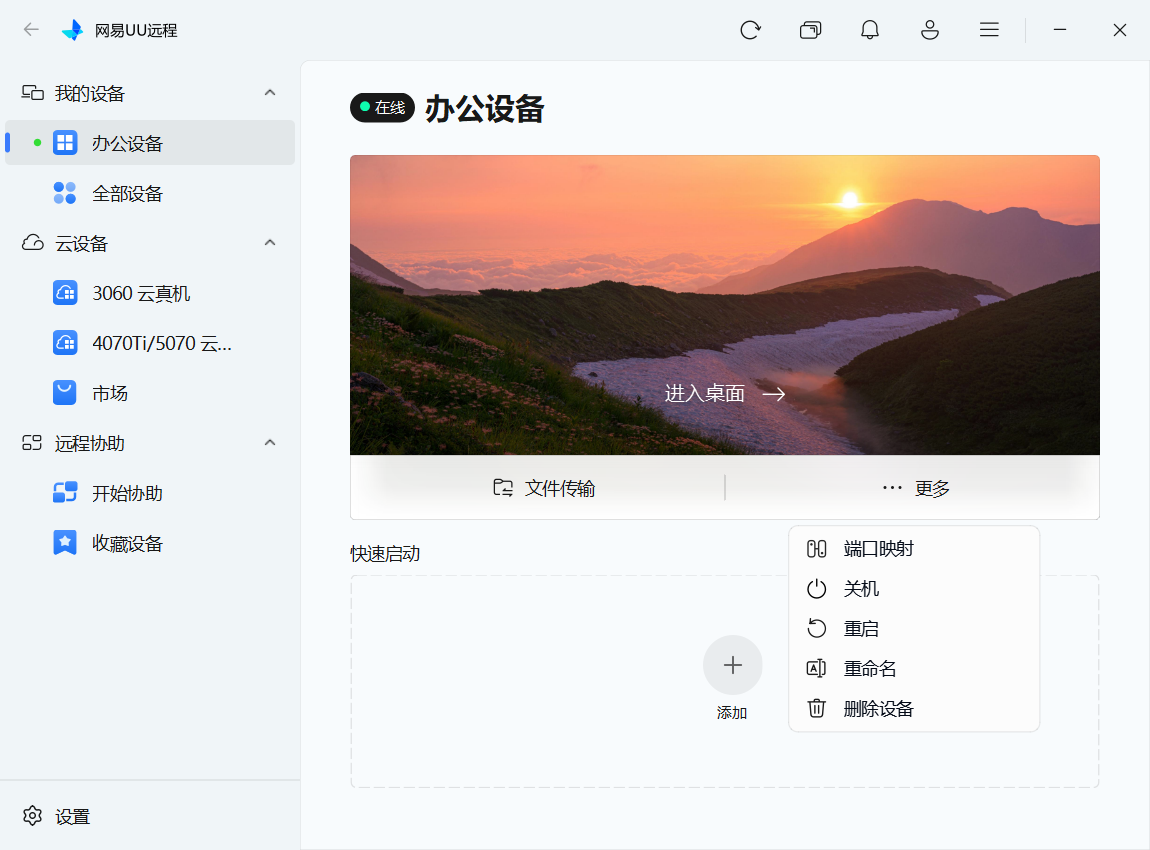 AI Visual Insight: This image shows where to open the port mapping panel. It reflects how the feature is embedded into the device details workflow, indicating that the target users are developers with existing remote access needs rather than pure network administrators.
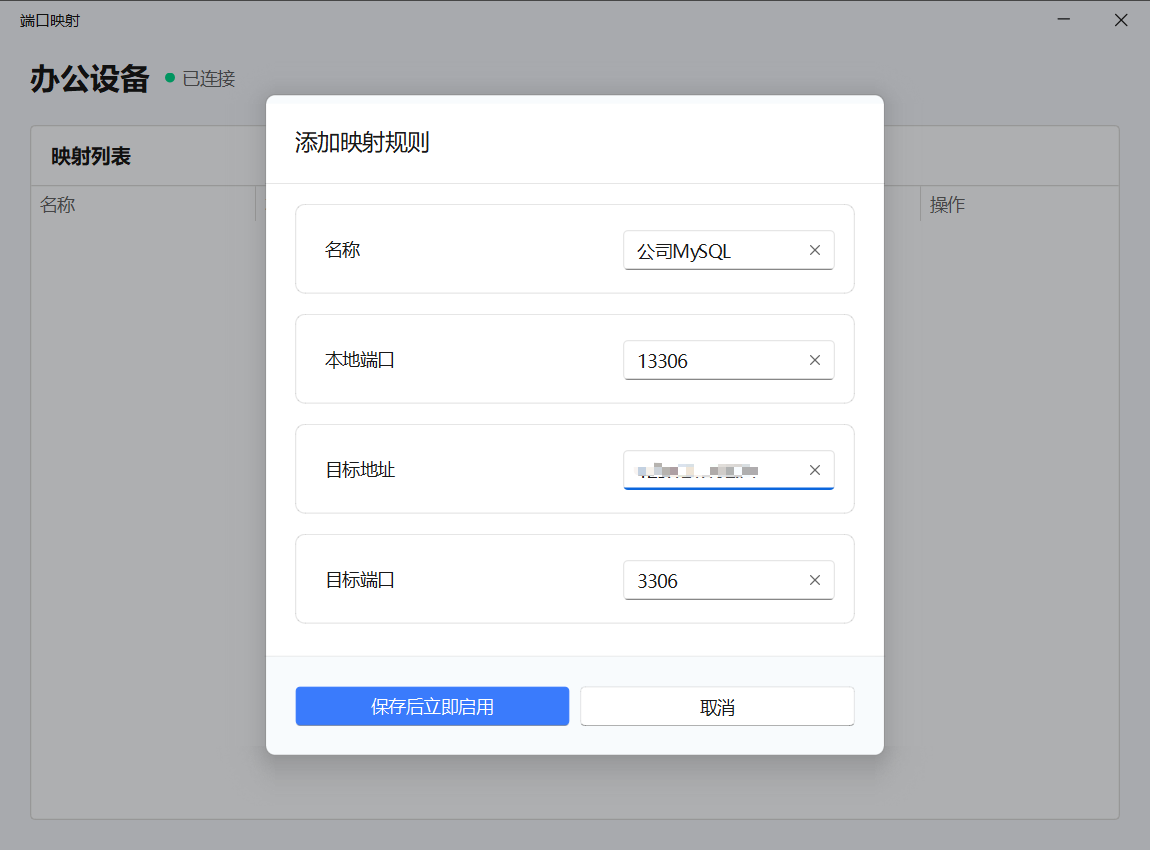 AI Visual Insight: This image is likely the new mapping rule interface. It highlights four key fields: rule name, target address, target port, and local port. The interface clearly aims to lower the configuration barrier.
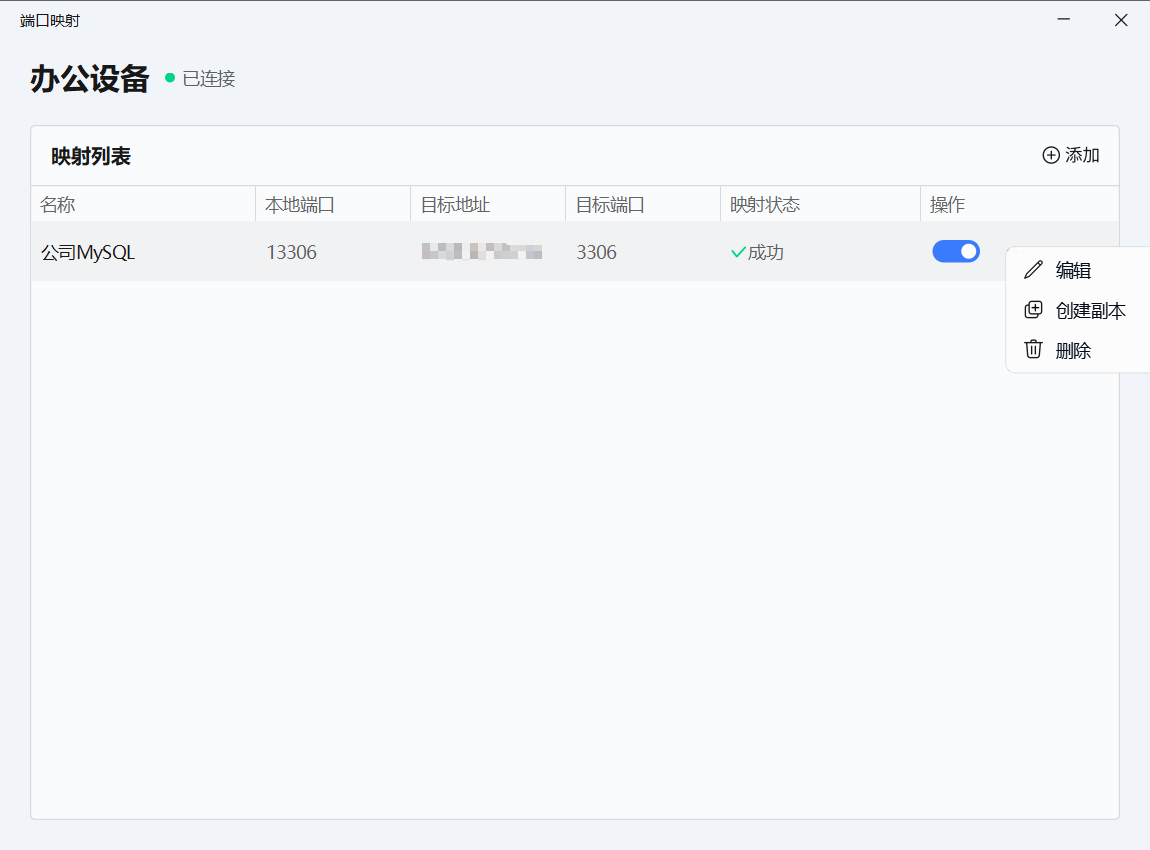 AI Visual Insight: This image shows the status page after a connection is established. From a technical perspective, it indicates that the mapping depends on an active session and uses status indicators to tell the user whether the path is ready.
 AI Visual Insight: This image explains rule status and start/stop controls, reflecting the ability to manage multiple rules in parallel. That makes it suitable for simultaneously mapping databases, caches, and backend pages.
Its difference from frp and ngrok is engineering overhead, not tunnel mechanics
At the protocol level, UU Remote port mapping does not change the nature of NAT traversal. The real difference is that it packages the networking and operations burden—work that developers usually carry themselves—into the product. As a result, the selection standard shifts from raw performance alone to a more practical question: is it worth maintaining an entire connection stack for this specific need?
The comparison leads to a clear conclusion
| Dimension | UU Remote Port Mapping | frp | ngrok |
|---|---|---|---|
| Deployment Cost | Very low | High | Medium |
| Server Requirement | None | Required | None |
| Configuration Method | Graphical UI | Configuration file | Command line |
| Temporary Debugging Efficiency | High | Medium | Medium |
| Controllability | Medium | High | Medium |
| Learning Curve | Low | High | Medium |
def choose_tool(need_server, need_ui, need_custom_protocol):
    if need_ui and not need_server:
        return "UU Remote Port Mapping"  # Best for zero-config, fast usability
    if need_custom_protocol:
        return "frp"                     # Better when you need stronger protocol and deployment control
    return "ngrok"                       # Good for quick demos, but the free tier is usually limited
This logic shows that UU Remote is a strong fit for developers who debug frequently and want minimal operational overhead, while frp better serves engineering teams that want full control.
You still need to respect several clear constraints
First, it supports TCP only, so do not treat it as a full-protocol tunneling platform. Second, the local port must be unique, or the rule fails immediately. Third, the relay device must actually be able to reach the target address. If the relay machine cannot access the LAN target, the mapping cannot succeed either.
Fourth, when the connection is interrupted, the local port becomes unavailable. That means it works best as an on-demand development path rather than as a long-term public service exposure solution.
A better rule design strategy improves long-term maintainability
- Use the naming format
project-service-port, such aserp-mysql-3306. - Plan local ports with a simple pattern such as
1 + remote_port, for example3306 -> 13306. - Disable the rule when debugging ends to avoid long-term port occupation.
FAQ
Q1: Is UU Remote port mapping a good replacement for frp?
A: If your goal is remote development, database debugging, backend access, and temporary integration work—and you do not want to provision a public server—it can effectively replace frp. If you need multi-protocol support, custom routing, or long-term public exposure, frp is still more flexible.
Q2: Why does retrying still fail after a mapping failure?
A: Check three things first: whether the local port is already in use, whether the relay device is online, and whether a real TCP service is actually listening on the target address and target port.
Q3: Can it access other machines on the LAN where the relay device is located?
A: Yes. As long as the relay device can access that internal host—for example, 192.168.1.100:6379—you can reach it through the locally mapped port.
Core summary
This article reconstructs and analyzes the port mapping capability in UU Remote, focusing on real developer needs for remote access to databases, test environments, and NAS services. It compares the solution with traditional options such as frp and ngrok, and organizes the working model, use cases, constraints, hands-on workflow, and tool selection guidance into a practical decision framework.