fluttertoast is a widely used message prompt library for Flutter and now includes an OpenHarmony-compatible version. It provides both MethodChannel-based native Toast and Overlay-based FToast, helping solve common cross-platform issues such as inconsistent messaging capabilities, limited styling, and difficult queue management. Keywords: Flutter, OpenHarmony, fluttertoast
Technical specification snapshot
| Parameter | Details |
|---|---|
| Language | Dart / Flutter |
| Platform | OpenHarmony 6.0, Android, iOS, Web |
| Flutter Version | 3.27.5 |
| Plugin Version | fluttertoast 8.2.8 (OpenHarmony-compatible edition) |
| License | Not explicitly stated in the source; page copyright is CC BY-SA 4.0 |
| Star Count | Not provided in the source material |
| Core Dependencies | fluttertoast, MaterialApp, Overlay, MethodChannel |
fluttertoast on OpenHarmony already provides a practical dual-channel messaging model
The value of fluttertoast is not simply that it can display a message. Its real strength is that it unifies the feedback model across platforms. Developers can use native Toast for lightweight prompts or FToast to build customizable cards, icon notifications, and queued messages.
This dual mode is especially important on OpenHarmony. Native capabilities work well for low-cost integration, while FToast compensates for native limitations in styling, interaction, and layout. That makes it a better fit for the UI feedback systems of medium and large applications.
The core capabilities fall into two layers: native prompts and custom prompts
| Capability | Native Toast | FToast |
|---|---|---|
| Implementation | MethodChannel | Overlay |
| Custom Widget Support | No | Yes |
| Multiple Message Queue | Basic support | Full support |
| Position Control | Yes | Yes |
| Best For | Success/failure text feedback | Notification cards, workflow prompts |
dependencies:
  flutter:
    sdk: flutter
  fluttertoast:
    git:
      url: https://atomgit.com/openharmony-sig/flutter_fluttertoast.git
      ref: br_8.2.8_ohos # Specify the OpenHarmony-compatible branch
This configuration pulls the fluttertoast plugin from the OpenHarmony-compatible repository.
flutter pub get # Fetch dependencies and generate the lock fileRun this command in the project root to install dependencies.
The core API already covers most message feedback scenarios
Fluttertoast.showToast() is the most direct entry point. It works well for plain text messages and supports basic parameters such as duration, position, background color, and font size. On OpenHarmony, you can treat it as the native message bridge interface.
By contrast, FToast is more application-layer oriented. It relies on Overlay injection into the widget tree, so it can render complex widgets and includes a built-in queue mechanism to prevent multiple prompts from overlapping.
Native Toast works best for low-cost, fast feedback
Fluttertoast.showToast(
  msg: '保存成功', // Prompt message
  toastLength: Toast.LENGTH_SHORT, // Control display duration
  gravity: ToastGravity.BOTTOM, // Control display position
  backgroundColor: Colors.black, // Background color
  textColor: Colors.white, // Text color
  fontSize: 16.0, // Font size
);
This code displays a short message at the bottom and is well suited for action confirmation feedback.
FToast works best for branded notification components
late FToast fToast;

@override
void initState() {
  super.initState();
  fToast = FToast();
  fToast.init(context); // Initialize context and bind to Overlay
}
This code initializes FToast so it can inject a custom prompt layer into the current page.
Correctly configuring MaterialApp is a prerequisite for FToast to work
Many developers see Overlay is null during OpenHarmony adaptation. In most cases, the plugin is not broken. The root cause is that the application entry point does not include FToastBuilder(). FToast depends on this builder to inject an Overlay container into the app tree.
MaterialApp(
  home: const MyHomePage(),
  builder: FToastBuilder(), // Inject the Toast Overlay
)
This code enables Overlay support for FToast across the entire application.
The complete example demonstrates native prompts, custom cards, and queue behavior
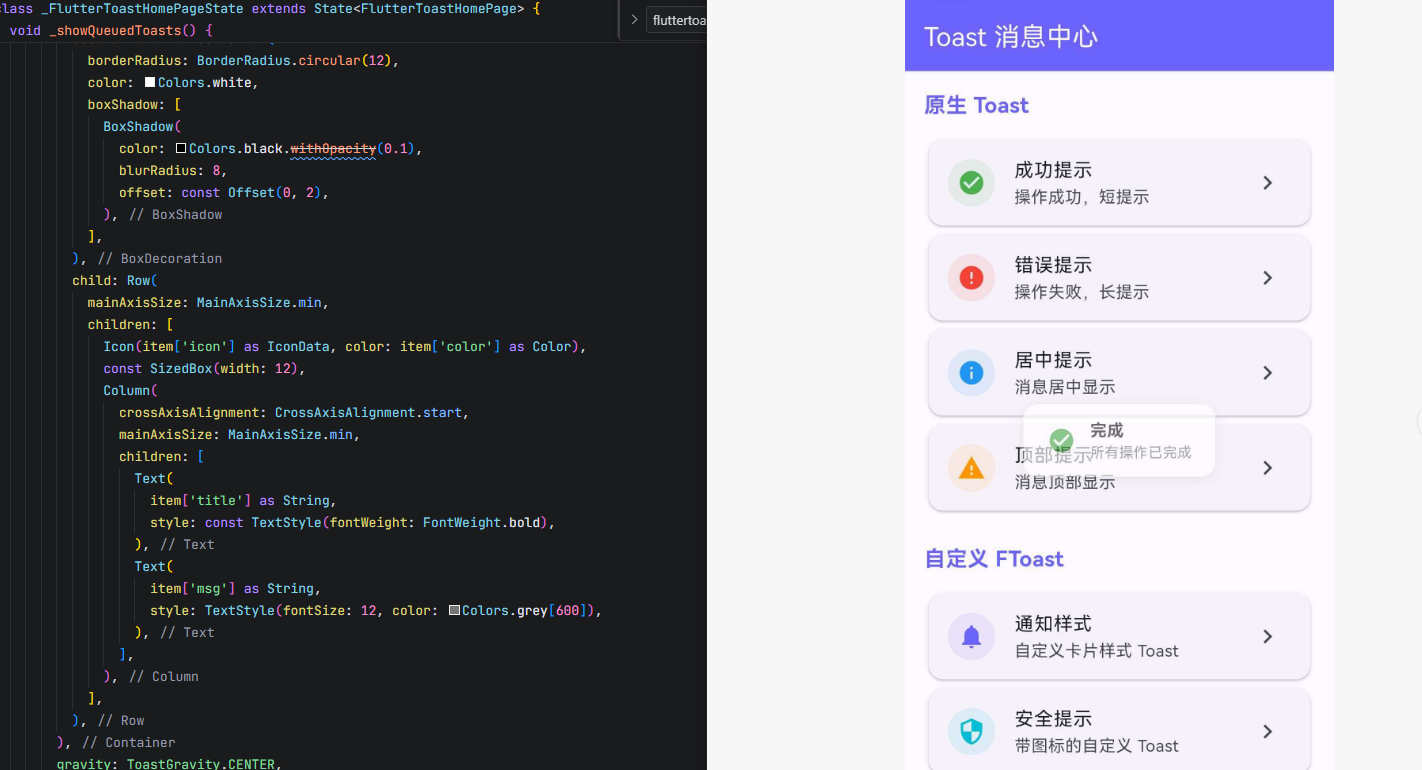 AI Visual Insight: The image shows a Toast demo page built in a Material 3 style. The interface organizes native Toast, custom FToast, and queue demonstrations into separate sections. From the button layout, you can see that the example covers success messages, error messages, top-aligned prompts, centered prompts, and icon-based card notifications. This indicates that the plugin supports not only basic text feedback but also more advanced notification interaction flows.
_fToast.showToast(
  child: Container(
    padding: const EdgeInsets.symmetric(horizontal: 20, vertical: 12),
    child: const Text('您有一条新的系统通知'), // Custom prompt content
  ),
  gravity: ToastGravity.TOP, // Specify display position
  toastDuration: const Duration(seconds: 3), // Control duration
  isDismissable: true, // Allow tap to dismiss
);
This code displays a custom Toast that users can dismiss by tapping.
The key OpenHarmony adaptation differences are mostly about capability boundaries, not invocation style
Based on the source material, the OpenHarmony adaptation of fluttertoast already covers native Toast, FToast, custom fonts, position control, and queue management. In other words, most Flutter-side invocation patterns do not require rewriting.
What you really need to watch is the boundary of each capability. Native Toast still fits only text prompts and is not suitable for complex layouts. Web-specific properties such as gradient backgrounds have no practical meaning on OpenHarmony, so you should avoid mixing platform semantics.
The selection strategy should depend on interaction complexity, not simply on whether the app is cross-platform
- For simple result feedback: prefer
Fluttertoast.showToast - For icons, titles, and action-oriented styling: prefer
FToast - For sequential broadcasting of multiple states: use the
FToastqueue - For immediately clearing active prompts: call the cancel or queue removal methods
Fluttertoast.cancel(); // Cancel the current native Toast
_fToast.removeCustomToast(); // Remove the current custom Toast immediately
_fToast.removeQueuedCustomToasts(); // Clear the pending queue
This code provides a unified way to clean up both active and queued prompts.
Most common failures can be diagnosed through initialization and context checks
The two most common issues are Context is null and Overlay is null. The former usually means init(context) was called at the wrong time or with an invalid context. The latter means MaterialApp.builder was not wired to FToastBuilder().
In addition, if your business flow triggers multiple Toasts in rapid succession, first decide whether you should clear the queue before showing new prompts. That helps prevent old messages from interfering with the current user flow.
FAQ
1. Why does FToast not display on OpenHarmony?
Answer: Usually because fToast.init(context) was not called in initState, or because MaterialApp was not configured with builder: FToastBuilder(), so the Overlay could not be injected.
2. How should I choose between native Toast and FToast in a project?
Answer: Use native Toast for plain-text, low-interruption prompts. Use FToast when you need card-style UI, icons, tap-to-dismiss behavior, or queued display. FToast is better suited for admin consoles and complex business applications.
3. How can I prevent multiple prompts from appearing at the same time and overlapping?
Answer: Use FToast’s queue mechanism to display prompts sequentially, and call removeQueuedCustomToasts() before starting a new flow to clear stale tasks. This keeps the notification flow aligned with the business state.
The conclusion is that fluttertoast is already a production-ready messaging solution on OpenHarmony
If your goal is to get stable prompt capability quickly, native Toast is enough. If your goal is to build a unified message feedback hub, FToast should be your primary solution. Used together, they let you balance performance, user experience, and maintainability on OpenHarmony.
Core Summary: This article systematically reconstructs the fluttertoast adaptation approach for the OpenHarmony platform, covering dependency integration, core APIs, the differences between native Toast and FToast, queue mechanisms, a complete example, and common issues. It helps Flutter developers quickly build stable and customizable message feedback capabilities.