This article focuses on choosing between KMP and Flutter for cross-platform development: KMP is best for sharing business logic while preserving native UI, whereas Flutter is best for delivering a unified multi-platform interface from a single codebase. The core challenge is balancing performance, delivery speed, and team capabilities. Keywords: KMP, Flutter, cross-platform architecture.
Technical Specifications at a Glance
| Item | KMP | Flutter |
|---|---|---|
| Primary language | Kotlin | Dart |
| Sharing scope | Business logic, data layer, partial platform adaptation | UI, logic, state management |
| UI rendering | Native controls | Widgets + Skia |
| Typical protocols / communication | HTTP, REST, native platform bridging | HTTP, Method Channel, plugin system |
| Core ecosystem | JetBrains / Kotlin ecosystem | Google / Flutter ecosystem |
| GitHub stars | Kotlin repository: about 50K+ | Flutter repository: about 160K+ |
| Core dependencies | Gradle, Kotlin Multiplatform, Xcode | Flutter SDK, Dart, Android Studio / Xcode |
The Fundamental Difference Between KMP and Flutter Lies in the Sharing Boundary
KMP’s core value is not “write one UI and run it everywhere.” Instead, it extracts stable logic such as networking, caching, validation, and domain models into a shared layer, while Android and iOS each retain their native presentation. This makes KMP especially suitable for incremental reuse in teams that already have native mobile stacks.
Flutter, by contrast, unifies both UI and logic and achieves consistent rendering through its custom rendering engine. It behaves more like a complete application framework whose goal is to ship a consistent experience faster. It is especially well suited for MVPs, campaign pages, e-commerce apps, and content-driven products.
A Single Table Can Drive the First-Round Decision
| Focus Area | Better Fit for KMP | Better Fit for Flutter |
|---|---|---|
| Existing native projects | Yes | Usually not |
| Strong native experience requirements | Yes | Usually not |
| Team lacks iOS / Android native expertise | No | Yes |
| Need unified UI and high delivery speed | No | Yes |
| Heavy reliance on native SDKs | Yes | Depends on plugin maturity |
The purpose of this table is to quickly eliminate mismatched options before moving into detailed engineering evaluation.
A Login Example Clearly Exposes the Two Architectural Approaches
For the same requirement—validating an email and password—KMP places the validation logic in a shared module, while the UI remains platform-specific and is implemented separately with Android XML / Compose and iOS SwiftUI / UIKit. Flutter, on the other hand, writes the form, validation, and interaction entirely in a single Dart codebase.
KMP Shared Logic Works Best for Stable, Reusable Rules
class LoginService {
    fun validate(email: String, password: String): Boolean {
        val emailOk = email.contains("@") && email.length > 5 // Validate the basic email format
        val passwordOk = password.length >= 6 // Validate the minimum password length
        return emailOk && passwordOk // Return the unified validation result
    }
}
The purpose of this code is to turn login validation rules into shared logic that can be reused by both Android and iOS.
KMP’s strength is that rules like these can be reused over time and naturally extended into common layers such as repositories, API clients, and database access. The downside is equally clear: you still need to maintain two separate front-end UI projects.
Flutter Is Better for Delivering Pages and Logic in One Pass
bool validate(String email, String password) {
  final emailOk = email.contains("@"); // Validate whether the email contains @
  final passwordOk = password.length >= 6; // Validate the password length
  return emailOk && passwordOk; // Return whether the form is valid
}
The purpose of this code is to complete form validation entirely in the Dart layer, making it easy to bind directly to the same cross-platform UI.
Flutter’s key benefit is not that “the code is shorter,” but that pages, state, interaction, and testing are more centralized, which lowers collaboration overhead. The tradeoff is that once you need complex native capabilities, you may still have to rely on platform channels and plugin integration.
Environment Setup Complexity Directly Affects Real Team Costs
KMP’s main barrier is not Kotlin syntax, but coordination across multiple toolchains. Android Studio, Gradle, Xcode, CocoaPods, and Swift Package Manager may all participate in the build, and the iOS framework output pipeline is especially likely to block beginners.
Flutter offers a shorter startup path. After installing the SDK, running flutter doctor, and creating a project, you can see results quickly. That is one reason Flutter spreads faster in teaching scenarios, prototyping, and smaller teams.
Minimal Startup Commands for Both Approaches
# KMP: Initialize a multiplatform project
./gradlew init --type kotlin-multiplatform-application

# Flutter: Create a cross-platform app
flutter create login_app
cd login_app
flutter run
The purpose of this code is to show the minimal startup path for KMP and Flutter so you can quickly compare their onboarding difficulty.
The Decision Flowchart Reveals the Typical Selection Path
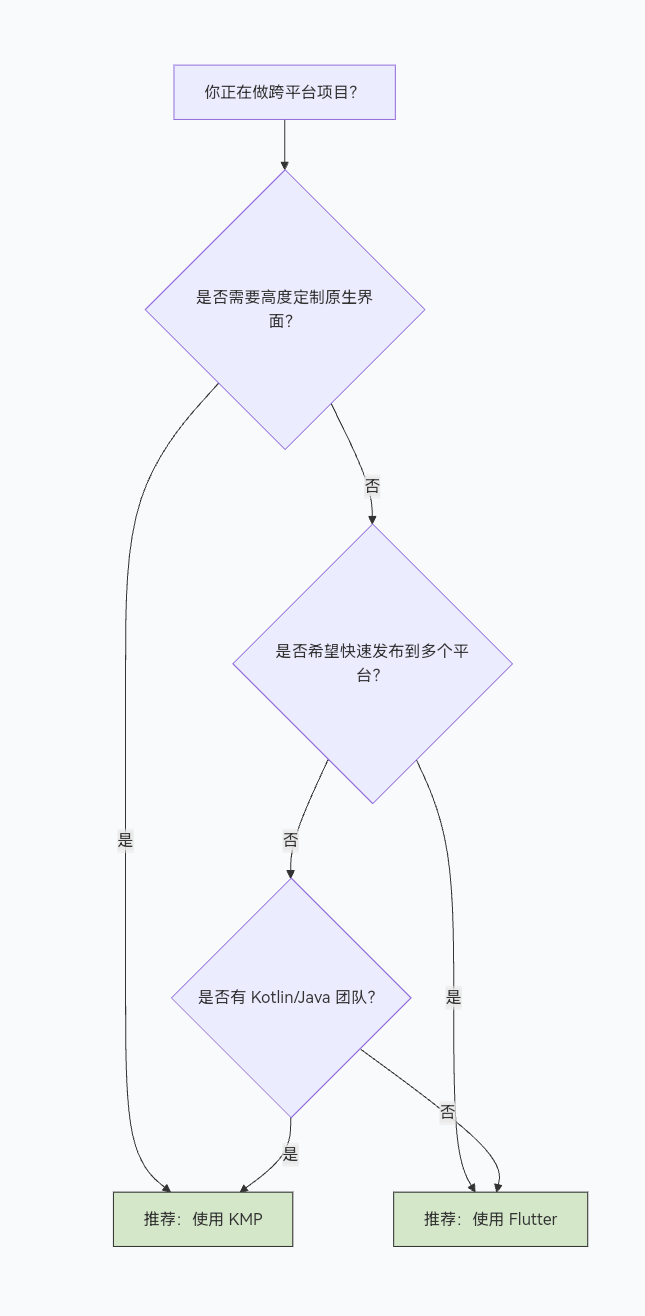
AI Visual Insight: This diagram presents a branch-based decision flow for cross-platform technology selection. The key evaluation axes include whether you prioritize native UI, whether you need a unified interface, whether delivery speed is critical, and whether the application depends on high-performance native capabilities. In practice, the chart reflects two architectural routes: one is the KMP model, which preserves the platform rendering layer while sharing the business layer; the other is the Flutter model, which unifies rendering and state management. It works well as a first-pass filtering framework during technical design reviews.
The value of this diagram is not the conclusion alone, but that it turns abstract discussion into executable judgment: if you already have an Android product and want to add iOS, KMP is usually the safer choice; if you need to validate a new business idea quickly, Flutter is more direct.
Practical Recommendations by Business Scenario
| Scenario | Recommended Option | Reason |
|---|---|---|
| Incremental cross-platform expansion for a large native app | KMP | Preserves the native architecture and supports gradual migration |
| MVP for a startup product | Flutter | Unifies UI and logic for faster delivery |
| Heavy integration with device capabilities | KMP | Native API integration is more natural |
| E-commerce, education, and content apps | Flutter | Rich UI components and high iteration speed |
| Extreme performance and platform consistency requirements | KMP | Native rendering provides a higher performance ceiling |
Final Technology Selection Should Be Based on Organizational Capability, Not Isolated Metrics
If your team already has strong Android and iOS native expertise and wants to maintain a high-quality platform experience over time, KMP’s value increases as the business grows. It is better understood as a “reuse engine” than as a “unified front end.”
If your team cares more about speed, design consistency, and reducing staffing requirements, Flutter will often help you produce a shippable product faster. Its real strength is the completeness of its engineering loop, especially during the 0-to-1 phase of a product.
One Practical Conclusion
- If you want to share business logic while preserving native UX, choose KMP first.
- If you want to unify UI and ship across platforms quickly, choose Flutter first.
- If you already have complex native assets, do not rewrite every interface solely for the sake of going cross-platform.
FAQ
Is KMP suitable for building a new project from scratch?
Yes, but only if the team already has Android and iOS native development capabilities. Otherwise, the benefits of shared logic may be offset by the cost of building and maintaining two UI layers.
Is Flutter always faster to develop with than KMP?
In most new projects, yes. Because UI, state, and interaction all live in one codebase, development is usually faster. However, when the project depends on complex native SDKs, that speed advantage can be reduced by plugin integration work.
Can KMP and Flutter be used together?
Yes. A common approach is to use KMP for the shared data or business layer and Flutter for isolated modules in specific scenarios. However, a mixed architecture requires stronger engineering governance.
Core Summary: Using a login example, this article compares Kotlin Multiplatform and Flutter across code-sharing scope, rendering model, performance, team learning curve, and environment setup complexity, then provides clear selection guidance for native teams, startup teams, and high-performance scenarios.