Pinecone is a managed vector database built for AI applications. Its core strengths are high-performance similarity search, metadata filtering, and elastic scalability, helping solve common RAG challenges such as complex index management, high scaling costs, and unstable retrieval quality. Keywords: Pinecone, LangChain, Vector Database.
Technical Specification Snapshot
| Parameter | Description |
|---|---|
| Core Language | Python |
| Access Protocols | REST API / Python SDK |
| Typical Use Cases | RAG, Semantic Search, Recommendation Systems, Agent Memory |
| Deployment Models | Serverless / Pod-based |
| Similarity Metrics | cosine / euclidean / dotproduct |
| Popularity Reference | 5.1k views, 82 likes, 45 bookmarks |
| Core Dependencies | pinecone-client, langchain-pinecone, langchain-google-genai |
 AI Visual Insight: This animation introduces Pinecone and highlights its role as a cloud-native vector database for AI retrieval workloads. It typically maps to the core workflow of index creation, vector ingestion, and similarity querying.
Pinecone provides efficient managed infrastructure for the RAG retrieval layer.
Pinecone is not a replacement for a traditional relational database. It is specialized infrastructure designed for high-dimensional vector retrieval. Through a managed indexing service, it packages embedding vectors, metadata, and query interfaces into a unified capability, reducing the complexity of the retrieval layer in AI systems.
For developers, the biggest benefit is that they do not need to maintain ANN indexes, sharding, replicas, or capacity planning themselves. That allows teams to focus on data cleaning, chunking strategy, retrieval quality, and generation pipelines instead of operating low-level vector infrastructure.
Pinecone’s core capabilities can be grouped into four categories.
The first is high-performance similarity search, which fits nearest-neighbor retrieval for text, image, and multimodal embeddings. The second is metadata filtering, which lets you combine structured constraints with semantic retrieval. The third is real-time upserts and deletes, which support continuously updated knowledge bases. The fourth is managed high availability, which makes Pinecone suitable for production use.
from pinecone import Pinecone

# Initialize the Pinecone client and read the API key from environment variables by default
pc = Pinecone()

# List existing index names so you can decide whether a new index is needed
print(pc.list_indexes().names())
This snippet verifies that the Pinecone client can successfully access the control plane.
Pinecone uses a design with a unified control entry point and isolated index resources.
From an architectural perspective, the client accesses a unified entry point through the SDK or API, and the Pinecone gateway handles authentication, routing, and load distribution. The actual retrieval workload runs on a specific Index, and each Index can be understood as an independent vector database instance.
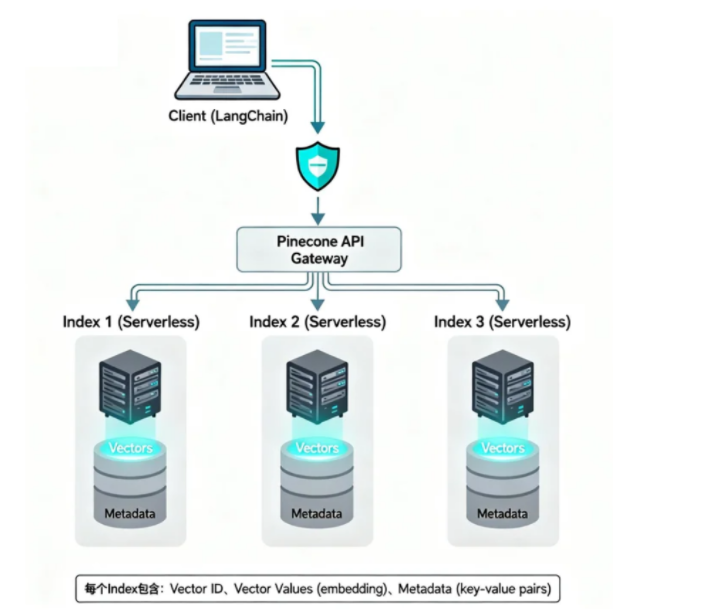 AI Visual Insight: The diagram shows a typical Pinecone component flow: the client sends requests through the API Gateway, while a dedicated Index stores vectors and metadata. This structure illustrates the separation of control plane and data plane, which improves centralized authentication, elastic scaling, and multi-tenant isolation.
In the data model, each record contains at least three parts: a unique ID, vector values, and metadata. The vector drives semantic similarity calculation, metadata supports filtering and business constraints, and the ID is used for updates, deletes, and source tracking.
Serverless and Pod-based represent two different resource models.
Serverless works well for projects with fluctuating traffic, tighter budgets, and a need for fast time-to-market. It uses on-demand billing and removes capacity planning, but it may be slightly less predictable than reserved-resource models in cold-start behavior and extreme stability scenarios.
Pod-based is better suited for production systems that require high concurrency, low jitter, and predictable capacity. It demands more careful resource planning, but it provides more consistent performance.
LangChain and Pinecone can quickly form a complete retrieval pipeline.
In the LangChain ecosystem, Pinecone is commonly used as a VectorStore. The standard workflow includes selecting an embedding model, creating an index, loading documents, splitting text, writing vectors, executing retrieval, and then passing results to an upper-layer RAG chain or agent.
pip install langchain-pinecone langchain-google-genai pinecone-client python-dotenvThis command installs the core dependencies required for Pinecone and Gemini embeddings.
Environment variable configuration is the first prerequisite for successful integration.
Store API keys in environment variables or a .env file instead of hardcoding them into a repository. This follows security best practices and also simplifies CI/CD, containerized deployment, and multi-environment configuration.
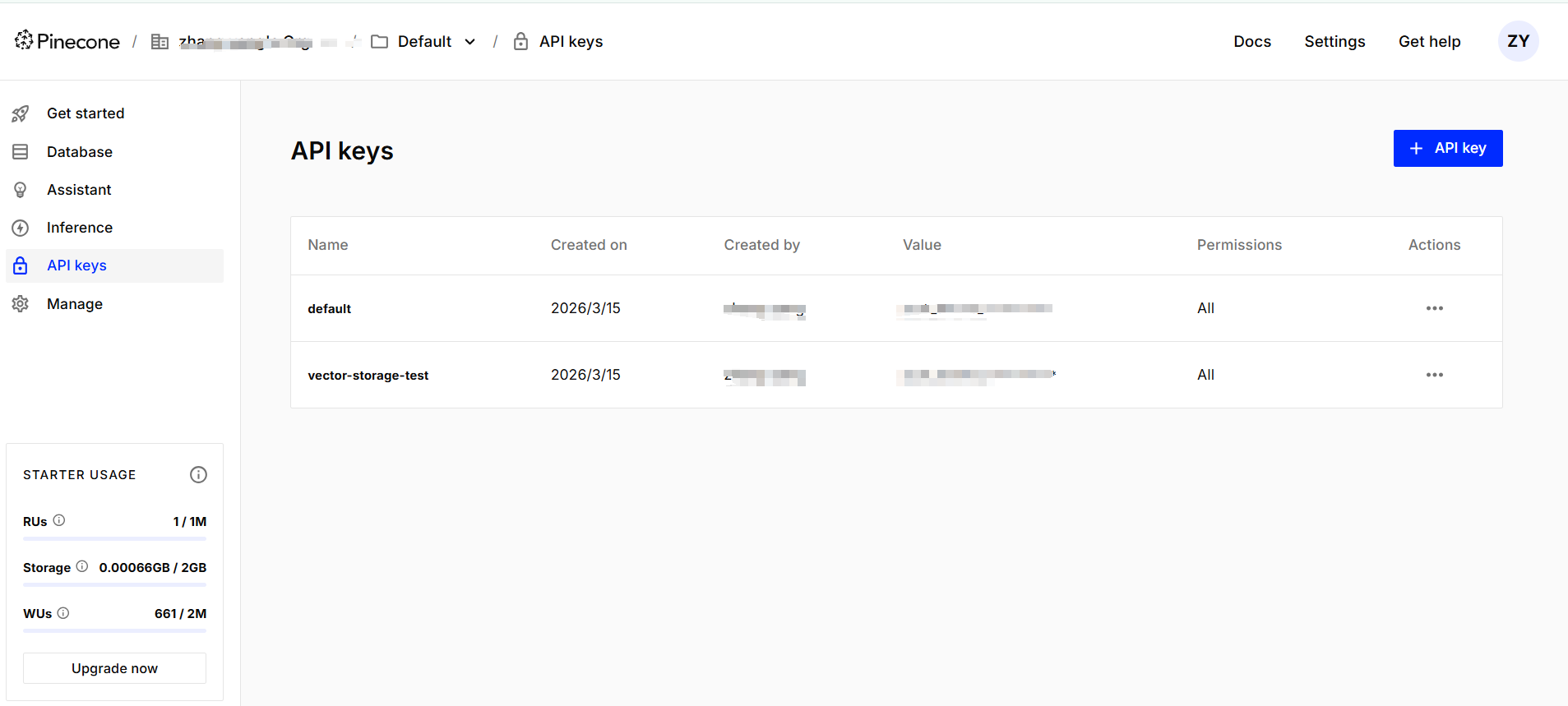 AI Visual Insight: This screenshot shows where to create and view API keys in the Pinecone console, reflecting the authentication management step in the integration flow. In production systems, this maps directly to secret lifecycle management and the principle of minimum exposure.
import os
from dotenv import load_dotenv
from pinecone import Pinecone, ServerlessSpec
from langchain_google_genai import GoogleGenerativeAIEmbeddings

load_dotenv()  # Load local .env configuration
embeddings = GoogleGenerativeAIEmbeddings(model="gemini-embedding-001")
pc = Pinecone(api_key=os.getenv("PINECONE_API_KEY"))
index_name = "md-documents"

# Create the index if it does not exist; the dimension must match the embedding model
if index_name not in pc.list_indexes().names():
    pc.create_index(
        name=index_name,
        dimension=3072,  # Output dimension of gemini-embedding-001
        metric="cosine",
        spec=ServerlessSpec(cloud="aws", region="us-east-1")
    )
This snippet initializes the embedding model and creates a Serverless index, which is the most critical integration entry point.
Document ingestion quality mainly depends on chunking strategy, metadata design, and dimension consistency.
Knowledge base ingestion is not as simple as dropping Markdown files into the system. What really affects retrieval quality is chunk granularity, overlap size, metadata field design, and strict alignment between the embedding model and the index dimension.
Metadata should include at least fields such as source, category, timestamp, and paragraph number. That enables scoped search, result traceability, and auditability during business queries.
from langchain_pinecone import PineconeVectorStore
from langchain_text_splitters import CharacterTextSplitter
from langchain_community.document_loaders.markdown import UnstructuredMarkdownLoader

loader = UnstructuredMarkdownLoader("test.md", mode="elements")
documents = loader.load()

splitter = CharacterTextSplitter.from_tiktoken_encoder(
    encoding_name="cl100k_base",
    chunk_size=200,      # Control chunk size to avoid chunks that are too small or too large semantically
    chunk_overlap=50     # Preserve contextual overlap to reduce boundary information loss
)
chunks = splitter.split_documents(documents)

for i, chunk in enumerate(chunks, start=1):
    chunk.metadata["category"] = "qa"   # Mark the business category
    chunk.metadata["num"] = i           # Record the chunk sequence number for filtering

vector_store = PineconeVectorStore(index_name=index_name, embedding=embeddings)
vector_store.add_documents(chunks)
This snippet implements Markdown loading, text splitting, metadata enrichment, and batch ingestion.
Pinecone offers layered retrieval capabilities for different RAG scenarios.
The most basic method is similarity search, which directly retrieves the top-k semantically closest documents for a query. If you need to inspect result quality, use score-aware search so you can apply relevance thresholds.
When your data includes structured attributes, you should combine retrieval with metadata filtering whenever possible. This reduces irrelevant results and is especially useful for multi-tenant knowledge bases, category-based QA, and time-sensitive document sets. If the results are highly repetitive, use MMR to improve context diversity.
# Basic similarity search
results = vector_store.similarity_search(
    query="What is Claude skill?",
    k=2
)

# Score-aware search for threshold-based evaluation
scored = vector_store.similarity_search_with_score(
    query="What is Claude skill?",
    k=2
)

# Similarity search with metadata filtering
filtered = vector_store.similarity_search(
    query="What is Claude skill?",
    k=2,
    filter={"category": "qa", "num": {"$lte": 3}}  # Search only the first 3 QA chunks
)
These examples show the three most common Pinecone retrieval patterns in LangChain.
MMR search works best when you need context that is relevant but not redundant.
In RAG systems, standard Top-K retrieval often returns multiple chunks that are semantically similar and repetitive. MMR first pulls a larger candidate set, then balances relevance and diversity, making it better suited for question answering augmentation and long-document summarization.
docs = vector_store.max_marginal_relevance_search(
    query="What is Claude skill?",
    k=2,
    fetch_k=10,      # Retrieve more candidates first
    lambda_mult=0.5  # Balance relevance and diversity
)
This snippet reduces duplicate retrieval and improves context coverage.
Pinecone differs from Redis, Chroma, and FAISS mainly in operational boundaries and elasticity at scale.
If your goal is fast prototyping, local Chroma or InMemoryVectorStore is often lighter. If you want maximum local performance and full control, FAISS is a common choice. If you already run Redis infrastructure and need both caching and vector capabilities, RedisSearch is highly attractive.
Pinecone’s advantage is managed production readiness. It behaves more like retrieval infrastructure as a service, making it well suited for teams that want less operations overhead, faster scaling, and direct support for online traffic. The tradeoff is deeper dependence on the cloud service ecosystem and pricing model.
You can make a technology choice quickly by answering four questions.
Do you need a fully managed service? Do you require extreme low-latency local performance? Will your data volume grow quickly? Does your team have the ability to maintain low-level indexes and clusters? Once you answer these four questions, the right direction is usually clear.
Most common failures concentrate around dimensions, API keys, index existence, and metadata consistency.
The most typical issue is dimension mismatch. For example, if your embedding model outputs 3072 dimensions but your index was created with 768 dimensions, Pinecone will fail immediately. The second common issue is a missing API key or failed environment loading. The third is a missing index. The fourth is inconsistent metadata types that cause filters to fail.
# Check embedding dimensions to avoid write-time errors
test_vector = embeddings.embed_query("test")
print(len(test_vector))  # Must exactly match the index dimension

# Inspect index statistics to confirm vectors were written successfully
index = pc.Index(index_name)
print(index.describe_index_stats())
This snippet helps quickly troubleshoot two high-frequency problems: dimension errors and failed ingestion.
FAQ
What project sizes is Pinecone suitable for?
Pinecone works for most AI retrieval projects, from PoC to production. For small to medium workloads, Serverless is usually the best starting point. For large and stable workloads, evaluate Pod-based deployment.
How should I choose between Pinecone and Redis vector search?
Choose Pinecone if you value managed infrastructure, scalability, and minimal operations work. Choose Redis if you already have Redis infrastructure and want extremely low latency plus ecosystem reuse.
Why are my Pinecone retrieval results inaccurate?
In most cases, the problem is not the database itself. Common causes include poor chunking granularity, an unsuitable embedding model, weak metadata design, or a missing query rewriting strategy. Start by checking chunks, embeddings, and filters, then optimize the retrieval pipeline.
[AI Readability Summary]
This article provides a structured breakdown of Pinecone’s core capabilities as a vector database, the architectural differences between Serverless and Pod-based deployments, the LangChain integration workflow, and practical retrieval and filtering methods. It also compares Pinecone with Redis, Chroma, and FAISS, and includes common troubleshooting guidance for real-world RAG systems.