A unified logging solution for Flutter for OpenHarmony: implement DEBUG/INFO/WARN/ERROR/FATAL level-based output in the ArkTS layer, write to both HiLog and local files, and solve the limitations of
Technical specifications are easy to review at a glance
| Parameter | Description |
|---|---|
| Language | ArkTS / TypeScript-style interfaces |
| Runtime platform | OpenHarmony, Flutter for OpenHarmony |
| Logging protocol | HiLog + local file output |
| Log levels | DEBUG, INFO, WARN, ERROR, FATAL, NONE |
| Core capabilities | Level-based filtering, async writes, file rotation, old file cleanup |
| Core dependencies | hilog, fs |
| Repository info | The original article notes that you can search for the corresponding repository on AtomGit |
| Star count | Not provided in the source material |
This logging solution addresses real pain points in cross-platform projects
In a Flutter for OpenHarmony project, the Dart layer and the ArkTS native layer coexist. If you rely only on print or scattered hilog calls, logs quickly become inconsistent in format, impossible to persist, and easy to lose after a restart.
More importantly, production issues usually require historical traceability. Logs stored only in the system buffer are not suitable as a long-term evidence trail. That makes a logging module that supports both real-time inspection and local file persistence almost essential for production engineering.
The goals of the logging system are clearly defined
This module is designed around five goals: level-based output, dual-channel writing, automatic rotation, concurrency safety, and custom configuration. It is not just a thin API wrapper. It fills in the missing application-side logging infrastructure for OpenHarmony.
export enum LogLevel {
  DEBUG = 0,
  INFO = 1,
  WARN = 2,
  ERROR = 3,
  FATAL = 4,
  NONE = 5,
}

export interface LoggerConfig {
  level: LogLevel; // Minimum output level
  enableHiLog: boolean; // Whether to write to the system log
  enableFile: boolean; // Whether to write to a local file
  logDir: string; // Log directory
  logFileName: string; // Log filename prefix
  maxFileSize: number; // Maximum bytes per file
  maxFileCount: number; // Maximum number of retained files
}
This definition establishes the contract for the logging system and determines both the filtering strategy and the boundaries of file management.
The module architecture uses a singleton and a decoupled dual-channel design
The overall structure can be summarized into four layers: the public API layer, the formatting layer, the output layer, and the file management layer. The singleton pattern ensures that only one Logger instance exists throughout the application lifecycle, avoiding file handle contention across multiple instances.
The public API stays intentionally minimal: d(), i(), w(), e(), and f(). Internally, the module formats the message and then sends it to HiLog and the file system separately so that the two output channels do not block each other.
static getInstance(config?: LoggerConfig): Logger {
  if (Logger.instance === null) {
    const defaultCfg = new DefaultConfig();
    if (config) {
      defaultCfg.level = config.level ?? defaultCfg.level; // Override only the config values explicitly provided by the caller
      defaultCfg.enableHiLog = config.enableHiLog ?? defaultCfg.enableHiLog;
      defaultCfg.enableFile = config.enableFile ?? defaultCfg.enableFile;
      defaultCfg.logDir = config.logDir ?? defaultCfg.logDir;
      defaultCfg.maxFileSize = config.maxFileSize ?? defaultCfg.maxFileSize;
      defaultCfg.maxFileCount = config.maxFileCount ?? defaultCfg.maxFileCount;
    }
    Logger.instance = new Logger(defaultCfg); // Create the single instance on the first call
  }
  return Logger.instance;
}
This code safely constructs the globally unique Logger and uses default configuration values as a fallback.
Log directory initialization must handle both available and unavailable context
If the Ability context is already available, the log directory should be placed under context.filesDir first, since that location naturally belongs to the app’s private storage space. If the context has not been injected yet, the module should fall back to a default system path.
private initLogDirectory(): void {
  try {
    if (this.config.logDir === "") {
      this.config.logDir = this.getDefaultLogDir(); // Automatically infer the directory when it is not configured
    }
    if (!fs.accessSync(this.config.logDir)) {
      fs.mkdirSync(this.config.logDir, true); // Recursively create the directory if it does not exist
    }
    this.currentLogFile = this.getLogFilePath(0);
  } catch (e) {
    hilog.error(LOG_DOMAIN, LOG_TAG, "Failed to init log directory: %{public}s", JSON.stringify(e));
  }
}
This logic ensures that the log directory can be created reliably at different stages of the application lifecycle.
The dual-output mechanism supports both real-time observation and offline analysis
HiLog is ideal for real-time inspection during development, while files are better suited for postmortem investigation. This implementation places both channels in the same logging pipeline: it filters by level first, then formats the message, and finally writes to both outputs.
One engineering detail matters a lot here: when calling hilog, the code uses %{public}s. This helps reduce privacy-field warnings and aligns with OpenHarmony’s logging security requirements.
private async log(level: LogLevel, tag: string, message: string, args: Object[]): Promise
<void> {
  if (level < this.config.level) {
    return; // Filter out logs below the current threshold
  }

  const formatMessage = args.length > 0 ? this.formatMessage(message, args) : message;
  const logLine = this.formatLogEntry(this.getLevelString(level), tag, formatMessage);

  if (this.config.enableHiLog) {
    hilog.info(LOG_DOMAIN, tag, "%{public}s", formatMessage); // Write to the system log
  }

  this.writeToFile(logLine).catch((e: Error) => {
    hilog.error(LOG_DOMAIN, LOG_TAG, "Async write failed: %{public}s", JSON.stringify(e));
  });
}
This code acts as the unified entry point for logging and connects real-time output with persistent writes.
The file rotation strategy determines whether the logging system can run reliably over time
Without rotation, log files will grow indefinitely and eventually consume too much storage space. This solution defines two critical thresholds: maxFileSize and maxFileCount.
When the active file reaches its size limit, the system deletes the oldest file, renames the remaining files in sequence, and then creates a new app_log_0.txt. This is a low-complexity and maintainable rotation strategy.
private rollLogFile(): void {
  try {
    const files = this.getLogFileList();
    if (files.length >= this.config.maxFileCount) {
      fs.unlinkSync(files[0]); // Delete the oldest file first when the limit is exceeded
    }
    for (let i = files.length - 1; i > 0; i--) {
      const oldPath = files[i];
      const newPath = this.getLogFilePath(i);
      if (fs.accessSync(newPath)) {
        fs.unlinkSync(newPath);
      }
      fs.renameSync(oldPath, newPath); // Shift older files back by one slot
    }
    this.currentFileSize = 0;
    this.currentLogFile = this.getLogFilePath(0); // Reset the current output file
  } catch (e) {
    hilog.error(LOG_DOMAIN, LOG_TAG, "Failed to roll log file: %{public}s", JSON.stringify(e));
  }
}
This logic controls disk usage and keeps the most recent logs the easiest to access.
Concurrent write safety is one of the most valuable implementation details
In cross-platform projects, log writes often come from multiple asynchronous tasks. If several writes happen at the same time, file contents can become interleaved or truncated, and file handle errors may follow.
This solution uses fileLock + pendingLogs to implement lightweight serialization. When the file is busy, new log entries enter a queue. Once the current write finishes, the queued entries are flushed one by one. This avoids contention without blocking the main thread.
private async writeToFile(logLine: string): Promise
<void> {
  if (!this.config.enableFile) return;

  if (this.fileLock) {
    this.pendingLogs.push(logLine); // Queue the log when a write is already in progress
    return;
  }

  this.fileLock = true;
  const logLineBytes = this.getByteLength(logLine);

  if (this.currentFileSize + logLineBytes > this.config.maxFileSize) {
    this.rollLogFile(); // Rotate the file before writing when the threshold is exceeded
  }

  try {
    const openMode = fs.OpenMode.CREATE | fs.OpenMode.APPEND | fs.OpenMode.READ_WRITE;
    const result = await fs.open(this.currentLogFile, openMode);
    const fd = this.getFdFromOpenResult(result);
    if (fd !== -1) {
      fs.writeSync(fd, logLine + "\n"); // Append the formatted log entry to the file
      fs.close(fd);
      this.currentFileSize += logLineBytes;
    }
  } finally {
    this.fileLock = false; // Release the lock and continue processing queued logs
    if (this.pendingLogs.length > 0) {
      const pending = this.pendingLogs.shift();
      if (pending) this.writeToFile(pending);
    }
  }
}
This code enables async-safe persistence and is the key to the stability of the entire module.
Version compatibility shows up in file descriptor handling
The source article also notes that fs.open may return either a numeric file descriptor or an object containing an fd field on different OpenHarmony versions. Because of that, the module needs a compatibility layer to avoid runtime type errors.
private getFdFromOpenResult(result: ESObject): number {
  if (typeof result === 'number') {
    return result; // Handle platforms that return the file descriptor directly
  }
  try {
    const obj = result as FileDescriptor;
    return obj.fd; // Handle object-based return values
  } catch {
    return -1;
  }
}
This code hides platform differences and keeps the file-writing logic stable.
The integration model keeps business code minimally invasive
Business code only needs to inject context during initialization and then use a unified API to record logs. For developers, the call pattern feels similar to Android Log, so migration costs stay low.
import logger from '../util/Logger';

logger.setContext(context); // Bind the Ability context to determine the private log directory
logger.d("Network", "Request sent: %{public}s", url);
logger.i("Network", "Response received: %{public}s", JSON.stringify(data));
logger.e("Database", "Query failed: %{public}s", error.message);
logger.setLevel(LogLevel.INFO); // Raise the level in production to suppress DEBUG logs
This example shows the full call flow for initialization, logging, and dynamic level changes.
Runtime validation should check build output, HiLog, and file-side results together
First, build the project with DevEco Studio or hvigor and make sure the ArkTS layer compiles without errors. Then run the application in an emulator or on a real device and inspect the output in real time with hilog.
hvigor.bat build --mode module -p product=phone -p target=arkJsRelease
hilog | grep Logger
These two commands are used for build verification and real-time log observation.
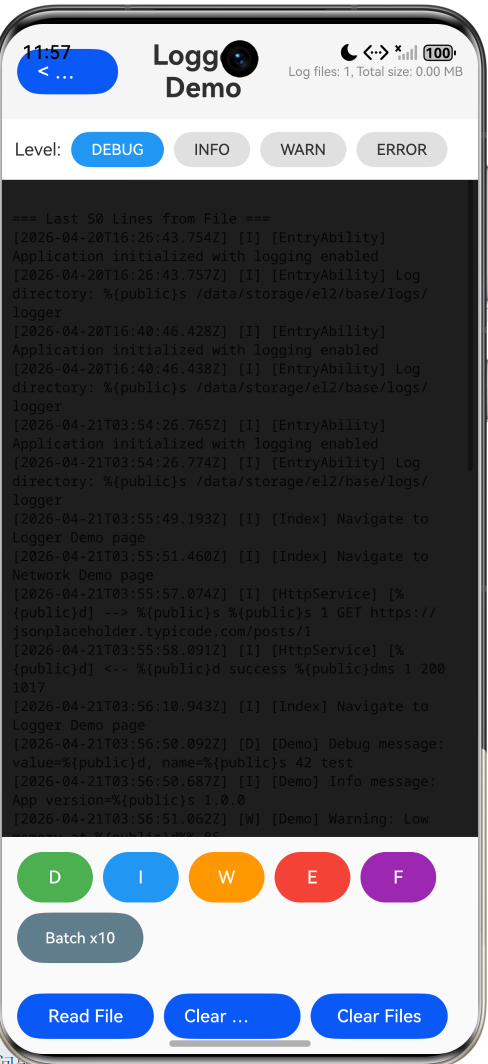
AI Visual Insight: This screenshot shows log output in an OpenHarmony runtime environment. The key signals should include the chronological order of different log levels in the console, Tag identifiers, and message content. Use it to verify that HiLog’s real-time output matches the local file format and that level-based filtering works as expected.
Functional acceptance should focus on seven key checkpoints
Check at least the following: whether DEBUG/INFO/ERROR appear according to the configured level; whether files are created under the /logs/ directory; whether the system rotates to app_log_1.txt after the active file fills up; whether old files are deleted after the retention limit is exceeded; and whether readLastLines() can read the tail of the log.
If all of these checks pass, this logging infrastructure is ready for production use.
This design also has clear extension paths
First, you can bridge ArkTS logging capabilities to the Dart layer through a method channel to achieve a unified cross-layer format. Second, you can add log compression and upload to connect with a server-side analysis platform. Third, you can introduce AES encryption to protect local logs in security-sensitive scenarios. Fourth, you can upgrade plain-text logs to structured JSON logs for easier integration with ELK or Graylog.
These extensions build on top of the current implementation rather than replacing it, which shows that the design has strong room to evolve.
FAQ
1. Why not use only HiLog?
HiLog is suitable for real-time debugging, but it is not ideal for long-term persistence. After an app restart or once the system log buffer is overwritten, historical evidence disappears. This solution closes that gap by persisting logs to local files for offline troubleshooting.
2. Why use a boolean file lock instead of a more complex concurrency primitive?
The goal here is lightweight serialized writing, not a general-purpose locking framework. fileLock + pendingLogs is enough for application-level logging scenarios, while keeping complexity and maintenance costs low.
3. Which log levels should be retained in production?
In most cases, keep at least INFO, WARN, and ERROR, and disable DEBUG. If crash tracking is important, retain FATAL as well and combine it with log upload to reduce noise while controlling file size.
Core Summary: This article reconstructs the implementation of an ArkTS logging module for Flutter for OpenHarmony. It systematically explains level-based logging, dual-channel output with HiLog and local files, async-safe persistence, log rotation, old file cleanup, integration examples, validation methods, and future extension options.