Named pipes (FIFO) are one of the lightest-weight inter-process communication mechanisms in Linux. They are ideal for sharing byte-stream data between unrelated processes. FIFO removes the limitation of anonymous pipes, which only work between related processes, while preserving a simple file-like programming model. Keywords: Linux IPC, named pipe, FIFO.
Technical specification snapshot
| Parameter | Value |
|---|---|
| Topic | Linux Named Pipes (FIFO) |
| Language | C / C++ |
| Protocol semantics | POSIX File I/O / IPC |
| Typical APIs | mkfifo, open, read, write, unlink |
| Runtime environment | Linux / Unix-like |
| Star count | Not provided in the original article |
| Core dependencies | unistd.h, fcntl.h, sys/stat.h, sys/types.h |
Named pipes provide a lightweight IPC mechanism for unrelated processes
Anonymous pipes work well for related processes such as parent and child processes because file descriptor inheritance is a prerequisite for communication. Named pipes remove that restriction: as long as two processes can access the same path, they can exchange data through the same FIFO file.
A named pipe has a visible pathname in the file system, but its data does not persist like a regular file. You can think of it as a kernel-managed buffered channel with a pathname: externally, processes locate it by file name; internally, it still behaves like a streaming pipe.
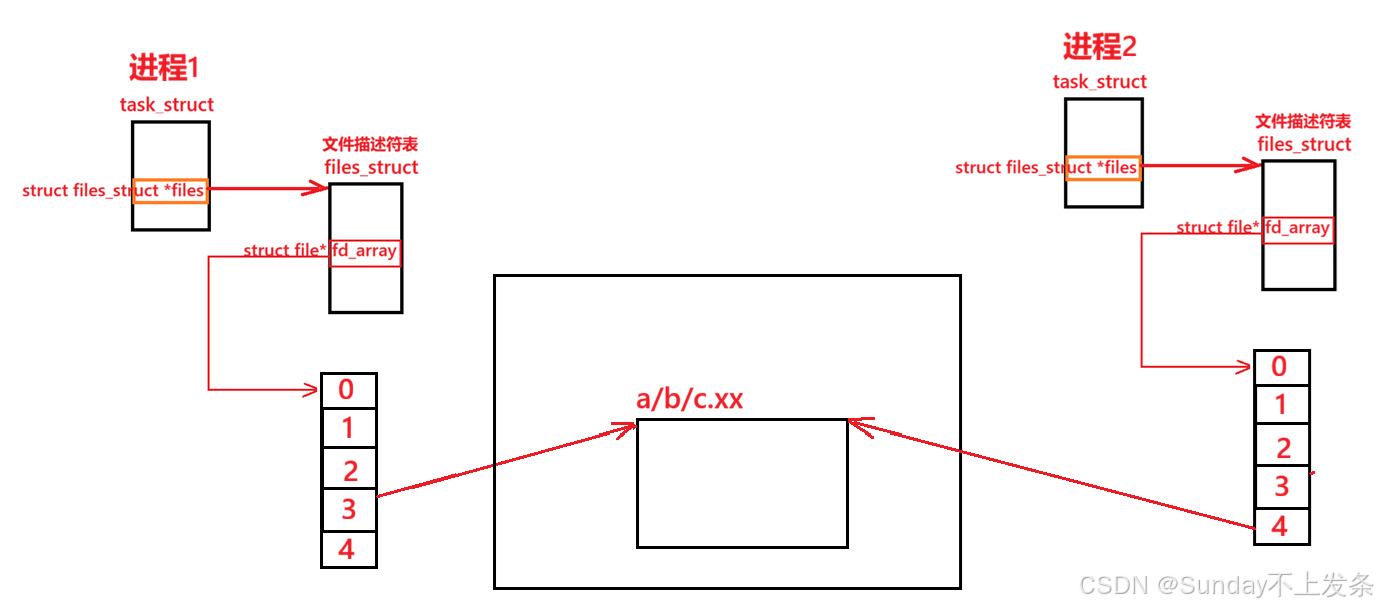 AI Visual Insight: The diagram shows two independent processes connecting to the same kernel buffer through a single named FIFO node. It highlights that both processes share the same kernel resource rather than separate file copies, which is the foundation of FIFO-based cross-process IPC.
Creating a named pipe is straightforward
You can create a FIFO from the command line with mkfifo, which is useful for debugging and shell-based validation. In application code, you can call mkfifo(), which is better suited for initializing IPC resources during service startup.
mkfifo /tmp/demo_fifo
unlink /tmp/demo_fifo
These commands create and delete a FIFO node, making them useful for quickly verifying blocking behavior and communication flow.
#include <sys/stat.h>
#include <sys/types.h>

int ret = mkfifo("/tmp/demo_fifo", 0666); // Create a named pipe and set permissions
This code creates a FIFO at runtime, which is a common pattern when a service prepares its communication channel during startup.
The core difference between named pipes and anonymous pipes appears at creation and open time
Their data read/write semantics are largely the same. The real difference lies in how both sides access the same pipe. Anonymous pipes rely on a pair of file descriptors returned by pipe(). Named pipes rely on a file-system path plus open().
Because of that, FIFO is a better fit for decoupled process architectures, such as a daemon and a command-line client, two independently launched utility processes, or a simple local message delivery workflow.
FIFO blocking rules determine whether a program stalls at the open stage
In default blocking mode, opening a FIFO read-only waits for a writer, and opening it write-only waits for a reader. This is one of the most common FIFO behaviors and is also the reason developers often mistake the program for being hung.
If you use O_NONBLOCK, opening for read can return immediately, while opening for write usually fails and returns -1 when no reader is present. In production code, you should explicitly design startup ordering and retry behavior.
int rfd = open("/tmp/demo_fifo", O_RDONLY);                // Blocking by default, waits for a writer
int wfd = open("/tmp/demo_fifo", O_WRONLY);                // Blocking by default, waits for a reader
int nrfd = open("/tmp/demo_fifo", O_RDONLY | O_NONBLOCK); // Non-blocking read open
This code shows the difference between blocking and non-blocking FIFO opens and is essential when troubleshooting startup stalls.
Using a named pipe for file copying makes data flow easy to observe
One process reads the source file and writes into the FIFO. Another process reads from the FIFO and writes to the destination file. Although the example is simple, it covers the full lifecycle: creation, opening, reading and writing, closing, and cleanup.
#include <fcntl.h>
#include <unistd.h>
#include <sys/stat.h>

int main() {
    mkfifo("tp", 0644); // Create the pipe
    int infd = open("abc", O_RDONLY); // Open the source file
    int outfd = open("tp", O_WRONLY); // Open the FIFO as the writer

    char buf[1024];
    ssize_t n;
    while ((n = read(infd, buf, sizeof(buf))) > 0) {
        write(outfd, buf, n); // Continuously write file content into the pipe
    }
    close(infd);
    close(outfd);
    return 0;
}
This code writes regular file content into the FIFO and effectively acts as the producer process.
#include <fcntl.h>
#include <unistd.h>

int main() {
    int outfd = open("abc.bak", O_WRONLY | O_CREAT | O_TRUNC, 0644); // Open the destination file
    int infd = open("tp", O_RDONLY); // Open the FIFO as the reader

    char buf[1024];
    ssize_t n;
    while ((n = read(infd, buf, sizeof(buf))) > 0) {
        write(outfd, buf, n); // Read data from the pipe and write it to the backup file
    }
    close(infd);
    close(outfd);
    unlink("tp"); // Remove the FIFO node after communication completes
    return 0;
}
This code consumes FIFO data and writes it to the destination file. Together, the two programs implement cross-process file copying.
 AI Visual Insight: The image shows the visible file-system node created by the
 mkfifo command. You can usually inspect it with ls -l and identify its type marker as p, which helps distinguish FIFO files from regular files, directories, and sockets.
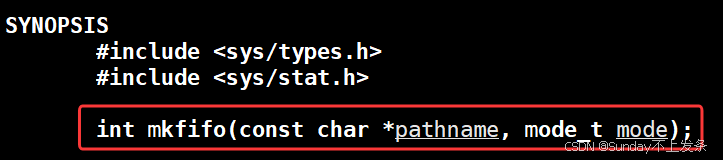 AI Visual Insight: The image highlights the programmatic interface for creating a named pipe with
 mkfifo(), emphasizing that the pathname and permission bits are the two critical parameters. This is useful when you need to create IPC endpoints dynamically during service initialization.
A two-process communication example better reflects the engineering value of FIFO
The receiving side usually creates and opens the FIFO first. The sender then connects by opening the same FIFO for writing. As long as both sides agree on the same path, they can exchange messages using the same file-style operations.
#include
<iostream>
#include <fcntl.h>
#include <unistd.h>
#include <sys/stat.h>

int main() {
    umask(0);
    mkfifo("fifo", 0666); // Initialize the shared FIFO
    int fd = open("fifo", O_RDONLY); // Block on the read side until a writer connects

    char buffer[1024];
    ssize_t n = read(fd, buffer, sizeof(buffer) - 1);
    if (n > 0) {
        buffer[n] = 0; // Manually append the string terminator
        std::cout << "client say: " << buffer << std::endl;
    }
    close(fd);
    unlink("fifo"); // Clean up the FIFO resource
    return 0;
}
This code implements the receiver logic, with emphasis on blocking wait behavior and resource cleanup after communication ends.
#include
<iostream>
#include
<string>
#include <fcntl.h>
#include <unistd.h>

int main() {
    int fd = open("fifo", O_WRONLY); // Connect to the reader process as the writer
    std::string msg;
    while (std::getline(std::cin, msg)) {
        write(fd, msg.c_str(), msg.size()); // Send user input to the FIFO
    }
    close(fd);
    return 0;
}
This code implements the sender logic and is suitable for building a minimal local one-way messaging channel.
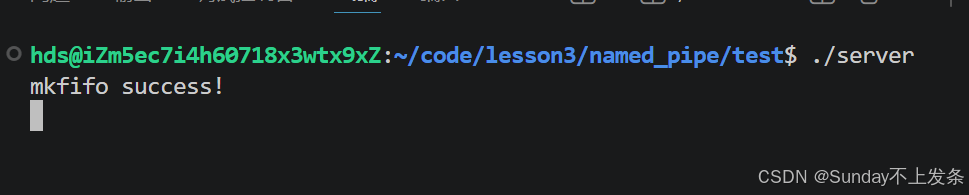 AI Visual Insight: The image demonstrates that in default blocking mode, both the reader and writer must appear as a pair before
 open() returns. This behavior directly affects service startup order, process orchestration, and troubleshooting.
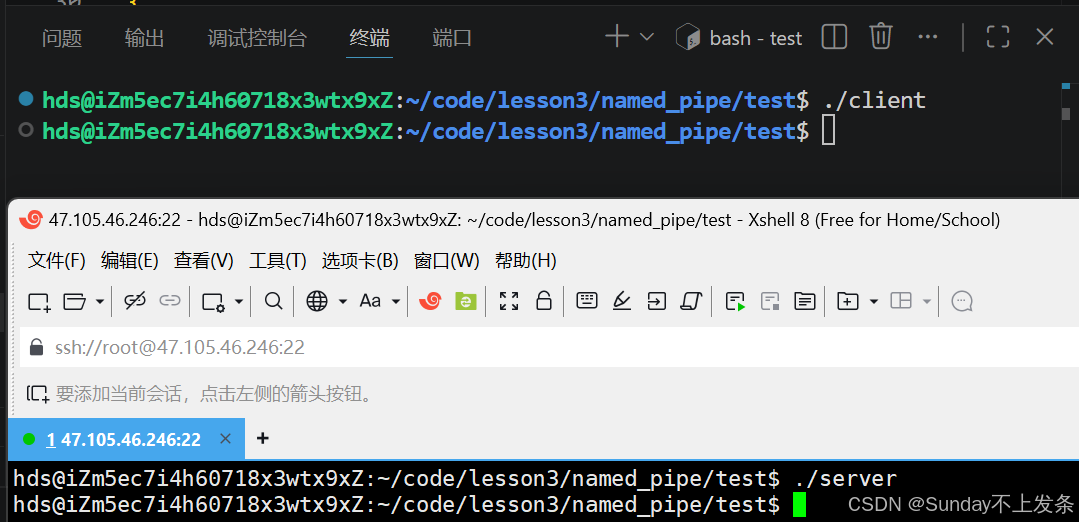 AI Visual Insight: The image shows the runtime result of transferring file data through a FIFO, validating the pipeline model in which one process reads the source file and another writes the destination file.
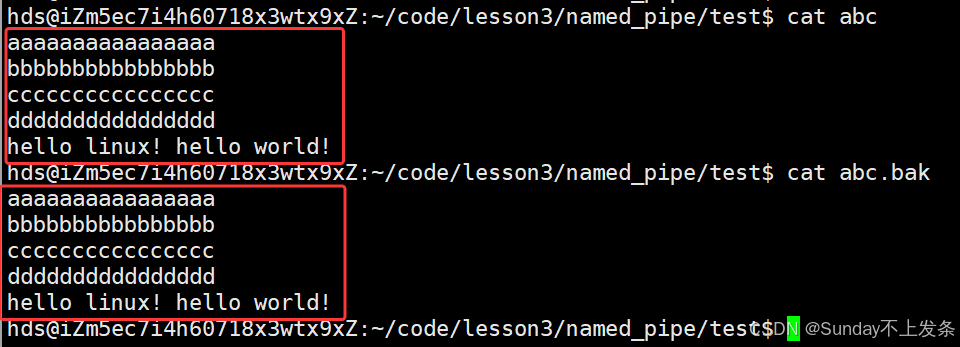 AI Visual Insight: The image emphasizes that the source file and backup file contain identical content, confirming that FIFO works well as a temporary local data channel. However, its semantics are still sequential byte streams rather than structured message queues.
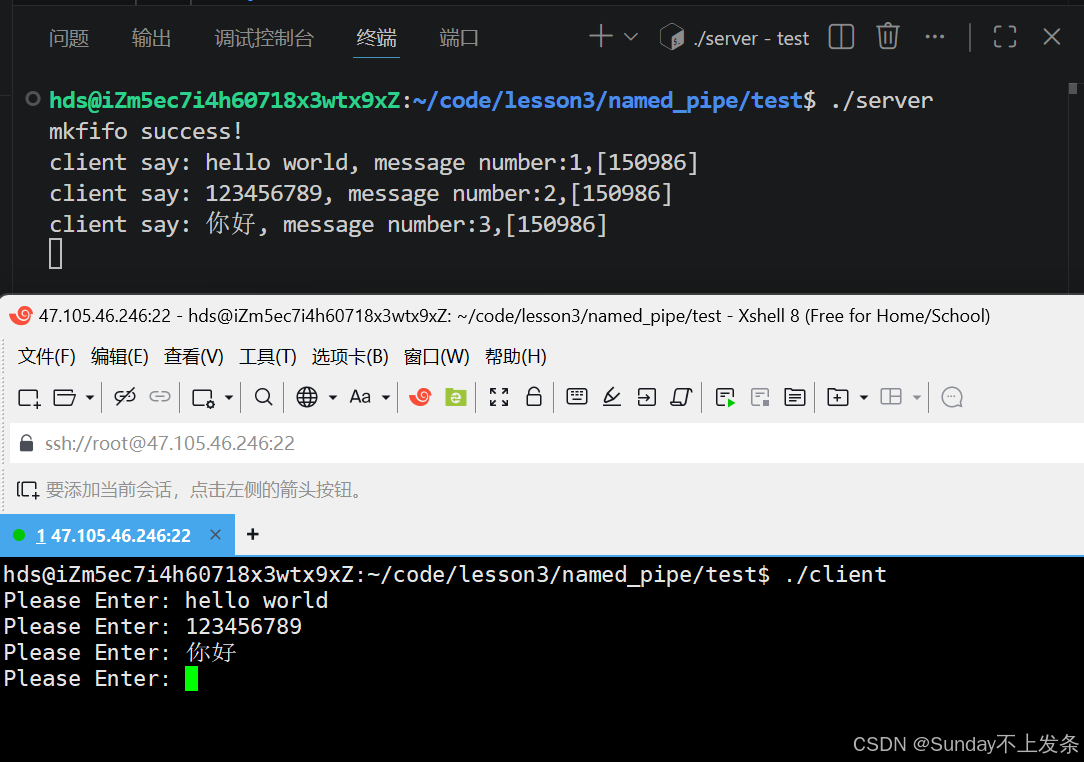 AI Visual Insight: The image demonstrates an interactive workflow where one process continuously enters messages and another process receives and prints them in real time, showing FIFO’s practical value in local CLI tools and daemon control channels.
In production, you must handle EOF, SIGPIPE, and cleanup correctly
When all writers close their end, read() on the reader side returns 0, which indicates end-of-file and usually means the sender has exited. Conversely, if the reader closes first, a process that keeps writing may receive SIGPIPE and terminate unexpectedly.
For that reason, real-world applications should handle error conditions explicitly, control open order carefully, and call unlink() on exit to remove the FIFO node and avoid leaving behind a stale communication endpoint.
FAQ
Q1: What is the essential difference between a named pipe and an anonymous pipe?
A: Their read/write semantics are almost identical. The main difference is creation and visibility. Anonymous pipes depend on pipe() and file descriptor inheritance between related processes. Named pipes depend on a pathname and allow communication between unrelated processes.
Q2: Why does the program block at open(O_WRONLY) or open(O_RDONLY)?
A: Because FIFO uses blocking open behavior by default. If no reader exists, the writer waits. If no writer exists, the reader also waits. You can use O_NONBLOCK for debugging, but you must handle possible open failures.
Q3: Can named pipes replace sockets or message queues?
A: Not completely. FIFO is lighter and works well for local, one-way, simple byte-stream scenarios. If you need bidirectional communication, cross-host networking, message boundaries, or more advanced reliability controls, you should prefer Unix domain sockets, message queues, or shared memory.
[AI Readability Summary] This article systematically explains how Linux named pipes (FIFO) work, how to create them, how blocking and non-blocking open modes behave, and how they differ from anonymous pipes. It also uses file-copy and two-process communication examples to demonstrate common IPC usage patterns and practical pitfalls.