Excessive website network payload usually means a page transfers more resources than performance budgets allow. That directly slows down first paint, lowers Lighthouse scores, and degrades the mobile experience. This article focuses on four high-impact optimization strategies: image optimization, lazy loading for static assets, code minification, and browser caching. Keywords: PageSpeed, network payload, frontend performance.
Technical Specifications Snapshot
| Parameter | Details |
|---|---|
| Domain | Web performance optimization |
| Applicable Languages | HTML, CSS, JavaScript, PHP |
| Key Protocols | HTTP/1.1, HTTP/2, HTTPS, Cache-Control |
| Typical Trigger | Total page resources exceed approximately 1.6 MB |
| Reference Metrics | Lighthouse, PageSpeed Insights, Core Web Vitals |
| Core Dependencies | Image compression tools, build minifiers, CDN, browser caching policies |
| Stars | Not provided in the original content |
Massive Network Payloads Directly Consume Page Performance
Network payload refers to the total volume of resources the browser fetches from the server during the first page visit, including HTML, CSS, JavaScript, fonts, images, and video. It is not the size of a single file. It is the full cargo required to render a page.
When total page resources keep growing, the problem is not just that the page feels slow. More typical chain reactions include longer time to first screen, delayed interaction on mobile networks, higher bandwidth costs, and lower page experience scores from search engines.
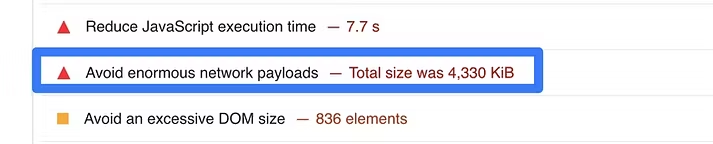 AI Visual Insight: The image shows a typical performance tool diagnosis for a “massive network payload” issue. The core signals usually include total transferred resources, oversized requests, and optimization candidates. It shows that the page does not suffer from a single bottleneck. Instead, images, scripts, styles, and other resources collectively push the page size out of control.
Oversized Payloads Usually Come From Three Sources
The first source is uncompressed images. High-resolution PNG files, uncropped banners, and duplicated size variants can quickly inflate total transfer volume. Images are often the first area to optimize and the easiest place to achieve meaningful gains.
The second source is redundant frontend assets. Unused CSS, full-bundle JavaScript loading, duplicated dependency packages, and unnecessary polyfills all increase download size while also adding parse and execution time.
The third source is poor request strategy. Without caching, with static files fetched on every visit, or with all modules loaded upfront for the first screen, users repeatedly pay the network cost.
// Lazy-load images outside the initial viewport
const images = document.querySelectorAll('img[data-src]');

const observer = new IntersectionObserver((entries) => {
  entries.forEach((entry) => {
    if (entry.isIntersecting) {
      const img = entry.target;
      img.src = img.dataset.src; // Load the real image after it enters the viewport
      img.removeAttribute('data-src'); // Remove the placeholder attribute
      observer.unobserve(img); // Stop observing to reduce overhead
    }
  });
});

images.forEach((img) => observer.observe(img));
This code changes below-the-fold images so the browser requests them only after they enter the viewport, which reduces the initial network payload.
Controlling Page Weight Is a Foundational Step for Better User Experience
Preventing massive network payloads is not only about fixing a PageSpeed warning. The real benefit comes from reducing cost across transfer, parsing, and rendering at the same time. The improvement is especially noticeable on low-end and mid-range mobile devices.
In mobile scenarios, network instability and CPU limitations amplify resource size problems. A 2 MB page that still feels acceptable on desktop can easily cause white screens, bounce, and conversion loss on a weak 4G connection.
Image Optimization Is the Fastest High-ROI Improvement
Start with image format, dimensions, and loading timing. If you can use WebP or AVIF, do not keep shipping large original images. If you can deliver responsive dimensions, do not send the same oversized wide image to every device. If you can lazy-load, do not request every image during the initial load.
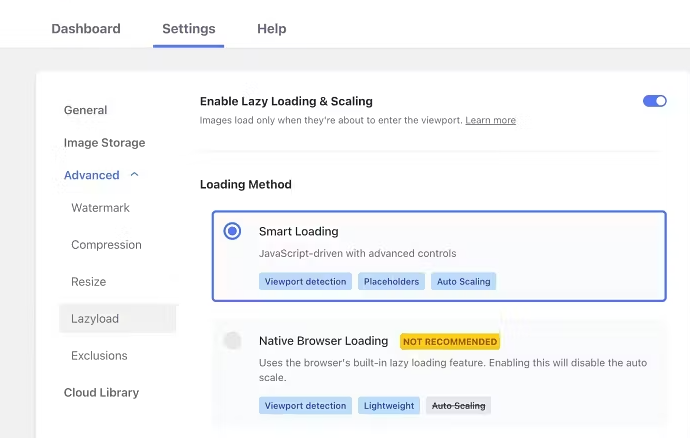 AI Visual Insight: The image highlights the use of automation tools or plugins to standardize image compression, code minification, and resource optimization workflows. The technical takeaway is to shift performance work from manual page-by-page fixes to build-time or runtime automation, which works especially well for content-heavy sites such as WordPress.
<!-- Use modern image formats and lazy loading -->
<picture>
  <source srcset="hero.avif" type="image/avif">
  <source srcset="hero.webp" type="image/webp">
  <img src="hero.jpg" loading="lazy" alt="Homepage hero banner"> <!-- Let the browser choose the best supported format -->
</picture>
This snippet uses a modern format fallback chain and native lazy loading to reduce image transfer costs.
CSS and JavaScript Should Load Along the Critical Rendering Path
CSS required for the first screen should be inlined or extracted into a dedicated critical file. Non-critical styles should load later. JavaScript should avoid blocking rendering, and you should prefer defer or route-based code splitting.
If a page loads all component logic at once, users still pay the full script download and execution cost even when they only view the first screen. This is one of the main reasons many sites “do not look large in file size but still feel slow.”
Code Minification Reduces Both Payload Size and Request Cost
Minification is not only about removing whitespace and comments. It also includes tree shaking, code splitting, removing unused dependencies, and enabling Gzip or Brotli. The build layer and the transport layer must work together. Doing only one limits the gains.
server {
    gzip on;
    gzip_types text/css application/javascript application/json image/svg+xml; # Compress high-frequency text resources
    gzip_min_length 1024; # Do not compress very small files to avoid extra overhead

    location /static/ {
        expires 30d;
        add_header Cache-Control "public, max-age=2592000, immutable"; # Set strong caching for static assets
    }
}
This configuration enables both text compression and static asset caching, which is foundational infrastructure for reducing repeated requests.
Browser Caching Eliminates Repeated Downloads
For static assets with versioned filenames, use a long-cache strategy. Because the filename changes when the file changes, the browser can safely keep old resources cached instead of downloading them again on every visit.
The value of proper caching is not only better speed. It can also significantly reduce outbound bandwidth consumption. For content sites, admin systems, and e-commerce campaign pages, this directly affects operating cost.
A Four-Step Rollout Order Works Best for Most Teams
Step one: audit the largest resource items and compress images and video covers first. Step two: split non-critical CSS and JavaScript to reduce first-screen blocking. Step three: enable build-time minification and server-side compression. Step four: configure caching and version control for static assets.
The advantage of this sequence is that it requires limited investment, produces fast wins, and is easy to validate. It is a practical path for teams that do not have dedicated performance engineers.
FAQ
Q1: If PageSpeed says “Avoid enormous network payloads,” is image compression alone enough?
No. Images are often the biggest contributor, but CSS, JavaScript, fonts, and repeated requests can also push total payload too high. The right approach is to review the request waterfall first, then prioritize fixes by payload size and critical rendering path.
Q2: If I keep page resources under 1.6 MB, will the site definitely be fast enough?
Not necessarily. Total size is only a reference point. User experience also depends on first-screen critical resources, request count, script execution time, and cache hit rate. Performance optimization should address both transfer and execution.
Q3: If a small or medium-sized site has no frontend build pipeline, how can it quickly reduce network payload?
Start with low-friction improvements: enable image compression plugins, add defer to scripts, enable Gzip or Brotli, and configure browser caching. Even without changing the architecture, these steps can produce visible gains.
Core Summary: This article restructures the topic of “avoiding enormous network payloads” around the performance problems caused by oversized page resources. It systematically breaks down four high-impact strategies: image optimization, deferred loading for CSS and JavaScript, code minification, and browser caching. Together, these methods help developers improve Lighthouse and PageSpeed performance, reduce bandwidth consumption, and deliver a better mobile experience.