make is an automated build command, and a Makefile is the declarative file that defines dependencies and execution rules. Its core value lies in timestamp-based incremental compilation, which solves the inefficiency, error-proneness, and maintenance overhead of manual builds. Keywords: Makefile, incremental build, .PHONY.
The technical specification snapshot summarizes the core environment
| Parameter | Description |
|---|---|
| Core Languages | Makefile, Shell, C |
| Runtime Environment | Linux / Unix-like |
| Core Mechanism | File timestamp-driven build rules |
| Stars | Not provided in the source content |
| Core Dependencies | make, gcc, touch, stat |
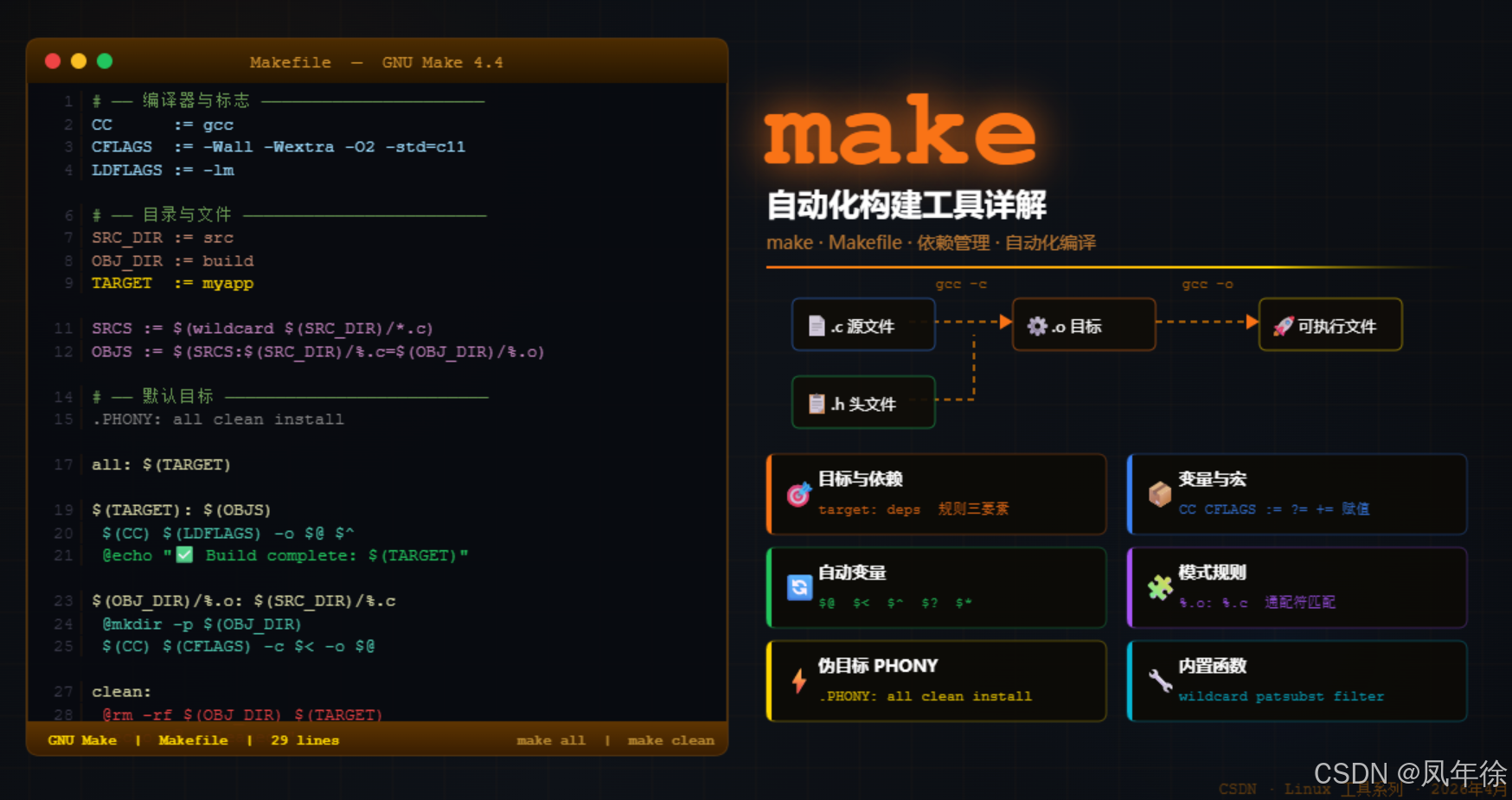 AI Visual Insight: The image serves as a thematic cover for the article, highlighting the central role of make and Makefile in Linux automated build workflows. It typically introduces the knowledge framework around compilation rules, dependency management, and incremental builds.
make and Makefile act as the rule executor and rule definition file in a build system
At its core, make is a command-line tool. It reads the Makefile in the current directory and decides whether it needs to re-run commands based on the rules it finds. The Makefile defines target files, dependency files, and the commands used to generate outputs.
This combination does not merely solve how to compile once. It solves how to compile only the necessary parts after a project changes over time. That is why it is widely used in C/C++, kernels, embedded systems, and script-driven build workflows.
A minimal Makefile rule consists of a target, dependencies, and commands
hello: hello.c
    gcc -o hello hello.c  # Build the executable from the source file
This rule means that the target hello depends on hello.c. When the dependency is updated, make runs the compilation command to generate the target.
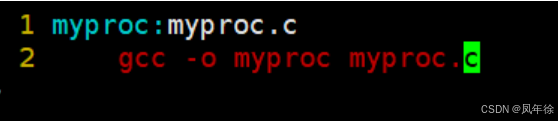 AI Visual Insight: The image breaks down a single Makefile rule into its usual three parts: target, dependencies, and recipe. It also emphasizes a common pitfall: commands must begin with a Tab.
make relies on file timestamps rather than source content comparison for incremental builds
By default, make executes the first target in the Makefile. It does not analyze source code semantics. Instead, it compares the modification times of target files and dependency files. If a dependency is newer than the target, the target is considered out of date and must be rebuilt.
This is also why make is fast. It reduces the rebuild decision to a filesystem-level timestamp comparison, which avoids recompiling modules that have not changed.
The three timestamps on Linux files determine the foundation of build decisions
stat hello.c   # View the file's access, modify, and change times
touch hello.c  # Update the timestamp to the current time to simulate a file change
These two commands let you inspect and modify file time attributes. They are foundational tools for understanding how make works.
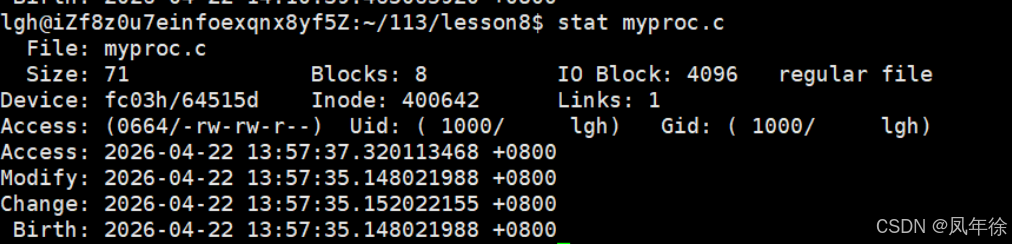 AI Visual Insight: The image typically shows the Access, Modify, and Change fields in
 stat output, with the main focus on how make primarily relies on the Modify time to decide whether a file needs to be rebuilt.
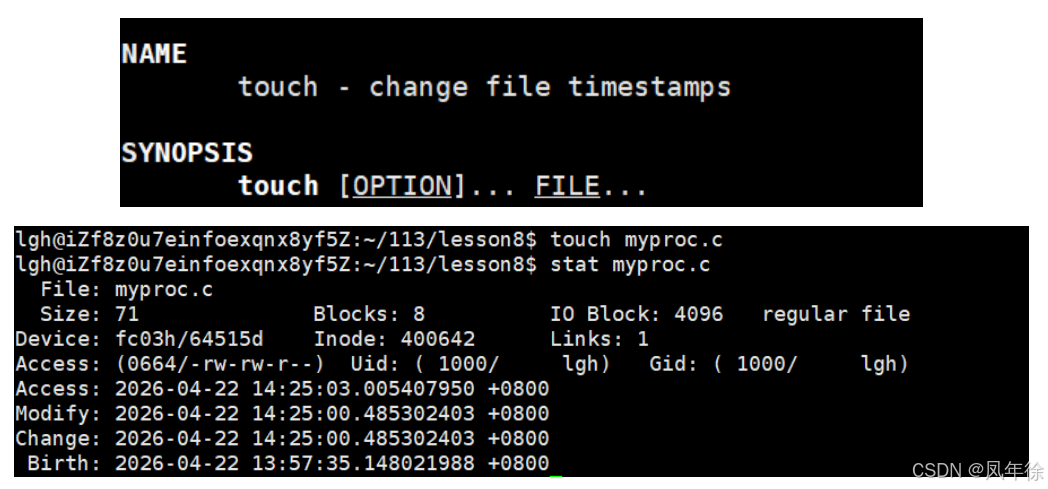 AI Visual Insight: The image shows the effect of changing a file timestamp with
 touch, illustrating that make can be triggered to reevaluate a target even when file content has not changed. This is a useful entry point for understanding phony targets and forced builds.
.PHONY targets declare operational commands that do not correspond to real files
Targets such as clean, test, and install usually do not generate files with matching names. Instead, they perform actions such as deletion, testing, or deployment. If a file with the same name happens to exist in the directory, make may incorrectly assume that the target has already been satisfied and skip execution.
For that reason, operational targets should be explicitly declared as .PHONY. This tells make that the target is not a file, so it should not perform file existence checks and should run the recipe every time.
.PHONY: clean
clean:
    rm -f *.o hello  # Remove intermediate files and the executable
This rule ensures that make clean always works. It is one of the most common and most important maintenance rules in a Makefile.
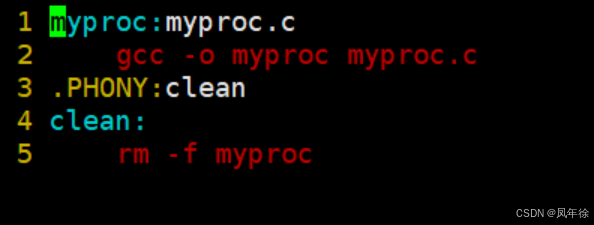 AI Visual Insight: The image illustrates why phony targets such as
 clean always run, typically by comparing timestamp logic or target types to show how .PHONY avoids conflicts with real files.
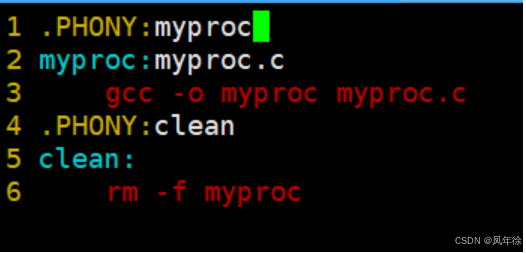 AI Visual Insight: The image shows a counterexample where a normal compilation target is designed to always run and highlights the side effect: this destroys the benefits of incremental compilation and adds unnecessary build overhead.
Automatic variables and pattern rules turn a Makefile from a single-file script into a reusable build template
When a project grows from one source file to many, writing every compilation rule by hand becomes expensive and error-prone. Makefile provides automatic variables and pattern rules to abstract repeated logic.
Common automatic variables include: $@ for the target file, $^ for all dependencies, and $< for the first dependency. These variables significantly reduce repetition.
Automatic variables make rules shorter and more robust
BIN = hello
SRC = hello.c

$(BIN): $(SRC)
    @gcc -o $@ $^  # $@ is the target, $^ is all dependencies
    @echo "Compilation complete"  # Hide command echo and print a status message
This style is easier to maintain than hard-coded file names and is well suited for consistently building small executable programs.
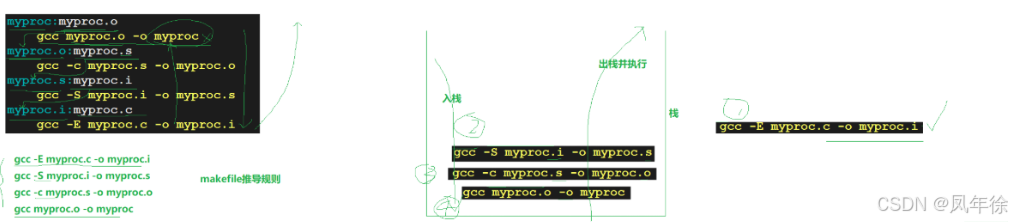 AI Visual Insight: The image shows how make scans rules from top to bottom, recursively descends through dependencies, and then returns to execute commands. At its core, it reflects build graph traversal and dependency resolution order.
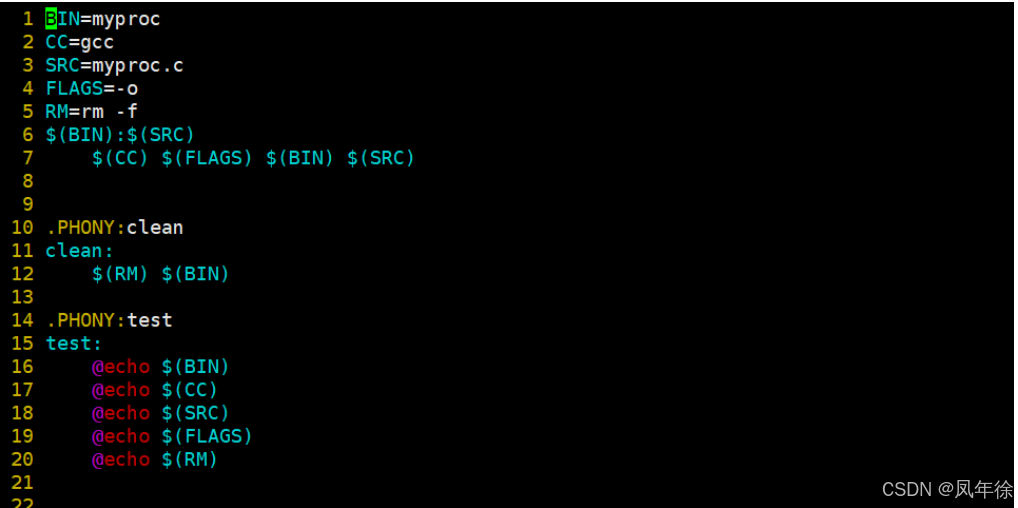 AI Visual Insight: The image highlights how
 $(BIN), $(SRC), and automatic variables work together, showing how Makefiles become more maintainable by moving from hard-coded values to parameterized rules.
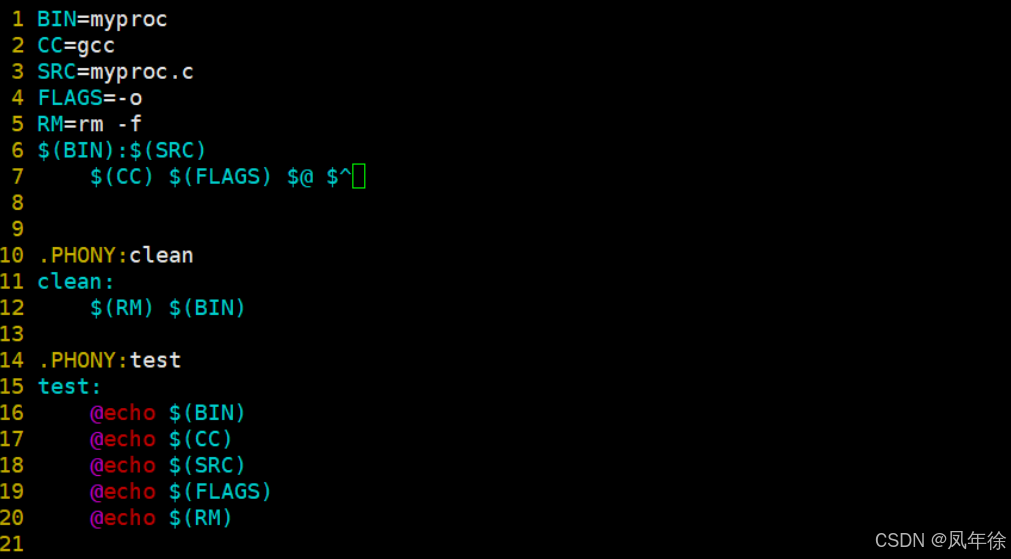 AI Visual Insight: The image focuses on the semantic mapping of automatic variables such as
 $@ and $^, helping developers understand how make injects contextual information during rule execution.
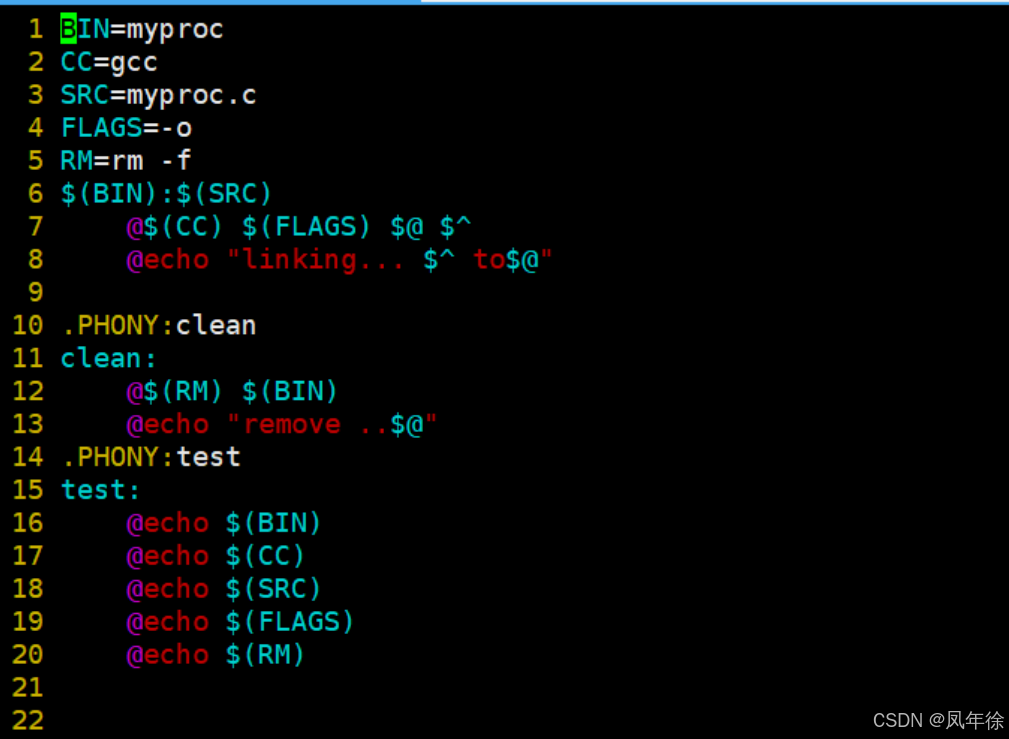 AI Visual Insight: The image shows how adding
 @ before a command makes terminal output cleaner, demonstrating why this technique is useful for improving build log readability.
Pattern rules are the key mechanism for compiling multiple source files
%.o: %.c
    gcc -c $< -o $@  # Compile a matching .c file into a .o file
This rule means that any .o file can be derived from a .c file with the same base name. It is the core abstraction behind multi-file project builds.
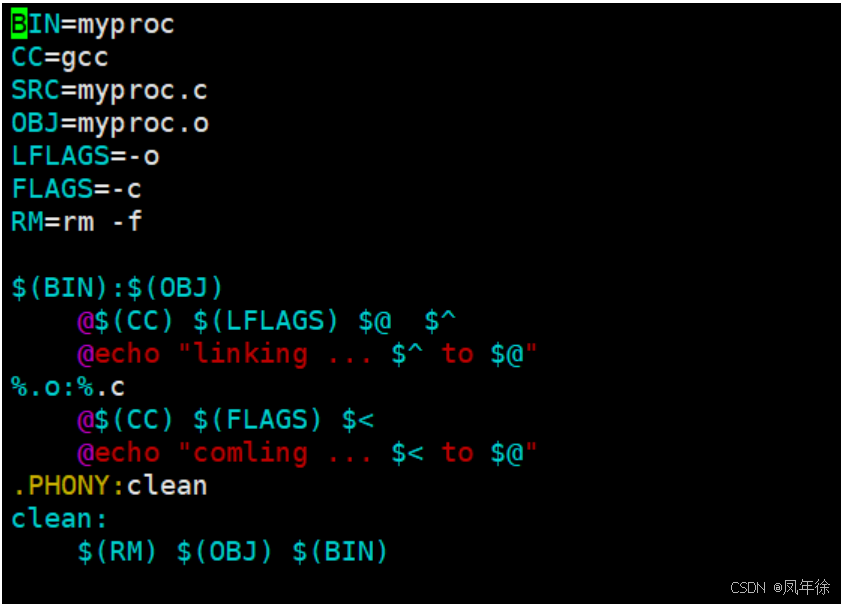 AI Visual Insight: The image shows how pattern rules such as
 %.o: %.c match in multi-file scenarios, emphasizing the automatic binding of $< to the first dependency and $@ to the target file.
A general-purpose Makefile template can automatically discover source files and generate object files in bulk
In real projects, developers usually do not enumerate every .c file manually. Instead, they use functions to collect source files automatically and then generate the object file list through suffix substitution. This approach is better suited for small and medium-sized projects.
SRC := $(wildcard *.c)          # Find all .c files in the current directory
OBJ := $(SRC:.c=.o)             # Map the source file list to the object file list
BIN := app

$(BIN): $(OBJ)
    gcc -o $@ $^                  # Link all object files

%.o: %.c
    gcc -c $< -o $@               # Compile a single source file

.PHONY: clean
clean:
    rm -f $(OBJ) $(BIN)           # Clean build artifacts
This template provides four core capabilities: automatic source discovery, stepwise compilation, unified linking, and artifact cleanup. It is sufficient for common C project build requirements.
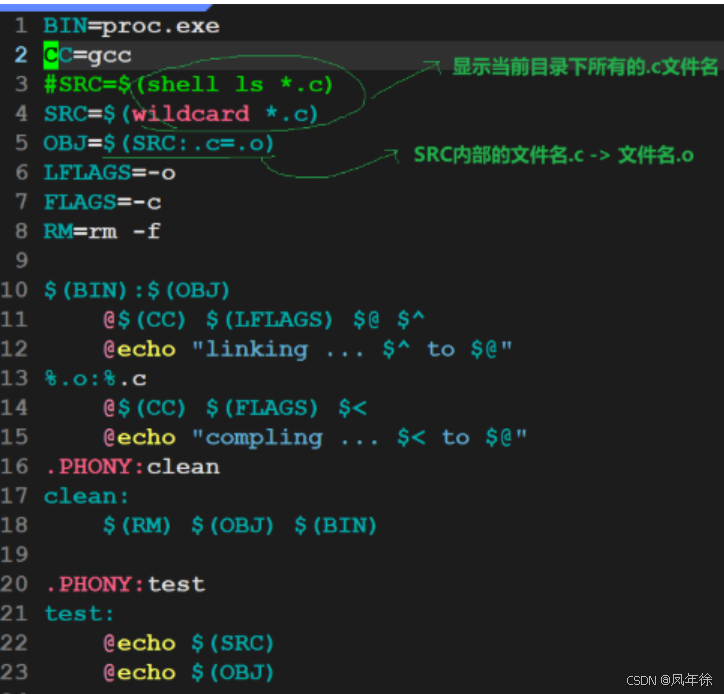 AI Visual Insight: The image shows the complete structure of a Makefile template that uses
 wildcard, variable substitution, and pattern rules, illustrating an automated pipeline from source discovery to target generation.
Developers should treat a Makefile as an executable build knowledge graph
A high-quality Makefile is not just a collection of commands. It is an explicit representation of a project’s dependency relationships. It codifies which files depend on which inputs, when rebuilds are necessary, and which operations must always run.
The key to mastering make is not memorizing syntax. It is understanding three things: the dependency graph, timestamps, and rule reuse. Once you connect these concepts, a Makefile evolves from a teaching example into an engineering-grade build entry point.
FAQ provides structured answers to common questions
Why does make sometimes fail to recompile a project I modified?
If you changed a file that does not affect the target timestamp, or if the dependency was not declared in the Makefile, make cannot detect the change. First, verify that your dependency list is complete and that the Modify times of the target and its dependencies are correct.
What is the fundamental difference between .PHONY and a normal target?
A normal target corresponds to a real file by default, so make decides whether to run it by comparing file timestamps. A .PHONY target explicitly declares that the target is not a file, so make runs it every time it is invoked. This is ideal for targets such as clean, test, and deploy.
Why must multi-file projects use pattern rules and automatic variables?
Because writing one rule for every .c file is difficult to maintain and easy to miss. Pattern rules describe the compilation process uniformly, while automatic variables reduce repetition and hard-coding, significantly improving scalability.
Core Summary: This article systematically reconstructs the core knowledge of make and Makefile, covering rule syntax, timestamp-based decisions, .PHONY targets, automatic variables, pattern rules, and a general-purpose template to help developers quickly build a solid mental model of incremental builds in Linux/C projects.