Built for autonomous driving scenarios with multiple objects, small targets, and heavy occlusion, this article systematically breaks down an object detection engineering stack based on YOLOv5–YOLOv12: a unified dataset, a unified training protocol, and a unified desktop interaction layer. It supports image, video, and camera-stream inference with model switching. The goal is to solve three common pain points: difficult model selection, fragmented reproducibility, and disconnected deployment demos. Keywords: YOLOv12, autonomous driving, object detection.
| Technical Specification | Parameter |
|---|---|
| Primary Language | Python 3.12 |
| GUI Framework | PySide6 |
| Deep Learning Framework | PyTorch / Ultralytics YOLO |
| Data Storage | SQLite |
| Annotation Format | YOLO TXT |
| Input Protocols | Image / Video / Camera Stream |
| Dataset Size | 29,800 images |
| Representative Models | YOLOv5, v8, v10, v11, v12 |
| Core Dependencies | OpenCV, PySide6, Torch, CUDA |
| Engagement Reference | Approx. 610 views, 11 likes |
This system provides a unified detection pipeline for autonomous driving deployment
This project does not simply stack multiple YOLO releases. Instead, it builds a detection system around two goals: unified experimentation and unified presentation. Its core value lies in comparing YOLOv5 through YOLOv12 inside the same data protocol, the same thresholding system, and the same GUI container, which reduces model selection noise.
The system covers login, model switching, image/video/camera input, detection result visualization, statistical export, and theme configuration. For teaching demos, experiment reproduction, and prototype validation, this closed-loop structure offers more engineering value than a standalone training script.
The system capabilities can be abstracted into three layers
- Model layer: a unified wrapper for multiple YOLO versions.
- Interaction layer: a desktop interface powered by PySide6.
- Data layer: SQLite for user settings and result persistence.
class Detector:
    def __init__(self, weight_path: str):
        self.weight_path = weight_path  # Store the weight path
        self.model = self._load_model(weight_path)  # Load the detection model

    def infer(self, frame):
        img = self.preprocess(frame)  # Unified preprocessing entry point
        pred = self.model(img)        # Run forward inference
        return self.postprocess(pred) # Return standardized detection results
This code captures the most important design decision in the project: use a stable interface to isolate differences across YOLO versions.
Dataset design directly determines the upper bound of autonomous driving detection
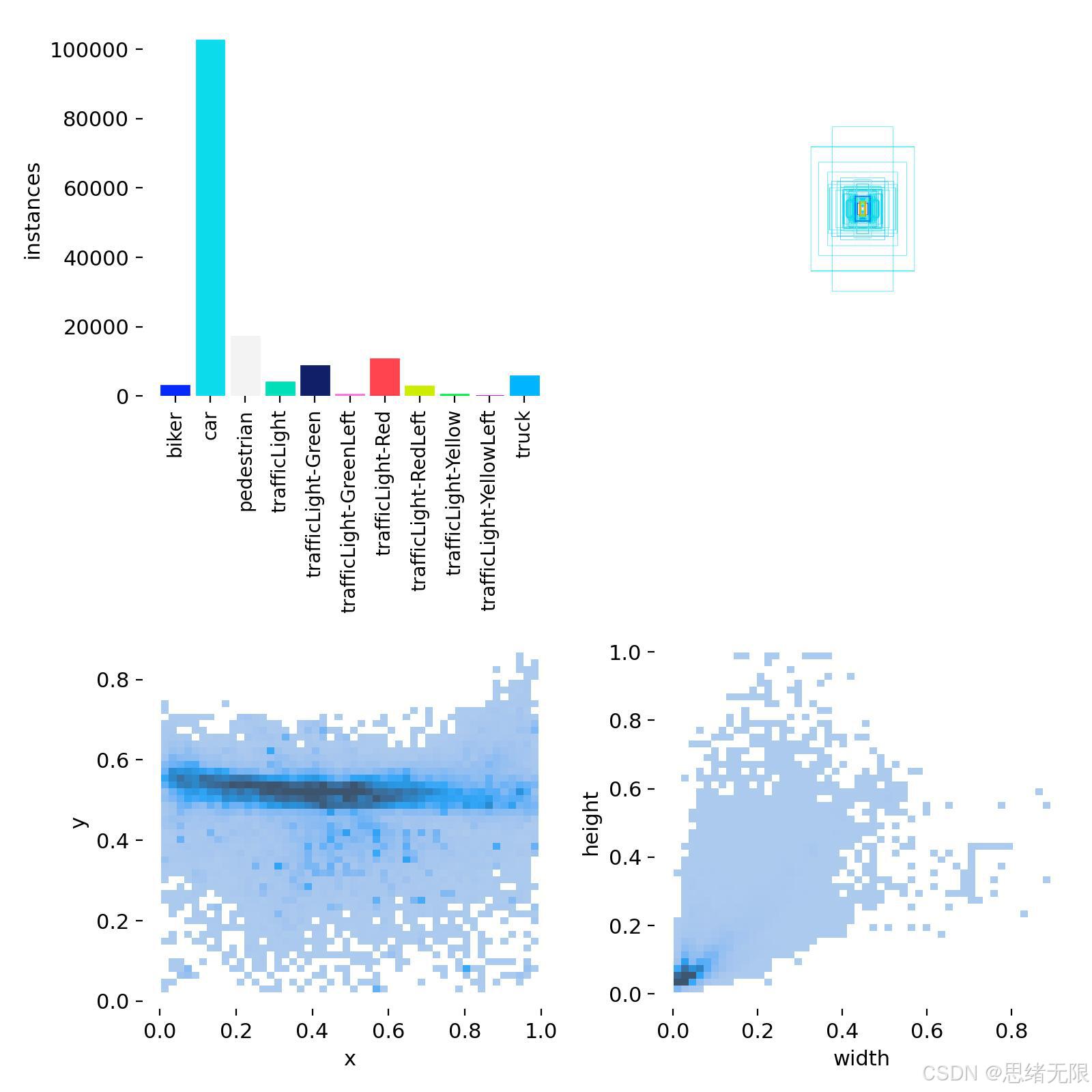
The dataset contains 29,800 images and covers cars, pedestrians, riders, trucks, traffic lights, and fine-grained traffic light states. Its structure clearly follows a long-tail distribution: car has the most samples, while biker, truck, and yellow-light classes are much sparser. This directly affects recall and class balance.
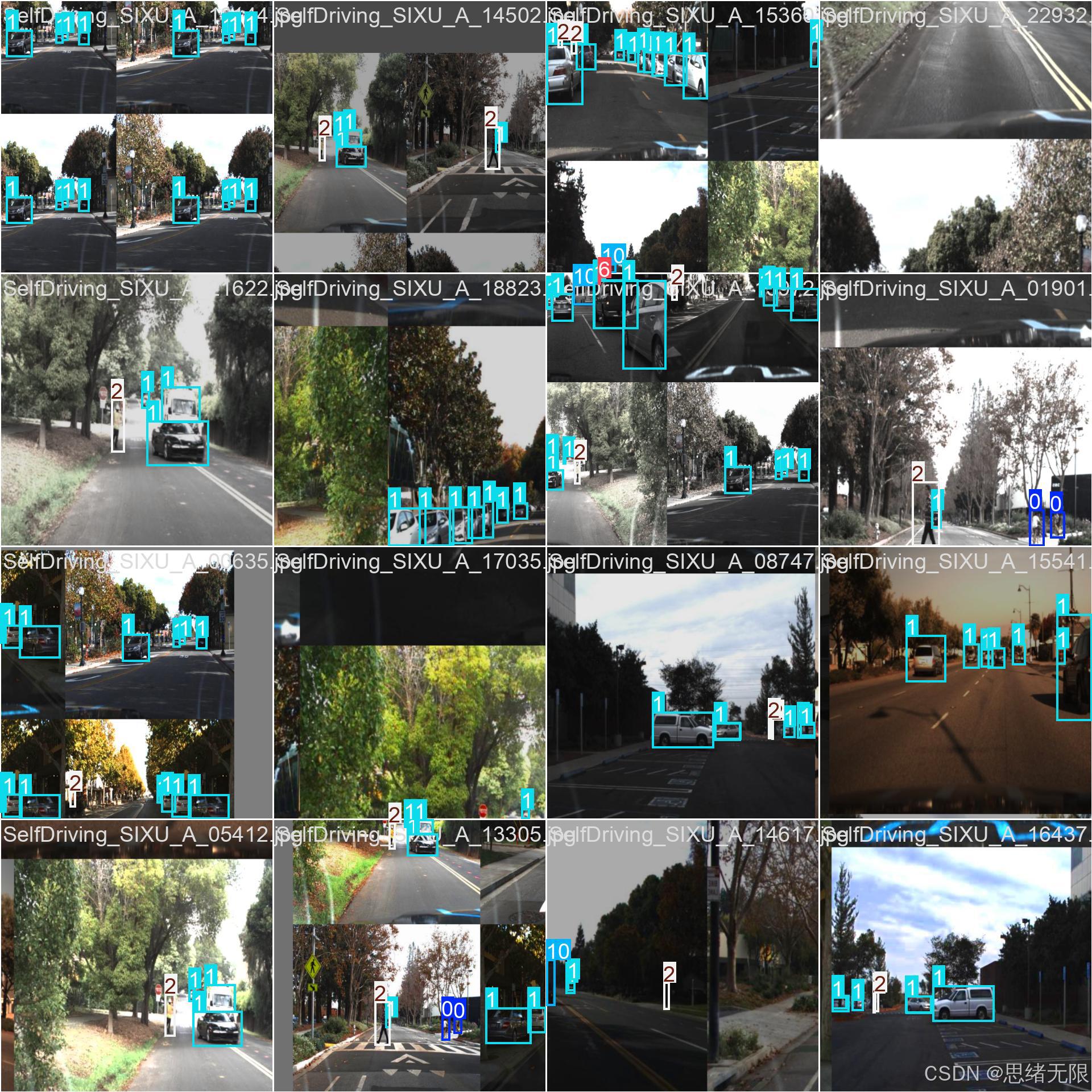 AI Visual Insight: This figure shows class instance frequency, object-center heatmaps, and bounding-box width/height distributions. Vehicle categories dominate the head classes, object centers cluster around the middle of the image, and many targets appear as small boxes. That means the model must provide stronger multi-scale representation and better long-range small-object detection.
The train/validation/test split is 23,800 / 3,000 / 3,000, and all annotations use YOLO TXT format. This organization allows different YOLO generations to reuse the same dataset and evaluation scripts directly, which makes horizontal comparison valid.
Class mapping must be standardized at the engineering layer
Chinese_name = {
    "biker": "骑手",      # Chinese mapping for class labels
    "car": "汽车",
    "pedestrian": "行人",
    "trafficLight": "交通灯",
    "trafficLight-Red": "红灯",
    "trafficLight-Yellow": "黄灯",
    "truck": "卡车"
}
This mapping code aligns training labels with the display language used in the frontend.
 AI Visual Insight: This figure summarizes dataset splits, class IDs, input resolution, and annotation format. It serves as the baseline sheet for training and inference configuration. It highlights the 640×640 input size and the 11-class label system, which constrain unified training across multiple YOLO versions.
The upgrade path from YOLOv5 to YOLOv12 is fundamentally a shift in architecture and deployment paradigms
YOLOv5 remains a strong engineering baseline because its export pipeline is mature, its ecosystem is complete, and its deployment documentation is extensive. Starting with YOLOv8, the design places more emphasis on anchor-free detection and decoupled heads, reducing reliance on anchor priors and improving training stability.
The key value of YOLOv10 is not a single module, but its push toward end-to-end real-time detection, with an attempt to reduce the latency impact of NMS. YOLOv12 further introduces attention mechanisms into real-time detectors, improving representation power while keeping speed broadly controllable.
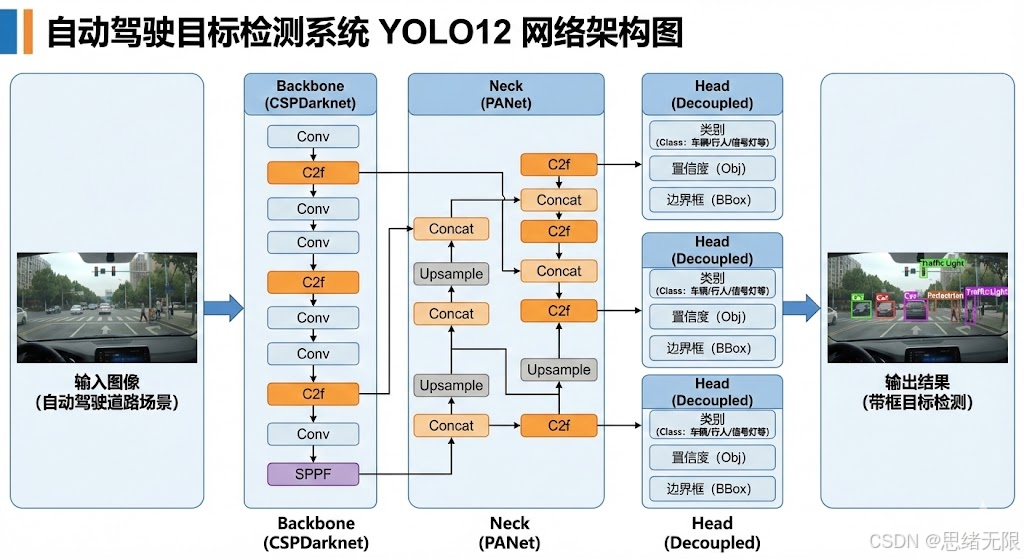 AI Visual Insight: This diagram shows the typical detector pipeline from backbone and feature fusion to the detection head, highlighting how multi-scale feature maps are aggregated to produce classification and box regression outputs. It is useful for understanding how the YOLO family evolves across the backbone, neck, and head layers.
The inference pipeline must be decoupled from the UI through asynchronous execution
def run_detection(frame, detector, conf=0.25):
    img = letterbox(frame)              # Resize uniformly to the model input size
    result = detector.infer(img)        # Call model inference
    boxes = filter_conf(result, conf)   # Filter prediction boxes by threshold
    return map_back(boxes, frame.shape) # Map results back to the original image coordinates
This flow summarizes the standard inference path used in camera and video modes.
A unified training strategy makes cross-version comparisons credible
The project uses a shared configuration with imgsz=640, epochs=120, batch=16, and a cosine annealing learning-rate schedule, while preserving common YOLO training practices such as warmup, EMA, Mosaic, and disabling Mosaic near the end of training. The goal is not to push one version to its absolute best score, but to obtain fair and comparable conclusions.
When dealing with long-tail classes and small objects, the main issue is not whether the model can converge, but whether it can converge stably. For weak classes such as yellow traffic lights, blindly scaling up the model is not always effective. In practice, more refined augmentation and rebalancing strategies are often required.
train_cfg = {
    "epochs": 120,          # Maximum number of training epochs
    "batch": 16,            # Batch size
    "imgsz": 640,           # Input resolution
    "lr0": 0.01,            # Initial learning rate
    "warmup_epochs": 3.0,   # Warmup phase
    "close_mosaic": 10      # Disable Mosaic in the final stage
}
This configuration represents a default training baseline that balances accuracy, GPU memory usage, and reproducibility.
Experimental results show that model selection must jointly consider accuracy and latency
Among lightweight models, YOLOv12n outperforms YOLOv5nu, YOLOv8n, and YOLOv11n on both mAP50 and mAP50-95, which indicates that newer releases deliver clearer gains in small-model settings. However, its latency also increases. That makes it more suitable for real-time UIs that need higher accuracy, rather than ultra-high-FPS scenarios.
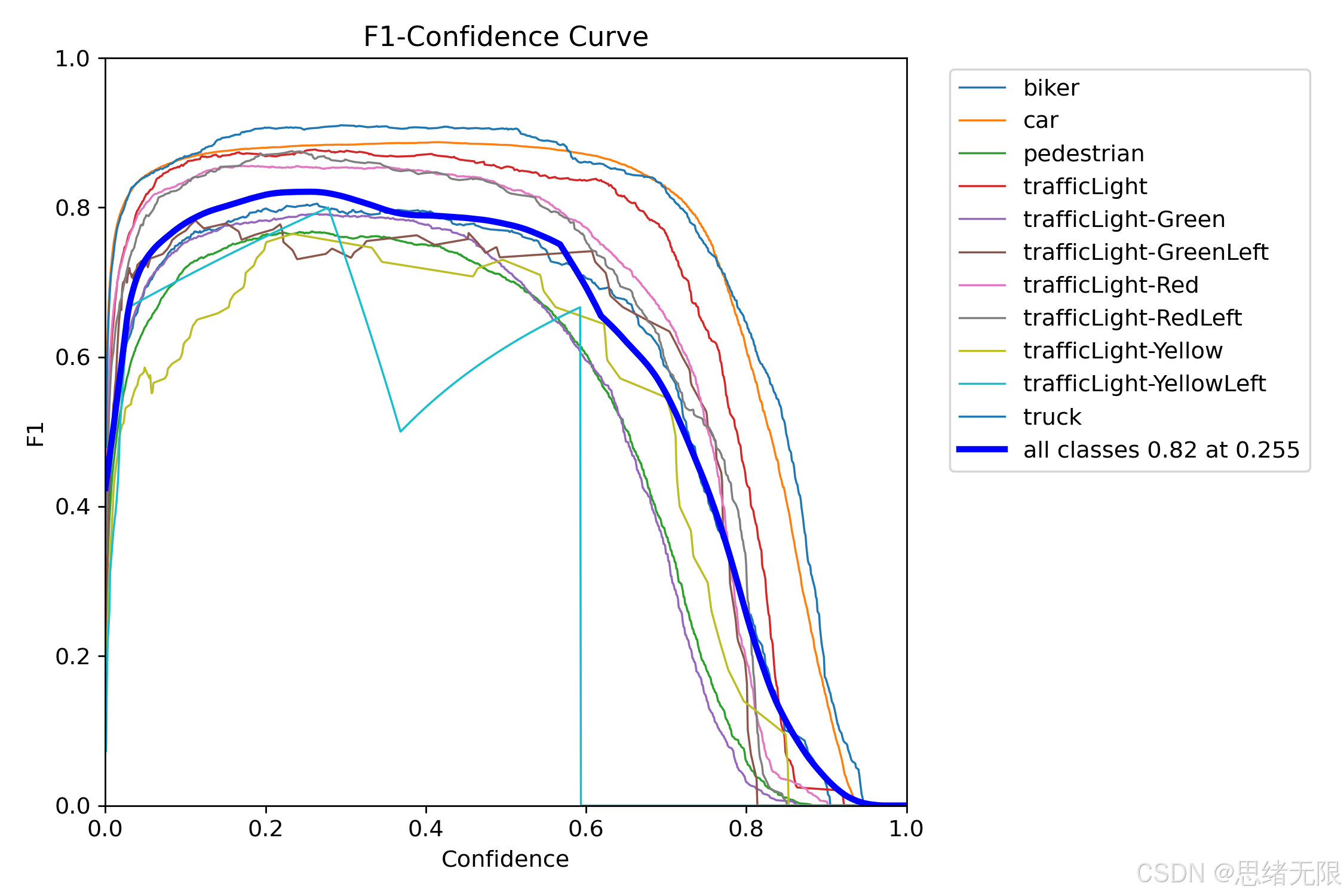 AI Visual Insight: The chart shows how F1 changes under different confidence thresholds, with the peak appearing around 0.25. This suggests that the dataset contains many medium-confidence small or occluded targets, and that an overly high threshold will significantly reduce recall.
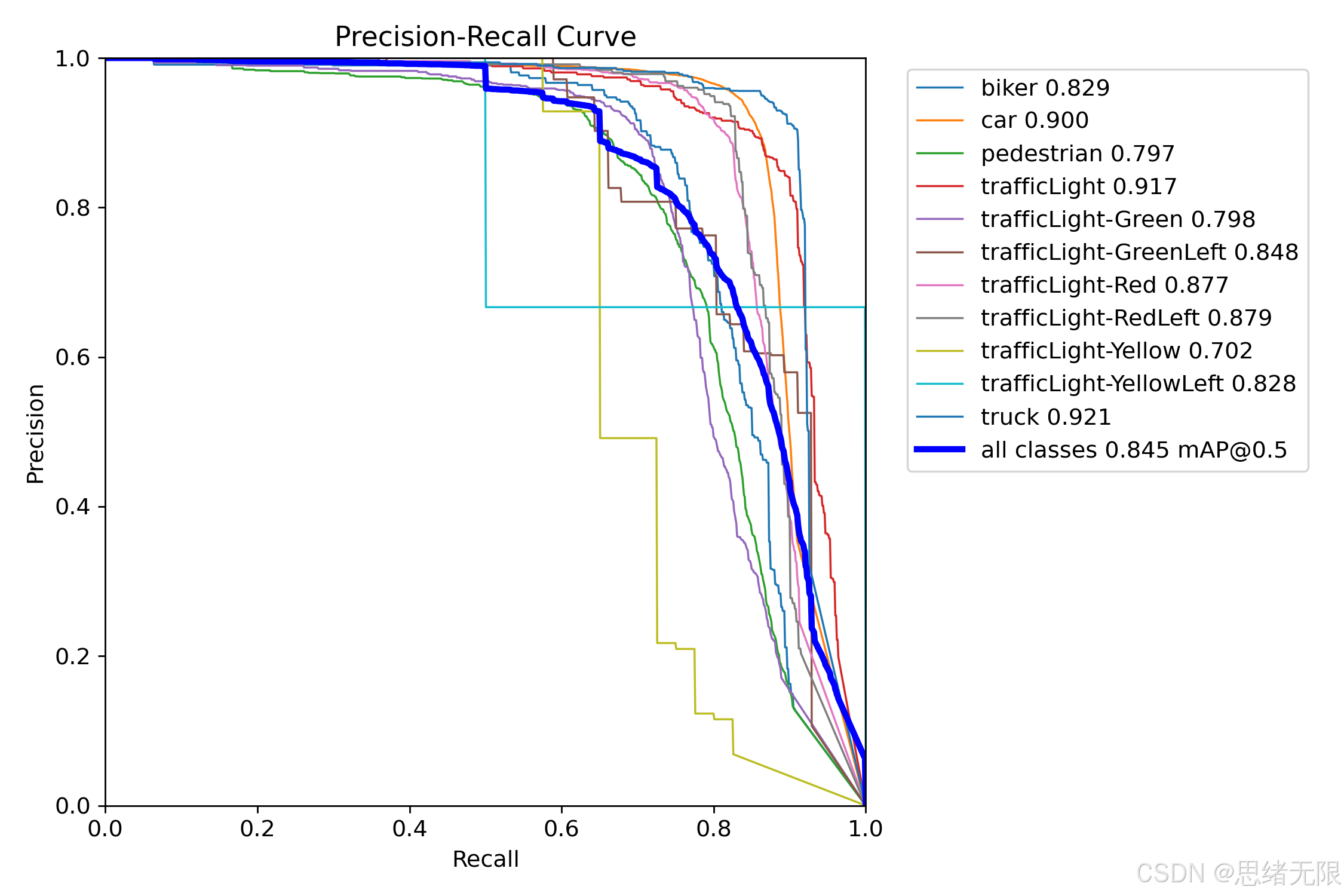 AI Visual Insight: This figure presents multi-class Precision-Recall curves. Vehicle and generic traffic light categories stay closer to the upper-right corner, while the yellow-light class drops faster, indicating that fine-grained signal-color recognition remains a weak point in the system.
For s-size models, YOLOv10s and YOLOv11s deliver a more attractive overall trade-off. Their accuracy gap relative to higher-capacity models is not large, but their latency is lower, which better fits the deployment target of a real-time desktop detection system.
The PySide6 interface turns algorithm engineering into an operable product
The desktop client supports four input modes: single image, folder, video, and camera. It also provides model switching, threshold adjustment, class statistics, and result export. Compared with command-line-only inference, this structure is better suited to product demos, experiment tracking, and collaborative use.
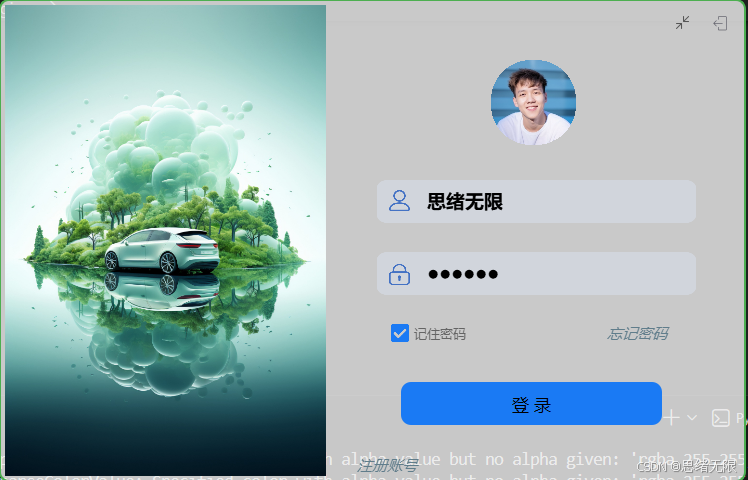 AI Visual Insight: This screen shows the account entry point of the system, which typically includes login, registration, and configuration recovery. From a technical perspective, it implies that user identity, model preferences, and historical parameters have been integrated into persistent management rather than treated as temporary inference-only state.
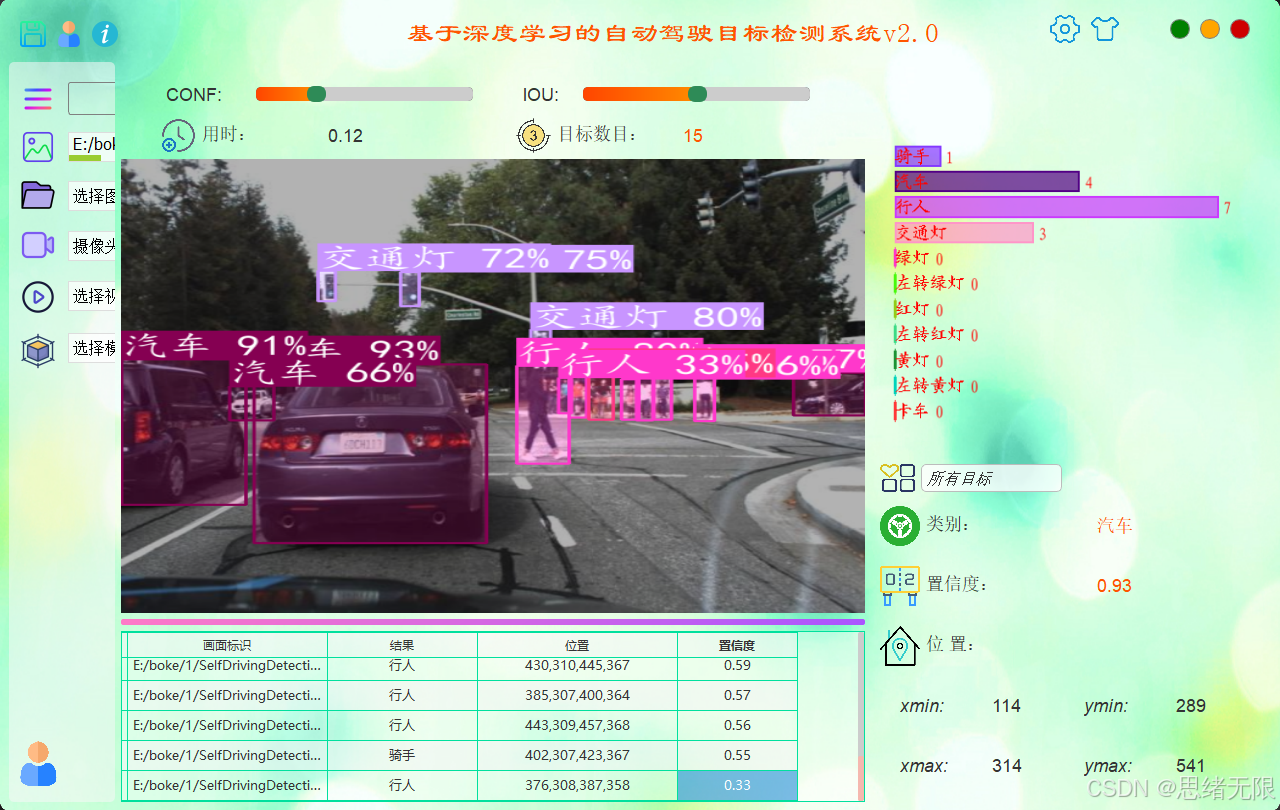 AI Visual Insight: This figure shows the main detection window, which typically includes an image display area, result list, class statistics, and a control panel. It reflects a desktop application pattern in which inference threads, image rendering, and parameter control run in parallel.
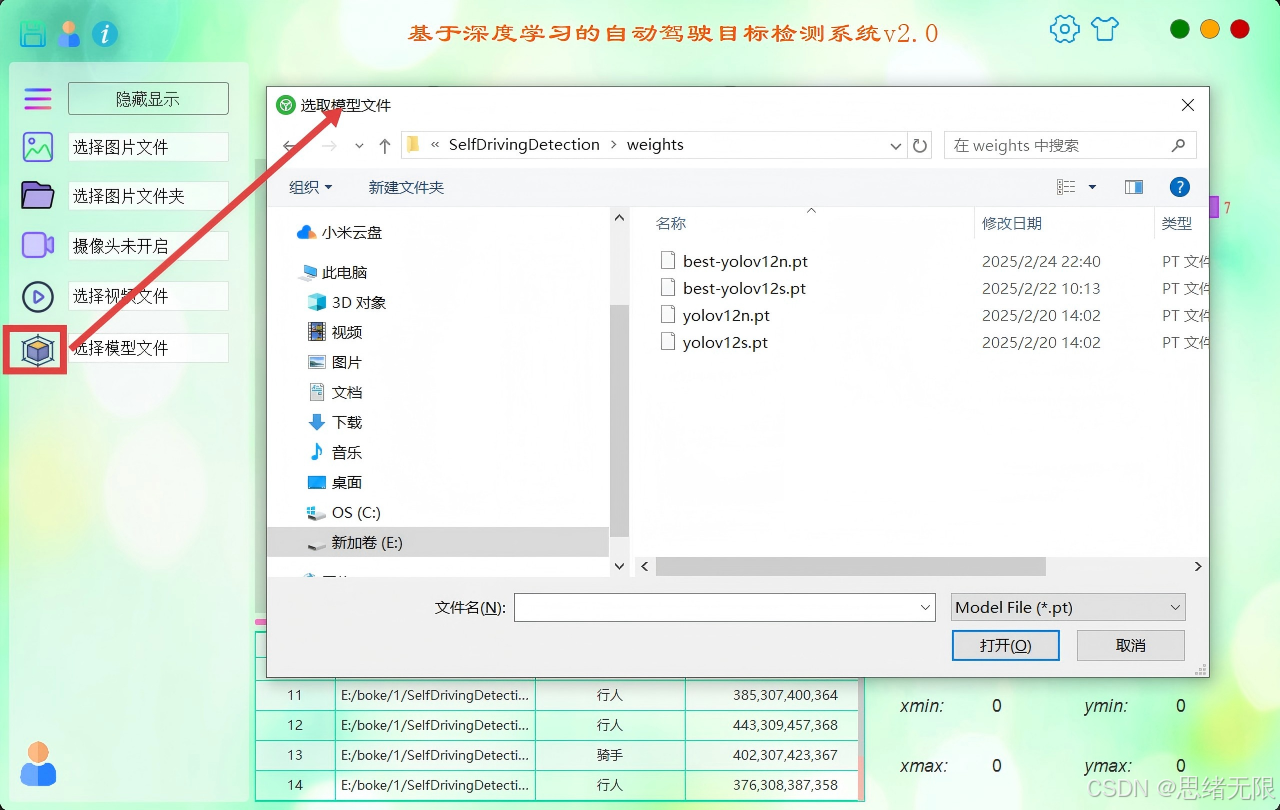 AI Visual Insight: This figure highlights multi-model weight management and same-image comparison, making it useful for quickly validating how different YOLO versions behave on small objects, occlusion, and long-range targets. It is an important interaction entry point for model selection.
The GUI main thread should not handle inference directly
from PySide6.QtCore import QThread, Signal

class DetectThread(QThread):
    result_ready = Signal(dict)

    def __init__(self, detector, frame):
        super().__init__()
        self.detector = detector
        self.frame = frame

    def run(self):
        result = self.detector.infer(self.frame)  # Run expensive inference in a worker thread
        self.result_ready.emit(result)            # Send results back to the UI thread
This code shows why the system can keep the interface responsive even in real-time video scenarios.
The closed-loop system depends on result persistence and replayable configuration
The project writes accounts, themes, model preferences, threshold parameters, and detection results into SQLite. As a result, users can restore the last experiment state every time they log in, which is especially useful for teaching, research, and customer demos.
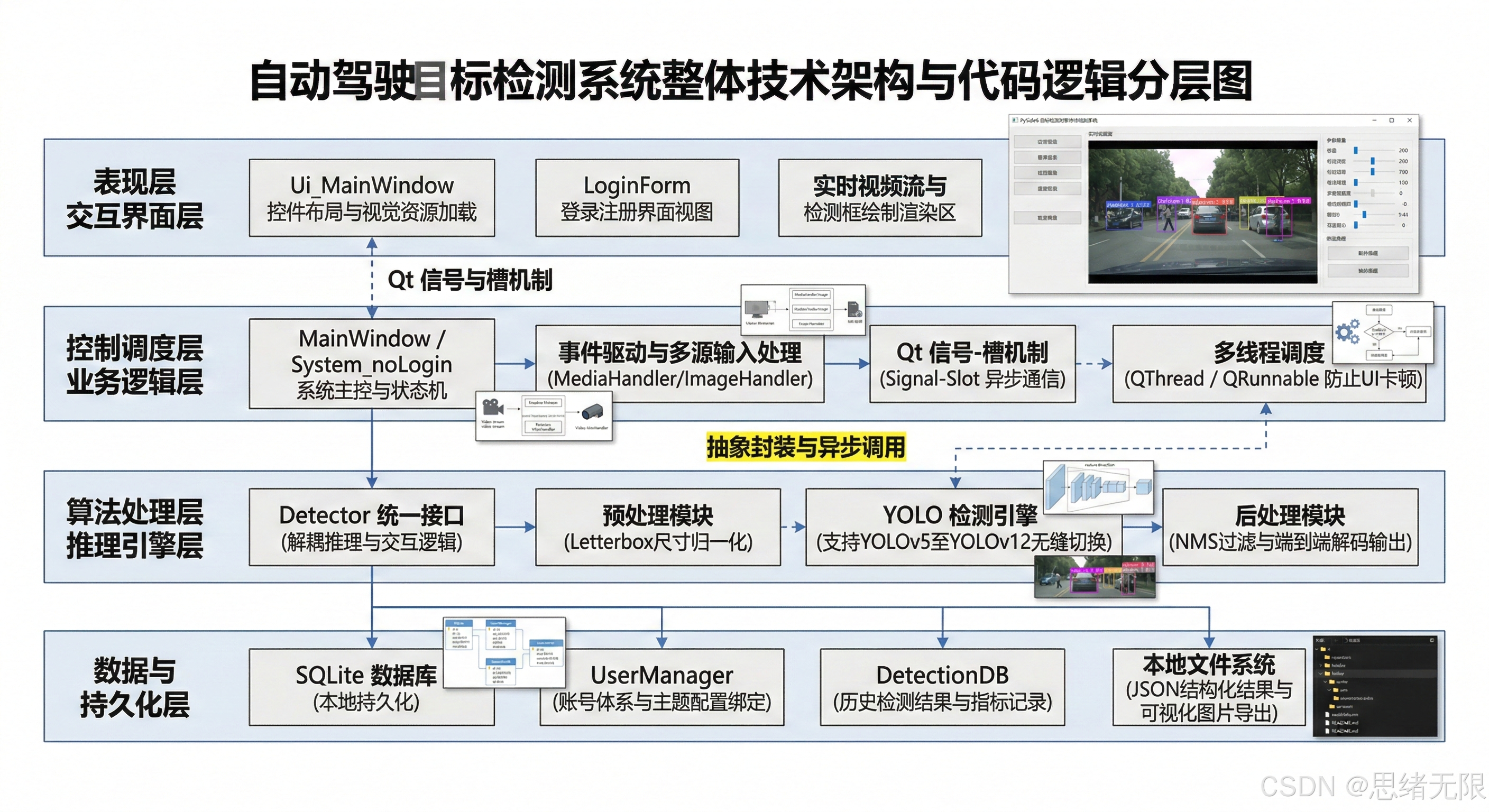 AI Visual Insight: This figure shows the relationship between the UI layer, control layer, detection layer, and database layer, indicating that the system follows a relatively clear layered architecture. That makes it easier to replace the model backend or add new input sources later.
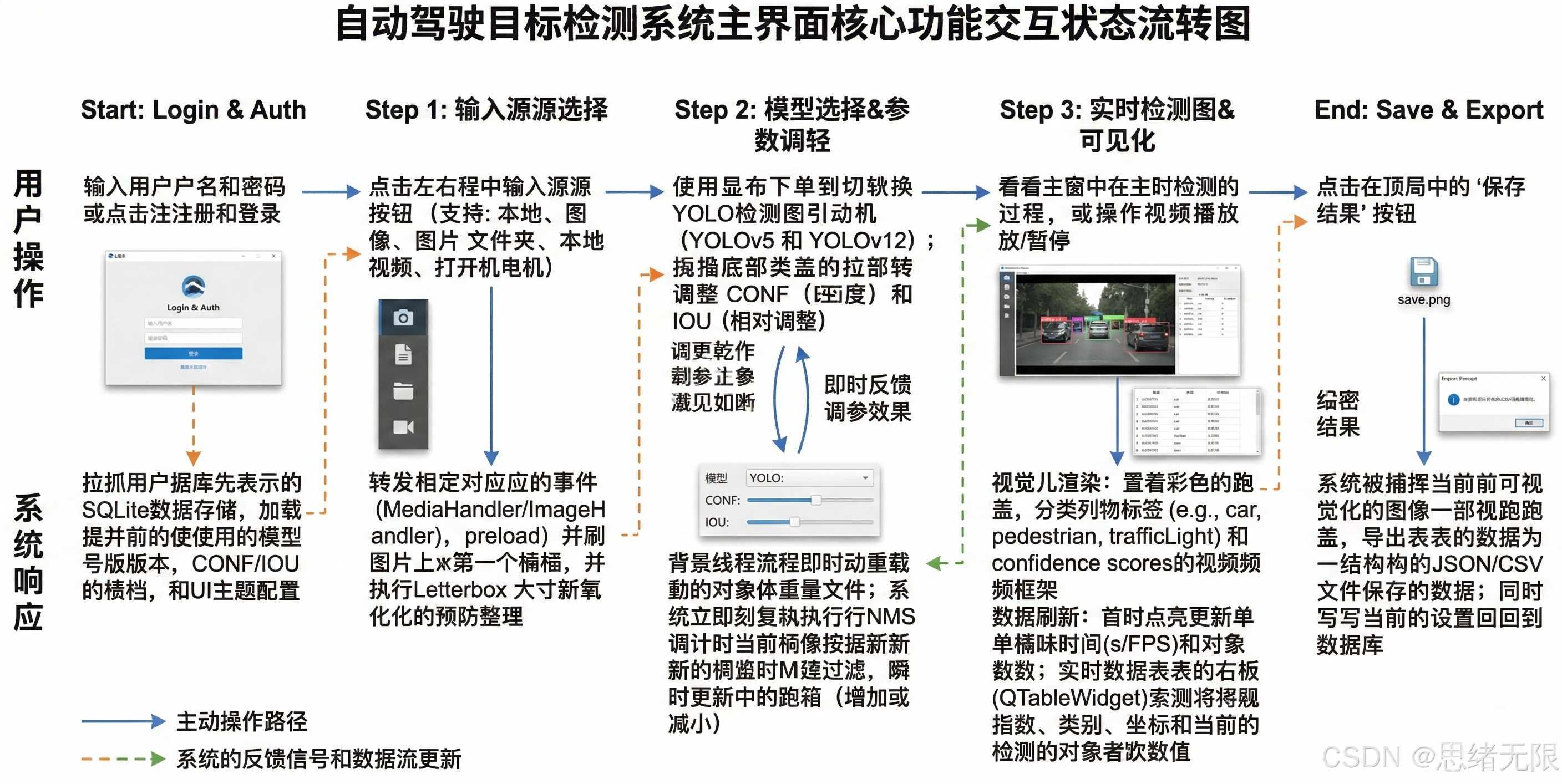 AI Visual Insight: This figure presents the full workflow from initialization and input loading to preprocessing, inference, rendering, and result saving. It is the core diagram for understanding the system’s closed-loop execution path and debugging flow.
The conclusion is that model selection cannot rely on mAP alone
If your goal is real-time desktop detection, YOLOv10n and YOLOv12n are more balanced lightweight candidates. If you can afford a larger compute budget, YOLOv10s and YOLOv11s are more suitable as high-accuracy real-time options. In practice, the real upper bound of the system is often constrained less by the backbone network itself and more by the coordination quality among data distribution, weak classes, and the deployment pipeline.
FAQ
Q1: Why is it not advisable to choose a model for autonomous driving based only on mAP50?
A: Because real-world deployment is jointly constrained by end-to-end latency, FPS, post-processing overhead, small-object recall, and weak-class stability. If you look only at mAP50, you may choose a model with high offline accuracy but insufficient real-time performance.
Q2: Is YOLOv12 always more suitable for production projects than YOLOv10 or YOLOv11?
A: Not necessarily. YOLOv12 offers stronger representation capacity, but it does not always dominate in training stability, memory usage, or engineering maturity. If you prioritize stable deployment, YOLOv10 and YOLOv11 are often more conservative and reliable choices.
Q3: What is the most reusable part of this system?
A: It is not a single model, but the engineering framework composed of a unified Detector interface, a PySide6 interaction layer, and SQLite persistence. That framework can be quickly adapted to adjacent tasks such as traffic sign detection, pedestrian counting, or driver fatigue monitoring.
[AI Readability Summary]
This article reconstructs an autonomous driving object detection system built on YOLOv5–YOLOv12. It covers the dataset, training strategy, model evolution, experimental findings, and a PySide6 visualization interface, with a particular focus on the trade-offs among accuracy, speed, and deployment complexity across multiple YOLO versions.