This article shows how to use Java to integrate with SiliconFlow through the OpenAI-compatible protocol, implement both non-streaming and streaming LLM calls, and solve real-world integration issues such as inconsistent API formats, complex response parsing, and difficult streaming output handling. Keywords: Java, OpenAI protocol, SSE.
Technical specifications are summarized below
| Parameter | Description |
|---|---|
| Language | Java |
| Protocol | HTTP + OpenAI Chat Completions-compatible protocol + SSE |
| Platform | SiliconFlow |
| GitHub Stars | Not provided in the original article |
| Core dependencies | OkHttp 4.12.0, Gson 2.13.1 |
| Typical model | Qwen/Qwen3-32B |
 AI Visual Insight: The image is the article cover screenshot. Its core message centers on the theme of practical Java LLM API integration, highlighting a complete learning path from protocol understanding to production code implementation. It works well as an introductory guide for backend developers.
The OpenAI-compatible protocol has become one of the de facto standards for LLM APIs
For Java developers, the first step in integrating an LLM is not choosing a model, but understanding the unified interface. The OpenAI Chat Completions protocol matters because many model providers now target compatibility with it.
That means when you switch from SiliconFlow to another platform, you usually only need to replace baseURL, apiKey, and model, while the core request structure remains nearly unchanged. Low migration cost is its biggest engineering advantage.
The minimum request body structure must center on messages
{
  "model": "Qwen/Qwen3-32B",
  "messages": [
    {
      "role": "system",
      "content": "You are an enterprise knowledge base Q&A assistant. Only answer policy and process questions."
    },
    {
      "role": "user",
      "content": "Can employees split annual leave into multiple periods?"
    }
  ],
  "temperature": 0.1,
  "max_tokens": 512,
  "stream": false
}
This request defines the model, context, output randomness, and response mode. It is the most common skeleton for a Chat API call.
The messages mechanism determines whether the model truly understands the context
messages is not just a parameter. It is the conversation state itself. system sets identity and behavioral boundaries, user represents the current question, and assistant carries historical replies.
Many developers mistakenly assume that the model remembers context automatically. In reality, every API call is independent. Multi-turn conversation works only because you send the previous messages again with each request.
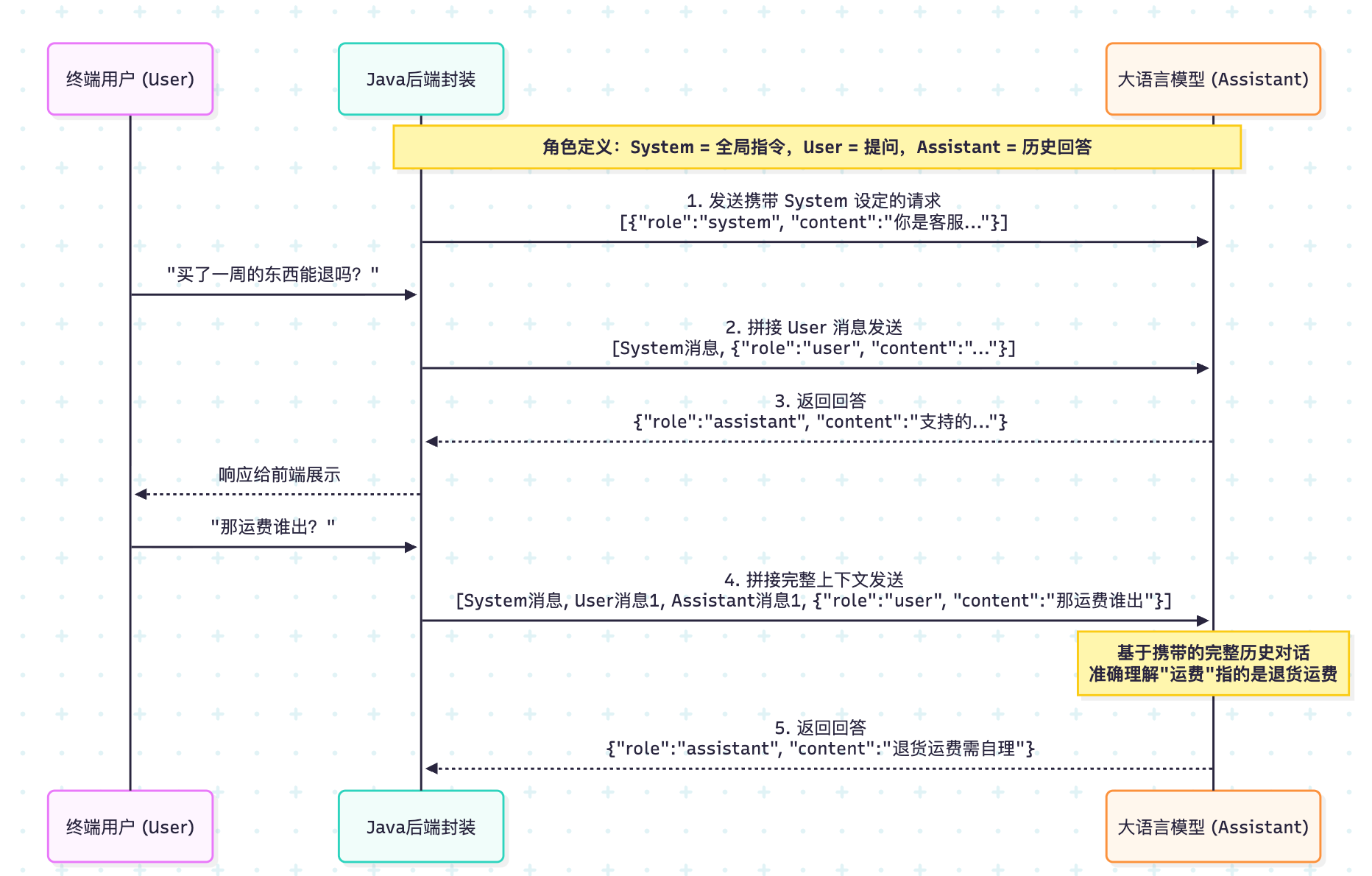 AI Visual Insight: The image illustrates the structured composition of the conversation message array, emphasizing that
 system, user, and assistant jointly form the context window. The model does not only read the last sentence; it generates answers based on the full message sequence.
The system prompt directly affects answer style and behavioral constraints
{
  "role": "system",
  "content": "Answer based on the reference materials. If the materials are insufficient, clearly say so and do not fabricate information."
}
This kind of system prompt is a key control lever in RAG scenarios. It can significantly reduce hallucinations and improve answer consistency.
Common request parameters require trade-offs between stability and cost
In enterprise knowledge bases, process Q&A, and RAG generation scenarios, you should usually prioritize stability over creativity. That is why temperature is often set between and 0.3.
max_tokens defines the output limit. If it is too small, the answer may be truncated. If it is too large, costs increase. You typically tune either top_p or temperature, not both. stream determines whether the server returns the result all at once or token by token as it is generated.
The recommended parameter snapshot is directly usable for RAG-style Q&A
temperature = 0~0.3
max_tokens = 512~2048
stream = true (user-facing)
stream = false (debugging or batch processing)
This parameter combination is better suited for business-oriented Q&A systems that require stable, explainable, and low-hallucination output.
Non-streaming responses are better for debugging, batch jobs, and structured parsing
When stream=false, the server returns the full JSON payload in one response. In most cases, you only need to focus on three fields: choices[0].message.content, finish_reason, and usage.
Among them, finish_reason=length usually means max_tokens is too small. usage can be used to monitor token cost and is an important basis for billing and auditing in production environments.
You can implement a non-streaming call with only OkHttp and Gson
public class NonStreamingChat {
    // API endpoint
    private static final String API_URL = "https://api.siliconflow.cn/v1/chat/completions";
    // In production, read the key from environment variables
    private static final String API_KEY = "YOUR_API_KEY";

    public static void main(String[] args) throws Exception {
        JsonObject body = new JsonObject();
        body.addProperty("model", "Qwen/Qwen3-32B");
        body.addProperty("temperature", 0); // Low randomness for better stability
        body.addProperty("max_tokens", 1024);
        body.addProperty("stream", false); // Non-streaming call

        JsonArray messages = new JsonArray();
        JsonObject system = new JsonObject();
        system.addProperty("role", "system");
        system.addProperty("content", "You are an enterprise knowledge base Q&A assistant. Keep answers concise.");
        messages.add(system);

        JsonObject user = new JsonObject();
        user.addProperty("role", "user");
        user.addProperty("content", "Can employees split annual leave into multiple periods?");
        messages.add(user);
        body.add("messages", messages);

        OkHttpClient client = new OkHttpClient.Builder()
                .readTimeout(60, java.util.concurrent.TimeUnit.SECONDS)
                .build();

        Request request = new Request.Builder()
                .url(API_URL)
                .addHeader("Authorization", "Bearer " + API_KEY)
                .addHeader("Content-Type", "application/json")
                .post(RequestBody.create(body.toString(), MediaType.parse("application/json")))
                .build();

        try (Response response = client.newCall(request).execute()) {
            String json = response.body().string();
            JsonObject root = new Gson().fromJson(json, JsonObject.class);
            String answer = root.getAsJsonArray("choices")
                    .get(0).getAsJsonObject()
                    .getAsJsonObject("message")
                    .get("content").getAsString(); // Extract the model's final answer
            System.out.println(answer);
        }
    }
}
This code completes non-streaming request construction, authenticated submission, and result extraction. It works well as a minimal runnable example.
Streaming responses are fundamentally about continuously receiving incremental data chunks over SSE
Streaming does not reduce total generation time. It reduces time to first token. Users do not need to wait for the full answer to finish. As soon as the model generates the first chunk of text, the frontend can display it immediately.
At the protocol level, SSE continuously pushes data lines that begin with data:. Unlike non-streaming responses, streaming content does not appear in message.content; it appears in delta.content.
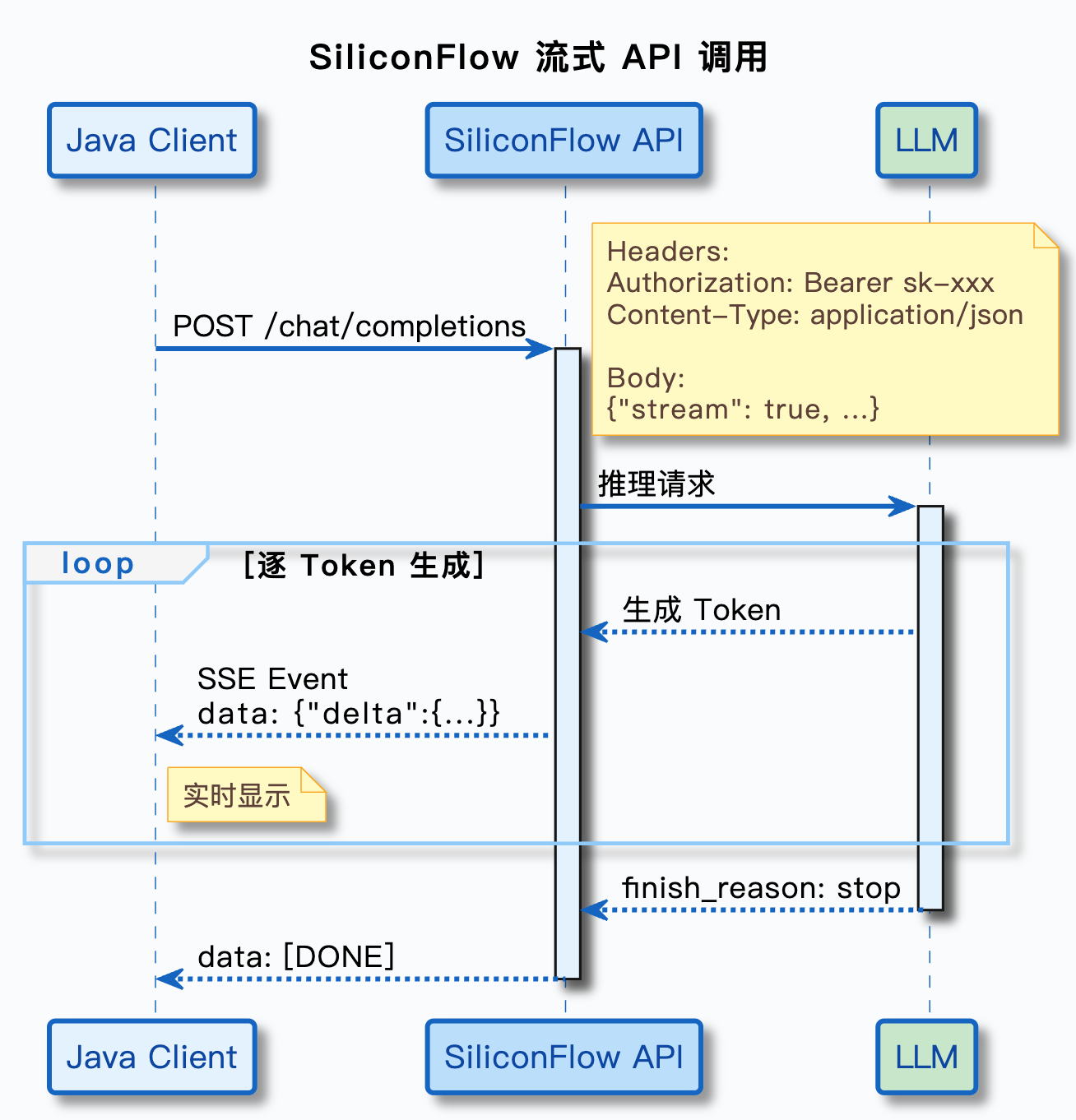 AI Visual Insight: The image shows the SiliconFlow platform interface, emphasizing its role as the console entry point for an OpenAI-compatible service provider. It is typically used for model selection, API key management, and call configuration setup.
Streaming parsing must read line by line and handle the [DONE] marker
BufferedReader reader = new BufferedReader(
        new InputStreamReader(response.body().byteStream())
);
StringBuilder fullContent = new StringBuilder();
String line;

while ((line = reader.readLine()) != null) {
    if (line.isEmpty() || !line.startsWith("data: ")) {
        continue; // Skip empty and invalid lines
    }

    String data = line.substring(6); // Remove the data: prefix
    if ("[DONE]".equals(data)) {
        break; // Stop reading when the end marker arrives
    }

    JsonObject chunk = new Gson().fromJson(data, JsonObject.class);
    JsonObject delta = chunk.getAsJsonArray("choices")
            .get(0).getAsJsonObject()
            .getAsJsonObject("delta");

    if (delta != null && delta.has("content") && !delta.get("content").isJsonNull()) {
        String content = delta.get("content").getAsString();
        System.out.print(content); // Print in real time to simulate typing
        fullContent.append(content); // Append to the full answer
    }
}
The key to this logic is consuming delta.content chunk by chunk instead of waiting for the full text to arrive in one piece.
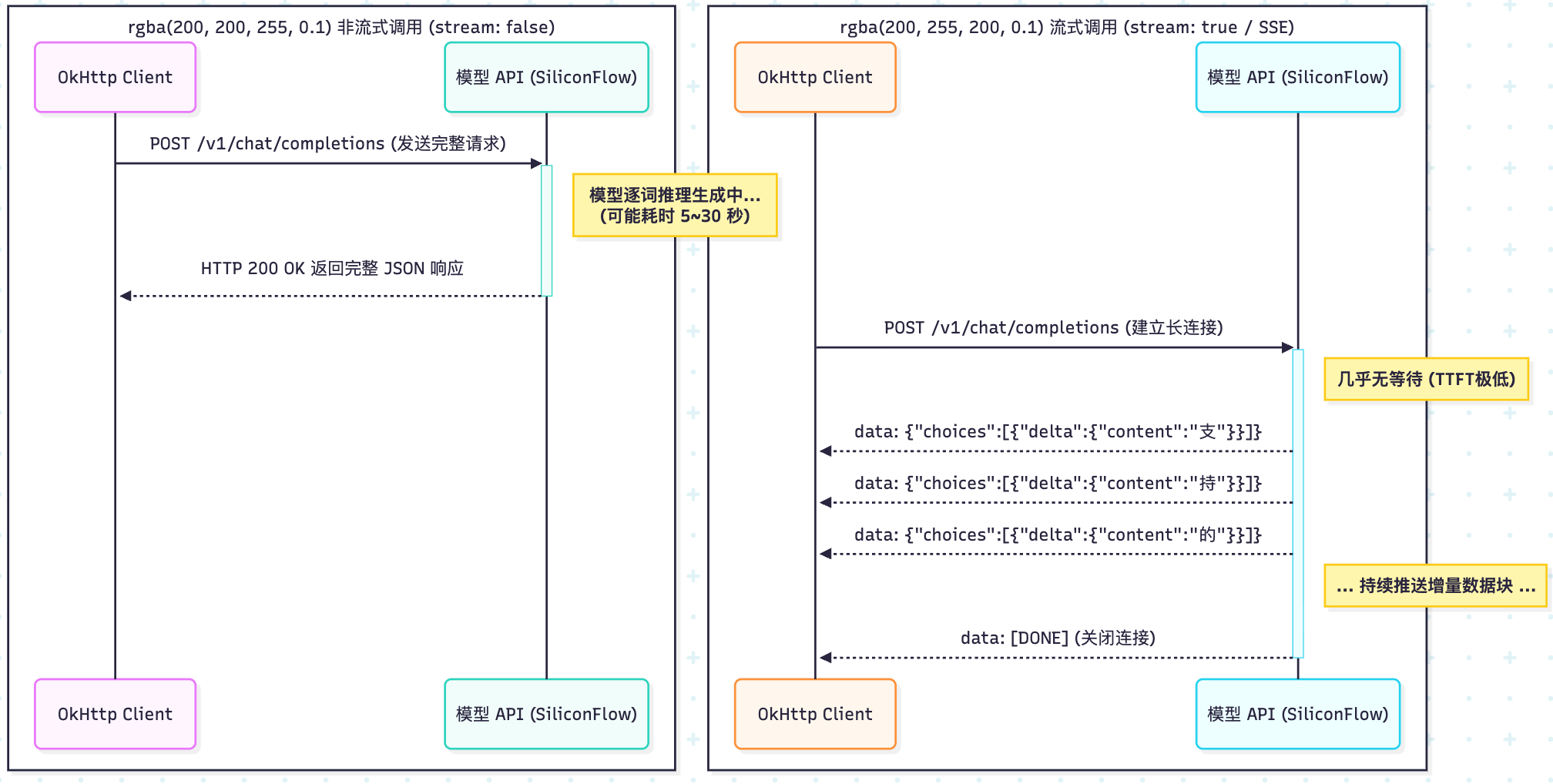 AI Visual Insight: The image illustrates the effect of streaming output, highlighting how answer content arrives in segments and is rendered by the client in real time. This interaction pattern is well suited for chat interfaces, knowledge base Q&A, and long-form text generation.
The choice between non-streaming and streaming should be driven by product experience
If you are working on API debugging, offline batch jobs, embeddings, or rerankers, non-streaming is simpler and logging is clearer. If you are building a user-facing Q&A page, AI assistant, or customer support chat, streaming provides a better user experience.
In engineering practice, it is best to start with non-streaming to validate the full request path, then switch the frontend interaction to streaming. This approach minimizes debugging cost and makes protocol and parsing issues easier to isolate.
A highly reusable migration strategy is to replace only three configuration items
String baseURL = "https://api.siliconflow.cn/v1/chat/completions";
String apiKey = "YOUR_API_KEY";
String model = "Qwen/Qwen3-32B";
As long as the provider supports the OpenAI protocol, in most scenarios you only need to replace the endpoint, key, and model identifier without rewriting the core calling logic.
In RAG scenarios, developers should pay closer attention to the coordination between the system prompt and response mode
RAG is not just “retrieve text and concatenate it.” You also need to tell the model explicitly through system: it must answer based on the reference materials, and if the materials are insufficient, it should refuse to answer or respond conservatively.
When integrating these scenarios into a frontend, streaming output is recommended to improve perceived responsiveness. When integrating them into backend evaluation, bulk replay, or quality auditing pipelines, non-streaming is recommended to preserve complete structure.
FAQ provides structured answers to common implementation questions
Why should Java developers learn the OpenAI protocol first when calling LLM APIs?
Because it has become a de facto compatibility standard. Once you understand it, you can migrate to multiple model platforms at low cost and reduce SDK lock-in and duplicated development effort.
Why can’t streaming responses be read directly with response.body().string()?
Because a streaming response is a continuously delivered data stream, not a one-time complete JSON payload. Reading the whole body at once removes the ability to process incremental output and makes real-time rendering harder.
Should enterprise knowledge base Q&A use streaming or non-streaming by default?
Use streaming first for end users to reduce perceived waiting time. Use non-streaming first for development, debugging, and offline tasks so that you can record the complete response and troubleshoot problems more easily.
AI Readability Summary: This article explains how to use Java to call SiliconFlow LLMs through the OpenAI-compatible protocol. It covers request body design, the messages role mechanism, non-streaming and SSE streaming response parsing, runnable OkHttp + Gson examples, and practical guidance on when to choose each response mode.