free-claude-code intercepts Claude Code’s Anthropic requests through a local proxy and forwards them to NVIDIA NIM, OpenRouter, or local models, solving the high cost of the official API. It works with the CLI, VS Code, and messaging platforms. Core keywords: Claude Code, model routing, local proxy.
Technical specifications are easy to scan
| Parameter | Details |
|---|---|
| Project Name | free-claude-code |
| Core Language | Python |
| Runtime Mode | Local proxy server |
| Compatible Protocols | Anthropic request endpoint, OpenAI-compatible backends |
| Default Address | http://localhost:8082 |
| Integration Targets | Claude Code CLI, VS Code extension, Discord bot |
| GitHub Stars | About 10.2k (as marked in the source material) |
| Core Dependencies | uv, uvicorn, pydantic, Node.js 18+ |
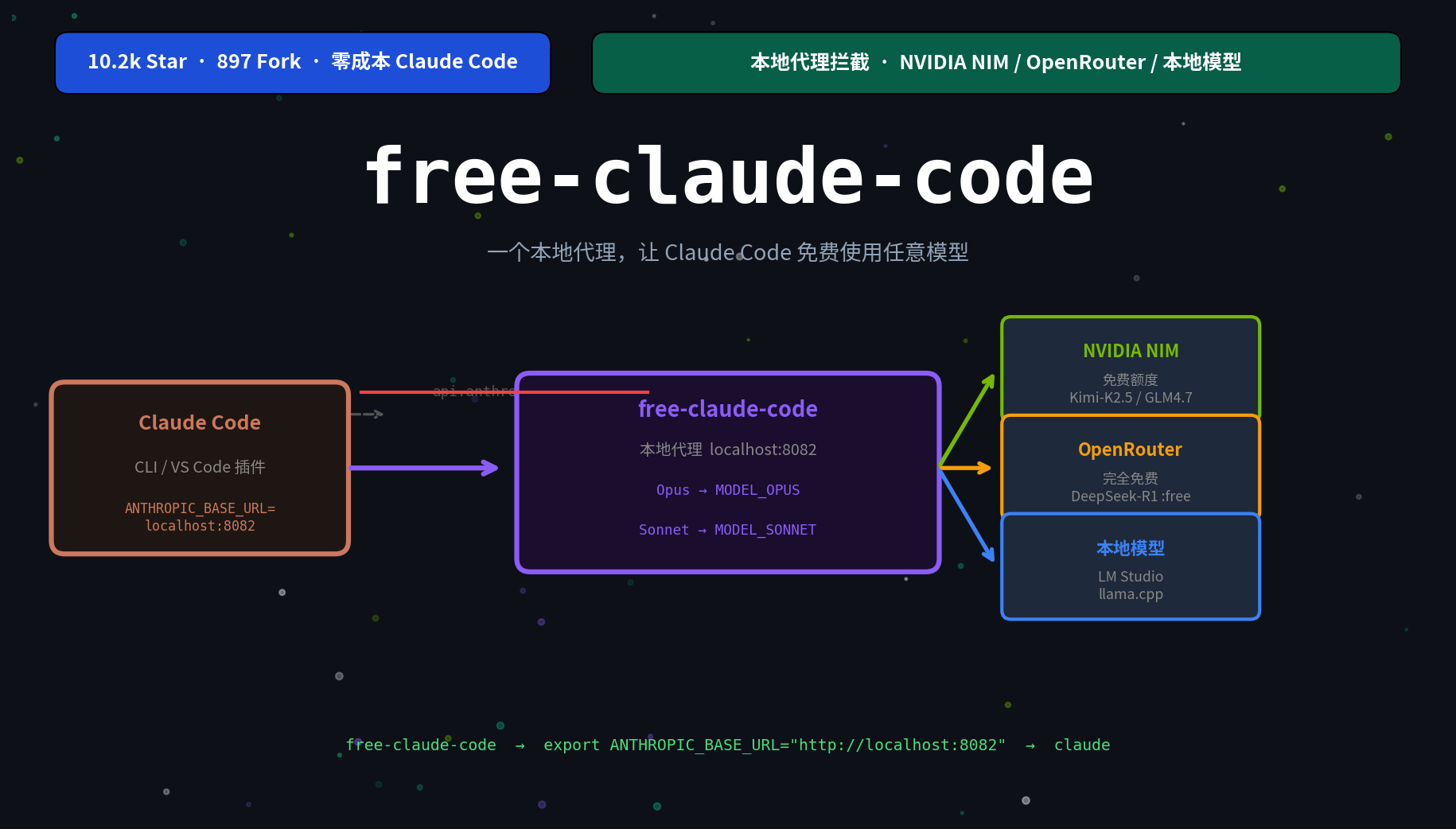 AI Visual Insight: This image shows the call chain between Claude Code and the local proxy. It highlights that requests first enter
 localhost:8082, and the proxy then dispatches them to different model backends. This creates a decoupled architecture where the frontend tool stays the same while the backend model remains replaceable.
The project’s core value is reusing Claude Code’s engineering capabilities
Claude Code itself is not what directly drives cost. The real expense comes from each call to the Anthropic API. The value of free-claude-code is not that it replaces Claude Code, but that it replaces Claude Code’s default model endpoint.
The benefit is straightforward: you keep Claude Code’s command-line experience, tool-calling capabilities, and understanding of engineering context, while switching the model layer to free-tier services, free models, or local inference services.
Its architecture is fundamentally built on protocol compatibility and request forwarding
 AI Visual Insight: This image shows the data flow after replacing the official Anthropic API address with a local proxy. On the left, Claude Code sends standard requests. On the right, the proxy routes those requests to NIM, OpenRouter, LM Studio, and llama.cpp. This makes it clear that the project is essentially a combination of an API compatibility layer and a model orchestration layer.
You only need to point Claude Code’s base URL to the local proxy and provide a placeholder token. The client will then send all messages to free-claude-code. The proxy completes routing based on the model name, environment variables, and backend availability.
# Route Claude Code through the local proxy
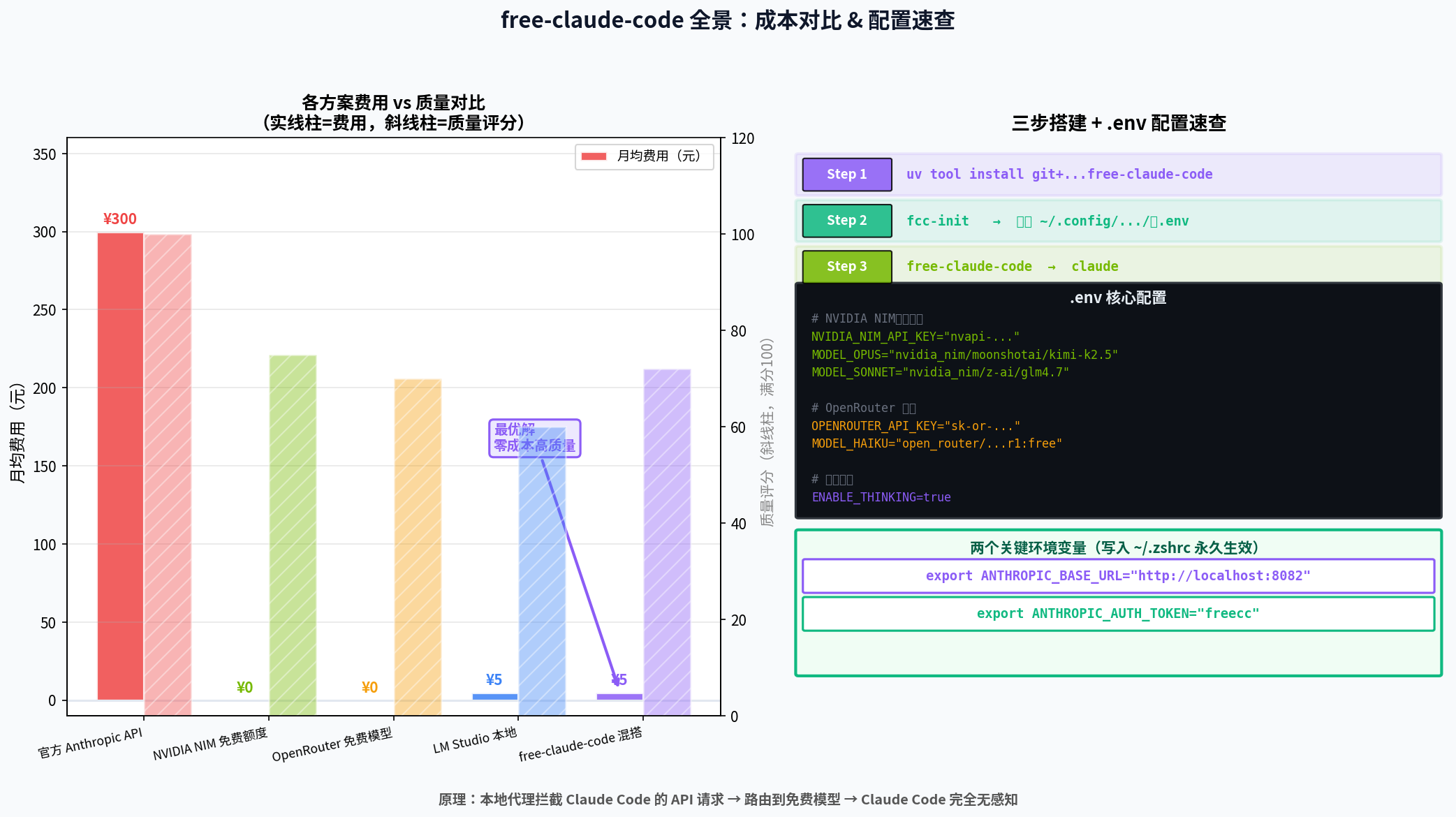
export ANTHROPIC_BASE_URL="http://localhost:8082"   # Point the request endpoint to the local proxy
export ANTHROPIC_AUTH_TOKEN="freecc"                # Placeholder string to avoid client-side validation failure
claude                                                # Start Claude Code normally
This configuration replaces Claude Code’s default outbound endpoint with the local proxy without modifying client source code.
The model routing mechanism is what makes it flexible enough for real work
The project maps requests based on the model field. A typical setup binds Opus, Sonnet, and Haiku to different providers or model performance tiers.
This design fits real development workflows well: use a high-quality model for complex refactoring, a lightweight model for fast completion, and a local model for offline or sensitive tasks. That lets you dynamically balance cost and quality by task.
The recommended installation flow takes about five minutes
Install Claude Code first, then install the proxy. In the source material, the most recommended method is uv tool install because it minimizes environment management overhead.
# Install Claude Code
node --version                                       # Make sure Node.js 18+ is available
npm install -g @anthropic-ai/claude-code            # Install the CLI
claude --version                                    # Verify installation

# Install free-claude-code
curl -LsSf https://astral.sh/uv/install.sh | sh     # Install uv
uv tool install git+https://github.com/Alishahryar1/free-claude-code.git
fcc-init                                             # Generate the default configuration
free-claude-code                                     # Start the local proxy
These commands create the minimum runnable setup for Claude Code and free-claude-code.
Configuring the .env file is the key step for production use
If you want the most stable free option, prioritize NVIDIA NIM. If you want to try more models quickly, start with OpenRouter. If you care most about privacy and offline capability, choose LM Studio or llama.cpp.
# ~/.config/free-claude-code/.env
NVIDIA_NIM_API_KEY="nvapi-your-key"                   # Free cloud quota
MODEL_OPUS="nvidia_nim/moonshotai/kimi-k2.5"         # Model for heavy tasks
MODEL_SONNET="nvidia_nim/z-ai/glm4.7"                # Model for day-to-day coding
MODEL_HAIKU="nvidia_nim/stepfun-ai/step-3.5-flash"   # Lightweight fast model
MODEL="nvidia_nim/z-ai/glm4.7"                       # Fallback default model
This configuration shows the most common NIM routing strategy and can directly cover different tiers of Claude model requests.
Hybrid routing is one of the project’s most practical capabilities
You can route Opus to a high-quality NIM model, Sonnet to an OpenRouter free inference model, and Haiku to a lightweight local model. This lowers cost and also reduces the risk of exhausting quota from a single provider.
NVIDIA_NIM_API_KEY="nvapi-..."                     # NIM credentials
OPENROUTER_API_KEY="sk-or-..."                     # OpenRouter credentials
MODEL_OPUS="nvidia_nim/moonshotai/kimi-k2.5"      # Complex generation tasks
MODEL_SONNET="open_router/deepseek/deepseek-r1-0528:free"  # Reasoning and analysis tasks
MODEL_HAIKU="lmstudio/unsloth/GLM-4.7-Flash-GGUF" # Local fast completion
MODEL="lmstudio/unsloth/GLM-4.7-Flash-GGUF"       # Default fallback
This configuration reflects a combined strategy of cloud quality, free-tier quota, and low-latency local execution.
It already supports three mainstream entry points
The CLI is the most direct option and works well for terminal-driven development. The VS Code extension fits users who already rely on an editor-based workflow. Discord mode acts more like a shared team entry point and is suitable for collaboration or remote bot scenarios.
VS Code integration only requires two settings
{
  "claude-code.anthropicBaseUrl": "http://localhost:8082",
  "claude-code.anthropicApiKey": "freecc"
}
These settings make the VS Code extension access alternative models through the local proxy, just like the CLI.
Most common issues come down to environment setup and compatibility
The first category is the Python version. The source material explicitly notes that Python 3.14 may have compatibility issues with pydantic, so Python 3.11 or 3.12 is recommended.
The second category is proxy connectivity. First check whether http://localhost:8082/health returns a healthy status, then confirm that your environment variables are active.
curl http://localhost:8082/health                    # Check proxy health status
echo $ANTHROPIC_BASE_URL                             # Confirm the proxy address
echo $ANTHROPIC_AUTH_TOKEN                           # Confirm the placeholder token
uv tool upgrade free-claude-code                     # Upgrade to the latest version to fix compatibility issues
These commands help diagnose three high-frequency failure modes: startup failure, connection failure, and version incompatibility.
The security boundary should be designed around a local-proxy default
It is best to listen only on localhost, never commit .env to the repository, and never expose an unauthenticated proxy instance to the public internet. If you must expose it externally, add an authentication token.
If you call NVIDIA NIM or OpenRouter, assume that request content will be sent to a third-party service. If your workflow involves private code, sensitive scripts, or internal network configuration, prioritize local models.
Comparing cost and fit helps you decide faster
NVIDIA NIM is a strong choice for most developers who want a free daily driver. OpenRouter works well as a supplemental pool of free models. LM Studio is best for privacy and offline usage. llama.cpp is better suited to advanced users who already understand local inference stacks.
From an engineering perspective, the best option is usually not a single backend. The multi-backend hybrid mode provided by free-claude-code lets you optimize quality, speed, privacy, and cost at the same time.
FAQ
Q1: Is free-claude-code a replacement for Claude Code?
No. It is better understood as a local model proxy layer for Claude Code. It preserves the frontend experience and only replaces the model endpoint.
Q2: Which free backend is best for beginners?
Start with NVIDIA NIM. It is easy to configure, its free quota is clear, and model quality is relatively stable.
Q3: When should you use local models?
Local models are the best choice when you need offline execution, want to protect code privacy, or do not want requests sent to third-party platforms.
Core summary
This article reconstructs the core principles, installation workflow, model routing, CLI and VS Code integration methods, and common troubleshooting steps behind free-claude-code. It helps developers switch Claude Code seamlessly to NVIDIA NIM, OpenRouter, or local models through a local proxy, enabling a low-cost or even zero-cost AI coding workflow.