This Linux server log cleanup solution combines Ansible, Cron, and optional cpolar to solve long-term log accumulation, recurring disk alerts, and the lack of auditable manual cleanup. Keywords: Ansible automation, Cron scheduled jobs, log cleanup.
Technical Specifications Snapshot
| Parameter | Description |
|---|---|
| Primary Languages | YAML, Shell |
| Communication Protocols | SSH, TCP |
| Runtime Environment | CentOS 7 / Linux |
| Scheduling Component | Cron |
| Automation Engine | Ansible |
| Optional Dependency | cpolar |
| Repository Stars | Not provided in the source |
| Typical Target | Batch cleanup of /ceshi/1.log or similar log files |
This solution turns log cleanup from a manual action into a repeatable infrastructure task
In production environments, the most common disk alerts are not always caused by traffic spikes. More often, they happen because log files lack lifecycle management. Logging in to servers one by one and deleting files manually is inefficient, error-prone, and impossible to standardize consistently.
Ansible handles batch execution, while Cron handles scheduled triggering. Together, they turn log cleanup from something people need to remember into something the system executes according to predefined rules. If the target hosts are located on a private network, cpolar can extend remote connectivity.
 AI Visual Insight: The image shows the overall entry point of the original solution. It emphasizes how operations teams move from reacting to disk alerts toward an automated workflow built on Ansible and scheduled jobs. The key idea is to upgrade from “detect a problem and fix it manually” to “execute predefined rules automatically.”
Ansible works well for cross-host log governance
Ansible’s real strength is not just that it can run commands, but that it can declare a desired state. It connects to target hosts over agentless SSH and uses YAML Playbooks to describe tasks, making it a strong fit for batch, traceable, and idempotent operations changes.
For log cleanup scenarios, idempotency is especially important. Re-running the same Playbook does not push the system into an unpredictable state. Clearing files, creating jobs, and updating configuration can all be applied reliably.
---
- name: Clear the target log file
  hosts: dbservers
  become: yes
  tasks:
    - name: Empty the log file content
      copy:
        content: ""   # Write empty content to the target file
        dest: /ceshi/1.log
        mode: '0644'
This Playbook resets the target log file to an empty file by using the copy module.
Installing Ansible on CentOS 7 is the starting point of the workflow
The original solution is based on CentOS 7, and the installation path is straightforward: update the system, install EPEL, then install Ansible and verify its version. This quickly gives you a working control node.
yum update -y                    # Update system packages
yum install -y epel-release      # Install the EPEL repository
yum install -y ansible           # Install Ansible
ansible --version                # Verify the installation
These commands initialize the control node and confirm that Ansible is installed correctly.
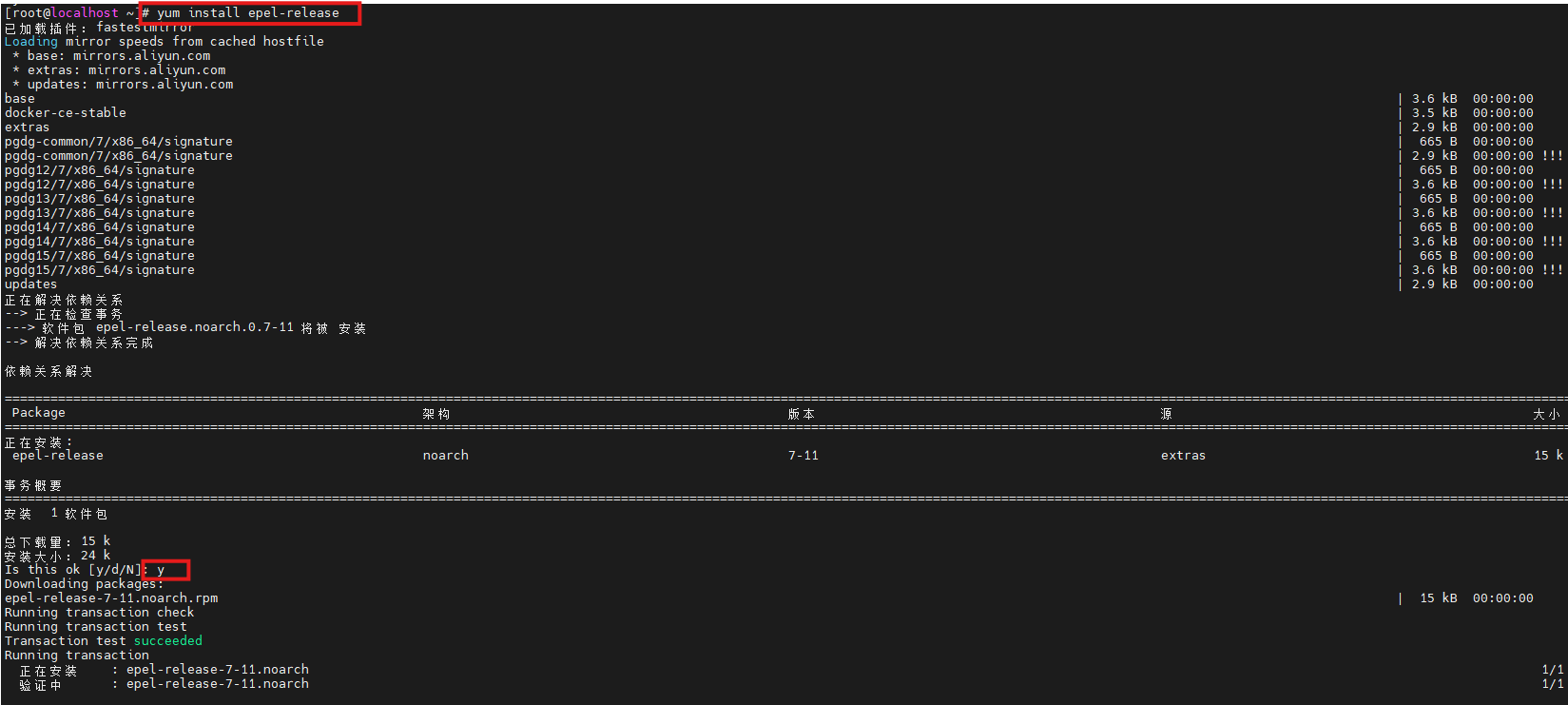 AI Visual Insight: The image shows the EPEL repository installation process, indicating that the system now meets the prerequisite for retrieving the Ansible package. This is especially relevant for distributions such as CentOS 7, where default repositories often contain older packages.
 AI Visual Insight: The image displays the output of
 ansible --version, which typically includes the core version, module paths, and Python environment details. You can use it to confirm the control node installation state and downstream compatibility.
Simulating log growth with a continuous write script makes cleanup validation easier
To prove that the cleanup task works, the original article first creates /ceshi/1.log on the target host, then uses a looping Shell script to append log data continuously. This is a practical design because it makes file growth and post-cleanup changes easy to observe.
#!/bin/bash
LOG_FILE="1.log"
INTERVAL=1                       # Write once per second
trap 'echo -e "\nStop writing logs..."; exit 0' SIGINT

while true; do
  echo "$(date '+%Y-%m-%d %H:%M:%S') - Automatically written log message" >> "$LOG_FILE"  # Continuously append logs
  sleep "$INTERVAL"
done
This script continuously generates log data so you can verify whether automated cleanup works as expected.
Separating inventory from the Playbook improves maintainability
Ansible best practice is to put target hosts in the inventory and execution logic in the Playbook. That way, no matter how many servers you add later, most changes stay in the configuration layer rather than the script layer.
[dbservers]
192.168.42.146 ansible_user=root ansible_password=your_password
This inventory defines the target host group and connection credentials.
You can then run the Playbook to clear log files in batch:
ansible-playbook -i hosts cleanup.yml # Run the cleanup task using the inventoryThis command distributes the cleanup rule to the specified host group in one step.
 AI Visual Insight: The image shows that
 /ceshi/1.log on the target host has been cleared. This confirms that the Playbook executed successfully over SSH on the remote host and reset the file content instead of deleting the file itself.
Using Cron to manage execution timing makes the system truly unattended
Batch execution alone is not enough. The key question is when the task should run automatically. Cron provides the lightest-weight local scheduling mechanism and is a strong fit for triggering ansible-playbook on a fixed schedule.
0 2 * * * /usr/bin/ansible-playbook -i /etc/ansible/hosts /etc/ansible/cleanup.yml >> /etc/ansible/ansible_cleanup.log 2>&1This crontab rule runs log cleanup every day at 2:00 AM and writes both standard output and standard error to an audit log.
With this approach, the cleanup action gets a fixed maintenance window, execution records, and minimal human intervention. Compared with waiting for an alert and then cleaning up manually, the operations workflow becomes more stable and easier to standardize.
 AI Visual Insight: The image reflects the scheduling result after crontab configuration. The focus is on binding the Ansible Playbook to the system scheduler so that periodic batch cleanup runs automatically and leaves an execution trail.
When target hosts are on a private network, cpolar can serve as a remote access extension
The original solution also introduces cpolar to solve connectivity issues when the control node and the target host are not on the same network. In practice, it maps an internal SSH port to a public TCP endpoint so that Ansible can still manage remote nodes over SSH.
sudo curl https://get.cpolar.sh | sh    # Install cpolar with one command
sudo systemctl status cpolar            # Check the service status
These commands install cpolar and verify that the service is running correctly.
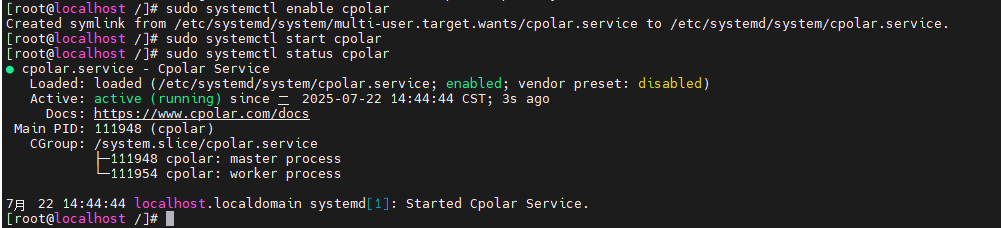 AI Visual Insight: The image shows the cpolar service status page, indicating that the private network tunneling proxy is running. You can then continue by configuring an SSH mapping tunnel to provide a connection entry point for a remote Ansible control node.
After configuration, you can use the mapped public domain name and port directly in the inventory:
[dbservers]
2.tcp.cpolar.top ansible_user=root ansible_port=10807 ansible_password=***
This configuration allows Ansible to connect to the private network host through the public TCP endpoint provided by cpolar.
A fixed TCP endpoint reduces automation configuration drift
If cpolar assigns a random port, you need to update the inventory every time it changes. That weakens the stability of the automation system. For long-term operations, especially with Cron-driven recurring tasks, a fixed TCP endpoint is a better fit.
The value of a fixed endpoint is not just that it preserves connectivity. It keeps connection parameters stable. Once the control node, Playbook, inventory, and scheduled jobs all depend on a consistent access path, the maintainability of the entire automation chain improves significantly.
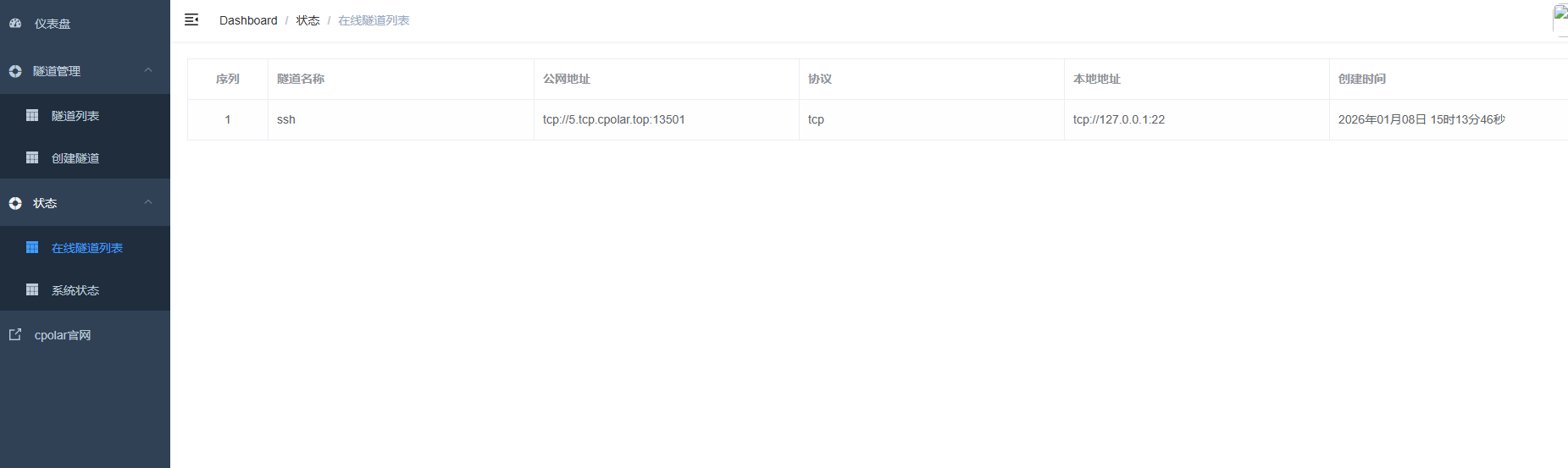 AI Visual Insight: The image shows the online tunnel result after a fixed TCP endpoint takes effect, indicating that the previous random public entry point has been replaced by a stable endpoint suitable for long-term use in Ansible inventory and scheduled task configuration.
The boundaries and optimization paths of this method should also be explicit
The original example clears a fixed log file, which works well for testing or temporary logs, but it may not be appropriate for production application logs. In production, a safer approach is usually to combine find, logrotate, or archive policies to manage logs with more precise rules based on time, size, and directory structure.
If you want to take this further, you can parameterize cleanup directories, retention days, and file matching rules in variable files. Combined with an alerting platform, CMDB, or CI/CD pipeline, this can evolve into a more complete operations task system.
FAQ
1. Why not use Shell + crontab directly instead of introducing Ansible?
Shell works well for single-host tasks, while Ansible is designed for consistent governance across multiple hosts. It provides inventory management, idempotent execution, result output, and batch control, which significantly reduces the risk of inconsistent cross-host operations.
2. Which is better: clearing a log file or deleting a log file?
If a process still holds the file handle, deleting the file may not release space immediately and can affect continued writes. Clearing the file content is usually safer. In production, you should still decide based on application behavior and your log rotation strategy.
3. Is cpolar required?
No. It is only a practical addition when the control node cannot reach the target host directly over SSH and you do not have a VPN, dedicated line, or bastion host available. If the private network is already reachable, you can skip it entirely.
Core summary: This article reconstructs a log cleanup automation solution for operations teams. It uses Ansible to distribute cleanup tasks in batch, Cron to schedule execution, and optional cpolar to extend remote operations access to private network hosts. The result is a practical way to address full disks, inefficient manual inspection, and inconsistent cleanup rules.