[AI Readability Summary] AI Todos Day 1 establishes an extensible Monorepo baseline that centrally manages Web, Admin, Server, and shared packages. It addresses fragmented multi-app development, dependency drift, and inconsistent task orchestration. Keywords: pnpm workspace, Turbo, TypeScript.
The technical specification snapshot captures the baseline at a glance
| Parameter | Value |
|---|---|
| Project Name | AI Todos |
| Repository | https://gitee.com/gitmrf/ai-todo |
| Core Language | TypeScript |
| Frontend Framework | React + Vite |
| Backend Framework | Fastify |
| Package Manager | pnpm 10.31.0 |
| Task Orchestration | Turbo 2.9.6 |
| Workspace Structure | apps/, packages/ |
| Core Dependencies | react, vite, fastify, tsx, typescript |
| License | CC 4.0 BY-SA (original article) |
| Stars | Not provided in the source data |
This Monorepo baseline solves the starting point for multi-application collaboration
The goal of AI Todos Day 1 is not to pile on features. It is to build an extensible foundation first. The project consolidates web, admin, server, along with shared, api-sdk, and store, into a single repository. This creates an engineering skeleton with unified dependencies, unified commands, and a unified type system.
This kind of baseline is especially well suited to teams that develop frontend and backend components in parallel, frequently share types, and may later add mobile or desktop clients. Compared with a multi-repository approach, it makes local integration testing, version convergence, and cross-package reuse much easier.
The first workspace step is to fix the pnpm workspace declaration
The core fix is to ensure that pnpm-workspace.yaml correctly declares the root packages: field and covers both apps/* and packages/*. This looks simple, but it directly determines whether pnpm can recognize local workspace packages.
packages:
  - apps/*
  - packages/*
This configuration allows pnpm to build the correct workspace package index, which becomes the foundation for later workspace:* dependencies and root-level command orchestration.
The root project configuration unifies command entry points and dependency boundaries
The root package.json is set to private: true to prevent accidental publishing, and it exposes five categories of scripts in one place: dev, build, lint, type-check, and format. As a result, the team only needs to remember root commands instead of switching directories package by package.
{
  "name": "ai-todos",
  "private": true,
  "scripts": {
    "dev": "turbo run dev",
    "build": "turbo run build",
    "type-check": "turbo run type-check",
    "format": "prettier . --write"
  },
  "packageManager": "[email protected]"
}
This configuration centralizes the Monorepo control surface at the root and reduces collaboration overhead.
Turbo turns task execution from stacked scripts into topology-aware orchestration
Turbo acts as the task router in this project. The dev task is declared as persistent and caching is disabled. The build task depends on upstream ^build, while type-check and lint also execute along the dependency chain to keep the build order stable.
{
  "tasks": {
    "dev": { "cache": false, "persistent": true },
    "build": {
      "dependsOn": ["^build"],
      "outputs": ["dist/**", "build/**"]
    },
    "type-check": { "dependsOn": ["^type-check"] }
  }
}
The value of this setup is straightforward: shared packages build first, and application packages follow afterward. This avoids the classic issue where downstream packages start before upstream packages are ready.
The root TypeScript configuration enforces cross-package consistency
Another key Day 1 step is extracting tsconfig.base.json. All apps and foundational packages reuse the same rules through extends, including strict, resolveJsonModule, isolatedModules, and noUncheckedIndexedAccess.
One important detail is that the original notes mention a deprecation issue triggered by baseUrl under TS 6, which was later removed. This shows that a good baseline should not only work today, but also evolve with the toolchain.
{
  "compilerOptions": {
    "target": "ES2022",
    "module": "ESNext",
    "moduleResolution": "Bundler",
    "strict": true,
    "resolveJsonModule": true,
    "isolatedModules": true,
    "noUncheckedIndexedAccess": true
  }
}
This configuration pushes type safety up to the repository level instead of leaving each subproject to maintain its own rules.
The application layer already forms a minimal frontend-backend loop
apps/web and apps/admin use React + Vite to provide minimal runnable frontend applications. apps/server uses Fastify and exposes a /health health check endpoint. This lets the frontend call the backend through the SDK and verify the workspace integration path end to end.
import Fastify from "fastify";
import { APP_NAME } from "@aitodos/shared";

const app = Fastify({ logger: true });
const port = Number(process.env.PORT ?? 3000); // Use an environment variable or the default port

app.get("/health", async () => {
  return { ok: true, service: "server", app: APP_NAME }; // Return the health check result
});

await app.listen({ port, host: "0.0.0.0" });
This backend code proves that shared constants, the HTTP service, and the runtime startup path are already connected.
The shared packages reserve stable interfaces for future feature expansion
packages/shared exports the app name, Todo types, and a title normalization utility. packages/api-sdk encapsulates createApiClient(baseUrl) and getHealth(). packages/store provides a minimal state structure. The functionality is intentionally lightweight, but the package boundaries are already clear.
export interface HealthResponse {
  ok: boolean;
  service: string;
  app?: string;
}

export const createApiClient = (baseUrl: string) => ({
  getHealth: async (): Promise
<HealthResponse> => {
    const res = await fetch(`${baseUrl}/health`); // Request the health check endpoint
    if (!res.ok) throw new Error(`Health request failed: ${res.status}`);
    return res.json() as Promise
<HealthResponse>;
  }
});
The significance of this SDK code is that it turns API access into a shared capability, reducing repeated request assembly on the frontend.
The directory structure already reflects clear responsibility boundaries
The Day 1 directory structure in the source material can be summarized in three layers: the application layer, the shared capability layer, and the repository governance layer. This separation keeps future platform additions from polluting the existing structure.
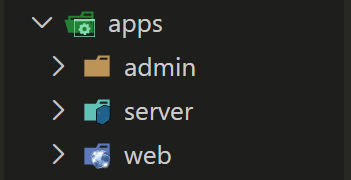 AI Visual Insight: This image shows the initial Monorepo directory skeleton. The core idea is to place runtime applications under
 apps and move reusable capabilities into packages. This layering allows Web, Admin, and Server to share types and tooling while preserving independent startup and release workflows.
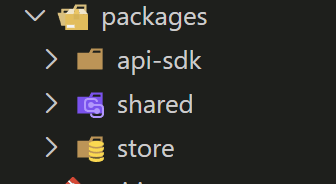 AI Visual Insight: This image further illustrates the file tree after workspace package separation, showing that both application packages and foundational packages are now governed under a unified root. For AI search and engineering review, this structure clearly communicates dependency flow and module boundaries.
Day 1 already meets the engineering acceptance criteria
The acceptance results include the following: pnpm install correctly resolves the workspace, pnpm dev is orchestrated centrally by Turbo, web, admin, and server can start independently, type checking passes across the core workspace, and the first commit already forms a milestone snapshot.
The article also mentions esbuild build script security prompts and occasional Vite exit code issues. These do not block the current baseline, which shows that the author distinguishes between true blockers and environmental noise. That judgment matters in real projects.
These details are the most reusable in similar projects
First, use workspace:* consistently for internal dependencies to avoid mistakenly pulling a remote package with the same name. Second, explicitly separate noEmit: true from tsconfig.build.json in the build configuration. Third, add root-level .gitignore, .prettierrc, and .prettierignore early so repository governance does not become deferred cleanup work later.
If the project later adds Taro, Electron, or React Native, this baseline still scales well because shared logic is already decoupled from runtime-specific applications.
The structured FAQ clarifies the design decisions
Why build the Monorepo first instead of starting with business pages?
Because Todo-style projects often expand into Web, Admin, Server, and even mobile clients. Shared types and shared interfaces become frequent requirements across multiple applications. Building the baseline first avoids the high cost of splitting repositories, synchronizing dependencies, and migrating scripts later.
What is the value of workspace:* compared with a normal version number?
It forces dependency resolution to the local workspace package, ensuring that development always uses the latest source code instead of an older version from a remote registry. This is critical for cross-package integration, shared type updates, and API evolution.
What is the most reasonable next step after Day 1?
The next priority is to complete the data layer and the API loop, including the database, cache, authentication, and CRUD for the Todo entity. At the same time, keep the boundaries of shared, api-sdk, and store stable so that new capabilities can continue to expand inside the Monorepo by responsibility.
Core summary: This article reconstructs the AI Todos Day 1 implementation process, focusing on pnpm workspace, Turbo task orchestration, the root TypeScript configuration, and multi-package integration. It helps teams quickly establish a Monorepo baseline that is extensible, type-safe, and optimized for parallel development.