AWS S3 Files exposes S3 as a file system through an NFS interface, which helps reduce small-file read latency. However, it does not directly solve Kafka’s persistence, failover, and tail-latency challenges on shared storage. Core keywords: S3 Files, Kafka, AutoMQ.
Technical Specifications at a Glance
| Parameter | Description |
|---|---|
| Domain | Cloud Storage / Event Streaming Platform |
| Related Languages | Java, Go, C++ (common stacks for Kafka and storage implementations) |
| Access Protocols | NFS, S3 API |
| Representative Systems | Apache Kafka, AWS S3 Files, AutoMQ |
| Core Dependencies | EFS, S3, WAL, Direct IO |
| GitHub Stars | Not provided in the source |
| Key Focus Areas | Durability, HA, P99 Latency, Throughput Cost |
AWS S3 Files Does Not Mean Kafka Can Directly Use Shared Storage
The key change introduced by AWS S3 Files is that it adds a file-system-like access surface to S3. Applications can mount and access object data through NFS, while S3 remains the actual system of record. That makes the idea of “running Kafka directly on shared storage” attractive again.
 AI Visual Insight: This cover image introduces the topic by emphasizing the convergence of object storage, shared storage, and message queues. It highlights the core question: can a new storage interface change the Kafka deployment model, rather than showing specific architectural details.
But the real issue is not whether Kafka can mount the storage. The issue is whether Kafka’s core assumptions still hold. Native Kafka is built on local disks, replica-based replication, and asynchronous flushes. S3 Files only upgrades the access method. It does not rewrite Kafka’s write acknowledgments, leader failover model, or storage engine behavior.
S3 Files Is Primarily Designed for Low-Latency Access to Small Files
You can think of S3 Files as a high-performance access layer built on top of S3 and backed by EFS. Files smaller than 128 KB can be imported into the high-performance tier, where read latency can reach sub-millisecond to single-digit millisecond levels. Larger objects are better suited to streaming reads.
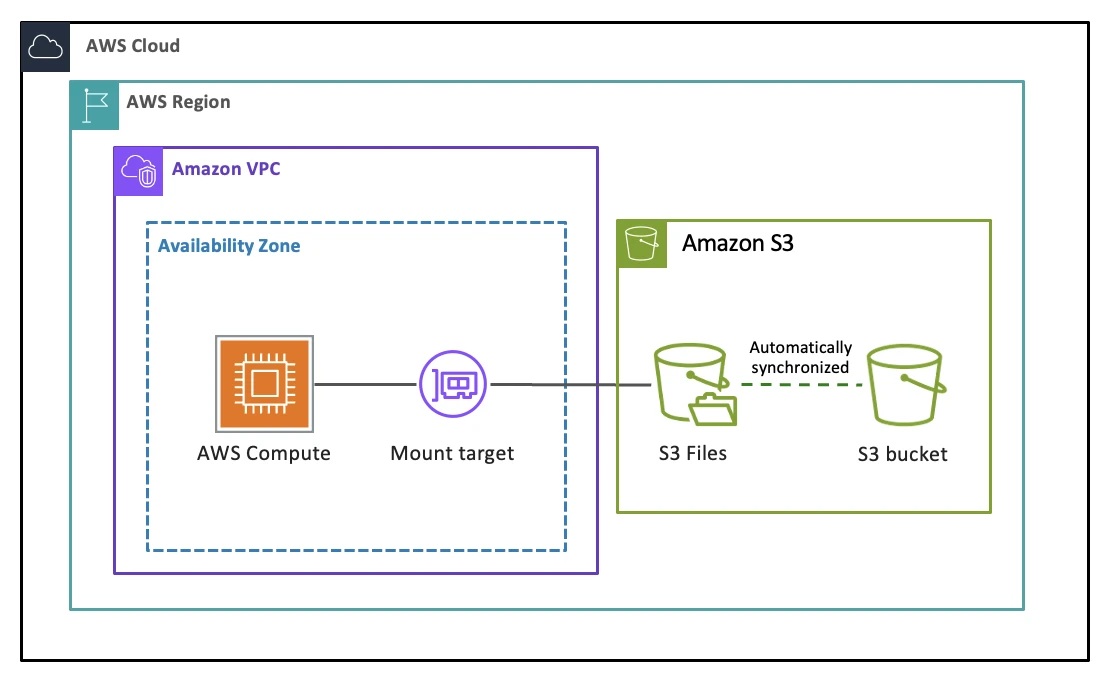 AI Visual Insight: The diagram shows the dual-path architecture of S3 Files: small files enter the EFS-based high-performance tier for low-latency access, while large files are streamed directly from S3 through a proxy. On the write path, data lands in the high-performance tier first and is asynchronously exported back to S3, which shows that the design optimizes access acceleration rather than sustained high-throughput log writes.
This means S3 Files is a better fit for workloads with frequent reads, infrequent writes, and a relatively small active set. Kafka, by contrast, is dominated by continuous sequential writes, real-time catch-up reads, and long-lived high-throughput traffic. The workload models do not match.
Producer -> Broker -> Page Cache -> Disk/Shared Storage
                      ↑
                 ack often precedes true persistence
This path shows that Kafka’s high throughput depends on asynchronous flush behavior rather than synchronously persisting every message to the underlying durable medium.
Shared Storage Is Highly Attractive for Kafka
Shared storage is attractive because it can theoretically eliminate three major categories of Kafka cloud cost: cross-AZ replica traffic, compute-storage coupled scaling, and operational complexity caused by data migration.
Traditional Kafka relies on ISR replication to guarantee reliability in multi-AZ deployments. With a replication factor of 3, if followers are placed in different availability zones, Kafka continuously generates cross-AZ replication traffic. In high-throughput scenarios, that becomes a long-term billing sinkhole.
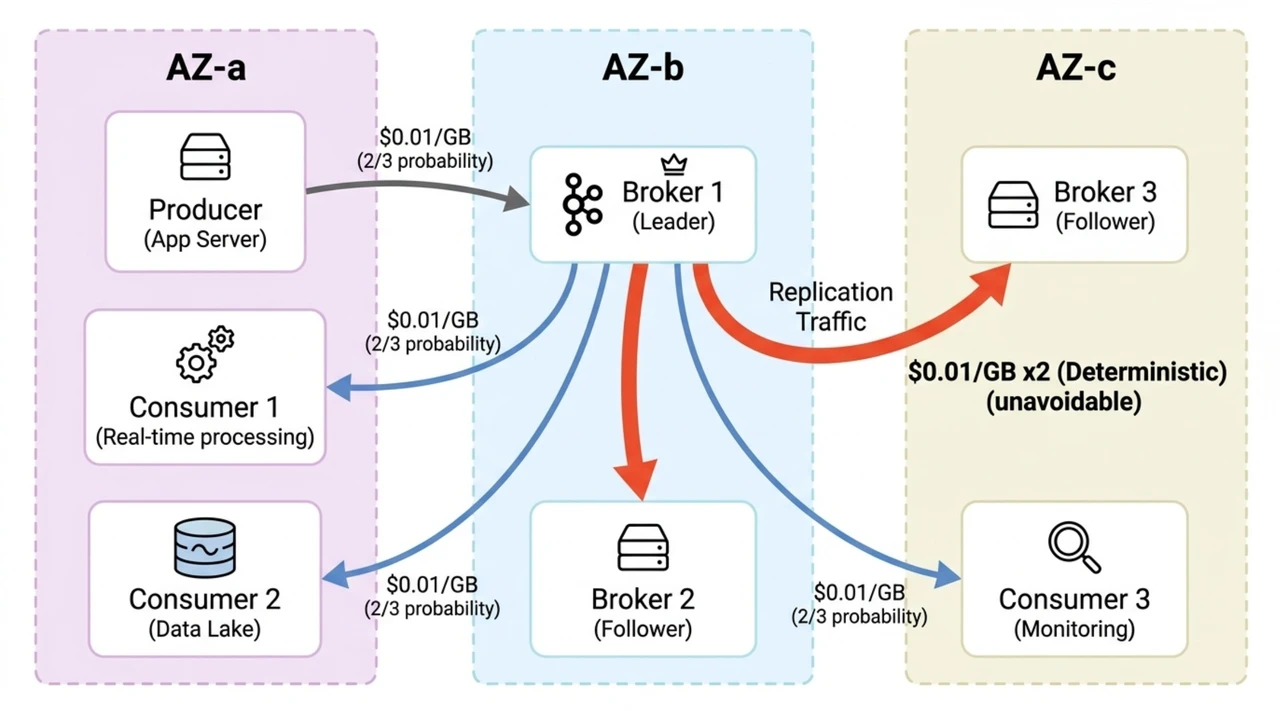 AI Visual Insight: The diagram should emphasize the path where the leader replicates logs to multiple followers across availability zones. It reveals how Kafka’s high-availability mechanism linearly amplifies network traffic cost, especially for high-throughput topics where cloud bills can rise sharply.
Shared Storage Is Really Trying to Solve an Architectural Problem
If data naturally resides in shared storage, brokers can become close to stateless. Scaling out means adding compute only. Recovery no longer requires moving large replicas. Scaling in also no longer depends on complex rebalancing. This is the most important direction for cloud-native Kafka, not simply replacing a local disk mount with NFS.
class SharedStorageGoal:
    def __init__(self):
        self.zero_cross_az_copy = True  # Goal 1: reduce cross-AZ replication
        self.stateless_broker = True    # Goal 2: make brokers as stateless as possible
        self.fast_failover = True       # Goal 3: enable failover within seconds
This pseudocode summarizes the three benefits a shared-storage architecture aims to deliver: lower cost, elasticity, and high availability.
Running Native Kafka Directly on S3 Files Exposes Four Hard Constraints
The Durability Gap Does Not Disappear Just Because S3 Is Durable
S3’s eleven nines of durability only applies to data that has already been written into S3. When a Kafka producer receives an ack, the message may still be sitting in the broker’s page cache. If the broker crashes at that moment and the replication factor has dropped to 1, the data is lost immediately.
Kafka High Availability Depends on Replicas, Not Shared Storage
Kafka’s current failover logic works by promoting a follower to become the new leader. But with replica=1, there is no follower to promote. Even if the underlying storage is shared, Kafka still lacks a native mechanism that allows a new broker to directly take over a partition from a shared log.
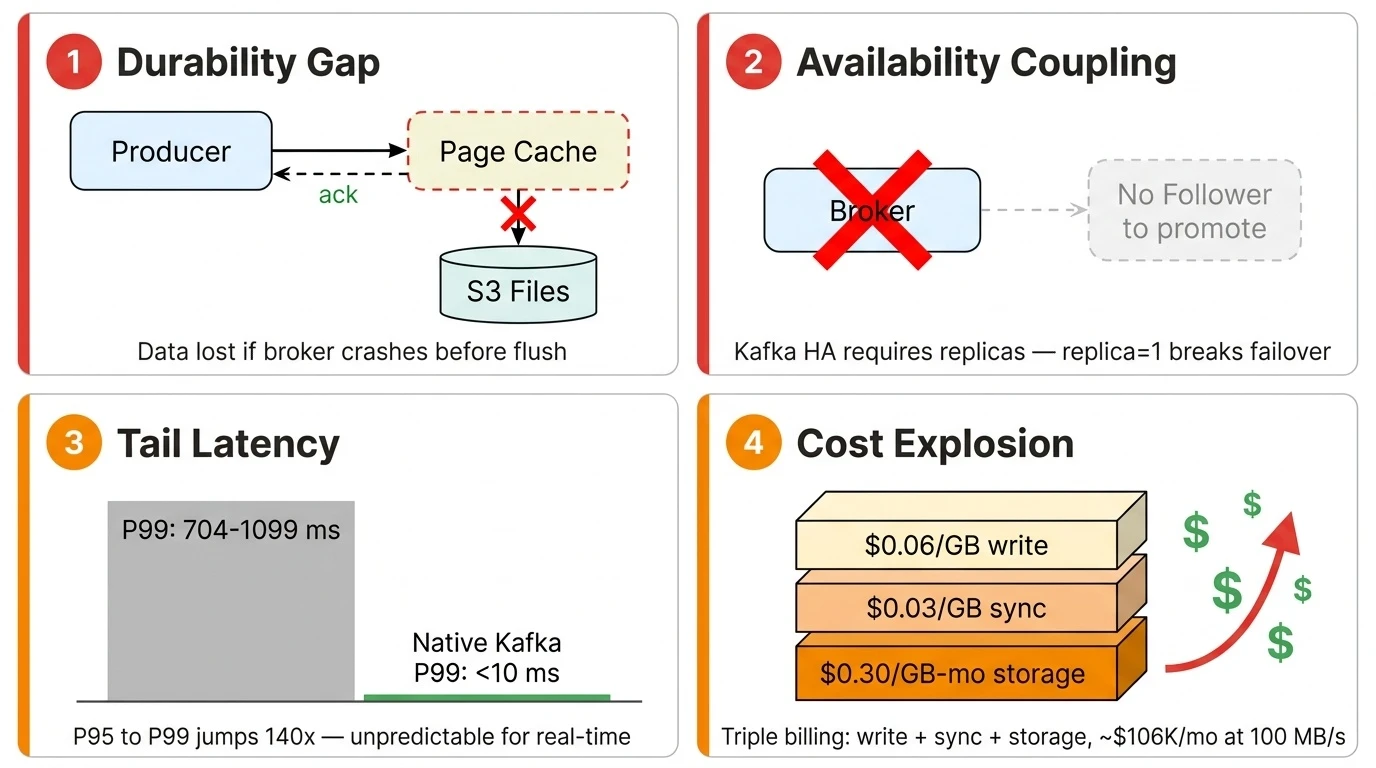 AI Visual Insight: This diagram should summarize four classes of obstacles: durability gaps caused by asynchronous writes, HA failure because no follower exists to promote, amplified tail latency on shared storage, and runaway costs under a traffic-based billing model. The message is clear: the problem is not the interface, but incompatible architectural assumptions.
Tail Latency Is More Dangerous Than Average Latency
Benchmark results show that S3 Files may look acceptable at P50 or P95, but P99 and P99.9 can jump to hundreds of milliseconds or even seconds. For risk control, real-time analytics, and event-driven pipelines, this kind of long-tail jitter can directly break SLAs.
// Pseudocode: determine whether shared storage is suitable for a real-time message log layer
if (p99LatencyMs > 100 || p999LatencyMs > 1000) {
    throw new RuntimeException("Tail latency is unacceptable"); // Real-time systems should prioritize tail latency over averages
}
This code emphasizes that when you evaluate storage media for Kafka, you must prioritize P99 and P99.9 instead of looking only at averages.
The Cost Model Also Conflicts with Kafka’s Access Pattern
The core pricing model of S3 Files is based on traffic volume and residency in the high-performance tier. Kafka, however, is defined by continuous writes, continuous reads, and continuously active data. As a result, write charges, export-back-to-S3 charges, catch-up read charges, and residency charges all stack up.
 AI Visual Insight: The diagram should break down the cost sources of Kafka on S3 Files, including writes into the high-performance tier, asynchronous export back to S3, consumer catch-up reads from the high-performance tier, and monthly EFS residency charges. It should highlight the billing pattern: the higher the throughput and the longer the active data window, the more linearly or even compoundingly the cost grows.
AutoMQ Solves the Problem by Rewriting Kafka’s Storage Path for the Shared Storage Era
AutoMQ does not simply mount native Kafka onto a shared file system. Instead, it uses S3 as the primary storage layer and adds a pluggable WAL layer in front of it. This preserves the benefits of shared storage while closing the architectural gaps in native Kafka.
The WAL absorbs writes first and uses Direct IO to complete real persistence before the ack is returned, which eliminates the data-loss window introduced by page cache buffering. After that, data is asynchronously compressed, aggregated, and batch-written into S3, which reduces object storage API costs and write amplification.
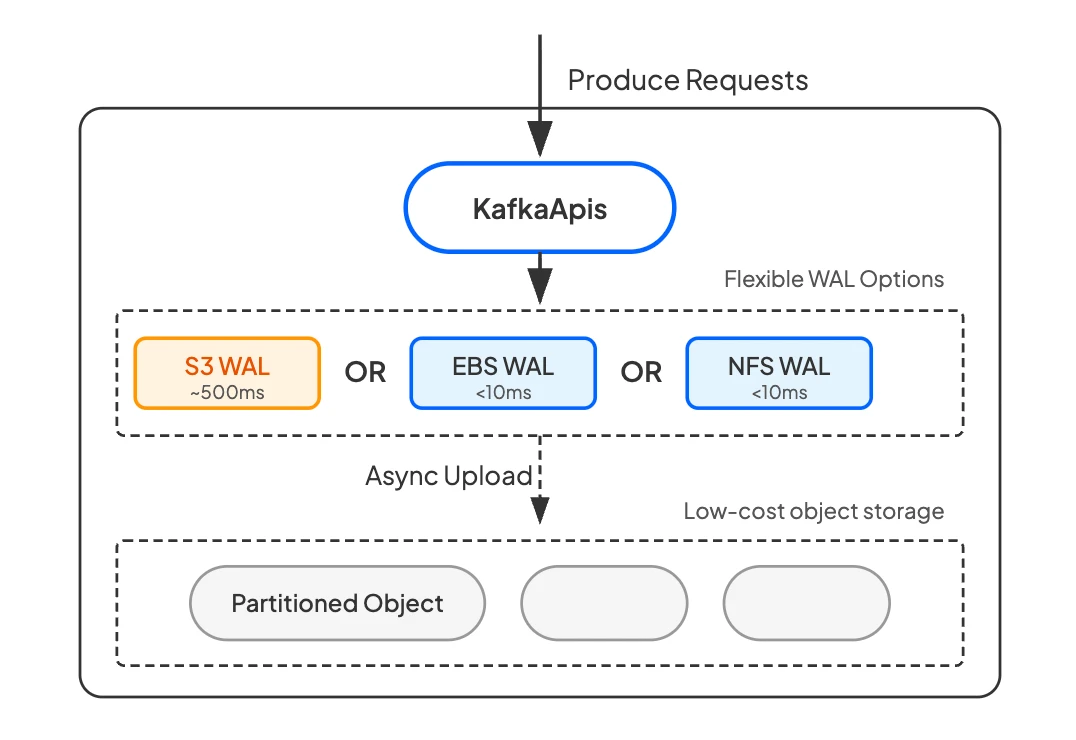 AI Visual Insight: The core of this architecture diagram should include three layers: broker, WAL, and S3 primary storage. The write path first enters the low-latency WAL, returns an acknowledgment after persistence, and then uploads data to S3 in asynchronous batches. The read path recovers directly from the shared object layer. During failures, a new broker can take over without relying on local replicas, which reflects a true diskless Kafka design.
func Append(msg []byte) error {
    err := wal.WriteDirect(msg) // Write to the WAL first to guarantee persistence before ack
    if err != nil { return err }
    go batchUploadToS3()        // Upload in batches in the background to reduce S3 API cost
    return nil
}
This code captures AutoMQ’s key write path: persist with low latency first, then convert to object storage asynchronously.
S3 Files Is Better Suited as an Optional WAL Backend Than as a Direct Storage Engine
From a connectivity perspective, S3 Files exposes an NFS interface, so in theory it can serve as one of several WAL backend options. The issue is not whether it can connect, but whether it is cost-effective. At sustained write rates around 100 MB/s, the monthly cost of S3 Files is significantly higher than EFS-like WAL solutions.
For that reason, S3 Files currently looks more like a future candidate that could be integrated, rather than a mainstream production storage foundation for Kafka. It may become viable at scale only if AWS later introduces a more favorable provisioned-throughput model, lowers minimum I/O billing, or optimizes the residency policy.
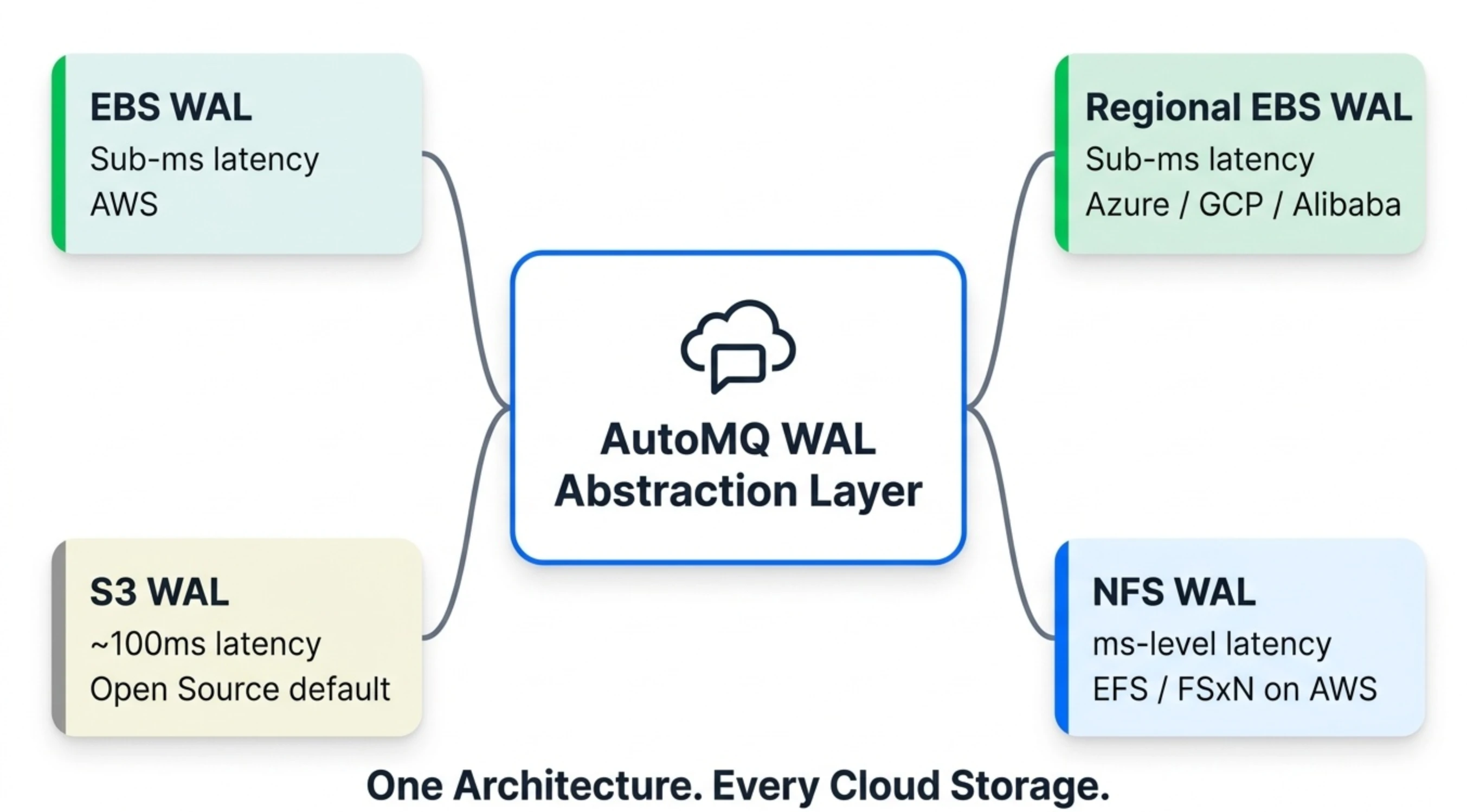 AI Visual Insight: The diagram should show that under the same broker-plus-S3-primary architecture, different WAL backends can be swapped in, such as EBS, Regional EBS, NFS, or S3 WAL. The key message is that the abstraction layer isolates differences in underlying cloud storage, allowing users to switch based on latency, AZ capability, and cost.
The Conclusion Is Already Clear
If the question is whether native Kafka can run directly on S3 Files and achieve the desired benefits, the answer is no. S3 Files improves the access interface, but it does not solve Kafka’s fundamental dependence on replicas, high availability logic, and persistence semantics.
If the question is whether shared storage will become Kafka’s future, the answer is yes. But it requires a redesign like AutoMQ, which rethinks WAL, S3 primary storage, and stateless brokers together, rather than lifting traditional Kafka onto a new medium unchanged.
FAQ
1. Why can’t Kafka directly benefit from S3 Files even if S3 Files offers lower latency?
Because Kafka’s core bottlenecks are not limited to read and write latency. They also include persistence before ack, replica-based leader failover, and tail-latency stability. An interface upgrade cannot replace an architectural redesign.
2. What makes S3 Files the least suitable for Kafka?
The most critical issues are tail latency and the cost model in high-throughput real-time workloads. Kafka requires continuous writes and continuous catch-up reads, while S3 Files is more optimized for hotspot access to small files.
3. What is the essential difference between AutoMQ and Kafka Tiered Storage?
Tiered Storage still keeps hot data on local disks, with S3 only serving cold data. AutoMQ makes S3 the only primary storage layer and uses WAL to provide low-latency persistence, which allows brokers to become truly stateless.
Core Summary: This article systematically evaluates whether AWS S3 Files is a viable storage layer for Kafka. It focuses on four constraints: durability, availability, tail latency, and cost. It also explains why native Kafka cannot directly benefit from shared storage, and how AutoMQ enables diskless Kafka through a pluggable WAL and S3-based primary storage.