F5 BIG-IP Advanced WAF uses signature matching, JavaScript challenges, behavioral analysis, and Device ID fingerprint tracking to precisely identify and handle trusted crawlers, suspicious browsers, and malicious automation tools. It helps stop credential stuffing, malicious scraping, and resource hoarding. Keywords: F5 AWAF, Bot Defense, Device ID
Technical Specifications at a Glance
| Parameter | Description |
|---|---|
| Product | F5 BIG-IP Advanced WAF |
| Core Module | Bot Defense |
| Deployment Targets | Virtual Server / Web Application / API Entry Point |
| Related Protocols | HTTP, HTTPS, TCP/IP |
| Management Methods | BIG-IP GUI, Log Center, Command Line |
| Core Dependencies | JavaScript Challenge, Device ID, IP Reputation, Behavioral Analysis |
| Reference Popularity | Original article shows 525 views, 7 likes, and 8 bookmarks |
| Applicable Versions | v16.x – v17.x |
F5 Bot Protection Is Not a Simple Extension of Traditional Static WAF Rules
In modern internet traffic, bots are no longer limited to search engine crawlers. More automated tools now perform credential stuffing, API probing, inventory hoarding, and content scraping.
The key value of F5 BIG-IP Advanced WAF is that it does not only evaluate whether a single request “looks like an attack.” Instead, it combines request characteristics, browser capabilities, behavioral patterns, and device fingerprints to build persistent identification.
Core Terms Define the Configuration Boundaries
| Term | Meaning | Practical Significance |
|---|---|---|
| Bot Defense Profile | A collection of bot protection policies | Takes effect after it is bound to a virtual server |
| JavaScript Challenge | Injects JS to validate client execution capability | Filters scripted access |
| Device ID | Client device fingerprint | Tracks clients across IPs and sessions |
| Mitigation Action | Alarm, block, CAPTCHA, rate limit | Determines the response action |
| Enforcement Mode | Transparent or Blocking | Determines whether to observe or intercept |
# Check the learning or baseline status of a specified virtual server
admd -s vs./Common/vs_hackazon_http
This command quickly checks the bot learning and detection status of the target virtual server.
The Four-Layer Detection Pipeline Forms the Core Visibility Model of F5 Bot Defense
The First Layer Filters Known Malicious Signatures First
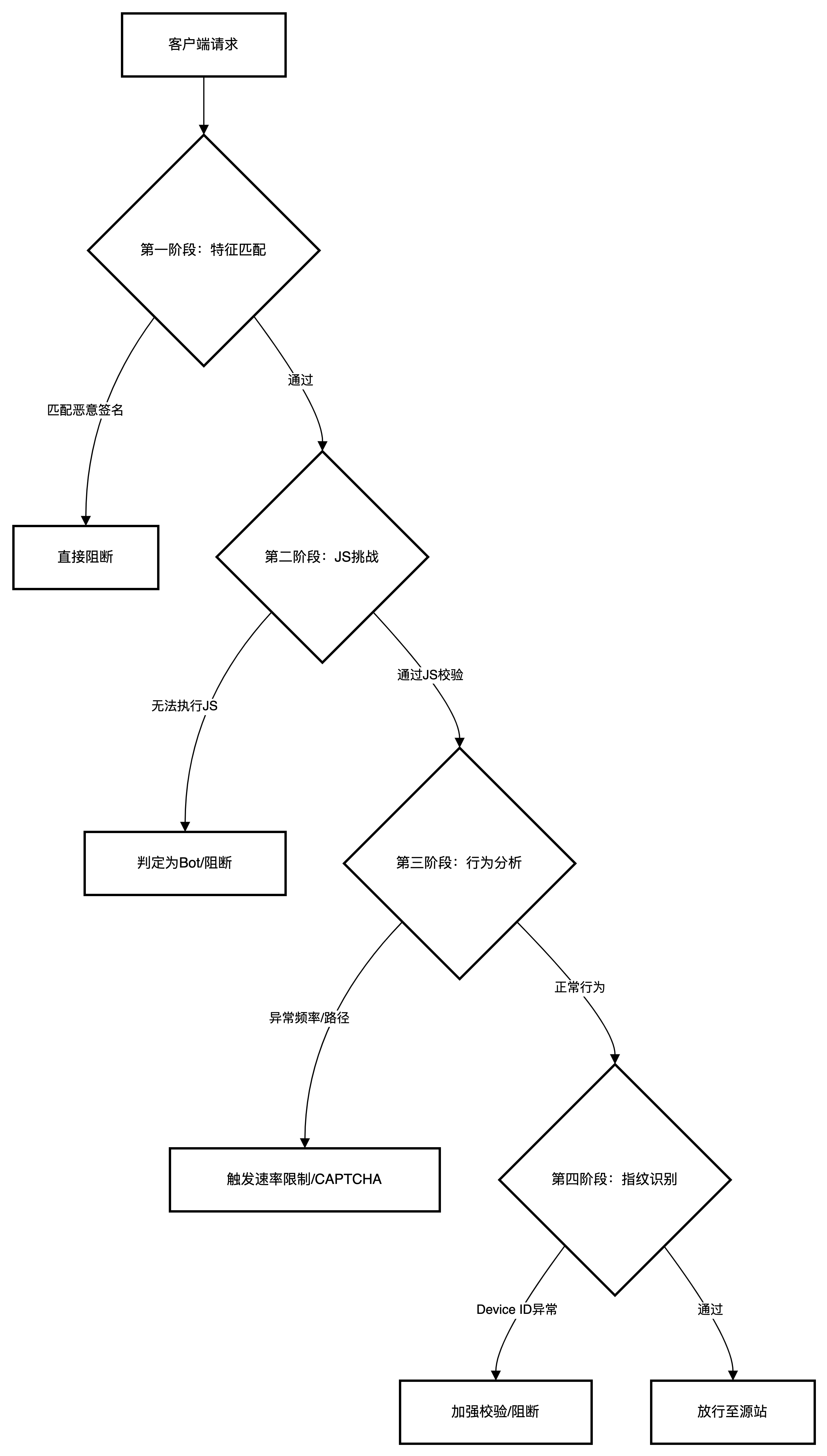
AI Visual Insight: The image shows the layered bot detection structure, starting with static signature identification and progressing through browser validation, behavioral analysis, and device fingerprint tracking. It reflects F5’s defense-in-depth approach that extends from single-request detection to full-session identification.
Signature-based detection prioritizes matches for malicious User-Agent strings, attack tool identifiers, and IP reputation. Typical targets include curl, Python requests, Burp Suite, Nikto, and sqlmap.
The Second Layer Identifies Disguised Traffic Through Browser Validation
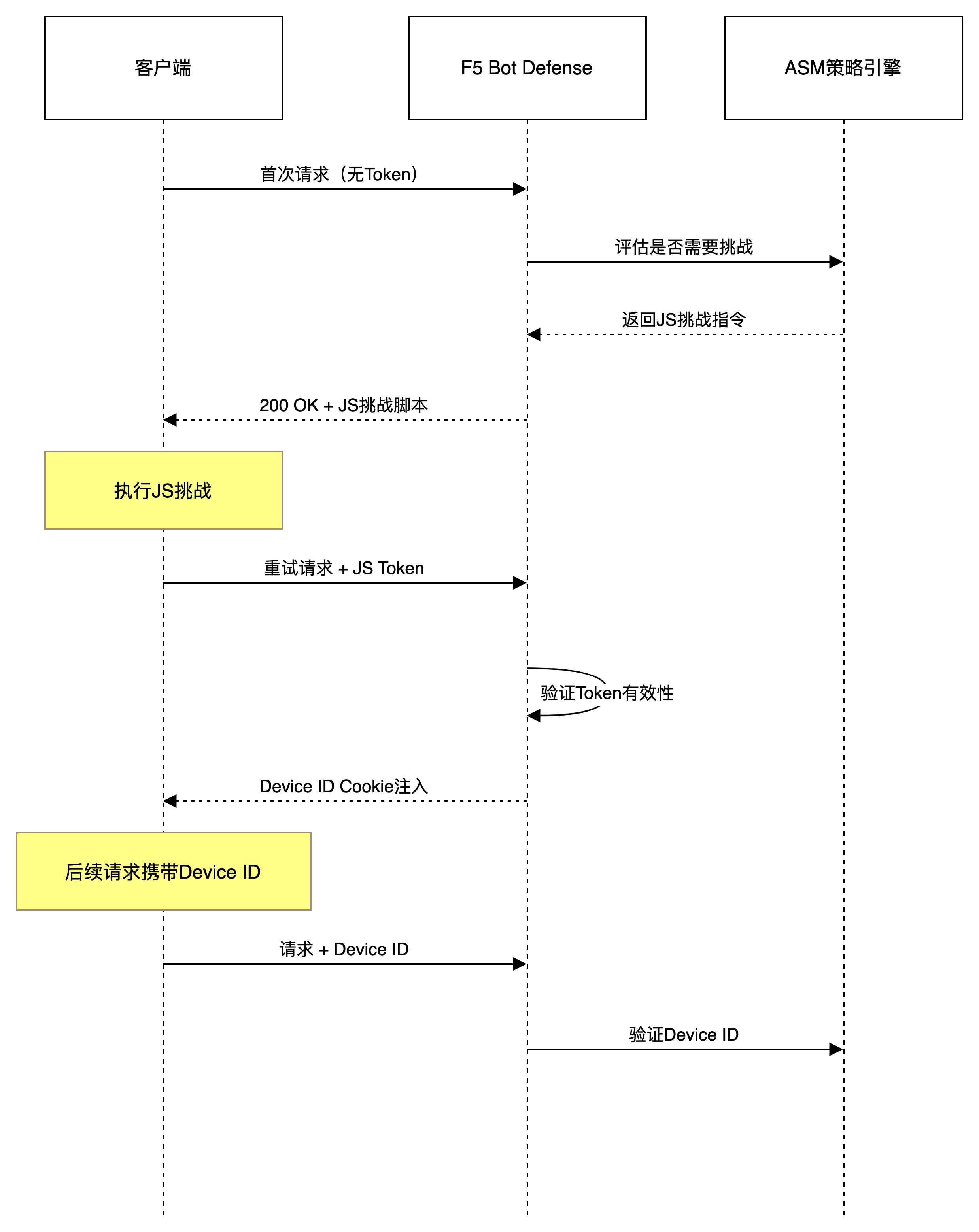
AI Visual Insight: The image highlights how browser validation works together with Device ID injection: on the first visit, the client receives a validation script; a real browser executes it and returns a credential; the system then establishes a trusted state and generates a persistently trackable device identifier based on the response.
The essence of a JavaScript Challenge is not to display a CAPTCHA, but to verify whether the client has a complete browser runtime. Clients that can execute JS and return an encrypted token are typically much closer to real users.
# Simplified logic that simulates F5 layered request evaluation
user_agent = request.headers.get("User-Agent", "")

if "curl" in user_agent or "python-requests" in user_agent:
    action = "block"  # Known tool signature, block directly
elif not request.cookies.get("f5_js_token"):
    action = "challenge"  # No JS validation result, trigger challenge
else:
    action = "inspect_behavior"  # Enter the behavioral analysis stage
This code summarizes the decision order of “signature first, validation next, behavior last.”
The Third Layer Relies on Behavioral Analysis to Identify High-Fidelity Automated Access
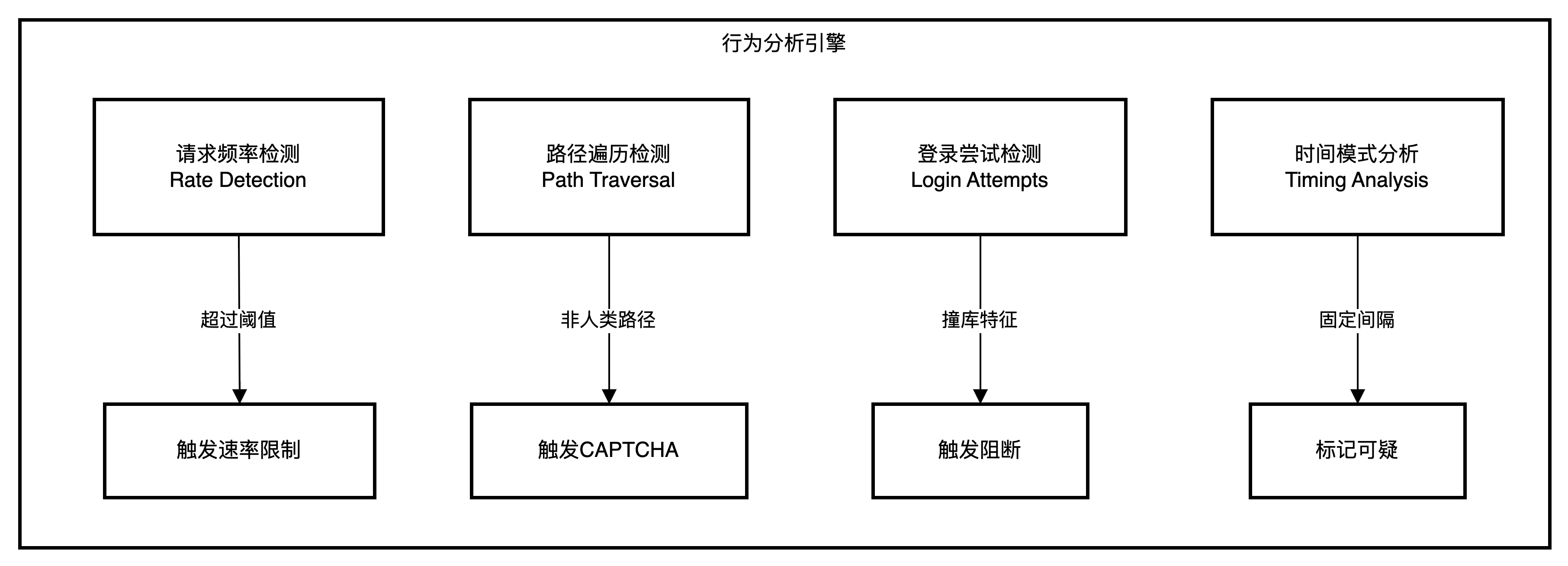
AI Visual Insight: The image emphasizes indicators such as access frequency, path traversal patterns, login attempt counts, and time intervals. It shows that the system does not only judge isolated requests, but identifies machine-driven access rhythms through continuous behavioral sequences.
Even if a client passes JS validation, it can still be classified as a Suspicious Browser or Malicious Bot if its behavior shows fixed intervals, fixed sequences, or high-frequency traversal.
The Fourth Layer Enables Persistent Tracking Through Device ID
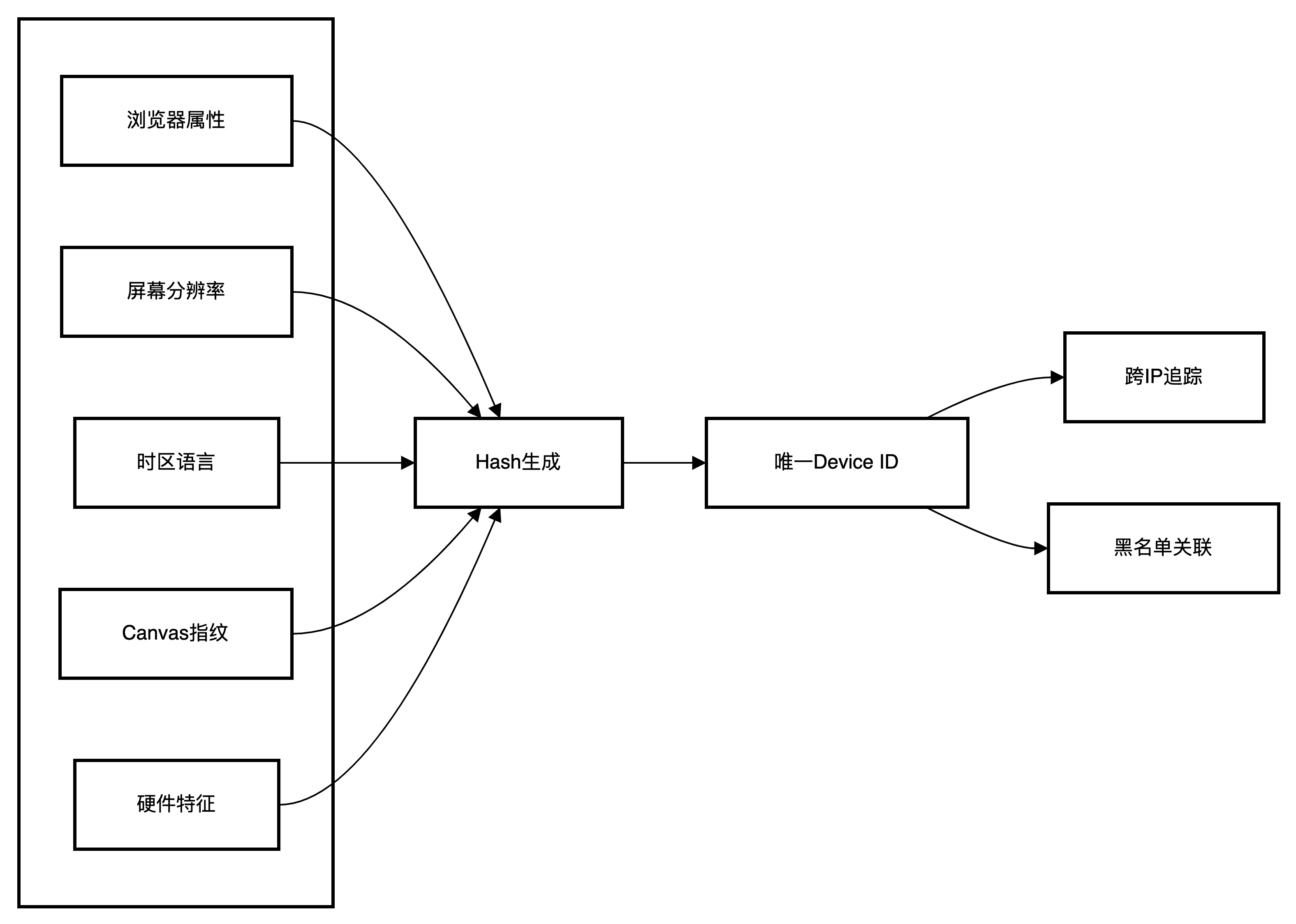
AI Visual Insight: The image illustrates how device fingerprinting aggregates browser attributes, screen parameters, timezone, and hardware characteristics into a stable identifier. Its core message is that it reduces the weight of IP-based identification and improves detection of attacks that rotate through proxy pools.
Device ID is a critical enhancement in F5 bot protection. Even if an attacker rotates proxy pools or clears cookies, the same policy may still identify them as long as the underlying device characteristics do not fundamentally change.
The Traffic Handling Workflow Reflects a Closed-Loop Design for Identification and Mitigation
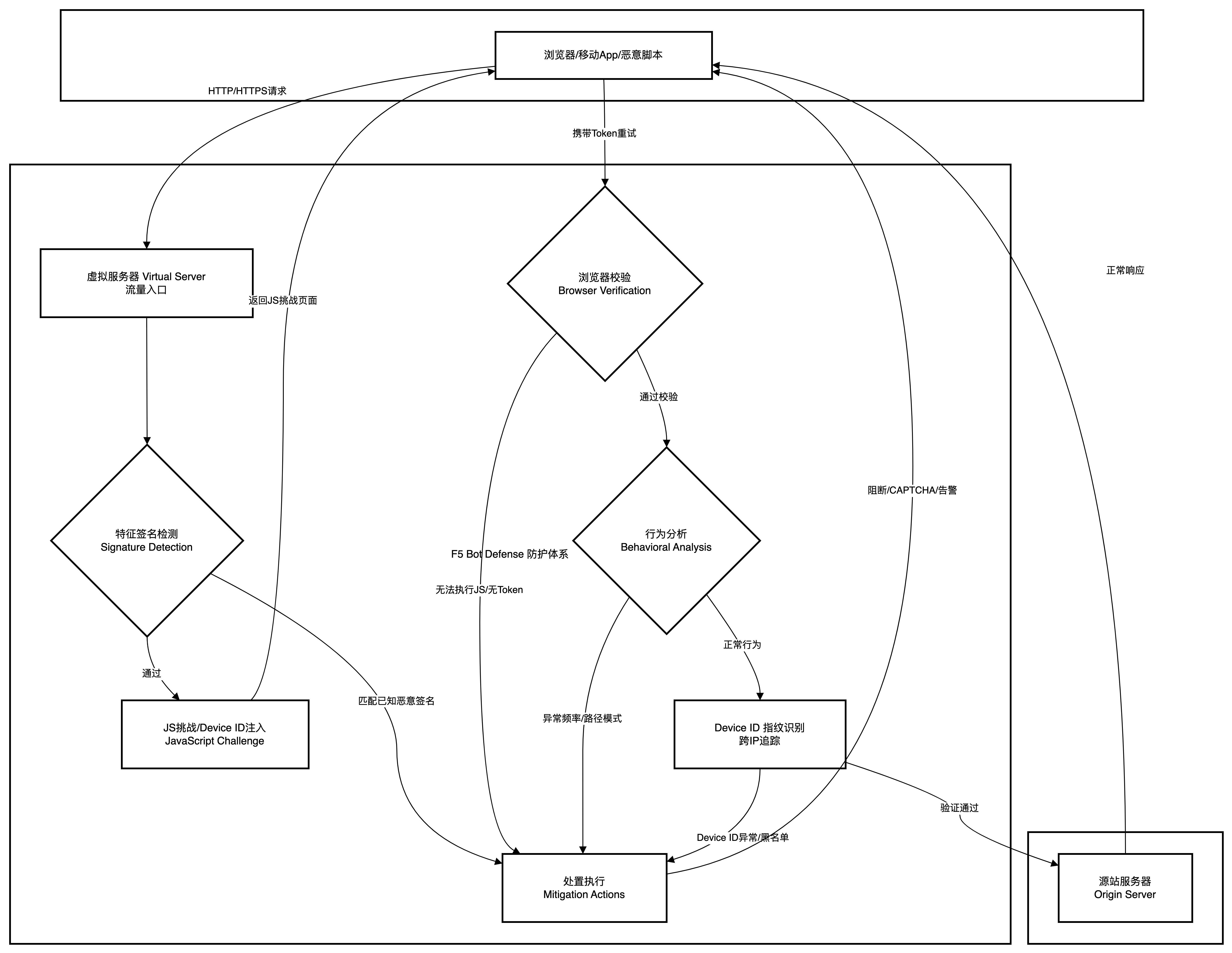
AI Visual Insight: This flowchart provides a complete view of the decision path after a request enters the virtual server, including signature matches, JS validation, behavior evaluation, category assignment, and the final responses such as Block, CAPTCHA, Alarm, or Rate Limit. It is the overall execution loop of F5 Bot Defense.
F5 does not assign a score once and immediately end the evaluation. Instead, it adds evidence multiple times during the request lifecycle. This reduces false positives and is better suited for automated scripts that appear normal at first and turn malicious later.
Bot Classification Determines the Final Mitigation Action
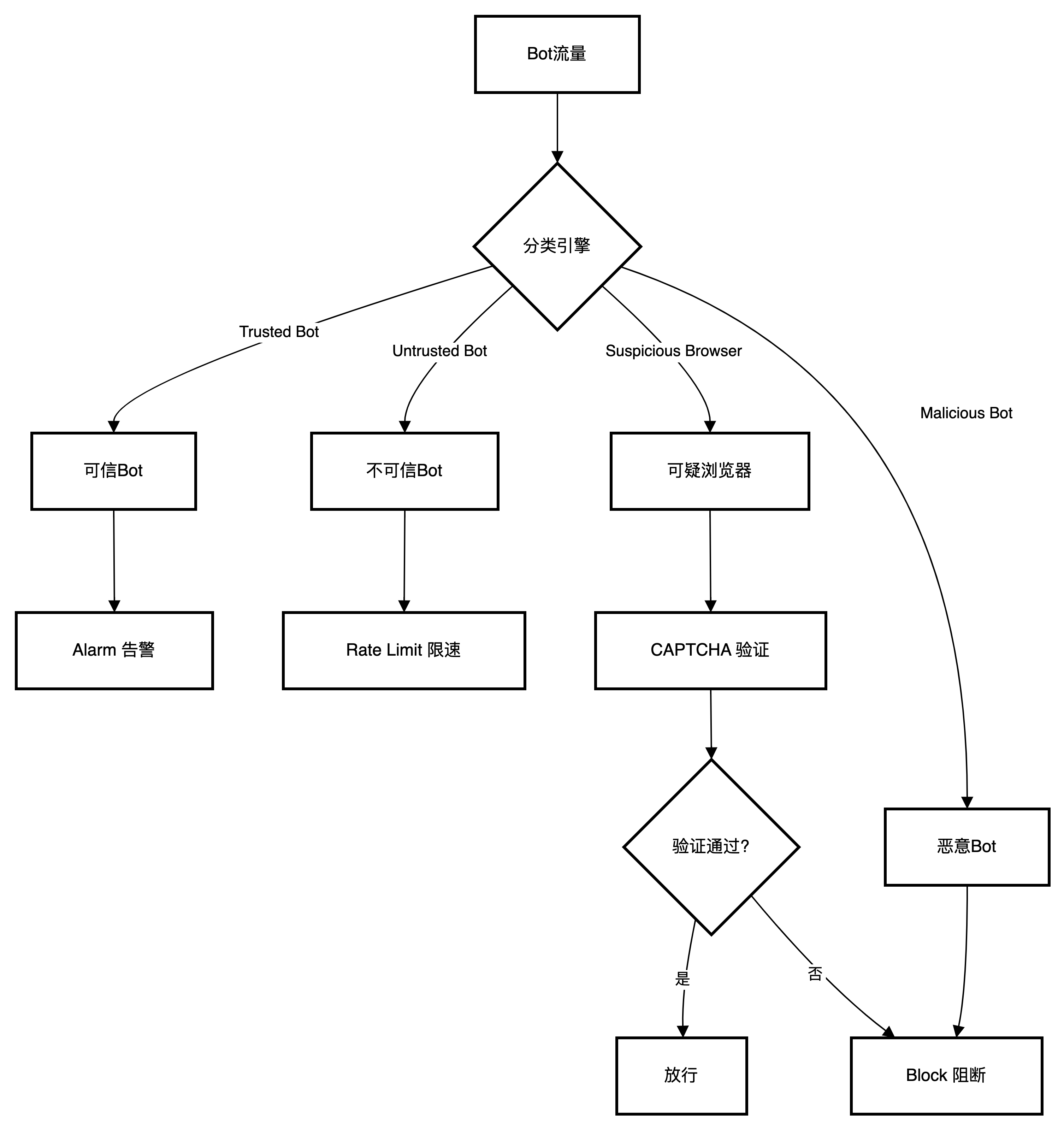
AI Visual Insight: The image presents the classification relationships among Trusted Bot, Untrusted Bot, Suspicious Browser, and Malicious Bot, and maps them to different mitigation actions. It shows how F5 applies graded governance rather than one-size-fits-all blocking, balancing security and user experience.
| Bot Category | Recommended Action | Description |
|---|---|---|
| Trusted Bot | Alarm | Only log trusted crawlers such as search engines |
| Untrusted Bot | Alarm / Rate Limit | Observe first, then decide whether to escalate |
| Suspicious Browser | CAPTCHA | Intercept anomalous traffic that may still come from a real user |
| Malicious Bot | Block | Directly block known attack tools |
| Unknown | Rate Limit | Control risk while minimizing accidental impact |
Three Built-In Templates Cover Different Business Risk Levels
| Configuration Item | Relaxed | Balanced | Strict |
|---|---|---|---|
| Browser Validation | No challenge | Verify after access | Verify before access |
| Device ID | Not generated | Generate after access | Generate after access |
| Suspicious Browser | Alarm | CAPTCHA | Block |
| Malicious Bot | Block | Block | Block |
| Unknown Bot | No action | Rate Limit | Block |
Balanced is the best general-purpose option for production environments. It preserves strong detection capability while reducing the chance of blocking real users through CAPTCHA.
bot_defense_profile:
  name: Production_Bot_Profile
  enforcement_mode: Transparent  # Observe first, then switch to blocking after validation
  template: Balanced
  browser_verification: Verify After Access (Blocking)
  device_id_mode: Generate After Access
  protected_endpoints:
    - /login
    - /api/*
This configuration example summarizes a common Bot Defense initialization strategy for production.
A Five-Step Method Enables Production-Grade Deployment Quickly
The First Step Is to Create a Bot Defense Profile
In Security > Bot Defense > Bot Defense Profiles, create a new policy. It is recommended to start with the Balanced template and set Enforcement Mode to Transparent.
The Second Step Is to Enable Browser Verification and Device ID
It is recommended to select Verify After Access (Blocking) and Generate After Access. This mode balances the first-visit experience with more accurate follow-up identification.
The Third Step Is to Configure Mitigation Settings by Category
Keep Alarm for Trusted Bot, use CAPTCHA for Suspicious Browser, directly Block Malicious Bot, and use Rate Limit for Unknown as a safer default.
The Fourth Step Is to Configure Allowlists to Avoid False Positives
You can add internal health check IPs, partner callback addresses, and special paths such as /robots.txt and /sitemap.xml to the allowlist to reduce non-business noise.
The Fifth Step Is to Bind the Profile to the Virtual Server
Go to Local Traffic > Virtual Servers, then enable and associate the newly created Bot Defense Profile under Security > Policies for the target virtual server.
Typical Business Scenarios Best Demonstrate the Value of F5 Bot Protection
Login Endpoint Protection Against Credential Stuffing Depends Most on Behavior and Fingerprint Correlation
For entry points such as /login, high-frequency username and password attempts rarely use the same IP address for long. In this case, IP-only limiting has little value, and Device ID becomes the more stable tracking key.
E-Commerce and Content Sites Are Better Served by Strict Templates to Stop Malicious Scraping
Price scraping, inventory harvesting, and review theft usually appear as high-frequency traversal with evenly timed access. After detection, F5 can apply rate limiting, CAPTCHA, or direct blocking.
# Simplified behavioral analysis example
if request_rate_per_second > 30 and unique_urls > 20:
    verdict = "suspicious_bot"  # High-frequency multi-path access, close to crawler behavior
elif login_failures >= 3 and interval_is_uniform:
    verdict = "credential_stuffing"  # Fixed-rhythm credential stuffing attempts
else:
    verdict = "normal"
This logic shows that the core of behavioral analysis is “frequency + diversity + rhythm.”
Scarce-Resource Scenarios Should Move Validation Forward to the Entry Layer
For ticketing, limited-edition retail drops, and appointment booking, it is recommended to enable Verify Before Access. This filters most scripted traffic before it reaches the application and reduces backend consumption.
APIs and Mobile Apps Require the Anti-Bot Mobile SDK
Native apps cannot directly execute browser-side JavaScript. Instead, use the F5 Anti-Bot Mobile SDK to complete client validation and token generation so that API entry points can also be protected within the Bot Defense framework.
Logging and Monitoring Are Prerequisites for Moving from Observation Mode to Blocking Mode
During the initial rollout, focus on Security > Event Logs > Bot Defense > Bot Requests and Bot Traffic. The former is better for analyzing individual decisions, while the latter is better for viewing trends and category distribution.
If a certain business flow produces too many false positives, tune the allowlist, category actions, and protected endpoint scope first instead of disabling Bot Defense entirely.
FAQ
1. Why start with Transparent mode?
Because bot protection deals with mixed traffic from real users, search crawlers, and automated tools. Observing logs first helps identify false positives without affecting the business, then allows a smooth transition to Blocking mode.
2. Why is Device ID more important than IP?
Attackers can rotate proxy IPs easily, but they cannot easily change the browser environment, screen parameters, timezone, and execution characteristics completely. Device ID is better suited for identifying persistent attackers across sessions.
3. What if APIs or mobile clients cannot execute JavaScript?
Integrate the F5 Anti-Bot Mobile SDK. It generates validation tokens and device identifiers through the SDK, replacing browser-side JS challenges and protecting mobile applications and API endpoints.
Core Summary: This article systematically reconstructs the Bot Defense capabilities of F5 BIG-IP Advanced WAF, covering the four-layer detection model, policy template differences, a five-step configuration workflow, typical protection scenarios, and key logging practices. It helps security and operations teams quickly build a practical and deployable bot protection system.