This article focuses on Flutter’s lifecycle model across four scenarios: StatefulWidget, app foreground/background transitions, route observation, and KeepAlive state preservation. It addresses common issues such as state loss, resource leaks, and poor page visibility tracking. Keywords: Flutter lifecycle, RouteObserver, WidgetsBindingObserver.
Technical Snapshot
| Parameter | Description |
|---|---|
| Language | Dart |
| Framework | Flutter |
| Lifecycle Scope | Widget, App, Route, KeepAlive |
| Core Protocols / Mechanisms | Navigator, WidgetsBindingObserver, RouteAware |
| Stars | Not provided in the source |
| Core Dependency | flutter/material.dart |
Flutter lifecycle management is not a single concept
Flutter lifecycle management is often misunderstood as just a handful of StatefulWidget callbacks. In real projects, however, there are at least four layers: the widget build lifecycle, the app foreground/background state, page route transitions, and state preservation for pages inside lists or tabs.
If you only understand initState and dispose, you will often run into problems in scenarios such as video playback, analytics tracking, background suspension, and Tab state retention. Common symptoms include unreleased listeners, repeated page refreshes, and lost state after navigating back.
StatefulWidget defines how widget-level state is created, updated, and destroyed
The most common lifecycle order is: createState → initState → didChangeDependencies → build. When the parent widget passes in a new configuration, Flutter also triggers didUpdateWidget. When the widget is removed, it enters deactivate and then dispose.
class MyWidget extends StatefulWidget {
  const MyWidget({super.key});

  @override
  State
<MyWidget> createState() => _MyWidgetState(); // Create State
}

class _MyWidgetState extends State
<MyWidget> {
  @override
  void initState() {
    super.initState();
    // Initialize controllers, subscriptions, or requests
    print('initState');
  }

  @override
  void didChangeDependencies() {
    super.didChangeDependencies();
    // Triggered when a dependent InheritedWidget changes
    print('didChangeDependencies');
  }

  @override
  Widget build(BuildContext context) {
    // Runs on every rebuild
    return const Text('Hello Flutter');
  }

  @override
  void dispose() {
    // Release resources to avoid memory leaks
    print('dispose');
    super.dispose();
  }
}
This code shows the smallest complete loop from widget initialization to destruction.
initState and didChangeDependencies must have clearly separated responsibilities
initState runs only once, so it is best for controller initialization, event listener registration, and starting network requests. didChangeDependencies is called once immediately after initialization, and then again whenever dependencies change. That makes it the right place to read from InheritedWidget or other context-dependent objects.
A common mistake is calling setState directly inside an async callback without checking whether the widget is still in the tree. A safer pattern is to verify mounted first and then update the UI.
Future
<void> loadData() async {
  final result = await Future.delayed(
    const Duration(seconds: 1),
    () => 'done',
  );

  if (!mounted) return; // Prevent updates after the widget is disposed
  setState(() {
    // Update UI state
    print(result);
  });
}
This code prevents the runtime exception caused by calling setState after dispose.
The app lifecycle is used to detect foreground/background transitions and system state changes
The app-level lifecycle is observed through WidgetsBindingObserver. It is suitable for handling global state such as pausing audio or video, stopping location updates, refreshing on resume, and keeping sessions alive. It should not replace page-level lifecycle handling.
class AppLifecycleDemo extends StatefulWidget {
  const AppLifecycleDemo({super.key});

  @override
  State
<AppLifecycleDemo> createState() => _AppLifecycleDemoState();
}

class _AppLifecycleDemoState extends State
<AppLifecycleDemo>
    with WidgetsBindingObserver {
  AppLifecycleState? appState;

  @override
  void initState() {
    super.initState();
    WidgetsBinding.instance.addObserver(this); // Register observer
  }

  @override
  void didChangeAppLifecycleState(AppLifecycleState state) {
    appState = state;
    if (state == AppLifecycleState.paused) {
      print('App moved to background');
    } else if (state == AppLifecycleState.resumed) {
      print('App returned to foreground');
    }
  }

  @override
  void dispose() {
    WidgetsBinding.instance.removeObserver(this); // Remove observer
    super.dispose();
  }
}
This code listens for app transitions into the foreground, background, and inactive states.
The route lifecycle determines whether a page is actually visible
A page build does not mean the user is actively viewing that page. For example, after page A pushes to page B, page A may still exist without being visible. In this case, you should use RouteObserver + RouteAware to track page visibility and overlay relationships.
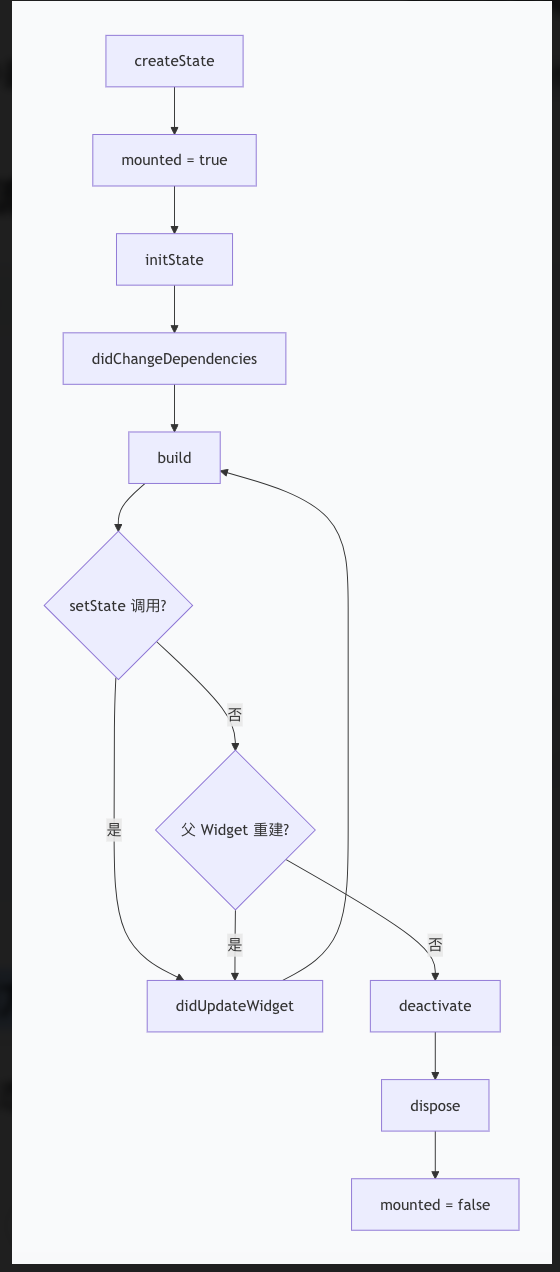 AI Visual Insight: This diagram shows the phase transitions in the StatefulWidget lifecycle, from state creation and initialization to dependency updates, UI construction, deactivation, and disposal. It helps identify when to initialize resources, when to respond to parent widget updates, and when to release listeners and controllers.
final RouteObserver
<PageRoute> routeObserver = RouteObserver<PageRoute>();

class MyPage extends StatefulWidget {
  const MyPage({super.key});

  @override
  State
<MyPage> createState() => _MyPageState();
}

class _MyPageState extends State
<MyPage> with RouteAware {
  @override
  void didChangeDependencies() {
    super.didChangeDependencies();
    final route = ModalRoute.of(context);
    if (route is PageRoute) {
      routeObserver.subscribe(this, route); // Subscribe to route events for this page
    }
  }

  @override
  void didPush() {
    print('Page entered for the first time');
  }

  @override
  void didPushNext() {
    print('Current page was covered by a new page');
  }

  @override
  void didPopNext() {
    print('Top page was popped, current page is visible again');
  }

  @override
  void dispose() {
    routeObserver.unsubscribe(this); // Unsubscribe
    super.dispose();
  }
}
This code is useful for page exposure analytics, pausing and resuming video playback, and controlling list refresh behavior.
NavigatorObserver is better for global route auditing and analytics instrumentation
If you want to record the entire app’s push, pop, replace, and remove behavior, use NavigatorObserver. It works at a global level and is well suited for centralized logging, route tracking, and analytics. By contrast, RouteAware is better when a single page needs to know whether it is visible.
class MyNavigatorObserver extends NavigatorObserver {
  @override
  void didPush(Route route, Route? previousRoute) {
    print('Route pushed: ${route.settings.name}');
  }

  @override
  void didPop(Route route, Route? previousRoute) {
    print('Route popped: ${route.settings.name}');
  }
}
This code records changes to the route stack globally.
The KeepAlive mechanism preserves page state after tab switches
In TabBarView, PageView, or long lists, a page may be disposed of by default after it goes off-screen. If you want to preserve text input, scroll position, or counters, use AutomaticKeepAliveClientMixin.
class KeepAlivePage extends StatefulWidget {
  const KeepAlivePage({super.key});

  @override
  State
<KeepAlivePage> createState() => _KeepAlivePageState();
}

class _KeepAlivePageState extends State
<KeepAlivePage>
    with AutomaticKeepAliveClientMixin {
  int counter = 0;

  @override
  bool get wantKeepAlive => true; // Enable keep-alive

  @override
  Widget build(BuildContext context) {
    super.build(context); // Required to activate the keep-alive mechanism
    return Column(
      children: [
        Text('Count: $counter'),
        ElevatedButton(
          onPressed: () {
            setState(() {
              counter++; // State is preserved after switching pages
            });
          },
          child: const Text('Increment'),
        ),
      ],
    );
  }
}
This code preserves page state in multi-page switching scenarios.
Lifecycle engineering practices should be designed around resource boundaries
The principle is simple: release resources where you create them. Use route observation to detect page visibility, use the app lifecycle to detect foreground/background transitions, and use mounted plus dispose to determine whether a widget still exists. Do not try to use one mechanism to cover every scenario.
It is a good practice to bring animation controllers, Stream subscriptions, event buses, media players, and location services into a unified lifecycle strategy. Otherwise, the problem is often not an immediate crash, but silent leaks and inconsistent state in production.
FAQ
1. Why is it not recommended to rely directly on context for inherited dependency reads inside initState?
Because dependencies are not fully stabilized yet. Reads involving InheritedWidget belong in didChangeDependencies, where Flutter can also respond correctly to future dependency updates.
2. How should I choose between RouteAware and NavigatorObserver?
Choose RouteAware when a single page needs to know, “Am I visible?” Choose NavigatorObserver when you need to audit all routing behavior globally for centralized analytics, logging, or tracking.
3. Why does my page state still get lost after I switch to another Tab?
That usually means KeepAlive is not enabled, or you forgot to call super.build(context) inside AutomaticKeepAliveClientMixin, so the keep-alive mechanism never became effective.
[AI Readability Summary] This article systematically explains the Widget lifecycle, app foreground/background lifecycle, route lifecycle, and KeepAlive mechanism in Flutter. It highlights key callback timing, common code patterns, and resource cleanup practices to help developers avoid setState exceptions, listener leaks, and lost page state.