Kafka is a high-throughput distributed messaging system whose core capabilities span producer sends, batch transmission, consumer group coordination, and cluster failover. This article focuses on the full request path and the key parameters behind it, helping you move beyond “I can use it, but I do not understand how it works.” Keywords: Kafka, Consumer Group, Batch.
Kafka specifications help you build a global mental model through key parameters
| Parameter | Description |
|---|---|
| Core languages | Scala, Java |
| Communication protocol | Custom binary protocol over TCP |
| Project positioning | Distributed publish-subscribe and streaming data platform |
| GitHub stars | Not provided in the source; typically refer to the official Apache Kafka repository |
| Core dependencies | Broker, Producer, Consumer, ZooKeeper / KRaft |
Kafka’s producer send path is completed through six connected stages
A message does not land on a Broker directly. Kafka first wraps it as a ProducerRecord, then performs serialization, partition routing, buffer writes, extraction by the Sender thread, and finally batch delivery to the target Broker.
The value of this design is that it decouples the application thread from network transmission. The application thread handles writes, while the Sender thread flushes data asynchronously. This balances throughput, latency, and scalability.
ProducerRecord is the starting point of the producer-side abstraction
ProducerRecord<String, String> record = new ProducerRecord<>(
    "order-topic",      // Target topic
    "orderId-1001",    // Message key
    "下单成功"           // Message value
);
This code snippet shows the most basic data wrapper Kafka uses when producing a message.
Kafka follows a three-layer rule when choosing a partition: an explicitly specified partition takes priority; otherwise, Kafka hashes by key; if no key is provided, it typically falls back to round-robin or sticky assignment. The partitioning strategy directly affects message ordering and load balancing.
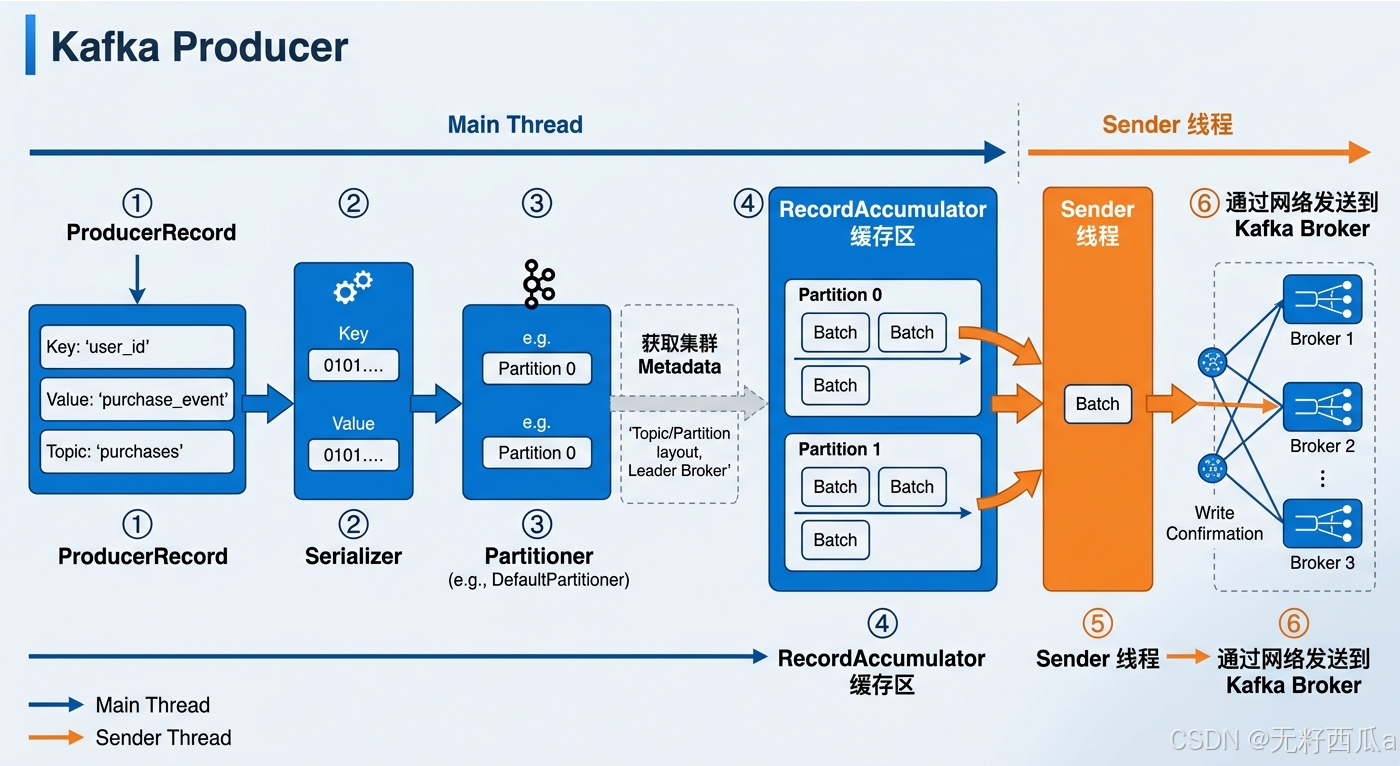 AI Visual Insight: This diagram presents the producer path as a pipeline with six stages: Kafka first wraps the message as an object, converts it into a byte stream through the serializer, and then uses the partitioner together with cluster metadata to select the target partition. The message enters the
 RecordAccumulator, where Kafka groups it into a Batch by partition. A background Sender thread then extracts the batch asynchronously and sends it to the Broker over the network. The diagram highlights two core design choices: decoupling the main thread from the send thread, and improving throughput through batching.
Properties props = new Properties();
props.put("bootstrap.servers", "localhost:9092");
props.put("key.serializer", "org.apache.kafka.common.serialization.StringSerializer");
props.put("value.serializer", "org.apache.kafka.common.serialization.StringSerializer");
props.put("batch.size", 16384); // Controls the byte size of a single batch; default is 16 KB
props.put("linger.ms", 10);     // Waits for more messages to form a batch and reduces request count

KafkaProducer<String, String> producer = new KafkaProducer<>(props);
producer.send(new ProducerRecord<>("order-topic", "orderId-1001", "下单成功"),
    (metadata, exception) -> {
        if (exception == null) {
            System.out.printf("topic=%s, partition=%d, offset=%d%n",
                metadata.topic(), metadata.partition(), metadata.offset());
        } else {
            exception.printStackTrace(); // Log the error when send fails
        }
    }
);
producer.close();
This code highlights the two most important producer-side tuning knobs: batch.size and linger.ms.
Kafka’s batch mechanism is fundamentally an engineering optimization that prioritizes throughput
Kafka does not work in a “send one message as soon as it arrives” mode. Instead, it prefers to accumulate data for the same partition into batches before sending. This significantly reduces the number of network requests and Broker-side I/O pressure.
Batch send conditions are determined jointly by size, time, and accumulation rate
| Dimension | Parameter | Typical value | Meaning |
|---|---|---|---|
| Batch size | batch.size |
16 KB / 64 KB | Send is triggered after the byte threshold is reached |
| Wait time | linger.ms |
0–100 ms | Even an incomplete batch can be sent when the timer expires |
| Accumulation trend | Same-partition message traffic | High-frequency writes | Makes it easier to fill a Batch quickly |
High-throughput workloads usually increase both batch.size and linger.ms. Low-latency workloads tend to reduce wait time to prevent individual messages from sitting in the batch queue too long.
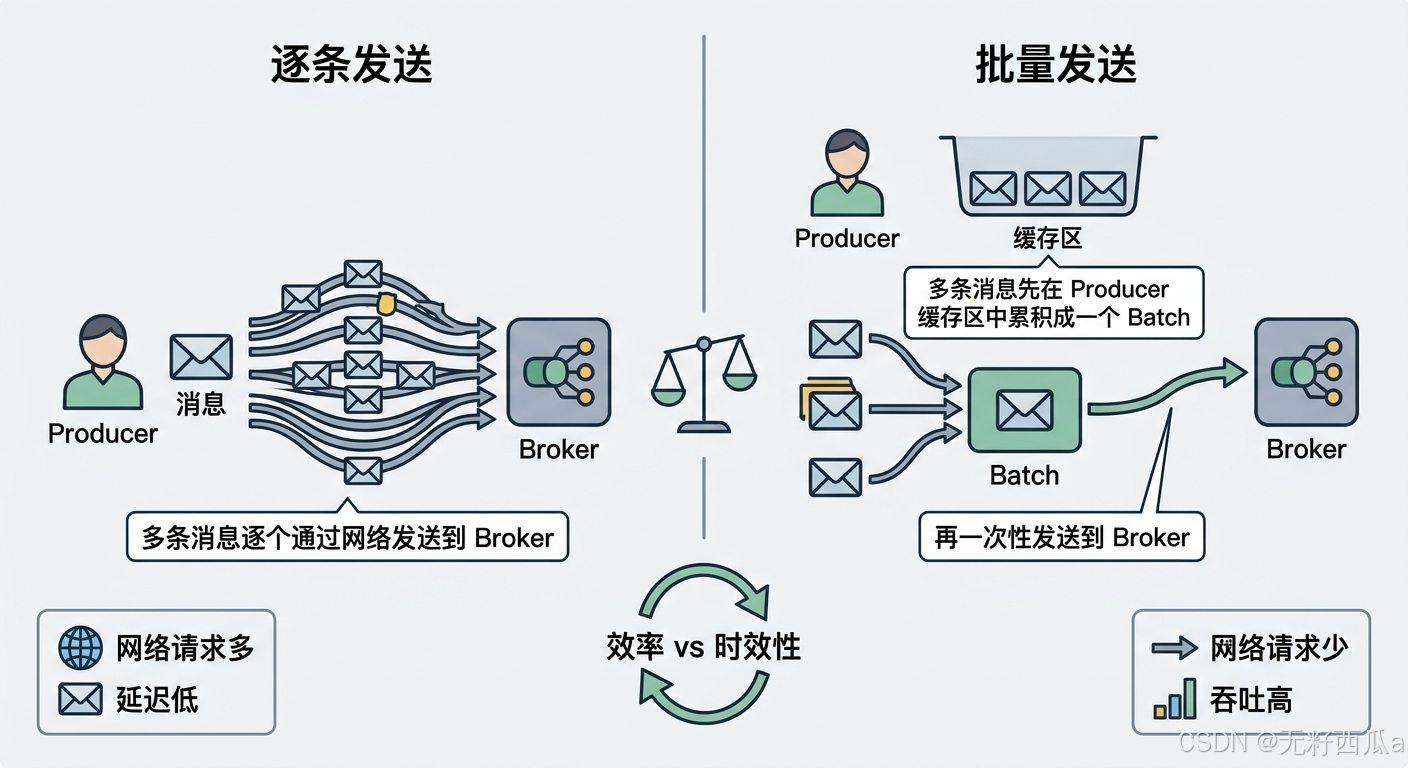 AI Visual Insight: This diagram emphasizes how Kafka aggregates multiple messages in memory by partition and then sends them together. It clearly shows how batching reduces network round trips and improves sequential disk writes, while also implying the classic tradeoff: larger batches can increase the waiting time of individual messages.
Kafka’s consumption model uses pull because it scales better
Unlike a model where the Broker actively pushes data, Kafka requires the Consumer to pull messages. This lets the client control the consumption rate, so slow consumers are not overwhelmed directly by upstream traffic.
The cost of the pull model is that empty polling can happen. Kafka mitigates this through blocking fetches, allowing consumers to wait for a reasonable amount of time when insufficient data is available instead of spinning and wasting CPU.
Fetch parameters determine the pace of pull behavior
Properties props = new Properties();
props.put("bootstrap.servers", "localhost:9092");
props.put("group.id", "order-consumer-group");
props.put("key.deserializer", "org.apache.kafka.common.serialization.StringDeserializer");
props.put("value.deserializer", "org.apache.kafka.common.serialization.StringDeserializer");
props.put("fetch.min.bytes", 1);     // Return only after at least the specified number of bytes is accumulated
props.put("fetch.max.wait.ms", 500); // Maximum blocking wait time

KafkaConsumer<String, String> consumer = new KafkaConsumer<>(props);
consumer.subscribe(Collections.singletonList("order-topic"));

while (true) {
    ConsumerRecords<String, String> records = consumer.poll(Duration.ofMillis(1000));
    for (ConsumerRecord<String, String> record : records) {
        System.out.printf("offset=%d, key=%s, value=%s%n",
            record.offset(), record.key(), record.value()); // Process messages one by one
    }
}
This code shows how a Consumer uses blocking fetches to balance real-time responsiveness and resource efficiency.
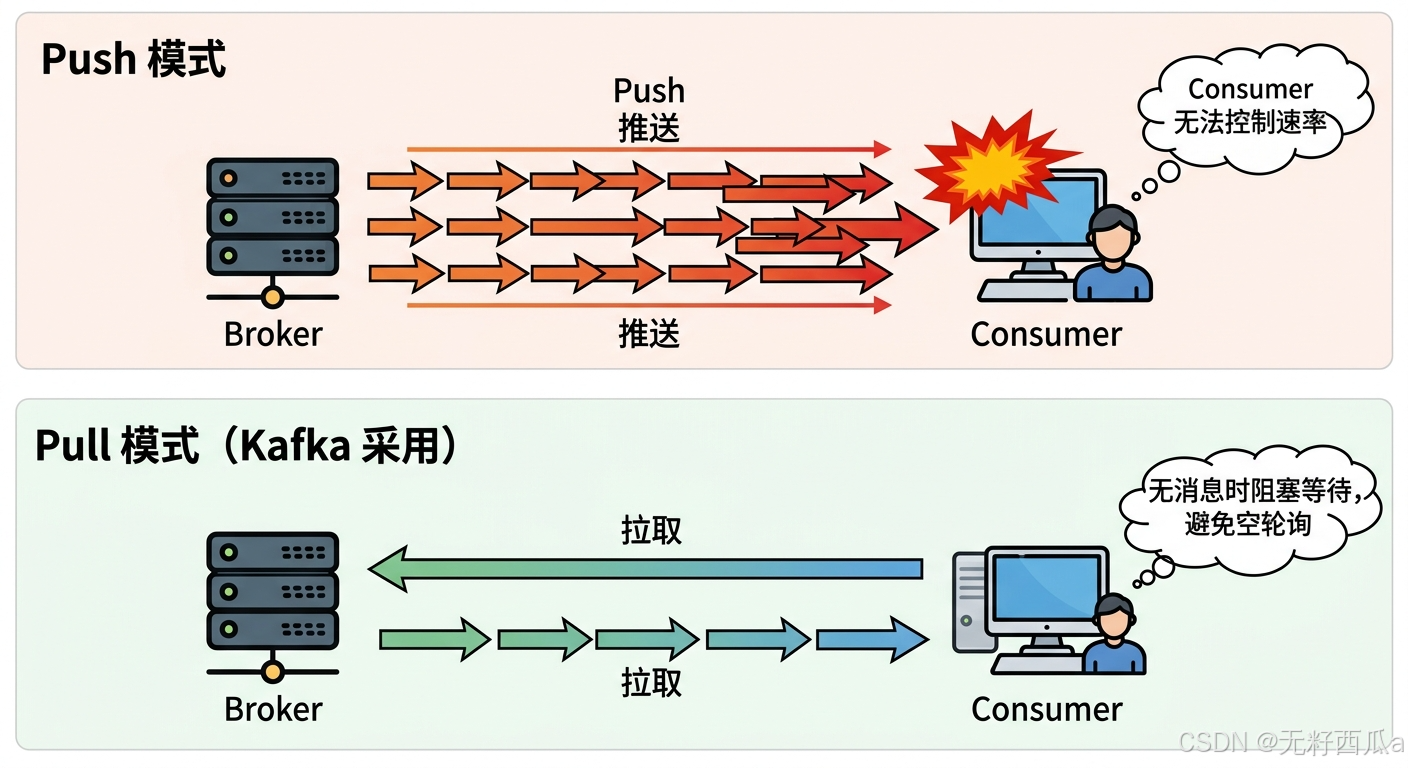 AI Visual Insight: The diagram highlights that the consumer actively sends fetch requests to the Broker instead of being force-fed by the server. It reflects Kafka’s core idea of adapting to different processing capacities by letting the client control consumption frequency, batch size, and poll cadence. It also reveals the pull model’s natural advantages for traffic smoothing and backpressure handling.
Kafka’s consumer group mechanism defines the boundaries of parallel consumption and fault tolerance
The Consumer Group is the foundation of Kafka’s horizontal scalability. A group can contain multiple consumers, but at any given time a single partition can be assigned to only one consumer within the same group. This guarantees partition-level ordered consumption.
A best practice is to avoid running more consumers than partitions for a long period of time. Otherwise, some instances will inevitably remain idle. When planning the number of topic partitions, include your future consumption concurrency targets as part of the design.
Rebalancing relies on heartbeats and the coordinator to maintain group topology
Properties props = new Properties();
props.put("bootstrap.servers", "localhost:9092");
props.put("group.id", "order-consumer-group");
props.put("heartbeat.interval.ms", 3000); // Send heartbeats periodically
props.put("session.timeout.ms", 30000);   // Consider the member out of the group after timeout
props.put("key.deserializer", "org.apache.kafka.common.serialization.StringDeserializer");
props.put("value.deserializer", "org.apache.kafka.common.serialization.StringDeserializer");

KafkaConsumer<String, String> consumer = new KafkaConsumer<>(props);
consumer.subscribe(Collections.singletonList("order-topic"));
This code shows the core conditions that trigger rebalancing: heartbeat liveness and session timeout.
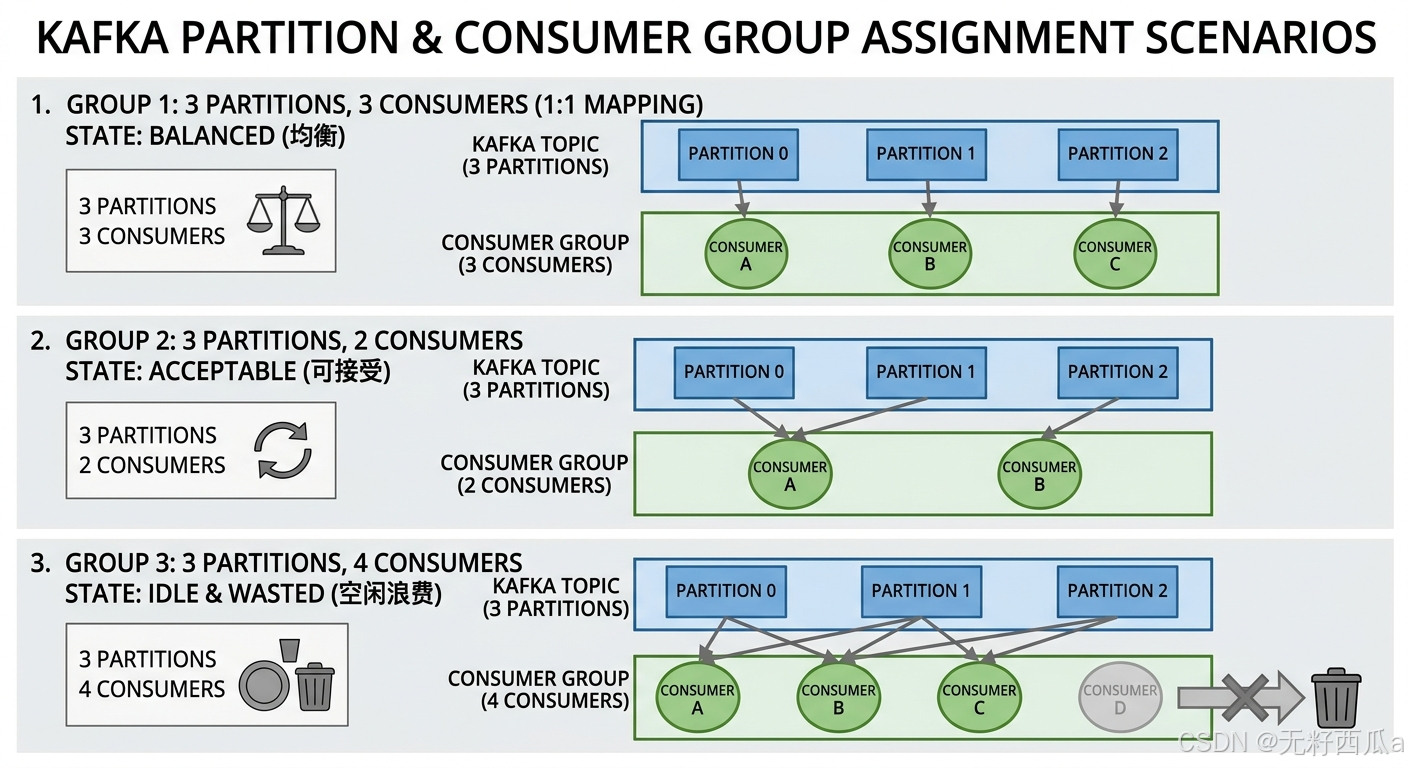 AI Visual Insight: This diagram shows the mapping between multiple Consumers and multiple Partitions, emphasizing the allocation rule that “within the same consumer group, one partition can be owned by only one consumer at a time.” When the number of consumers is lower than the number of partitions, a single consumer handles multiple partitions; when the number of consumers is higher, some consumers stay idle. This directly illustrates the tradeoff between scaling and resource utilization.
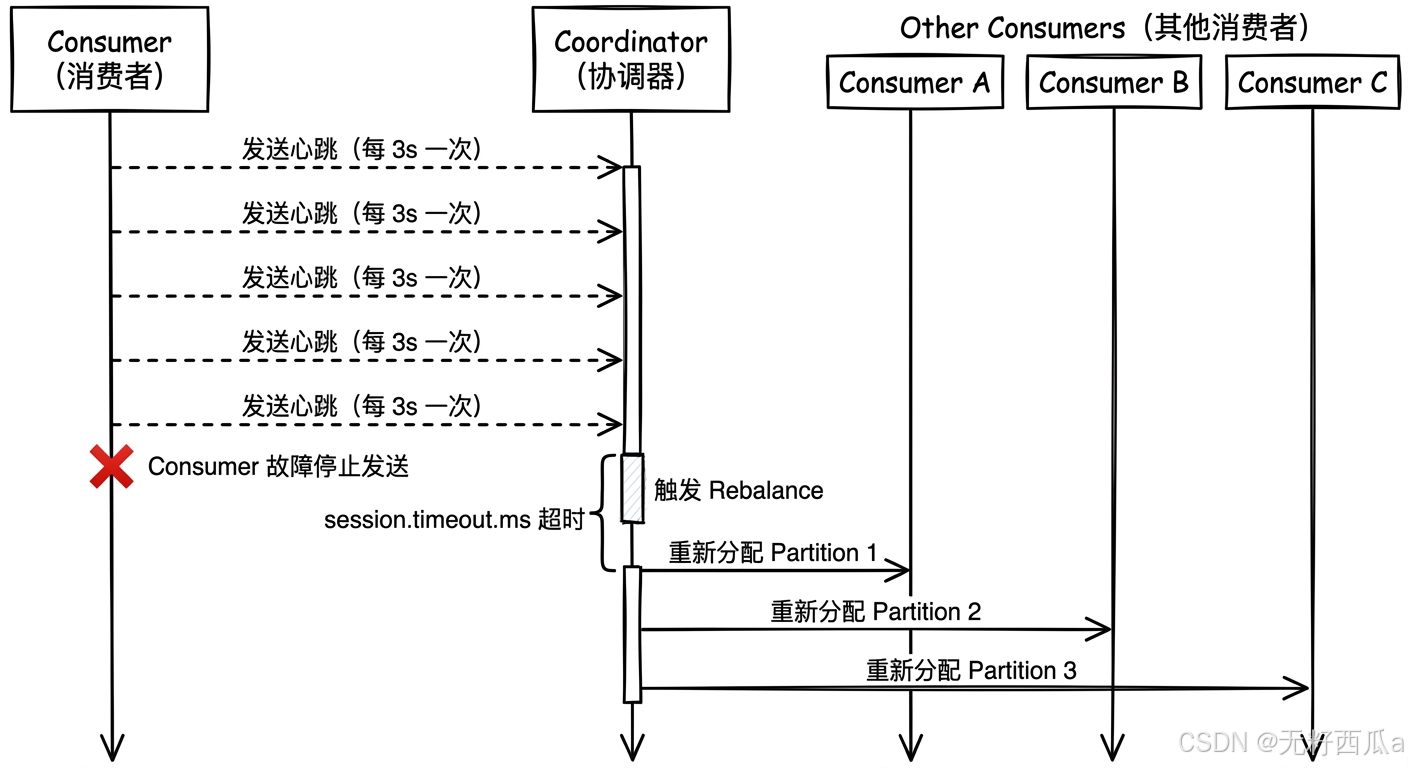 AI Visual Insight: The diagram should show Consumers periodically sending heartbeats to the Coordinator. Once a node disconnects or a new node joins, the Coordinator triggers a rebalance and reassigns partitions. This explains how Kafka uses the control plane to handle consumer fault tolerance and dynamic scaling without requiring manual intervention in application code.
Kafka’s cluster load balancing and failover depend on leader distribution and metadata coordination
Kafka reads and writes revolve around the partition leader. As a result, whether leaders are distributed evenly directly determines whether the cluster is truly balanced. If too many hot leaders concentrate on a single machine, that machine becomes an obvious bottleneck.
The key to failover is rapid replacement after a node disconnects. In the traditional architecture, a Broker maintains liveness through its session with ZooKeeper. Once that session breaks, the cluster triggers a new leader election.
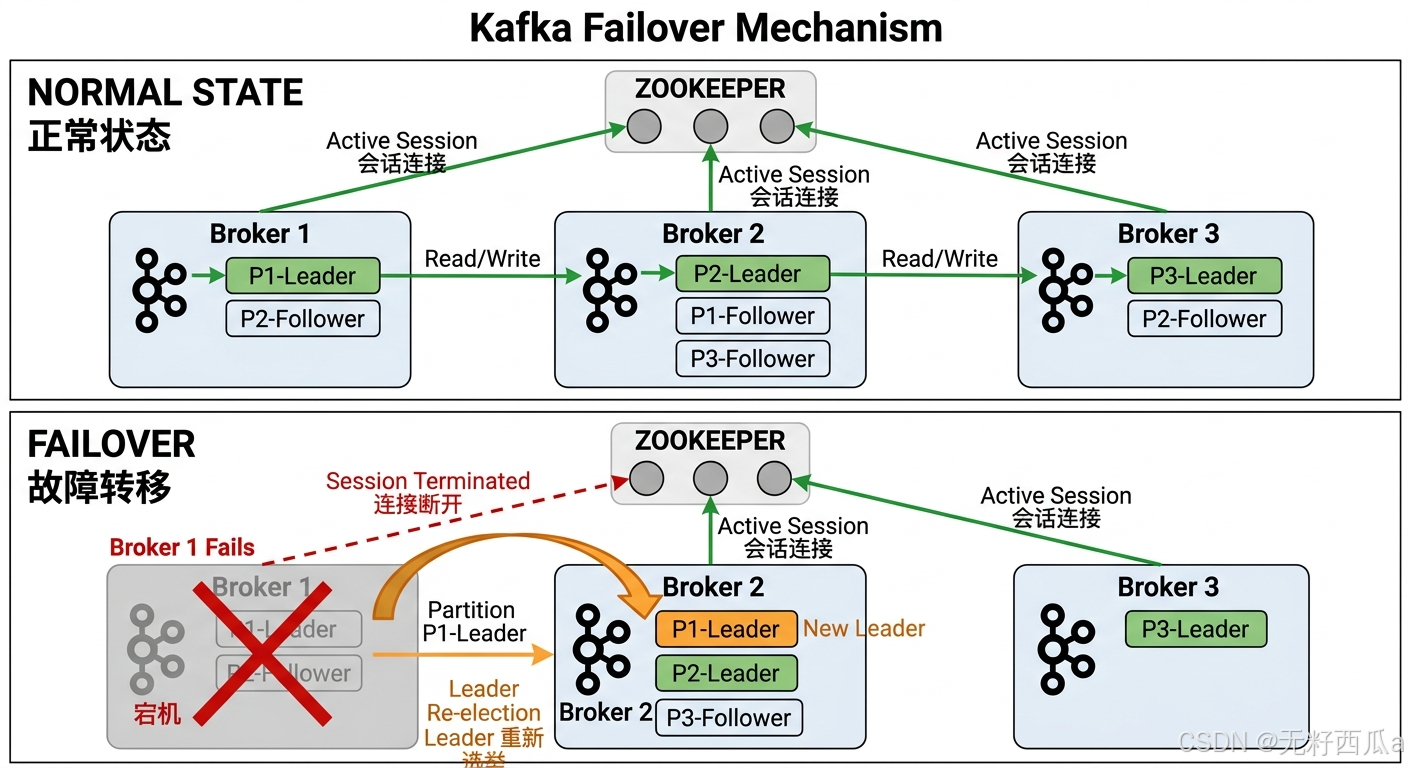 AI Visual Insight: This diagram contrasts the normal state with the failure state. Under normal conditions, multiple Brokers host leaders for different partitions and maintain sessions with ZooKeeper. After a failure occurs, the failed Broker loses its connection, and its leader roles are re-elected onto other Brokers. The diagram clearly shows how Kafka maintains service continuity through metadata coordination.
ZooKeeper used to be the core of Kafka metadata management, while KRaft is the current direction of evolution
| Component capability | Description |
|---|---|
| Broker registration | Tracks broker join and leave events |
| Partition metadata maintenance | Stores the mapping among Topics, Partitions, and Brokers |
| Controller election | Determines which node is responsible for the cluster control plane |
| Failure recovery assistance | Helps the cluster complete state transitions |
It is important to note that Kafka is gradually reducing its dependency on ZooKeeper. KRaft has become the direction of the new architecture, with the goal of bringing metadata management back into Kafka itself.
Kafka’s built-in tools cover migration, mirroring, and consumer troubleshooting
Kafka does not ship with a large number of built-in tools, but the tools it provides are highly practical. Typical capabilities include version migration assistance, cross-cluster mirroring, and inspection of consumer groups and partition state.
For operations teams, MirrorMaker is useful for cross-region disaster recovery and multi-data-center synchronization. Consumer inspection tools are well suited for quickly locating consumer lag, partition ownership, and abnormal group states.
FAQ
1. Why does Kafka not use a push model?
Because a push model is hard to adapt to consumers with different processing capacities, and it can easily overwhelm slow consumers. The pull model gives pacing control to the Consumer, which makes it a better fit for high-throughput distributed workloads.
2. How should I balance batch.size and linger.ms?
If throughput is the priority, increase both to improve the chance of forming larger batches. If low latency is the priority, reduce linger.ms so messages do not wait too long. In practice, tune these values based on message size, peak traffic, and SLA-driven load testing.
3. Why should the number of consumers not exceed the number of partitions?
Because within the same consumer group, one partition can be owned by only one consumer. When there are more consumers than partitions, some instances cannot receive any assignment and remain idle, which wastes resources.
[AI Readability Summary]
This article reconstructs Kafka’s core mechanisms end to end, from message production, batch processing, and pull-based consumption to consumer group coordination, load balancing, failover, and the evolution from ZooKeeper to KRaft. The goal is to help developers quickly build an operational and tunable mental model of Kafka’s full data path.