[AI Readability Summary]
This article explains Linux processes from the ground up. It starts with the Von Neumann architecture to show why programs must be loaded into memory before the CPU can execute them. It then explains why the operating system is fundamentally a resource manager, how Linux represents processes with PCB structures such as task_struct, and how fork() creates a child process. If you are new to Linux, this gives you a complete mental model that connects hardware execution, kernel resource management, and the Unix process model.
Technical Specification Snapshot
| Parameter | Details |
|---|---|
| Domain | Linux / Operating Systems / Process Management |
| Primary Language | C |
| Key Interfaces | getpid() , getppid() , fork() , wait() |
| Runtime Environment | Linux (Ubuntu / CentOS) |
| Key Protocols / Standards | POSIX / Unix process model |
| Source Format | Reconstructed from original CSDN Markdown |
| Popularity Reference | 571 views, 27 likes, 17 bookmarks |
| Core Dependencies | glibc, Linux kernel, Shell, /proc filesystem |
The Von Neumann Architecture Defines the Physical Path of Program Execution
Modern computers largely follow the Von Neumann architecture: input devices, output devices, memory, the arithmetic logic unit, and the control unit together form a complete system. The core principle is simple: both programs and data are stored in memory in binary form, and the CPU fetches and executes instructions one by one.
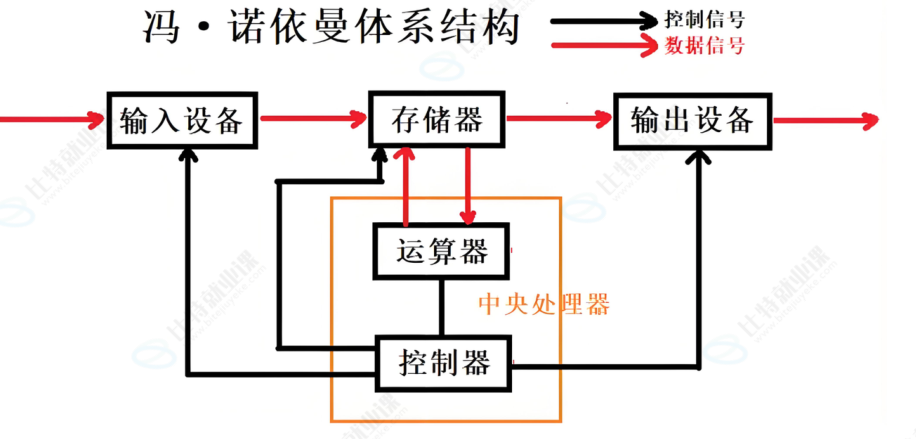 AI Visual Insight: This diagram shows the logical connections among the five major Von Neumann components. It highlights that input, output, and memory do not exchange data by having the CPU process peripherals byte by byte directly. Instead, memory acts as the intermediary for both instructions and data flow.
This directly answers a basic question: if an executable file already exists on disk, why must the system still load it into memory before running it? Because the CPU can efficiently process instructions and data in memory, not execute directly against files on disk.
There is an inherent speed gap between the CPU and peripherals
The CPU is fast, peripherals are slow, and memory serves as the buffering layer. Data usually follows the path “peripheral → memory → CPU → memory → peripheral,” rather than having the CPU operate directly on the keyboard, disk, or network card one device interaction at a time.
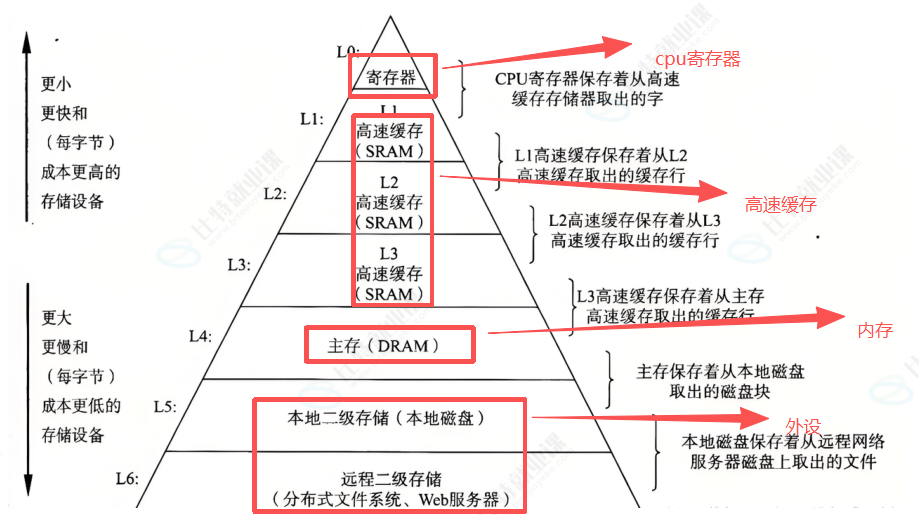 AI Visual Insight: This diagram illustrates the speed hierarchy among registers, cache, main memory, and peripherals. It shows that storage layers closer to the CPU have lower latency, and that program performance is often limited by memory access rather than raw compute power.
// Simplified view: a program must enter memory before it can run
int run_program() {
    load_binary_to_memory();   // Load the executable from disk into memory
    cpu_fetch_and_execute();   // The CPU fetches instructions from memory and executes them
    return 0;
}
This code shows that CPU execution depends on one prerequisite: the code must already be in memory.
The Operating System Is Fundamentally a Layer for Resource Management and Abstraction
An operating system is not a single program. It is a collection of software that manages hardware and software resources. Downward, it manages resources such as the CPU, memory, disks, and network interfaces. Upward, it provides applications with a unified execution environment and standard interfaces.
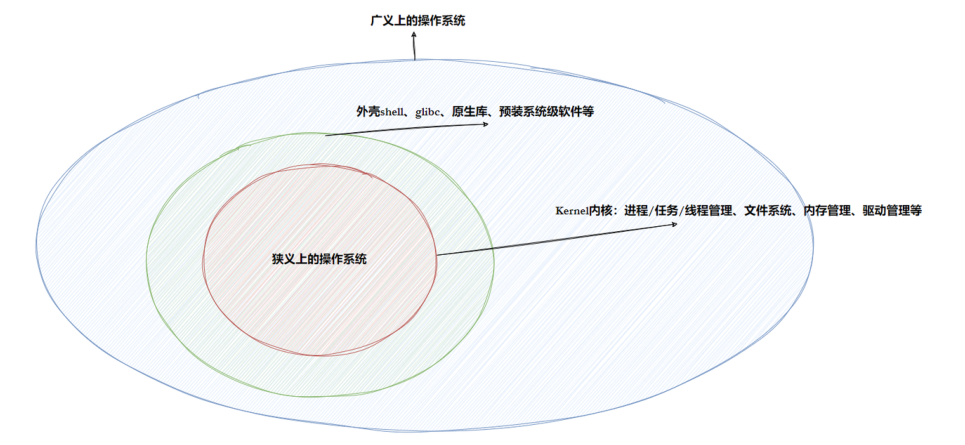 AI Visual Insight: This diagram shows the broad boundary of an operating system, which typically includes the kernel, drivers, system call interfaces, and upper-layer tools. It demonstrates that the OS is both a control layer and a service layer.
The most effective way to understand an operating system is to focus on one sentence: describe first, then organize. The operating system does not “understand” hardware or processes directly. Instead, it uses structures to describe object attributes, then organizes those objects with data structures such as linked lists, queues, and trees, and ultimately achieves management through those representations.
In the kernel, “management” is equivalent to operating on data structures
Consider the analogy of managing students: first use a structure to describe student attributes, then organize all student nodes into a linked list. Querying, inserting, deleting, and sorting all become operations on that list. The kernel manages hardware, files, and processes in exactly the same way.
struct student {
    char name[10];      // Student name
    char sex;           // Sex
    int age;            // Age
    double score;       // Score
    char addr[100];     // Address
};
This code shows that the first step in describing any object is to extract its set of attributes.
A Linux Process Is the Managed Runtime Entity of a Program
A process is not just an executable file, nor is it simply a piece of code. More precisely, a process = code + data + the management structure the operating system creates for it. That management structure is the PCB, or Process Control Block.
In Linux, the core PCB implementation is task_struct. It records information such as the process identifier, state, priority, program counter, memory mappings, context registers, I/O metadata, and accounting information.
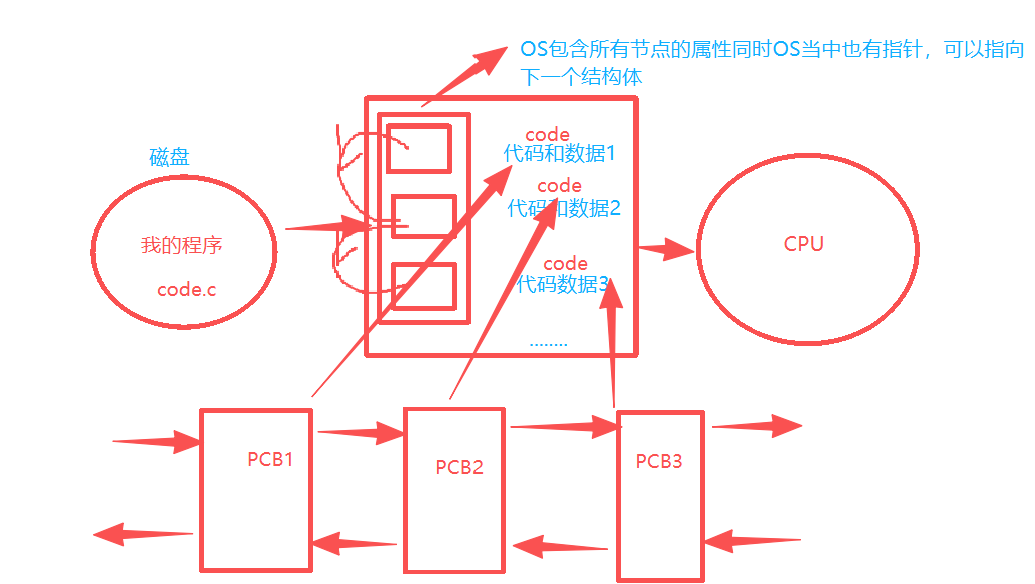 AI Visual Insight: This diagram shows the process of loading an executable from disk into memory, then having the operating system create a PCB and establish the relationship among the code segment, data segment, and management structure. This is the key step in transforming a “program” into a “process.”
The PCB determines how the kernel identifies and schedules a process
During a process switch, the kernel does not simply “remember where a piece of code stopped.” Instead, it saves and restores the context data stored in task_struct. The program counter, register values, and scheduling state are all persisted through the PCB.
// Pseudocode: the core action of process scheduling
void schedule(task_struct *next) {
    save_context(current);   // Save the register context of the current process
    current = next;          // Switch the current running entity
    restore_context(next);   // Restore the execution context of the target process
}
This code shows that scheduling is fundamentally about saving and restoring execution context.
System Calls Provide the Only Entry Point from User Space to the Kernel
By default, the operating system does not trust user programs. As a result, applications cannot directly manipulate critical resources. Users must request kernel services through system calls, such as creating processes, reading and writing files, or allocating memory.
Library functions are secondary wrappers built on top of system calls. printf(), container libraries, and Shell commands may appear easy to use, but underneath they often still rely on system calls. System calls answer “is this allowed,” while library functions answer “is this convenient to use.”
You can inspect real process state through ps and /proc
Developers commonly observe processes in two ways. One is through user-space tools such as ps and top. The other is through kernel-exported process views such as `/proc/