Linux processes are kernel-managed runtime entities. At their core are
task_struct, the virtual address space, and the hardware execution context. This article explains whyfork()appears to return twice, how copy-on-write saves memory, how zombie and orphan processes are created, and how the scheduler performs context switching. Keywords: PCB,fork(), context switching.
Technical Specifications at a Glance
| Parameter | Description |
|---|---|
| Language | C, Shell |
| Platform | Linux |
| Core Topics | Process management, scheduling, virtual memory |
| License | Originally marked as CC 4.0 BY-SA |
| Stars | Not provided in the source |
| Core Dependencies | glibc, Linux kernel, proc/ps toolchain |
A Linux process is first and foremost a kernel-managed runtime entity
A program is a static set of instructions stored on disk, while a process is a dynamic execution instance created after that program is loaded into memory. In Linux, a process is more than code. It also includes all the management metadata the kernel uses to track and control it.
Its essence can be summarized as: Process = executable code + data + task_struct + address space + open resources. To understand a process, you should not look only at main(). You should examine how the kernel represents and schedules it.
task_struct is the process’s core record
task_struct is the classic PCB (Process Control Block). It stores critical information such as the PID, PPID, state, priority, memory descriptor, file descriptor table, and CPU context.
#include <stdio.h>
#include <unistd.h>

int main(void) {
    printf("pid=%d, ppid=%d\n", getpid(), getppid()); // Print the current process ID and parent process ID
    return 0;
}
This code verifies the most basic identity information of a process: the PID and PPID.
Linux manages all processes through linked kernel structures
The kernel does not directly manage program source code. It manages collections of task_struct instances. Creating a process essentially means creating a new process descriptor and inserting it into the scheduling system. Destroying a process means releasing its associated resources and removing it from the relevant lists or queues.
Process states show whether a task can currently be scheduled
For developers, the most common place to inspect process state is the STAT column in ps output. R means running or runnable, S means interruptible sleep, D means uninterruptible sleep, T/t means stopped, and Z means zombie.
The D state is especially important. It usually means the process is waiting for critical I/O to complete, and the kernel does not allow ordinary signals to interrupt it, which helps prevent data corruption caused by interrupting device operations.
ps ajx | head -1 && ps ajx | grep myproc | grep -v grepThis command displays the header, process relationships, and state fields at the same time, making it useful for troubleshooting parent-child relationships, foreground/background state, and zombie processes.
The foreground plus sign and background execution are terminal-control semantics
In S+ and R+, the + does not mean “more active.” It means the process belongs to the foreground process group of the current terminal. Foreground processes can receive terminal signals such as Ctrl+C and Ctrl+Z directly, while background processes usually cannot.
fork() creates a child process by duplicating the execution state
fork() is the foundational Linux interface for process creation. When the call succeeds, it produces two nearly identical execution flows: the parent receives the child’s PID as the return value, and the child receives . That is why it appears as if “one function returns twice.”
#include <stdio.h>
#include <unistd.h>

int main(void) {
    pid_t id = fork();
    if (id < 0) {
        perror("fork"); // Print the error reason if process creation fails
    } else if (id == 0) {
        printf("child: pid=%d, ppid=%d\n", getpid(), getppid()); // Child process branch
    } else {
        printf("parent: child pid=%d\n", id); // Parent receives the child PID
    }
    return 0;
}
This example demonstrates the dual-return semantics of fork() and the control-flow split between parent and child.
The child continues after fork() because it inherits the program counter
When the parent process reaches fork(), the program counter already points to the next instruction. The child process copies that execution state, so it does not restart from the beginning of main(). Instead, it continues directly from the instruction after fork().
Copy-on-Write significantly reduces the cost of fork()
Linux does not copy the entire user-space memory region at the instant fork() is called. Instead, the parent and child initially share the same physical pages, and the kernel marks the corresponding page table entries as read-only. Only when one side attempts to write does the kernel trigger a page fault and copy the actual physical page.
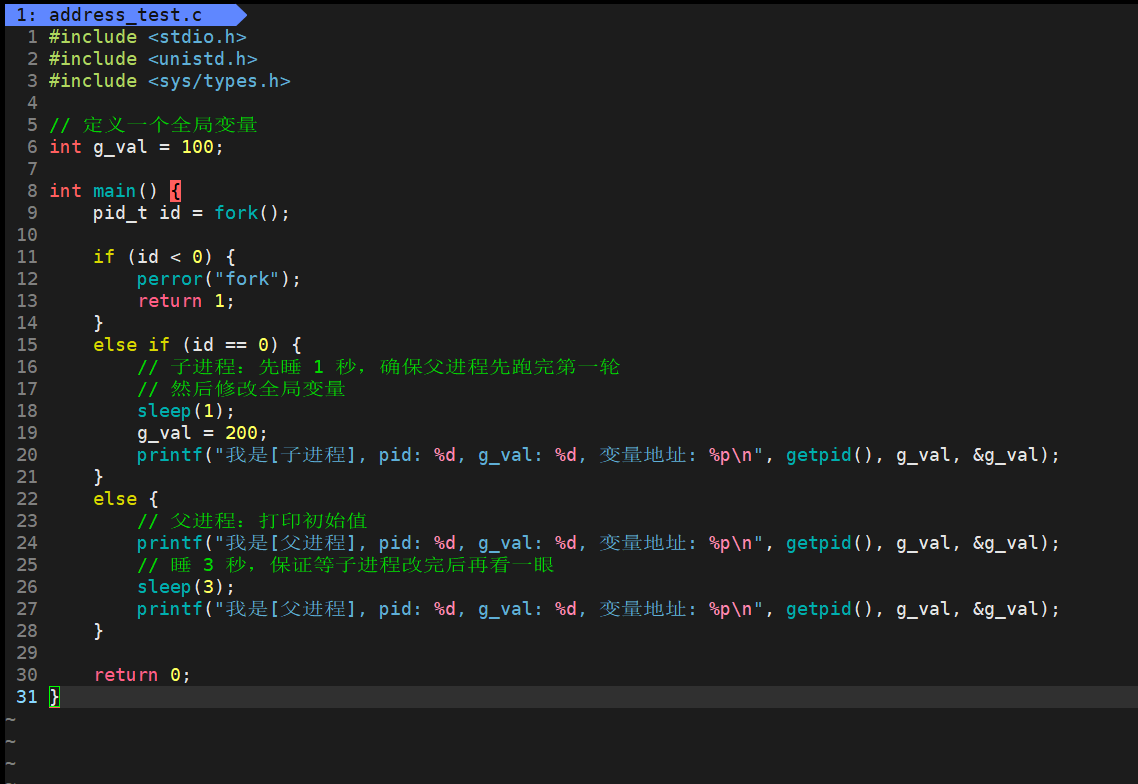 AI Visual Insight: The image shows how the parent and child share the initial memory mapping after
 fork(), and how physical pages split only after a write operation triggers the mechanism. The key idea is delayed duplication through page table redirection and Copy-on-Write.
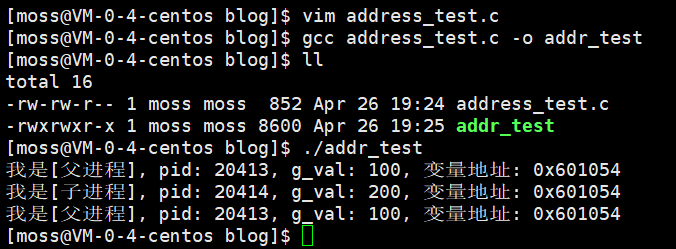 AI Visual Insight: The image compares the identical virtual address of the same variable in the parent and child process. This illustrates that user space sees independent virtual address spaces from its own perspective. Even after data diverges later, the virtual address can remain unchanged; what changes is the mapping from page tables to physical pages.
Zombie and orphan processes reflect Linux’s resource reclamation model
After a child process exits, the kernel releases most of its resources but retains the exit status and a small amount of control information until the parent calls wait() or waitpid() to reap it. This brief residual state is called a zombie process.
If the parent does not reap the child for a long time, the zombie continues to occupy a PID and kernel table entry. You cannot kill it with kill -9 because it is no longer an active execution entity. It is only an unreaped record.
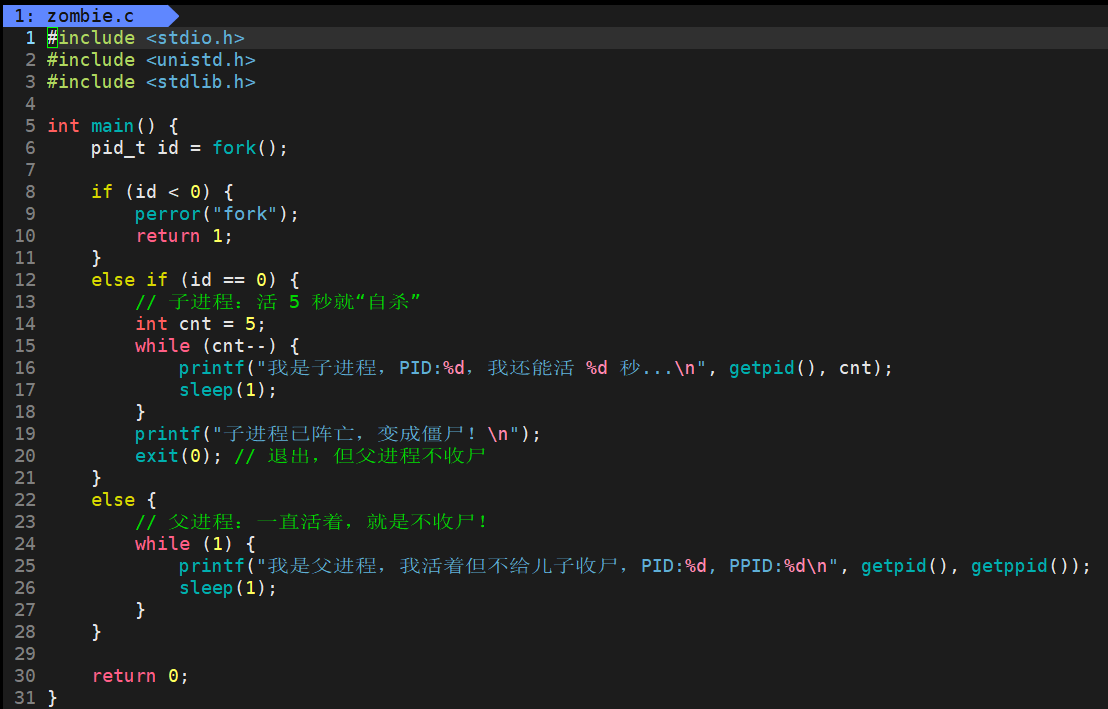 AI Visual Insight: The image appears to show sample code for creating a zombie process. It typically includes
 fork(), child exit logic, and delayed parent exit or sleep behavior to create a scenario where the parent does not call wait() in time.
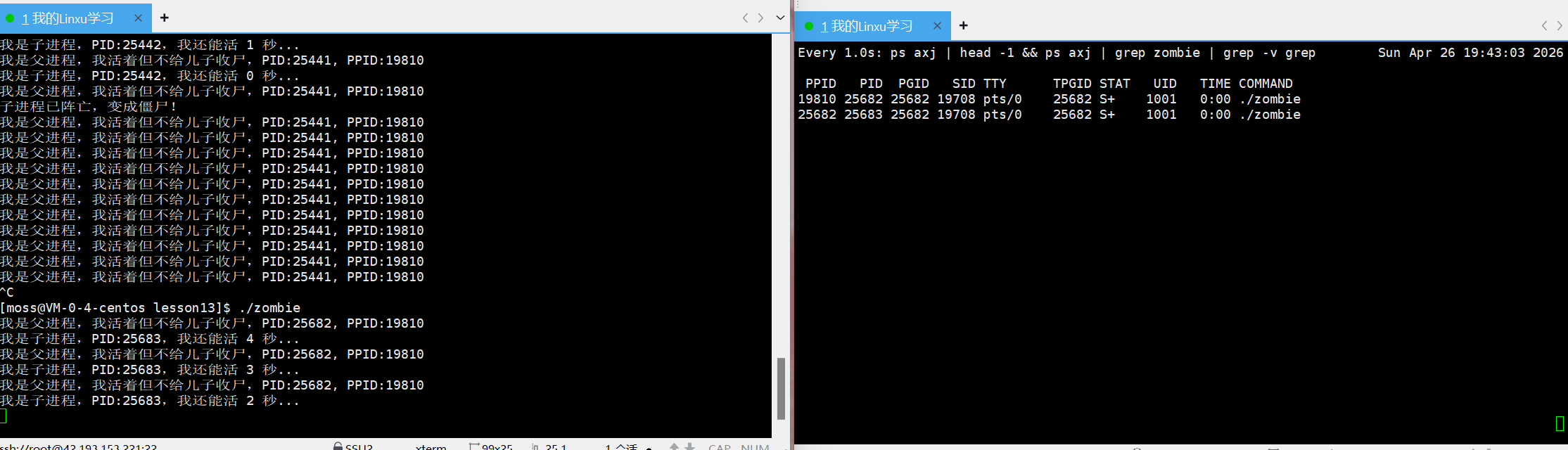 AI Visual Insight: The image shows monitoring results while both parent and child are still alive. Their states are likely
 S+, indicating that both are still controlled by the current terminal and are in interruptible sleep or a waiting state.
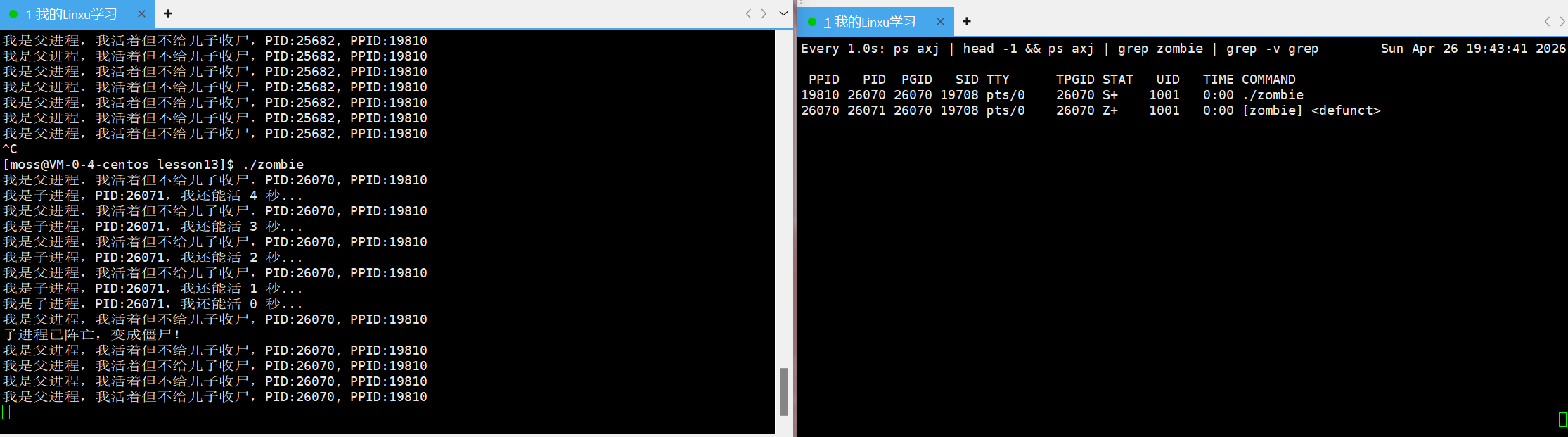 AI Visual Insight: The child process state changes to
 Z+, showing that the child has exited but its task_struct has not yet been reaped by the parent. This is direct evidence of the zombie state.
Orphan processes are adopted by process 1
If the parent exits before the child, the child is re-parented to init/systemd, and its PPID becomes 1. Orphan processes are usually not a problem. In fact, they are part of Linux’s design for ensuring that processes can eventually be reaped.
watch -n 1 "ps axj | head -1 && ps axj | grep myprocess | grep -v grep"This command continuously monitors changes in the orphan process’s PPID and STAT fields.
ps, kill, and nice form a common control surface for developers
ps aux is useful for viewing global resource consumption, while ps ajx is better for examining parent-child relationships. The essence of kill is not “killing a process,” but sending a signal to a target. SIGTERM is more graceful, while SIGKILL is more forceful.
For priority management, developers more often work directly with the Nice value. A larger Nice value means the process is more willing to yield, so its scheduling priority is usually lower. A smaller Nice value means it usually gets more opportunities to run on the CPU.
nice -n 10 ./myproc
sudo renice -n -5 -p 1234
These two commands lower priority at startup and adjust the Nice value of a target process while it is running.
Context switching preserves the continuity of concurrent multi-process execution
An infinite loop does not automatically freeze the entire system because Linux uses preemptive scheduling and time slices. When a process exhausts its time slice, the kernel forcibly switches it out and allows the CPU to execute other tasks.
The key to context switching is not “switching programs,” but “saving registers and restoring registers.” When process A is switched out, the CPU registers such as the program counter, general-purpose registers, and flags are saved into its kernel context. When process B is switched in, B’s execution state is restored.
The O(1) scheduling algorithm uses bitmaps to find the highest-priority task quickly
The classic O(1) scheduler maintains a run queue for each CPU and stores tasks in priority-based levels. With the help of bitmaps, the scheduler can find the highest-priority non-empty queue in constant time, without scanning all processes.
Its Active/Expired dual-queue design prevents long-term starvation of low-priority tasks. Tasks that exhaust their time slices move to the expired queue. Once the current active queue becomes empty, the scheduler can start the next round simply by swapping pointers.
FAQ
1. Why do the parent and child see the same variable address after fork()?
Because each process sees the same virtual address within its own virtual address space. Before Copy-on-Write is triggered, both page tables may still map that virtual address to the same physical page.
2. Why can’t kill -9 terminate a zombie process?
A zombie process has already exited and can no longer receive signals. The issue is not how to kill it, but that the parent process has not yet called wait() to reap its exit information.
3. Why does context switching introduce performance overhead?
Because switching requires saving and restoring registers, may involve switching address spaces, and can flush part of the cache or TLB. During that time, the CPU is not directly executing application logic, so frequent switches reduce throughput.
Core Summary: This article systematically reconstructs the core knowledge of Linux processes, covering task_struct, process states, fork() and Copy-on-Write, zombie and orphan processes, ps/kill, priority management, context switching, and the O(1) scheduling algorithm. It helps developers build a complete mental model from user space to kernel scheduling.