[AI Readability Summary] LTX-Video 2.3 is an open-source image-to-video model designed for local deployment. It improves I2V quality, reduces Ken Burns artifacts, and supports tiered execution on GPUs with 8GB to 24GB of VRAM. It addresses the high cost, lack of control, and limited private deployment options of closed-source video models. Keywords: I2V, ComfyUI, local deployment.
The technical specification snapshot is straightforward
| Parameter | Details |
|---|---|
| Core language | Python |
| Model architecture | DiT + reconstruction VAE |
| Input modes | Image-to-Video, first-and-last-frame control |
| Deployment options | ComfyUI, Diffusers/Python |
| Protocol / License | MIT |
| VRAM threshold | Starts at 8GB, 12GB is more practical, 24GB delivers a fuller experience |
| Core dependencies | torch, diffusers, transformers, accelerate, imageio |
| Project ecosystem | Official Lightricks repository + ComfyUI nodes |
LTX-Video 2.3 has a clearly defined role
LTX-Video 2.3 is the practical release in the Lightricks video generation roadmap. Its core value is not achieving a single-point maximum in visual quality, but being locally deployable, commercially usable, controllable, and runnable on consumer hardware. That makes it a strong fit for creator workstations, private enterprise deployments, and rapid prototyping.
Compared with earlier versions, 2.3 significantly improves I2V stability, prompt understanding, and texture detail. It performs especially well in scenes with subtle human motion, camera push-ins, and product showcase shots, where the output looks more natural and fake zoom or pan artifacts are noticeably reduced.
The product line can be summarized as a three-layer upgrade
The first layer expands model scale, the second introduces native audio-video support and longer durations, and the third makes I2V and control features genuinely usable. For developers, what matters most is that the model has moved from being demo-ready to delivery-ready.
LTX-Video → LTXV-13B → LTX-2 → LTX-2.3
Lightweight and fast   Better long-video support   Unified audio-video   Improved I2V usability
This progression chart is intended to help you quickly understand the version evolution path.
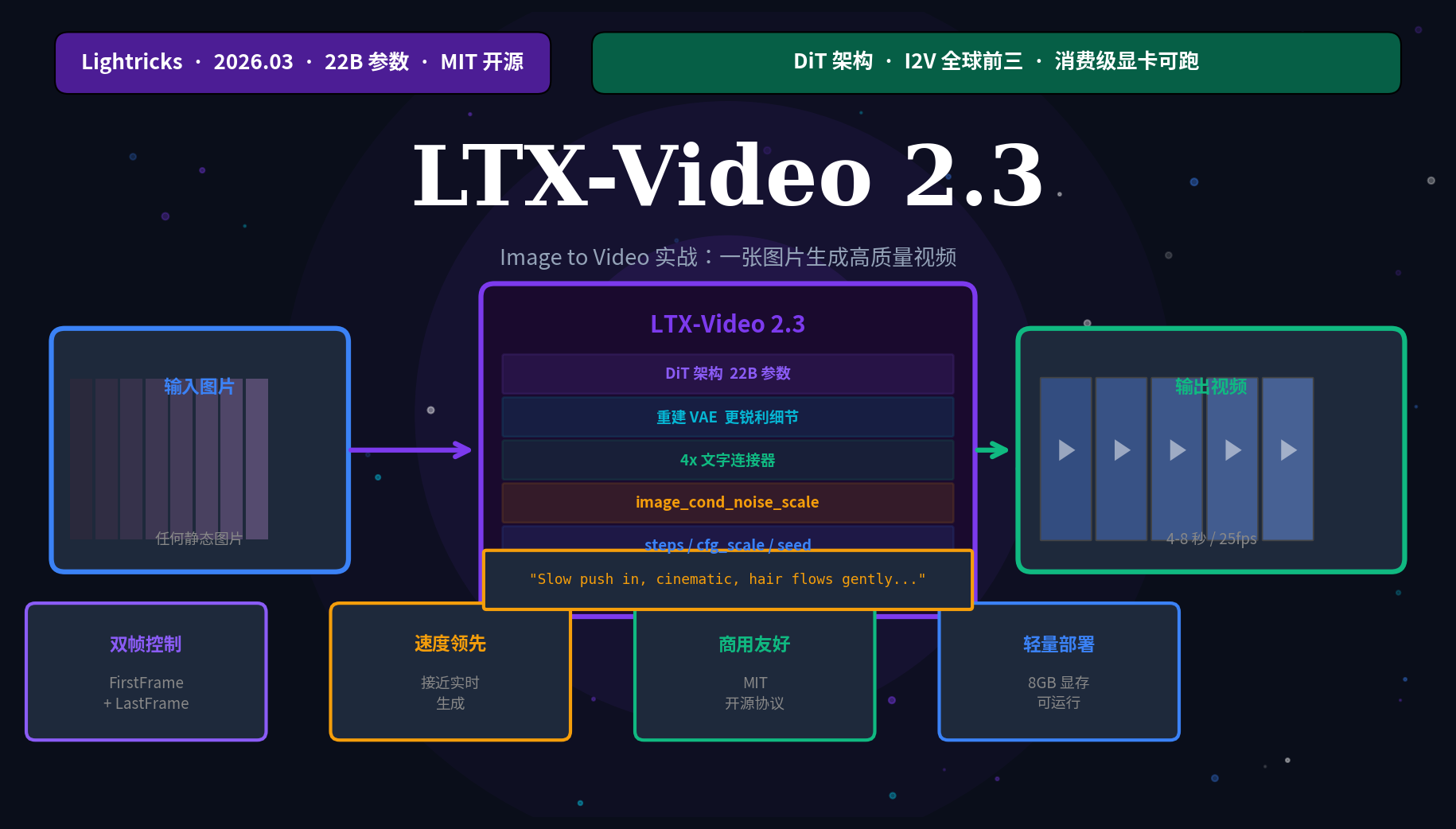 AI Visual Insight: This image shows the I2V ranking distribution of video generation models in third-party benchmarks. LTX-2.3 ranks near the top among open-source models, indicating that it has entered a competitive range in motion consistency, instruction following, and visual stability.
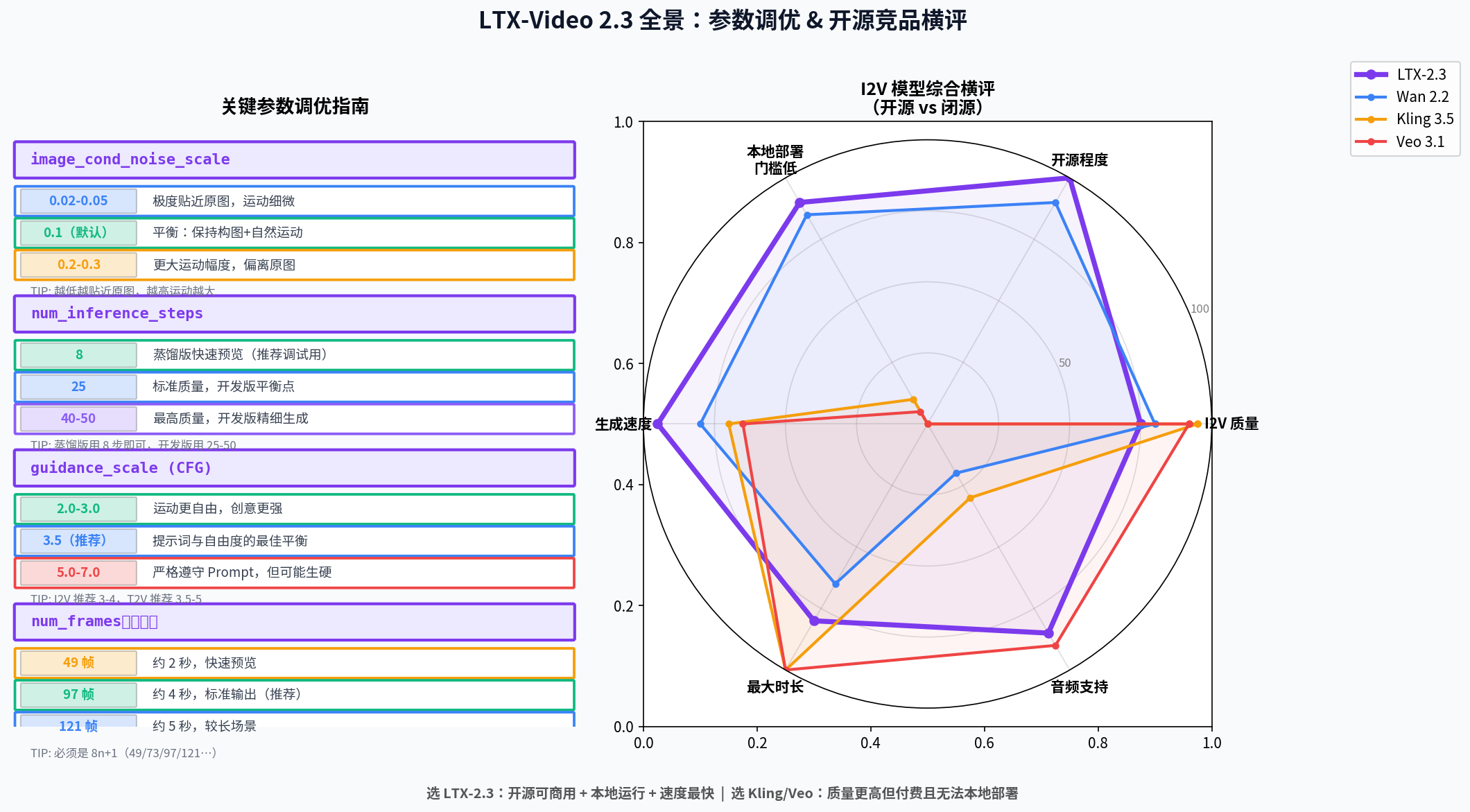 AI Visual Insight: This image presents model outputs or a product capability comparison, highlighting local detail sharpness, motion direction, and subject consistency. These dimensions usually have a direct impact on real-world I2V usability.
You should choose the deployment path based on VRAM and workflow
If you are new to this stack, start with ComfyUI. Its node-based workflow makes it easier to understand the full chain of image encoding, text conditioning, video generation, and export. It also lowers the cost of trial and error. If you need batch generation, business system integration, or automated testing, the Python path is more direct.
A simple VRAM breakdown works well in practice: 8GB is suitable for 2B models or low-resolution previews, 12GB is suitable for FP8 and baseline I2V, and 16GB to 24GB is better for stable production output. Do not start by targeting 1216×704 resolution and long frame counts, or you will hit OOM errors quickly.
ComfyUI installation is better for getting started quickly
git clone https://github.com/comfyanonymous/ComfyUI
cd ComfyUI
pip install -r requirements.txt

cd custom_nodes
git clone https://github.com/ltdrdata/ComfyUI-Manager
git clone https://github.com/Lightricks/ComfyUI-LTXVideo
These commands install ComfyUI, the plugin manager, and the LTX-Video nodes.
A Python environment is better for automation
pip install torch torchvision --index-url https://download.pytorch.org/whl/cu128
pip install diffusers transformers accelerate
pip install imageio imageio-ffmpeg

git clone https://github.com/Lightricks/LTX-Video
cd LTX-Video
pip install -e .
These commands create a minimal runnable Python inference environment.
Four parameters determine most of the I2V output quality
The first is resolution, which directly determines VRAM pressure and clarity. The second is frame count, which affects duration and temporal stability. The third is steps, which controls the balance between generation quality and speed. The fourth is image_cond_noise_scale, which is almost the most sensitive control lever in I2V.
During development, start with 768×512 and either 49 or 97 frames, with steps set to 8 or 25. If you want results that stay closer to the source image, lower image_cond_noise_scale to 0.05. If you want stronger motion, raise it to 0.15–0.2.
A runnable I2V example explains the workflow clearly
import torch
from PIL import Image
from diffusers import LTXImageToVideoPipeline
from diffusers.utils import export_to_video

# Load the model and use bfloat16 to balance speed and VRAM usage
pipe = LTXImageToVideoPipeline.from_pretrained(
    "Lightricks/LTX-Video-2.3",
    torch_dtype=torch.bfloat16,
)
pipe.to("cuda")
pipe.enable_model_cpu_offload()  # Key: recommended for 12GB GPUs

# Load the input image and resize it to dimensions divisible by 32
image = Image.open("./my_image.jpg").convert("RGB").resize((768, 512))

# Write camera motion first, then subject action and lighting
prompt = (
    "Slow push in, cinematic, golden hour sunlight, "
    "the woman turns her head slightly, hair flows gently, 4K"
)
negative_prompt = "blurry, jittery, distorted, static, no movement"

# Fix the seed to make test results reproducible
frames = pipe(
    image=image,
    prompt=prompt,
    negative_prompt=negative_prompt,
    height=512,
    width=768,
    num_frames=97,
    num_inference_steps=25,
    guidance_scale=3.5,
    image_cond_noise_scale=0.1,
    generator=torch.Generator("cuda").manual_seed(42),
).frames[0]

export_to_video(frames, "output.mp4", fps=25)  # Export the final video
This code completes the full generation pipeline from a single image to an MP4 video.
Prompt structure must be organized around camera semantics
LTX-Video 2.3 is highly sensitive to camera semantics. The most effective prompts do not stack style keywords. Instead, they start with camera movement, then define subject action and environmental detail. The recommended formula is: camera motion + style + lighting + subject action + local detail + quality terms.
For example, in character scenes you can write slow push in; in product showcases, slow orbit; and in architecture scenes, aerial push in. Negative prompts should specifically suppress blur, jitter, deformation, and static motion tendencies.
Batch prompt testing is the fastest way to tune parameters
prompts = [
    "Slow push in, cinematic, subtle ambient motion",
    "Camera orbits slowly to the right, dramatic lighting",
    "Gentle zoom out, peaceful scene, soft natural light",
]

for i, prompt in enumerate(prompts):
    # Core idea: test different camera semantics on the same image
    print(f"Testing prompt set {i+1}: {prompt}")
This code builds multiple prompt variants so you can quickly compare output differences across camera language styles.
First-and-last-frame control provides stronger camera constraints
When single-frame I2V cannot express the target motion reliably, switch to First Frame + Last Frame control. This is not simple frame interpolation. It conditions the model on both the starting composition and the ending composition, which makes push-ins, orbiting shots, and entrance motion easier to converge.
This method is especially effective for e-commerce rotation showcases, architectural walkthroughs, and character transitions. You only need a starting image and an ending image, then describe the transition in the prompt. The model is much more likely to generate motion with clear directional intent.
# The key parameter for first-and-last-frame control is last_image
output = pipe(
    image=first_frame,
    last_image=last_frame,  # Specify the final frame to constrain the ending composition
    prompt="Camera slowly pushes forward and slightly right",
    num_frames=97,
    guidance_scale=3.5,
).frames[0]
This code shows the most essential invocation pattern for dual-frame conditioning.
Most common issues can be solved through parameter adjustments
If the Ken Burns effect is too obvious, first lower image_cond_noise_scale and explicitly state static camera or locked-off shot in the prompt. If VRAM is insufficient, reduce resolution and frame count at the same time, and enable CPU offload or a more aggressive sequential offload mode.
If the video is almost static, the issue is usually not that the model has failed, but that the conditioning is too strong. In that case, increasing image_cond_noise_scale, raising guidance_scale, and explicitly writing large camera movement often helps. Facial collapse and hand distortion are still common weaknesses in open-source video models, so you should mitigate them with negative prompts and more conservative motion design.
The most practical parameter reference is below
| Goal | Recommended setting |
|---|---|
| Fast preview | 512×384 + 49 frames + steps=8 |
| Standard output | 768×512 + 97 frames + steps=25 |
| High quality | 1216×704 + 97 frames + steps=40 |
| Stay close to the source image | image_cond_noise_scale=0.05 |
| Increase motion | image_cond_noise_scale=0.2 |
| Reproduce experiments | Fixed seed |
FAQ provides structured answers
Q1: Who should use LTX-Video 2.3 first?
A: It is ideal for developers and creators who need local deployment, low-cost experimentation, a commercially usable license, and a controllable workflow, especially ComfyUI users and teams that require private deployment.
Q2: Can a 12GB GPU run I2V reliably?
A: Yes, but you should prioritize FP8 or distilled variants, start with 768×512 and 49–97 frames, and enable enable_model_cpu_offload() to manage VRAM usage.
Q3: Why are my results still poor even with long prompts?
A: I2V relies more on camera semantics and motion constraints than on prompt length. Writing camera movement first, then subject action and detail, is usually more effective than stacking style keywords.
Core Summary: LTX-Video 2.3 is an open-source image-to-video model from Lightricks built on a DiT architecture, and it can run locally on consumer GPUs. This article focuses on practical I2V usage, covering VRAM requirements, deployment with ComfyUI and Python, key parameters, prompt structure, dual-frame control, and common troubleshooting techniques.