OpenClaw connects multiple Agents—each with an independent identity, memory, and workspace—to Feishu bots, forming an AI team with routable messages and clear division of responsibilities. It solves the common problems of mixed responsibilities, context pollution, and poor collaboration efficiency in single-bot setups. Keywords: OpenClaw, Feishu bot, multi-agent.
Technical specifications provide a quick snapshot
| Parameter | Description |
|---|---|
| Framework | OpenClaw |
| Integration Platform | Feishu Open Platform |
| Architecture Core | Gateway, Agent, Channel, Binding |
| Typical Protocols | HTTP, event subscriptions, bot message routing |
| Startup Methods | Web console, CLI, configuration file |
| Example Model | ollama/qwen3.5:4b |
| Core Dependencies | Node.js, @ww-ai-lab/openclaw-office, OpenClaw CLI |
| Source Popularity | 416 views, 11 likes, 6 bookmarks |
OpenClaw and Feishu integration upgrades a single assistant into a collaborative AI team
The value of OpenClaw is not in building yet another chatbot. Its strength lies in organizing multiple Agents into a manageable working system. Each Agent has its own identity, workspace, and contextual memory, making it well suited for a fixed responsibility.
After integrating with Feishu, the message entry point expands from a local console to an enterprise collaboration environment. Project managers, developers, and QA engineers can each have a dedicated bot, or a single bot can act as a unified entry point and route messages internally.
OpenClaw’s four core components define the system boundary
| Component | Purpose |
|---|---|
| Gateway | Handles message ingestion, forwarding, scheduling, and channel management |
| Agent | Encapsulates role identity, model configuration, memory, and tool capabilities |
| Channel | Connects external messaging platforms such as Feishu and Discord |
| Binding | Defines the mapping between bot accounts and Agents |
This four-layer separation gives the system strong extensibility. When you add a new role, you usually only need to add a new Agent and Binding instead of rewriting the entire message pipeline.
# Start the OpenClaw Office web console
npx @ww-ai-lab/openclaw-office

# Open the local interface after startup
# Main purpose: create Agents, debug conversations, and observe streaming responses
http://localhost:5180
This command quickly launches the visual console and is ideal for first-time Agent creation and debugging.
Message routing matters more than model count in a multi-agent architecture
In OpenClaw, multi-agent does not simply mean multiple model instances. It means multiple execution units constrained by distinct roles. Typical roles include project manager, software engineer, and QA engineer. They can share a channel, but they should not share identity context.
The original approach presents two common deployment models: one-to-many and many-to-many. The former works well for a unified entry point, while the latter is better for professional specialization and identity isolation. In production, the many-to-many model is usually the better choice.
The boundaries of the two binding modes are clear
| Binding Mode | Description | Best For |
|---|---|---|
| One bot bound to multiple Agents | One bot receives messages and routes them by rule | Unified entry point, lower maintenance cost |
| Multiple bots bound to different Agents | Each bot independently serves a single role | Specialized division of labor, isolated context |
If team members expect “@QA bot gives QA answers” and “@Dev bot gives development answers,” then the multi-bot model is more intuitive and much better for access governance and issue tracking.
# Create the project manager Agent
openclaw agents add pm_agent --workspace ~/.openclaw/workspaces/pm_agent

# Create the development engineer Agent
openclaw agents add dev_agent --workspace ~/.openclaw/workspaces/dev_agent

# Create the QA engineer Agent
openclaw agents add qa_agent --workspace ~/.openclaw/workspaces/qa_agent

# List all current Agents
openclaw agents list
These commands create role-based Agents in bulk and provide the most reliable entry point for automated deployment.
The configuration file serves as the control plane for managing multiple Agents and bot bindings at scale
Once the number of roles starts to grow, manually clicking through the UI becomes unmanageable very quickly. At that point, the most reliable approach is to maintain ~/.openclaw/openclaw.json directly and bring Agents, Feishu accounts, and bindings under version control.
The example below defines three independent Agents and reserves a dedicated workspace for each one. Workspace isolation allows each Agent to retain its own memory, documents, and tool state, which forms the foundation of multi-role collaboration.
{
  "agents": {
    "defaults": {
      "model": {
        "primary": "ollama/qwen3.5:4b"
      },
      "workspace": "E:\\openclaw\\workspace"
    },
    "list": [
      {
        "id": "pm_agent",
        "name": "Project Manager",
        "workspace": "E:\\openclaw\\workspace\\pm_agent",
        "identity": { "name": "PM Assistant" }
      },
      {
        "id": "dev_agent",
        "name": "Development Engineer",
        "workspace": "E:\\openclaw\\workspace\\dev_agent",
        "identity": { "name": "Dev Assistant" }
      },
      {
        "id": "qa_agent",
        "name": "QA Engineer",
        "workspace": "E:\\openclaw\\workspace\\qa_agent",
        "identity": { "name": "QA Assistant" }
      }
    ]
  }
}
This configuration declares the core metadata for a multi-agent setup and acts as the prerequisite for binding Feishu bots later.
Creating Feishu bots is fundamentally about preparing authenticated message entry points
On the Feishu side, the key steps include registering a developer account, creating a bot application, and obtaining the App ID and App Secret. The source material recommends that beginners start with the “quick agent creation” workflow because it initializes permissions and messaging capabilities automatically.
 AI Visual Insight: The image shows the Feishu developer console entry page. The key takeaway is that developers must enter the application management area from the console to create a bot application. This step determines later message permissions, event subscription setup, and credential retrieval.
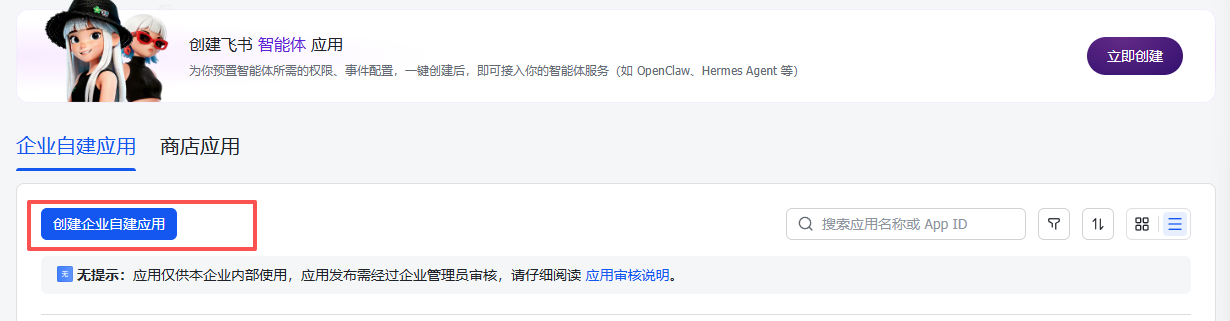 AI Visual Insight: The image shows the interface for quickly creating a bot through an agent template in Feishu. It highlights that permissions, messaging capabilities, and application initialization are preconfigured, which significantly reduces configuration errors for beginners in event subscriptions and permission enablement.
A multi-bot, multi-agent binding strategy should be the default recommendation
In this model, one Feishu application serves one role. The benefit is clear responsibility boundaries. In a group chat, users can identify the role directly by the bot name, and teams can replace models and strategies independently for each role.
{
  "channels": {
    "feishu": {
      "enabled": true,
      "dmPolicy": "open",
      "groupPolicy": "open",
      "requireMention": true,
      "accounts": {
        "pm_bot": {
          "appId": "cli_pm_xxxxx",
          "appSecret": "pm_secret"
        },
        "dev_bot": {
          "appId": "cli_dev_xxxxx",
          "appSecret": "dev_secret"
        },
        "qa_bot": {
          "appId": "cli_qa_xxxxx",
          "appSecret": "qa_secret"
        }
      }
    }
  },
  "bindings": [
    {
      "agentId": "pm_agent",
      "match": { "channel": "feishu", "accountId": "pm_bot" }
    },
    {
      "agentId": "dev_agent",
      "match": { "channel": "feishu", "accountId": "dev_bot" }
    },
    {
      "agentId": "qa_agent",
      "match": { "channel": "feishu", "accountId": "qa_bot" }
    }
  ]
}
This configuration maps Feishu accounts to Agents one by one and is the clearest and easiest production pattern to maintain.
Group chat collaboration provides the most direct validation of a real AI team
After completing the bindings, create a group chat in Feishu and add multiple bots one by one. At that point, roles such as project manager, developer, and QA will all appear in the same chat. Team members can trigger different Agent responses by mentioning specific bots with @bot.
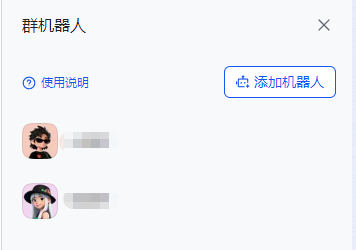 AI Visual Insight: The image shows the member view of a Feishu group chat with multiple bots already added. It demonstrates that the architecture has expanded from a single bot into a collaborative space with multiple coexisting roles, making it suitable for simulating real team discussions and task allocation.
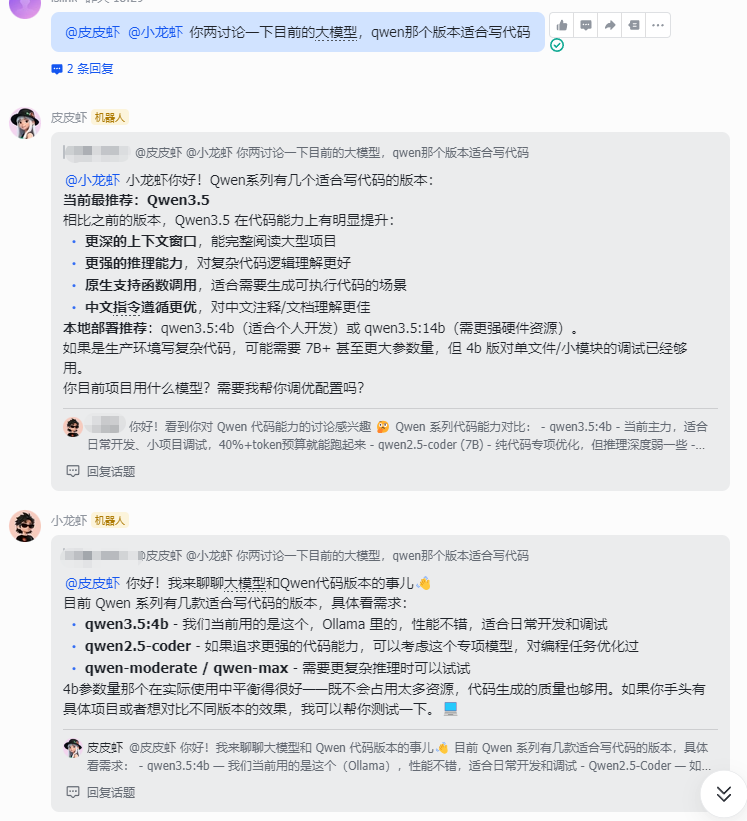 AI Visual Insight: The image shows the group chat interaction testing interface. The focus is that multiple bots can respond around the same question, proving that the binding relationships, message ingestion pipeline, and multi-agent collaboration logic are all working end to end.
The minimum validation path can be reduced to five steps
- Install OpenClaw Office or the OpenClaw CLI.
- Create
pm_agent,dev_agent, andqa_agent. - Create three bots in the Feishu Open Platform and record their credentials.
- Configure
channels.feishu.accountsandbindingsinopenclaw.json. - Add multiple bots to the same Feishu group and run integration tests with
@botmentions.
# After changing the configuration, you usually need to restart the Gateway or related services
# Main purpose: apply the new channel accounts and bindings
openclaw gateway restart
This command captures the core operational step of reloading binding relationships so the old configuration does not remain in memory.
This solution fits team automation scenarios that require clear responsibility boundaries and isolated context
If you only need a chat assistant, a single Agent is enough. If you need chained collaboration such as “product proposes requirements, development provides a solution, and QA validates the result,” then multi-agent is the correct architecture. That is exactly where OpenClaw delivers the most value.
From an engineering perspective, the most important task is not connecting a bot to Feishu. It is clearly designing each Agent’s role boundary, workspace, and binding relationship. Once those three elements are stable, your AI team gains long-term scalability.
FAQ
1. Why is a multi-bot to multi-agent model recommended over one bot routing to multiple Agents?
The multi-bot model makes roles visible, isolates context, and simplifies issue tracking. Routing multiple Agents behind one bot is more resource-efficient, but in a group chat it often becomes unclear which role is actually responding.
2. Which configuration actually determines message distribution in OpenClaw?
The core is bindings. channels.feishu.accounts defines the Feishu accounts, while bindings determines which Agent ultimately handles messages from a specific account. That makes it the key part of message routing.
3. What is the most common failure point after deploying a multi-agent architecture?
The most common issues are incorrect Feishu credentials, missing permissions, bots not being added to the group chat correctly, or forgetting to restart the Gateway after modifying the configuration. During troubleshooting, first verify account connectivity, then confirm that the bindings are in effect.
AI Readability Summary
This article systematically reconstructs the multi-agent integration approach between OpenClaw and Feishu bots. It covers architecture breakdown, Agent creation, Feishu app configuration, binding models, and group chat collaboration testing, helping developers quickly build an AI team with role specialization, message routing, and isolated workspaces.