This is a practical initial triage workflow for suspicious IPs designed for enterprise IT and security operations. By calling an IP lookup API with PowerShell, you can quickly retrieve geolocation, ISP, proxy/VPN indicators, and risk labels to eliminate slow, manual per-IP lookups and improve evidence retention. Keywords: PowerShell, IP Lookup API, security investigations.
Technical Specifications Snapshot
| Parameter | Description |
|---|---|
| Language | PowerShell |
| Protocol | HTTPS / REST API |
| Star Count | Not provided in the source |
| Core Dependencies | Invoke-RestMethod, Export-Csv, IP Lookup API |
Enterprise security investigations should turn IP lookups into a standard procedure
Unusual enterprise account activity, remote VPN logins, WAF alerts, and public-facing scans all begin with the same question: Is the source IP worth investigating? If your team still copies IPs manually, opens web pages, and checks them one by one, the process is slow and hard to turn into a defensible evidence trail.
A more effective approach is not to “look up one IP,” but to automate and structure IP enrichment, then integrate it into tickets and SOPs. This allows frontline IT, desktop support, and security operations teams to complete an initial risk assessment in minutes.
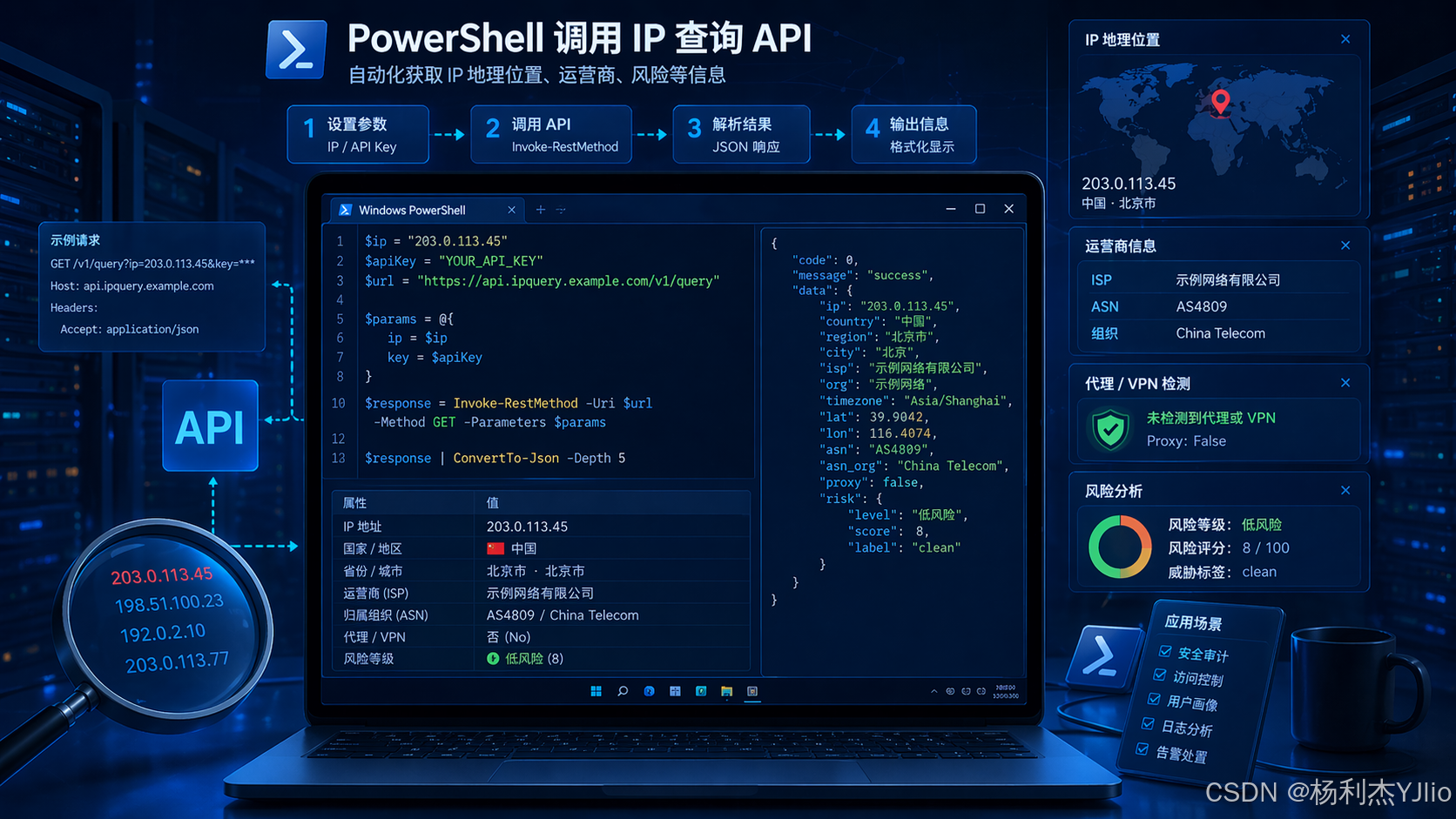 AI Visual Insight: The image shows how multiple data sources converge in an enterprise security investigation workflow. Logs, alerts, IP addresses, and risk judgments are consolidated into a single analytical view, highlighting the transition from fragmented access records to structured security conclusions.
Typical usage centers on three log analysis tasks
The first category is suspicious login investigations. When a user reports that “my account logged in from another region,” you need to verify the source IP’s location, whether it is a proxy egress point, and whether it comes from an IDC or cloud server.
The second category is firewall, gateway, and WAF log analysis. When you face hundreds or thousands of source addresses, batch API lookups can quickly enrich them with geolocation, ISP, and risk labels, making them ideal for the first screening pass.
The third category is initial triage of web access logs. Whether you work with IIS, Nginx, or Tomcat, pre-filtering by region, proxy characteristics, and access frequency can significantly narrow the scope of deeper analysis.
A fixed workflow should guide the path from suspicious IP to initial risk triage
The recommended workflow is: extract IPs, call the API, parse geolocation and risk fields, evaluate them against rules, and export the results. The key is not the API itself, but converting the output into data that is actionable, auditable, and easy to revisit.
# Define basic variables
$ApiKey  = $env:IP_API_KEY           # Read the key from an environment variable to avoid hardcoding it in the script
$Ip      = "8.8.8.8"                  # Example test IP
$ApiBase = "https://api.ipdatacloud.com/v2/query"
$ApiUrl  = "$ApiBase?ip=$Ip&key=$ApiKey"  # Build the final request URL
This code constructs the base request parameters for calling the IP lookup API.
A single IP lookup is the right way to validate the API and field structure
Before moving to batch processing, query a single IP first to confirm the endpoint, authentication parameters, and response field names. Different providers define fields very differently, so you should never copy a sample script directly into production.
# Query a single IP and print the full JSON
$ApiKey  = $env:IP_API_KEY
$ApiBase = "https://api.ipdatacloud.com/v2/query"
$Ip      = "8.8.8.8"
$ApiUrl  = "$ApiBase?ip=$Ip&key=$ApiKey"

try {
    $Result = Invoke-RestMethod -Uri $ApiUrl -Method Get -TimeoutSec 10  # Call the REST endpoint
    $Result | ConvertTo-Json -Depth 5                                     # Output the complete response structure
}
catch {
    Write-Host "Query failed: $($_.Exception.Message)" -ForegroundColor Red   # Print the exception reason
}
This code verifies API reachability and checks whether the returned field structure matches the script’s expectations.
If the response includes fields such as country, city, isp, is_proxy, and risk_level, the integration path is generally usable. However, you must still verify the full JSON output because field names may instead appear as organization, hosting, or country_name.
Batch lookup and CSV export deliver the core operational value
In real enterprise environments, batch processing is where this approach becomes valuable. After extracting IPs from logs into a text file, you can loop through them with PowerShell, call the API, and export the results to CSV for direct attachment to tickets, incident records, or postmortem documentation.
# Batch query IPs and export the results
$ApiKey    = $env:IP_API_KEY
$ApiBase   = "https://api.ipdatacloud.com/v2/query"
$InputFile = ".\ip-list.txt"
$OutputFile = ".\ip-result.csv"
$Results   = @()

$IpList = Get-Content $InputFile | Where-Object { $_ -match "^\d{1,3}(\.\d{1,3}){3}$" }  # Filter for IPv4 format

foreach ($Ip in $IpList) {
    $ApiUrl = "$ApiBase?ip=$Ip&key=$ApiKey"
    try {
        $Response = Invoke-RestMethod -Uri $ApiUrl -Method Get -TimeoutSec 10
        $Results += [PSCustomObject]@{
            IP        = $Ip
            Country   = $Response.country      # Country
            Region    = $Response.region       # State/Province
            City      = $Response.city         # City
            ISP       = $Response.isp          # Internet service provider
            IsProxy   = $Response.is_proxy     # Whether the IP is a proxy
            RiskLevel = $Response.risk_level   # Risk level
        }
    }
    catch {
        $Results += [PSCustomObject]@{
            IP        = $Ip
            Country   = ""
            Region    = ""
            City      = ""
            ISP       = ""
            IsProxy   = ""
            RiskLevel = "QueryFailed"         # Mark the failed status
        }
    }
    Start-Sleep -Milliseconds 300              # Control the request rate to avoid rate limiting
}

$Results | Export-Csv -Path $OutputFile -NoTypeInformation -Encoding UTF8
This code enriches IP intelligence at scale and exports the results as a standardized CSV file.
Risk assessment must use context instead of geolocation alone
If a user normally works from Beijing but a login appears overseas, that is worth reviewing. But it may still be explained by business travel, VPN usage, enterprise proxies, or mobile carrier routing changes. Geolocation anomalies alone are not enough to conclude that an account was compromised.
Higher-value signals include proxy usage, VPN indicators, hosting providers, and risk labels. If the API returns is_proxy=true, hosting=true, or risk_level=high, the address usually deserves closer inspection.
# Simple risk tagging example
if ($Response.is_proxy -eq $true -or $Response.risk_level -eq "high") {
    Write-Host "High-risk source detected. Continue investigating account and device activity." -ForegroundColor Yellow  # Trigger deeper analysis
}
This code applies a basic tag based on proxy characteristics and risk level.
The choice between an online API and an offline database depends on enterprise constraints
An online API works well for rapid integration, small-scale lookups, and scenarios that require fresher data. Its advantages include low maintenance overhead, while its tradeoffs include network dependency, quota limits, and API key security.
An offline database is better suited for internal network environments, large-scale log platforms, and high-compliance requirements. Its advantages include speed and tighter control over the processing path, while its drawbacks include the need to update the database regularly and maintain the parsing logic internally.
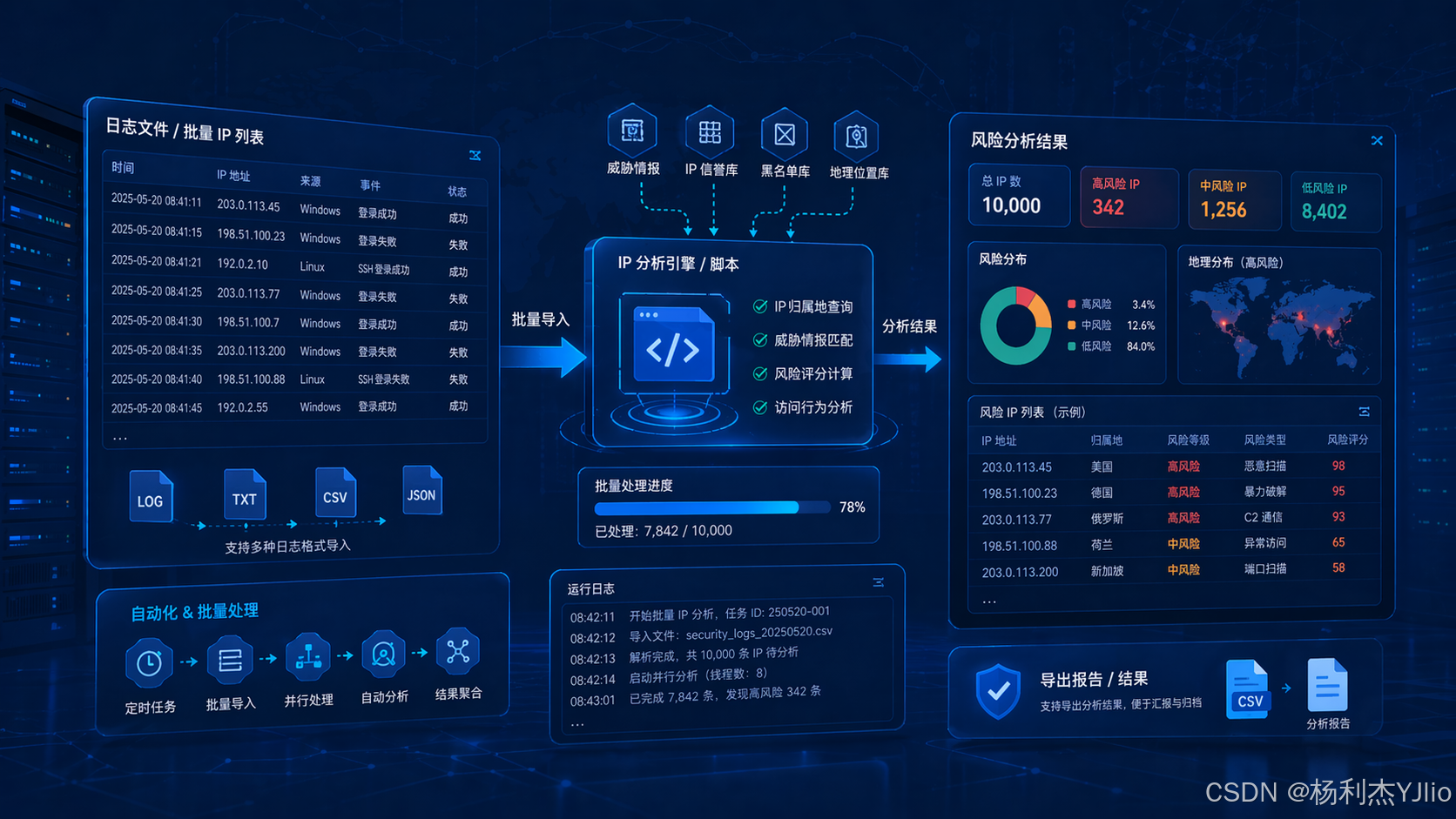 AI Visual Insight: This image supports the comparison between online APIs and offline databases, emphasizing the architectural tradeoffs around integration complexity, data freshness, internal network compatibility, and operational control. It works well as a visual anchor for an architecture selection section.
Teams should address three security details first during implementation
First, never expose API keys in plaintext in public scripts or repositories. Use environment variables, access-controlled configuration files, or an internal secret management system.
Second, never treat IP geolocation as the only evidence. A more reliable decision chain combines IP intelligence with login time, device fingerprinting, MFA records, and security logs.
Third, when performing batch requests, you must control request frequency and retry behavior. Otherwise, rate limiting may distort the results or cause the task to fail.
Standardized tickets and SOPs are the real output of automation
Mature teams do not stop at “the script runs.” They formalize the lookup results into ticket templates that record the issue, impact scope, lookup results, risk conclusion, and follow-up recommendations. With that structure in place, the team can handle similar suspicious login events or access alerts through a consistent process.
A practical SOP looks like this: receive the alert, extract IPs, call the API, export the CSV, correlate account and device logs, draw a conclusion, and then codify the rule. At that point, “looking up an IP” has evolved into a reusable security investigation capability.
FAQ
Q1: Why do the API response fields not match the field names in the script?
A: Because different IP intelligence providers use different response schemas. Before production use, print the full response with ConvertTo-Json -Depth 10, then adjust the script to the actual field names.
Q2: Can I block high-risk IPs immediately?
A: Usually no. First confirm whether the source is part of legitimate business traffic, an enterprise VPN, a cloud desktop platform, or a proxy egress point. Then decide whether to block it based on access behavior and impact scope.
Q3: Is this approach suitable for desktop support engineers?
A: Yes. It is especially useful for frontline scenarios such as initial triage of suspicious account logins, VPN source validation, investigation of unusual email logins, and enriching the evidence trail in support tickets.
AI Readability Summary: This article reframes suspicious IP triage in enterprise security operations as a repeatable workflow. It shows how to use PowerShell with an IP lookup API to batch-enrich source IPs with geolocation, proxy indicators, and risk labels, then export the results to CSV and integrate them into SOPs. The result is faster, more consistent alert analysis for IT, operations, and security teams.