This article focuses on a combined Photoshop and Nano Banana workflow, showing how to transform traditional e-commerce detail page production from a multi-step manual design process into an automated pipeline built around selection preprocessing, AI retouching, and batch image set generation. It addresses three core problems: slow asset creation, inconsistent visual style, and poor batch reuse. Keywords: Photoshop, e-commerce detail pages, Nano Banana.
Technical specifications are easy to summarize
| Parameter | Description |
|---|---|
| Core tools | Adobe Photoshop + StartAI plugin |
| AI capabilities | Nano Banana image generation and retouching |
| Applicable scenarios | E-commerce detail pages, product showcase images, batch image set generation |
| Workflow type | Selection preprocessing → Product replacement → Image set generation |
| Collaboration model | Integrated directly inside Photoshop, with no frequent tool switching |
| Source article engagement | Original article shows 399 views, 7 likes, and 9 saves |
| Core dependencies | Photoshop, StartAI plugin, Nano Banana Pro |
Native Photoshop detail page production has obvious bottlenecks
A traditional e-commerce product detail page is not a single retouching task. It is a compound workflow that includes product enhancement, scene compositing, layout structuring, copy placement, and color consistency. If any one step falls out of balance, the page can look cheap and directly hurt click-through and conversion performance.
The biggest issue with the original process is not that it is impossible to produce results. The problem is that output per unit time is too low. A single detail page can take hours, and a complete page set often takes half a day or more. For merchants who launch new products quickly, that level of efficiency cannot support multiple SKUs and multi-style testing.
Four issues have the greatest impact on conversion and efficiency
First, the workflow is too long. Designers have to switch repeatedly between cutout work, compositing, texture placement, color grading, and layout adjustment. Second, the skill threshold is too high. Beginners struggle to produce a consistent visual style. Third, blending often looks unnatural. After product replacement, harsh edges and mismatched lighting are common. Fourth, batch production is weak, which creates a large amount of repetitive work.
Traditional detail page workflow
Product enhancement -> Scene compositing -> Copy design -> Layout adjustment -> Multi-size export

AI-enhanced workflow
Selection marking -> Upload target image -> Enter prompt -> Batch generation -> Photoshop fine-tuning
This process comparison shows that Nano Banana does not replace Photoshop. Its value lies in compressing repetitive work.
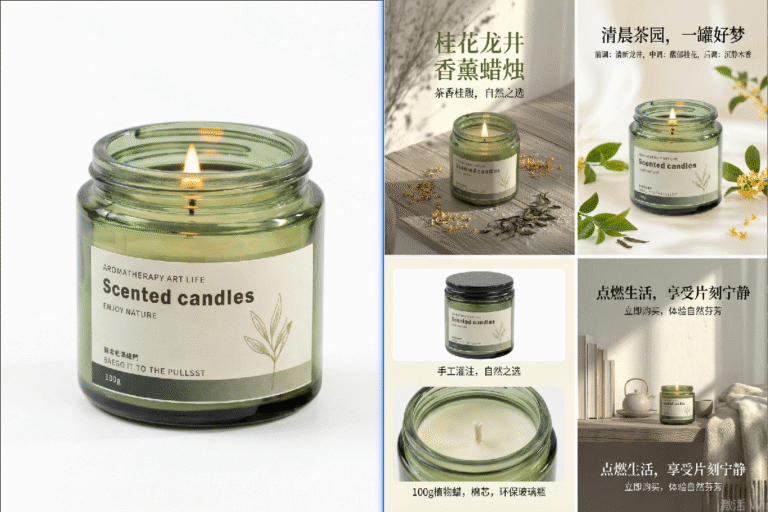 AI Visual Insight: The image shows AI-generated e-commerce detail page samples. The product sits at the visual center, while the background and color palette are organized around the product’s character. This suggests that the tool is good at unifying product presentation, atmosphere, selling-point copy, and mobile-friendly layout structure, making it suitable for quickly validating multiple detail page style directions.
Combining Photoshop and Nano Banana can rebuild the production pipeline
The core solution described in the source material is to connect the StartAI plugin directly to Photoshop, then use Nano Banana to handle product replacement and detail page generation. The key benefit is clear: you keep Photoshop’s precision editing capabilities while letting AI take over most of the repetitive composition and style organization work.
This kind of workflow is especially suitable for collaboration between designers, store owners, and operations teams. Operations can define selling points and style direction, while designers focus only on high-value refinements instead of building every page from scratch.
The first step is to preprocess the product image
Preprocessing essentially gives the AI a clearly defined replacement region. The source article recommends selecting the product in Photoshop and filling the target region in red. Although this step is simple, it directly affects recognition accuracy in later stages.
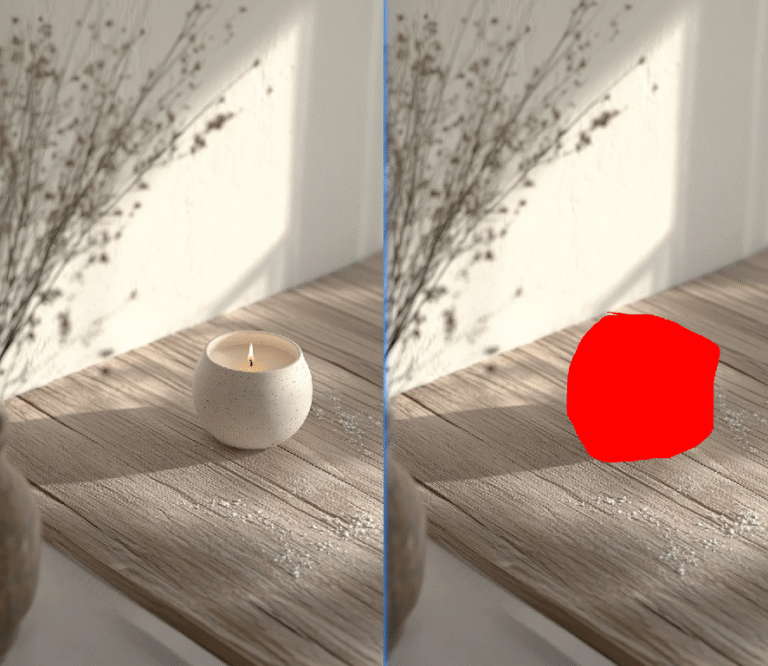 AI Visual Insight: The image shows the process of creating a precise selection for the product in Photoshop and covering it in red. This is an explicit region-marking method that helps the model identify the target subject’s boundary, scale, and position, reducing deformation, missed recognition, and background contamination.
// Pseudocode: core steps for product preprocessing
const steps = [
  "Import the original product image", // Load the source asset to process
  "Use the selection tool to precisely isolate the product", // Keep edges complete
  "Set the foreground color to red", // Mark the replacement region
  "Fill the selection and export the marked image" // Provide AI with a clear input reference
]
console.log(steps)
This pseudocode abstracts the preprocessing workflow. Its core purpose is to emphasize that precise marking matters more than complex operations.
The second step is to generate a refined showcase image with prompts
After marking the red region, input both the target product image and the preprocessed image into Nano Banana. The Pro version is recommended to ensure stable product detail, texture retention, and edge quality. It is best to keep the generation ratio consistent with the original image to avoid stretching during later detail page layout work.
The core prompt logic from the source article can be summarized in three points: replace the specified region, preserve the target product’s details, and integrate lighting naturally into the background. For categories such as fragrance, home goods, and beauty products that depend heavily on texture, this step determines the final sense of realism.
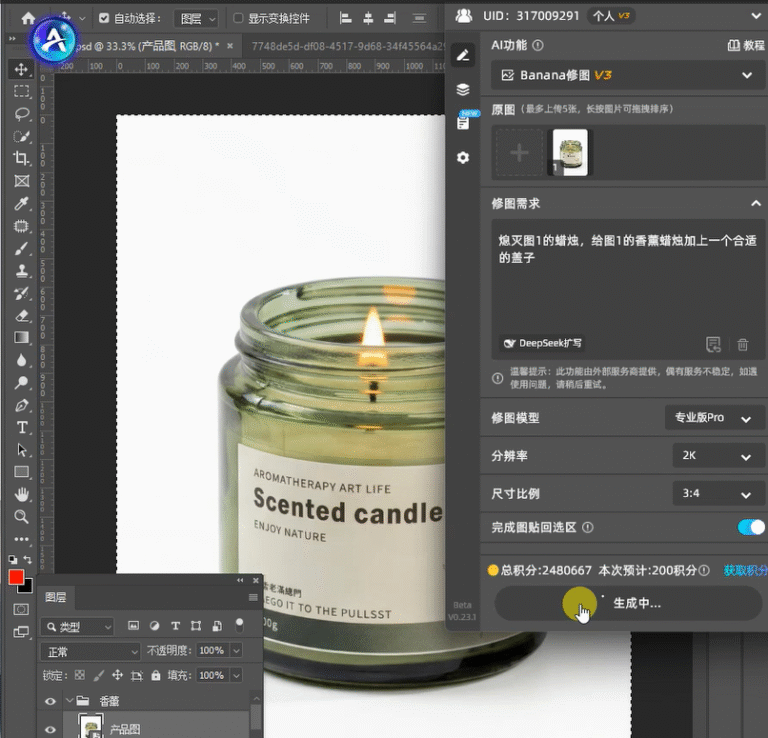 AI Visual Insight: This image shows the process of entering prompts and configuring generation parameters inside the plugin interface. Key elements include the model version, combined input images, and aspect ratio settings. It shows that this workflow is not simple text-to-image generation, but constrained reference-based image editing and generation.
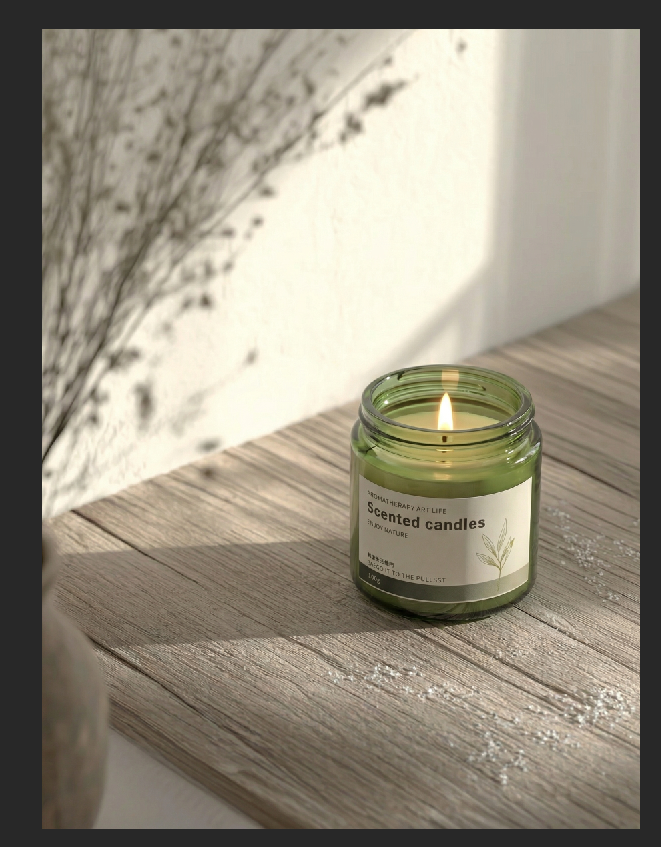 AI Visual Insight: The image presents the refined product showcase result. The main product retains its packaging texture and contour features, while the background lighting direction remains consistent with the subject, indicating that the AI achieves a strong balance between product replacement and texture fidelity.
Prompt template:
Replace the product in the red-marked image with the target item, and make the lighting blend naturally into the background.
Strictly preserve the target product’s detail and texture, and emphasize a premium feel and strong subject recognition.
This template works well for product replacement tasks. The key is to constrain three elements: region, detail, and lighting.
Generating a complete detail page set at once better matches e-commerce operations
Once a single showcase image becomes stable, you can move on to generating a full detail page set. The source article recommends uploading the refined image and adding two to three product reference images to strengthen layout consistency and style constraints. At this stage, the goal is no longer to fix a single image. The goal is to produce content assets that are ready for deployment.
Your prompt should explicitly require coordinated color usage, clean layout, focused selling points, no subject obstruction, and mobile-friendly viewing. A detail page is a conversion tool, not an art poster, so the information hierarchy must stay clear.
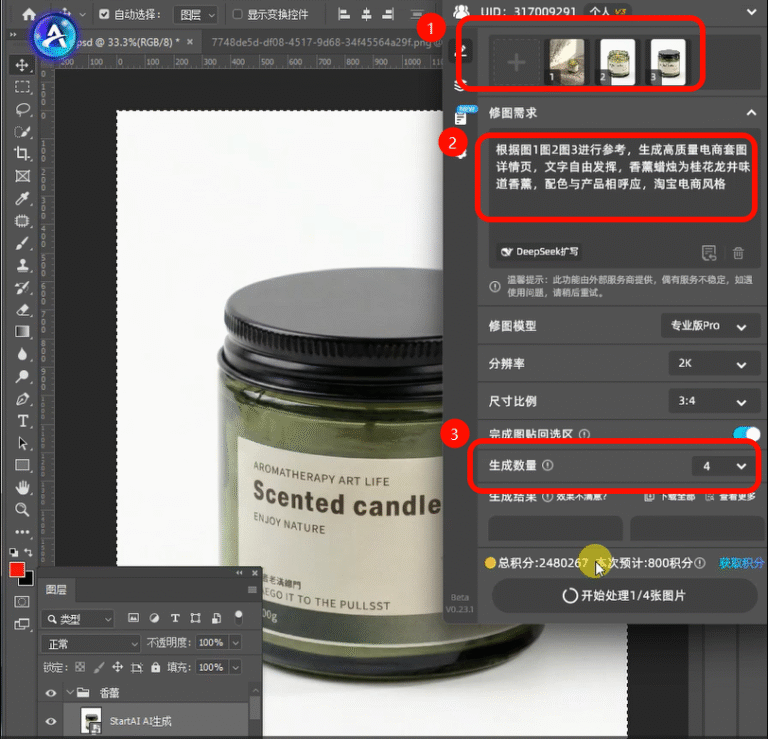 AI Visual Insight: This image shows the parameter configuration interface before generating a full detail page set, including reference image upload, prompt input, and generation count selection. It demonstrates that the tool supports batch output of multiple page drafts, which is useful for A/B testing and rapid product launches.
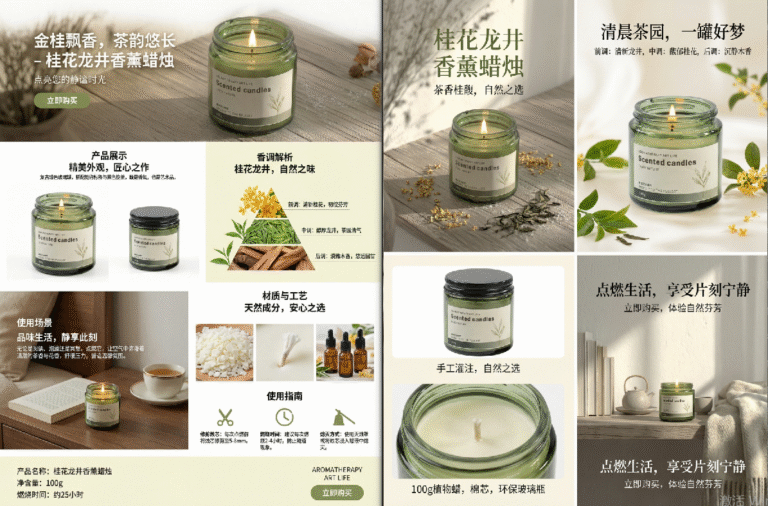 AI Visual Insight: The result page displays multiple stylistically consistent e-commerce detail pages. Each page builds different selling-point modules around the same product, showing that the model can generate consistency at the image-set level and can support batch first-draft production for mobile product detail pages.
High-quality prompts should reflect five constraints
- Clearly specify the product name and its core selling points.
- Define the page style, such as minimalist, premium, or Instagram-inspired.
- Keep copy concise and prevent it from blocking the subject.
- Emphasize that the overall color palette should match the product.
- State that the output should fit mobile viewing and maintain layout consistency.
prompt = """
Reference all uploaded images and generate a high-converting e-commerce-style detail page set.
The core product is an osmanthus longjing scented candle, # Clearly define the main product
Use a color palette that matches the product tone, and keep the layout clean and simple, # Constrain the overall visual style
Keep text concise and focused on selling points, and do not block the main product, # Control the relationship between copy and subject
Maintain a consistent, premium style, optimized for mobile viewing. # Constrain the output use case and target device
"""
print(prompt)
This code snippet shows a reusable prompt structure that works well when you need to replace product information in batches across different SKUs.
Stable generation quality comes from rules, not luck
The high-frequency issues listed in the source article are highly typical. Product deformation usually comes from inaccurate selections or insufficient model quality. Style inconsistency usually comes from loose prompt descriptions. Messy text usually appears because the prompt did not constrain copy behavior in advance.
So the effective solution is not to keep retrying. The real solution is to standardize the input layer: use consistent selections, consistent aspect ratios, a consistent prompt template, and a consistent number of reference images. That is how you make generation results predictable.
FAQ: The three questions developers and design teams ask most often
1. Why does the product often deform after replacement?
Because the AI mainly relies on the selection boundary and the reference image to understand the subject. If the red marking is incomplete, or if background content leaks into the edges, the model will estimate the product contour incorrectly. Fix the selection first, then upgrade to the Pro version if needed.
2. How do you keep the detail page style consistent?
The key is not to add more adjectives. The key is to lock the prompt structure and add consistent reference images. Turn requirements such as coordinated colors, clean layout, mobile adaptation, and no subject obstruction into hard constraints, and the output will become more stable.
3. Do you still need Photoshop after AI generation?
Yes. AI is better at generating first drafts and batch options, while Photoshop is still better for local corrections, precise text layout, adding brand elements, and final export. Best practice is not replacement. It is AI for first-pass generation, followed by human finalization.
[AI Readability Summary]
This article systematically rebuilds the workflow for producing e-commerce detail pages with Photoshop, the StartAI plugin, and Nano Banana. It focuses on key pain points in traditional Photoshop production, including slow output, poor batch efficiency, and inconsistent style. It then provides a practical framework for product preprocessing, AI retouching, complete detail page generation, and common failure avoidance. This workflow is especially suitable for e-commerce designers, visual artists, and operations teams who want to implement a faster production process.