When a corporate Nexus private repository fails and internal JARs can no longer be resolved, you can quickly restore project builds by using a shared local Maven repository or Mirror-based redirection. This article focuses on three areas: global configuration in
settings.xml,file://protocol repositories, andmirrorOfinterception rules. It addresses common pain points such as missing dependencies, legacy projects that are hard to modify, and inefficient team collaboration. Keywords: Maven, local repository, Mirror.
Technical Specification Snapshot
| Parameter | Description |
|---|---|
| Language | XML, Shell/CLI |
| Build Tool | Maven |
| Repository Protocol | file:// |
| Applicable Environments | Java projects, offline or intranet environments |
| Star Count | Not provided in the original article |
| Core Dependencies | Maven settings.xml, local repository directory, optional Samba share |
A local repository replacement is a cost-effective way to stop the bleeding when the private repository fails
Many teams originally relied on a Nexus private repository to host shared components and internal JARs. Once the server is migrated, operations support disappears, or the repository is taken offline, legacy projects often show a large number of unresolved dependencies during startup. In many cases, even mvn install:install-file cannot fully repair the issue.
The root cause is usually not a single missing JAR. More often, the dependency chain, repository declarations, and metadata resolution all fail at the same time. In this situation, introducing a usable repository directory and making Maven recognize it explicitly is usually more reliable than installing JARs one by one.
 AI Visual Insight: The image illustrates the replacement strategy after a private repository failure. The key idea is to connect a complete Maven
 repository directory as a file:// protocol repository. The goal is not to change dependency coordinates, but to restore Maven’s resolution path so that the IDE and build tools can locate artifacts, POM files, and metadata again.
The decision criteria for choosing a solution are straightforward
If you want a one-time configuration that applies globally, prioritize profiles in settings.xml. If legacy projects already hardcode the failed private repository ID in pom.xml, use mirrors for redirection first.
# Core idea: verify whether dependency resolution hits the target repository first
mvn help:effective-settings   # View the effective settings configuration
mvn dependency:tree           # Check whether dependencies are still missing
These commands help verify which repository settings Maven is actually using.
Configuring a shared local repository through settings.xml globally is better for stable emergency recovery
Global configuration works well when the private repository is unavailable for a long time, but the team has already accumulated a relatively complete dependency directory. Its main advantage is zero intrusion into project pom.xml files. Developers only need to change the Maven environment once.
The approach is to add a new profile in settings.xml under either the Maven installation directory or the user directory, and declare the local directory as a repository URL. The key point is to enable both releases and snapshots so that snapshot versions do not fail to resolve.
You can reuse the following global repository configuration example directly
<settings>

<profiles>

<profile>

<id>local-repo-profile</id>

<repositories>

<repository>

<id>local-shared-repo</id>

<name>Local Shared Repository</name>

<url>file:///D:/repository</url> <!-- Points to the complete local repository directory -->

<releases>

<enabled>true</enabled> <!-- Allow release dependency resolution -->
          </releases>

<snapshots>

<enabled>true</enabled> <!-- Allow snapshot dependency resolution -->
          </snapshots>
        </repository>
      </repositories>
    </profile>
  </profiles>

<activeProfiles>

<activeProfile>local-repo-profile</activeProfile> <!-- Activate this configuration -->
  </activeProfiles>
</settings>
This configuration registers D:/repository as a shared dependency source that Maven can recognize.
A network-shared directory can further increase team-wide efficiency
If your team has Samba or NAS available, a shared directory can replace maintaining a separate local repository copy for each developer. In that case, only one person needs to synchronize JARs, and everyone else can reuse the same repository.
<url>file:////192.168.3.211/share/maven/repository</url> <!-- Shared directory repository URL -->This line switches the repository URL to a LAN shared path, which works well for multi-developer collaboration.
Using Maven Mirror to redirect a failed private repository is the least disruptive option for legacy projects
When a legacy project already declares a failed private repository in pom.xml, and the repository id is still referenced in the dependency resolution process, simply adding a new repository may not work. Maven may still prioritize the old repository URL.
In that case, the most effective solution is to use the Mirror mechanism to redirect requests originally sent to the old repository to a local backup repository. In essence, this works as request-level interception and forwarding for repository access.
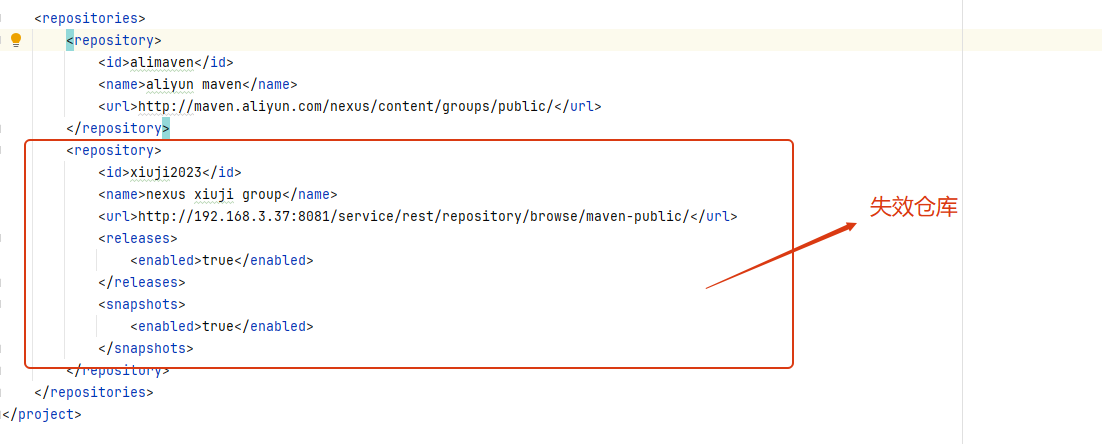 AI Visual Insight: The image highlights the core capability of Mirror. It does not modify project dependency declarations. Instead, it intercepts requests by repository ID at the
 settings layer and maps the failed Nexus URL to a new file:// repository. This approach is especially useful in enterprise environments with many existing projects and difficult-to-standardize POM changes.
The key to Mirror configuration is that mirrorOf must match the repository ID
mirrorOf is not the repository URL. It is the value of `