This article focuses on high-frequency failures and key configuration points in SAP Business Partner WebService integrations. It covers multi-system distribution, role filtering, Key Mapping, message replay, and lock handling to help you quickly diagnose connectivity pain points between MDG and S/4HANA. Keywords: SAP MDG, BP WebService, DRFF.
Technical specifications are summarized in the following snapshot.
| Parameter | Description |
|---|---|
| Domain | SAP Master Data Governance / Business Partner Integration |
| Primary Languages | ABAP, XML |
| Communication Protocol | SOAP WebService |
| Key Transaction Codes | SOAMANAGER, DRFF, DRFIMG, SRT_MONI, SXMB_MONI |
| Key Objects | BP, Key Mapping, Logical Port, Service Group |
| Core Dependencies | SAP MDG, S/4HANA, PI/XI (optional), BAdI extensions |
| Source Article Pattern | FAQ-style integration troubleshooting checklist |
This article summarizes the core configuration entry points for BP WebService.
SAP official documentation should be your first reference point. S/4HANA, MDG, Ariba, and C4C each provide their own configuration guides, with the main focus on SOAMANAGER, service definitions, and endpoint bindings.
If your project distributes data from an MDG hub to downstream systems, first confirm the NetWeaver version and then select the matching official configuration guide. Choosing the wrong version path can directly lead to inconsistencies in service activation steps.
Configuration objects you should verify first
1. Whether the SOAMANAGER service is activated
2. Whether the Service Group is configured
3. Whether the Logical Port is generated automatically
4. Whether the business system definition for the target system is complete
5. Whether point-to-point communication is enabled
This checklist helps narrow the scope of initial BP WebService configuration troubleshooting.
Multi-target system distribution should be implemented through Service Groups, not manual Logical Ports.
The key to distributing one BP to multiple systems is not duplicating multiple manual Logical Ports. Instead, use a Service Group and let the system automatically generate the required Logical Ports for pending tasks.
If you manually create a Logical Port, it usually supports only a single target call and does not align with the standard design for multi-target distribution. Therefore, when multi-system distribution fails, you should first review the SOA configuration approach rather than the DRF rules themselves.
Role deletion and unintended role creation should be prevented upstream through filters or BAdI logic.
When roles are deleted in the target system, a common cause is that the inbound payload contains an incomplete role set. The best practice is to define a role segment filter in DRFF so that roles not intended for integration comparison are excluded.
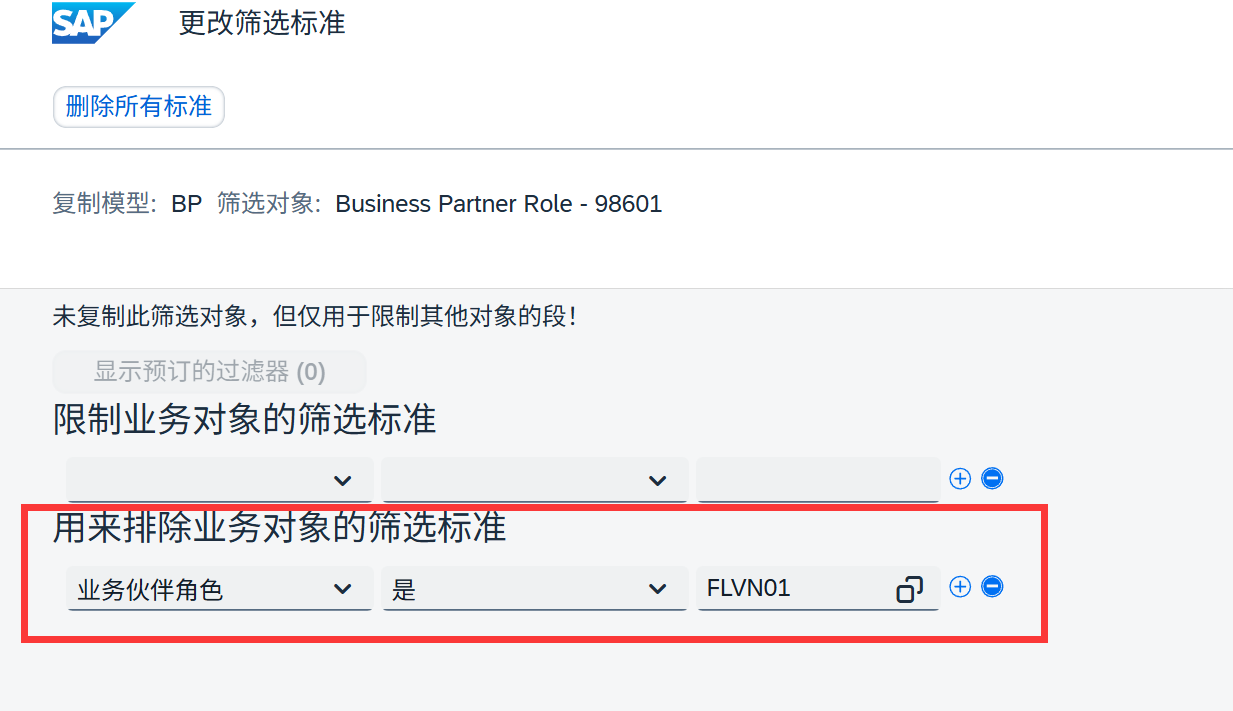 AI Visual Insight: The image shows the configuration screen in SAP DRFF for filtering Business Partner role segments. The key idea is to use exclusion conditions to protect existing roles in the target system and prevent inbound messages from triggering role deletion. In essence, this setting controls which role segments participate in comparison and overwrite logic.
If the source system cannot be changed, you can implement BAdI MDG_SE_BP_BULK_REPLRQ_IN in the target system and remove unnecessary role nodes during inbound processing to prevent dirty data from being persisted.
Typical filtering approach
* Remove unnecessary role nodes in the inbound enhancement
LOOP AT lt_roles ASSIGNING
<ls_role>.
  IF
<ls_role>-role = 'FLVN01'. " Filter supplier roles
    DELETE lt_roles INDEX sy-tabix.    " Prevent irrelevant roles from being created or overwritten
  ENDIF.
ENDLOOP.
This example shows how to directly sanitize inbound role data in an enhancement point.
DRFF determines which BPs are sent to which systems.
If the requirement is to prevent certain BPs from being sent to a specific system, maintain both include conditions and exclude conditions in the DRFF object filter. This allows you to control the distribution scope precisely based on organization, grouping, roles, or identifiers.
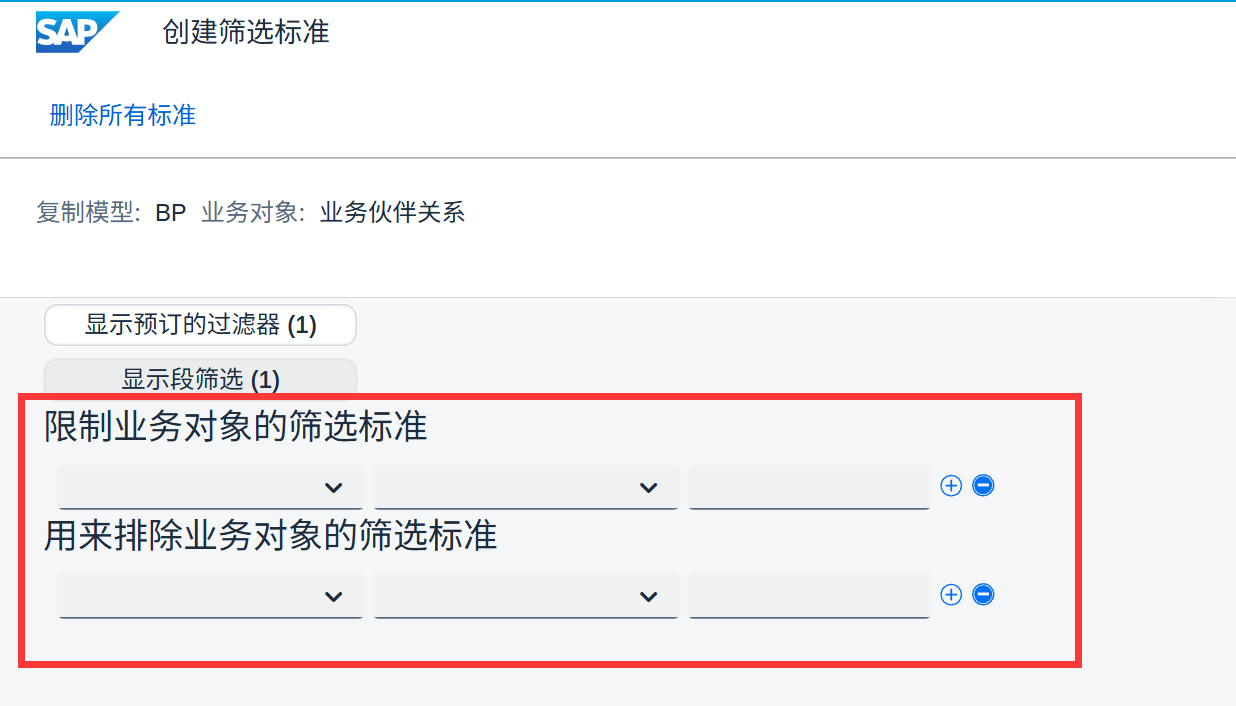 AI Visual Insight: The image shows the object filtering area in the DRFF distribution model. The interface is split into two categories: conditions for allowed distribution and conditions for excluded distribution. It reflects SAP’s declarative filtering mechanism for master data distribution rather than hard-coded routing rules.
Distributing only the main BP while excluding Business Partner relationships is also controlled in DRFF through BP selection mode. It belongs to the same control layer.
SAP standard explicitly blocks chained automatic redistribution from A→B→C.
The standard BP WebService design prevents distribution loops. In other words, after system B receives a BP from system A, it should not automatically forward that BP to system C.
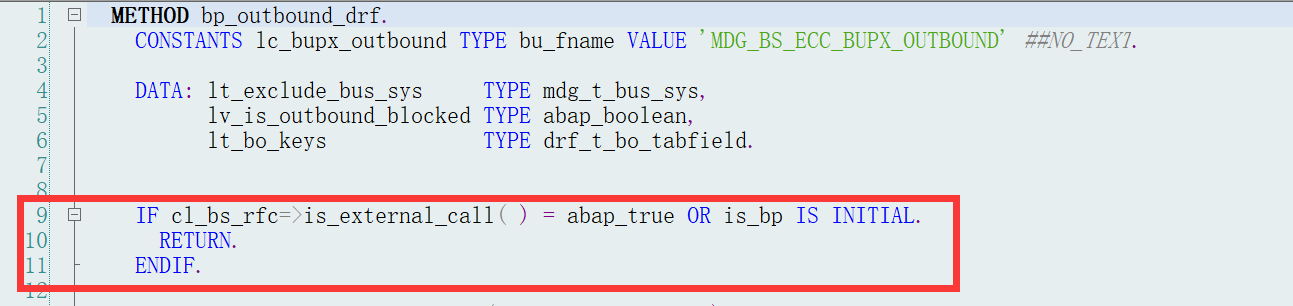 AI Visual Insight: The image shows the code logic in a standard SAP function used to prevent a receiving system from automatically redistributing a BP. This confirms that the restriction is not caused by missing configuration, but by a product-level safeguard designed to prevent master data synchronization loops and message storms across multiple systems.
The correct pattern is parallel distribution from the source system: A→B and A→C. If your business process absolutely requires chained routing, it typically requires custom development, which carries higher risk and deviates from the SAP standard.
Recommended topology model
Recommended: A -> B
             A -> C

Not recommended: A -> B -> C
This topology reflects SAP’s standard constraints around the system of record and distribution boundaries for master data.
Numbering, account groups, and employee BPs have clearly defined boundaries.
If the target system must preserve the source BP number, the BP grouping in the target system must be configured with an external number range, for example via view V_TB001. Otherwise, the target system will renumber the BP, which increases Key Mapping complexity.
Customer and vendor account groups depend on mappings in V_TBD001 and V_TBC001, as well as whether flexible grouping is enabled. If flexible grouping is enabled, the system prioritizes the account group from the payload. If not, it uses the locally configured value.
Employee role BPs should not be distributed through the BP interface. SAP explicitly recommends using the dedicated HR interface first and then running the synchronization report in the target system to generate the related BP.
Output mode, message monitoring, and replay capabilities form the operational closed loop.
BP distribution can be configured in DRFIMG as either immediate output or pooled output. In non-MDG scenarios, pooled output is generally not recommended because it adds complexity to the processing chain.
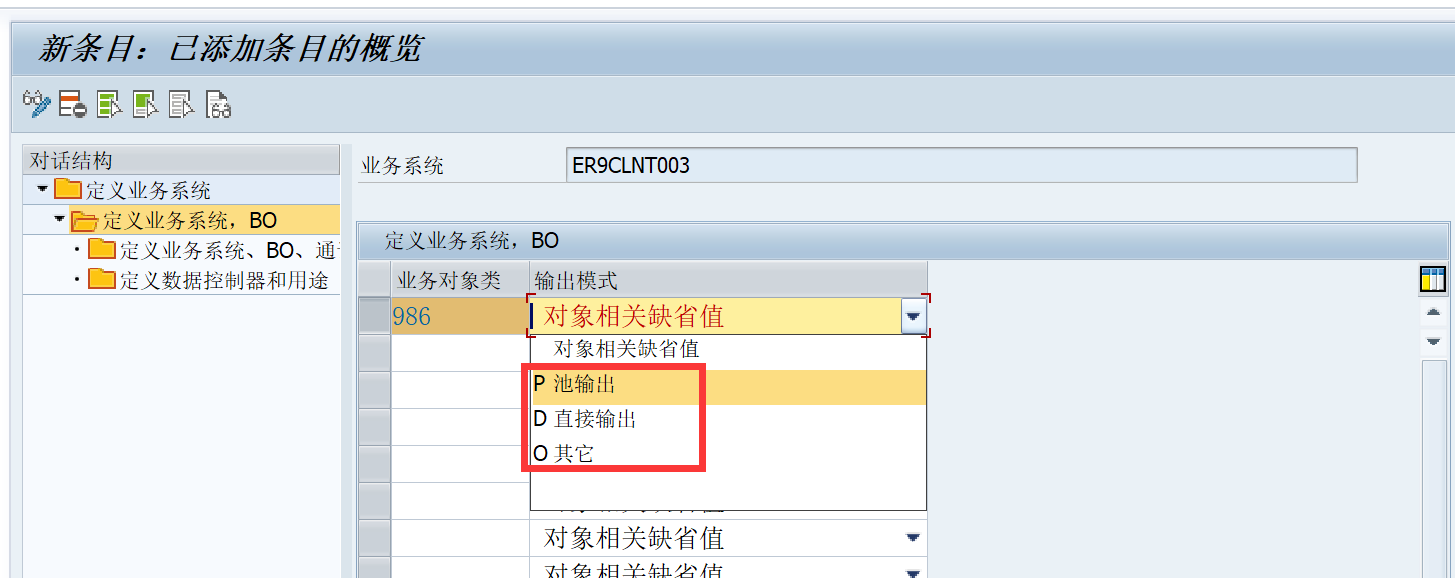 AI Visual Insight: The image shows the output mode configuration screen in DRFIMG for target systems and BO types. The key technical point is that the technical settings for business object 986 determine whether messages are sent in real time or placed into a pool processing queue, which directly affects timeliness and recovery paths.
If you need to replay XML, download the payload from SRT_MONI or SXI_MONITOR, then re-import it using SPROXY_START. Before importing, remove changeOrdinalNumberValue; otherwise, the sequence control field may block the replay.
* Set lock wait and retry parameters
EXPORT bupa_enq_repeats FROM 20          " Retry up to 20 times
       bupa_enq_wait    FROM 3           " Wait 3 seconds each time
  TO MEMORY ID 'BUPA_ENQ_WAIT'.
This code is used to mitigate BP lock conflicts during inbound processing.
Key Mapping is the most frequent source of BP integration failures.
Typical errors include object identifier is still active, address does not exist, Business Partner already exists, role does not exist, and customer or vendor task does not support insert operations. At their core, these issues are usually caused by inconsistent cross-system identifiers.
Pay particular attention to the address GUID in BUT020. It must remain consistent between the source and target systems. Otherwise, address-related errors will keep recurring even when the business number itself looks correct.
Recommended Key Mapping handling path
1. MDG_ANALYSE_IDM: Review mappings
2. MDG_KM_MAINTAIN: Maintain a single mapping entry
3. MDG_ADJUST_IDM: Perform bulk adjustments after a system copy
4. Standard mass report: Applicable only when BP numbers are identical on both sides
This path covers troubleshooting, correction, and mass repair scenarios after system refreshes.
Whether a message appears in SXMB_MONI or SRT_MONI reveals the integration path.
If a message appears in SXMB_MONI or SXI_MONITOR, it usually means the integration is still running through the PI/XI runtime. Common reasons include point-to-point communication not being enabled or Logical Ports not being generated correctly in SOAMANAGER.
If a message appears in SRT_MONI, it means the integration is using the ABAP Web Service runtime, which usually indicates that the direct system-to-system configuration is already working. This distinction is critical when diagnosing why an interface did not use direct connectivity.
Pending messages block new BP distribution, and this is a standard safeguard.
When a BP has a pending inbound message, the system blocks further outbound processing for that object to prevent older data from overwriting newer data. Many projects mistake this for a stuck DRF process, but it is actually a message consistency safeguard.
If necessary, first process the suspended message or use MDG_DEL_MSG_PEND to clear the pending record before resuming normal distribution.
Custom field mapping must be implemented on both outbound and inbound sides.
After extending enterprise service fields, changing only the database structure is not enough. You must map the API structure to the proxy structure through MDG_SE_BP_BULK_REPLRQ_OUT, and then map the inbound proxy structure back to the final API structure through MDG_SE_BP_BULK_REPLRQ_IN.
If you implement the BAdI on only one side, the most common result is that the field can be sent but not received, or received but not persisted.
FAQ
1. Why did I configure the WebService, but the message does not appear in SRT_MONI?
Usually because SOAMANAGER did not generate the Logical Port correctly, or point-to-point communication was not enabled. As a result, the message is still processed through the PI/XI channel and therefore appears in SXMB_MONI or SXI_MONITOR.
2. Why was the BP renumbered in the target system?
Because the BP grouping in the target system was not configured with an external number range, the system did not use the number from the source payload. Check V_TB001 and the related value mapping settings.
3. Why is distribution still blocked even after I fixed the interface?
There is most likely a pending message. SAP blocks further sending of the same BP until suspended messages are processed or cleared, in order to prevent inconsistent master data states. You should process or clear the pending message first.
Core summary: This article systematically reconstructs 18 high-frequency issue patterns in SAP BP WebService integration across MDG, S/4HANA, and downstream systems. It covers SOAMANAGER, DRFF, Key Mapping, message monitoring, lock handling, and custom field mapping.