Spring AI Alibaba Graph is a graph-based AI workflow framework for Java microservices. Its core capability is to break large-model tasks into State, Node, and Edge for controllable orchestration, solving the challenges of implementing complex business flows, improving observability, and governing AI calls at scale. Keywords: Spring AI Alibaba Graph, multi-agent workflows, microservice orchestration.
Technical Specifications Snapshot
| Parameter | Details |
|---|---|
| Primary Language | Java |
| Framework Foundation | Spring Boot 3.3.3 |
| JDK | 17 |
| Model Access Protocol | DashScope API |
| Core Version | spring-ai 1.0.0-M6 / spring-ai-alibaba 1.0.0-M6.1 |
| Core Dependencies | spring-ai-alibaba-starter, spring-ai-alibaba-graph-core |
| Data Layer | MyBatis / MyBatis-Plus / MySQL |
| Repository Popularity | Star count not provided in the source |
Spring AI Alibaba Graph is a graph orchestration framework for microservices
Spring AI Alibaba Graph can be viewed as the LangGraph of the Java ecosystem. It abstracts AI tasks into a directed graph, allowing model calls, standard Java logic, database queries, and flow control to run under a unified execution framework.
It is especially well suited for two categories of scenarios. The first is deterministic workflows with fixed paths and clearly defined nodes. The second is multi-agent tasks where multiple agents collaborate with distinct responsibilities. Compared with chaining prompts alone, it places greater emphasis on state propagation, replayability, and governance.
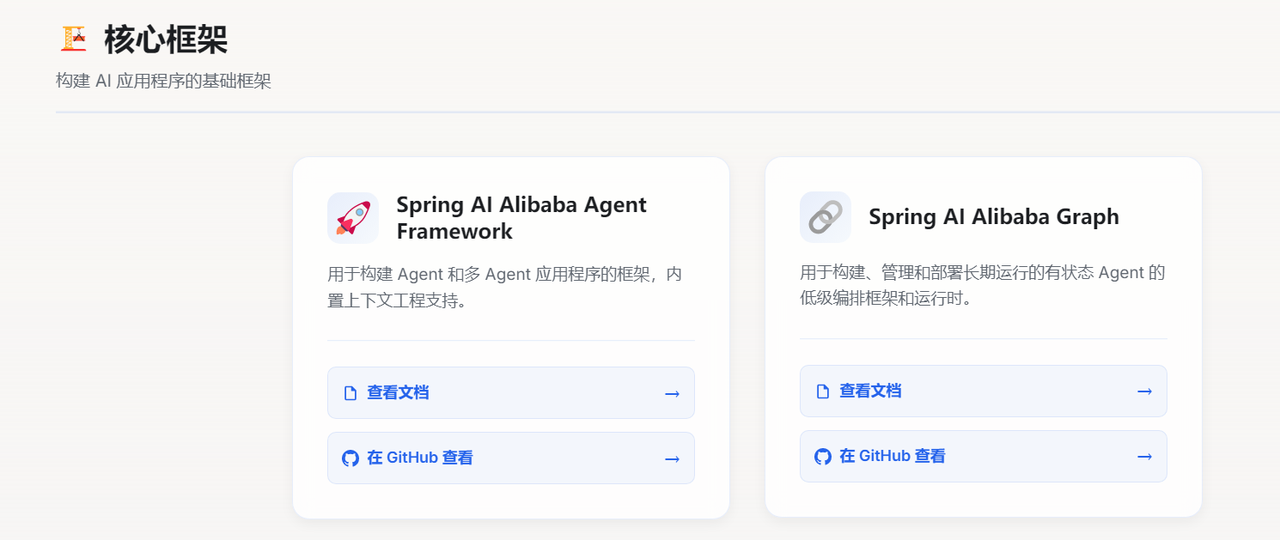 AI Visual Insight: This image shows the official entry point of Spring AI Alibaba Graph, indicating that the framework has evolved into an independent documentation and ecosystem hub. That signals it is more than a simple SDK; it is an engineering-grade framework with full support for graph orchestration, node modeling, and developer documentation.
The three core abstractions of Graph form a closed execution loop
State is the shared runtime context of a workflow. It stores the inputs, outputs, and intermediate results of each step. Node is the execution unit and can encapsulate LLM calls, rule evaluation, or database access. Edge controls how execution flows between nodes and can represent fixed transitions or conditional branches.
The value of this model is clear: your business flow is no longer a single oversized prompt. Instead, it becomes a decomposable, testable, and replaceable network of nodes. State evolves continuously across the graph, the framework handles propagation and persistence, and developers can focus on business modeling.
// Define replacement strategies for key fields in graph state
KeyStrategyFactory keyStrategyFactory = () -> Map.of(
    "msg", new ReplaceStrategy(),      // Input in Chinese
    "sentence", new ReplaceStrategy(), // Intermediate sentence
    "english", new ReplaceStrategy()   // English output
);

StateGraph stateGraph = new StateGraph(keyStrategyFactory);
This code defines the update strategy for workflow state fields and provides consistent data semantics for downstream node orchestration.
The strengths of Spring AI Alibaba Graph lie in both control and extensibility
The framework includes built-in multi-agent collaboration patterns such as Supervisor, Sequential, and Loop, making it easier to organize multiple roles quickly. At the same time, it supports Human-in-the-Loop, which pauses execution at critical nodes for manual review. This is especially useful in approval, risk control, and content governance scenarios.
Another key capability is the Checkpointer. It records state snapshots at every step, enabling resumability, long-term memory, and issue tracing. For enterprise systems, this is far closer to real production requirements than a one-shot request-response model.
The application pattern should be selected based on task determinism
Deterministic workflows fit scenarios such as customer service routing, form approval, ticket classification, and content moderation. Their advantages include fixed paths, stable results, and straightforward debugging. Autonomous multi-agent systems are better suited to research, planning, tool usage, and cross-system task execution.
If your task requires a sequence like “query data, analyze it, then generate recommendations,” Graph is a strong fit. If your task requires “autonomously decomposing goals and dynamically selecting tools and execution paths,” you should adopt a multi-agent collaboration pattern.
The basic example shows how to build a minimal runnable workflow
The original example aims to turn a Chinese word into an English sentence. It is split into two nodes: first, ask the model to generate a Chinese sentence from the input word; then translate that sentence into English. Although simple, this example fully covers the minimal Graph execution loop: input, node execution, edge connection, and result output.
First, inject ChatClient as the unified model access entry point for all subsequent nodes. The main benefit is that it reuses connection configuration and reduces repetitive code inside business nodes.
@Configuration
public class ChatConfig {

    @Bean
    public ChatClient chatClient(ChatClient.Builder builder) {
        return builder.build(); // Build a shared model client
    }
}
This code registers a shared ChatClient in the Spring container so graph nodes can inject it directly.
Node implementations should encapsulate a single clear responsibility
The first node, GenSentenceNode, reads msg from state, calls the model to generate a Chinese sentence, and writes the result back to sentence. The second node, TransferEnglishNode, reads sentence, translates it, and outputs english.
@Override
public Map<String, Object> apply(OverAllState state) {
    String msg = state.value("msg", ""); // Read the input word
    String result = chatClient.prompt()
        .user(u -> u.text("根据用户输入的单词:{msg},生成一个句子").param("msg", msg))
        .call()
        .content(); // Call the model to generate a sentence
    return Map.of("sentence", result); // Write back to graph state
}
This code encapsulates a single LLM inference into a standard Node so it can be reused and orchestrated by the graph structure.
CompiledGraph is the actual execution entry point of the workflow
After defining the nodes, connect them in sequence through StateGraph and compile them into a CompiledGraph. This step effectively transforms a declarative flow definition into an executable object.
stateGraph.addNode("genSentence", AsyncNodeAction.node_async(new GenSentenceNode(chatClient)));
stateGraph.addNode("transferEnglish", AsyncNodeAction.node_async(new TransferEnglishNode(chatClient)));
stateGraph.addEdge(StateGraph.START, "genSentence");      // Start to sentence generation
stateGraph.addEdge("genSentence", "transferEnglish");   // Sentence generation to translation
stateGraph.addEdge("transferEnglish", StateGraph.END);   // End after translation
CompiledGraph graph = stateGraph.compile();
This code organizes nodes and edges into a linear process and creates an invocable AI workflow.
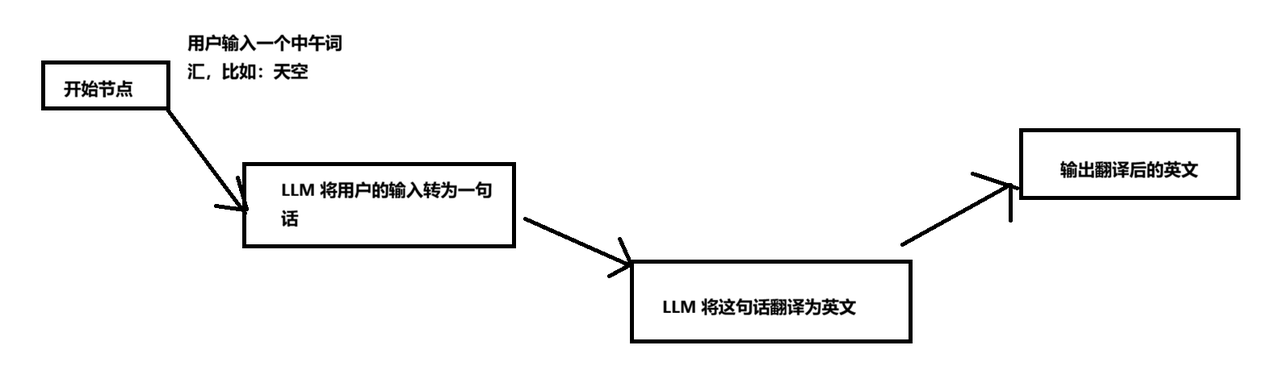 AI Visual Insight: This image shows a typical linear AI workflow. It starts with a Chinese word as input, passes through a sentence-generation node and a translation node, and outputs the English result. It highlights Graph’s ability to decompose sequential tasks into modular nodes.
 AI Visual Insight: This image shows the response returned after the API call, confirming that the graph orchestration completes an end-to-end execution loop from request input and state transitions to final model output.
The enterprise example shows how Graph connects databases with model-driven analysis
The second example is closer to a real business scenario. The input is a store name. The system first queries sales data, then passes the structured data to the model to generate operational recommendations. This hybrid chain of “rules system + data system + LLM” is a typical production use case for Graph.
In the example, a sales_area_order table is created to store sales amount, top-selling SKUs, and related metrics by store and time. Two nodes are then defined: StoreAreaNode handles database queries and data serialization, while AnalysisLlmNode generates the report from the store context and sales data.
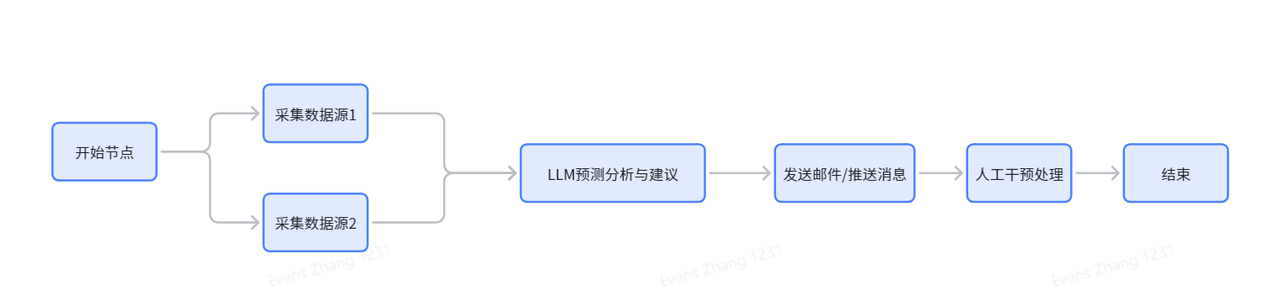 AI Visual Insight: This image shows the business workflow diagram. It starts with store-level input, aggregates sales samples through a database query node, and then feeds the results into an LLM analysis node to generate recommendations. It demonstrates the orchestration principle of decoupling data retrieval from intelligent analysis.
@Override
public Map<String, Object> apply(OverAllState state) throws Exception {
    String storeArea = state.value("storeArea", ""); // Read the store name
    List
<SalesAreaOrder> list = salesAreaOrderService.getList(storeArea); // Query the database
    String json = new ObjectMapper().writeValueAsString(list); // Convert to JSON for model consumption
    return Map.of("storeAreaData", json); // Write to the next node's input
}
This code encapsulates a business database query as a Graph node and provides structured context for downstream model analysis.
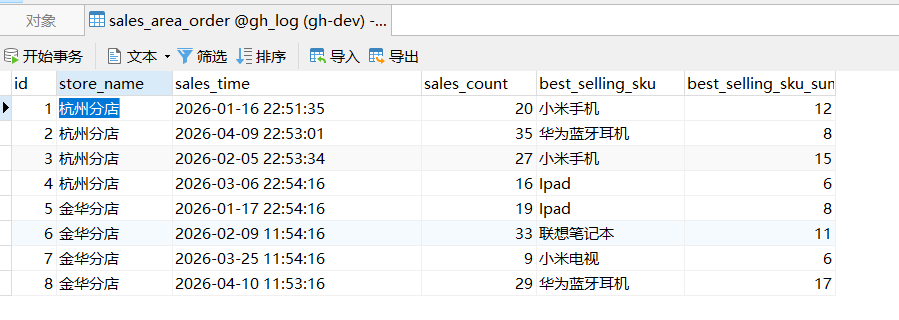 AI Visual Insight: This image shows that test data has been inserted into the sales statistics table. The fields include store, sales time, total sales volume, and top-selling SKUs, which can serve directly as business context for the LLM analysis node.
String content = chatClient.prompt()
    .user(u -> u.text("根据店铺名称:{storeArea}和销售数据:{storeAreaData},生成一份分析建议")
    .params(Map.of("storeArea", storeArea, "storeAreaData", storeAreaData)))
    .call()
    .content(); // Generate store operation analysis
return Map.of("llmData", content);
This code turns structured sales data into a model-readable analysis task and outputs a natural-language report.
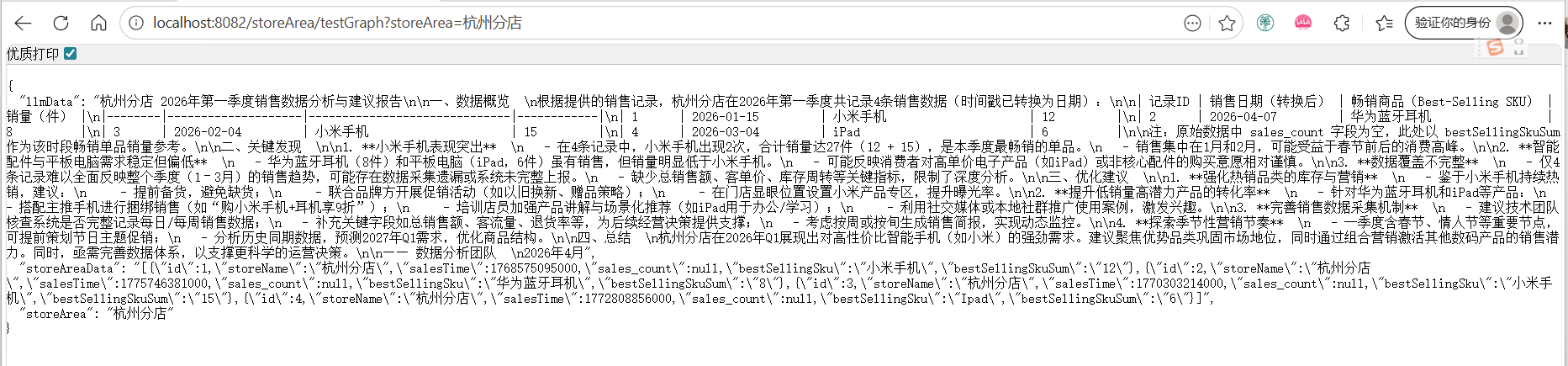 AI Visual Insight: This image shows the final analysis output, proving that Graph has fully connected the chain of business parameter input, database retrieval, and LLM summarization. This pattern is well suited for ChatBI, store diagnostics, or automated weekly operations reports.
Successful production adoption depends more on business modeling than on writing code
From a coding perspective, the Graph pattern is relatively fixed: define state, split nodes, connect edges, then compile and execute. The real challenge is whether you can decompose business workflows into highly cohesive, loosely coupled nodes and design stable keys for state management.
In production, you should prioritize three principles. First, each Node should do only one thing. Second, state field naming should remain stable. Third, LLM nodes and database nodes should be decoupled. These practices improve testability, maintainability, and reuse.
FAQ
Q1: Can Spring AI Alibaba Graph replace Dify or Coze?
A: Not exactly. Dify and Coze are more low-code oriented platforms, while Graph is better suited for Java teams that need deep integration inside a microservice architecture, version-controlled development, and custom extensibility.
Q2: When should you use Graph instead of calling an LLM API directly?
A: If the task involves multi-step processing, state propagation, conditional branching, database reads and writes, or human review, Graph should be the default choice. For simple single-turn Q&A, a direct API call is enough.
Q3: What is the best scenario to prioritize for enterprise adoption?
A: Start with deterministic flows such as “query database + analyze + generate report,” including customer service routing, sales analysis, approval recommendations, and NL2SQL. These scenarios usually have lower implementation cost and clearer business value.
Core Summary: This article reconstructs and explains the core model, workflow patterns, and integration approach of Spring AI Alibaba Graph. Through two examples—Chinese-to-English sentence generation and store sales analysis—it shows how to build AI workflows and multi-agent orchestration in Spring Boot using State, Node, and Edge.