This article focuses on the Tool Calling mechanism in Spring AI Alibaba. It explains why large language models need external tools, how to connect time and weather capabilities through declarative and programmatic approaches, and how key components such as ToolContext, Schema, and MethodToolCallback work together. Keywords: Spring AI, Tool Calling, DashScope.
Technical specifications are summarized below
| Parameter | Description |
|---|---|
| Language | Java |
| Frameworks | Spring Boot, Spring AI, Spring AI Alibaba |
| Model access | DashScope / Tongyi Qianwen |
| Protocols | HTTP, JSON Schema |
| Core capabilities | Tool Calling, ToolCallback, context propagation |
| Core dependencies | spring-webflux, spring-ai-alibaba-starter-dashscope |
| GitHub stars | Not provided in the source material |
Tool Calling solves the problem that LLMs can explain but cannot execute
Large language models are good at generating text, but they are not good at directly accessing the real-time world. Questions like “What time is it now?” or “What is the weather like in Beijing today?” go beyond the static boundary of training data.
The value of Tool Calling is that it allows the model not only to understand a task, but also to delegate it to external functions, services, or APIs, and then write the result back into the conversation context. This creates a closed loop of reasoning plus execution.
The invocation flow can be summarized in six steps
- The application registers tool definitions with the model.
- The model decides whether to call a tool based on user intent.
- Spring AI receives the tool name and arguments.
- A local method or remote capability is executed.
- The tool result is written back into the context as a message.
- The model generates the final answer based on that result.
// Pseudocode: shows the core Tool Calling flow
Prompt prompt = new Prompt(userInput, chatOptions); // Build the user request
ChatResponse response = chatModel.call(prompt);     // The model decides whether to trigger a tool
String answer = response.getResult().getOutput().getText(); // Return the final result
This code shows the minimal surface area that Tool Calling exposes to the business layer. In practice, developers mainly focus on tool definitions and option assembly.
Annotation-based tool definitions are better for fast implementation
Spring AI provides @Tool and @ToolParam, which let you declare ordinary Java methods directly as model-callable tools. The most important field is description, because it determines whether the model can correctly understand what the tool is for.
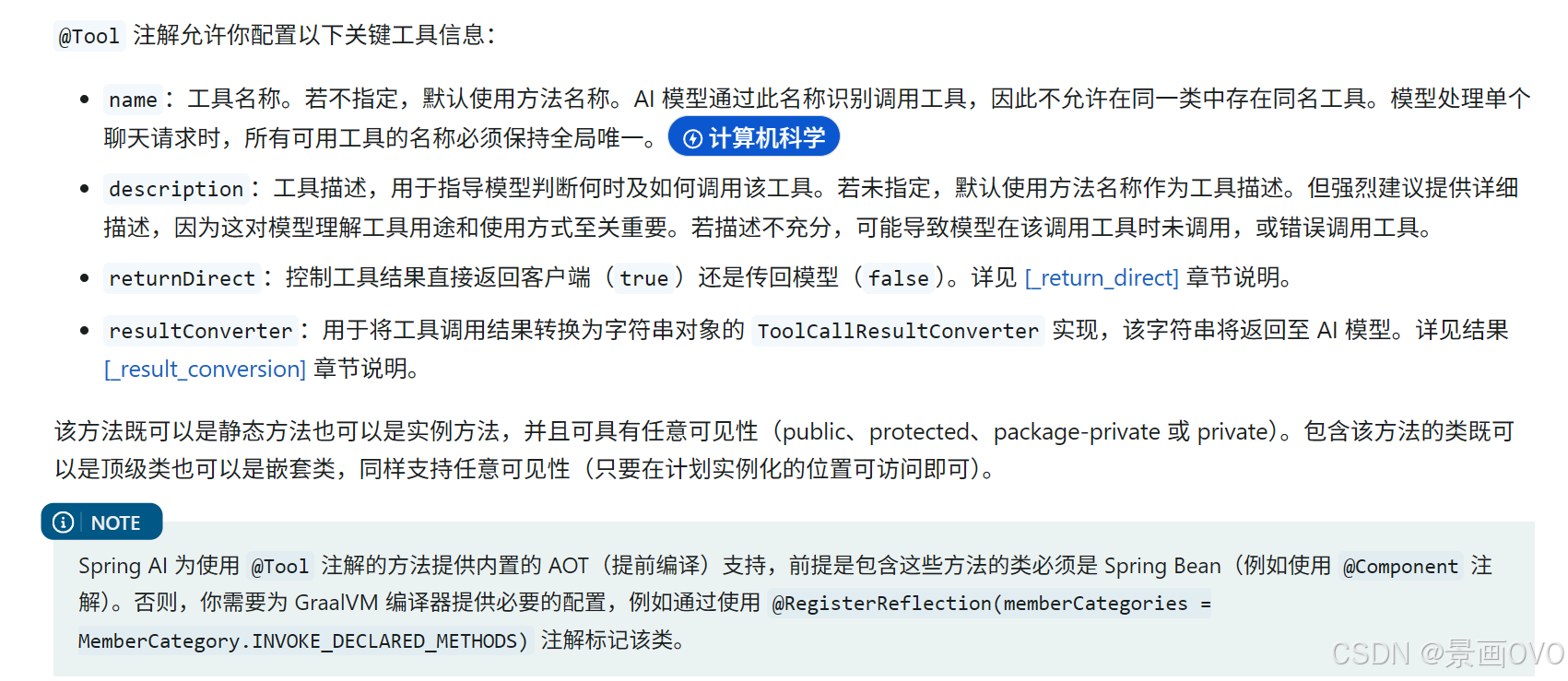 AI Visual Insight: This image shows how the
 @Tool annotation is declared at the method level. It highlights the importance of the description field for exposing tool semantics, showing that the model does not rely on the method name itself but on the natural-language description used to generate the callable schema.
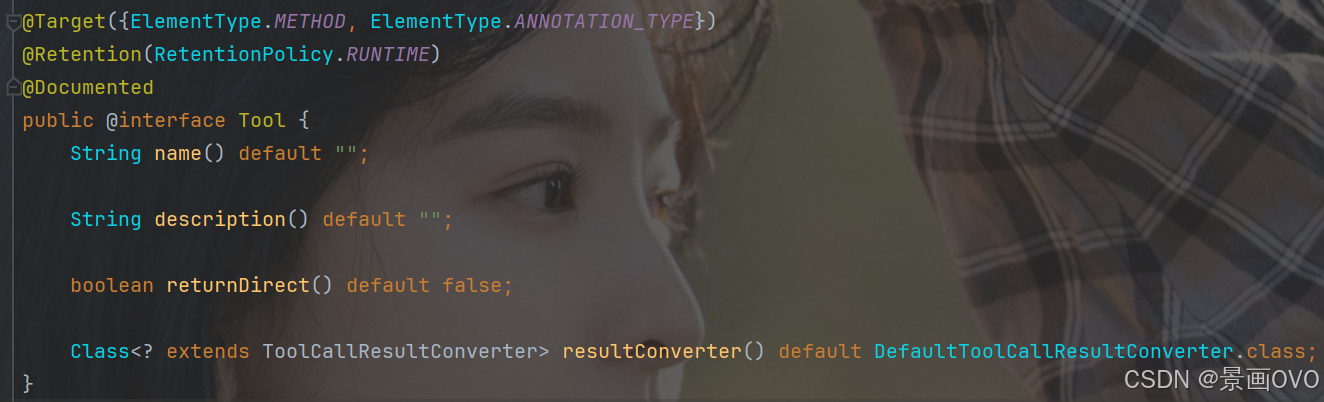 AI Visual Insight: This image further shows the relationship between tool methods and the framework scanning process. It explains that Spring AI converts annotated methods into tool definitions that the model can recognize and injects them into the model context during a request.
public class DateTimeTools {

    @Tool(description = "Get the current time for the active region") // The more specific the description, the easier it is for the model to match the tool
    String getCurrentDateTime() {
        return LocalDateTime.now()
                .atZone(LocaleContextHolder.getTimeZone().toZoneId()) // Return time based on the user's time zone
                .toString();
    }
}
This code wraps local time lookup into a tool that the model can invoke automatically.
Parameter descriptions determine Schema quality
@ToolParam is used to add information such as whether a parameter is required and what it means. At its core, it helps the framework generate a more accurate JSON Schema and reduces the probability of incorrect tool invocations by the model.
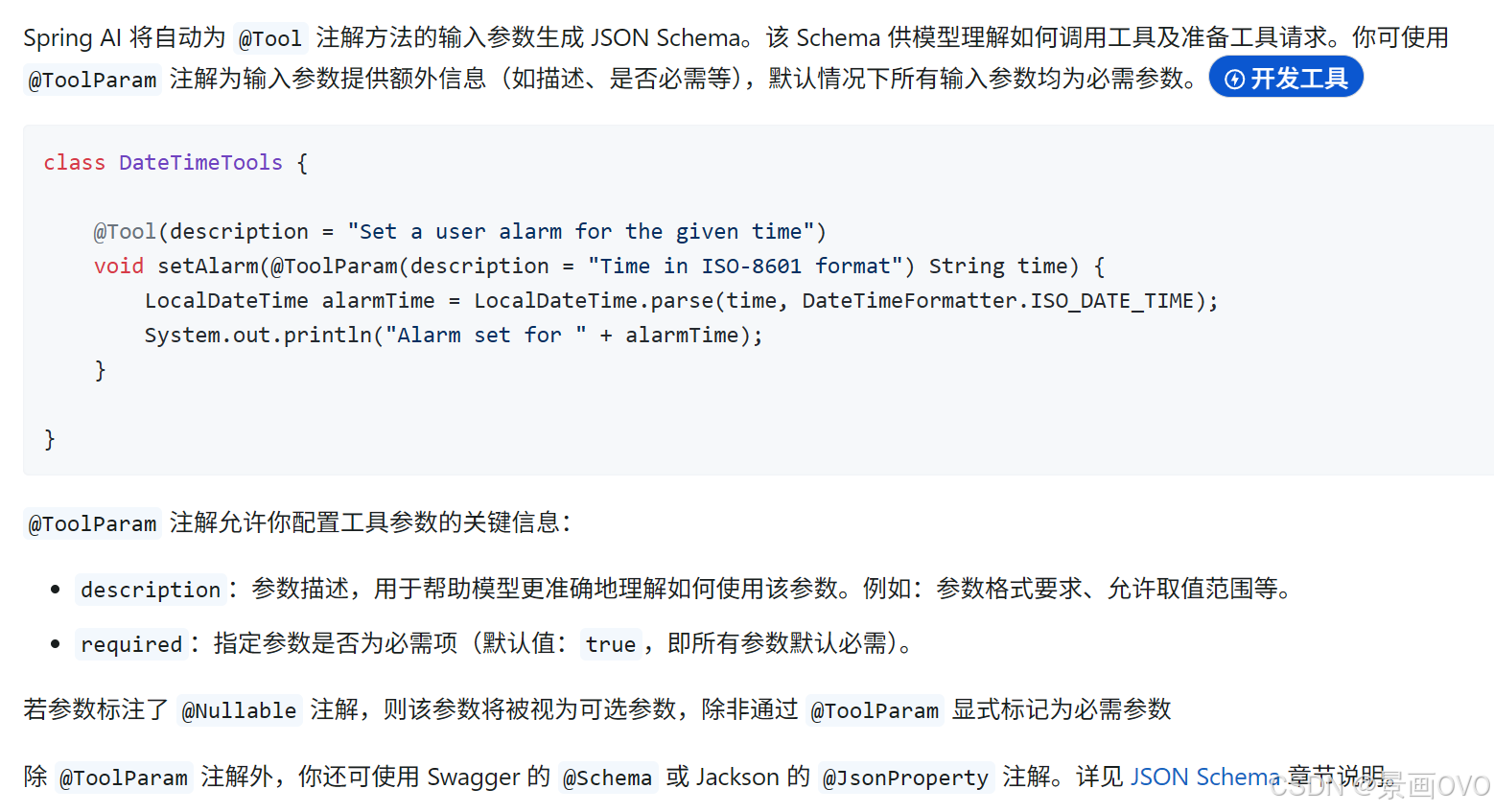 AI Visual Insight: This image shows where
 @ToolParam is declared at the parameter level. It emphasizes that parameter descriptions become part of the tool schema and therefore affect how the model constructs invocation arguments.
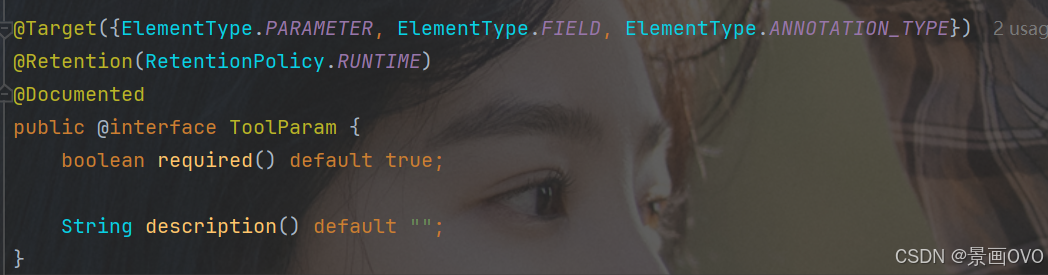 AI Visual Insight: This image illustrates the mapping between tool parameter descriptions and the generated structured fields. It shows that Spring AI can infer schema from a method signature automatically while also allowing developers to add semantic details.
@Tool(description = "Set a reminder time")
void setAlarm(
    @ToolParam(description = "Time in ISO-8601 format, for example 2026-04-23T20:00:00") String time
) {
    LocalDateTime alarmTime = LocalDateTime.parse(time); // Parse the time argument passed by the model
    System.out.println("Alarm set for " + alarmTime);
}
This code shows that tools can do more than query data. They can also carry action-oriented tasks.
ChatClient is better suited to application-layer encapsulation
In ChatClient mode, tools can be registered either as runtime tools or as default tools. Runtime tools apply only to the current request, while default tools stay active for the lifetime of the client after it is created.
@RestController
@RequestMapping("/chat")
public class ChatController {

    private final ChatClient client;

    public ChatController(DashScopeChatModel chatModel) {
        this.client = ChatClient.builder(chatModel).build(); // Build the client
    }

    @RequestMapping("/call")
    public String call(String msg) {
        return client.prompt("Your name is Jinghua")
                .user(msg)
                .tools(new DateTimeTools()) // Inject runtime tools for the current request
                .call()
                .content();
    }
}
This code demonstrates the most common integration pattern: bind tools temporarily when the request arrives.
Default tools reduce repeated assembly
If a category of tools is reused frequently, such as time, exchange rates, or weather, you can bind them persistently when constructing ChatClient through defaultTools or defaultToolCallbacks. One important detail is that runtime tools override default tools.
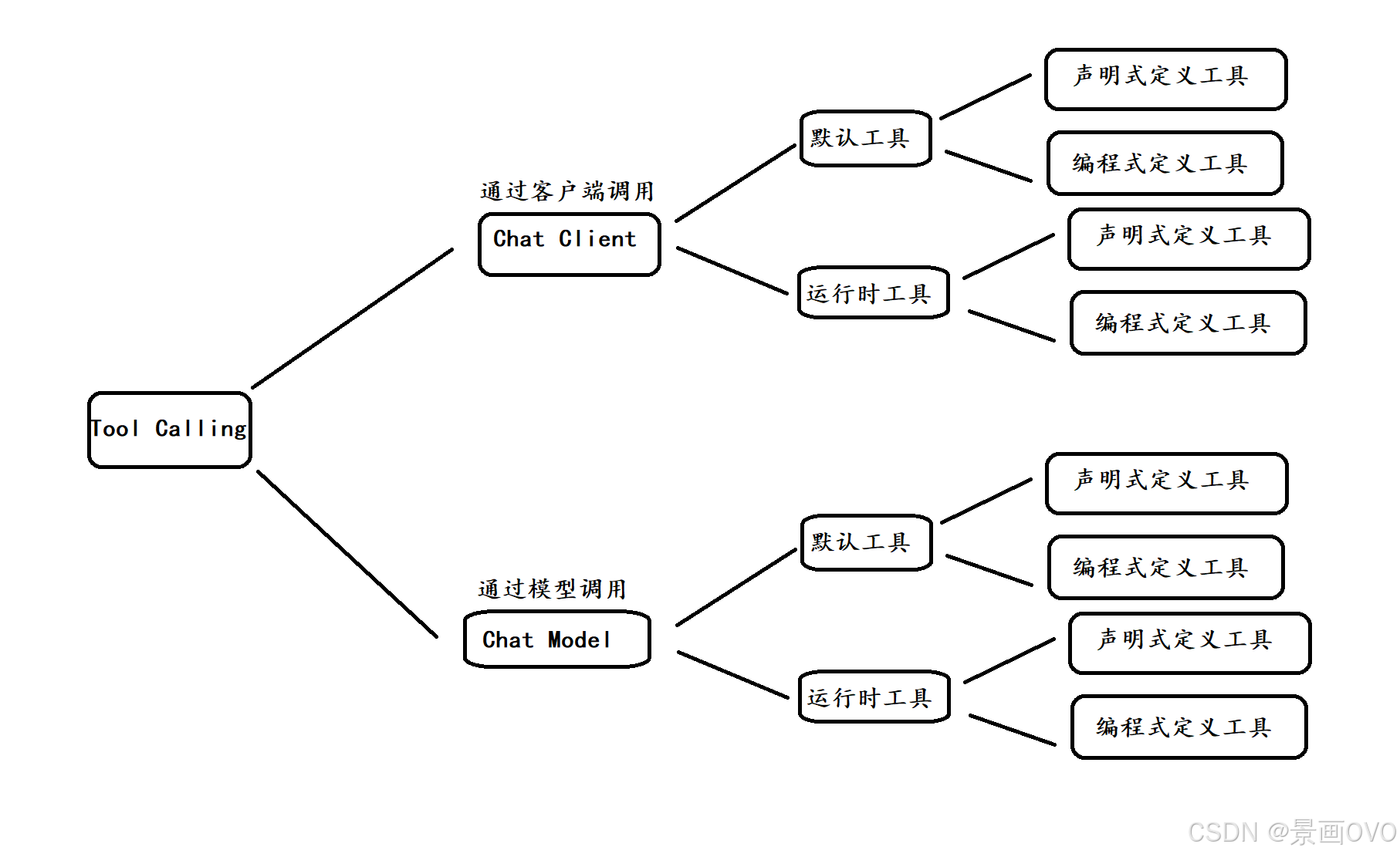 AI Visual Insight: This image shows the priority relationship between default tools and runtime tools when both coexist. It highlights that request-level tools override client-level default tools, which is especially important for multi-tenant scenarios or dynamic task routing.
Programmatic registration is better for complex tool governance
When tools do not come from annotation-based classes, but instead from ordinary business methods, third-party adapters, or reflection-generated logic, you should use MethodToolCallback. It is one of the core abstractions that implement Tool Calling in Spring AI.
@Configuration
public class ToolConfig {

    @Bean("weatherTool")
    public ToolCallback weatherTool() {
        Method method = ReflectionUtils.findMethod(
                WeatherTools.class,
                "getCurrentWeatherByCityName",
                String.class
        );

        return MethodToolCallback.builder()
                .toolDefinition(ToolDefinitions.builder(method)
                        .description("Get weather by city name") // Expose tool semantics to the model
                        .build())
                .toolMethod(method)               // Specify the actual method to execute
                .toolObject(new WeatherTools())   // Specify the instance that owns the method
                .build();
    }
}
This code wraps a normal method as a ToolCallback, which is a good fit for centralized registration, auditing, and extension.
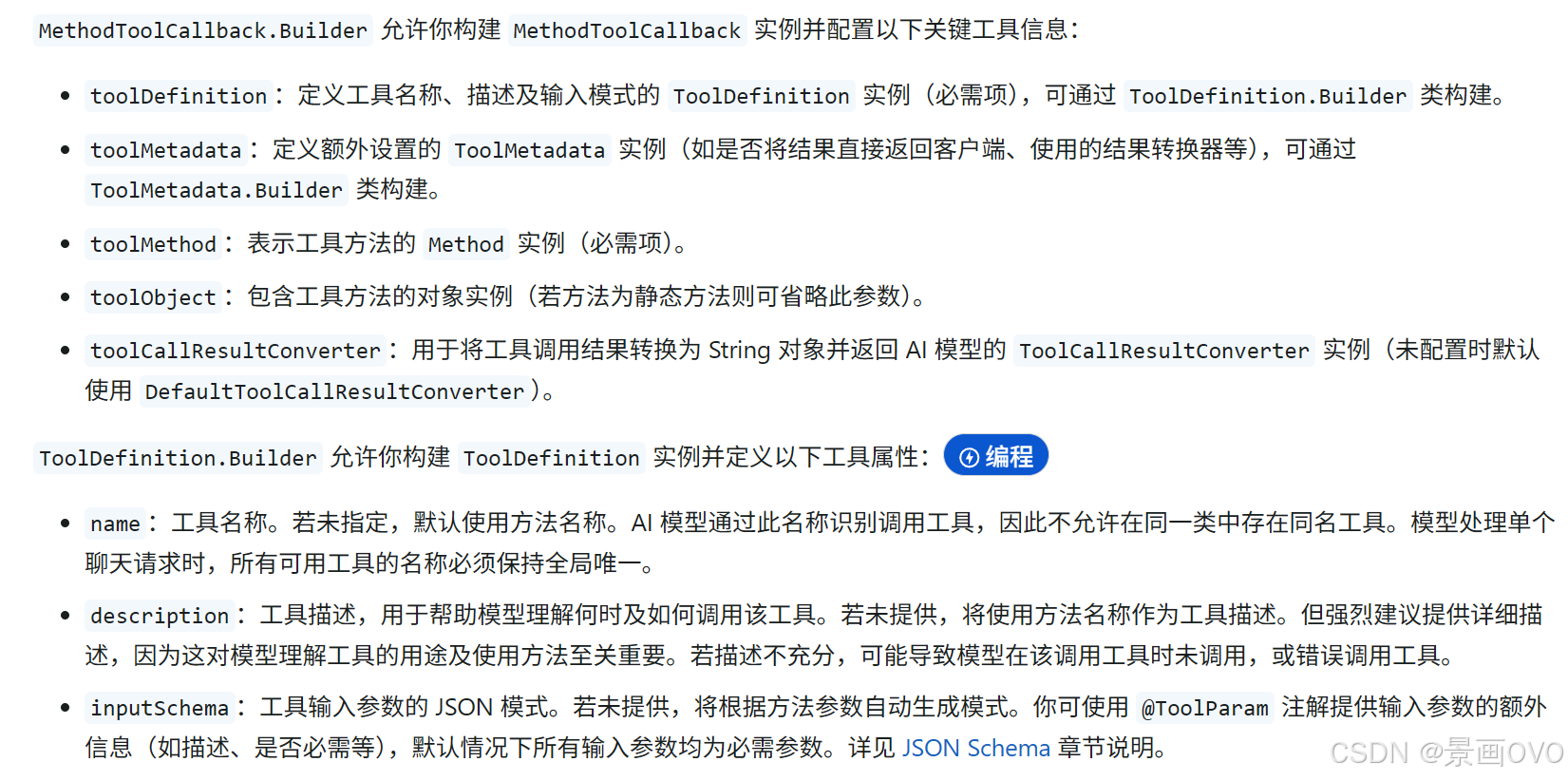 AI Visual Insight: This image shows the construction structure of
 MethodToolCallback, including key elements such as method reflection, tool definition, and target object. It reflects how Spring AI converts an ordinary Java method into a model-callable unit.
ChatModel provides more direct low-level control
If you want to directly control Prompt, ChatOptions, model default options, or arrays of tool callbacks, ChatModel is more flexible than ChatClient.
@RequestMapping("/call")
public String call(String msg) {
    ToolCallback[] dateTimeTools = ToolCallbacks.from(new DateTimeTools()); // Convert annotated tools into callbacks
    ChatOptions chatOptions = ToolCallingChatOptions.builder()
            .toolCallbacks(dateTimeTools) // Explicitly attach tools to this request
            .build();

    Prompt prompt = new Prompt(msg, chatOptions);
    return chatModel.call(prompt).getResult().getOutput().getText();
}
This code shows direct invocation at the model layer, which is suitable when you need to combine temperature, model name, and tool lists in a single request.
ToolContext supports secure propagation of business context
ToolContext passes additional context into the tool execution layer without exposing it to the model. It is well suited for sensitive metadata such as user IDs, tenant IDs, and permission information.
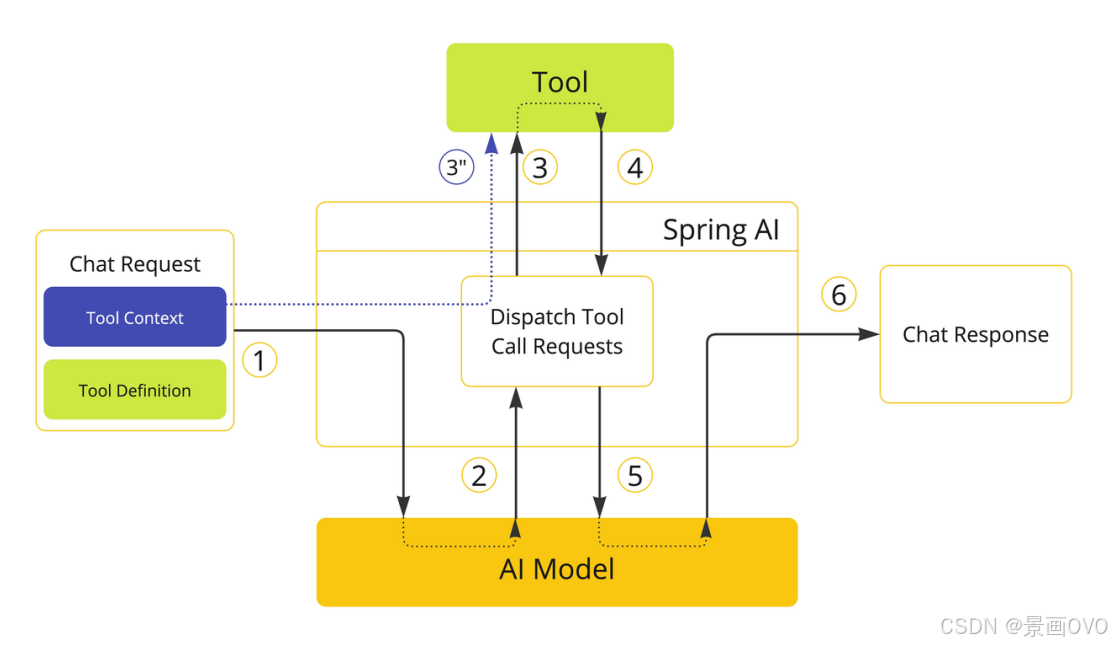 AI Visual Insight: This image describes the data flow of ToolContext. It makes clear that context is passed directly from the application side to the tool execution layer and does not enter the model-side context, making it appropriate for permissions, tenancy, tracing, and other internal data.
public class ContextIdTools {

    @Tool(description = "Get tool context information")
    public void getId(ToolContext toolContext) {
        System.out.println(toolContext.getContext().get("id")); // Read application-propagated data
    }
}
This code shows that a tool can receive both model-generated parameters and application-private context securely.
Tool definition quality determines final usability
The original article also covers ToolCallback, ToolDefinition, Result Conversion, Return Direct, and the tool execution chain. These concepts solve different problems, including invocation abstraction, metadata description, result serialization, and whether to bypass model post-processing.
Among them, Return Direct is especially useful in RAG retrieval or external executor scenarios. When the tool result is already the final answer, it can be returned directly to the caller without asking the model to rewrite it again.
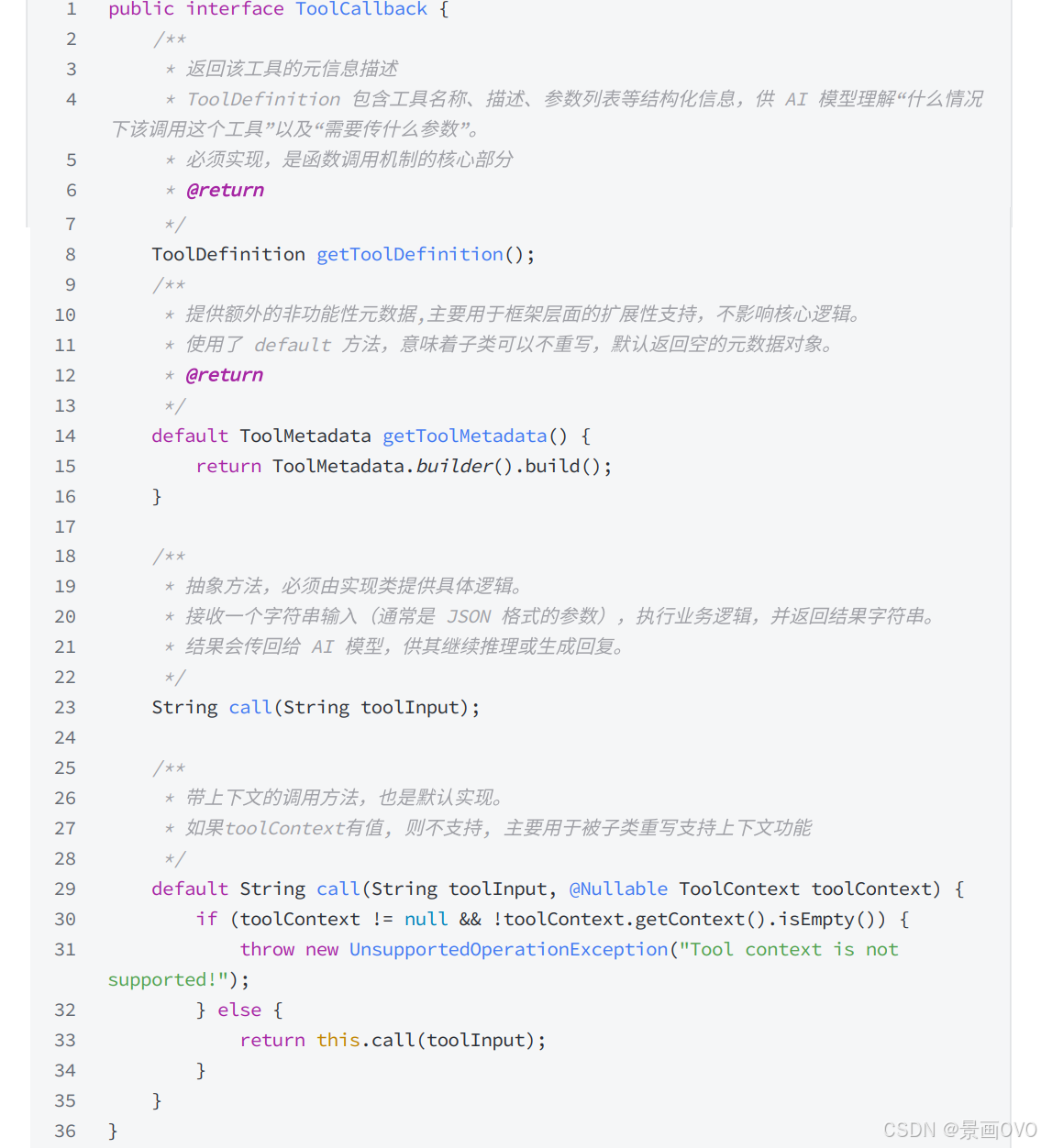 AI Visual Insight: This image shows the abstract position of
 ToolCallback as a unified interface. It indicates that different tool implementations ultimately interact with the model through the same protocol, which makes unified framework scheduling possible.
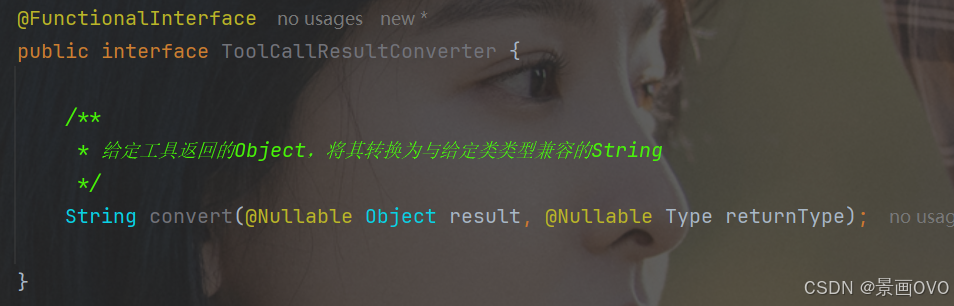 AI Visual Insight: This image reflects that tool results pass through a result converter for serialization before they are returned to the model. It emphasizes that stringified output is a critical intermediate layer for model consumption.
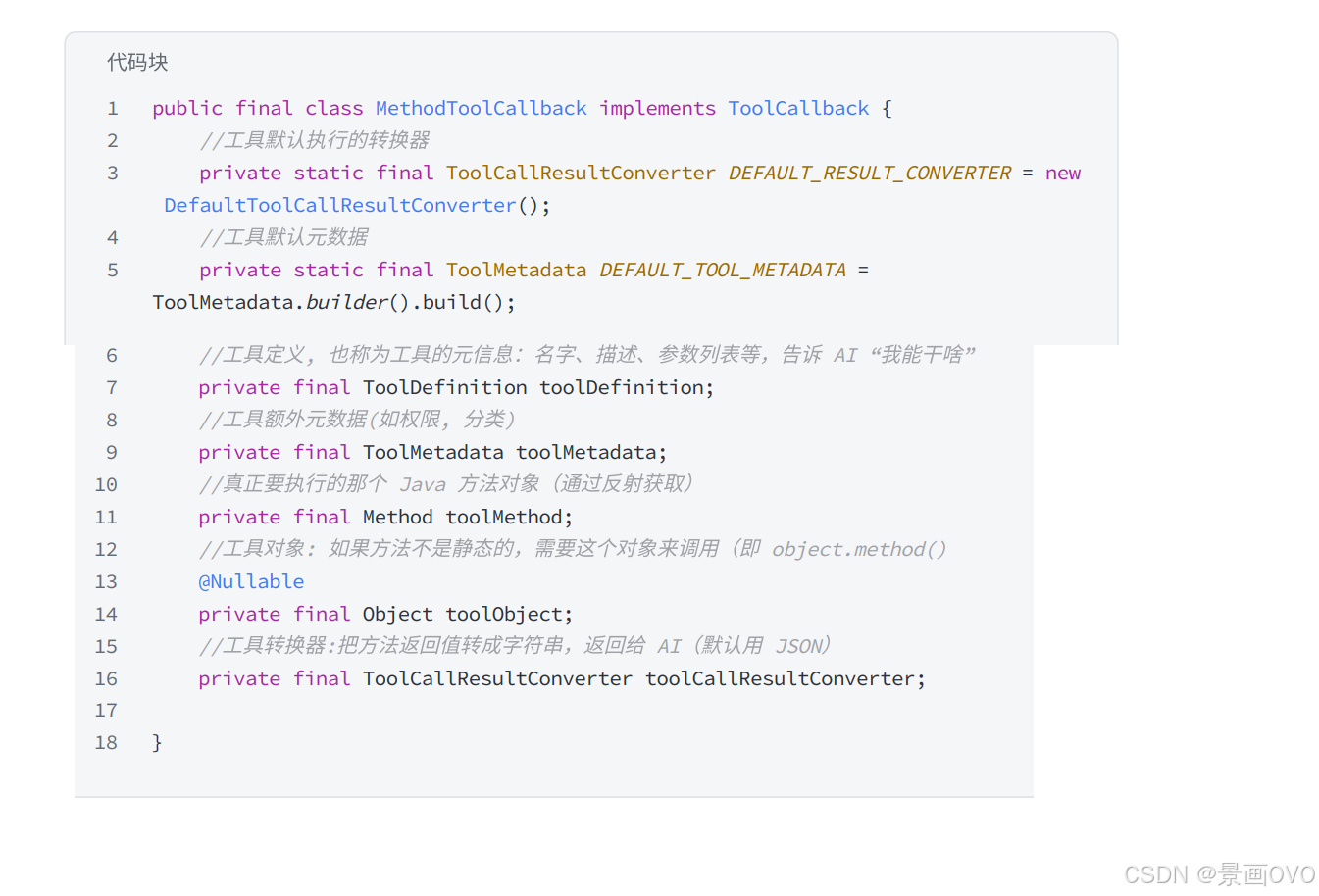 AI Visual Insight: This image shows the central role of
 MethodToolCallback in the overall architecture, indicating that it acts as the bridge from method reflection to actual tool invocation.
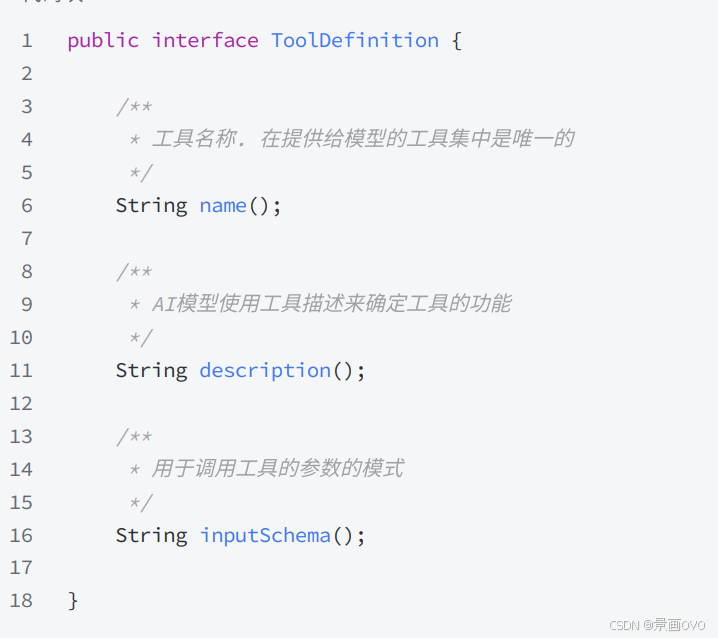 AI Visual Insight: This image shows the name, description, and parameter structure carried by
 ToolDefinition, illustrating that whether the model can choose the right tool fundamentally depends on the quality of the metadata exposed here.
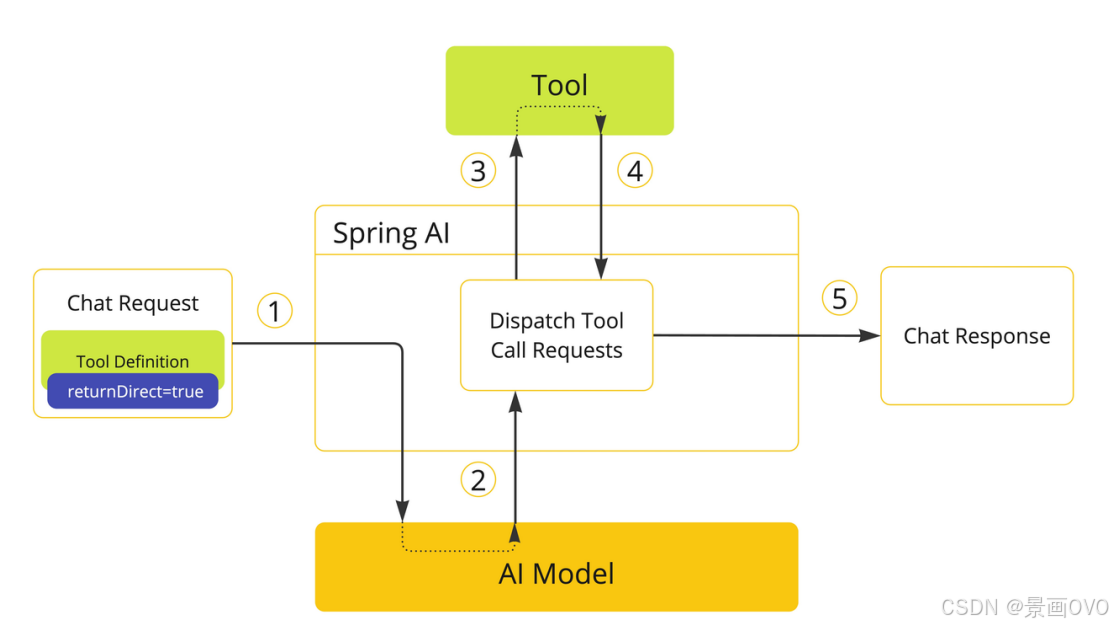 AI Visual Insight: This image highlights the branch path for Return Direct, showing that some tool executions can skip the step of returning the result back to the model and terminate the invocation chain immediately, reducing latency and secondary hallucinations.
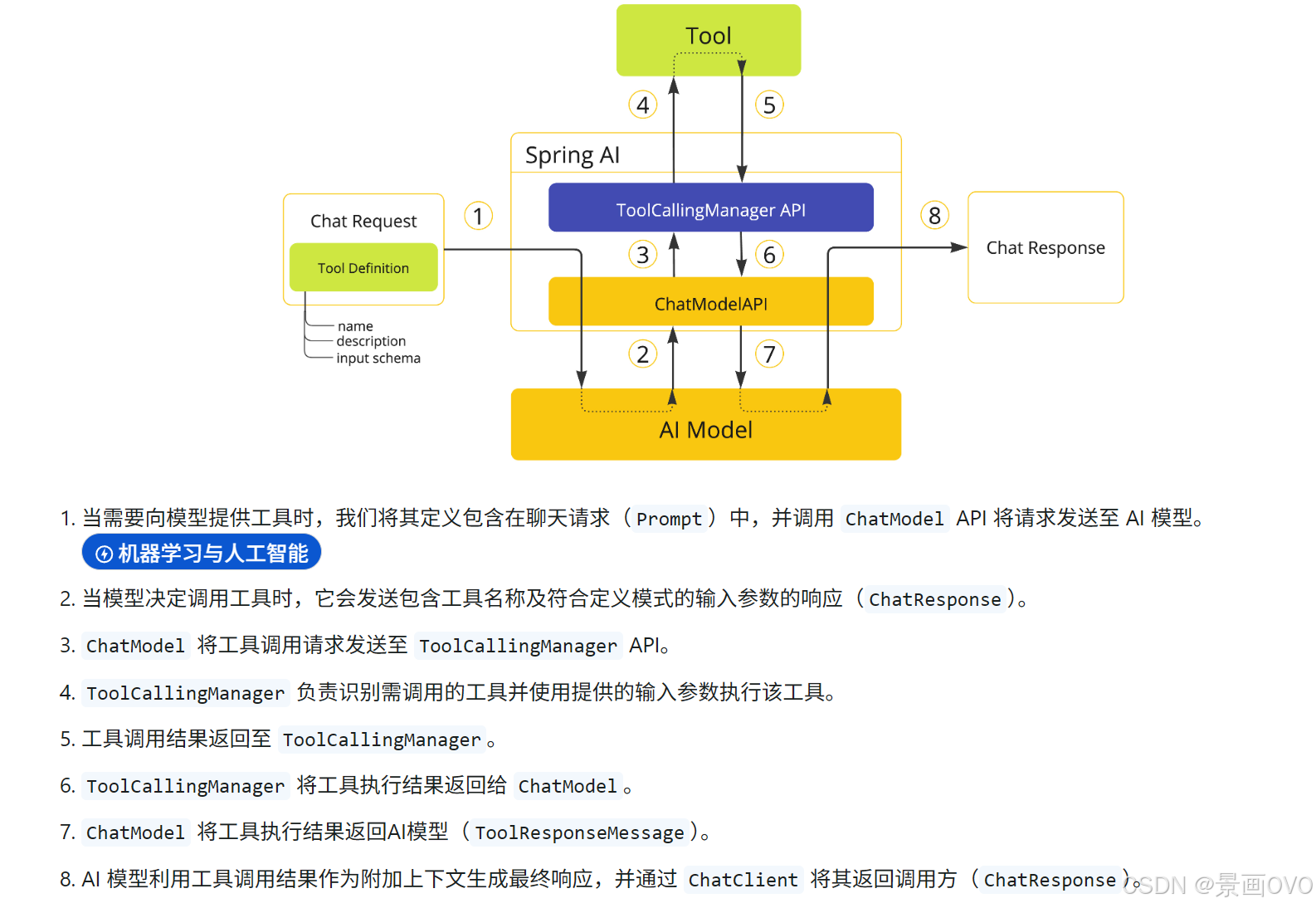 AI Visual Insight: This image presents the full tool execution lifecycle, from model decision-making and argument dispatch to tool execution and result injection, helping developers understand where to diagnose problems in the chain.
The conclusion is that tool descriptions and assembly patterns matter equally
If you want development speed, start with annotation-based @Tool. If you want controllability, governance, and enterprise-grade extensibility, prioritize the combination of MethodToolCallback and ChatModel.
In real-world engineering, the factor that most often determines effectiveness is not whether Tool Calling is supported at all, but whether tool descriptions are precise, whether the Schema is clear, whether context is isolated correctly, and whether results should be returned directly.
FAQ
1. Why do we still need Tool Calling if the model is already powerful?
Because model knowledge is static. It cannot naturally access real-time data, business systems, or execute actions. Tool Calling gives the model an execution path for invoking external capabilities.
2. How should I choose between ChatClient and ChatModel?
Choose ChatClient for fast application-layer integration. Choose ChatModel for fine-grained low-level control. The former provides higher-level encapsulation, while the latter is better for complex routing, multi-tool composition, and default option management.
3. What is the most common pitfall in tool definitions?
The most common issues are descriptions that are too short, unclear parameter semantics, and incomplete Schema definitions. The result is that the model knows a tool exists, but does not know when to call it or how to construct the arguments.
AI Readability Summary: This article systematically reconstructs the core Tool Calling mechanisms and implementation patterns in Spring AI Alibaba. It covers @Tool, @ToolParam, ChatClient, ChatModel, MethodToolCallback, ToolContext, and Return Direct, helping developers quickly build LLM applications that can invoke external capabilities such as time and weather services.