This article focuses on the minimum viable implementation of the SQLite C API for embedded database scenarios: opening a database, creating a table, executing SQL, querying results, and closing the connection to build a C-based CRUD console program. It addresses common pain points such as lightweight device-side storage, service-free deployment, and low resource usage. Keywords: SQLite, C API, embedded database.
Technical Specification Snapshot
| Parameter | Description |
|---|---|
| Language | C |
| Database Engine | SQLite |
| Access Method | SQLite C API |
| Typical Protocols/Interfaces | File-based database interface, local SQL calls |
| GitHub Stars | Not provided in the source material |
| Core Dependencies | sqlite3.h, SQLite runtime library, stdio.h, stdlib.h |
| Runtime Model | Single-process, locally embedded |
| Typical Use Cases | Device-side data caching, configuration storage, lightweight business tables |
This SQLite C API approach works well for lightweight local persistence
SQLite stands out because it requires zero deployment, stores data in a single file, and does not need a standalone database service. For embedded development, small Linux utilities, and edge device applications, it is much easier to integrate than service-based databases such as MySQL.
The source material has a very clear goal: call the SQLite API directly from C to open a database, create a table, insert, delete, update, and query records, then wrap everything in a menu-driven program that serves as a runnable minimum management console.
The core APIs have clearly defined responsibilities
sqlite3_open: Open or create a database filesqlite3_close: Close the database connectionsqlite3_errmsg: Get the reason for the most recent errorsqlite3_exec: Execute SQL, optionally using a callback to process query resultssqlite3_get_table: Fetch the full query result table in one call
#include <sqlite3.h>
#include <stdio.h>
#include <stdlib.h>

int main(void) {
    sqlite3 *db = NULL;

    // Open the database. Create it automatically if it does not exist.
    if (sqlite3_open("student.db", &db) != SQLITE_OK) {
        printf("Open failed: %s\n", sqlite3_errmsg(db));
        return 1;
    }

    printf("Database opened successfully\n");

    // Always close the handle after use.
    sqlite3_close(db);
    return 0;
}
This snippet demonstrates the minimum lifecycle of an SQLite program: open, use, and close.
sqlite3_exec is a strong fit for table creation and CRUD statements
In real-world projects, you can hand off DDL and most DML statements to sqlite3_exec. Its interface is simple, which makes it ideal for quickly implementing administrative logic.
The example from the original article centers on a stu table with fields such as id, name, and score. This is a common embedded database pattern: simple schema, lightweight transactions, and mostly local read/write access.
char *errmsg = NULL;
const char *sql = "create table if not exists stu(id integer, name char, score integer);";

// Execute the CREATE TABLE SQL and return an error message on failure.
if (sqlite3_exec(db, sql, NULL, NULL, &errmsg) != SQLITE_OK) {
    printf("Create table failed: %s\n", errmsg);
    sqlite3_free(errmsg); // Release the memory for the error message.
} else {
    printf("Create table succeeded\n");
}
This code ensures that the program always has a usable table structure after startup.
sqlite3_open and sqlite3_errmsg are the entry points for error diagnosis
sqlite3_open returns SQLITE_OK on success. If it fails, the developer should immediately print the error details with sqlite3_errmsg(db), such as an invalid path, insufficient permissions, or an invalid handle.
A useful practice rule applies here: check the return value after every SQLite API call. Never assume the database is always available. In embedded environments, file system failures and permission issues are common.
You must release related resources before calling sqlite3_close
If you previously received an errmsg through sqlite3_exec, or retrieved a result set through sqlite3_get_table, release those resources before closing the database. Otherwise, you may trigger resource leaks or shutdown failures.
if (errmsg != NULL) {
    sqlite3_free(errmsg); // Release the error message first.
    errmsg = NULL;
}

sqlite3_close(db); // Close the database connection last.
This snippet reflects the ordering constraint in SQLite C API programming: clean up resources first, then close the handle.
Two query patterns cover most beginner scenarios
The original content demonstrates both sqlite3_exec + callback and sqlite3_get_table. The first is more stream-oriented, while the second is better for fetching the entire result set at once.
If you only want to print results quickly, sqlite3_get_table is more straightforward. If you want to process records as they arrive, the callback approach is more flexible.
Callback-based queries are closer to event-driven processing
int print_result(void *arg, int f_num, char **f_value, char **f_name) {
    for (int i = 0; i < f_num; i++) {
        // Convert NULL values into printable text to avoid null-pointer access.
        printf("%s=%s ", f_name[i], f_value[i] ? f_value[i] : "NULL");
    }
    printf("\n");
    return 0; // Return 0 to continue processing subsequent rows.
}
This callback function prints the field name and field value when each query result row arrives.
char *errmsg = NULL;
const char *sql = "select * from stu;";

// Process query results row by row with a callback.
if (sqlite3_exec(db, sql, print_result, NULL, &errmsg) != SQLITE_OK) {
    printf("Query failed: %s\n", errmsg);
    sqlite3_free(errmsg);
}
This approach works well when the result set is not large and you want to consume data immediately.
sqlite3_get_table is better for one-shot tabular output
char **resultp = NULL;
int nrow = 0, ncolumn = 0;
char *errmsg = NULL;

if (sqlite3_get_table(db, "select * from stu;", &resultp, &nrow, &ncolumn, &errmsg) == SQLITE_OK) {
    // Print the header first.
    for (int j = 0; j < ncolumn; j++) {
        printf("%-10s", resultp[j]); // The first ncolumn items are column names.
    }
    printf("\n");

    int index = ncolumn; // Skip the header row.
    for (int i = 0; i < nrow; i++) {
        for (int j = 0; j < ncolumn; j++) {
            printf("%-10s", resultp[index++]); // Print field values in order.
        }
        printf("\n");
    }

    sqlite3_free_table(resultp); // Always release the result table after the query.
}
This code reads the complete result into memory and prints it in a two-dimensional table format.
The full CRUD menu program demonstrates a typical embedded database workflow
The main program flow in the source code is straightforward: open the database and create the table at startup, then use a loop-based menu to call do_insert, do_delete, do_update, and do_query2.
This structure is ideal for teaching and prototype validation because it maintains a single database handle and keeps each business function focused and easy to understand.
This sample code includes three issues worth fixing
First, the delete function example contains sqlite_3 free(errmsg);, which is a clear typo. The correct form is sqlite3_free(errmsg);.
Second, the failure branch in do_query1 used sqlite3_free(resultp);, but that function does not define resultp. The correct fix is to free errmsg.
Third, although constructing SQL with sprintf is convenient for teaching, it introduces SQL injection and buffer overflow risks. Production code should switch to prepared statements with sqlite3_prepare_v2.
switch (cmd) {
    case 1:
        do_insert(db);   // Insert a student record.
        break;
    case 2:
        do_delete(db);   // Delete a record by id.
        break;
    case 3:
        do_query2(db);   // Query and print the results in table form.
        break;
    case 4:
        do_update(db);   // Update a student's score.
        break;
    case 5:
        sqlite3_close(db); // Close the database before exiting.
        exit(0);
    default:
        printf("cmd err\n");
}
This menu dispatch logic forms the business entry point of the entire console database program.
The screenshots show runtime output and feature completion status
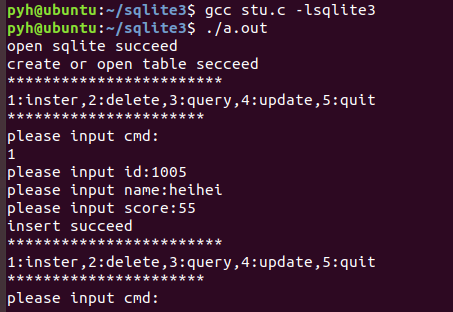 AI Visual Insight: This screenshot shows the runtime interface of the SQLite console program. It typically includes messages such as a successful database open, successful table creation, or menu command output, and confirms that the initialization flow is working end to end.
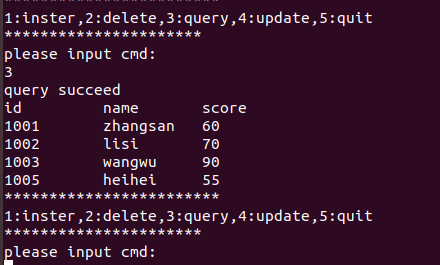 AI Visual Insight: This image reflects the terminal output after an insert or query operation. It highlights that records in the
 stu table have been written successfully, confirming that the sqlite3_exec execution path is functioning correctly.
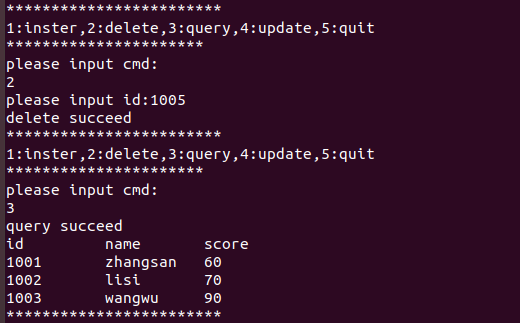 AI Visual Insight: This screenshot most likely shows the echoed results after a delete or update operation. It indicates that targeted modifications based on the primary key
 id have taken effect and verifies the persistence behavior of DML statements in the local database file.
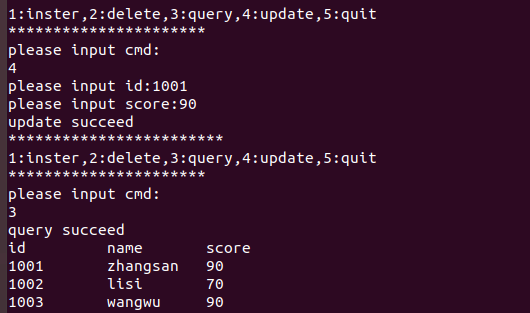 AI Visual Insight: This image appears to correspond to tabular query output. You can see column names and row values printed with fixed-width formatting, which shows that the two-dimensional traversal logic of
 sqlite3_get_table is correct.
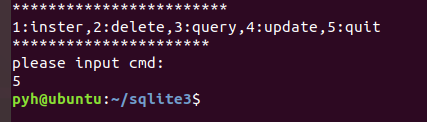 AI Visual Insight: This screenshot serves as evidence that the full CRUD workflow has been integrated successfully. It typically shows the final state after multiple operations and is a key indicator that the program works as a complete closed loop.
This is a high-value entry path to databases for embedded developers
If your goal is to introduce structured storage into a single-board computer, industrial control device, edge node, or local utility, the SQLite C API is a very safe first choice.
It has a low learning curve, minimal dependencies, simple portability, and tight integration with the C ecosystem. Once you master the five core APIs in this article, you can move on to prepared statements, transactions, and concurrency control to cover most lightweight business scenarios.
FAQ
1. Why do embedded projects often use SQLite instead of MySQL?
SQLite does not require a standalone service process, deploys as a single file, and consumes fewer resources. That makes it especially suitable for device-side applications, local caching, and offline workloads.
2. How should I choose between sqlite3_exec and sqlite3_get_table?
Use sqlite3_exec first for table creation, inserts, deletes, and updates. For queries, use a callback if you want row-by-row processing. Use sqlite3_get_table if you want the full result table quickly.
3. What should I change first before shipping this sample code to production?
First, replace SQL built with sprintf by prepared statements to avoid injection and out-of-bounds risks. Second, fix the incorrect resource-release logic. Finally, add transactions and input validation to improve reliability.
[AI Readability Summary]
This article reconstructs the core SQLite C API call flow around
sqlite3_open,sqlite3_exec,sqlite3_get_table, andsqlite3_close, using a student-management example to explain CRUD implementation, error handling, and memory-release best practices for embedded databases.