This article focuses on OSPFv2 neighbor formation and packet capture analysis in IPv4 networks. It explains the interaction logic of Hello, DD, LSR, LSU, and LSAck packets to help you quickly identify why a neighbor gets stuck in Down, Init, ExStart, Exchange, or other stages. Keywords: Wireshark, OSPFv2, neighbor troubleshooting.
Technical specification snapshot
| Parameter | Description |
|---|---|
| Protocol | OSPFv2 |
| Applicable network | IPv4 Interior Gateway Protocol |
| Packet transport | IP protocol number 89 |
| Capture tool | Wireshark |
| Typical multicast address | 224.0.0.5 |
| Authentication field | Located in the OSPF packet header |
| Core dependencies | Router OSPF process, Layer 3 directly connected link, packet capture environment |
| Star count | Not provided in the original content |
| Language | Chinese technical walkthrough |
OSPFv2 delivers its core value through fast convergence with a link-state mechanism
OSPFv2 primarily serves IPv4 networks. Unlike protocols that rely on distance-vector updates, it calculates the optimal path by synchronizing the LSDB, which makes it better suited for medium and large networks.
The original material also notes that OSPFv2 later evolved into OSPFv3 to support IPv6 because of its limited extensibility, while IS-IS is inherently easier to extend because it uses a TLV structure. This background is important when you evaluate the scalability boundaries of OSPFv2.
The OSPF neighbor state machine maps directly to what you see in packet captures
OSPF neighbor formation does not happen in a single step. It progresses through stages: Down, Init, 2-Way, ExStart, Exchange, Loading, and Full.
- Down: No neighbor has been discovered yet.
- Init: A Hello has been received from the peer, but the peer’s Hello does not yet contain the local Router ID.
- 2-Way: Each side sees the other’s Router ID in Hello packets, so the neighbor relationship is established.
- ExStart: The devices negotiate master/slave roles and determine the DD sequence number.
- Exchange: The devices exchange LSA summaries.
- Loading: The devices request and fill in missing LSAs.
- Full: The LSDB is fully synchronized, and adjacency is complete.
Down -> Init -> 2-Way -> ExStart -> Exchange -> Loading -> Full
# Key point: 2-Way means the neighbor relationship exists, but Full means adjacency is complete
# In broadcast networks, not every neighbor will ultimately reach Full
This state chain shows that seeing 2-Way does not mean routing is fully operational. The real completion point for database synchronization is Full.
Successful neighbor formation depends on a strict set of matching prerequisites
When OSPF neighbor formation fails, the most effective method is not to blindly capture all traffic. First validate the prerequisites for adjacency. The troubleshooting checklist from the original content is highly practical.
You should verify parameter consistency before analyzing adjacency formation
- Layer 3 direct connectivity is reachable.
- The
networkstatement correctly advertises the subnet. - Authentication succeeds.
- The Area ID matches.
- Hello and Dead timers match.
- Stub/NSSA-related option bits match.
- The subnet mask matches on multi-access networks.
- The interface is not passive or suppressed.
- The MTU is compatible.
- The OSPF version matches.
- The Router ID is unique.
# Example of modifying the Hello timer on a Huawei device

<Huawei> system-view
[Huawei] interface GigabitEthernet0/0/0
[Huawei-GigabitEthernet0/0/0] ospf timer hello 20  # Change the Hello interval
This configuration adjusts the Hello timer, but the two sides do not negotiate this automatically. A mismatch will directly cause neighbor formation to fail.
Pay special attention to the MTU. The original text points out that DD packets carry MTU information, and some vendors validate it strictly. If multi-vendor devices remain stuck in ExStart or Exchange, check the MTU first.
Hello packets are the starting point for neighbor discovery and session maintenance
After OSPF starts, it automatically sends Hello multicast packets, usually to 224.0.0.5. In a capture, periodic Hello packets are the first thing you should see.
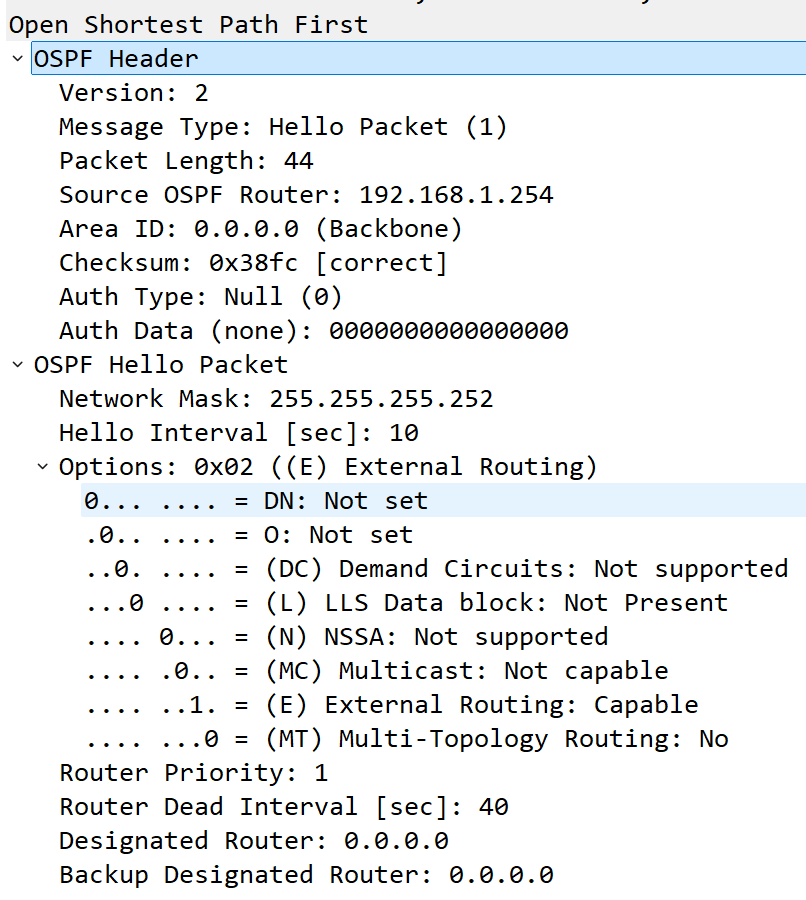 AI Visual Insight: This image shows the expanded OSPF Hello packet fields in Wireshark. You can inspect key header information such as the version, area ID, packet type, authentication field, Hello Interval, Dead Interval, and DR/BDR addresses, which makes it useful for validating whether adjacency parameters match.
The Hello header lets you directly verify several adjacency requirements: version, area, authentication, Hello/Dead timers, options, and DR/BDR information all appear here.
 AI Visual Insight: This image shows a device sending Hello multicasts to 224.0.0.5, which confirms that the local OSPF process has started but has not yet confirmed a neighbor. This usually corresponds to Down or the early discovery stage, and it is the first piece of evidence when you ask whether the device is actively initiating neighbor formation.
You can distinguish Init from 2-Way by checking the neighbor list field directly
When the local device has received a Hello from the peer, but the peer’s packet does not yet include the local Router ID in its neighbor list, the local state is Init. This commonly happens when the peer has just started OSPF or when the link is only reachable in one direction.
 AI Visual Insight: This image shows that the peer is also sending Hello packets, which means the OSPF process is running on both sides. At this point, troubleshooting should shift from “is it sending” to “do the fields match” and “is bidirectional reachability intact.”
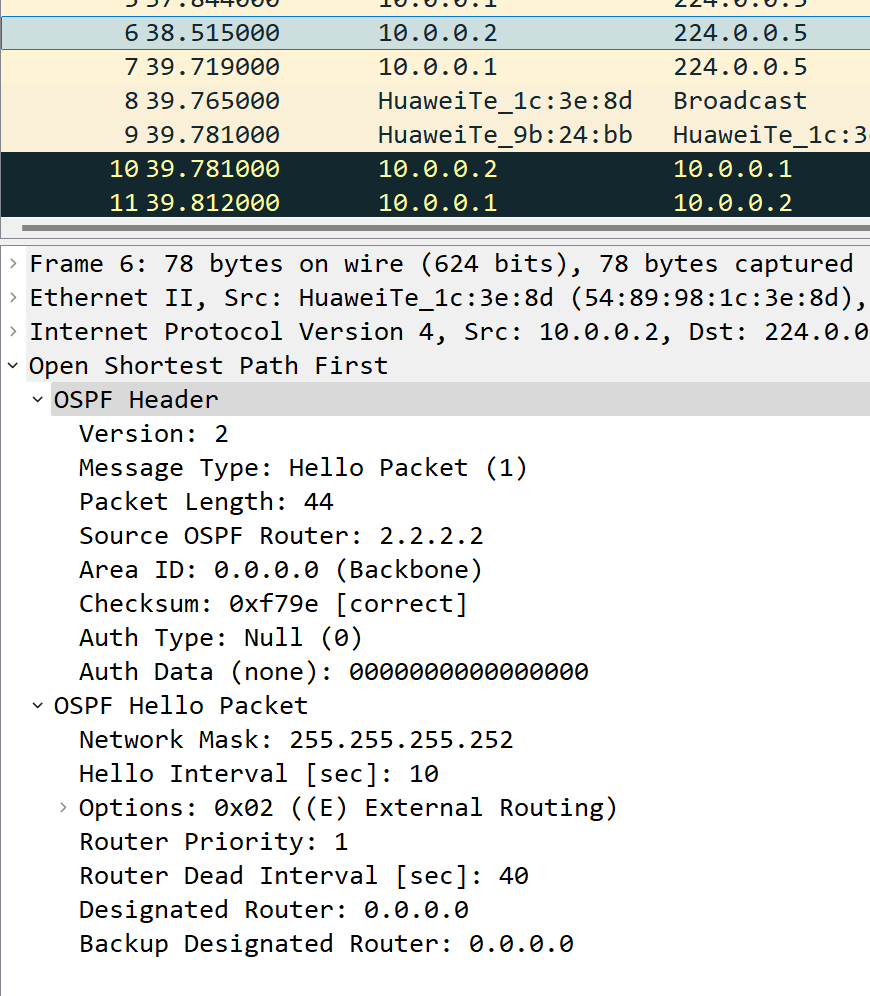 AI Visual Insight: This image shows that the local Router ID is still missing from the Hello packet’s neighbor list, so the state remains Init. When you capture this condition, first suspect that the peer did not receive the local Hello, authentication is failing, or interface filtering is blocking packets.
When subsequent Hello packets from both sides include each other’s Router ID, the state moves to 2-Way.
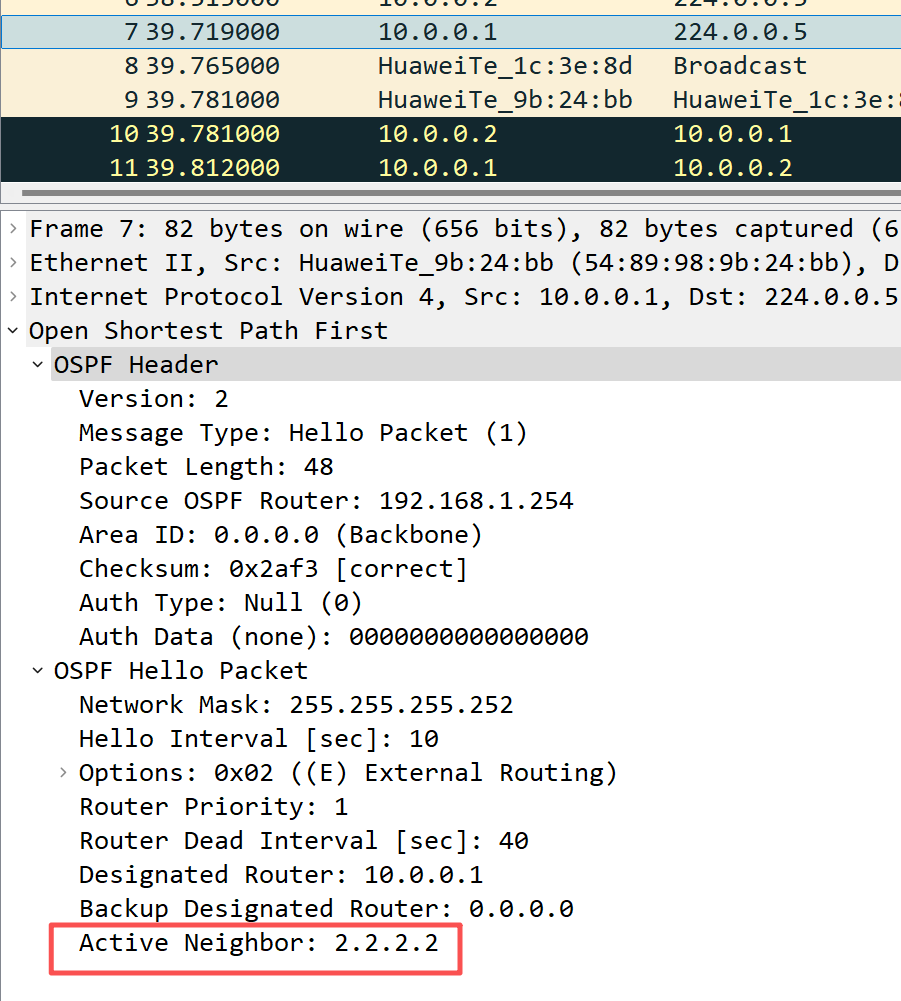 AI Visual Insight: This image shows that the Hello packet already carries the peer Router ID, which means bidirectional discovery is complete and the neighbor relationship is established. If the network type allows adjacency to continue, the session will next enter ExStart and begin DD negotiation.
The DD packet phase handles master-slave negotiation and database summary exchange
ExStart is one of the stages most likely to get stuck in production because master/slave negotiation, sequence numbers, and MTU issues are all exposed here.
Empty DD packets in ExStart are used to elect the master and slave roles
During ExStart, both sides first send DD packets without link-state summaries. At this point, it is common to see the I, M, and MS bits all set to 1, which indicates that this is the first DD packet, that more DD packets will follow, and that “I believe I am the master.”
I=1, M=1, MS=1
# I: Initial DD packet
# M: More DD packets follow
# MS: This device currently claims to be the Master
# The device with the higher Router ID ultimately becomes the master
The essence of this step is to establish the synchronization rhythm, not to exchange the full LSA contents immediately.
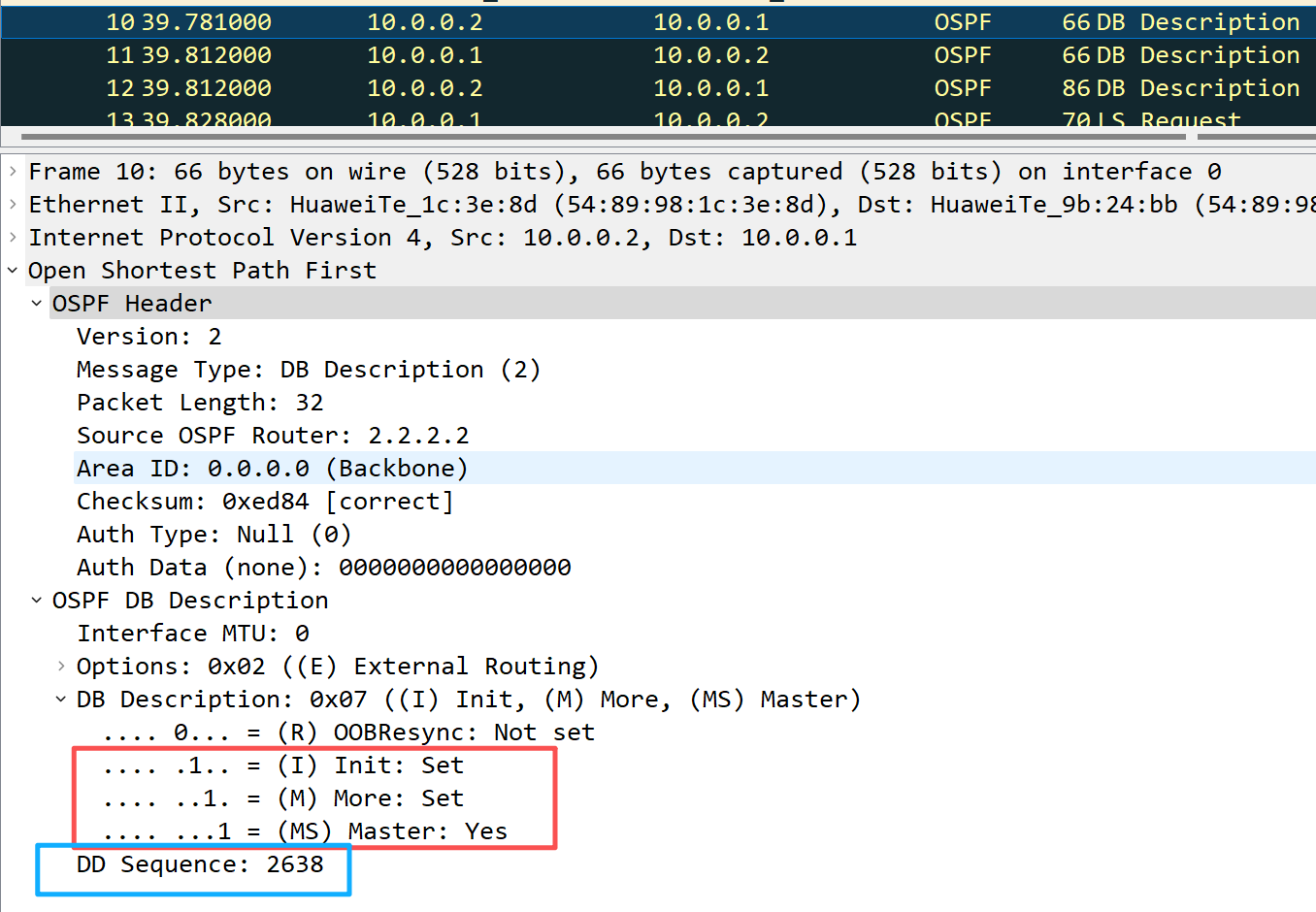 AI Visual Insight: This image shows the DD packet flags and sequence number field during ExStart. By looking at the I/M/MS bits and the random initial sequence number, you can observe how both sides initially claim to be the master and wait for final arbitration.
After the device with the higher Router ID wins, the slave clears the MS bit and follows the master’s sequence number progression.
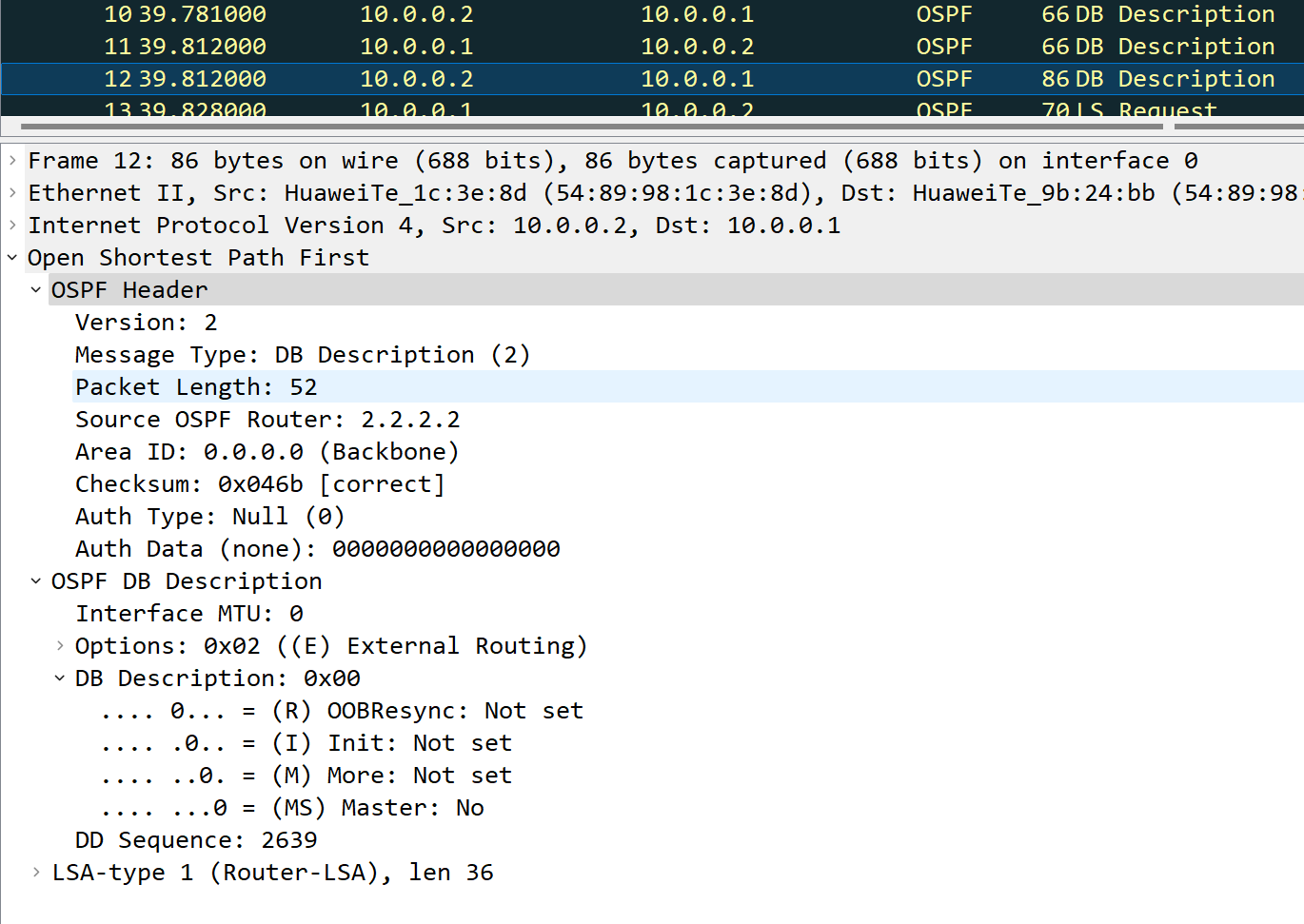 AI Visual Insight: This image shows that the master/slave relationship has already been determined: the DD packet sent by the slave has the MS bit cleared, and the sequence number now follows the master’s progression. This is key evidence that ExStart is successfully moving into Exchange.
The Exchange and Loading stages complete LSA summary comparison and missing-entry retrieval
After entering Exchange, DD packets begin carrying LSA summaries. The peer uses these summaries to determine which database entries are missing.
The device then uses LSR to request missing entries, LSU to return the specific LSAs, and LSAck to acknowledge successful receipt of the LSAs carried in the LSU. After this process completes, the neighbor reaches Full.
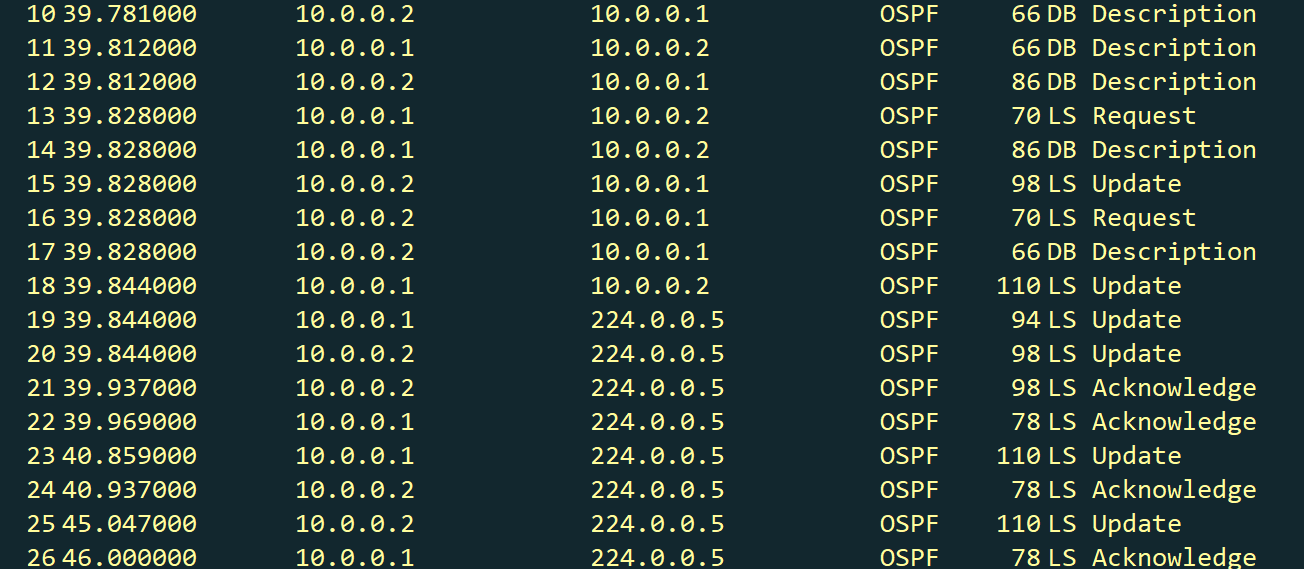 AI Visual Insight: This image provides an integrated view of the roles of DD, LSR, LSU, and LSAck in OSPF database synchronization: DD provides only summaries, LSR requests specific items, LSU carries the full LSA payloads, and LSAck confirms receipt. It is core packet-capture evidence for understanding the Exchange and Loading stages.
DD   -> Tell the peer "here are the LSA summaries I have"
LSR  -> Request from the peer "here are the LSAs I am missing"
LSU  -> Send "here are the full LSAs you requested"
LSAck -> Confirm "I have received these LSAs"
Together, these four packet types form the complete closed loop of OSPF adjacency database synchronization.
Packet capture troubleshooting is most effective when combined with device-side commands
If you only look at packet captures, you may stay at the symptom level. If you only look at device commands, you may miss the evidence chain. Combining both gives you the highest troubleshooting efficiency.
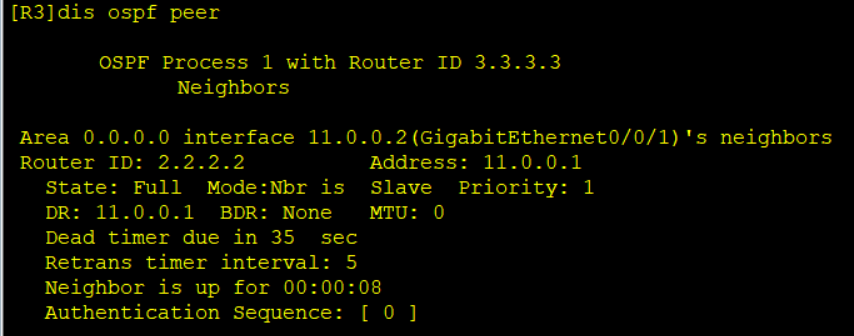 AI Visual Insight: This image shows device-side output for viewing OSPF neighbor information. It is useful for validating packet-capture states, such as confirming whether a neighbor is stuck in Init, 2-Way, or Full, and whether some adjacencies are only partially established.
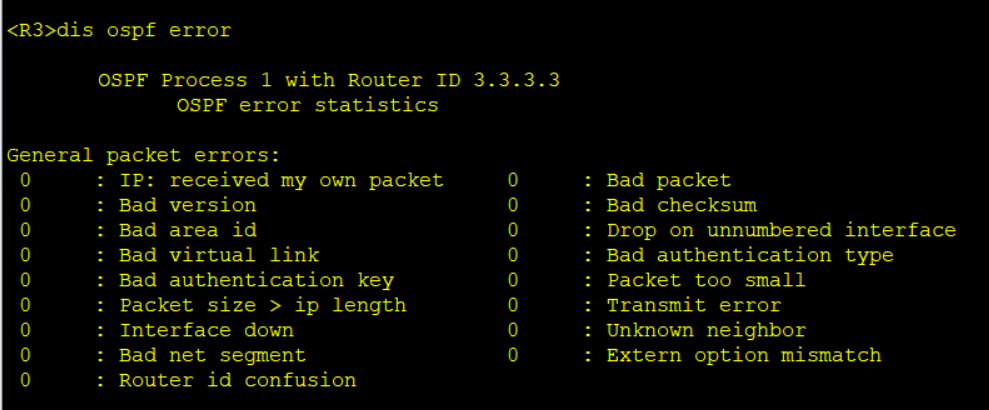 AI Visual Insight: This image shows a device log or error display interface. It is useful for correlating protocol field anomalies with vendor-specific implementation details, such as authentication failures, MTU mismatches, or parameter inconsistencies that prevent neighbor formation.
An efficient OSPFv2 troubleshooting workflow starts with Hello and then moves to DD
Use this sequence: first confirm whether Hello packets exist, then verify whether the Hello fields match, then check whether the session reaches 2-Way, and finally analyze DD master/slave negotiation and MTU.
# Recommended troubleshooting sequence
display ospf peer brief      # Check whether the neighbor state is stalled
display ospf error           # Check device-side error messages
# Recommended Wireshark filter: ospf
# Focus on: Hello -> DD -> LSR/LSU/LSAck
These commands, combined with packet captures, help you quickly determine whether the issue occurs in the discovery stage or the synchronization stage.
FAQ structured Q&A
1. Why do I see 2-Way, but routing still does not work?
2-Way only means the two devices have discovered each other, which establishes a neighbor relationship. The LSDB is considered synchronized only after the session reaches Full. In broadcast networks, not every neighbor must reach Full.
2. If an OSPF neighbor is always stuck in Init, what should I check first?
First check whether the peer is receiving the local Hello packets. Common causes include a unidirectional link, authentication failure, an Area mismatch, a Hello/Dead timer mismatch, or an interface that was not correctly advertised into the OSPF process.
3. Why do multi-vendor devices often get stuck in ExStart or Exchange?
A very common cause is differing MTU validation behavior. DD packets include an MTU field. Some vendors validate it strictly, while others are more permissive by default. Standardize the interface MTU first, then verify whether master/slave negotiation and sequence number progression are normal.
Core summary: This article reconstructs the OSPFv2 learning path from a packet-capture perspective. It systematically breaks down the neighbor state machine, Hello/DD/LSR/LSU/LSAck packet interactions, master/slave negotiation, and common causes of adjacency failure, while also providing a combined Wireshark and device-side troubleshooting approach.