This project targets wood surface defect detection and builds a complete pipeline from data annotation and YOLOv5–YOLOv12 training evaluation to PySide6 desktop deployment. It addresses key pain points such as low manual inspection efficiency, complex textured backgrounds, and frequent misses on small defects. Keywords: wood defect detection, YOLO, multi-source inference.
The technical specification snapshot summarizes the project baseline
| Parameter | Description |
|---|---|
| Task Type | Single-class object detection (Wood Defect) |
| Programming Language | Python |
| Desktop Framework | PySide6 |
| Data Storage | SQLite |
| Model Range | YOLOv5 to YOLOv12 |
| Input Size | 640×640 |
| Annotation Format | YOLO TXT |
| Dataset Size | 8,249 images |
| Data Split | Train 7,124 / Val 752 / Test 373 |
| Core Dependencies | Ultralytics, PyTorch, OpenCV, PySide6, SQLite |
| License / Copyright | Original article declares CC BY-NC-SA |
| Project Form | Training and evaluation + visual inspection system |
The system builds a complete engineering loop for industrial wood quality inspection
Wood surface defects include knots, cracks, wormholes, decay, resin pockets, and dents. The typical challenges are small targets, ambiguous boundaries, and a high visual similarity to wood grain backgrounds. In this type of scenario, traditional methods such as threshold segmentation, edge detection, and texture-feature pipelines struggle to deliver both robustness and real-time performance.
The value of this project lies not only in model training, but in connecting dataset construction, model comparison, parameter tuning, UI interaction, result export, and account management into one workflow. For industrial deployment, this kind of trainable, deployable, and traceable closed loop matters more than a single benchmark metric.
The main UI demonstrates the complete inspection workflow
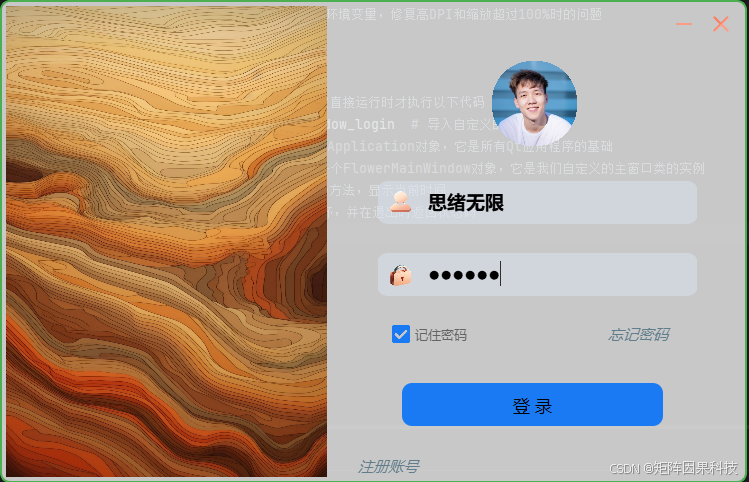 AI Visual Insight: The image shows desktop login and registration entry points, indicating that the system already integrates a local account system. In practice, this usually means detection history, theme settings, model preferences, and export paths are stored in a user-isolated manner.
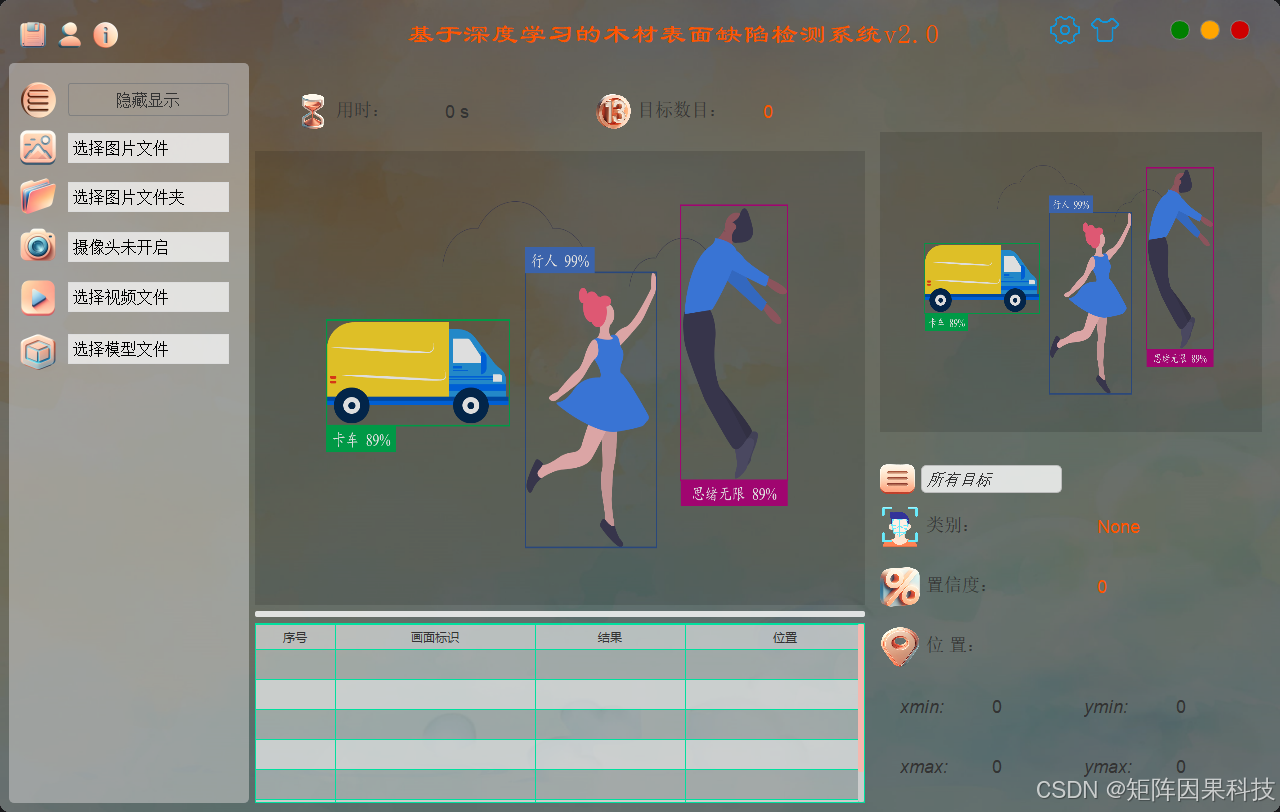 AI Visual Insight: The layout reflects a typical industrial vision UI pattern, with a control panel on the left, a detection canvas in the center, and a statistics panel on the right. This suggests support for input-source switching, result overlays, class statistics, and runtime status feedback.
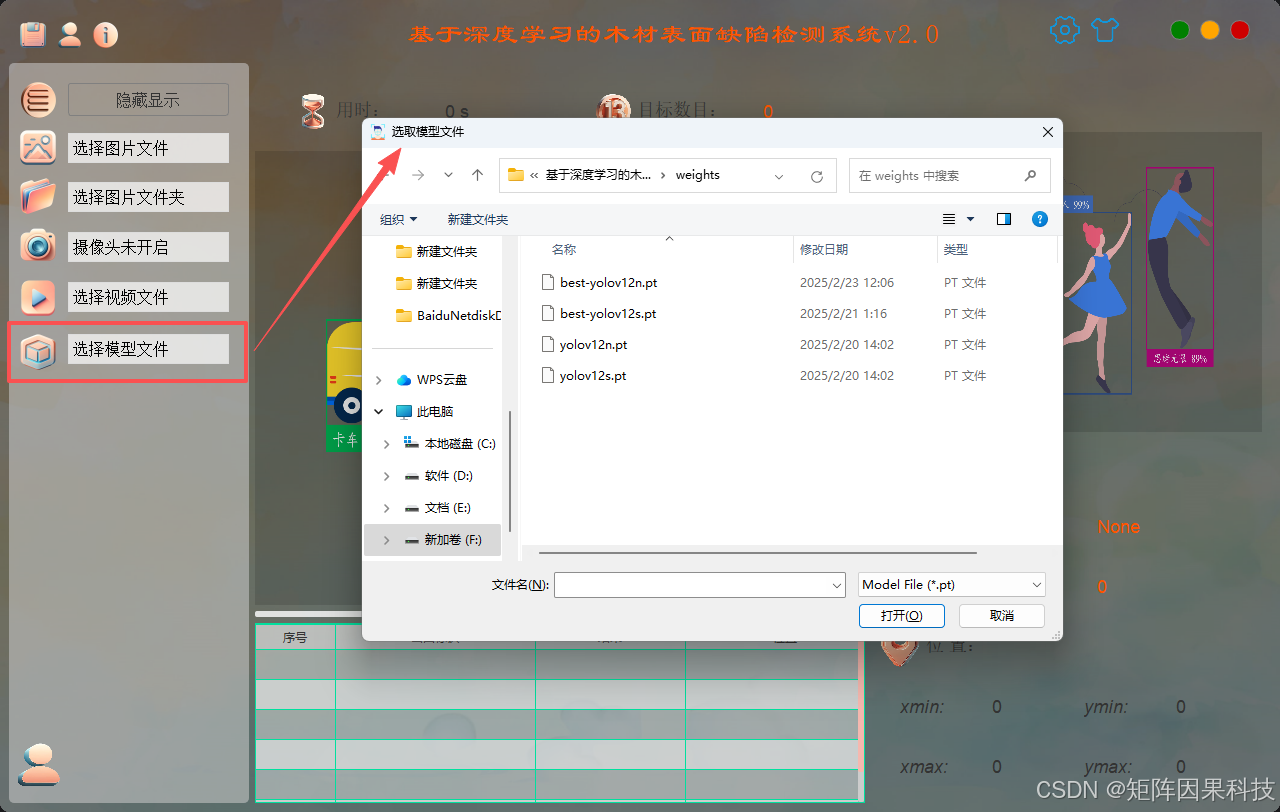 AI Visual Insight: The image highlights multi-model switching and result comparison capabilities. This indicates that the frontend has already wrapped different YOLO weights behind a unified interface, enabling horizontal comparison of false positives, missed detections, and latency on the same sample.
Dataset design directly determines the model ceiling
The project uses 8,249 wood board images with YOLO TXT normalized bounding-box annotations. The current task is single-class detection, with the class name Wood Defect. The train, validation, and test splits account for 86.36%, 9.12%, and 4.52% of the dataset, respectively.
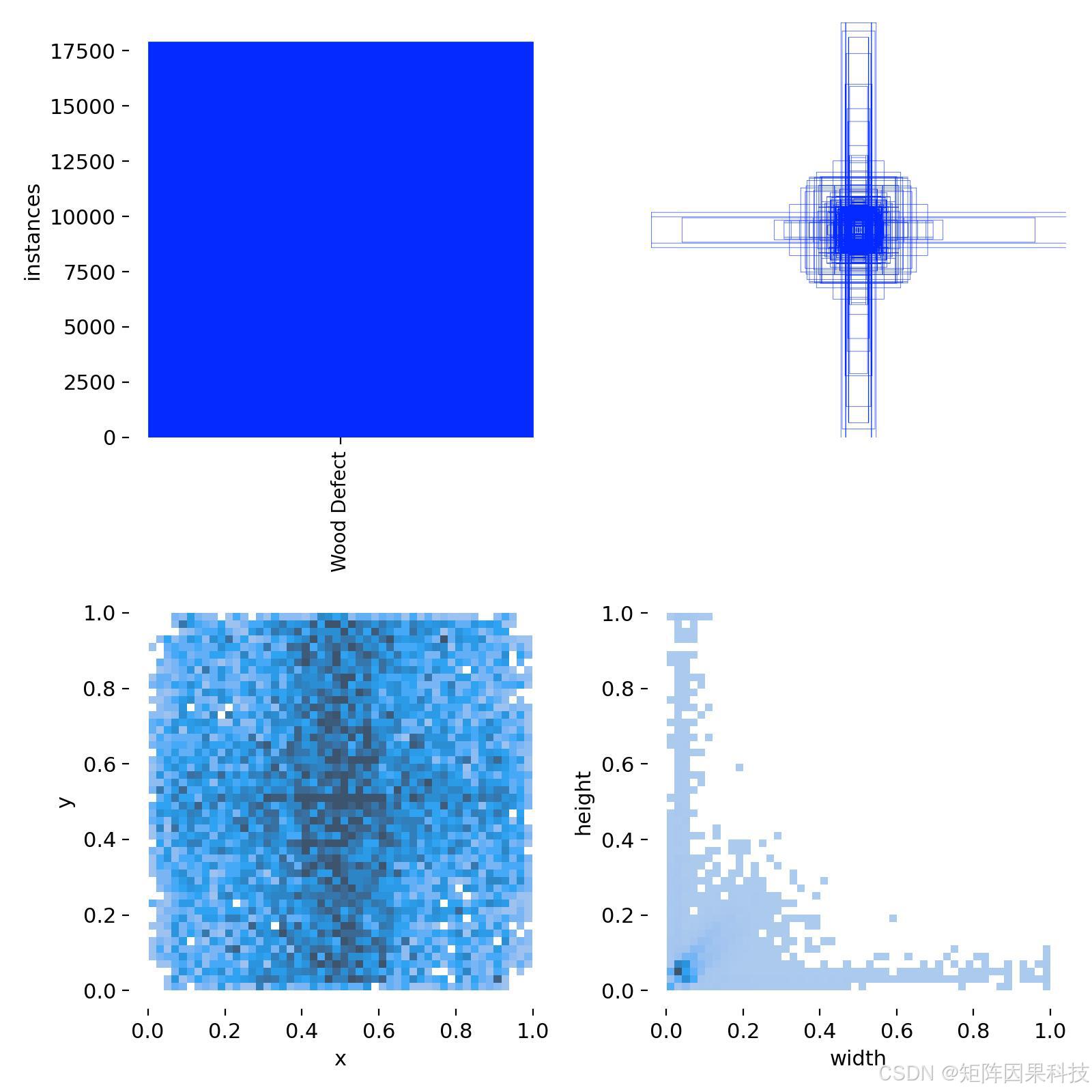
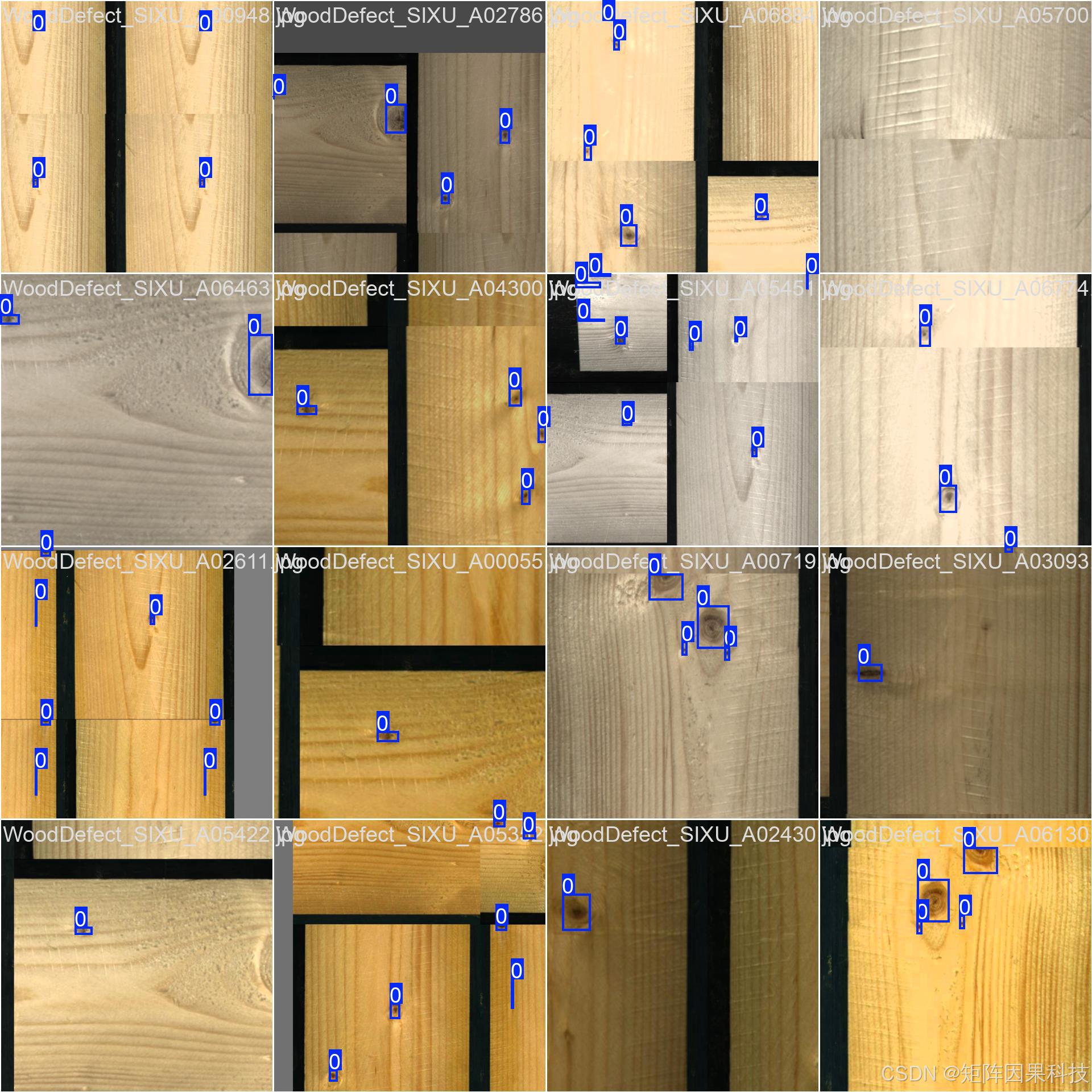
Based on the description, the data includes strongly directional wood grain, local glare, seam interference, and defects at multiple scales. This makes it a standard hard-sample industrial dataset. Bounding-box width and height follow a long-tail distribution, with a relatively high proportion of small boxes and elongated boxes. That places strict demands on the regression branch and sample assignment strategy.
Data visualization exposes the small-object and long-tail distribution challenges
 AI Visual Insight: The image shows stitched training samples and annotation-box distributions. It is visually clear that most defects occupy small regions scattered across wood panels with complex textures, which means the model must deliver strong small-object recall.
 AI Visual Insight: The figure summarizes bounding-box width, height, center-point, and instance-count statistics. The long-tail pattern is obvious, which means training must account for regression instability caused by the coexistence of thin cracks and sparse large defects.
from ultralytics import YOLO

# Load a pretrained model as the baseline for wood defect detection
model = YOLO("yolov8n.pt")

# Start training with a unified data configuration
model.train(
    data="wood_defect.yaml",  # Dataset configuration file
    imgsz=640,                 # Keep training and inference size consistent
    epochs=120,                # Set the upper training limit and combine it with early stopping
    batch=16,                  # Balance GPU memory usage and throughput
    patience=50                # Stop if the validation set shows no improvement for a long time
)
This code shows how to quickly establish a baseline for wood defect detection training through the Ultralytics interface.
The project uses a unified YOLO interface for cross-version evaluation
The project does not reimplement the detector. Instead, it relies on Ultralytics model configuration and weight-loading mechanisms to call YOLOv5 through YOLOv12 under a unified interface. This approach improves experiment reproducibility and reduces the complexity of model switching in the UI layer.
For wood defects, model design should not focus only on making networks deeper. The real priorities are multi-scale feature fusion, decoupled classification and regression, and bounding-box regression that is friendly to small objects. When a defect occupies only a tiny portion of the image, DFL and IoU-family losses are often more effective than simply increasing network depth.
The inference pipeline must reliably cover both preprocessing and postprocessing
import cv2
from ultralytics import YOLO

model = YOLO("best.pt")
img = cv2.imread("test.jpg")

# Run inference; conf and iou determine the balance between false positives and missed detections
results = model.predict(
    source=img,
    imgsz=640,
    conf=0.25,   # Lower the threshold to improve recall
    iou=0.45     # Control the suppression strength for overlapping boxes
)

for box in results[0].boxes:
    cls_id = int(box.cls[0])      # Get the class ID
    score = float(box.conf[0])    # Get the confidence score
    xyxy = box.xyxy[0].tolist()   # Get the bounding-box coordinates
    print(cls_id, score, xyxy)
This code corresponds to the core inference loop of the system’s Detector module: load weights, run detection, and output structured results.
Training strategy should follow industrial data distribution rather than default parameters
The project uses 640×640 inputs, pretrained initialization, warmup, cosine annealing, and early stopping to improve training stability. For wood defects, transfer learning is especially important because even though the dataset contains 8,249 images, the effective complexity of texture and lighting remains high.
The augmentation strategy emphasizes moderation, including flipping, scaling, HSV jitter, and Mosaic. One key lesson is that augmentation must not destroy the real statistical characteristics of wood grain. Otherwise, the model may learn artificial textures, which can sharply increase false positives in production.
At the deployment layer, the confidence and IoU thresholds are exposed in the UI so operators can switch between stricter and looser inspection modes. This externalized parameter design fits production-line usage better than hardcoding thresholds in the source code.
Experimental results show that YOLOv8n and YOLOv11s are the most practical engineering choices
Among nano models, YOLOv8n delivers the most stable overall performance, achieving an mAP50 of 0.8934 and an F1 score of 0.8728 while maintaining real-time inference latency. YOLOv11n and YOLOv5nu are also close in performance, but YOLOv12n produces nearly all-zero metrics, which clearly indicates an abnormal result.
Among small models, YOLOv11s reaches an mAP50 of 0.9004 and provides the best overall accuracy. YOLOv9s achieves a higher mAP50-95, but with higher latency as well. If real-time performance matters most, YOLOv8n or YOLOv11n should be the default choice. If accuracy matters more, YOLOv11s is the stronger option.
The curves reveal the difference between abnormal models and normally converged models
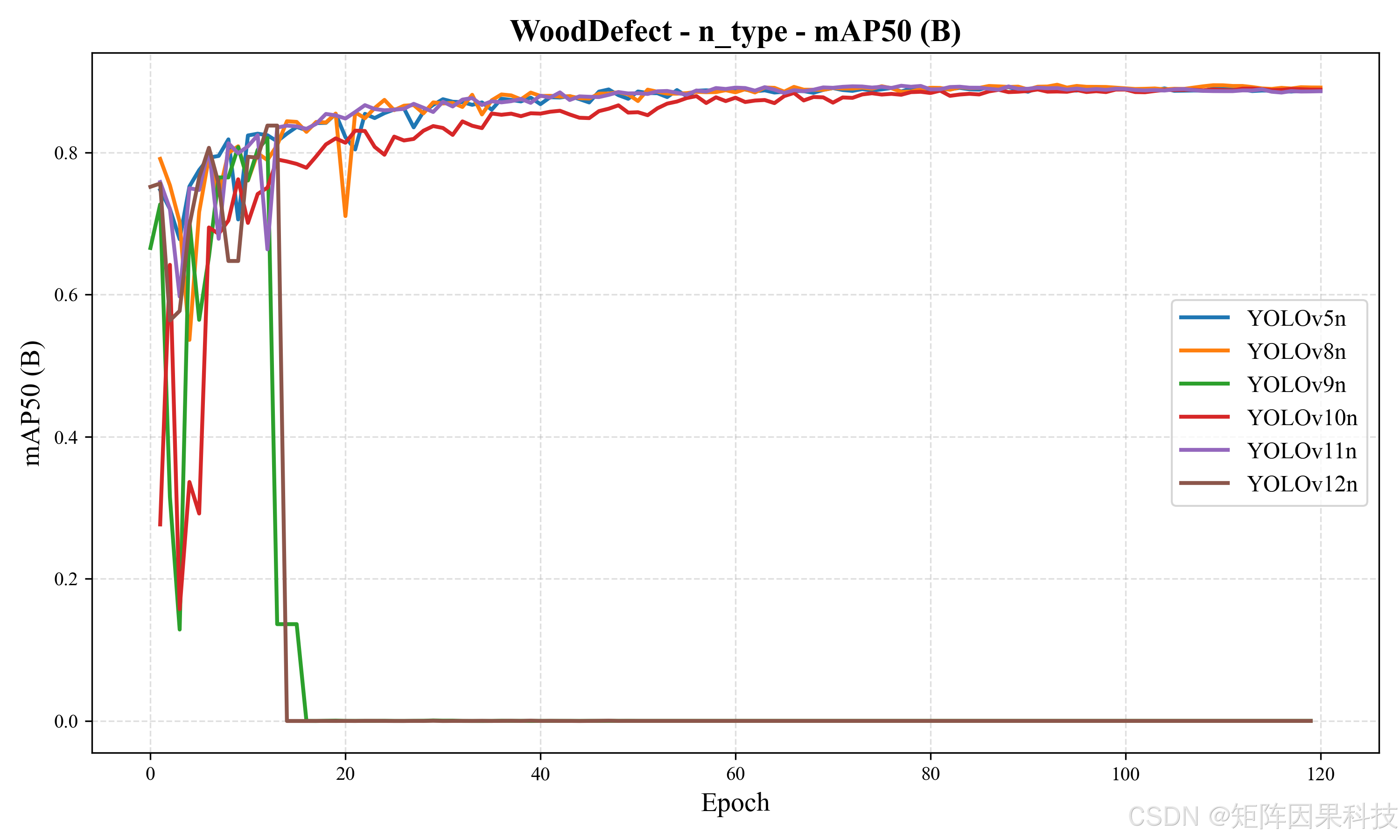 AI Visual Insight: The figure compares mAP curves for several nano-scale models. The YOLOv12n curve stays abnormally close to zero, while YOLOv8n and YOLOv11n converge stably. This suggests the problem is more likely related to configuration, labels, or evaluation flow than to the task being inherently unlearnable.
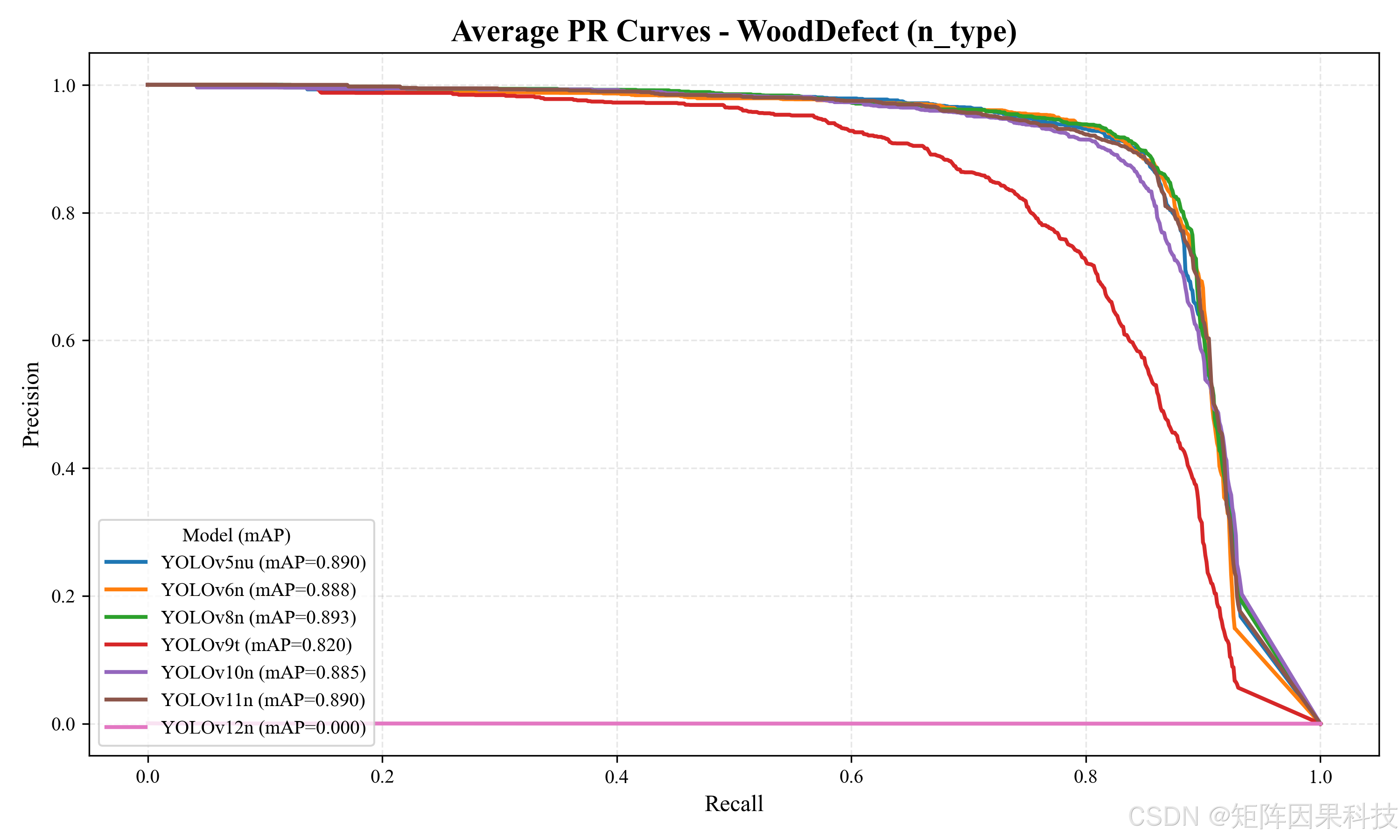 AI Visual Insight: This chart shows differences in PR-curve area among nano-scale models. Models such as YOLOv8n maintain solid precision even in the high-recall region, while the abnormal model almost fails to form an effective PR envelope.
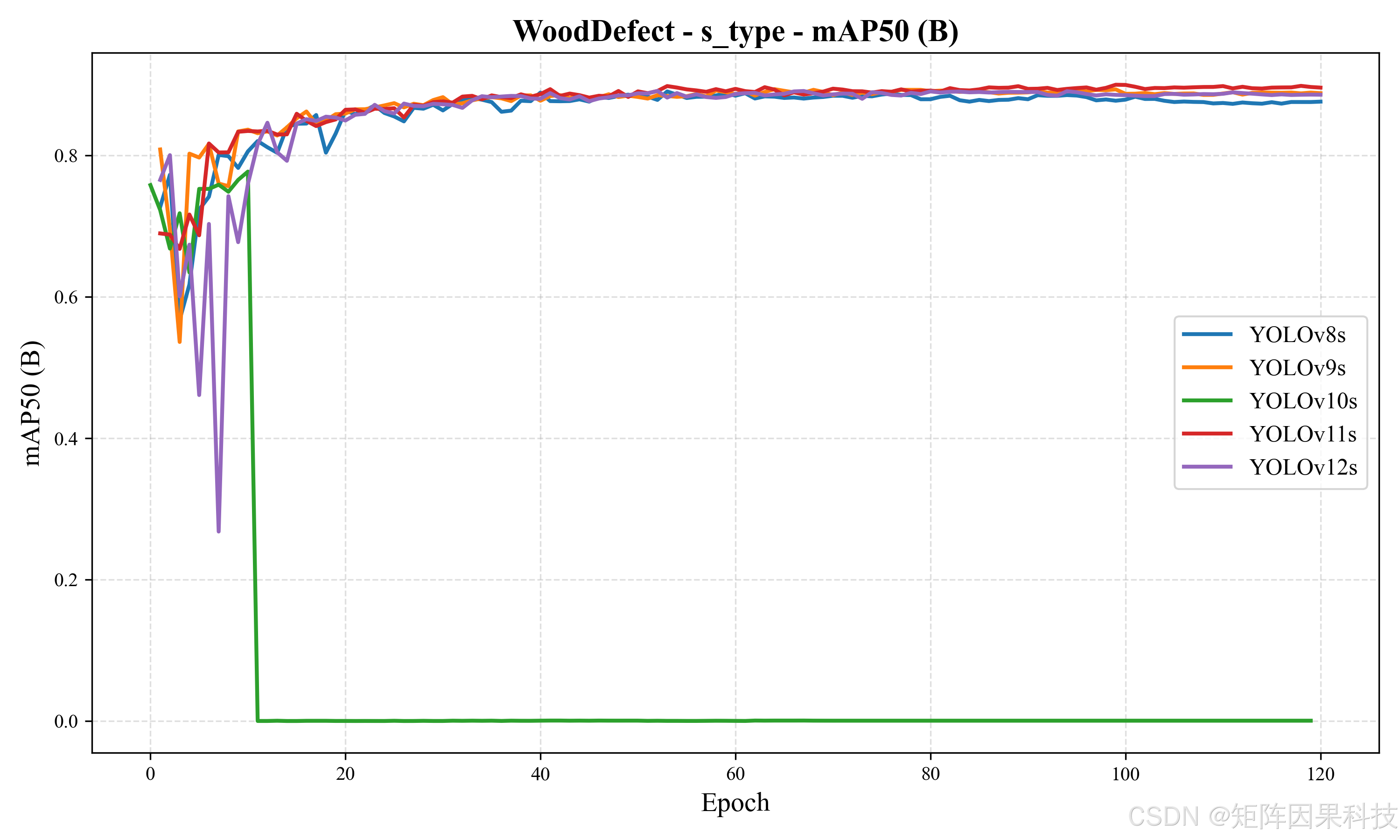 AI Visual Insight: The chart indicates that small models generally outperform most nano models. The upper-range curves of YOLOv11s and YOLOv9s suggest that larger capacity clearly helps under complex textured backgrounds.
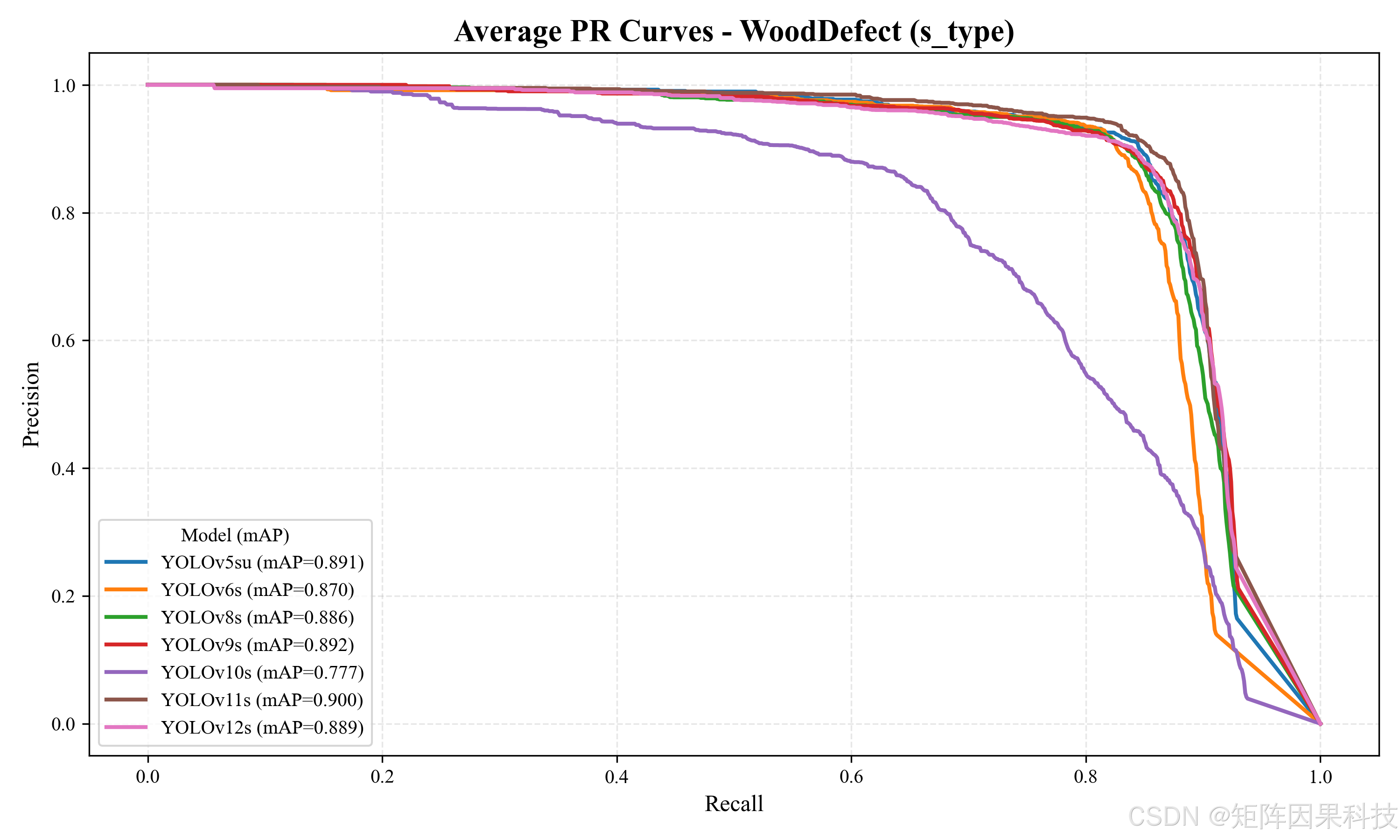 AI Visual Insight: The chart shows how well small models maintain precision across different recall ranges, making it useful for judging false-positive control under a strict-inspection mode.
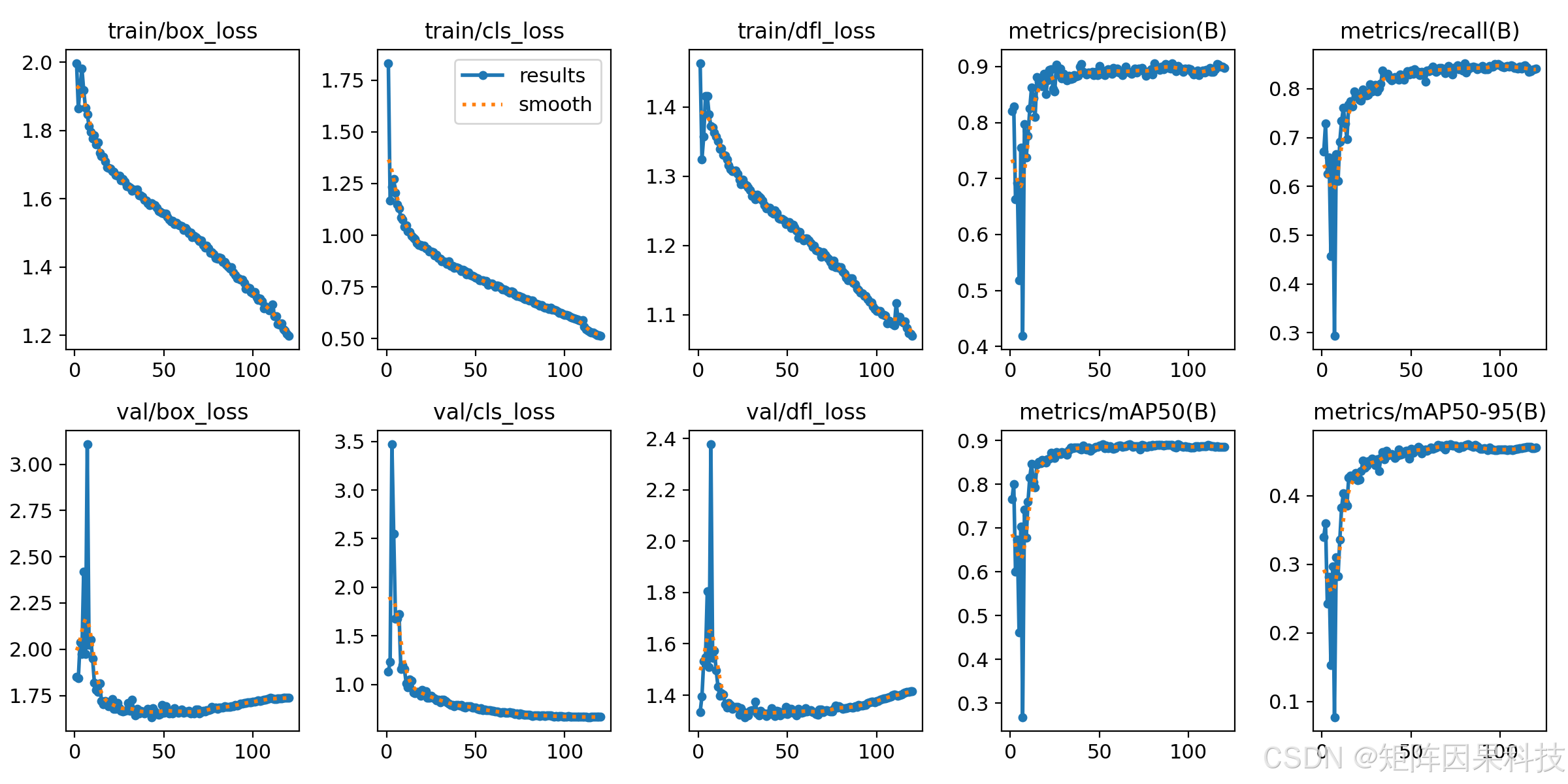 AI Visual Insight: The figure includes box loss, cls loss, dfl loss, and mAP curves. The overall trends are stable, which indicates that aside from a few abnormal models, most training runs are convergent and reproducible.
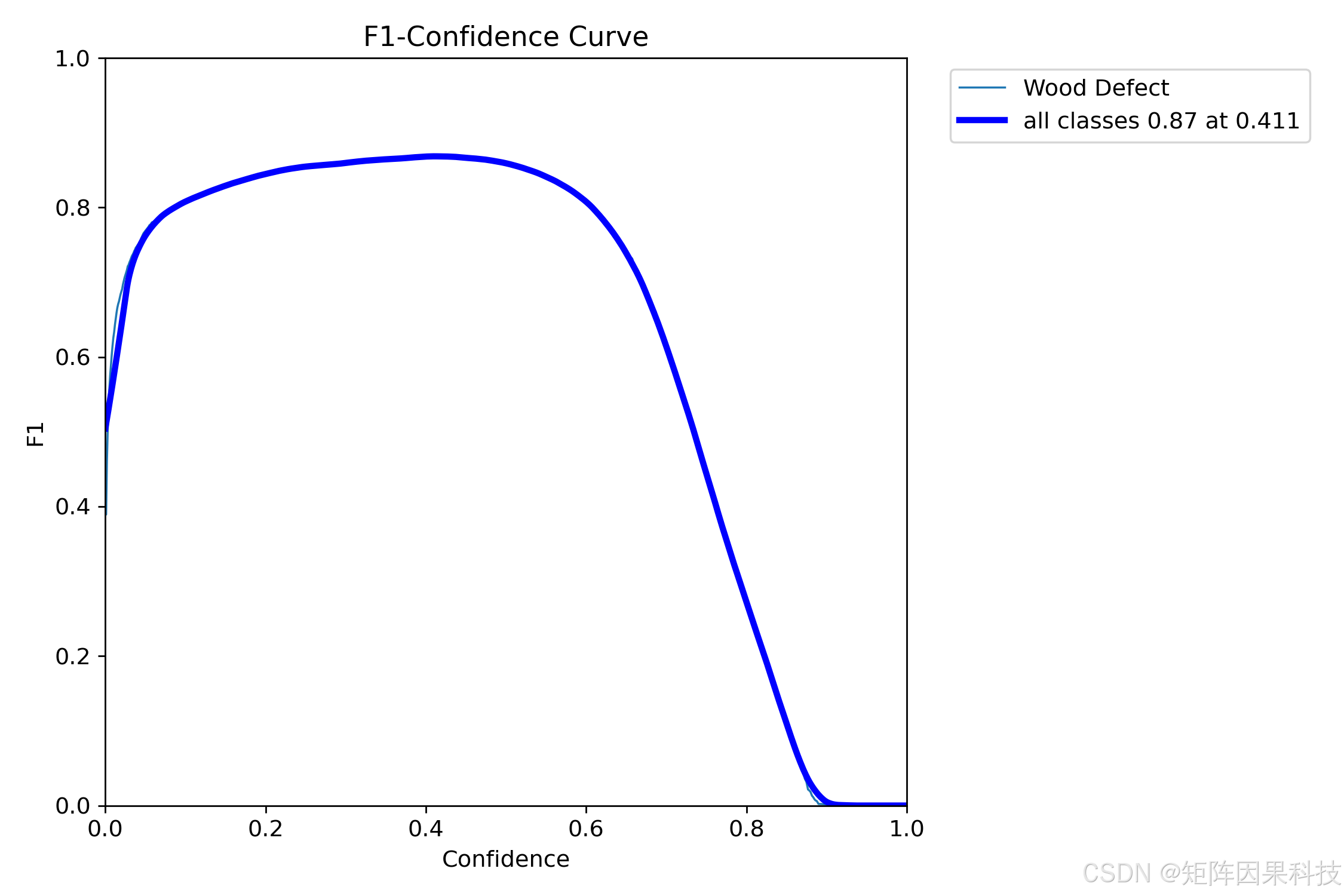 AI Visual Insight: The curve shows the F1 peak as the confidence threshold changes. The optimal point appears around 0.41, which suggests the default system threshold should not be set too high, or recall on small defects will drop noticeably.
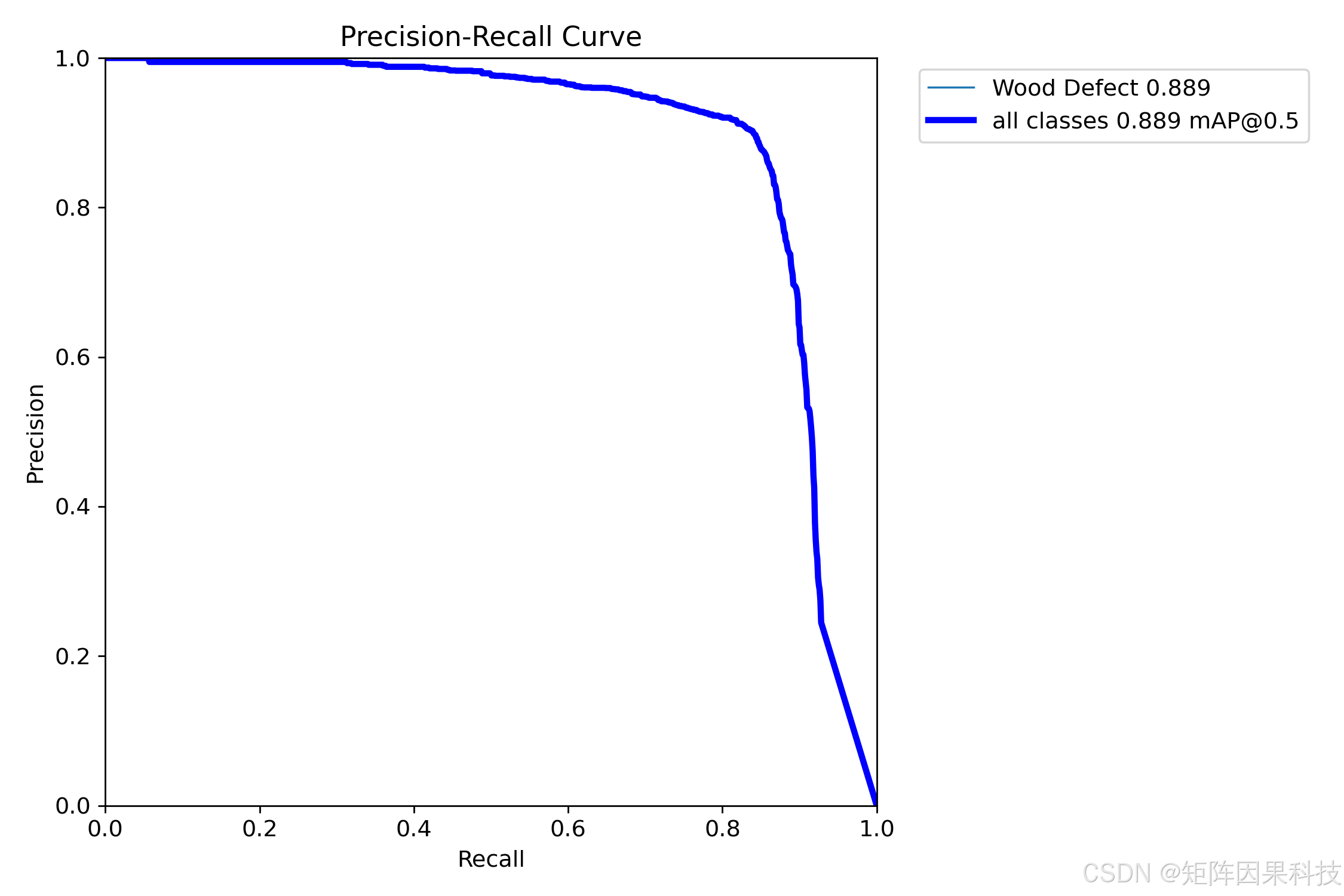 AI Visual Insight: The chart reveals a rapid precision drop in the high-recall region, indicating that wood grain, glare, and seams are still the main sources of false positives. Future optimization should focus on hard-example sampling and targeted data cleaning.
The desktop system emphasizes interactivity, traceability, and extensibility
The system uses PySide6 as the desktop UI framework, while SQLite stores user data, preference parameters, and history records. From an architectural perspective, it can be divided into a UI layer, a control layer, and a Detector inference layer that handle presentation, state orchestration, and model computation, respectively.
The advantage of this layered design is clear: the frontend can iterate independently on themes, widgets, and interactions; the backend can seamlessly swap YOLO weights or export to ONNX/TensorRT; and the database can archive inspection records by user, which supports industrial auditing and review requirements.
The architecture diagrams reflect a modular decoupling strategy
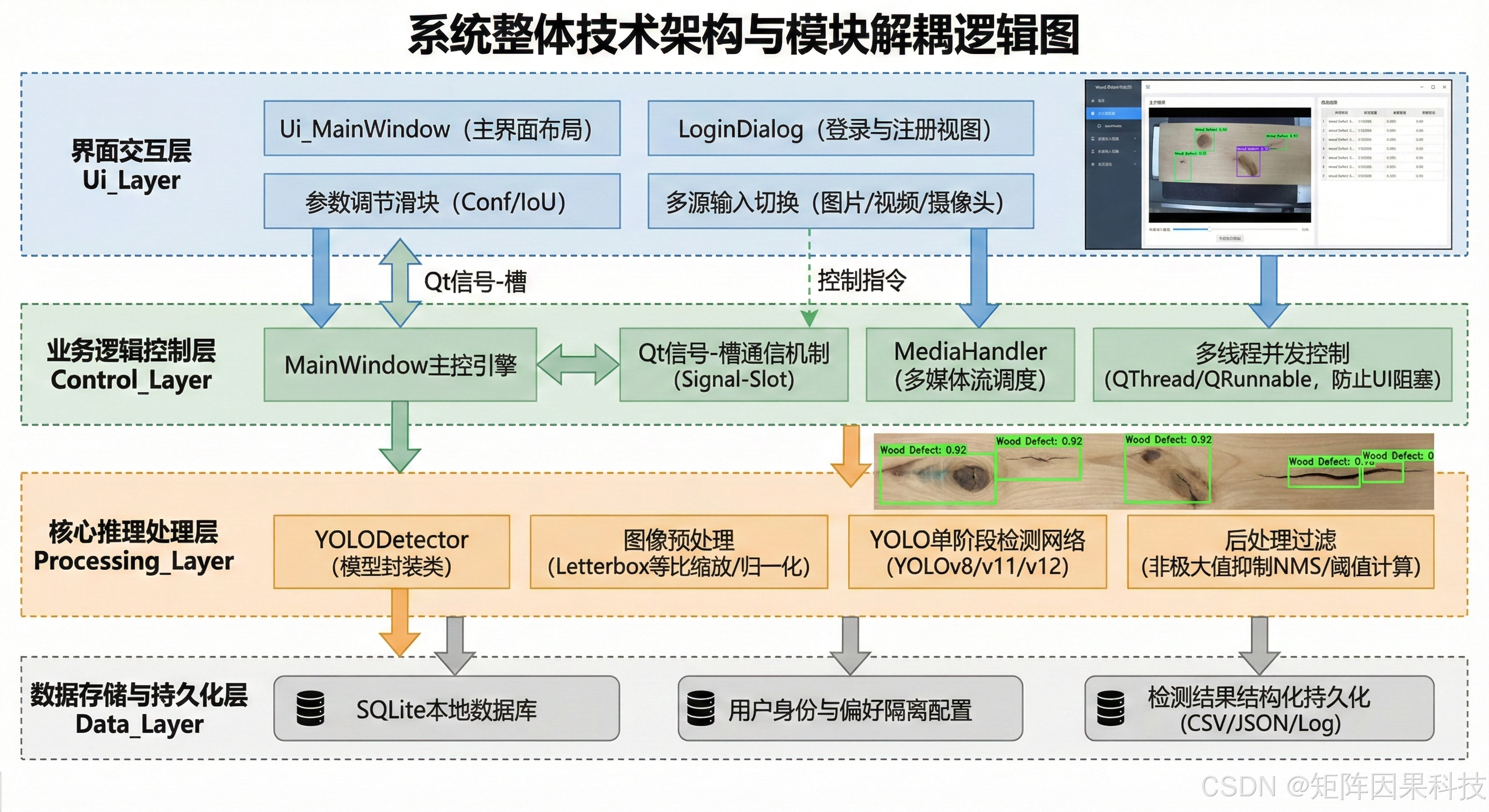 AI Visual Insight: The diagram shows the layered relationships among UI, business control, model inference, and data storage. This indicates a decoupled design that simplifies model replacement, feature expansion, and threaded inference.
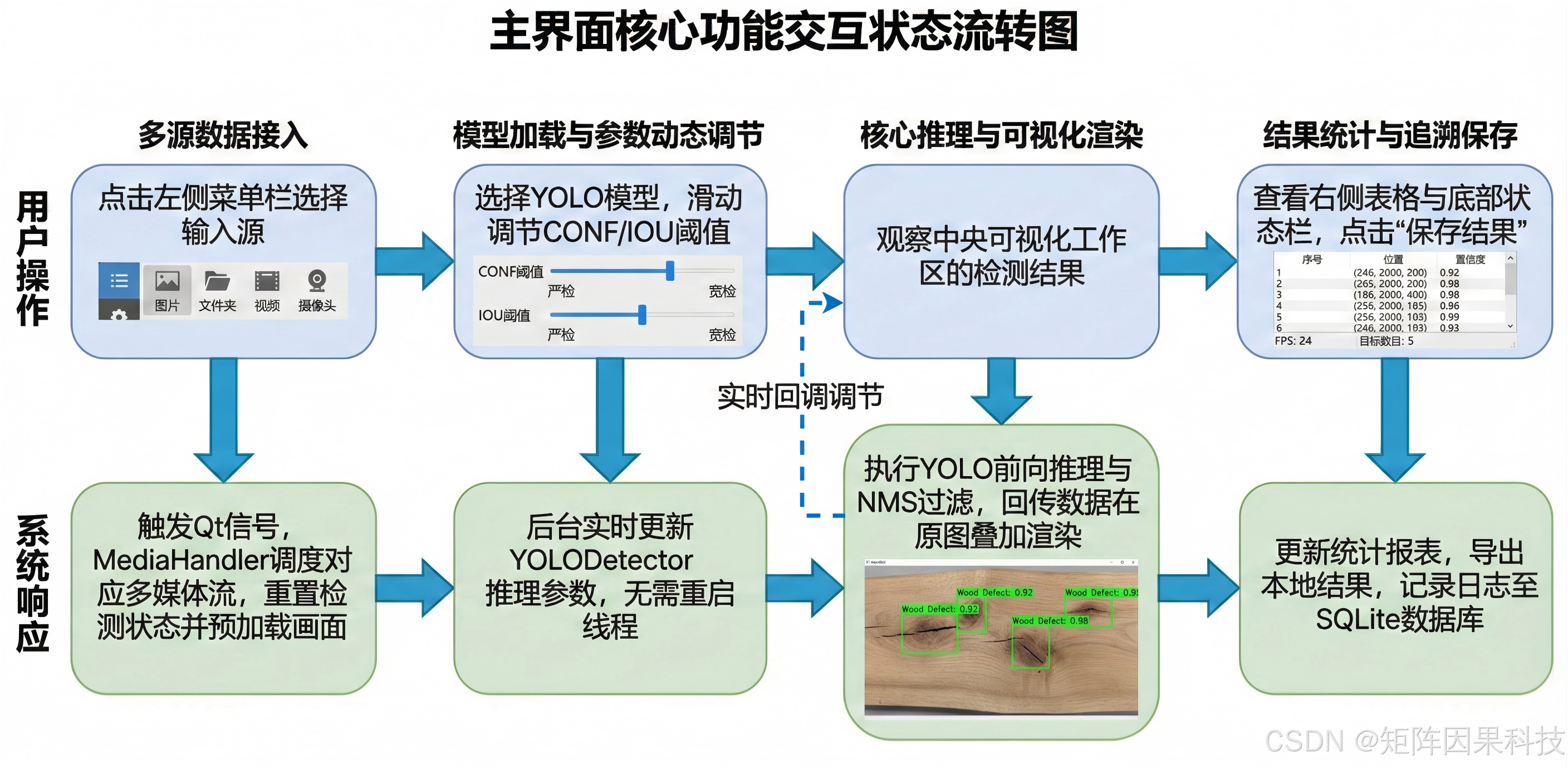 AI Visual Insight: The figure presents the full loop from input-source selection and image preprocessing to model inference, result display, and persistence. It reflects a system designed for real operational workflows rather than a one-off demo.
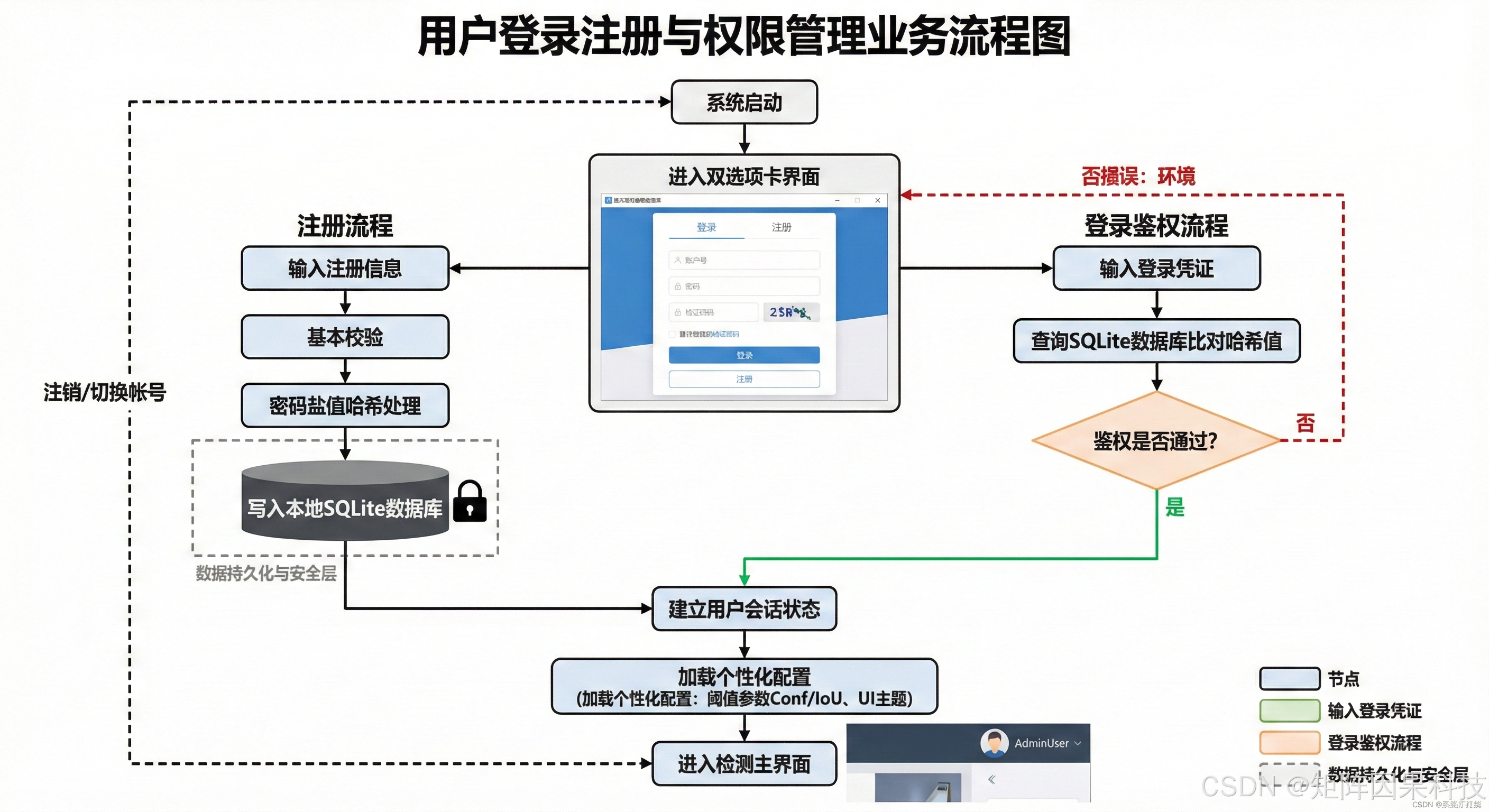 AI Visual Insight: The figure describes logic for registration, login, configuration loading, and history restoration, showing that the system already considers multi-user collaboration, parameter persistence, and result traceability.
import sqlite3
from hashlib import sha256

def register_user(username: str, password: str):
    conn = sqlite3.connect("users.db")
    cur = conn.cursor()
    cur.execute(
        "CREATE TABLE IF NOT EXISTS users (username TEXT PRIMARY KEY, password TEXT)"
    )
    pwd_hash = sha256(password.encode()).hexdigest()  # Hash the password to avoid plain-text storage
    cur.execute(
        "INSERT OR REPLACE INTO users (username, password) VALUES (?, ?)",
        (username, pwd_hash)
    )
    conn.commit()
    conn.close()
This code summarizes the minimal implementation logic of the account management module used to store user identity and the basis for personalized configuration.
Engineering conclusions should prioritize deployability over a single benchmark run
Based on the current evidence, the most practical deployment route is to use YOLOv8n or YOLOv11n as the default real-time model, use YOLOv11s as the high-accuracy mode, and combine that with PySide6 multi-source input and SQLite traceability to form a production-ready industrial inspection workstation.
The abnormal YOLOv12n result should not be treated as direct evidence of model failure. It is more likely caused by mismatched class labels, data.yaml settings, weight versions, or evaluation commands. For engineering teams, the correct path is to first restore experiment reproducibility and only then compare model generations.
FAQ provides structured answers to common engineering questions
1. Why is wood defect detection harder than general object detection?
Because wood defects are usually small, irregular in shape, and highly similar to wood grain backgrounds. The model must detect actual defects while also separating them from pseudo-targets such as natural texture, glare, and seams.
2. Which model should this project prioritize for production?
If the production line emphasizes real-time performance, choose YOLOv8n or YOLOv11n first. If precision and reinspection quality matter more, YOLOv11s is the better choice. YOLOv9s also has accuracy advantages, but with higher latency.
3. YOLOv12n shows near-zero metrics. What should you check first?
First verify whether all label class IDs are 0, whether nc and class names in data.yaml match, whether training and validation use the same configuration, and whether the weights are compatible with the installed Ultralytics version. In practice, these issues are more common than architectural flaws in the model itself.
Core Summary: This article reconstructs a wood surface defect detection project and systematically reviews YOLOv5–YOLOv12 model selection, a single-class dataset with 8,249 images, training optimization strategies, experimental conclusions, and a PySide6 + SQLite desktop deployment plan. It also explains the engineering troubleshooting path for the abnormal YOLOv12 metrics.