This setup upgrades a portable Wi-Fi device into a lightweight private cloud node
| Parameter | Description |
|---|---|
| Hardware | ZTE F50 portable Wi-Fi |
| System foundation | Linux kernel environment |
| Core service | OpenList |
| Public access | cpolar HTTP/HTTPS tunnel |
| Local port | 5244 |
| Local storage | About 20 GB |
| Mountable storage | Quark Cloud Drive, Baidu Netdisk, WebDAV, and more |
| Core dependencies | UFI-TOOLS, OpenList, cpolar |
| Original article popularity | About 10,000 views |
The core value of this solution is not the firmware modification itself, but the capability unlock. The F50 originally serves as a hotspot-sharing device, but its underlying Linux runtime allows it to take on lightweight server responsibilities such as file management, online playback, and remote sharing once UFI-TOOLS and plugin scripts are installed.
 AI Visual Insight: This image shows a typical OpenList web administration interface and its unified file access model, highlighting its role as a multi-storage aggregation layer. Developers can manage local directories, cloud drive backends, and external access policies through a single frontend entry point.
OpenList acts as a unified storage abstraction layer
OpenList follows the AList ecosystem path and stands out for being lightweight, extensible, and consistent in its web interaction model. For edge devices like the F50, it is not a NAS replacement. Instead, it serves as a low-cost hub for file aggregation and distribution.
# Typical OpenList access URL on the F50
# 5244 is the default WebUI port
http://192.168.0.1:5244
Use this address for the initial LAN-side verification to confirm that the service has started successfully on the device.
The OpenList installation workflow relies on the UFI-TOOLS plugin mechanism
There are two prerequisites: the F50 must have network connectivity, and UFI-TOOLS must already be installed. Then open the advanced features page, confirm that advanced functionality is enabled, and import the OpenList installation script through the plugin interface.
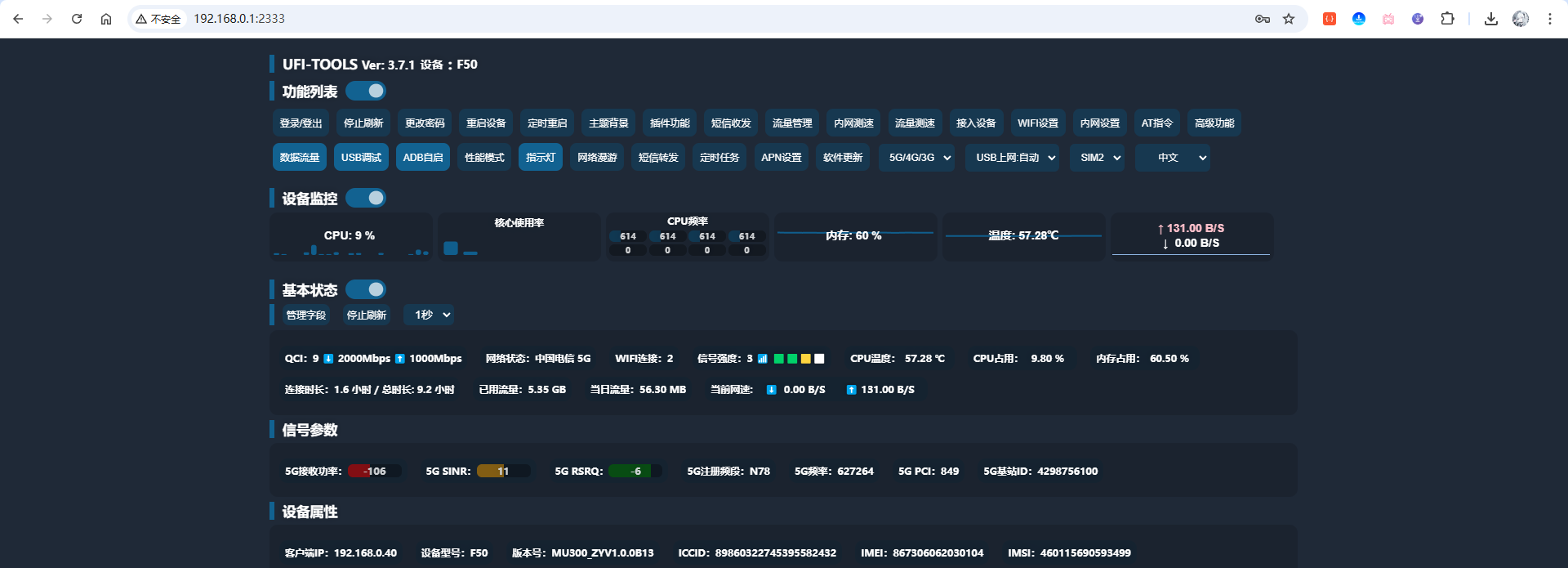 AI Visual Insight: This image shows that the F50 management entry has been extended with an advanced control panel, indicating that custom management capabilities have been layered on top of the native web console. That is the prerequisite for loading plugins and executing installation scripts.
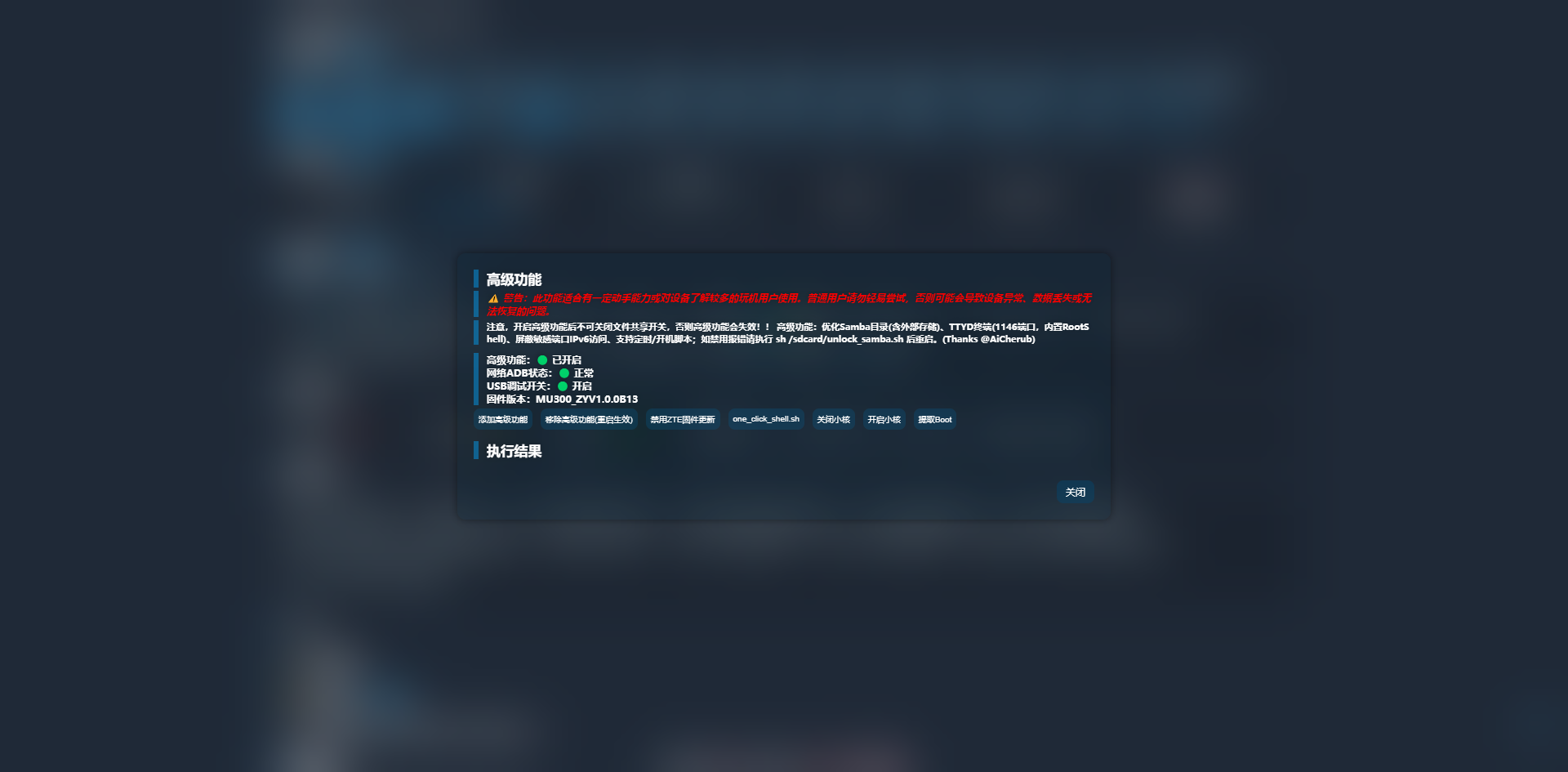 AI Visual Insight: This interface reflects UFI-TOOLS’ capability-gating design. Only after advanced features are enabled do plugin injection, script execution, and embedded page capabilities become available.
 AI Visual Insight: This image shows the plugin management entry, making it clear that the F50 extends functionality not through a traditional package manager, but through frontend script plugins that inject feature buttons and execution logic into the device.
The plugin script packages installation steps into visual operations
After importing f50_openlist_by_minikano_and_junwan.js, the page adds buttons such as Install OpenList, Show Embedded Webpage, and Open WebUI. This lowers the barrier compared with manual SSH deployment and makes the workflow more approachable for developers without an embedded systems background.
// The core goal of the plugin is to register action buttons in the backend
// This is pseudocode that describes its responsibility rather than the original script
registerPlugin({
  name: "openlist-installer", // Register the plugin name
  actions: ["install", "show_iframe", "open_webui"] // Expose installation and access actions
})
This pseudocode shows that the plugin essentially wraps complex deployment actions into clickable buttons.
The local 20 GB storage can be mounted directly as an OpenList driver
After OpenList is installed successfully, sign in to the admin console with the default admin/admin credentials and go to the Storage menu to add a driver. For the F50’s built-in space, choose the Local Storage driver and point the root directory to the user storage path exposed by the system.
# F50 local storage mount path
# This path maps to the device's readable and writable user directory
/storage/emulated/0/
This path allows OpenList to index local files directly for upload, browsing, and online playback.
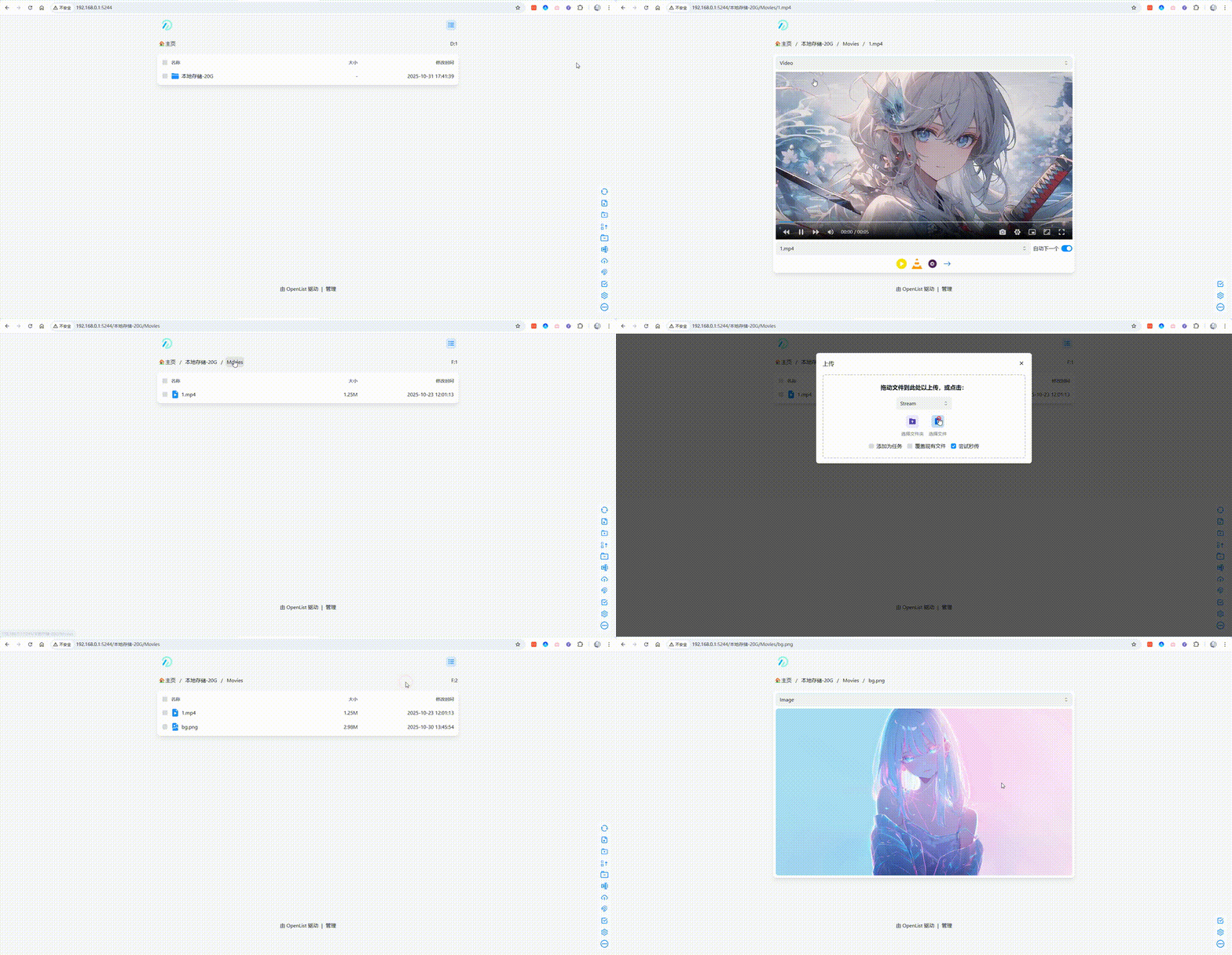 AI Visual Insight: This animated image shows the full workflow of uploading local files, listing them in OpenList, and playing them online. It demonstrates that the F50’s local flash storage can do more than just be indexed—it can also support lightweight media distribution.
Local mounting works well for temporary file relay and mobile sharing
This pattern fits travel scenarios especially well. Once phones, laptops, and tablets join the F50 hotspot, users can transfer files across devices directly in the browser without relying on WeChat file assistant, USB cables, or third-party sync clients.
After Quark Cloud Drive integration, the F50 gains cloud drive aggregation capabilities
The second core capability is cloud drive aggregation. Using Quark Cloud Drive as an example, select the Quark driver in OpenList and provide the Cookie and root folder ID. To obtain the Cookie, you usually sign in to the web version first and then inspect the request headers with browser developer tools.
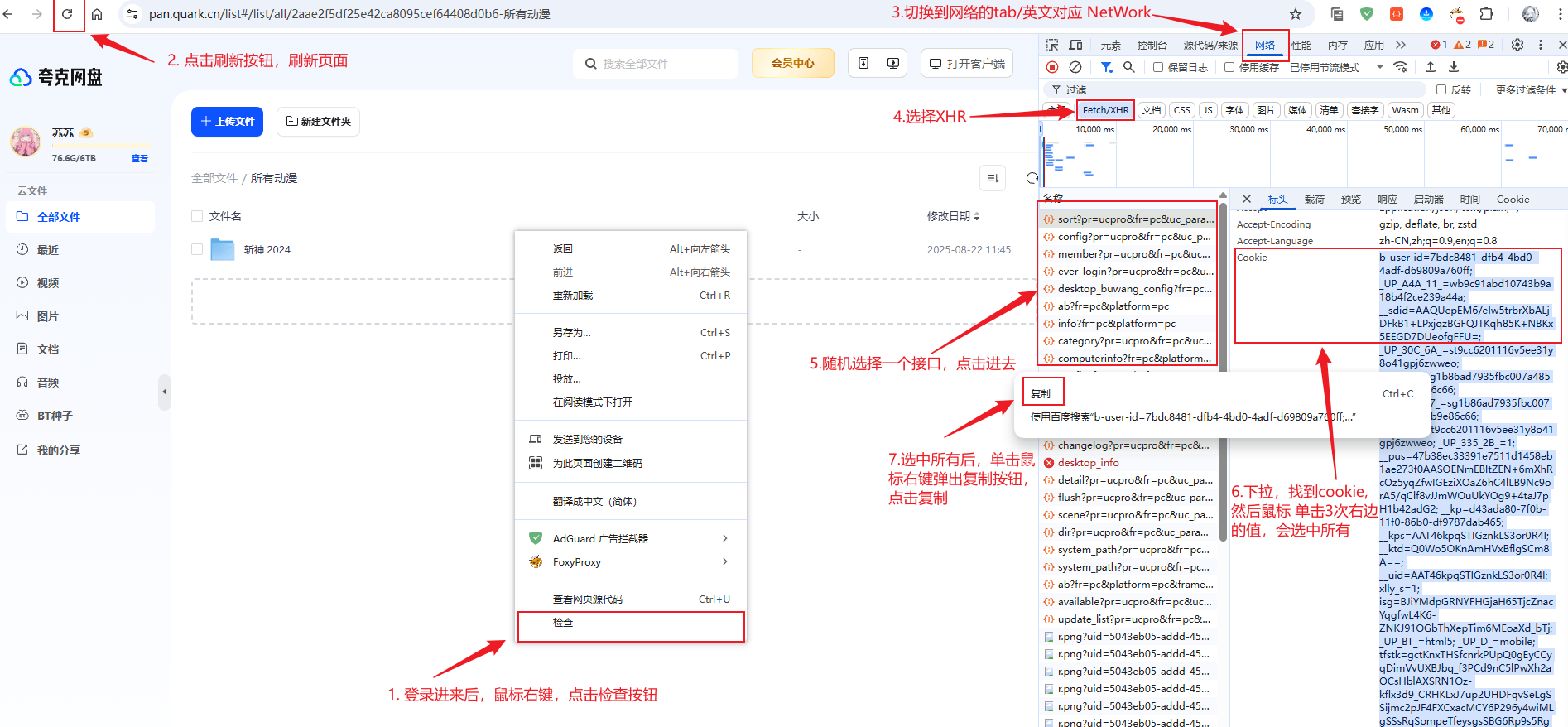 AI Visual Insight: This image shows the process of extracting authentication credentials through browser developer tools. The key is to capture a reusable Cookie field so that OpenList can access the Quark Cloud Drive API on the user’s behalf.
# Quark Cloud Drive web login URL
# Use it to sign in manually and capture the Cookie
https://pan.quark.cn/
At its core, this step creates an identity bridge to third-party storage rather than synchronizing files.
Smooth 4K playback depends on the 302 redirect strategy
The original article specifically points out that smooth Quark video playback does not happen because the F50 performs local transcoding or handles heavy origin traffic. Instead, OpenList returns a direct resource link, and the client then requests the asset directly from Quark’s domain.
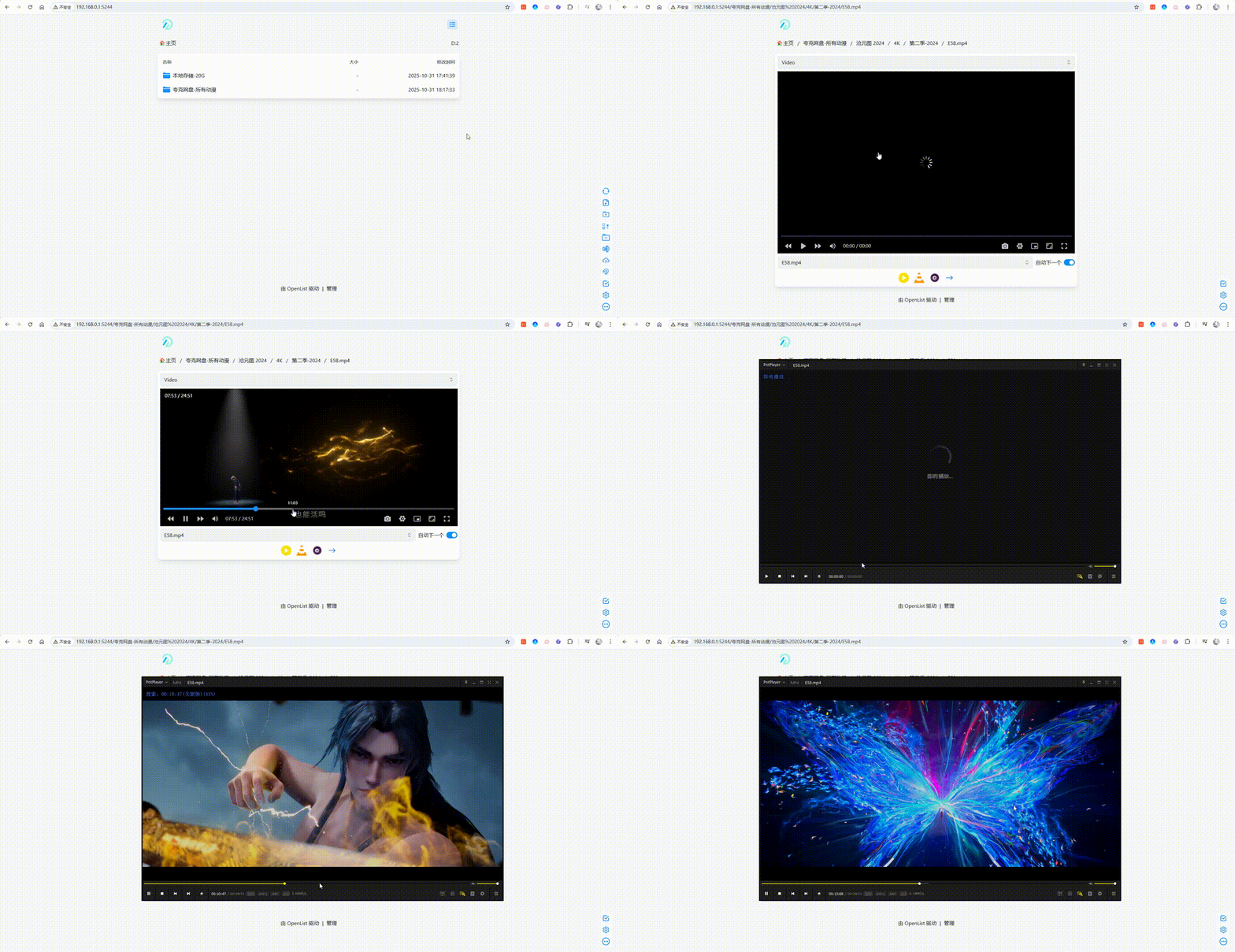 AI Visual Insight: This animation shows that the OpenList frontend can successfully list cloud media resources and trigger the online playback path. From the user experience perspective, it feels like a local media library, while the actual transport path may use third-party object storage or cloud drive CDN delivery.
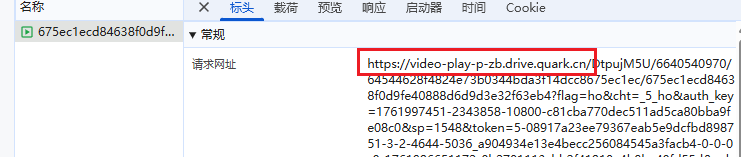 AI Visual Insight: The request domain in the image has switched to a Quark-side resource domain, proving that OpenList issued a 302 redirect. This avoids making tunnel bandwidth the bottleneck for video playback and is the key optimization that allows an edge device to serve 4K media efficiently.
cpolar gives the LAN-only OpenList instance a public entry point
Deploying OpenList alone limits access to the 192.168.x.x local network. To open the file library remotely, you need a tunneling layer. The original article uses cpolar, installs it on the F50 through a plugin, and then creates an HTTP/HTTPS tunnel for port 5244.
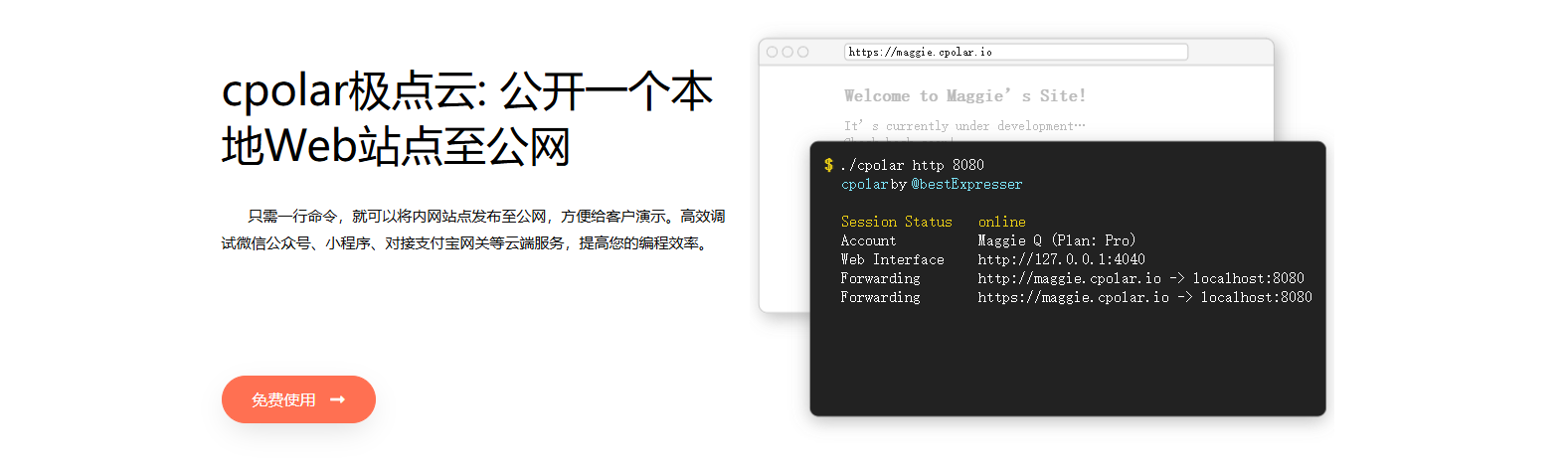 AI Visual Insight: This image emphasizes cpolar’s cross-platform and tunnel-based exposure capabilities, showing that it acts as a mapping layer from a local service to a public URL. That makes it a good fit for lightweight devices without a public IP address.
# Example: the local OpenList service that needs to be exposed
# The cpolar tunnel forwards traffic to this port
127.0.0.1:5244
This means the tunnel targets the OpenList web service itself rather than the device’s entire network.
A fixed domain determines whether the setup is practical for long-term use
The free plan usually provides a random domain that changes about every 24 hours. That works for testing, but not for bookmarked links, media player subscriptions, or team sharing. For stable access, reserve a subdomain in the cpolar console and then switch the tunnel domain type to a fixed subdomain.
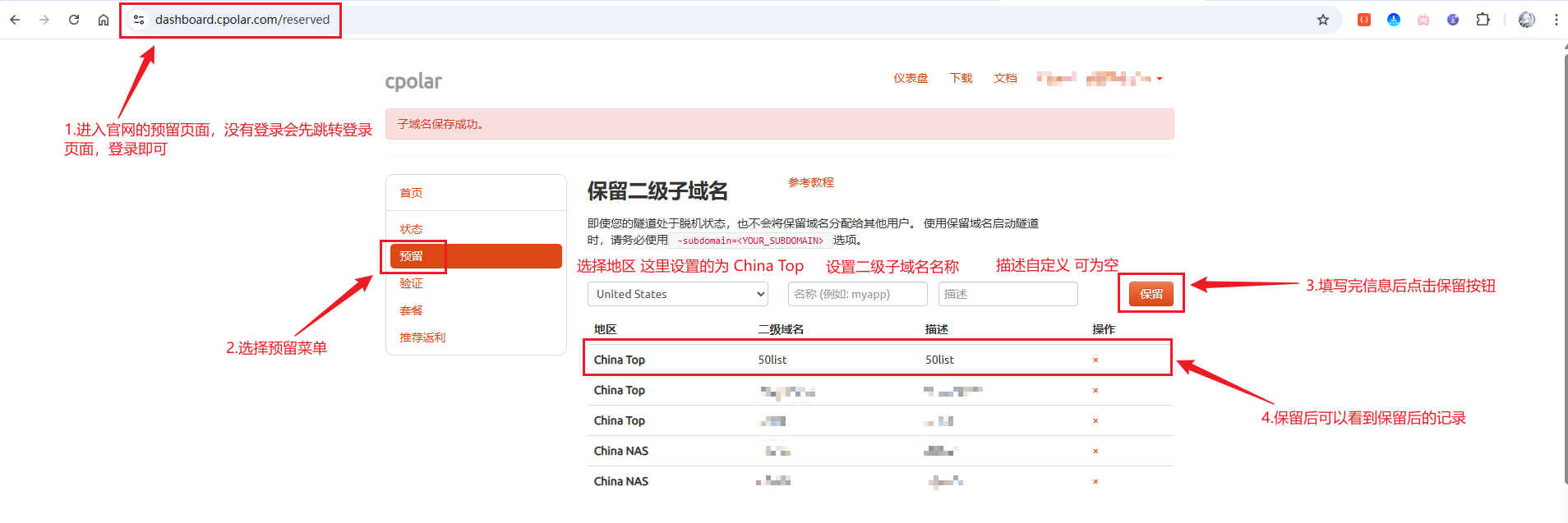 AI Visual Insight: This interface shows that cpolar offers domain stability as a premium capability. Users can reserve a unique subdomain first and then bind a dynamic tunnel to that fixed entry point to create a long-term, memorable access URL.
This combination works best for lightweight remote file services rather than a heavy NAS
The strength of the F50 + OpenList + cpolar combination is its low cost, low power consumption, and fast deployment. It is especially suitable for temporary sharing, mobile work, remote file retrieval, and lightweight media access. It is not suitable for large-scale concurrency, complex permissions, multi-user collaboration, or replacing a professional NAS for long-term core storage.
You should pay close attention to these three implementation boundaries
First, cloud drive mounts that rely on Cookies can expire and require periodic maintenance. Second, you should change the default password immediately after exposing the service publicly. Third, the F50 has limited compute capacity and thermal headroom, so it works best as an aggregation entry point rather than as a host for heavy transcoding or high-concurrency downloads.
# Minimum security action after deployment
# Sign in to the admin console and change the default administrator credentials immediately
admin -> change_password -> strong_password
This step is simple, but it determines the baseline security level of the publicly exposed service.
FAQ
1. What is the biggest benefit of installing OpenList on a ZTE F50?
Answer: It upgrades a single-purpose hotspot device into a lightweight file server. It can unify the built-in 20 GB of local storage with multiple cloud drive entry points and let you upload, play, share, and remotely access files directly in the browser.
2. Why can 4K video play smoothly without overwhelming the F50’s bandwidth?
Answer: The key is OpenList’s 302 redirect behavior for cloud drive resources. The player ultimately requests the media from resource URLs provided by Quark and similar services, so the main traffic does not pass through the tunnel or the F50 itself.
3. Is this setup suitable for long-term production use?
Answer: It is suitable for personal use or small-scale lightweight scenarios, but not as an enterprise-grade core file platform. If you want more stability, you should at least use a fixed domain, a strong password, and regularly check Cookie validity and tunnel status.
[AI Readability Summary]
This article reconstructs the full ZTE F50 OpenList deployment workflow: install OpenList on the F50 through UFI-TOOLS, mount the built-in 20 GB of local storage and Quark Cloud Drive, and combine it with cpolar for public internet access. It is a strong fit for developers who want to turn a portable Wi-Fi device into a lightweight file server, a temporary sharing node, or a remote media access point.