This article provides a structured comparison of three AI coding tools—Cursor 3, TRAE SOLO, and Claude Code—focusing on multi-agent collaboration, end-to-end automation, million-token context windows, and Chinese-language support to answer the tool selection questions developers care about most. Keywords: AI coding, agents, code generation.
Technical Specifications at a Glance
| Parameter | Cursor 3 | TRAE SOLO | Claude Code |
|---|---|---|---|
| Product form | AI-native IDE | End-to-end intelligent agent tool | CLI coding agent |
| Interaction protocol / mode | Multi-agent workspace | Dual-agent Builder + Coder | Command line + long-context reasoning |
| Public benchmark | SWE-bench Multilingual 73.7% | No unified public score released | SWE-bench Verified 87.6% |
| Context window | 200K tokens | Depends on the underlying model | 1M tokens |
| Pricing | Pro $20/month | Free | Max $25/month |
| Chinese-language support | Moderate | Excellent | Moderate |
| Core dependencies | Composer 2, proprietary agent workspace | Doubao, DeepSeek, GLM-4.7 | Claude Opus 4.7 |
These Three Tools Represent Three Distinct Paths in AI Coding
By 2026, the divergence is clear: Cursor 3 represents multi-agent collaboration inside the IDE, TRAE SOLO represents unified automation from requirements to deployment, and Claude Code represents high-quality engineering reasoning powered by ultra-long context.
This is no longer a competition about who autocompletes faster. It is about which tool best matches your engineering workflow. As code generation becomes commoditized, the truly scarce capabilities are task orchestration, verification quality, and cross-file understanding.
 AI Visual Insight: The image compares the three tools across positioning, models, context capacity, pricing, and ideal use cases in a high-density table format. It works well as a decision panel for developers doing an initial shortlist. Claude Code stands out for long context and benchmark performance, TRAE SOLO is most notable for being free and highly optimized for Chinese, and Cursor 3 emphasizes an IDE-centric collaborative experience.
A minimal tool-selection mapping can establish a quick decision framework
Individual beginners / Chinese-speaking teams -> TRAE SOLO
Complex refactoring / parallel team workflows -> Cursor 3
Large repositories / high-quality fixes -> Claude Code
The purpose of this mapping is to narrow the field by scenario first, then move into detailed feature comparisons.
Cursor 3 Is Turning the IDE Into a Multi-Agent Control Plane
Cursor 3 is not fundamentally about better autocomplete. Its core lies in the Glass workspace and Agent Workspace. It attempts to bring local editing, cloud execution, and parallel task decomposition into a single interface, shifting developers from coders to orchestrators.
Its in-house model, Composer 2, is the key enabler. In public data, CursorBench reaches 61.3, a significant improvement over the previous generation. It also scores 73.7% on multilingual SWE-bench, suggesting targeted optimization for repository-level context understanding.
Cursor 3 gains its edge primarily from collaboration and orchestration
agents = ["local_editor", "cloud_refactor", "test_runner"]
results = []

for agent in agents:
    # Assign different responsibilities in parallel to reduce single-threaded waiting time
    results.append(f"{agent}: task assigned")

print(results)  # Summarize the status of each agent
This illustrative snippet captures the core value of Cursor 3: split editing, refactoring, and testing across different agents and process them in parallel.
It is a strong fit for complex module refactoring, cross-file edits, and teams with frequent iteration cycles. The trade-offs are also clear: Chinese-language understanding is not its strength, some cloud capabilities depend on a paid subscription, and beginners must adapt to a new workflow model.
TRAE SOLO Brings End-to-End Automation Into the Free Tier
TRAE SOLO’s breakthrough is not a single benchmark. It is the closed loop from PRD to deployment. Through the division of labor between SOLO Builder and SOLO Coder, it creates a continuous pipeline that spans requirement understanding, architecture decomposition, code generation, and test execution.
For Chinese-speaking developers, its value is especially direct: Chinese semantic understanding, support for local frameworks, reliable availability on domestic networks, and built-in access to domestic foundation models all significantly reduce the barrier to entry.
TRAE SOLO behaves more like an outcome-oriented automation pipeline
workflow = ["PRD analysis", "architecture design", "code generation", "unit testing", "deployment"]

for step in workflow:
    # Advance through software lifecycle stages in sequence
    print(f"Execute: {step}")
This workflow snippet summarizes TRAE SOLO’s product philosophy: minimize manual context switching and prioritize runnable output.
It is especially well suited for rapid prototyping, MVPs, and student projects. However, its stability and deep refactoring capability in large enterprise engineering environments still require more long-term validation. If your goal is to build something quickly, its cost-performance ratio is excellent. If your goal is long-term maintainability, you still need human review.
Claude Code Builds an Advantage for Large Codebases Through Million-Token Context
Claude Code’s defining trait is its 1M-token context window combined with the engineering reasoning capability of Opus 4.7. For multi-module repositories, legacy-heavy systems, and environments where documentation and code must be reasoned about together, this context length is not a bonus feature. It is a capability threshold.
In public data, Opus 4.7 reaches 87.6% on SWE-bench Verified, indicating a leading position in solving real repository issues. Compared with writing code quickly, its strengths are broader visibility, more stable modifications, and deeper reasoning.
Claude Code is better suited for long-horizon tasks and root-cause analysis
claude-code analyze ./repo --focus auth,api,db
# Analyze cross-directory call chains
claude-code fix issue_1432 --with-tests
# Add tests alongside the fix
This command-driven workflow emphasizes repository-level analysis, issue localization, and a closed-loop fix process.
Its weaknesses are equally clear: CLI interaction is less approachable for beginners, the Chinese-language experience is average, and developers must already be good at context management and task decomposition.
Real-World Results Show There Is No Absolute Winner, Only the Best Fit by Scenario
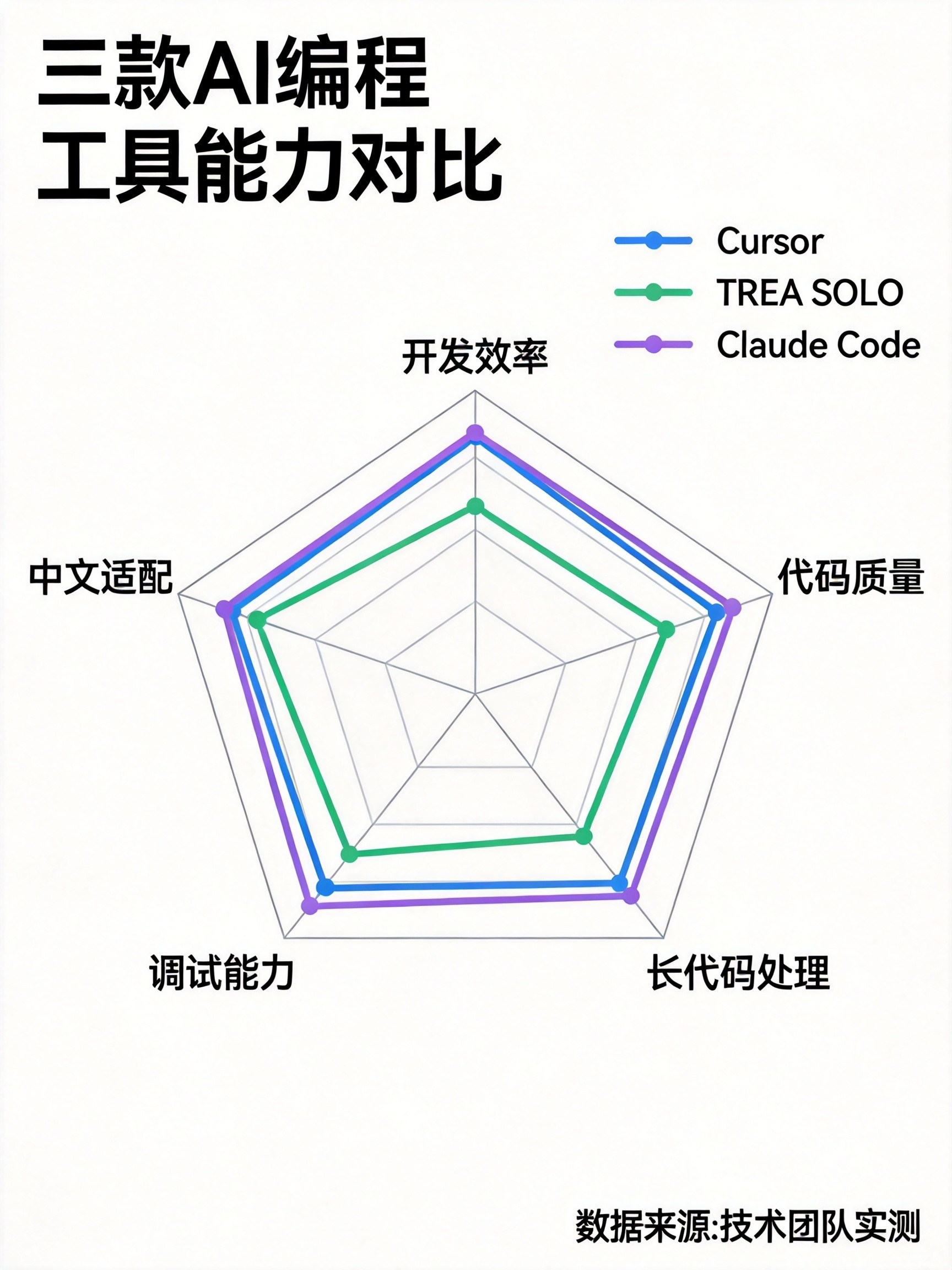
In terms of development speed, TRAE SOLO often produces a runnable prototype first because its automation chain is more complete. In terms of code quality, Claude Code is closer to production-grade output. In terms of collaboration experience and parallel processing, Cursor 3’s multi-agent design is better suited to mid-sized and large teams.
If you compress the comparison into one sentence: TRAE SOLO wins on accessibility and speed, Cursor 3 wins on workspace collaboration, and Claude Code wins on complexity handling and output ceiling.
A simple decision function can help standardize team selection criteria
def choose_tool(scene):
    # Return the recommended tool based on the primary scenario
    if scene in ["Chinese-language prototyping", "student project", "rapid MVP"]:
        return "TRAE SOLO"
    if scene in ["team collaboration", "cross-file refactoring", "deep IDE integration"]:
        return "Cursor 3"
    return "Claude Code"  # Default for complex repositories and high-quality tasks
The value of this function is not absolute accuracy. It is making selection criteria explicit and shareable across the team.
In 2026, the Real Bottleneck Has Shifted From Generation to Verification
The most important warning in the underlying data is not which tool scores higher. It is that AI-generated code can introduce vulnerabilities and technical debt. As generation capability becomes widespread, requirement definition, test coverage, and review workflows are becoming the new dividing lines in productivity.
For that reason, the best practice is not to bet on a single tool. It is to build a three-layer mechanism of generation, review, and testing. Tools accelerate output; humans validate truth. That is also the core sign that AI coding has entered an engineering-centric phase in 2026.
You should preserve a minimal safety loop
def ai_code_guard(code_review, tests, security_scan):
    # Allow merge into the main branch only when all three checks pass
    return all([code_review, tests, security_scan])
This logic makes the point clearly: before any AI-generated code reaches production, it should pass three gates—review, testing, and security scanning.
FAQ
1. Which AI coding tool should individual developers choose first?
TRAE SOLO should be the first choice. It is free, Chinese-friendly, and strong in end-to-end automation, making it ideal for building fast positive feedback loops before you add Cursor 3 or Claude Code as project complexity increases.
2. Which tool is best for refactoring large legacy codebases?
Claude Code is the better fit. Its 1M-token context window and stronger cross-file reasoning make it the most capable option for large-repository analysis, root-cause localization, and long-horizon code changes.
3. Why does Cursor 3 remain competitive in team collaboration scenarios?
Because it combines multi-agent parallelism, an IDE workspace, and task orchestration in a single interface. For team collaboration and concurrent transformation of complex modules, Cursor 3 often delivers higher workflow efficiency than single-agent tools.
Core Summary: Based on public data and hands-on observations, this article systematically compares Cursor 3, TRAE SOLO, and Claude Code across multi-agent collaboration, end-to-end automation, ultra-long context, Chinese-language support, and code quality, then provides practical 2026 guidance for developer tool selection.