[AI Readability Summary] MCP is a standard protocol for connecting large language models to external tools. Its core value lies in standardizing how tools, resources, and prompts are exposed, which reduces repeated integrations across models, eliminates fragmented tool calling, and makes services easier to extend. This article covers Spring AI integration, custom MCP servers, and both stdio and SSE transports. Keywords: MCP, Spring AI, Tool Calling.
Technical Specifications Snapshot
| Parameter | Description |
|---|---|
| Core topic | Hands-on MCP (Model Context Protocol) |
| Primary languages | Java, Python, TypeScript |
| Transport protocols | stdio, SSE, WebFlux SSE |
| Typical hosts | Cursor, Spring AI |
| Java dependencies | spring-ai-starter-mcp-client, spring-ai-starter-mcp-server |
| External commands | npx, uvx, java -jar |
| Original source platform | CSDN article; no source repository or GitHub stars provided |
MCP Provides a Unified Interface for Connecting LLMs to External Capabilities
You can think of MCP as the “USB-C interface” for AI applications. It standardizes tools, resources, and prompts as protocol-level capabilities so that host applications can discover, negotiate, and invoke external services in a consistent way.
The main problem MCP solves is not simply whether a model can call a tool. It solves how multiple models, multiple clients, and multiple servers can reuse the same tool capabilities with low coupling. This is especially important for agent-based systems.
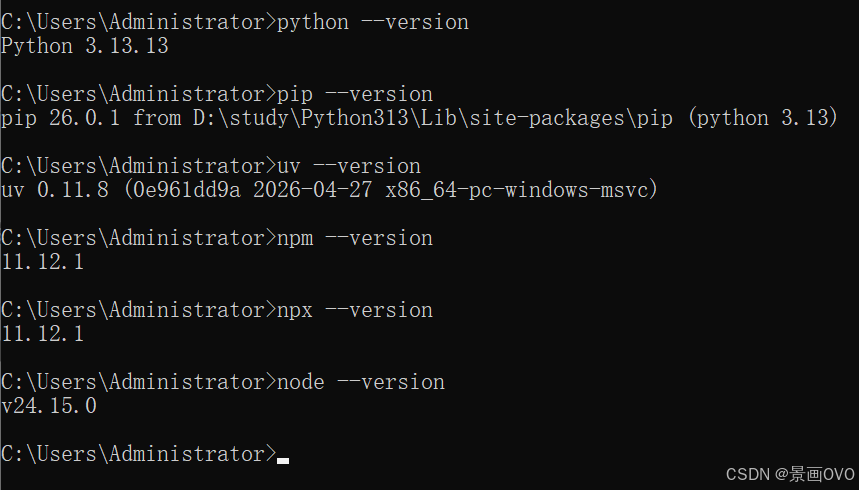 AI Visual Insight: This diagram shows the local runtime prerequisites for using MCP, focusing on the Node.js, Python, and uv toolchain. The key implication is that many MCP servers start through npx or uvx. If the runtime is missing, the client cannot launch subprocesses or perform tool discovery.
MCP Delivers Value Through Build Once, Reuse Everywhere
For developers, you only need to implement an MCP server once, and multiple MCP clients can reuse it. This avoids rebuilding separate plugins for different model vendors.
For host applications, MCP provides a standardized capability integration layer. Data sources, browser automation, crawling services, and internal business tools can all be attached to the model inference workflow in a uniform way.
node -v      # Check whether Node.js is installed
python -V    # Check whether Python is installed
pip install uv  # Install uv so uvx can launch Python-based MCP services
These commands perform the minimum environment verification required before running MCP.
MCP Uses a Layered Host-Client-Server Architecture
At the architectural level, the Host is the application container, such as Cursor or a Spring AI application. The Client is created and managed by the Host and maintains an independent connection to a specific Server. The Server is the component that actually exposes tools, resources, and prompts.
The key advantage of this structure is connection isolation. Each MCP server has its own session and capability boundary, which simplifies permission control, protocol negotiation, and fault isolation.
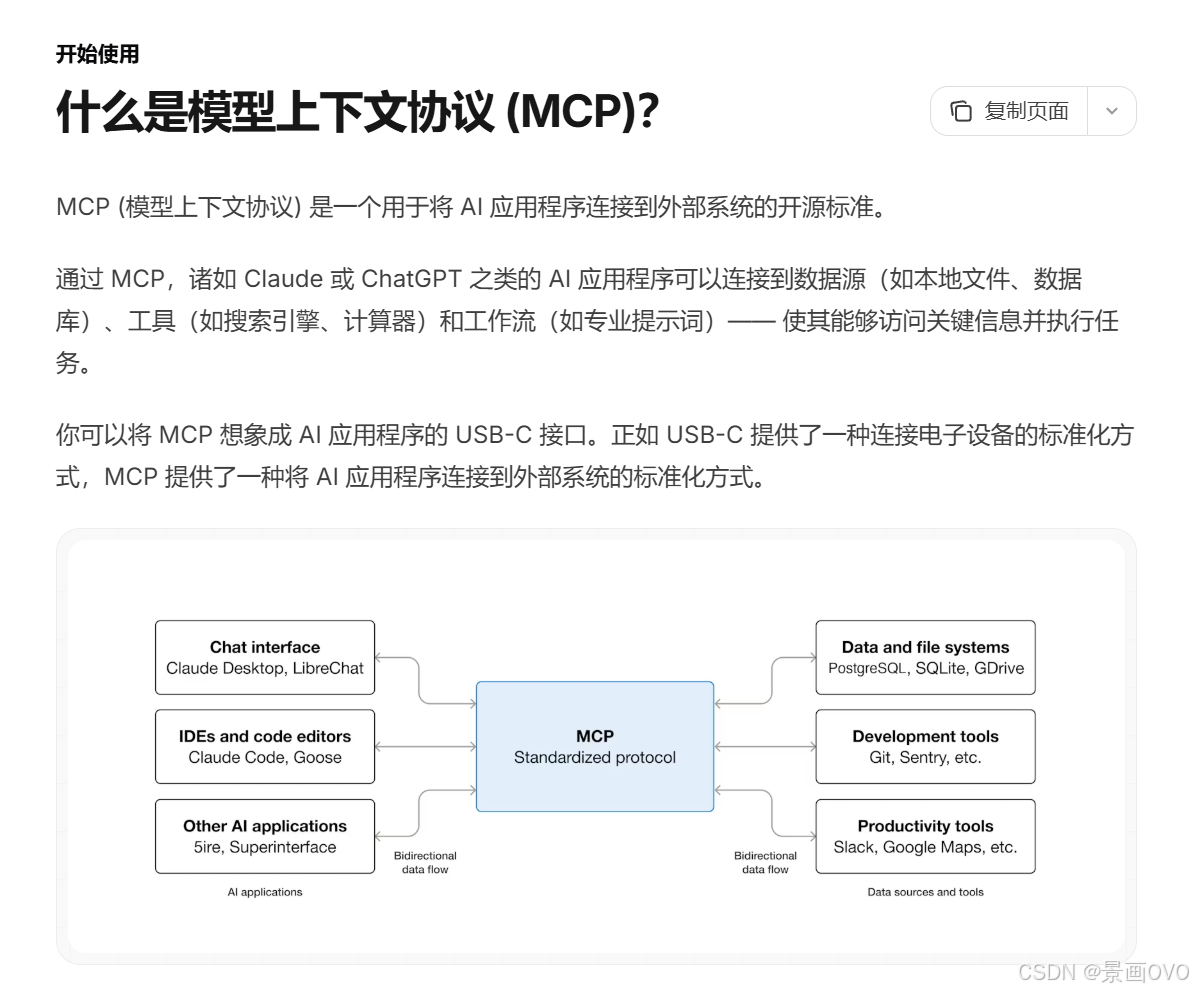 AI Visual Insight: This diagram explains MCP as a standardized interface layer by analogy. It emphasizes that AI applications do not bind directly to specific tool implementations. Instead, they access external capabilities through a unified protocol. This abstraction reduces coupling between the model layer and the tool layer.
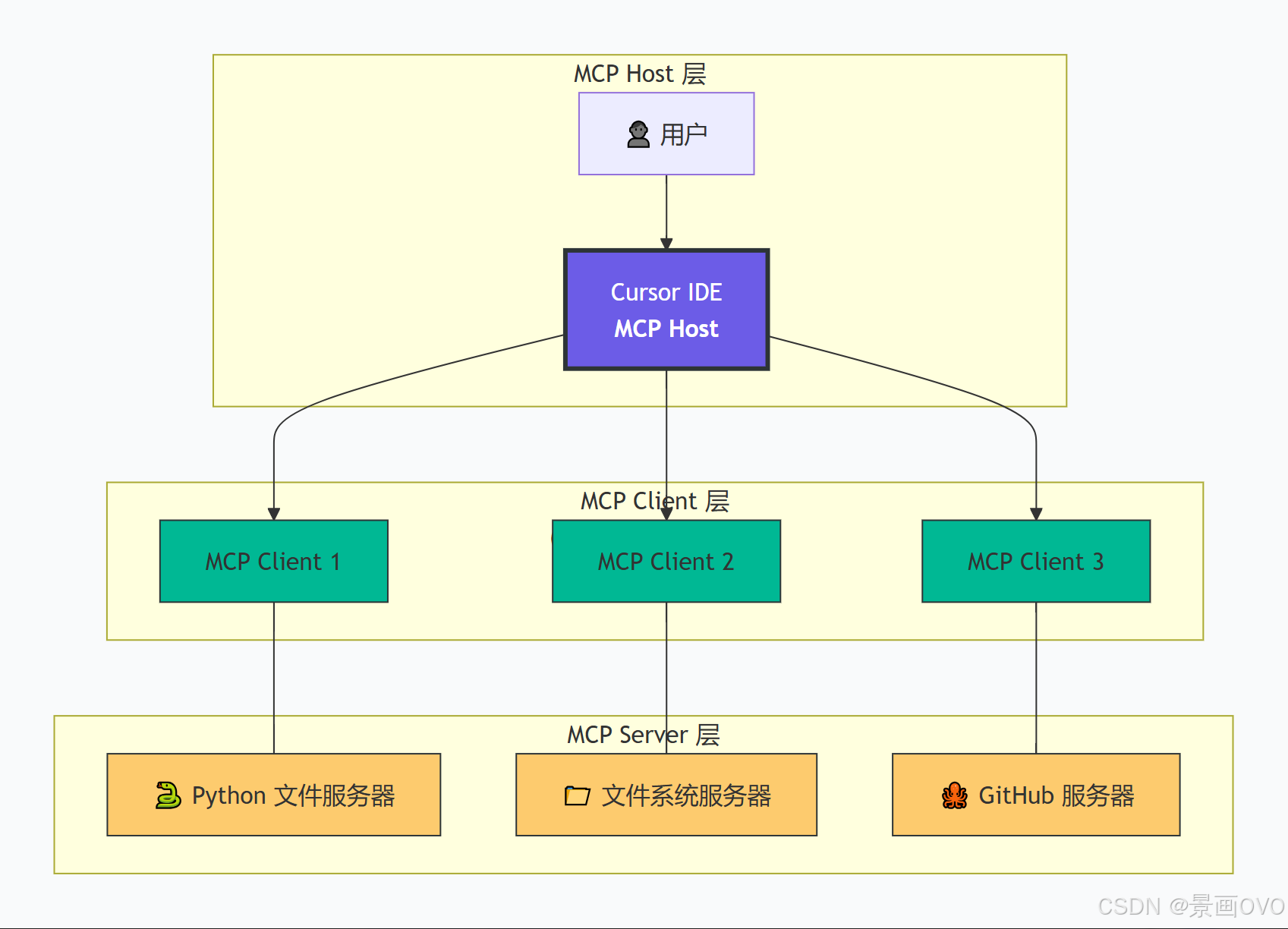 AI Visual Insight: The diagram clearly separates the Host, Client, and Server layers: the Host orchestrates the model, the Client manages sessions and message routing, and the Server exposes capabilities. This structure shows that MCP is more than a simple RPC mechanism; it is a protocol layer with capability negotiation and context management.
Java Commonly Uses Three Transport Options
stdio works well for efficient local invocation and is commonly used when services are launched through npx, uvx, or java -jar. SSE is better suited for cross-process and cross-host HTTP streaming communication. WebFlux SSE is a strong fit for reactive Java services.
If you only want to validate capabilities quickly, start with stdio. If you need long-term deployment or cross-machine access, SSE is more stable and aligns better with service-oriented operations.
You Can Start Integrating Third-Party MCP Services Through Cursor or Spring AI
In the original hands-on setup, Playwright and fetch were chosen first. The former handles browser operations, while the latter fetches target content and converts formats. These represent two of the most typical MCP capability extensions.
In Cursor, you only need to add a community-provided configuration entry to mcp.json to give the editor a discoverable external toolset.
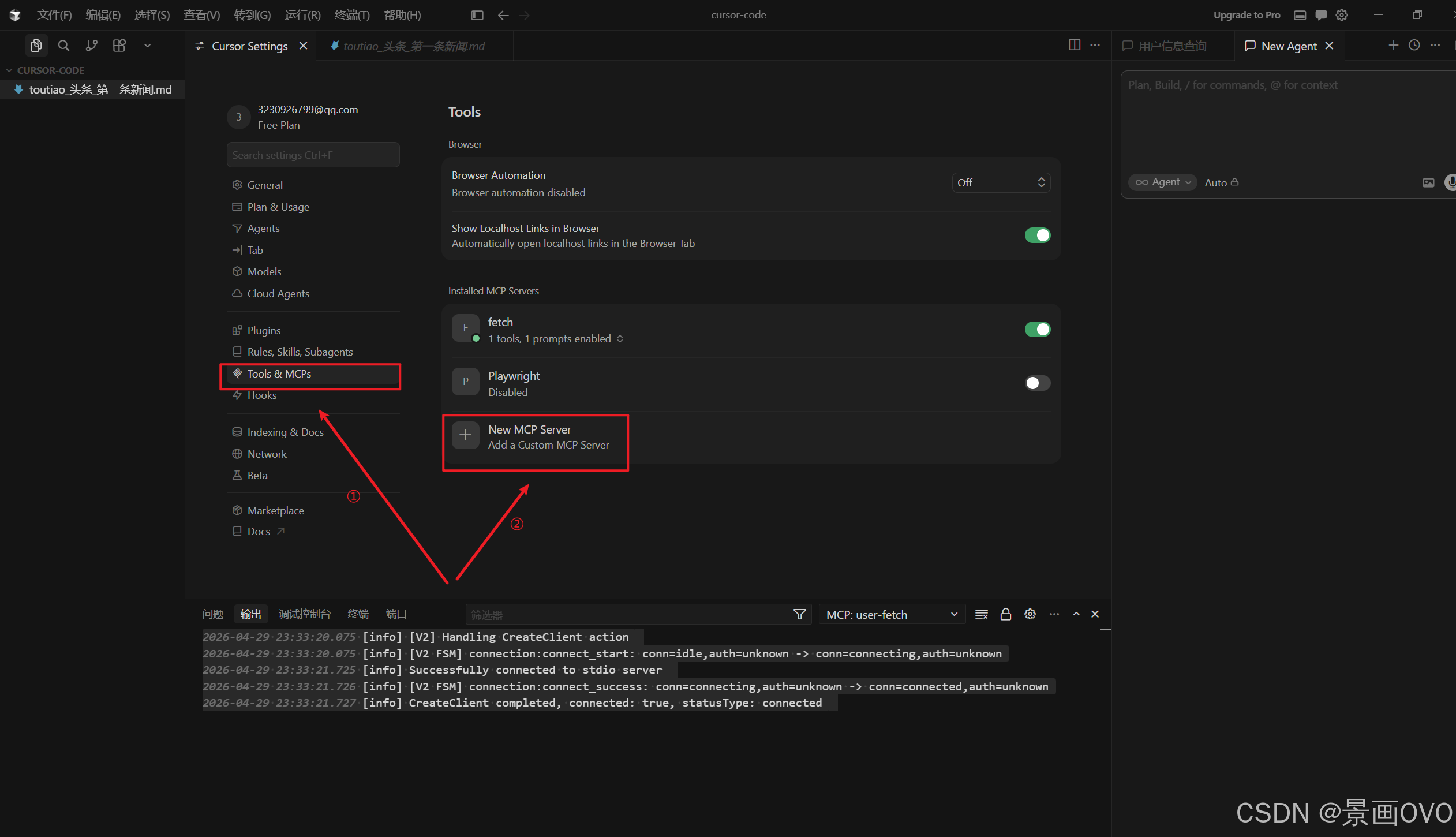 AI Visual Insight: This image shows the MCP configuration entry point inside Cursor, indicating that the host application already provides native support for MCP server registration. The technical takeaway is that the client manages external service connections through the UI rather than hardcoding tool logic into the IDE.
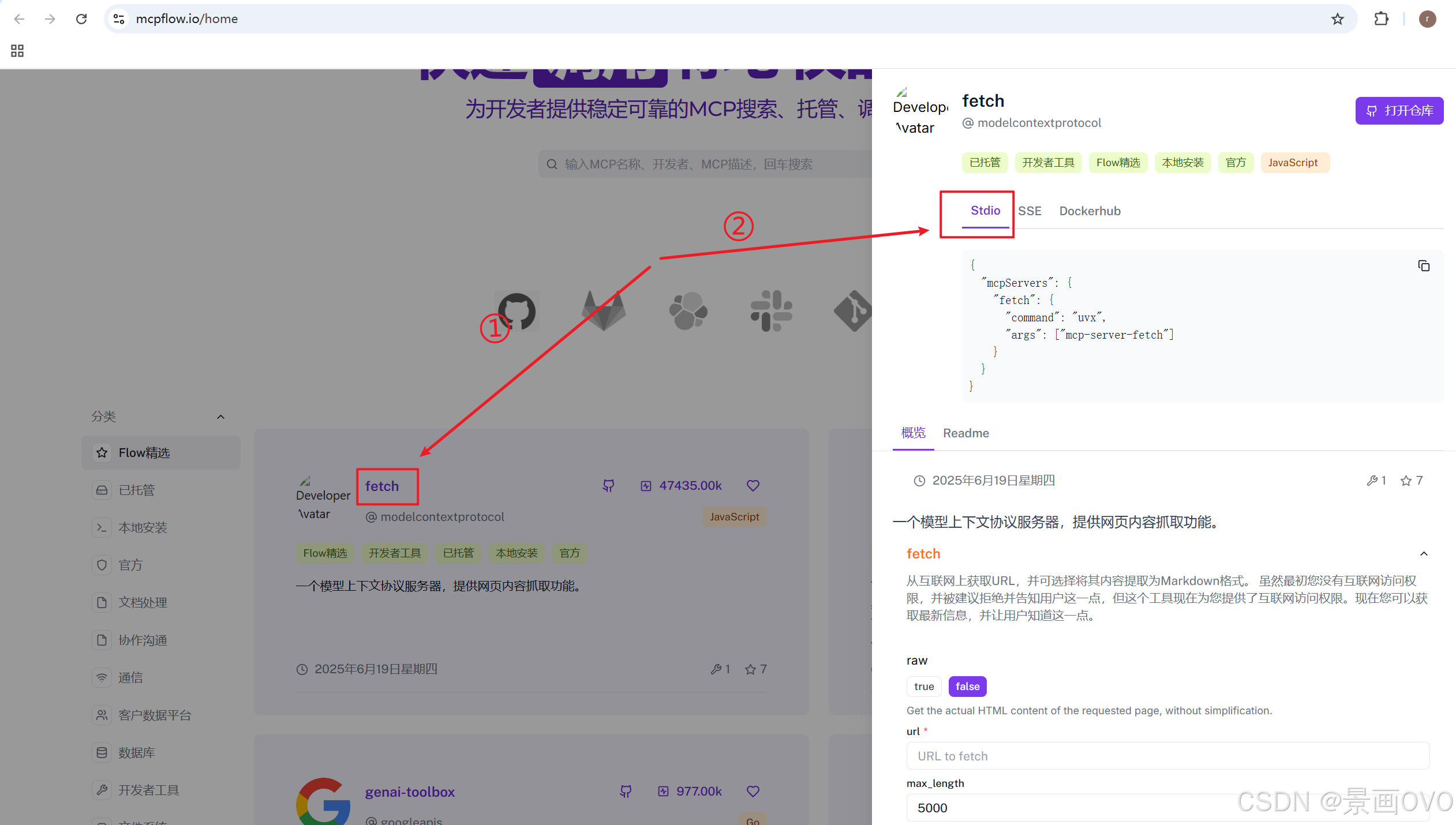 AI Visual Insight: This image illustrates the process of copying stdio or SSE configuration snippets from the MCP community. It shows that MCP services are gradually forming a shareable configuration ecosystem. Developers mainly need to focus on key fields such as command, args, and url.
{
  "mcpServers": {
    "Playwright": {
      "command": "npx -y @playwright/mcp@latest",
      "args": []
    },
    "fetch": {
      "command": "uvx",
      "args": ["mcp-server-fetch"]
    }
  }
}
This configuration registers two common third-party MCP servers in the host.
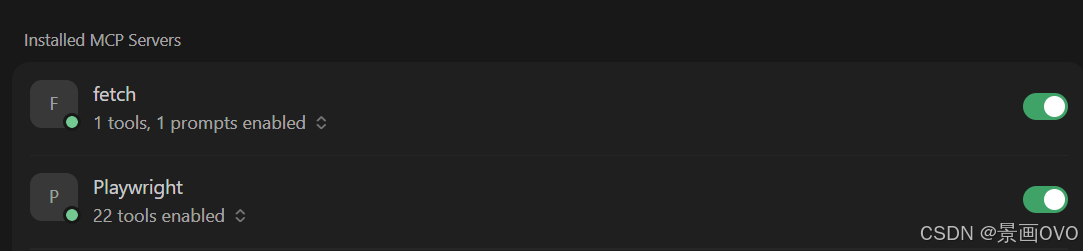 AI Visual Insight: This image shows that the host has successfully discovered and listed MCP tools, which means subprocess startup, protocol handshake, and capability registration have all completed successfully. The configuration format and runtime environment are therefore most likely correct.
Spring AI Can Serve as an Enterprise MCP Host
In the Java ecosystem, Spring AI is a strong choice for the Host role. It connects to the model on one side and manages the MCP client on the other, automatically attaching external tools to the conversation flow.
At the dependency level, you need at least Web, the model SDK, and the MCP Client Starter. If you use a streaming model such as DashScope, you should also add the WebFlux dependency.
<dependencies>

<dependency>

<groupId>org.springframework.boot</groupId>

<artifactId>spring-boot-starter-web</artifactId>
  </dependency>

<dependency>

<groupId>org.springframework</groupId>

<artifactId>spring-webflux</artifactId>
  </dependency>

<dependency>

<groupId>com.alibaba.cloud.ai</groupId>

<artifactId>spring-ai-alibaba-starter-dashscope</artifactId>
  </dependency>

<dependency>

<groupId>org.springframework.ai</groupId>

<artifactId>spring-ai-starter-mcp-client</artifactId>
  </dependency>
</dependencies>
These dependency declarations build a Spring Boot application that supports both model invocation and MCP client integration.
Spring AI Configuration Should Be Managed Centrally
A recommended approach is to place all stdio service definitions in a dedicated mcp-servers.json file. This keeps YAML from becoming bloated and makes environment switching easier.
spring:
  ai:
    dashscope:
      api-key: ${DASHSCOPE_API_KEY}
    mcp:
      client:
        stdio:
          servers-configuration: classpath:/mcp/mcp-servers.json
This configuration tells Spring AI to automatically load local MCP server definitions at startup.
The actual invocation entry point is very simple: inject ToolCallbackProvider into ChatClient, and the model can automatically choose the appropriate tool during inference.
@RestController
@RequestMapping("/chat")
public class ChatController {
    private final ChatClient chatClient;

    public ChatController(DashScopeChatModel chatModel,
                          ToolCallbackProvider toolCallbackProvider) {
        this.chatClient = ChatClient.builder(chatModel)
                .defaultToolCallbacks(toolCallbackProvider) // Inject all available tools
                .build();
    }

    @RequestMapping("/generate")
    public String generate(String msg) {
        return chatClient.prompt()
                .user(msg) // Pass user input to the model
                .call()
                .content();
    }
}
This controller exposes an HTTP-based chat endpoint with MCP tool-calling capabilities.
Building a Custom MCP Server Is the Key Step for Business Adoption
When third-party community services cannot meet your use case, you need to package internal system capabilities as an MCP server. The original example provides two implementation paths: stdio and SSE. The main difference lies in the startup model and communication layer.
stdio behaves more like a local command-style plugin and works well for internal desktop tools and low-latency testing. SSE behaves more like a standard microservice and is better for long-running deployments and multi-client access.
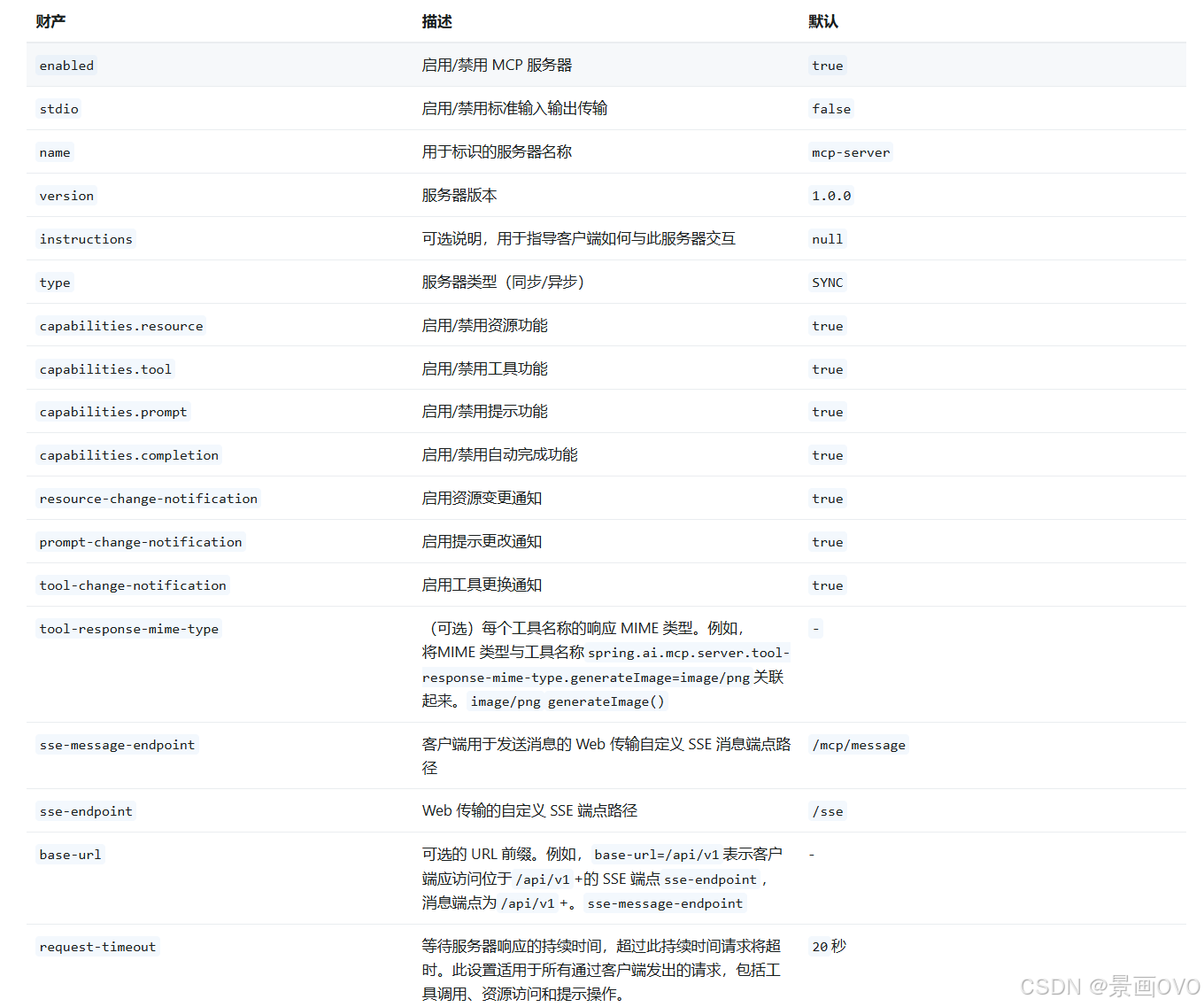 AI Visual Insight: This diagram shows the configuration parameters of an MCP server in stdio mode, including service name, version, and startup form. The key point is that this mode relies on standard input and output channels to exchange protocol messages rather than using an HTTP port.
@Service
public class UserService {
    private static final Map<String, String> USERS = Map.of(
        "zhangsan", "zhangsan, 12, male",
        "wangwu", "wangwu, 18, female",
        "lisi", "lisi, 17, male"
    );

    @Tool(description = "Return detailed information for a given user name")
    public String getUserInfo(@ToolParam(description = "User name") String name) {
        return USERS.getOrDefault(name, "User does not exist"); // Return the lookup result
    }
}
This code defines a minimal MCP tool that exposes a business query capability to the model.
@Configuration
public class ToolConfig {
    @Bean
    public ToolCallbackProvider toolCallbackProvider(UserService userService) {
        return MethodToolCallbackProvider.builder()
                .toolObjects(userService) // Let Spring automatically register the tool object
                .build();
    }
}
This configuration passes the tool object to Spring AI, which then converts it into a discoverable MCP capability.
SSE Mode Is Better Suited for Service-Oriented Deployment
If you use SSE, you no longer rely on the java -jar subprocess model. Instead, you start a web service directly and expose an /sse endpoint. The client then establishes a streaming connection through the URL.
server:
  port: 8088
spring:
  ai:
    mcp:
      server:
        name: user-info
        version: 0.0.1
This configuration starts an MCP SSE service based on WebMVC.
Then switch the client side to an SSE connection configuration:
spring:
  ai:
    mcp:
      client:
        sse:
          connections:
            user-info:
              url: "http://127.0.0.1:8088/sse"
This configuration allows Spring AI to connect to a remote MCP server over HTTP SSE.
FAQ
1. What is the core difference between MCP and traditional Function Calling?
Function Calling solves the problem of calling a specific function. MCP solves the problem of managing tools, resources, prompts, and connection lifecycles through a standard protocol. The former focuses on interface invocation, while the latter focuses on ecosystem integration and capability governance.
2. Should I choose stdio or SSE first?
Choose stdio first for local validation, desktop hosts, and command-line-launched services. Choose SSE first for remote deployment, service governance, and multi-client sharing. In short, stdio fits development workflows, while SSE fits production environments.
3. After integrating MCP with Spring AI, will the model always call tools automatically?
Not necessarily. Whether a model calls a tool depends on the user prompt, the quality of the tool description, the model’s capabilities, and the current inference strategy. To improve tool-selection accuracy, make sure the @Tool description is clear, parameter semantics are explicit, and the tool’s responsibility boundary is narrow.
Core summary: This article walks through a complete practical path for MCP (Model Context Protocol): first prepare the Node.js, Python, and uv environment; then understand the MCP architecture and stdio/SSE transport modes; and finally integrate third-party MCP services with Cursor and Spring AI, followed by a minimal runnable custom MCP server built with Spring.