This article focuses on Dockerized deployment for Java Web projects, covering a Spring Boot backend, a MySQL database, and Nginx-based frontend hosting. It addresses three common pain points: inconsistent environments, tedious deployments, and difficult multi-container coordination. Keywords: Docker deployment, Docker Compose, container networking.
The technical specification snapshot provides a quick overview
| Parameter | Description |
|---|---|
| Primary languages | Java, YAML, Shell |
| Runtime frameworks | Spring Boot, Nginx |
| Container protocols/mechanisms | Docker Engine, Bridge Network, Volume |
| Data service | MySQL 8.0 |
| Orchestration method | Docker Compose 3.8 |
| GitHub stars | Not provided in the source content |
| Core dependencies | JDK, MySQL, Nginx, Docker Compose |
Docker deployment first solves the problem of non-reproducible environments
The biggest cost of traditional deployment is not installing the environment once. It is reinstalling it repeatedly, troubleshooting repeatedly, and repeatedly aligning versions. If development, testing, and production differ in even one place, you can easily hit the classic problem: it works locally but fails in production.
Docker solves this by packaging the application, runtime, and dependencies together into an image, then running that image as a container. This shifts the deployment target from configuring servers to running a standardized image, which significantly improves portability and consistency.
You must define clear container boundaries before manual deployment
For a typical frontend-backend separated project, you need at least three roles: MySQL for data storage, Spring Boot for business APIs, and Nginx for static assets and reverse proxying. These should run in separate containers rather than being packed into a single instance.
 AI Visual Insight: The image shows a three-tier deployment structure made up of the database, backend service, and frontend static assets. It highlights the responsibility boundaries created by container separation and shows that services communicate over a network instead of through direct local processes.
spring:
  datasource:
    url: jdbc:mysql://mysql:3306/tlias?useSSL=false&serverTimezone=UTC # Use the container name to access the database
    username: root
    password: 123456
The key change in this configuration is replacing localhost with mysql, so the application can connect to the database through the Docker network service name.
Backend containerized deployment requires a synchronized change to the database connection strategy
When Spring Boot runs inside a container, localhost points to the current application container, not the host machine and definitely not the MySQL container. Because of that, the database address must be changed to the container name or service name on the same network.
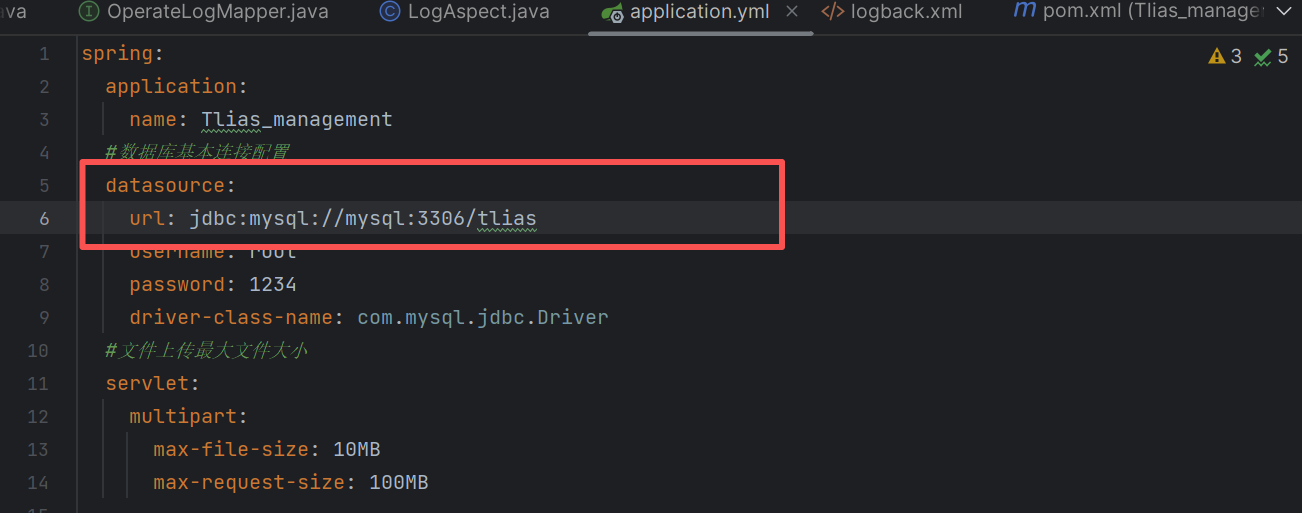 AI Visual Insight: The image visually compares the database connection configuration before and after the change, emphasizing the switch from
 localhost to mysql, which reflects Docker’s built-in DNS resolution in a user-defined network.
Next, you need to write a Dockerfile to package the runtime environment together with the JAR file into an image. A Dockerfile is not meant to start a Linux system. Its purpose is to precisely define how the application is built and run.
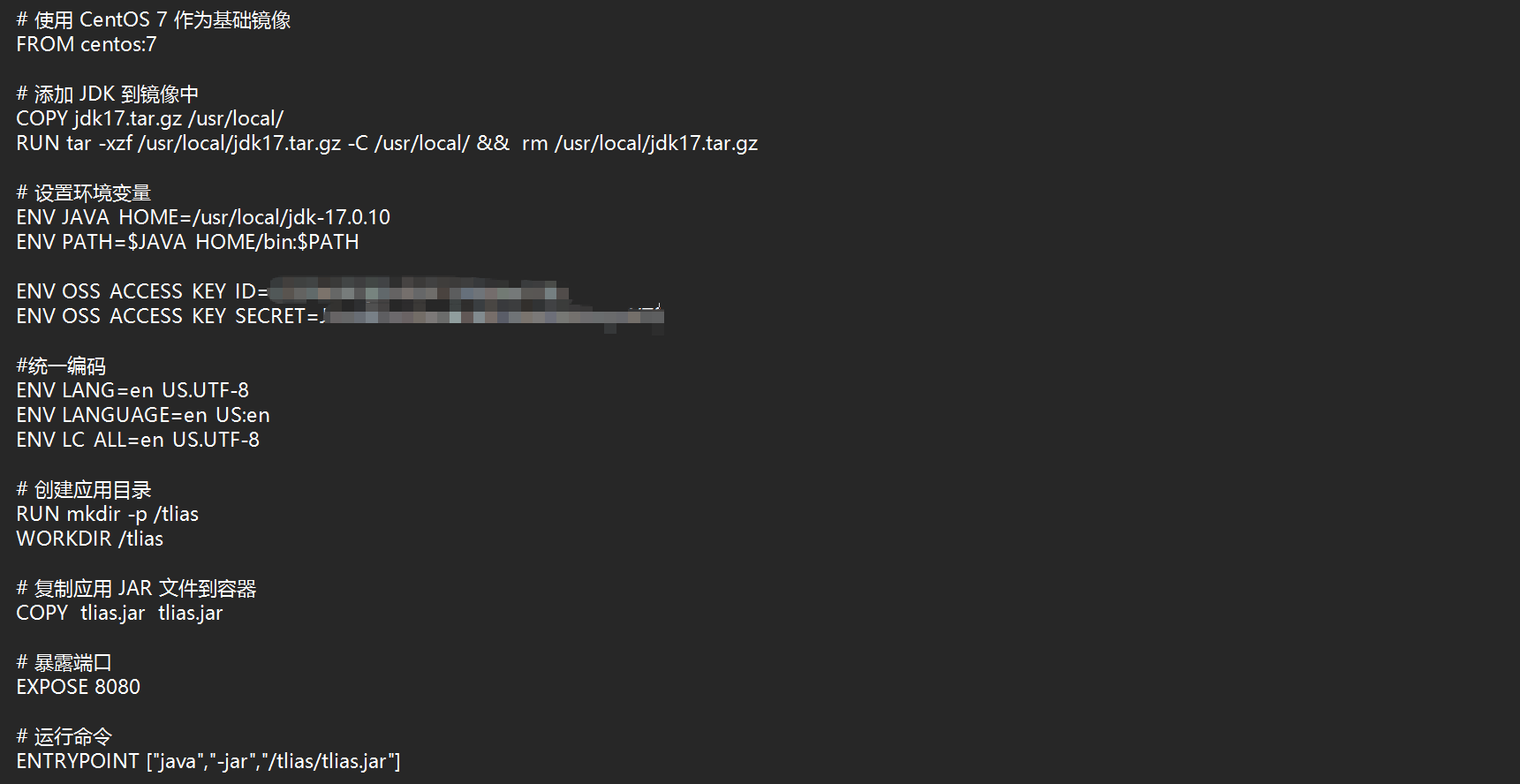 AI Visual Insight: The image shows the contents of the backend image build file, typically including the base JDK image, JAR file copy step, exposed port, and startup command. It illustrates the minimum closed loop required to containerize a Java application.
FROM openjdk:17-jdk-slim
WORKDIR /app
COPY tlias.jar app.jar # Copy the application JAR into the container working directory
EXPOSE 8080
ENTRYPOINT ["java","-jar","/app/app.jar"] # Run the Spring Boot application directly when the container starts
This Dockerfile packages a Java application image with the minimum required instructions.
Building an image and running a container are two separate phases
First, place the Dockerfile and the JAR file in the same directory, then run the build command to generate an image. An image is a static delivery artifact, while a container is a running instance of that image. This distinction is critical when troubleshooting.
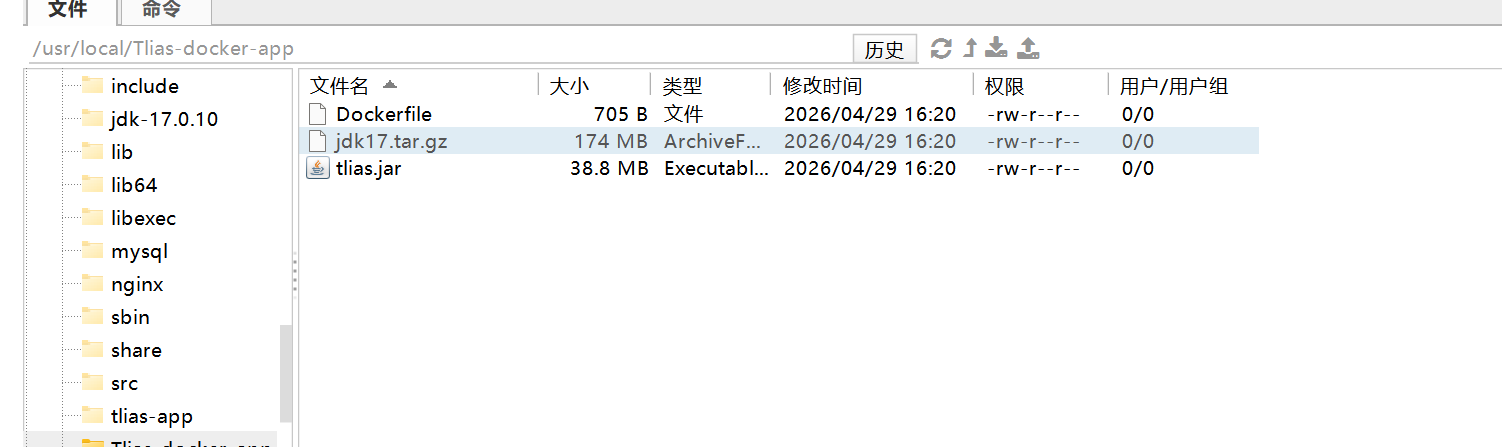 AI Visual Insight: The image shows the file organization in the build directory, explaining that Docker sends the current directory as build context to the builder. That is why the Dockerfile, JAR file, and related assets should be organized carefully.
cd /opt/tlias

docker build -t tlias:1.0 . # Build the backend image in the current directory

docker run -d \
  --name tlias-app \
  --network Leaf666 \
  -p 8080:8080 \
  tlias:1.0 # Join the application container to the same network and expose the service port
These commands first create the image, then run it as an accessible backend container.
 AI Visual Insight: The image shows the state of the backend container after startup or the terminal execution result. It primarily verifies that the container joined the specified network and successfully mapped port 8080, providing API support for subsequent frontend access.
Frontend static assets are better served through an Nginx container
Frontend deployment usually does not require rebuilding the business runtime. You only need to hand the packaged static files to Nginx for hosting, and when needed, add reverse proxy rules to forward /api requests to the backend container.
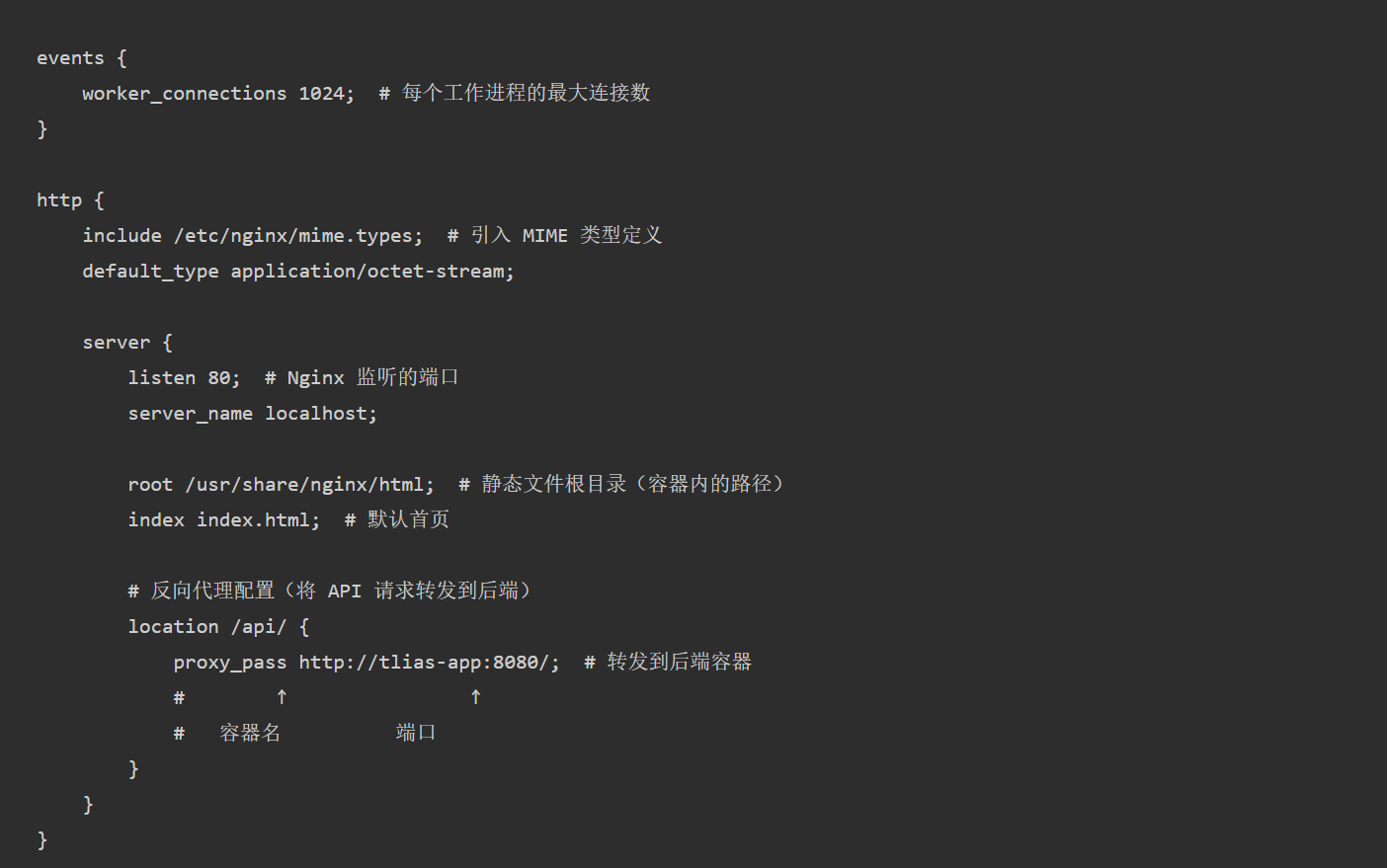 AI Visual Insight: The image shows the key sections of the Nginx configuration file, usually including the listening port, static directory mapping, and reverse proxy rules. These settings connect the browser, frontend assets, and backend APIs into a working request path.
 AI Visual Insight: The image shows how the frontend asset directory or configuration directory is organized, illustrating a deployment strategy in which static files and Nginx configuration are mounted from host directories into the container.
docker run -d \
  --name nginx-web \
  --network Leaf666 \
  -p 80:80 \
  -v /opt/nginx/html:/usr/share/nginx/html \
  -v /opt/nginx/nginx.conf:/etc/nginx/nginx.conf \
  nginx:latest # Mount static assets and configuration files into the container
This command injects frontend pages and Nginx configuration into the container through volumes, making hot updates and maintenance easier.
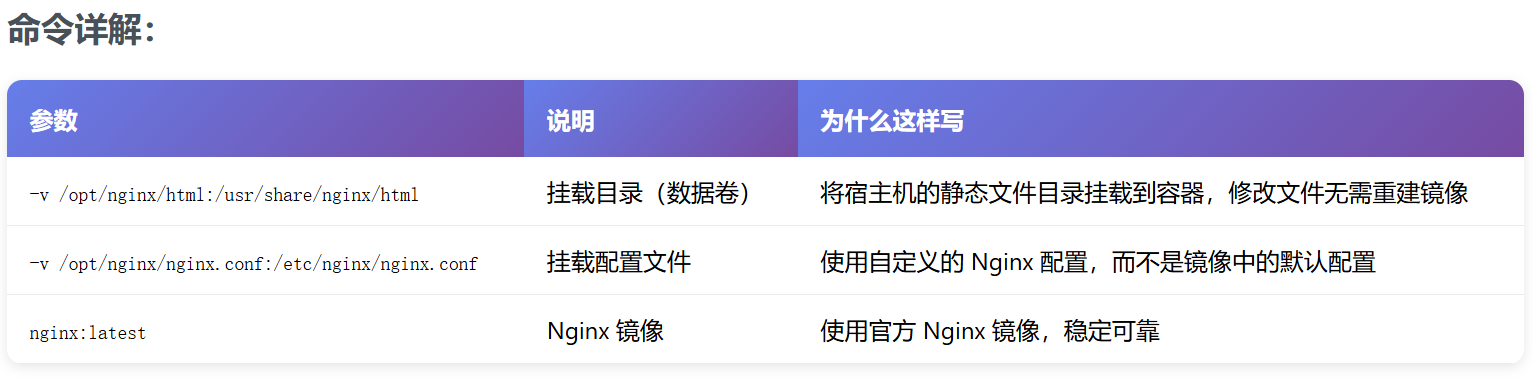 AI Visual Insight: The image shows the Nginx container running successfully, typically used to verify port 80 mapping, healthy container state, and successful hosting of page assets by the web server.
 AI Visual Insight: The image shows a browser access view or container status verification screen, used to confirm that the frontend page opens correctly, which indicates that both static asset mounting and Nginx startup have taken effect.
As the number of containers grows, you should switch to Docker Compose for unified orchestration
Manual docker run commands are useful for learning the fundamentals, but in multi-service scenarios, networks, volumes, environment variables, and startup order quickly become difficult to maintain. The advantage of Compose is that it declares all of these runtime parameters in a version-controlled configuration file.
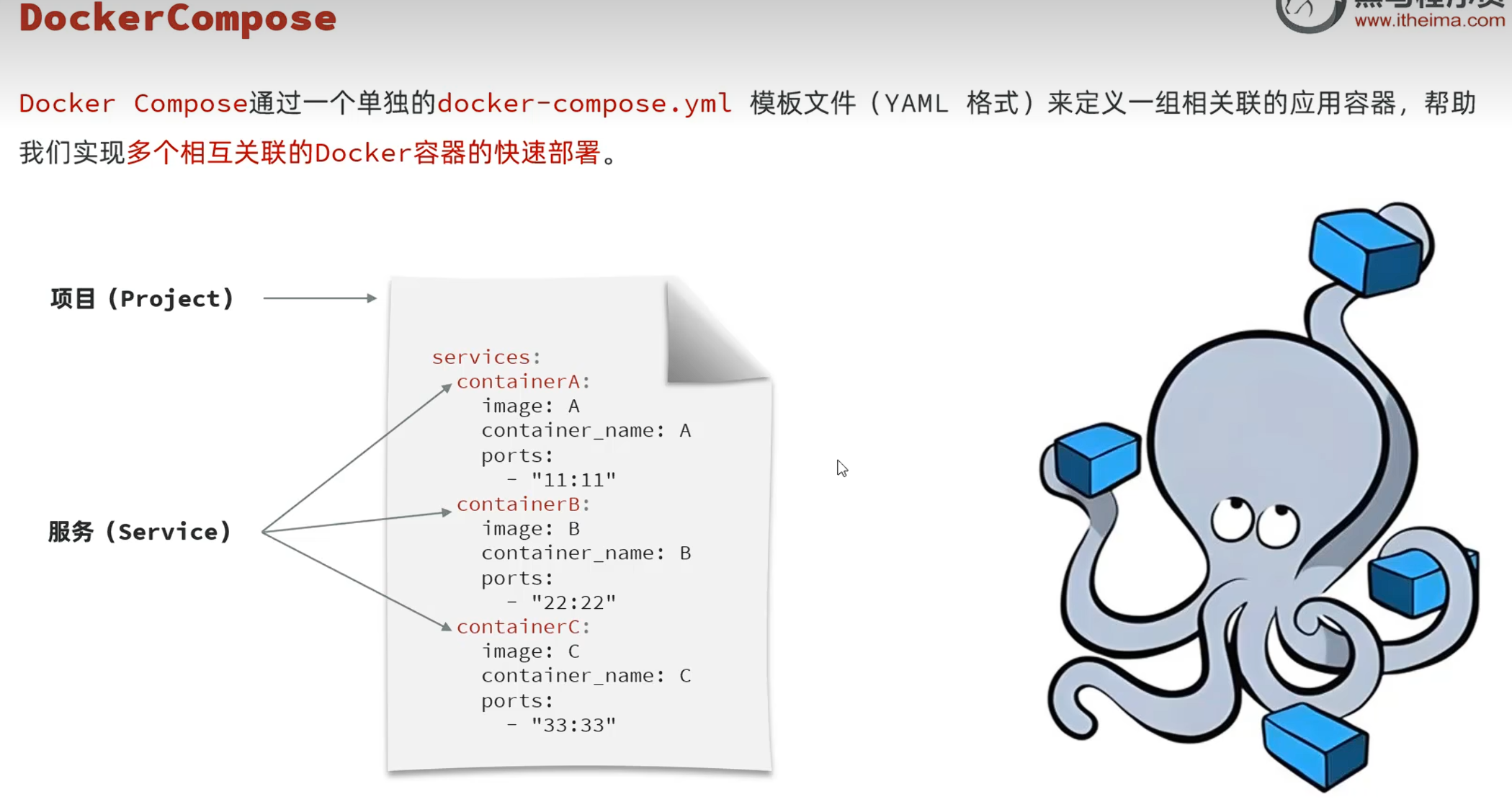 AI Visual Insight: The image emphasizes the shift from executing multiple container commands manually to using declarative orchestration, highlighting the management efficiency advantage of Docker Compose in multi-container projects.
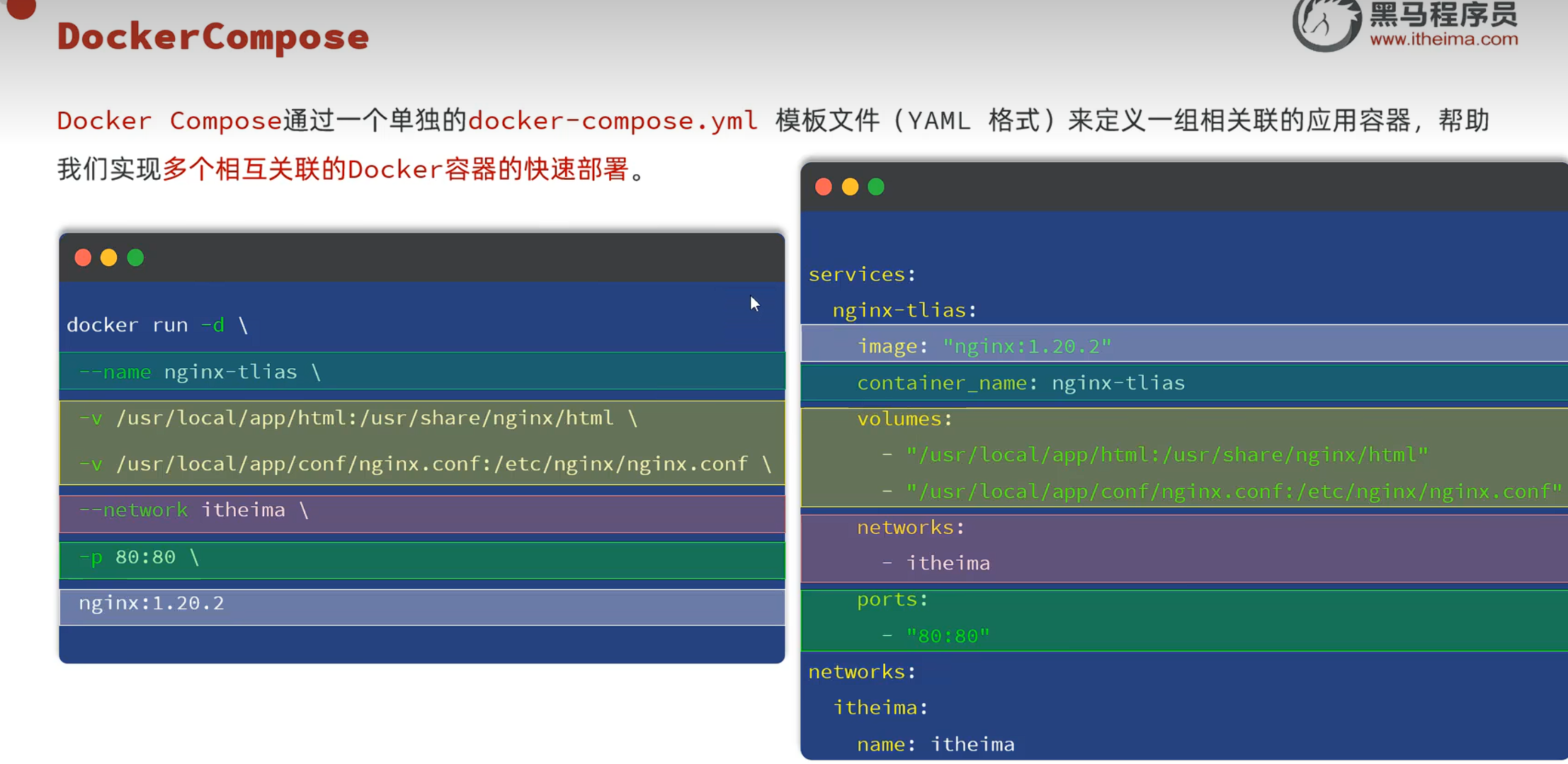 AI Visual Insight: The image shows the mapping between manual commands and Compose configuration, helping explain how fields like
 ports, volumes, environment, and depends_on replace lengthy command-line parameters.
version: '3.8'
services:
  mysql:
    image: mysql:8.0
    container_name: mysql
    environment:
      MYSQL_ROOT_PASSWORD: 123456 # Initialize the root password
      MYSQL_DATABASE: tlias # Automatically create the application database
    ports:
      - "3306:3306"
    volumes:
      - mysql-data:/var/lib/mysql # Persist database data
    networks:
      - leaf666

  app:
    build: .
    container_name: tlias-app
    ports:
      - "8080:8080"
    depends_on:
      - mysql # Start the database service first
    networks:
      - leaf666

  nginx:
    image: nginx:latest
    container_name: nginx-web
    ports:
      - "80:80"
    volumes:
      - ./nginx/html:/usr/share/nginx/html
      - ./nginx/nginx.conf:/etc/nginx/nginx.conf
    depends_on:
      - app # The frontend depends on backend API availability
    networks:
      - leaf666

networks:
  leaf666:
    driver: bridge

volumes:
  mysql-data:
This Compose file declares the database, backend, frontend, network, and data volume in one place, making collaboration and reuse much easier.
You need to clearly understand the limits of depends_on when using Compose
depends_on only guarantees startup order. It does not guarantee that a service is actually ready. After the MySQL process starts, it may still be initializing. If the backend tries to connect immediately, it can still fail. In production, you should usually add health checks or retry logic.
 AI Visual Insight: The image shows the output after running
 docker compose up -d, typically including network creation, container startup, and service state, demonstrating the orchestration tool’s ability to handle underlying resources automatically.
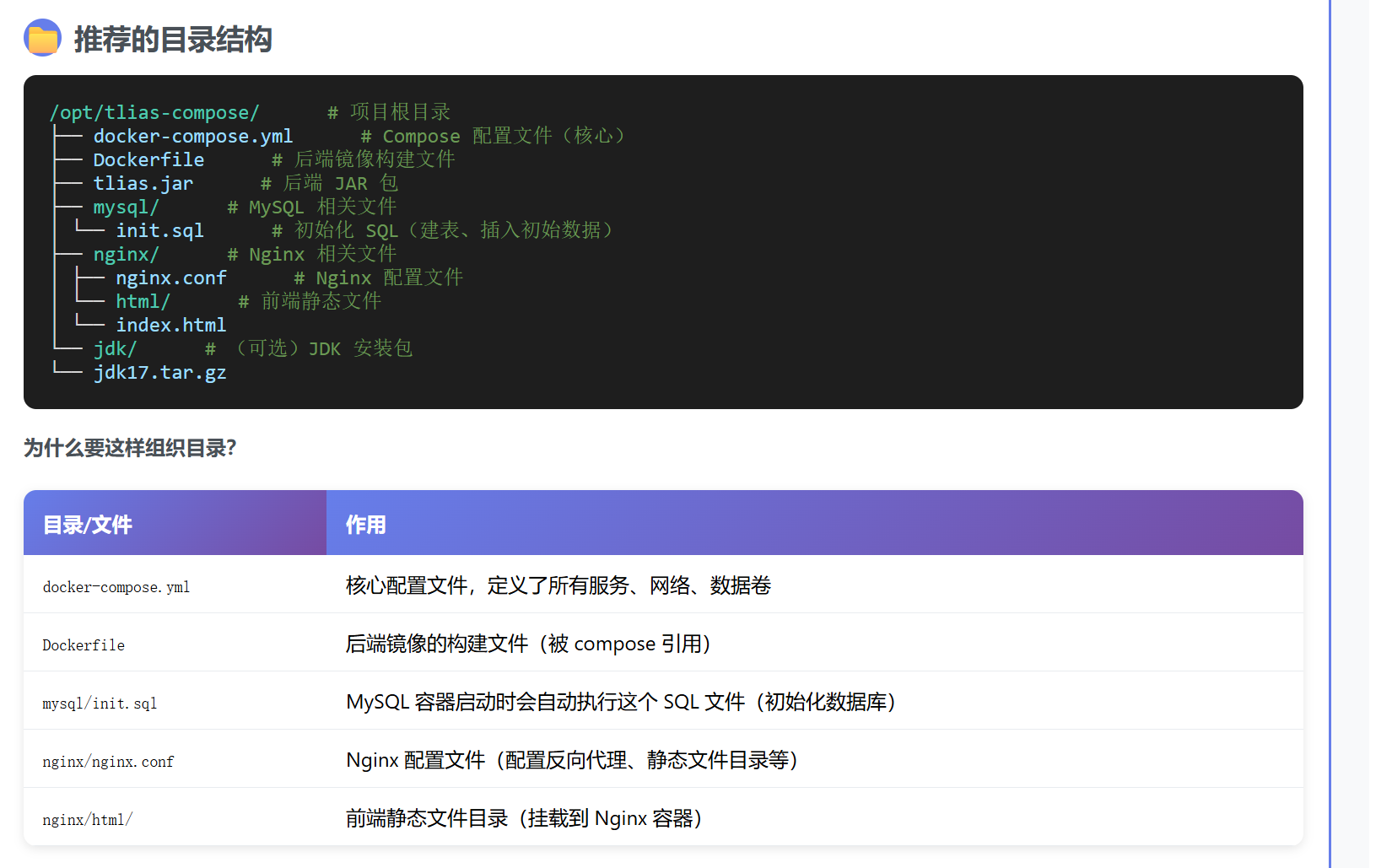
cd /opt/tlias-compose

docker compose up -d # Start all services in the background

docker compose ps # Check service status

docker compose logs app # Inspect backend startup logs for troubleshooting
These commands cover three high-frequency Compose operations: deployment, status inspection, and log-based troubleshooting.
The choice between manual deployment and Compose depends on maintenance cost, not complexity preference
If your goal is to understand the underlying mechanisms of images, containers, networks, and volumes, manual deployment is more direct. If you need to deliver a stable multi-container project, Compose is better suited for version control and team collaboration workflows.
From an engineering perspective, Docker solves environment consistency, while Compose solves declarative service relationships. They are not alternatives to each other. Instead, they represent a continuous evolution from single-container execution to multi-service delivery.
FAQ structured questions and answers
Why can a container no longer use localhost to connect to MySQL?
Because localhost points to the container itself. If a Spring Boot container needs to access MySQL, it should use the service name on the same Docker network, such as mysql.
Why can Docker Compose depends_on still lead to database connection failures?
Because it only controls startup order and does not mean MySQL has finished initializing. A more reliable approach is to add health checks, startup probes, or application-level retry mechanisms.
How do you apply changes after modifying docker-compose.yml?
Run docker compose up -d --build. If you only changed mounted files, a restart may be enough in some cases. If you changed image build content, you must rebuild and restart.
Core summary: This article systematically walks through manual Docker deployment and one-command Docker Compose orchestration for a Java Spring Boot + MySQL + Nginx project, with a focus on container networking, configuration changes, image building, volume persistence, and dependency management.